Acceptance criteria
- WPF users can save the zoo to a file.
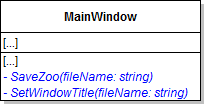
// Set the title of the window using the current file name
this.Title = $"Object-Oriented Programming 2: Zoo [{Path.GetFileName(fileName)}]";Then set the dialog's Filter to the following string:
"Zoo save-game files (*.zoo)|*.zoo"if (dialog.ShowDialog() == true)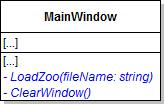
Set its Filter to the same string as the SaveFileDialog.
If the result of showing the dialog is equal to true, clear the window and call the LoadZoo method, passing in the dialog's FileName.
Ensure Jimmy is no longer in the Zoo, that there aren't any guests and that the temperature is back to 77 degrees.
The zoo should load successfully and Jimmy should be in the Zoo, the guest should be in the zoo and the temperature should be 60 degrees.
if (MessageBox.Show("Are you sure you want to start over?", "Confirmation", MessageBoxButton.YesNo) == MessageBoxResult.Yes)
{
    // code here
}The list boxes should go back to the original animals, the guest should disappear and the temperature should revert.
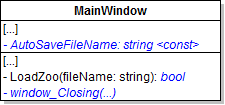
Set it to false in the catch block. Then return it.
If the result of that method is false, call the Zoo's NewZoo method. The code setting the temperature height and label, populating the combo box, and populating the list boxes should stay.
A message box should appear stating that a file could not be loaded. This is because there is not an autosave yet.
The Autosave.zoo file should be loaded automatically, and the guest should be in the list box.
© 2026 Northcentral Technical College