5.5A Zoo Assignment

5.5A Zoo Assignment
Use recursion to add all dingoes to the zoo
Acceptance Criteria
Acceptance criteria
  • Recursive traversal adds every animal in the dingo family to the zoo.

1.Use recursion to add all dingoes to the zoo
Problem
Solution
5.5.1 How to Use Recursion 5.5.2 Why we Use Recursion
A Make changes to the Animal and Zoo classes as specified in the diagram below.
Class Diagram: Add Methods. Reference figure for use recursion to add all dingoes to the zoo.
Class Diagram: Add Methods
B Instantiate the list of children in the Animal constructor.
C In the AddChild method, add the passed-in animal to the animal's list of children if the animal is not null.
D In the animal's Reproduce method, use the AddChild method to add the baby to the mother animal's list of children after creating the baby.
E Add the following code to the end of the zoo's constructor to create an animal hierarchy
Animal brutus = new Dingo("Brutus", 3, 36.0, Gender.Male);
Animal coco = new Dingo("Coco",7, 38.3, Gender.Female);
coco.AddChild(brutus);

Animal toby = new Dingo("Toby", 4, 42.5, Gender.Male);
Animal steve = new Dingo("Steve", 4, 41.1, Gender.Male);
Animal maggie = new Dingo("Maggie", 7, 34.8, Gender.Female);
maggie.AddChild(toby);
maggie.AddChild(steve);

Animal lucy = new Dingo("Lucy", 7, 36.5, Gender.Female);
Animal ted = new Dingo("Ted", 7, 39.7, Gender.Male);
Animal bella = new Dingo("Bella", 10, 40.2, Gender.Female);
bella.AddChild(coco);
bella.AddChild(maggie);
bella.AddChild(lucy);
bella.AddChild(ted);

List<Animal> tempList = new List<Animal>();
tempList.Add(bella);
tempList.Add(new Dingo("Max", 12, 46.9, Gender.Male));
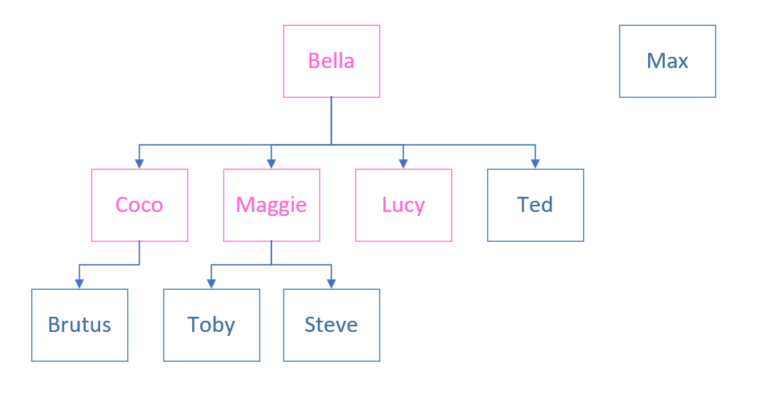
Snip: Dingo Family Tree. Reference figure for use recursion to add all dingoes to the zoo.
Snip: Dingo Family Tree
F Call the AddAnimalsToZoo method at the end of the zoo's constructor. Pass in the temporary list of animals.
G In the AddAnimalsToZoo method, use recursion to loop through the passed-in collection of animals and add each animal to the zoo.
1 Loop through the passed-in list of animals.
2 Add the current animal to the list (use AddAnimal).
3 Add the current animal's children to the zoo using a call to AddAnimalsToZoo, passing in the current animal's list of children.
H Check Your Work
1 Set a breakpoint on the foreach loop in the AddAnimalsToZoo method.
2 Start the application.
3 Ensure when the breakpoint hits ensure that the list of animals contains Bella and Max.
4 F10 over the call to AddAnimal and AddAnimalsToZoo.
5 When the breakpoint is hit again, ensure that the animals in the list are Coco, Maggie, Lucy and Ted (Bella's children).
6 F10 through the method again.

This time when the breakpoint hits, ensure that the animal in the list is just Brutus (Coco's child).

7 F10 through the method again. This time since Brutus doesn't have any children the animals list will be empty.
8 F10 through the method twice. Ensure that the animal in the foreach loop is now Maggie.
9 Continue pressing F10. Maggie should have two children added to the zoo.
10 Remove the breakpoint and click Continue.

Ensure that all of the dingos were added to the zoo. Note that the dingos are added in the order of the parents, then their children, then the children's children.
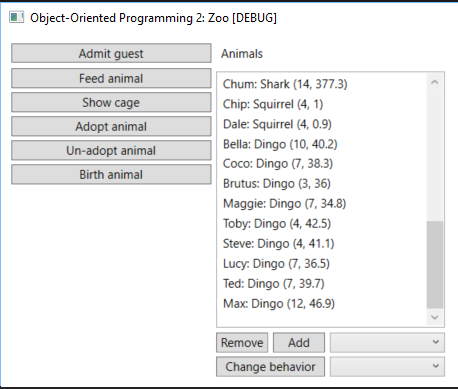
CYW - Dingo Family. Reference figure for use recursion to add all dingoes to the zoo.
CYW - Dingo Family
Use recursion to walk an animal's family tree
Acceptance Criteria
Acceptance criteria
  • The family-tree output uses recursion and depth information to show the family hierarchy.
2.Use recursion to walk an animal's family tree
Problem
Solution
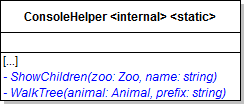
A Make changes to the ConsoleHelper class as specified in the diagram below.
Class Diagram: ShowChildren. Reference figure for use recursion to walk an animal's family tree.
Class Diagram: ShowChildren
B Add a case to the ProcessShowCommand method for "children". In it, call the ShowChildren method.
C In the ShowChildren method, find the animal with the passed-in name (use FindAnimal).

Then call the WalkTree method and pass in the animal and an empty string.

D In the WalkTree method
1 Write prefix and the name of the animal passed in to the method (the parent) to the console.
2 Loop through the parent's list of children and for each child, call WalkTree (recursion) and pass in the animal and the prefix with two spaces attached to it.
animal 1
    first child of animal 1
        first child of first child of animal 1
        second child of first child of animal 1
    second child of animal 1
        first child of second child of animal 1
animal 2
E Check Your Work: Run the console application.

Run the "show children" command for Bella. The result should look like the image below.
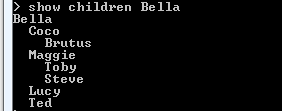
Check Your Work: WalkTree Example. Reference figure for use recursion to walk an animal's family tree.
Check Your Work: WalkTree Example
Use a quick sort to sort animals by weight
Acceptance Criteria
Acceptance criteria
  • Quick sort orders animals by weight.
3.Use a quick sort to sort animals by weight

Quick Sort: The quick sort find a pivot value (often the first, last or middle value in the list) and moves other items in the list to the appropriate side of the pivot value. It then uses recursion to sort the smaller lists on either side of the now correctly placed pivot value. Because it is recursive, the algorithm continually finds pivot values and sorts the ever-smaller sections of the overall list until the entire list is sorted.

5.5.3 How to Use Quick Sort
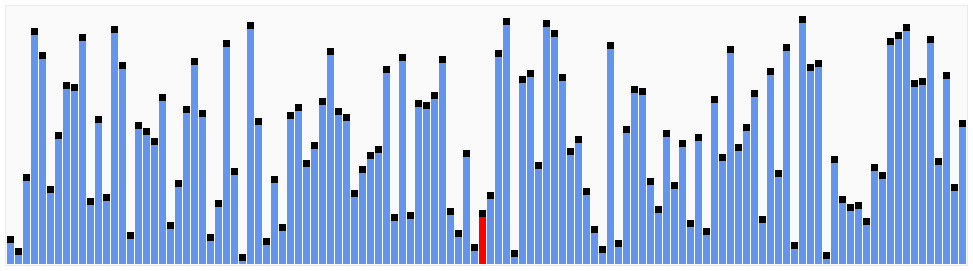
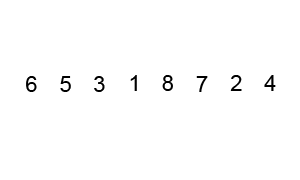
Animation: QuickSort. Reference figure for use a quick sort to sort animals by weight.
Animation: QuickSort
Animation: QuickSort. Reference figure for use a quick sort to sort animals by weight.
Animation: QuickSort
A Add the QuickSortByWeight method to the SortHelper as specified in the diagram below.
Class Diagram: QuickSort by Weight. Reference figure for use a quick sort to sort animals by weight.
Class Diagram: QuickSort by Weight
B Write the QuickSortByWeight method.
1 Define two local variables named leftPointer and rightPointer and initialize them to the values of the leftIndex and rightIndex respectively.

The pointer values will change throughout the method while the index values will stay the same.

2 Define a local Animal variable named pivotAnimal and assign it to the animal in the animals list that is at half of the sum of the rightIndex and leftIndex.
Animal pivotAnimal = animals[(leftIndex + rightIndex) / 2];

// Gets the animal between the index points.
3 Define a local boolean value named done to false.
4 Write a while loop.
Subtasks
  • A. While the done variable is false the while loop should execute.
  • B. Write a while loop that executes while the weight of the animal at the leftPointer index is less than the pivotAnimal weight. In it, increment the leftPointer and the sortResult's CompareCount.
// "Woah there's something bigger than you in this section".
Subtasks
  • C. Write a while loop that executes while the weight of pivotAnimal is less than the animal at the rightPointer index. In it, decrement the rightPointer and increment the sortResult's CompareCount.
// "Woah there's something smaller than you in this section."
Subtasks
  • D. If the leftPointer is less than or equal to the rightPointer, call the Swap method and pass in the animals list, the leftPointer and the rightPointer. Increment the SwapCount of the sortHelper and the leftPointer, and decrement the rightPointer.
// "We have to get these animals in the right section! Let's swap them! Then let's close in on a smaller section."
Subtasks
  • E. If the leftPointer is greater than the rightPointer, set the done variable to true (breaking the loop).
// "Have we completed this section or do we need to check again?"
5 If the leftIndex is less than then rightPointer, call the QuickSortByWeight method, passing in the animals list, the leftIndex, rightPointer and the sortResult.
// If the LEFT "section" of the list isn't sorted, sort it.
6 If the rightIndex is greater than the leftPointer, call the QuickSortByWeight method, passing in the animals list, the leftPointer, rightIndex, and sortResult.
// If the RIGHT "section" of the list isn't sorted, sort it.
7 Assign sortResult's Animals to the animals parameter.
8 Return the sortResult.
C Add a case for "quick" to the zoo's SortAnimals method.
D In the "quick" case
1 Instantiate a new Stopwatch object and start it.
2 Instantiate the SortResult variable.
3 Switch on the sortValue and add a case for weight.
4 In the weight case, call the QuickSortByWeight method and pass in the animals list, the start index (0), the end index (the count of the animals list - 1), and the SortResult variable.
5 After the switch statement, stop the stopwatch and assign the SortResult's EllapsedMilliseconds to the stopwatch's elapsed total milliseconds.
E Remove all animals except the Dingo family from the Zoo constructor to make debugging easier.
F Check Your Work
1 Put a breakpoint at the beginning of the QuickSortByWeight method.
2 Run the application.
3 Type in 'sort quick weight'
4 Add a watch for the animals list, leftPointer, rightPointer, leftIndex, rightIndex and pivotPosition.
5 Step through the outer while loop.

Toby should swap with Ted because Toby doesn't have an animal with a weight higher than his on the left of him BUT has an animal with a weight lower than his on the right of him.

6 Step through the while loop again.

This time the leftPointer is higher than the rightPointer, indicating that the section from 6 to 8 is sorted correctly.

7 Step through the remaining code in the method.

Since the leftPointer is less than the rightIndex the Sort method will be called with a new set of indexes (section).

8 Continue to use F10 and look at the watches to see how the sort algorithm works.
9 Remove the breakpoint and click Continue.

Ensure that the animals are sorted from lightest to heaviest, the swap count is 8 and the compare count is 21.
Use a quick sort to sort animals by name
Acceptance Criteria
Acceptance criteria
  • Quick sort orders animals by name.
4.Use a quick sort to sort animals by name
Problem
Solution
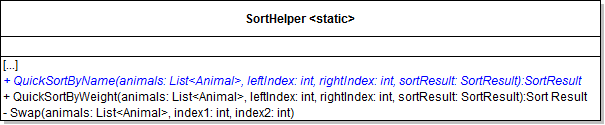
A Add the QuickSortByName method to the SortHelper class as specified in the diagram below.
Class Diagram: QuickSortByName. Reference figure for use a quick sort to sort animals by name.
Class Diagram: QuickSortByName
B In the zoo's SortAnimals method, call the QuickSortByName method in the "quick" case if the sortValue is "name".
C Write the quick sort algorithm to sort the animals by their names.

It is the same as the algorithm for weight, but it compares the name values instead of the weight values.

D Check Your Work
1 Run the console application.
2 Type in "sort quick name." The animals should be sorted by name in alphabetical order.

The swap count should be 8 and the compare count should be 20.

Demonstrate your work
5.Record a video showing
A Your Console Application
1 Step 2E - Check Your Work
Prepare and submit your work
6.Submission Steps
A Ensure that your application has no compiler errors or warnings
B Ensure that your code is StyleCop compliant
C Remove all bin and obj folders from your solution
D Zip your solution
E Submit your zipped solution to the Feedback System
F Submit your Feedback System results link to Canvas
G Submit your video recording to your f-channel
Source credit

© 2026 Northcentral Technical College
