5.3A Zoo Assignment

5.3A Zoo Assignment
Set up the infrastructure for sorting
Acceptance Criteria
Acceptance criteria
  • The console and zoo expose the structures needed to request and report a sort.
1.Set up the infrastructure for sorting
Problem
Solution
5.3.1 How to Understand Sorting in C#
A Remove any custom animals made in the NewZoo method and put the following code in the Zoo's constructor to initialize the list of animals
 this.animals = new List<Animal>()
{
    new Chimpanzee("Bobo", 10, 128.2, Gender.Male),
    new Chimpanzee("Bubbles", 3,  103.8, Gender.Female),
    new Dingo("Spot", 5, 41.3, Gender.Male),
    new Dingo("Maggie", 6, 37.2, Gender.Female),
    new Dingo("Toby", 0, 15.0, Gender.Male),
    new Eagle("Ari", 12, 10.1, Gender.Female),
    new Hummingbird("Buzz", 2, 0.02, Gender.Male),
    new Hummingbird("Bitsy", 1, 0.03, Gender.Female),
    new Kangaroo("Kanga", 8, 72.0, Gender.Female),
    new Kangaroo("Roo", 0, 23.9, Gender.Male),
    new Kangaroo("Jake", 9,153.5, Gender.Male),
    new Ostrich("Stretch", 26, 231.7, Gender.Male),
    new Ostrich("Speedy", 30, 213.0, Gender.Female),
    new Platypus("Patti", 13, 4.4, Gender.Female),
    new Platypus("Bill", 11, 4.9, Gender.Male),
    new Platypus("Ted", 0, 1.1, Gender.Male),
    new Shark("Bruce", 19,  810.6, Gender.Female),
    new Shark("Anchor", 17, 458.0, Gender.Male),
    new Shark("Chum", 14, 377.3, Gender.Male),
    new Squirrel("Chip", 4, 1.0, Gender.Male),
    new Squirrel("Dale", 4, 0.9, Gender.Male)
};
B Set up the infrastructure to allow for sorting animals in the console.

Look at the diagram below to understand how the command structure will work.
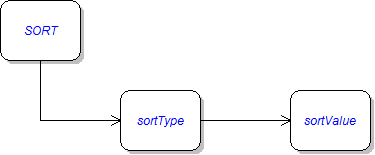
Command diagram: Sort. Reference figure for set up the infrastructure for sorting.
Command diagram: Sort
1 In the Program class add a "sort" command to the Main's switch-statement.
2 Make changes to the Zoo class and add the SortHelper and SortResult classes to the Zoos project, as specified in the diagram below.

Return null in methods that have a return for now.
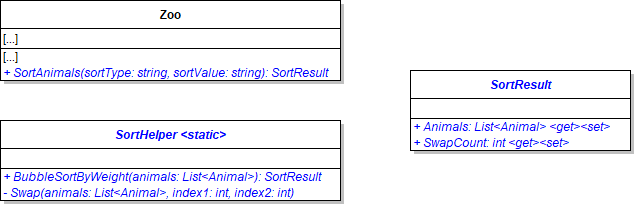
Class Diagram: Sort Infrastructure. Reference figure for set up the infrastructure for sorting.
Class Diagram: Sort Infrastructure
3 In the "sort" command call the Zoo's SortAnimals method passing in the second and third items in the commandWords array and catch the return in a SortResult type variable. (The command will look like: sort bubble weight)
4 Add a try-catch in the "sort" command to catch exceptions that may occur when entering in the commands.

Write the following message to the console when an exception is caught:

Sort command must be entered as: sort [sort type] [sort by -- weight or name].
5 After the call to the SortAnimals method in the try, write the sortType and the sortValue to the console as seen below
"SORT TYPE: " + commandWords[1].ToUpper()

"SORT BY: " + commandWords[2].ToUpper()
6 Use the SortResult's Swap Count property to write to the console how many times the animals are swapped when they are being sorted.

It should look similar to below:

"SWAP COUNT: " + [SortResult variable here].SwapCount"
7 Write a foreach loop that will loop through the SortResult variable's Animals property then write the animal to the console using the animal's ToString method.
8 In the zoo's SortAnimals method, define a SortResult result variable and initialize it to null.
9 Write a switch statement.
  • Switch on the sortType parameter.
  • Define a "bubble" case and call the BubbleSortByWeight method, passing in the animals list.
  • Call BubbleSortByWeight only if the sortValue is "weight".
10 Return the SortResult variable.
C In the SortHelper's Swap method, swap the two animals at the passed-in positions in the list.

For example, if the values of the index parameters are 2 and 6, then the animal in the 6 position in the list should move to the 2 position, and the animal in the 2 position should move to the 6 position.

D Check Your Work
1 Set a breakpoint in the SortHelper's BubbleSortByWeight method. Run the console application.
2 Type "sort bubble weight" in the console. Ensure that the breakpoint is hit.
Write a bubble sort to sort animals by weight
Acceptance Criteria
Acceptance criteria
  • Bubble sort orders animals by weight and records the required swap count.
2.Write a bubble sort to sort animals by weight

Bubble Sort: The bubble sort loops through a list. With each loop it compares two adjacent values; if the values are out of order it will swap the two values. This forces larger values to "bubble" up to the end of the list and then stops the value from being compared to again.
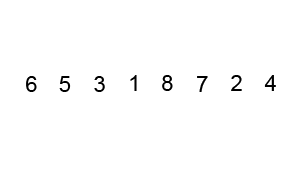
Gif: Bubble Sort. Reference figure for write a bubble sort to sort animals by weight.
Gif: Bubble Sort

By Swfung8 (Own work) [CC BY-SA 3.0 (http://creativecommons.org/licenses/by-sa/3.0) or GFDL (http://www.gnu.org/copyleft/fdl.html)], via Wikimedia Commons

5.3.2 How to Use Bubble Sort
A Copy and paste the code below into the BubbleSortByWeight method.
int swapCounter = 0;

// use a for loop to loop backward through the list
for (int i = animals.Count - 1; i > 0; i--)
{
    Console.WriteLine(i);
}
B Use an object initializer to return the SortResult value, set its SwapCount to the value of the swap counter variable and the Animals property to the animals that were sorted.
C Check Your Work
1 Run the Console and type 'sort bubble weight'.

Your output should look like the image below. The list of animals has 21 animals in it so the starting number is 20 and it decrements with each loop.
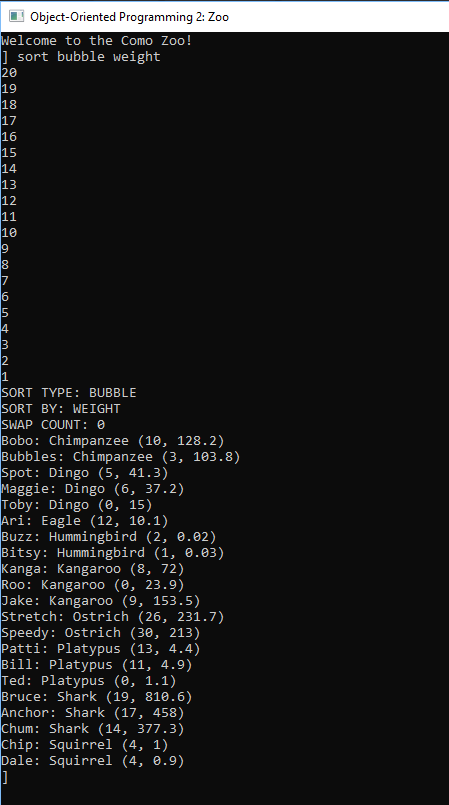
Snip - BubbleSort Outer Loop. Reference figure for write a bubble sort to sort animals by weight.
Snip - BubbleSort Outer Loop
D Copy and paste the code below above the Console.WriteLine() in the for loop.
// loop forward as long as the loop variable is less than the outer loop variable
for (int j = 0; j < i; j++)
    {
    }
E Check Your Work
1 Set a breakpoint on the outer for loop.
2 Run the console application. Type in "sort bubble weight".
3 Step through the loops and observe the autos window.

The outer loop should begin at 20 and the inner loop should begin at 0. While the outer loop is at 20, the inner loop will execute until it reaches 20 and then stops.

4 The outer loop then goes down to 19 and the inner loop starts back at 0.
F Inside the inner for loop, check if the animal at j has a greater Weight than the animal at one higher than j.

If it does, Swap the animals, passing in the animals list, j, and j + 1.

G After the Swap, increase the swapCounter variable by 1.
H In the outer loop, remove the Console.WriteLine(i)
I Check Your Work
1 Set a breakpoint on the outer for loop.
2 Run the console application. Type in "sort bubble weight".
3 Right click the animals parameter and click 'Add watch'. This will show the animals list.
4 Press F11 to go into the inner loop. Ensure the logic check passes.
5 Hover over the Weight of the first animal in the logic check.

It should be 128.2 (the weight of the first animal in the list, Bobo).

6 Hover over the Weight of the second animal in the logic check.

It should be 103.8 (the weight of the second animal in the list, Bubbles).
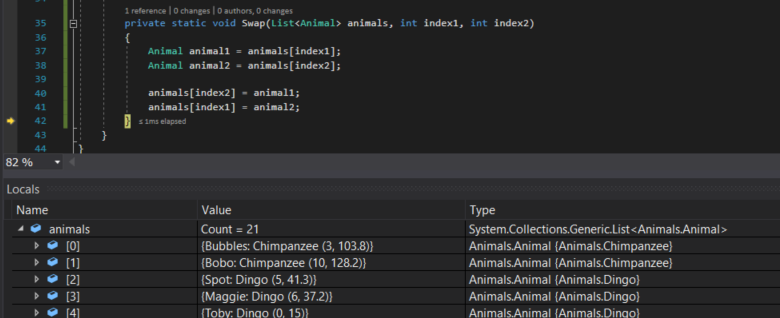
7 Step through the Swap method. Bubbles should now be at index 0 and Bobo should be at index 1.
Snip - Bubble Sort Swap. Reference figure for write a bubble sort to sort animals by weight.
Snip - Bubble Sort Swap
8 F11 back to the inner loop. Now the value of j should be 1.
9 F11 into the inner loop.

Hover over the Weight properties of the logic check. The first animal should be 128.2 (Bobo) and the second animal should be 41.3 (Spot).

10 F10 over the Swap call. Bobo and Spot should switch indexes. Check your Watch window for this.
11 F10 through the inner loop.

Bobo should continue to "bubble up" until he hits Jake and then the logic check will fail.

12 Continue pressing F10. The loop will now compare Jake and Speedy.
13 Continue pressing F10 until Bruce is the last animal in the list.

He has "bubbled" all the way to the top because he is the heaviest.

14 Continue pressing F10.

Now that we know Bruce is the heaviest animal, we don't care about him and the outer loop decreases to 19.

15 Continue pressing F10. The inner loop starts over and compares Bubbles and Spot.
16 Remove the breakpoint and press Continue.

Your console should look like the output below with the animals sorted in ascending weights and 108 swaps made.
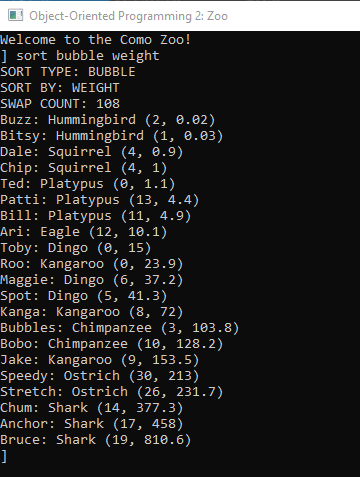
Snip - Bubble Sort Result. Reference figure for write a bubble sort to sort animals by weight.
Snip - Bubble Sort Result
Use a bubble sort to sort animals by name
Acceptance Criteria
Acceptance criteria
  • Bubble sort orders animals by name using string comparisons.
3.Use a bubble sort to sort animals by name
Problem
Solution
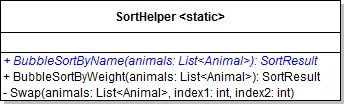
A Add the BubbleSortByName method to the SortHelper class as specified in the diagram below.
Class Diagram: SortAnimalByName. Reference figure for use a bubble sort to sort animals by name.
Class Diagram: SortAnimalByName
B In the zoo's SortAnimals method, call the BubbleSortByName method in the "bubble" case if the sortValue is "name".
C Write the bubble sort algorithm to sort the animals by their names.

It is the same as the algorithm for weight, but it compares the name values instead of the weight values.

5.3.4 How to Compare Strings
1 Copy and paste the code from the BubbleSortByWeight method into the BubbleSortByName method.
2 Before the if statement, initialize an int variable and assign it to a call to string.Compare()
3 For arguments to the Compare method, pass in the animal's Name at j and the animal's Name at one more than j.
4 Replace the conditional in the if statement that checks if the result of calling string.Compare is greater than 0.
D Check Your Work
1 Add a breakpoint at the beginning of the inner loop.
2 Run the console application and type in "sort bubble name."
3 F10 and look at the values and the animals list in the watch window to get an idea of how/what it is comparing/swapping.
4 Remove the breakpoint and click Continue.

The animals should be sorted by name in ascending order and the swap count should be 108.

Use a selection sort to sort animals by weight
Acceptance Criteria
Acceptance criteria
  • Selection sort orders animals by weight.
4.Use a selection sort to sort animals by weight

Selection Sort: The selection sort is similar to the bubble sort but improves upon it by making a maximum of one swap on each pass through the list instead of multiple swaps. The sort's outer loop looks at each item in the list to find out if an item has the minimum value of the unsorted items; if it doesn't have the minimum value, it will be swapped with whatever item does have the minimum value.

Sonny Jr via http://sonnyjr.me/tag/selection-sort/
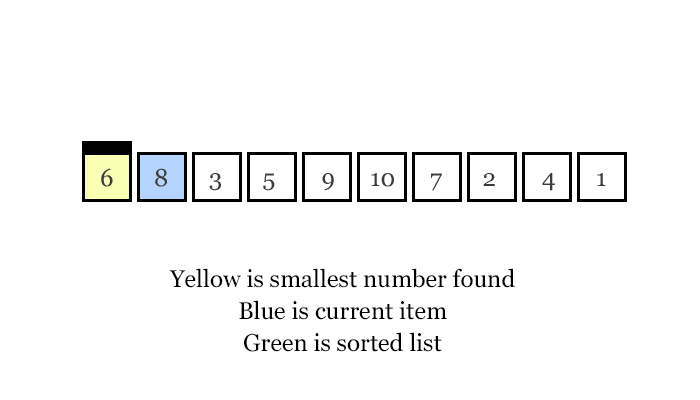
Gif: Selection Sort. Reference figure for use a selection sort to sort animals by weight.
Gif: Selection Sort
5.3.5 How to Use Selection Sort
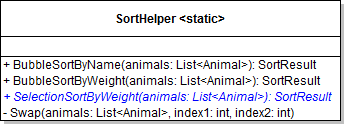
A Add the SelectionSortByWeight method to the SortHelper as specified in the diagram below.
Class Diagram: Selection Sort. Reference figure for use a selection sort to sort animals by weight.
Class Diagram: Selection Sort
B In the zoo's SortAnimals method, call the SelectionSortByWeight method in the "selection" case if the sortValue is "weight".
C Write SelectionSortByWeight code
1 Initialize a swapCounter variable and initialize it to 0.
2 Define an outer loop that starts at 0, loops only if it is less than Count of the animals list - 1, and increments by 1.
3 Declare a variable to hold the animal with the current minimum weight and assign it to the animal at the position of the loop [i].
4 Define an inner loop that starts at one more than i (the next animal in the list), loops only if it is less than the Count of the animals list, and increments by 1.
5 In the inner loop, if the Weight of the current animal [j] is less than the animal in the minimum weight animal variable, assign the minimum weight animal variable to the current animal.
6 Check Your Work
Subtasks
  • A. Set a breakpoint at the beginning of the outer loop.
  • B. Run the console application and type 'sort selection weight'.
  • C. Press F10 to step over the assignment of the minimum weight animal. That animal should be Bobo.
  • D. Step through the inner loop. The loop should be comparing Bubbles Weight (the second animal in the list) to Bobo's Weight (the animal in the variable).
  • E. Ensure that the minimum weight animal is now Bubbles instead of Bobo.
  • F. Step though the inner loop again. Now the minimum weight animal should be Spot instead of Bubbles.
  • G. Press Continue. The minimum weight animal should be Buzz the Hummingbird and the i value should be 1.
7 Outside of the inner loop, if the current animal's Weight is not the Weight of the minimum weight animal, swap them and increase the swapCounter by 1.
5.3.6 How to Use IndexOf
D Check Your Work
1 Put a breakpoint on the conditional check that compares the animal at i to the minimum weight animal.
2 Run the console application and type in 'sort selection weight'.
3 Open the Watch on the animals list.
4 The current animal should be Bobo and the animal in the minimum weight animal variable should be Buzz.
5 F10 over the Swap method. Buzz should now be at index 0 and Bobo should be at index 6 (where Buzz was).
6 Press Continue. The current animal should be Bubbles and the minimum weight animal should be Bitsy.
7 Press Continue. Bitsy should now be at index 1 and Bubbles should be at index 7 (where Bitsy was).
8 Remove the breakpoint and click Continue.

The animals should be in ascending order by weight with a swap count of 16.
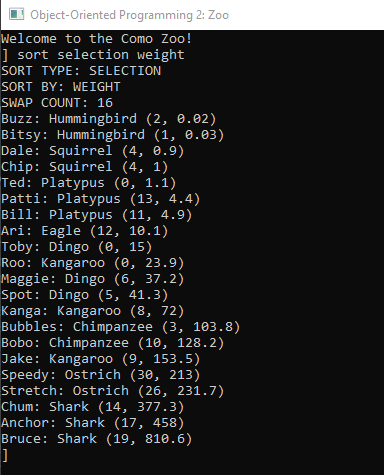
Snip - Selection Sort Result. Reference figure for use a selection sort to sort animals by weight.
Snip - Selection Sort Result
Use a selection sort to sort animals by name
Acceptance Criteria
Acceptance criteria
  • Selection sort orders animals by name.
5.Use a selection sort to sort animals by name
Problem
Solution
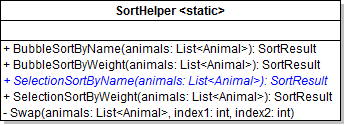
A Add the SelectionSortByName method to the SortHelper as specified in the diagram below.
Class Diagram: SelectionSortByName. Reference figure for use a selection sort to sort animals by name.
Class Diagram: SelectionSortByName
B In the zoo's SortAnimals method, call the SelectionSortByName method in the "selection" case if the sortValue is "name".
C Write the selection sort algorithm to sort the animals by their names.

It is the same as the algorithm for weight, but it compares the name values instead of the weight values.

D Check Your Work
1 Run the console application.
2 Type in "sort selection name." The animals should be sorted by name in ascending order.

The swap count should be 20.

Demonstrate your work
6.Record a video showing
A The Zoo class' SortAnimals method
B Your Console Application
1 Show that sorting commands correctly sorts the zoo's list of animals by typing
Subtasks
  • A. sort bubble name
  • B. sort bubble weight
  • C. sort selection name
  • D. sort selection weight
Prepare and submit your work
7.Submission Steps
A Ensure that your application has no compiler errors or warnings
B Ensure that your code is StyleCop compliant
C Remove all bin and obj folders from your solution
D Zip your solution
E Submit your zipped solution to the Feedback System
F Submit your Feedback System results link to Canvas
G Submit your video recording to your f-channel
Source credit

© 2026 Northcentral Technical College