Acceptance criteria
- Shared horizontal and vertical movement logic replaces repeated code.
MoveHelper class as specified in the diagram below.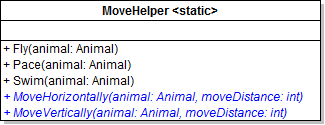
Pace method (which only moves horizontally) to the MoveHorizontally method.Use the moveDistance parameter wherever the animal's MoveDistance is used.
MoveHorizontally method from the Pace method, passing in the animal and the animal's MoveDistance.The method call should be the only code in the Pace method.
MoveHorizontally method from the Fly method in place of the code that moves the animal horizontally.Pass in the animal and the animal's MoveDistance. Leave the code that moves the animal vertically.
MoveHorizontally method from the Swim method in place of the code that moves the animal horizontally.Pass in the animal and the animal's MoveDistance. Leave the code that moves the animal vertically.
Swim method that moves the animal vertically to the MoveVertically method.Use the moveDistance parameter wherever the animal's MoveDistance is used.
moveDistance (the dividing by 2).Instead, it should simply use whatever move distance is passed in to it.
MoveVertically method from the Swim method.Pass in the animal and the animal's MoveDistance divided by two.
Move behavior objects supply interchangeable movement strategies.All new classes and interfaces should be created in the Animals project.
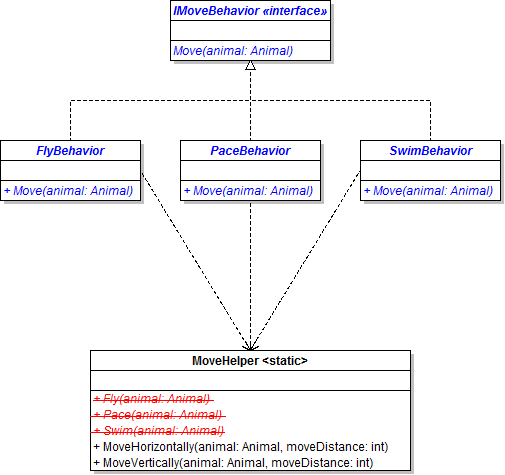
MoveBehaviors folder.MoveHelper's Pace method to the PaceBehavior's Move method and remove the Pace method.MoveHelper's Fly method to the FlyBehavior's Move method and remove the Fly method.MoveHelper's Swim method to the SwimBehavior's Move method.MoveHelper and Move classes to a new folder in the Animals project named MoveBehaviors.Animal class as specified in the diagram below.
MoveBehavior property an auto-property.Move method, call the Move method of the animal's MoveBehavior. Pass in the current animal.Move methods from the animal subclasses.NoMoveBehavior for animals to stand still.NoMoveBehavior class in the MoveBehaviors folder that implements the IMoveBehavior.The class should only have the Move method.
NoMoveBehavior write a comment to indicate that the animal is standing still.Mammal class, set the MoveBehavior to a new PaceBehavior.this.MoveBehavior = new PaceBehavior();Mammal classSwimBehaviorBird: FlyBehaviorPlatypus: SwimBehaviorPaceBehaviorNoMoveBehaviorNoMoveBehaviorIn the MakePregnant method in the Animal class, set the MoveBehavior to a new NoMoveBehavior.
Platypus: swim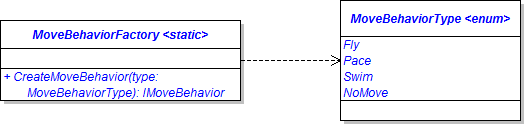
CreateMoveBehavior method, use a switch statement to determine what type of behavior to return (e.g. if the passed-in type is Fly, then return a FlyBehavior).MainWindow as specified in the wireframe below.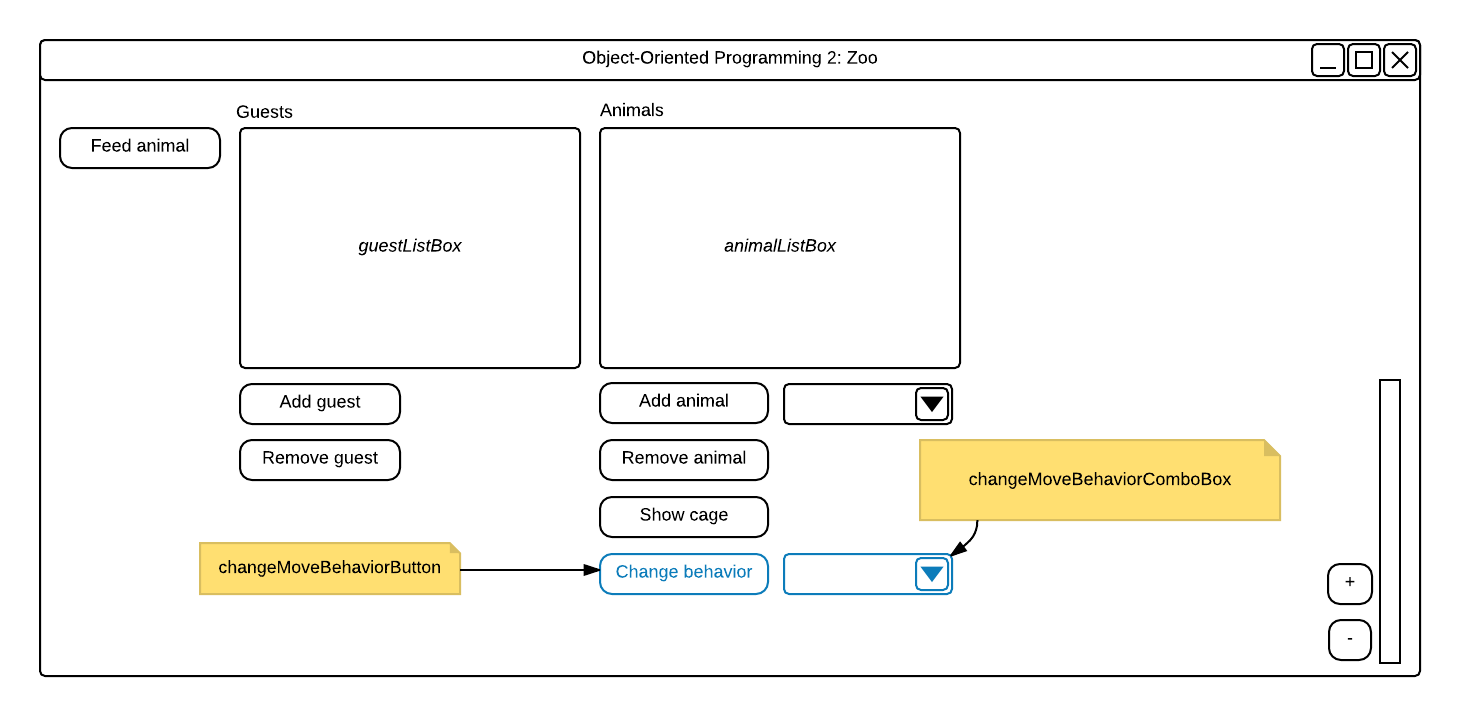
MainWindow's window_Loaded event, populate the move behavior combo box with the values of the MoveBehaviorType enum.MoveBehavior to the result of calling the MoveBehaviorFactory's CreateMoveBehavior method and pass in the behavior cast as a MoveBehaviorType.Fly from the move behavior combo box.Click the Change behavior button. The platypus in the cage should start to fly.
Fly. The dingo in the cage should start to fly.NoMove. The platypus in the cage should stop moving.Swim and one of them Fly.Eat behavior objects supply interchangeable eating strategies.EatBehaviors and add them to it.ConsumeBehaviorBuryAndEatBoneBehaviorShowAffectionBehaviorWeightGainPercentage property to the IEater interface in the Foods project with just a getter and add a setter to the Weight property.Animal classes, make the WeightGainPercentage property public if it isn't already.WeightGainPercentage property in the Guest and Employee class and have them return 0.EatBehaviors folder.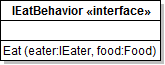
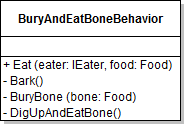
Eat method of each of the behaviors.EatBehaviors and put the eating behavior classes and the IEatBehavior interface in it.BuryAndEatBoneBehavior to look like the class diagram below.In the BuryAndEatBone behavior's eat method, the eater will bury the bone, dig up the bone, then eat the food. Finally, after the eater finishes its food, it will bark in satisfaction.
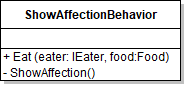
ShowAffectionBehavior to look like the class diagram below.In the ShowAffectionBehavior's Eat method, the eater should eat the food then show affection after it has finished eating.
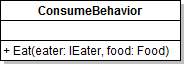
ConsumeBehavior to look like the class diagram below.The Eat method should just contain the weight gaining code.
Animal class, add an auto-property of type IEatBehavior named EatBehavior.EatBehavior in their constructorsAnimal class's Eat method, call the EatBehavior's Eat method and pass in the animal reference and the food object.Eat methods and the methods called in them from the Dingo and Platypus classes.BuryBone and ShowAffection methods.Reproduce behavior objects supply interchangeable reproduction strategies.GiveBirthBehaviorLayEggBehaviorReproduceBehaviors in the Animals project with an IReproduceBehavior interface and the behaviors.Reproduce method stub that returns an IReproducer and takes two parameters of type Animal named mother and baby.BabyWeightPercentage property in the Animal class public.Bird class to the LayEggBehavior class.Reproduce, HatchEgg and LayEgg methods from the Bird class.LayEggBehavior class.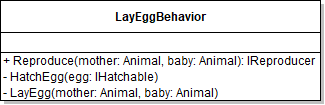
Reproduce method, if the baby is an IHatchable type, call LayEgg and HatchEgg.HatchEgg method, call the Hatch method.LayEgg method, subtract 125% of the baby's weight from the mother.Hatch Sequence from the Platypus class.Mammal class to the GiveBirthBehavior class.Reproduce method a mother and baby parameter.Reproduce method and the call to base.Reproduce.Platypus type.Animal parameter to the FeedNewborn method named mother.FeedNewborn method and update the references.Animal class, define an auto-property named ReproduceBehavior of type IReproduceBehavior.Animal class's Reproduce method.Weight of the mother.CreateInstance, call the mother's Reproduce method on their ReproduceBehavior and pass in the mother and the baby.CreateInstance call, pass in a gender as the last parameter.Use a ternary operator and the animal's random to set the gender randomly to either male or female.
MainWindow that births a selected animal. The event handler shouldReproduce and add the baby to the zoo.FeedNewborn method and the LayEgg method.Platypus and click the Birth animal button.LayEgg is hit. Click Continue.Platypus is added to the list and that the P on the Platypus goes away.FeedNewborn is hit. Click Continue.© 2026 Northcentral Technical College