Acceptance criteria
- WPF users can remove animals and guests through the specified controls.
Animal animal = this.animalListBox.SelectedItem as Animal;If they do, remove the animal.
if (MessageBox.Show(string.Format("Are you sure you want to remove animal: {0}?", animal.Name), "Confirmation", MessageBoxButton.YesNo) == MessageBoxResult.Yes)int.Parse(text) or double.Parse(text)In the event handler, set the animal's Gender to the SelectedItem in the gender combo box.
To do this, use a ternary operator to test the status if IsPregnant and if true, add " P" otherwise add string.Empty.
If it is not, throw an appropriate exception type (ArgumentOutOfRange) and include a user-friendly message.
Therefore, no validation is necessary.
If the inputted value does not match the regular expression, throw an appropriate exception type (Format) with a user-friendly message.
if (!Regex.IsMatch(value, @"^[a-zA-Z ]+$"))If it is not, throw an appropriate exception type and include a user-friendly message.
Show the exception's message to the user.
Test the following values to make sure that validation works. Ensure the Console application continually asks for a valid value when bad values are given.
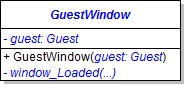
Initialize the controls to the guest's values in the window_Loaded event.
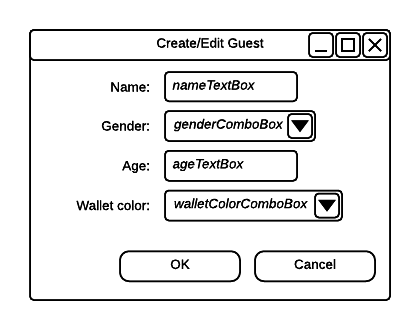
Make the Cancel button the cancel button. Add a click event to the OK button; in it, set the window's DialogResult to true.
If it is not, throw an appropriate exception type and include a user-friendly message.
If it is not, throw an appropriate exception type and include a user-friendly message.
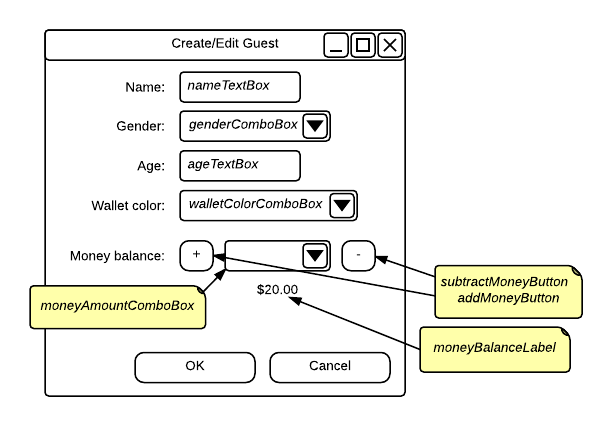
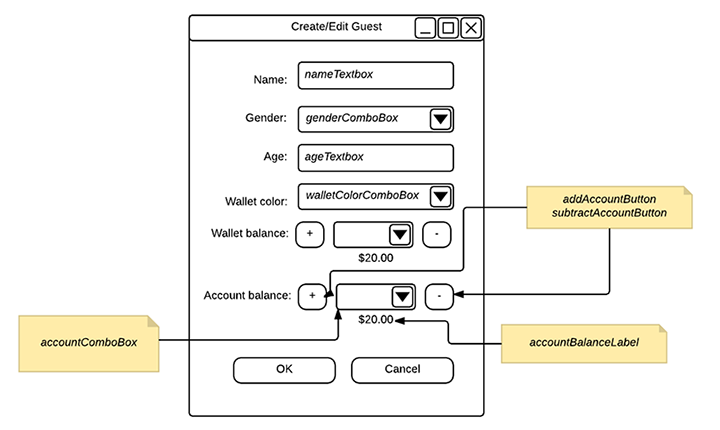
Example: moneyAmountComboBox.Items.Add(1);Model the account after the previous steps that set the wallet's money balance.
Only the zoo and the employees should be created.
© 2026 Northcentral Technical College