4.5A Zoo Assignment

4.5A Zoo Assignment
Add a console command to add new animals
Acceptance Criteria
Acceptance criteria
  • The console accepts input for a new animal and adds that animal to the zoo.
1.Add a console command to add new animals
Problem
Solution
A Add methods to read various value types from the console.
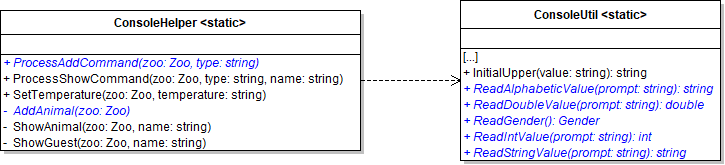
1 Add methods to the ConsoleHelper and ConsoleUtil classes, as specified in the diagram below.
Class Diagram: ConsoleHelper and ConsoleUtility. Reference figure for add a console command to add new animals.
Class Diagram: ConsoleHelper and ConsoleUtility
2 Add the method below to the Console.Util. You will need to add a using.
public static string GetTypes(Type type)
{
    StringBuilder typeList = new StringBuilder();

    foreach(string at in Enum.GetNames(type))
    {
        typeList.Append(at + "|");
    }

    return "|" + typeList.ToString();
}
3 The ReadAlphabeticValue method uses the ReadStringValue method to prompt the user for a value, passing in the type of thing to look for (ex: Animal type, Name, Gender, etc).

Then, it checks if the return only contains letters and spaces. It contains the following code:

string result = null;

bool found = false;

while (!found)
{
    result = ConsoleUtil.ReadStringValue(prompt);

    if (Regex.IsMatch(result, @"^[a-zA-Z ]+$"))
    {
        found = true;
    }
    else
    {
        Console.WriteLine(prompt + " must contain only letters or spaces.");
    }
}

return result;
4 The ReadStringValue method prompts the user for a value using the passed in prompt parameter, trims and lower cases the return from the Console and ensures that a value was entered.

It contains the following code:

string result = null;

bool found = false;

while (!found)
{
    Console.Write(prompt + "] ");

    string stringValue = Console.ReadLine().ToLower().Trim();

    if (stringValue != string.Empty)
    {
        result = stringValue;
        found = true;
    }
    else
    {
        Console.WriteLine(prompt + " must have a value.");
    }
}

return result;
5 The ReadIntValue method uses the ReadStringValue method to prompt the user for a value, then takes that values and checks if it is a whole number.

It contains the following code:

int result = 0;

string stringValue = result.ToString();

bool found = false;

while (!found)
{
    stringValue = ConsoleUtil.ReadStringValue(prompt);

    if (int.TryParse(stringValue, out result))
    {
        found = true;
    }
    else
    {
        Console.WriteLine(prompt + " must be a whole number.");
    }
}

return result;
6 The ReadDoubleValue method uses the ReadStringValue method to prompt the user for a value, then takes that value and checks if it is a double.

It contains the following code:

double result = 0.0;

string stringValue = result.ToString();

bool found = false;

while (!found)
{
    stringValue = ConsoleUtil.ReadStringValue(prompt);

    if (double.TryParse(stringValue, out result))
    {
        found = true;
    }
    else
    {
        Console.WriteLine(prompt + " must be either a whole number or a decimal number.");
    }
}

return result;
7 The ReadGender method uses the ReadStringValue method to prompt the user for a value and attempts to convert it to an enumeration value.

It contains the following code:

Gender result = Gender.Female;

string stringValue = result.ToString();

bool found = false;

while (!found)
{
    stringValue = ConsoleUtil.ReadAlphabeticValue("Gender");

    stringValue = ConsoleUtil.InitialUpper(stringValue);

    if (Enum.TryParse<Gender>(stringValue, out result))
    {
        found = true;
    }
    else
    {
        Console.WriteLine("Invalid gender. Possible gender types: " + GetTypes(typeof(Gender)));
    }
}

return result;
B Set up sequence for adding an animal.
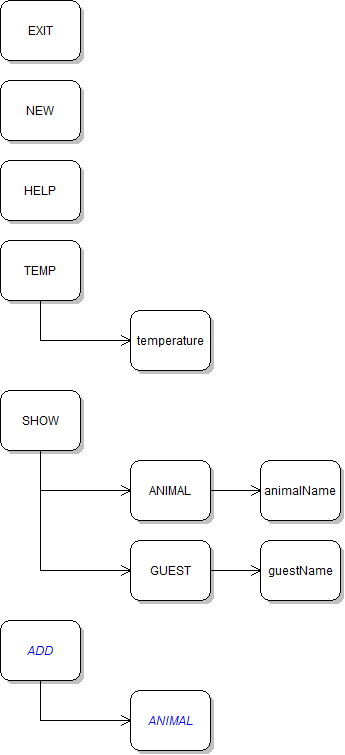
Command Diagram: Add Animal. Reference figure for add a console command to add new animals.
Command Diagram: Add Animal
1 Add a console command called "add".
2 In it, call the ConsoleHelper's ProcessAddCommand method.
3 Pass in the zoo and the second item in the commandWords array, which represents the type of object the user wants to add (e.g. "animal").
C Modify the ProcessAddCommand method.
1 Switch on the type parameter.
2 Add cases for "animal" and default.
3 Call AddAnimal in the "animal" case.
4 Throw an exception in the default case with a message that states that the command only supports adding animals.
D Fill out the ConsoleHelper's AddAnimal method.

The sequence of method calls will end up looking like the diagram below.
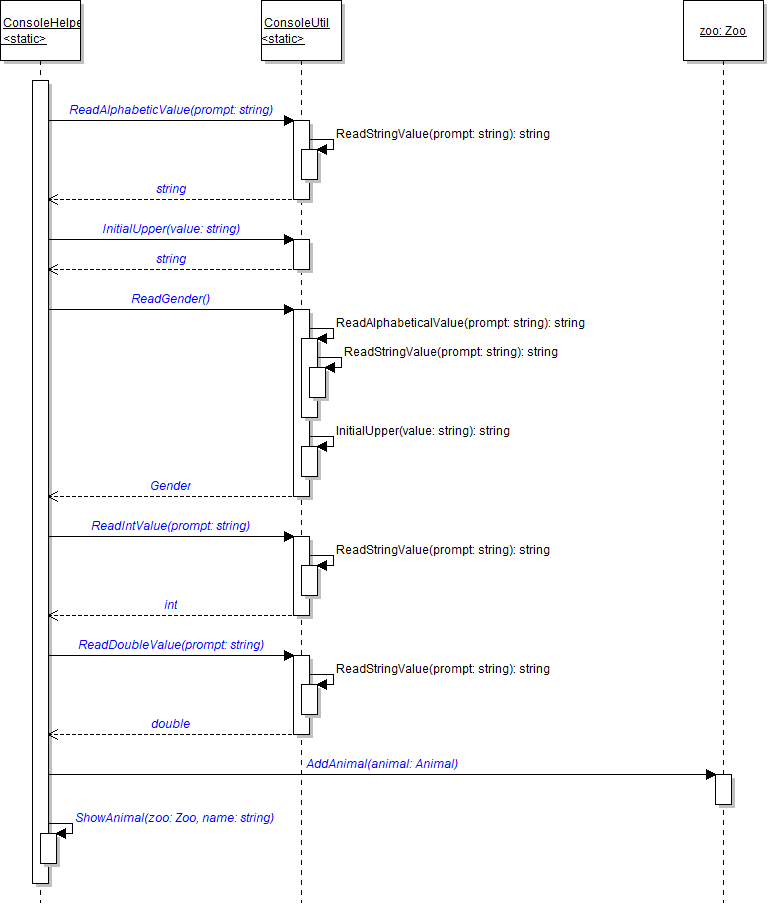
Sequence Diagram: Add Animal. Reference figure for add a console command to add new animals.
Sequence Diagram: Add Animal
1 In the call to ReadAlphabeticValue, pass "Name" as the argument.
2 In the call to ReadIntValue, pass "Age" as the argument.
3 In the call to ReadDoubleValue, pass "Weight" as the argument.
4 Change the Weight setter in the Animal class to public by removing the protected modifier.
5 Before all of the calls, instantiate a Dingo and store it in a variable.

Pass in any values you want for the age, name, weight, and gender.

6 Assign the dingo's Name to the result of calling the ReadAlphabeticValue method.
7 Use the InitialUpper method to ensure the Dingo's name has the first letter uppercased.
8 Set the dingo's Gender to the result of calling the ReadGender method.
9 Set the dingo's Age to the result of calling the ReadIntValue method, passing in "Age".
10 Set the dingo's Weight to the result of calling the ReadDoubleValue method, passing in "Weight".
11 Add the animal to the zoo and show the animal to the console.
E Check Your Work
1 Run the console application.
2 Type add animal.
3 A Name prompt should appear.
4 Typing the following values for the various properties should result in the dingo being added to the zoo and shown to the console.
  • Name: Spot
  • Gender: Male
  • Age: 2
  • Weight: 40.0
5 Test the validation of the various properties.
6 The console should continuously ask the user to enter a value while the value is invalid.
Add a console command to add new guests
Acceptance Criteria
Acceptance criteria
  • The console accepts input for a new guest and adds that guest to the zoo.
2.Add a console command to add new guests
Problem
Solution
A Add a method to the ConsoleHelper called AddGuest.

It takes a zoo as a parameter and returns void. Add a case in ProcessAddCommand for "guest" and call the AddGuest method in it.
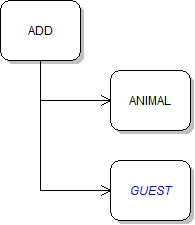
Command Diagram: Add Guest. Reference figure for add a console command to add new guests.
Command Diagram: Add Guest
B Fill out the AddGuest method in a similar way to the AddAnimal command.

Create a guest and then prompt the user for the following properties. You will need to create a method to read the wallet color enum.

  • Name
  • Gender
  • Age
  • Wallet's money balance
  • Wallet color
  • Checking account's money balance
C Sell the guest a ticket before adding them to the zoo and showing them.
D Check Your Work
1 Run the console application.
2 Type add guest.

A Name prompt should appear. Typing the following values for the various properties should result in the guest being added to the zoo and shown to the console.

  • Name: Billy
  • Gender: Male
  • Age: 30
  • Wallet money balance: 30
  • Wallet color: Black
  • Checking account's balance: 100
3 Test the validation of the various properties.

The console should continuously ask the user to enter a value while the value is invalid.
Use the factory pattern to instantiate animals based on type.
Acceptance Criteria
Acceptance criteria
  • A shared animal factory creates animals according to the requested type.
3.Use the factory pattern to instantiate animals based on type.
Problem
Solution
4.5.1 How to Implement the Factory Pattern
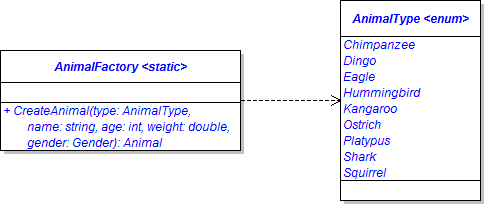
A Create a static class called AnimalFactory and the AnimalType enum in the Animals project, as specified in the diagram below.
Class Diagram: Animal Factory. Reference figure for use the factory pattern to instantiate animals based on type.
Class Diagram: Animal Factory
B Fill out CreateAnimal method.
1 First, define a result variable and instantiate it to null.
2 Switch on the type parameter. Include a case for each of the animal types in the AnimalType enum.
3 Inside each case, set the result variable to a new animal that matches the specified type
4 Return the result.
C In the Animals project, create an Enumerations folder and put the AnimalType enum in it and then create a Factories folder and put the AnimalFactory class in it.
D In the NewZoo static method in the Zoo class, use the static CreateAnimal method to instantiate the animals.

For example:

comoZoo.AddAnimal(AnimalFactory.CreateAnimal(AnimalType.Chimpanzee, "Bobo", 3, 50.0, Gender.Male));
E Check Your Work: Build the solution and ensure that the code compiles without errors or warnings.
Use the animal factory in the console.
Acceptance Criteria
Acceptance criteria
  • The console uses the animal factory to create the chosen animal type.
4.Use the animal factory in the console.
Problem
Solution
4.5.2 Why we Use the Factory Pattern
A Define a static method in the ConsoleUtil called ReadAnimalType. It takes no parameters and returns an AnimalType.
B Show enum types for users.
1 In the else statement of the ReadAnimalType method, add a call to the GetTypes method and pass in a typeof AnimalType.
Console.WriteLine("Invalid animal type. Possible animal types: " + GetTypes(typeof(AnimalType)));
2 In the else statement of the ReadGender method, do the same thing to return the gender types.
3 In the else statement of the ReadWalletColor method, do the same thing to return the wallet color types.
C In the AddAnimal method in the ConsoleHelper
1 Read an animal type from the console.
2 Create an animal using the factory's CreateAnimal method.

Pass in the animal type returned from the ReadAnimalType method for the first parameter.

D Add information about the add command to the help command.
E Check Your Work
1 Run the console application.
2 Type add animal.
3 You should be prompted for an animal type first instead of a name.
4 Try to add an animal the Animals project doesn't support (Dragon, Centaur, Unicorn, etc).

Ensure you get an error message that displays the list of animal types to instantiate.

5 Once you have successfully responded to all the prompts, an animal of that type should be created and, after you set the rest of its properties, added to the zoo and shown to the console.
6 Type 'help'. Information about the add command should appear.
Use the animal factory in the WPF application
Acceptance Criteria
Acceptance criteria
  • The WPF application uses the animal factory to create the chosen animal type.
5.Use the animal factory in the WPF application
Problem
Solution
A Add a Combo Box to the MainWindow named 'animalTypeComboBox'.
B In the windowLoaded event handler, assign the animalTypeComboBox's ItemsSource property to
Enum.GetValues(typeof(AnimalType))
C In the addAnimalButton_Click event handler
1 Define a local variable of type AnimalType and assign it to the animalComboBox's SelectedItem property and cast it as an AnimalType.
(AnimalType)this.animalTypeComboBox.SelectedItem
2 Instead of instantiating an animal, call the AnimalFactory's CreateAnimal method and pass in the animal type returned from the combo box.
3 Pass the returned animal into the new AnimalWindow.
4 Surround the existing code in a try/catch that catches a NullRefereceException.

In the catch, show a MessageBox with a message telling the user an animal must be selected before adding an animal to the zoo.

D Convert the logic check in the AnimalWindow's window_Loaded event handler to a ternary expression using the code below.
4.5.4 How to Use the Ternary Operator
this.pregnancyStatusLabel.Content = this.animal.IsPregnant ? "Yes" : "No";
E Check Your Work
1 Run the WPF application.
2 Select an animal type from the combo box.
3 Click the Add animal button.

The default values passed into the CreateAnimal method should appear in the AnimalWindow.

4 Click OK. The animal should get added to the list with the type you selected showing.
Add console command to remove animals and guests.
Acceptance Criteria
Acceptance criteria
  • Console commands remove the requested animals and guests.
6.Add console command to remove animals and guests.
Problem
Solution
A In the zoo class, create a RemoveAnimal method based on the class diagram below.

Inside the method it should call the Remove method on the animals list, passing in the animal parameter.
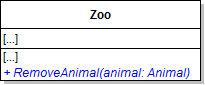
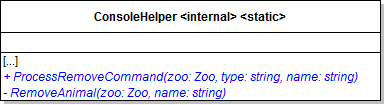
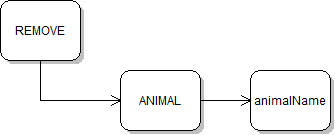
Class Diagram: RemoveAnimal. Reference figure for add console command to remove animals and guests.
Class Diagram: RemoveAnimal
B Add methods to the ConsoleHelper class as specified in the diagram below.
Class Diagram: RemoveAnimal Command. Reference figure for add console command to remove animals and guests.
Class Diagram: RemoveAnimal Command
C In the Main method of Program.cs.
1 Add a case to the top-level switch statement for "remove".
Command Diagram: Remove Animal. Reference figure for add console command to remove animals and guests.
Command Diagram: Remove Animal
2 In it, call the ProcessRemoveCommand method.

Pass in the zoo and the second and third items in the commandWords array.

D In the ProcessRemoveCommand method in the ConsoleHelper
1 Switch on the type parameter. Add cases for "animal" and default.
2 Call RemoveAnimal in the "animal" case and pass in the uppercased name parameter.
3 In the default case display a message that states that the command only supports removing animals.
E Inside the RemoveAnimal method
1 Find the animal whose name is the name parameter.
2 If the animal was found, remove it from the zoo and write a message to the console stating that the animal was removed.
3 If the animal is null, write a statement to the console saying that the animal could not be found.
F Add information about the remove command to the help command.
G Add a RemoveGuest method to the Zoo
H Follow the same process as in the previous steps to add a console command for removing guests.

You'll need to also add a RemoveGuest method to the ConsoleHelper and a case for "guest" in the ProcessRemoveCommand method.
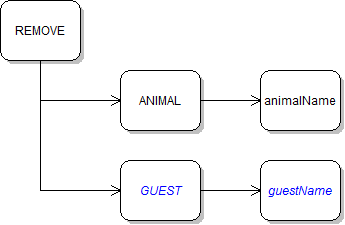
Command Diagram: Remove Guest. Reference figure for add console command to remove animals and guests.
Command Diagram: Remove Guest
I Check Your Work
1 Set breakpoints on the calls to RemoveAnimal and RemoveGuest. Run the console application.
2 Type remove animal Dolly.
3 Ensure that the breakpoint is hit, Dolly is removed from the zoo, and a success message is written to the console.
4 Type remove guest Greg.
5 Ensure that the breakpoint is hit, Greg is removed from the zoo, and a success message is written to the console.
Demonstrate your work
7.Record a video of your applications showing
A Your Console Application
1 1E - Check Your Work
2 2D - Check Your Work
3 4E - Check Your Work
4 6I - Check Your Work
B Your WPF Application
1 5E - Check Your Work
Prepare and submit your work
8.Submission Steps
A Ensure that your application has no compiler errors or warnings
B Ensure that your code is StyleCop compliant
C Remove all bin and obj folders from your solution
D Zip your solution
E Submit your zipped solution to the Feedback System
F Submit your Feedback System results link to Canvas
G Submit your video recording to your f-channel
Source credit

© 2026 Northcentral Technical College