4.2B Zoo Assignment

4.2B Zoo Assignment
Make animal inheritance hierarchy more robust
Acceptance Criteria
Acceptance criteria
  • The animal hierarchy supports the additional animal types specified in the assignment.
1.Make animal inheritance hierarchy more robust
Problem
Solution
Inheritance Review Abstraction Review
A Add more animal types.
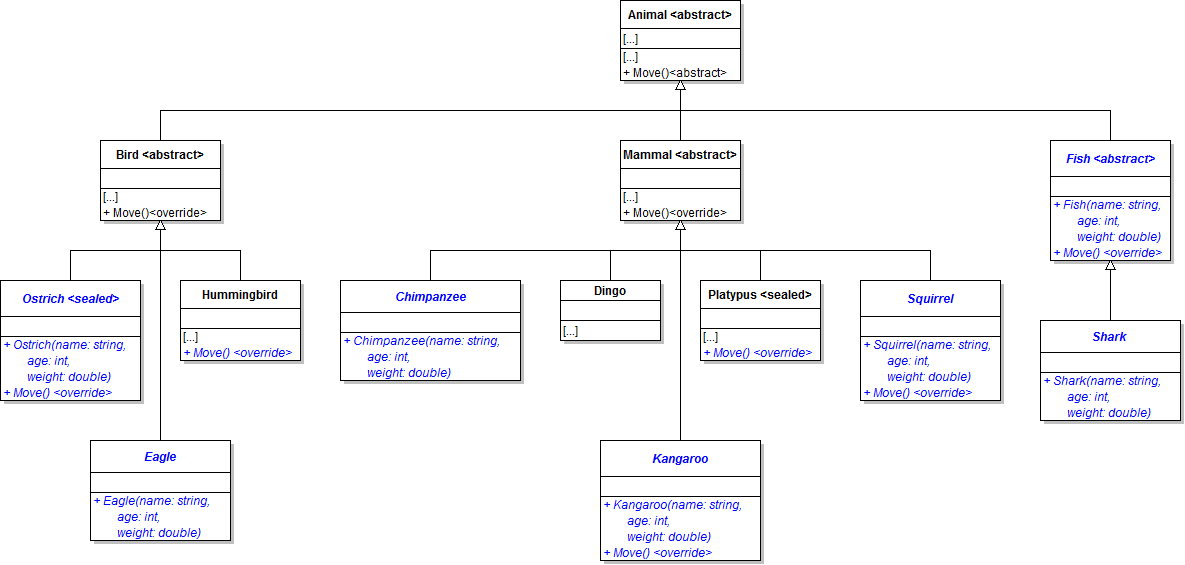
1 Create and/or modify classes as specified in the class diagram below.
Class Diagram: Animals. Reference figure for make animal inheritance hierarchy more robust.
Class Diagram: Animals
2 Assign the percent of the mother's weight the baby will be to the BabyWeightPercentage property in each animal's constructor.
Subtasks
  • A. Ostriches walk on two legs instead of flying. Put a comment in the ostrich's Move method to reflect this. A baby ostrich weighs 30% of its mother's weight.
Subtasks
  • B. A baby eagle weighs 25% of its mother's weight.
  • C. A baby chimpanzee weighs 10% of its mother's weight.
  • D. A baby kangaroo weighs 13% of its mother's weight. Kangaroos generally hop. Put a comment in the kangaroo's Move method to reflect this.
  • E. A baby squirrel weighs 17% of its mother's weight. Squirrels generally climb and scurry. Put a comment in the squirrel's Move method to reflect this.
  • F. Fish generally swim. Put a comment in the fish's Move method to reflect this. When eating food, fish gain weight by 5%.
  • G. A baby shark weighs 18% of its mother's weight.
  • H. A hummingbird generally hovers, write a note in the hummingbird's Move method to reflect this.
B In the create zoo method in MainWindow.xaml.cs, add at least one animal of each type to the zoo. Example
this.comoZoo.AddAnimal(new Chimpanzee("Bobo", 3, 50.0));
C Check Your Work
1 Set a breakpoint at the end of the create zoo method. Run the WPF application.
2 Ensure that the zoo contains at least one animal of each of the nine types.
Handle exceptions to create a better user experience
Acceptance Criteria
Acceptance criteria
  • Admission failures display an error message without crashing the application.
2.Handle exceptions to create a better user experience
Problem
Solution
4.2.4 How to Use Try/Catch 4.2.5 How to Determine Using Exceptions or Conditions
A In the admitGuestButton_Click, put the call to add a guest to the zoo inside a try statement, as shown in the code below
try
{
    // unsafe code goes here
}
B Add a catch block below the try block, as shown in the code below.

Inside the catch block, call MessageBox.Show. Pass in a message telling the user that they must have a ticket in order to enter the zoo.

4.2.6 How to Use Message Boxes
catchcatch
{
    // code here
}
C Check Your Work
1 Run the WPF application.
2 Click the Admit guest button four times.

A message box with your user-friendly message about running out of tickets should pop up. Click OK.
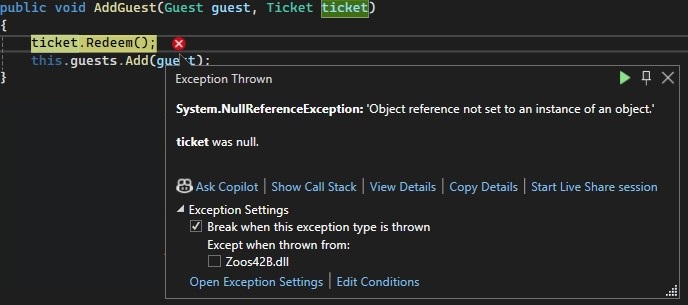
Exception.jpg. Reference figure for handle exceptions to create a better user experience.
Exception.jpg
D An alternate way of validating the admit guest button is using an if-statement.
1 In the AddGuest method on the Zoo class, add an if-statement around the code currently in the method.
2 The if-statement should check to make sure the ticket is not null and that the ticket has not been redeemed by making sure that the isRedeemed field on the ticket is false.
3 Delete the try-catch in the admitGuestButton_Click. The if-statement will take care of validating the ticket.
E Check Your Work
1 Run the WPF application.
2 Click the Admit Guest button four times.

A message shouldn't be shown. Instead, you should be able to keep clicking without an exception being thrown.
Use inheritance to reduce redundancy in classes that can collect money.
Acceptance Criteria
Acceptance criteria
  • Shared money-collection behavior resides in the common base class.
3.Use inheritance to reduce redundancy in classes that can collect money.
Problem
Solution
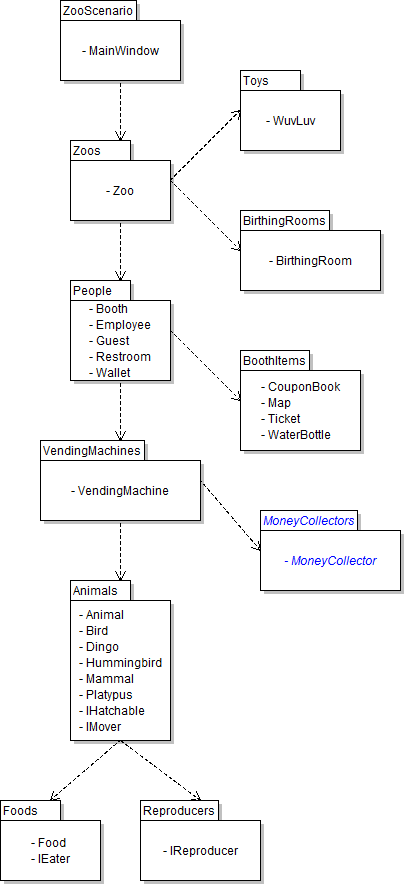
A Create the MoneyCollectors class library as specified in the class diagram below.
Package Diagram - MoneyCollectors. Reference figure for use inheritance to reduce redundancy in classes that can collect money.
Package Diagram - MoneyCollectors
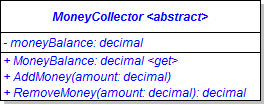
B Create the MoneyCollector class as specified in the class diagram below.
Class Diagram: MoneyCollector. Reference figure for use inheritance to reduce redundancy in classes that can collect money.
Class Diagram: MoneyCollector
C Copy and paste the code from the Wallet class's AddMoney and RemoveMoney methods into the equivalent methods in the MoneyCollector.
D Use inheritance to give the booth money collecting abilities
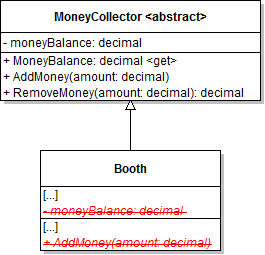
1 Make the Booth class inherit from the MoneyCollector class as specified in the class diagram below.
Class Diagram: Booth Inheritance. Reference figure for use inheritance to reduce redundancy in classes that can collect money.
Class Diagram: Booth Inheritance
2 Add assembly references and using directives as required to get the solution to build.
3 Remove the Booth's moneyBalance field and AddMoney method.

It might be necessary in the SellTicket and SellWaterBottle methods to change a reference to the moneyBalance field to a call to the AddMoney method.
E Use inheritance with wallets to reduce redundancy
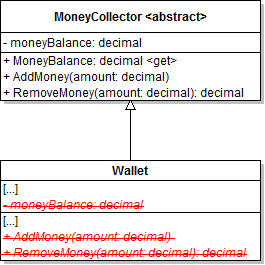
1 Make the Wallet class inherit from the MoneyCollector class and remove the wallet's now redundant field, property and methods, as specified in the diagram below.
Class Diagram: Wallet Inheritance. Reference figure for use inheritance to reduce redundancy in classes that can collect money.
Class Diagram: Wallet Inheritance
2 Add a using directive to the MoneyCollectors namespace as necessary.
F Use inheritance with vending machines to reduce redundancy
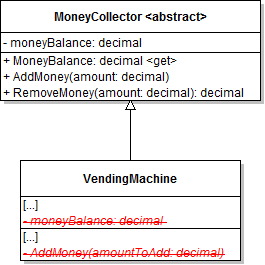
1 Make the VendingMachine class inherit from the MoneyCollector class and remove the vending machine's now redundant field and method, as specified in the diagram below.
Class Diagram: VendingMachine Inheritance. Reference figure for use inheritance to reduce redundancy in classes that can collect money.
Class Diagram: VendingMachine Inheritance
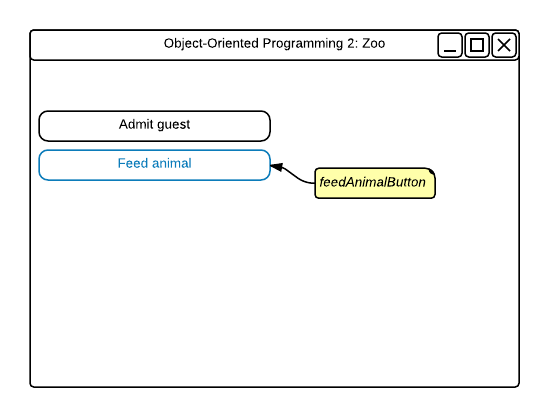
2 Create a button in MainWindow.xaml named feedAnimalButton and add a click event for it.
Wireframe: Feed Animal Button. Reference figure for use inheritance to reduce redundancy in classes that can collect money.
Wireframe: Feed Animal Button
3 In the click event: find guest Greg, find an ostrich, and then have the guest feed the ostrich.
G Check Your Work
1 Set a breakpoint in the MoneyCollector class at the beginning of the AddMoney method.
2 Set a breakpoint in the MoneyCollector class at the beginning of the RemoveMoney method.
3 Run the WPF application.

Ensure that the breakpoint is hit and that the call came from the ticketBooth object calling AddMoney in the Zoo constructor by using the Call Stack.
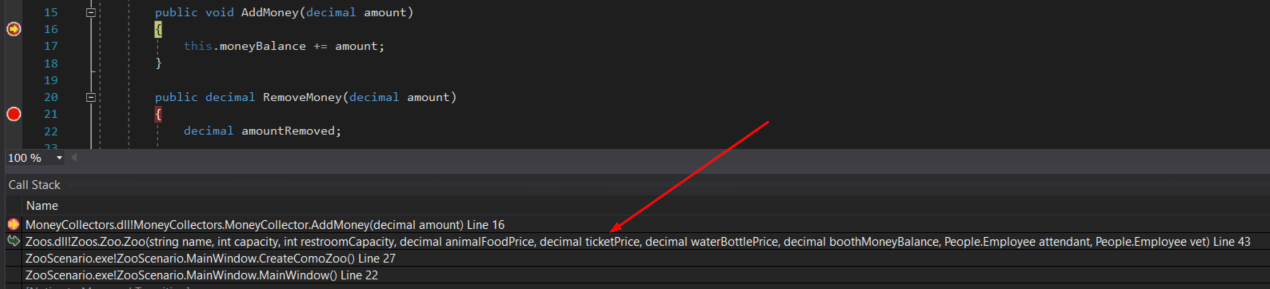
Snip: Call Stack. Reference figure for use inheritance to reduce redundancy in classes that can collect money.
Snip: Call Stack
4 Press Continue (F5).

The Call Stack will change. Check to ensure that the new call came from the AnimalSnackMachine calling AddMoney.

5 Press F5. Check to ensure that the new call came from the wallet object in the Guest constructor.
6 Press F5.

Check to ensure that the new call came from the wallet object in the VisitTicketBooth method in the Guest class.

7 Press F5.

Check to ensure that the new call came from the ticketBooth object in the SellTicket method in the Booth class.
8 Press F5 8 more times until the application window pops up. Click the Feed animal button.
9 Ensure that the breakpoint is hit and that the call came from the wallet object calling RemoveMoney from the FeedAnimal method in the Guest class.
Use inheritance to eliminate redundant code in booth items
Acceptance Criteria
Acceptance criteria
  • Booth items share common members through Item and redundant item-handling code is removed.
4.Use inheritance to eliminate redundant code in booth items
Problem
Solution
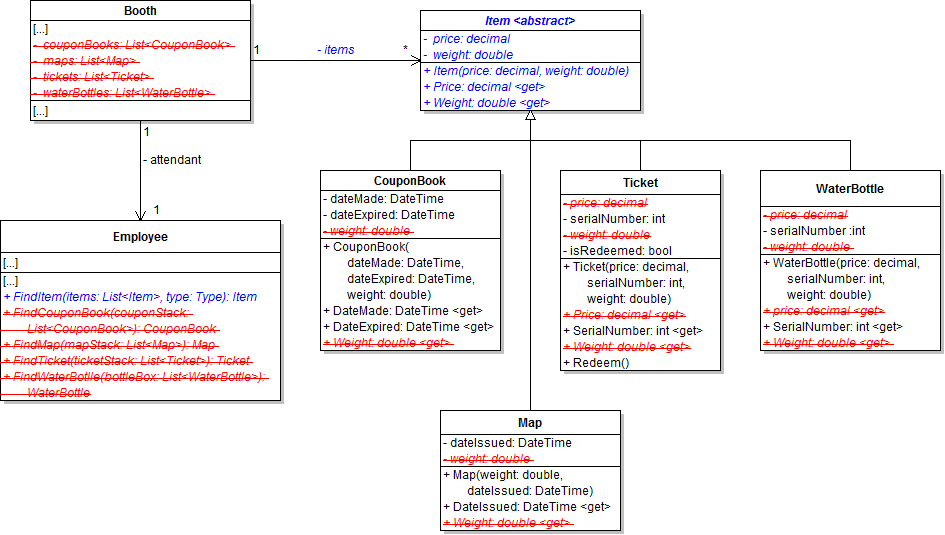
A Create and/or modify classes in the BoothItems project, as specified in the diagram below.
Class Diagram: Booth Item Inheritance. Reference figure for use inheritance to eliminate redundant code in booth items.
Class Diagram: Booth Item Inheritance
B Pass in 0.0m for the price of coupon books and maps when calling base in the constructor.
C Replace the booth's four individual lists for coupon books, maps, tickets and water bottles with a single list of items named items, as specified in the diagram above.
D Replace the employee's four individual methods for finding booth items with a single method named FindItem, as specified in the diagram above.
1 In the method, first check to see if the passed-in list has items in it.
2 If the list has items in it, use a foreach loop to loop through the item list.
3 Inside the loop, check to see if the current item's type matches the passed-in type.
4 If the type matches, assign the result to the current item, remove the result from the list and break out of the loop.
5 Return the resulting item.
E In the booth's SellTicket, SellWaterBottle, GiveFreeMap and GiveFreeCouponBook methods, call the employee's FindItem method, passing in the list of items and the type of item to search for.
F Check Your Work
1 Set a breakpoint at the start of the guest's VisitTicketBooth method. Run the WPF application.
2 After the breakpoint is hit, step through the method to ensure that each method call returns the appropriate item and removes it from the list
Subtasks
  • A. The booth's list of items should contain 10 maps, 5 coupon books, 5 tickets, and 5 water bottles.
  • B. The SellTicket method should return a ticket
  • C. The SellWaterBottle method should return a water bottle
  • D. The GiveFreeMap method should return a map
  • E. The GiveFreeCouponBook method should return a coupon book
Demonstrate your work
5.Record a video of your application showing
A There are comments in the Move method of the following Classes
1 Ostrich
2 Kangaroo
3 Squirrel
4 Fish
5 Hummingbird
B StyleCop works in the MoneyCollectors project
C Continually clicking the Admit Guest button to admit more Guests than tickets available does not throw an Exception
D Greg feeds an Ostrich in the feedAnimalButton_Click
E 3G - Check Your Work Steps
Prepare and submit your work
6.Submission Steps
A Ensure that your application has no compiler errors or warnings
B Ensure that your code is StyleCop compliant
C Remove all bin and obj folders from your solution
D Zip your solution
E Submit your zipped solution to the Feedback System
F Submit your Feedback System results link to Canvas
G Submit your video recording to your f-channel
Source credit

© 2026 Northcentral Technical College