We want to be able to count the WuvLuv as an "animal" in the Zoo and use it like we would an animal, but it isn't really an animal, it's a toy. It has similarities with an animal in that it can "Reproduce", but still isn't technically an animal.
This page is currently being built. Please check back soon.
Work through the user stories in order. Each story states the goal and acceptance criteria; its nested tasks retain the detailed implementation and verification steps.
Check the result against this instruction: Copy your 3.4 ending code, renaming both the folder and the Visual Studio solution file
We want to be able to count the WuvLuv as an "animal" in the Zoo and use it like we would an animal, but it isn't really an animal, it's a toy. It has similarities with an animal in that it can "Reproduce", but still isn't technically an animal.
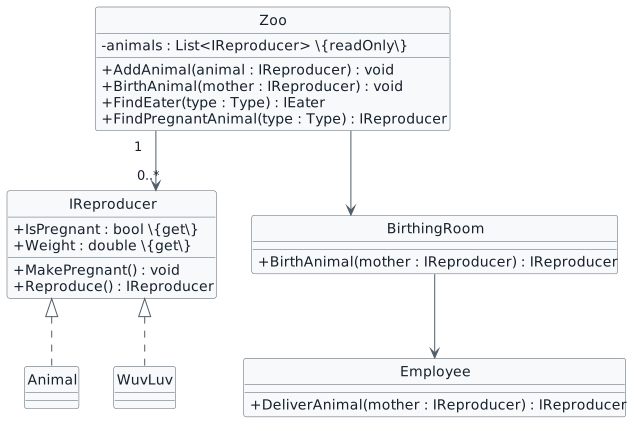
We will define an interface named IReproducer that both Animals and WuvLuvs can implement and change the Zoo's list type to be able to handle anything that is an IReproducer.
3.5.1 How to Utilize Polymorphism 3.5.3 How to Apply Polymorphism Using Interfaces 3.5.4 How to Achieve Encapsulation Using InterfacesThis focused design shows the members or flow relevant to this feature. Keep unchanged members from your preceding checkpoint; follow the tasks below for the order of intermediate edits.
this.comoZoo.AddAnimal(new WuvLuv("Purple"));Observe the error. We cannot add a WuvLuv to an Animal type list because a WuvLuv isn't an Animal. But we want to, though! And we will.
Check the result against this instruction: In the MainWindow at the end of the newComoZooButton_Click, add the following line of code:
Check the result against this instruction: Delete that line of code.
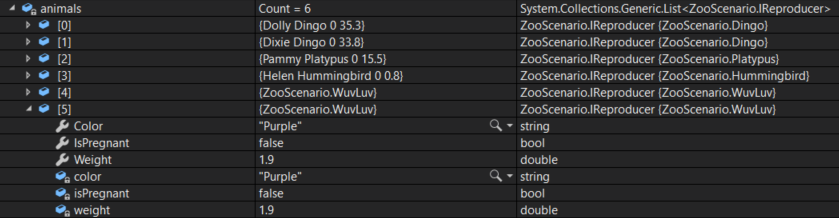
this.FeedNewborn(baby as IEater);double milkWeight = this.Weight * this.milkWeightPercentage;
Food milk = new Food(milkWeight);
newborn.Eat(milk);
this.Weight -= milkWeight;if (baby is Animal)
{
(baby as Animal).Name = "Baby";
}WuvLuv wuvLuv = new WuvLuv("Purple");
wuvLuv.MakePregnant();
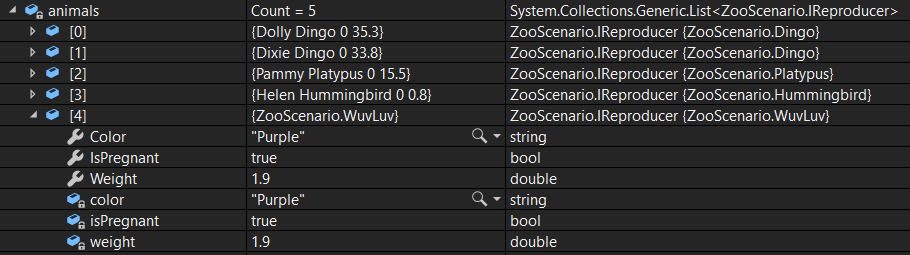
this.comoZoo.AddAnimal(wuvLuv);

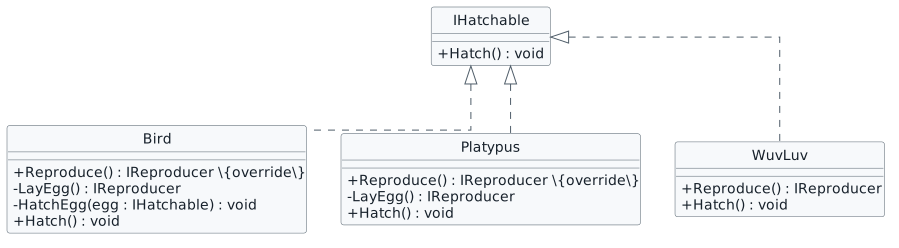
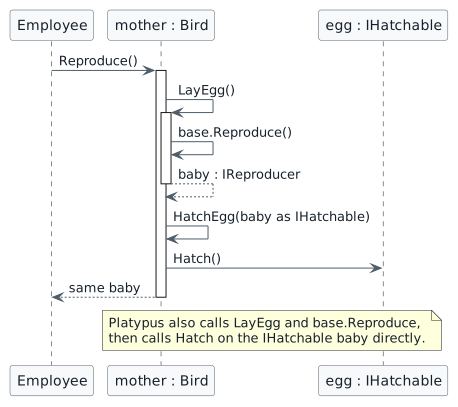
We have a birds, platypodes and wuvluvs that all "hatch" things, but in different ways.
We will use an interface and casting to control how different things hatch.
This focused design shows the members or flow relevant to this feature. Keep unchanged members from your preceding checkpoint; follow the tasks below for the order of intermediate edits.
Check the result against this instruction: Define an interface and implement it using this story’s design reference.
Check the result against this instruction: Ensure that your code is StyleCop compliant.
Check the result against this instruction: Zip the solution and submit to the Feedback System.
Check the result against this instruction: Submit the Feedback System url to the correct assignment in Canvas.
Return to each user story and confirm that you can demonstrate its acceptance criteria. Use the task checkboxes to track completion; a checked box is not a substitute for testing or inspecting the required evidence.
Include living animals and reproducing toys Hatch different kinds of newbornsRemove temporary lines used only to demonstrate compile-time errors. Build without errors or warnings, check StyleCop compliance, and rerun the required scenario paths.
Use the submission or attendance instructions in this page. For a Feedback System submission, upload the requested ZIP, review and resolve the feedback, and submit the resulting URL to the matching Canvas activity. For a Canvas quiz, enter only the requested answers; for an oral final, complete the scheduling and attendance steps.