3.4 Grade Book Assignment

Under Construction

This page is currently being built. Please check back soon.

A platypus
3.4 Grade Book Assignment — overview

Work through the user stories in order. Each story states the goal and acceptance criteria; its nested tasks retain the detailed implementation and verification steps.

1.Gather your resources
A Open the assignment resources
Set up the checkpoint
2.Copy your GradeBook 3.3 Assignment. Rename the folder and .sln to 3.4
A Verify the required change or observation

Check the result against this instruction: Copy your GradeBook 3.3 Assignment. Rename the folder and .sln to 3.4.

Delegate grading through an interface
3.Review the feature design
A Identify the contracts and expected behavior

This focused design shows the members or flow relevant to this feature. Keep unchanged members from your preceding checkpoint; follow the tasks below for the order of intermediate edits.
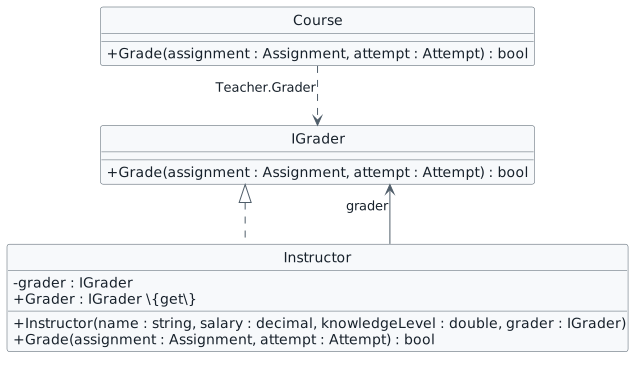
Delegate grading through IGrader. interface IGrader { + Grade(assignment : Assignment, attempt : Attempt) : bool } class Instructor { - grader : IGrader + Instructor(name : string, salary : decimal, knowledgeLevel : double, grader : IGrader) + Grader : IGrader {get} + Grade(assignment : Assignment, attempt : Attempt) : bool } class Course { + Grade(assignment : Assignment, attempt : Attempt) : bool } IGrader <|.. Instructor Instructor --> IGrader : grader Course ..> IGrader : Teacher.Grader
Delegate grading through IGrader
  • New
  • Changed
  • Removed
4.Modify the class structure using this story’s design reference
Review this feature’s design and requirements
A Verify the required change or observation

Check the result against this instruction: Modify the class structure using this story’s design reference.

5.Modify the arguments for new Instructors
A Pass in the Instructor object that is an instance of Donald as Alan's grader

You may need to move around how things are instantiated.

B Pass in null for Donald and Sheldon
C Pass in null for Jeff, Linus and Samuel
6.Modify the Grader property to return either the current instance if their grader field is null or the grader field if it is not null
A Verify the required change or observation

Check the result against this instruction: Modify the Grader property to return either the current instance if their grader field is null or the grader field if it is not null.

7.Modify the Grade method in the Course class
A Assign a local IGrader variable to the Teacher's Grader
B Return the boolean value from the call to the IGrader object's call to Grade
8.In the Student class's TakeAssignment method, call the course object's Grade method instead of the Teacher's Grade method
A Verify the required change or observation

Check the result against this instruction: In the Student class's TakeAssignment method, call the course object's Grade method instead of the Teacher's Grade method.
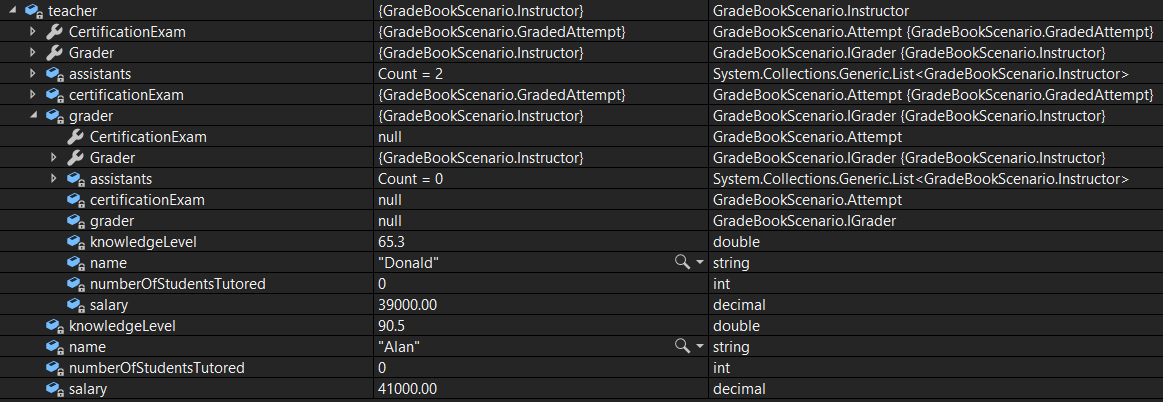
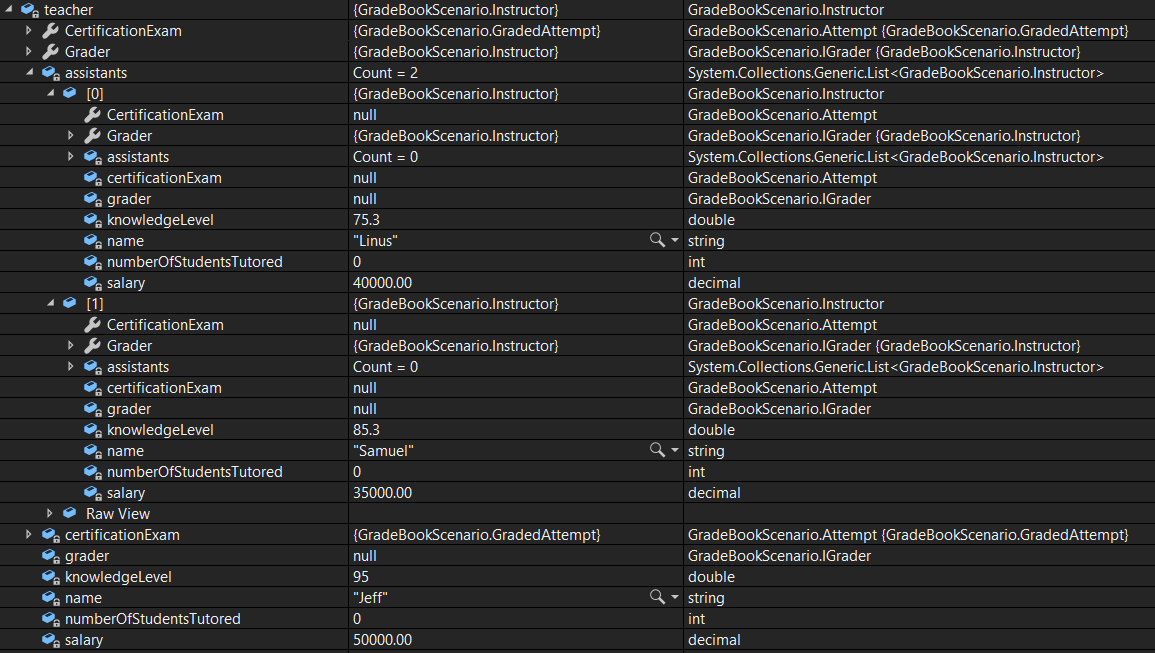
9.Check Your Work (Blackboard):
A Set a breakpoint in the Student class in the TakeAssignment method on the line of code that calls the Grade method
B Start the application. Click the 'New Blackboard' button. Click the 'Take midterm' button
C Ensure that the teacher's values match the values below
CYW - Teacher values; compare object identities, field values, and execution position with your debugger.
CYW - Teacher values
D Press F11 to step into the Grade method
E Step over the line of code that assigns the local IGrader variable. Ensure that it is an instance of Donald
F Press F11 to step into the Grade method. Ensure that Donald (a grader) is the one doing the grading
10.Check Your Work (Canvas):
A Set a breakpoint in the Student class in the TakeAssignment class on the line of code that calls the Grade method
B Start the application. Click the 'New Canvas' button. Click the 'Write midterm essay' button
C Ensure your teacher values match the values below
CYW - Teacher values; compare object identities, field values, and execution position with your debugger.
CYW - Teacher values
D Step over the line of code that assigns the local IGrader variable. Ensure that it is an instance of Jeff
E Press F11 to step into the Grade method. Ensure that Jeff (the teacher) is the one doing the grading
Let qualified students serve as assistants
11.Review the feature design
A Identify the contracts and expected behavior

This focused design shows the members or flow relevant to this feature. Keep unchanged members from your preceding checkpoint; follow the tasks below for the order of intermediate edits.
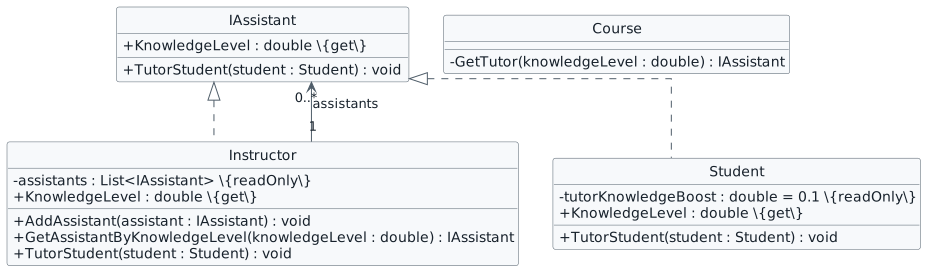
Students and instructors can tutor. interface IAssistant { + KnowledgeLevel : double {get} + TutorStudent(student : Student) : void } class Instructor { - assistants : List<IAssistant> {readOnly} + KnowledgeLevel : double {get} + AddAssistant(assistant : IAssistant) : void + GetAssistantByKnowledgeLevel(knowledgeLevel : double) : IAssistant + TutorStudent(student : Student) : void } class Student { - tutorKnowledgeBoost : double = 0.1 {readOnly} + KnowledgeLevel : double {get} + TutorStudent(student : Student) : void } class Course { - GetTutor(knowledgeLevel : double) : IAssistant } IAssistant <|.. Instructor IAssistant <|.. Student Instructor "1" --> "0..*" IAssistant : assistants
Students and instructors can tutor
  • New
  • Changed
  • Removed
12.Modify the class structure using this story’s design reference. Make sure to change types from Instructor to IAssistant where needed
Review this feature’s design and requirements
A Verify the required change or observation

Check the result against this instruction: Modify the class structure using this story’s design reference. Make sure to change types from Instructor to IAssistant where needed.

13.In the GetAssistantByKnowledgeLevel method, change all Instructor types to IAssistant and change the reference to the knowledgeLevel to reference the KnowledgeLevel property
A Verify the required change or observation

Check the result against this instruction: In the GetAssistantByKnowledgeLevel method, change all Instructor types to IAssistant and change the reference to the knowledgeLevel to reference the KnowledgeLevel property.

14.Assign the Student class's tutorKnowledgeBoost to 0.1
A Verify the required change or observation

Check the result against this instruction: Assign the Student class's tutorKnowledgeBoost to 0.1

15.Modify the TutorStudent method in the Student class
A Copy the method body of the TutorStudent method in the Instructor class and paste it into the method body of the TutorStudent method in the Student class
B Remove the line of code that increases the numberOfStudentsTutored from the Student class's TutorStudent method
C Add a line of code to the TutorStudent method in the Student class that increases the current instance's knowledgeLevel by the tutorKnowledgeBoost
16.In the MainWindow, add a new Student object to Alan's list of assistants with the values:

"Ada", 210172, 70.4, null

A Verify the required change or observation

Check the result against this instruction: In the MainWindow, add a new Student object to Alan's list of assistants with the values:

17.In the MainWindow, add a new Student object to Jeff's list of assistants with the values:

"Bob", 240016, 14.7, null

A Verify the required change or observation

Check the result against this instruction: In the MainWindow, add a new Student object to Jeff's list of assistants with the values:
18.Check Your Work (Blackboard):
A Set a breakpoint in the FindHelp method in the Course class on the line that calls GetTutor
B Start the application. Click the 'New Blackboard' button. Click the 'Tutor Arthur' button
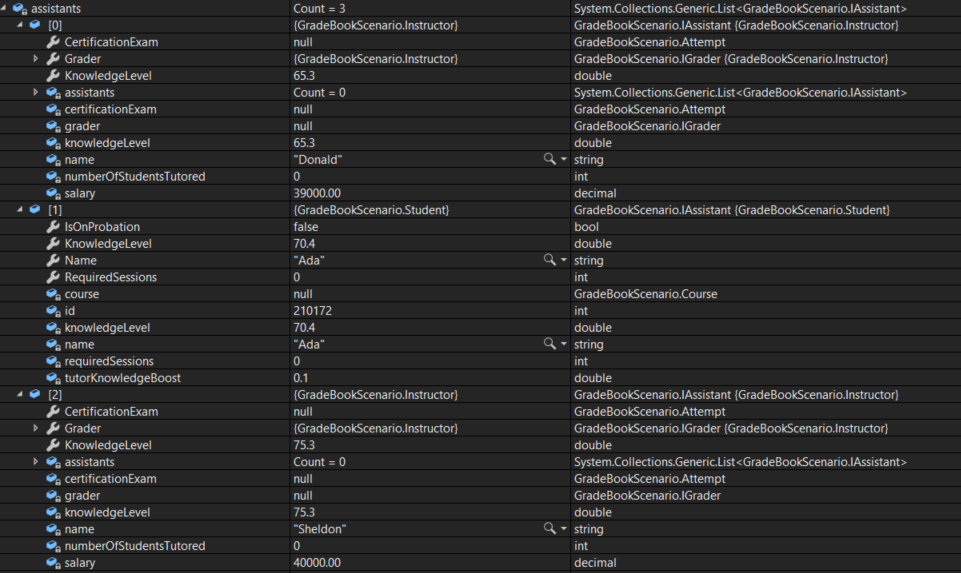
C Ensure that Alan has the assistants below
CYW - Assistant List; compare object identities, field values, and execution position with your debugger.
CYW - Assistant List
D Press F11 to step intp GetTutor. Press F10 to step over he call to GetAssistantByKnowledgeLevel. Ensure that the return is the instance of Ada
E Return to the FIndHelp method and step into the TutorStudent method
F Step through the TutorStudent method. Ensure that Ada's knowledgeLevel increases from 70.4 to 70.5
19.Check Your Work (Canvas):
A Set a breakpoint in the FindHelp method in the Course class on the line that calls GetTutor
B Start the application. Click the 'New Canvas' button. Click the 'Tutor Samantha' button
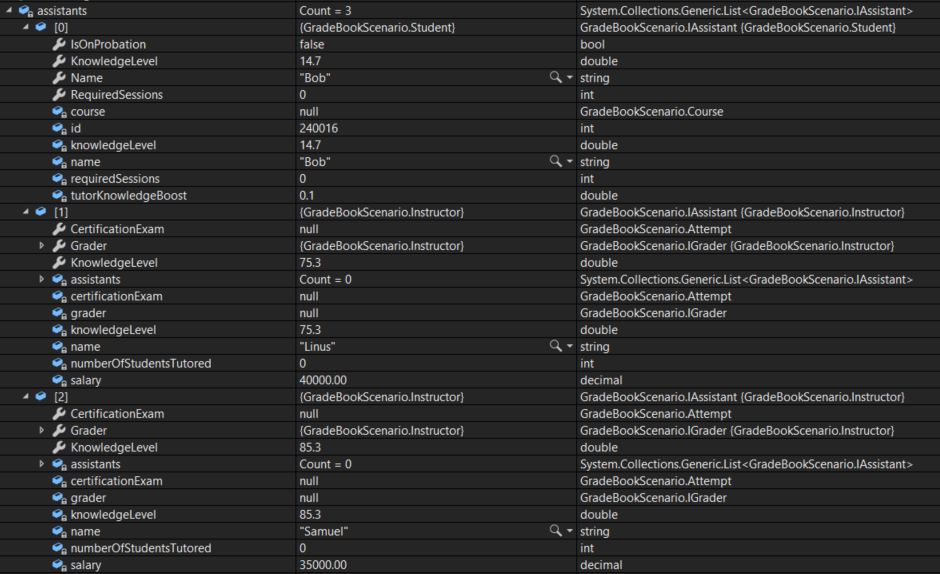
C Ensure that Jeff has the assistants below
CYW - Assistant List; compare object identities, field values, and execution position with your debugger.
CYW - Assistant List
D Press F10. Ensure that the tutor returned is the instance of Jeff

The only person with a knowledgeLevel higher than Samantha's is the Teacher.

E Press F10. Ensure that Jeff's numberOfStudentsTutored increases by 1
Submit your work
20.Ensure your code is StyleCop compliant
A Verify the required change or observation

Check the result against this instruction: Ensure your code is StyleCop compliant

21.Zip the solution and submit to the Feedback System
A Verify the required change or observation

Check the result against this instruction: Zip the solution and submit to the Feedback System.

22.Submit the Feedback System URL to the correct assignment in Canvas
A Verify the required change or observation

Check the result against this instruction: Submit the Feedback System URL to the correct assignment in Canvas.

Completion checklist
23.Review the required evidence
A Check every acceptance criterion

Return to each user story and confirm that you can demonstrate its acceptance criteria. Use the task checkboxes to track completion; a checked box is not a substitute for testing or inspecting the required evidence.

Delegate grading through an interface Let qualified students serve as assistants
B Build and inspect the final solution

Remove temporary lines used only to demonstrate compile-time errors. Build without errors or warnings, check StyleCop compliance, and rerun the required scenario paths.

C Follow this activity’s submission instructions

Use the submission or attendance instructions in this page. For a Feedback System submission, upload the requested ZIP, review and resolve the feedback, and submit the resulting URL to the matching Canvas activity. For a Canvas quiz, enter only the requested answers; for an oral final, complete the scheduling and attendance steps.