Give other objects controlled access to Grade Book information. Convert the public fields from your completed 2.6 project to properties, keep the data in private backing fields, and calculate probation from the number of tutoring sessions still required.
1.Copy the previous version
ACopy your completed Grade Book 2.6 folder, rename the folder and solution for Grade Book 2.7 using your last name, open the copied solution, and restore NuGet packages
BUpdate the window title in MainWindow.xaml and both assembly version values in Properties/AssemblyInfo.cs to 2.7
Use your last name in the window title. Use 2.7.0.0 for AssemblyVersion and AssemblyFileVersion. Keep .NET Framework 4.8 and the existing controls and handlers.
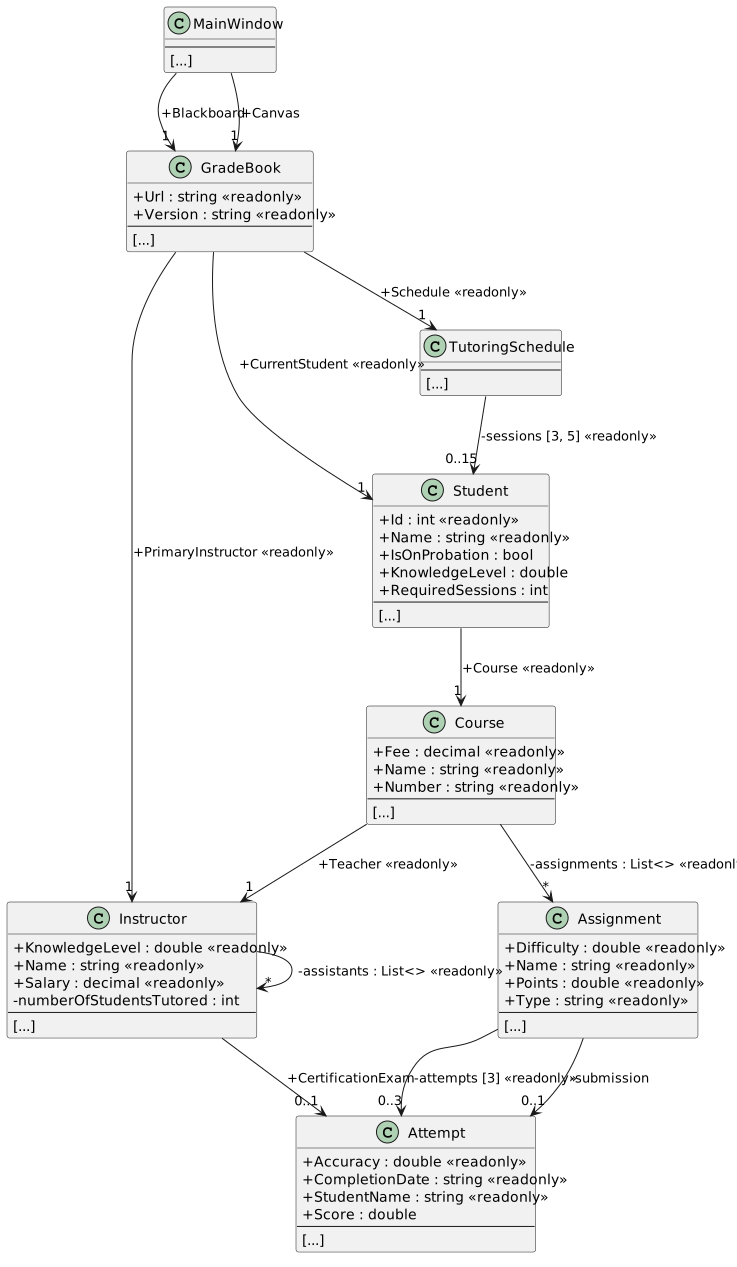
Starting structure — your completed Grade Book 2.6
NNew
CChanged
RRemoved
Read grade-book information safely
2.Read a property and its backing field
ACompare the property pattern with a public field
A property is used by its name, like a field, but its accessor contains executable code. A getter returns a value. A setter receives an assigned value in its implicit value parameter. A private backing field stores the data. A property with only a getter cannot be assigned by outside code.
One read-only property pattern from Attempt
publicdoubleAccuracy
{
get
{
returnthis.accuracy;
}
}
Accuracy is the public property; accuracy is the private field. The constructor assigns the backing field. Existing callers continue reading attempt.Accuracy. There are no method-call parentheses after a property name.
BUse the class diagrams to convert each field and its callers together
In the diagrams, <get;> means a getter only and <get; set;> means both accessors. Keep a backing field's existing readonly modifier where shown. Do not make the mutable fields Attempt.score, Student.knowledgeLevel, Student.requiredSessions, or Instructor.certificationExam readonly. The separate Instructor.knowledgeLevel field remains readonly. Complete the conversion tasks before building; a class can temporarily fail to compile while its old field references are being renamed.
3.Assignment — expose assignment information
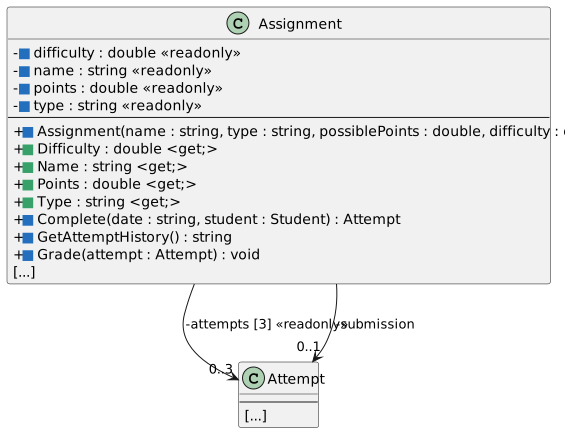
AIn Assignment.cs, use the focused diagram to replace Difficulty, Name, Points, and Type fields with private readonly backing fields and getter-only properties
Keep attempts and submission private. Existing methods continue to control attempts and accepted submissions.
Assignment fields, constructor, and properties
NNew
CChanged
RRemoved
4.Assignment constructor — initialize the backing fields
AIn the Assignment constructor, assign name, type, points, and difficulty backing fields from the existing parameters
Keep the parameter names and argument order shown in the diagram. Keep the three-slot attempt array initialization.
5.Assignment.Complete — read the private difficulty
AIn Complete, change the difficulty-factor calculation to read this.difficulty
Keep the accuracy calculation and Attempt construction unchanged.
6.Assignment.GetAttemptHistory — read the private name
AIn GetAttemptHistory, use this.name for the history heading
Keep the slot displays, best accuracy, and average accuracy.
7.Assignment.Grade — use the private points
AIn Grade, pass this.points to attempt.Grade
Keep the existing null check and grading delegation.
8.Attempt — expose results through getters
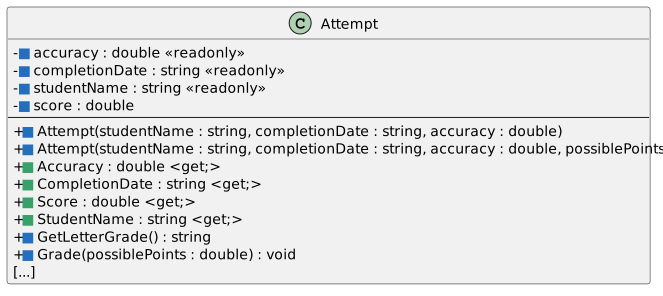
AIn Attempt.cs, use the focused diagram to create private backing fields and getter-only Accuracy, CompletionDate, StudentName, and Score properties
The score remains mutable inside Attempt. A read-only property prevents callers from setting the score directly; it does not prevent Attempt.Grade from updating the backing field.
Attempt fields, constructors, and properties
NNew
CChanged
RRemoved
9.Three-argument Attempt constructor — initialize stored data
AIn the three-argument Attempt constructor, assign this.studentName, this.completionDate, and this.accuracy from the existing parameters
10.Four-argument Attempt constructor — initialize and grade
AIn the four-argument Attempt constructor, assign the same three backing fields and retain the existing Grade(possiblePoints) call
11.Attempt.GetLetterGrade — read stored accuracy
AIn GetLetterGrade, update the accuracy references to this.accuracy
Keep the invalid-value check and the existing A, B, C, and F thresholds.
12.Attempt.Grade — update stored score
AIn Grade, read this.accuracy and assign the result to this.score
Keep the existing positive-points and accuracy-range checks and the unrounded score calculation.
13.Course — expose course information
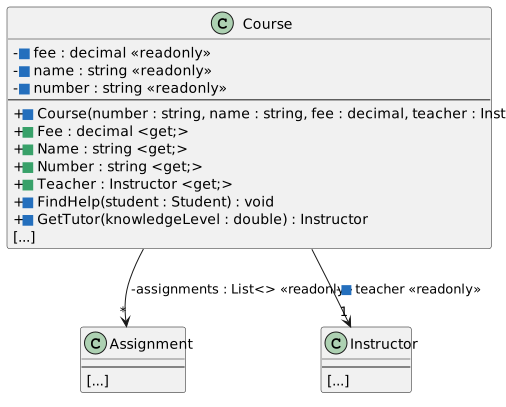
AIn Course.cs, use the focused diagram to create private readonly fee, name, number, and teacher fields and their public getter-only properties
Keep the assignments list private and retain AddAssignment and GetAssignmentHistory.
Course fields, constructor, and properties
NNew
CChanged
RRemoved
14.Course constructor — initialize stored course information
AIn the Course constructor, assign this.number, this.name, this.fee, and this.teacher from the existing parameters
Keep the assignments-list initialization.
15.Course.GetTutor — read the stored teacher
AIn GetTutor, change this.Teacher references to this.teacher
Keep GetTutor public: the tutoring handlers use it to identify the selected instructor before the session begins. Keep the assistant search and teacher fallback.
16.GradeBook — expose the existing object relationships
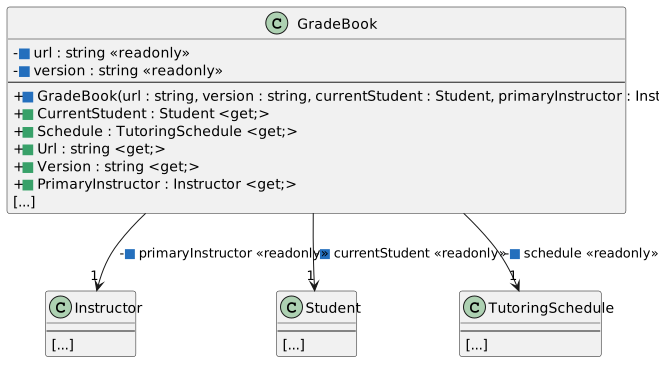
AIn GradeBook.cs, use the focused diagram to replace the five public readonly fields with private readonly backing fields and getter-only properties
GradeBook fields, constructor, and properties
NNew
CChanged
RRemoved
17.GradeBook constructor — store the existing references
AIn the GradeBook constructor, assign the five lower-case backing fields
Keep the existing arguments and create new TutoringSchedule() in this.schedule. The CurrentStudent and PrimaryInstructor properties must return the same references that were passed to the constructor.
18.Instructor — expose instructor information
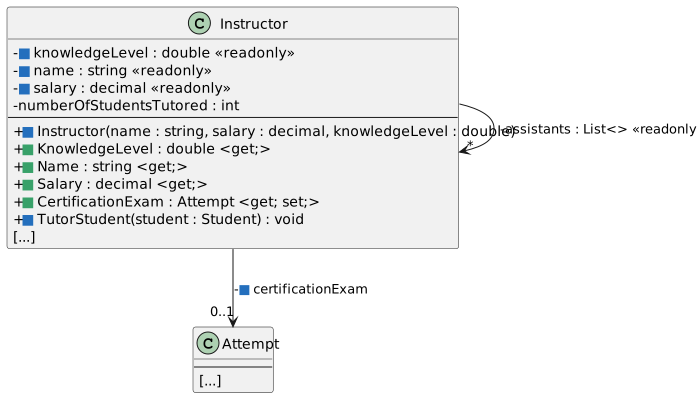
AIn Instructor.cs, use the focused diagram to create private readonly knowledgeLevel, name, and salary fields and getter-only properties
Keep the existing assistants list and numberOfStudentsTutored field private.
Instructor fields, constructor, and properties
NNew
CChanged
RRemoved
19.Instructor constructor — initialize stored instructor information
AIn the Instructor constructor, assign this.name, this.salary, and this.knowledgeLevel from the existing parameters
Keep the assistants-list initialization.
20.Instructor.TutorStudent — read the stored knowledge level
AIn TutorStudent, change this.KnowledgeLevel references to this.knowledgeLevel
Continue to update the student's required sessions through its public RequiredSessions property. Keep the knowledge-gain limit, the positive-session check, and the count increment.
21.Instructor.CertificationExam — retain a valid exam reference
AReplace the public CertificationExam field with a private certificationExam field and the getter/setter property shown in the class diagram
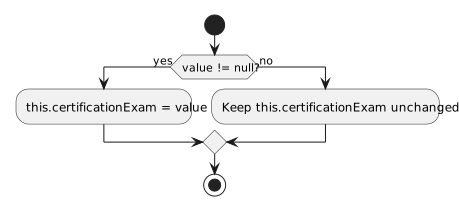
The get and set blocks are siblings inside one property. A setter has no explicit parameter list: C# automatically supplies value with the property's type, Attempt here. Complete the setter's condition and assignment from the activity diagram.
Getter and setter declaration pattern
publicAttemptCertificationExam
{
get
{
returnthis.certificationExam;
}
set
{
// Implement the validation and assignment from the activity diagram.
}
}
The getter returns the stored field. Use the activity diagram for the setter. A non-null assignment replaces the reference; a null assignment leaves the current reference unchanged.
CertificationExam setter
NNew
CChanged
RRemoved
The existing creation handlers still assign their newly constructed certification attempts through this property.
Keep tutoring requirements and probation consistent
22.Student — expose student information
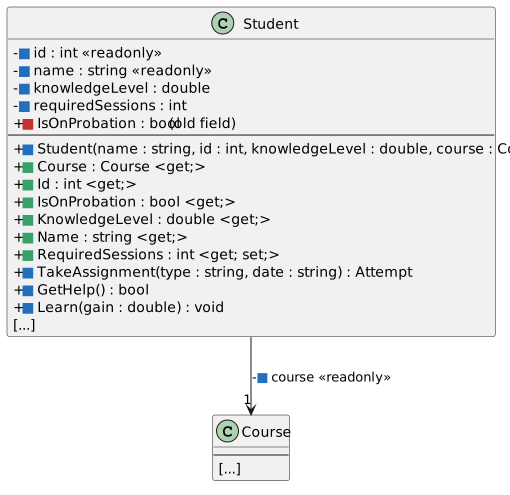
AIn Student.cs, use the focused diagram to create private course, id, name, and knowledgeLevel backing fields with getter-only properties
Keep course, id, and name readonly. Keep knowledgeLevel mutable because Learn updates it. The next tasks replace the remaining RequiredSessions and IsOnProbation fields.
Student backing fields and properties
NNew
CChanged
RRemoved
23.Student constructor — initialize stored student information
AIn the Student constructor, assign this.name, this.id, this.knowledgeLevel, and this.course from the existing parameters
Keep the signature unchanged. Required sessions will still be assigned after construction by the creation handlers.
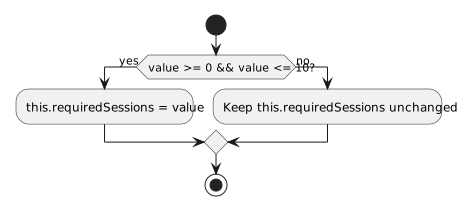
24.Student.RequiredSessions — accept only a valid requirement
AReplace the public RequiredSessions field with a private requiredSessions field and a public getter/setter property
The getter returns the stored field. Build the setter from the activity diagram. Accept values from 0 through 10 inclusive. Reject an out-of-range assignment by leaving the field unchanged.
RequiredSessions setter
NNew
CChanged
RRemoved
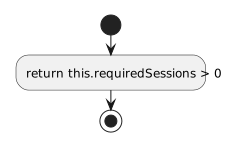
25.Student.IsOnProbation — calculate the answer
ARemove the IsOnProbation field and create the getter-only bool property shown in the diagram
Return the result of checking whether this.requiredSessions is greater than zero. Do not add a second field for probation.
IsOnProbation getter
NNew
CChanged
RRemoved
26.Student.TakeAssignment — use the stored course reference
AIn TakeAssignment, change this.Course references to this.course
Keep the course/instructor guards, assignment search, available-slot check, submission, and learning call.
27.Student.GetHelp — retain its Boolean result
AIn GetHelp, change this.Course references to this.course
Keep sessionsBefore, the positive-session check, and the comparison that reports whether tutoring reduced RequiredSessions.
28.Student.Learn — update stored knowledge
AIn Learn, change this.KnowledgeLevel references to this.knowledgeLevel
Keep the positive-gain condition and the maximum knowledge level of 100.
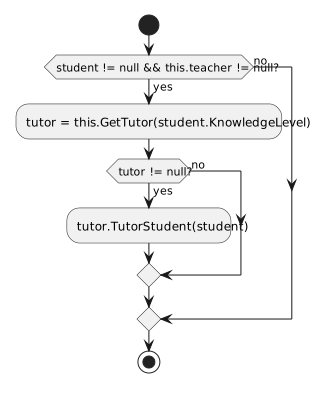
29.Course.FindHelp — let Student calculate probation
AIn Course.FindHelp, use this.teacher and remove the conditional block that assigns student.IsOnProbation = false
Keep the student/teacher guards, tutor selection, and TutorStudent call shown in the activity diagram. The Student property now calculates probation when read.
AUpdate newBlackboardButton_Click in MainWindow.xaml.cs using the diagrams
Use the Student property diagram to determine which assignments remain valid. Preserve the existing setup values, object relationships, and creation feedback.
BUpdate newCanvasButton_Click using the diagrams
31.Build the property version
ABuild the solution and resolve any incorrect casing or assignments to getter-only properties
Compare the focused diagrams with your code. Keep external reads in their existing PascalCase form; only code inside the class uses that class's lower-case backing fields. Keep required-session changes through RequiredSessions and the certification assignment through CertificationExam.
32.Follow a normal assignment into the setter
AStop debugging and set breakpoints at the RequiredSessions setter condition in Student.cs and the first statement of newCanvasButton_Click
Start debugging and click New Canvas. At the MainWindow breakpoint, open Watch 1 and add the expressions below. They are not in scope yet. Disable this MainWindow breakpoint before continuing to the setter.
Watch expressions before the setter runs
Expression
What to observe
value
Unavailable outside the setter; the value being assigned inside it
this.requiredSessions
The Student backing field while stopped inside Student
this.RequiredSessions
The getter returns the same stored number
this.IsOnProbation
Calculated from the stored number
Unavailable means an expression is outside the current scope; it does not mean its value is null. Before the setter is entered, value is unavailable. Inside Student, this is the student, rather than the MainWindow that initiated creation.
BPress F5 to reach the setter breakpoint, then confirm value is 4 and this.requiredSessions is still 0
The highlighted condition has not executed. Step with F10 through the condition and field assignment until the assignment has executed. Confirm RequiredSessions is 4 and IsOnProbation is true.
CDisable the setter breakpoint and press F5, then enable it again and click Tutor Samantha
At the next setter entry, value is 3 and the stored requirement is still 4. Step over the accepted assignment and confirm the stored requirement becomes 3. Disable the breakpoint and press F5 to let the handler display its full message.
DStop debugging, remove the breakpoint, and remove any Watch expressions that are no longer useful
33.Trace validation boundaries in the source
AUse the setter diagram to trace each case without changing the project or assigning through Watch
These are source traces, not additional UI inputs. Each row begins with a stored requiredSessions value of 4.
RequiredSessions source traces
Assigned value
Stored value afterward
IsOnProbation afterward
-1
4
true
0
0
false
10
10
true
11
4
true
BTrace the CertificationExam setter with an existing non-null exam reference and an assigned value of null
The stored reference is retained. With a non-null assigned Attempt reference, the stored reference becomes that same object. The setter does not instantiate a copy.
34.Check Your Work — retained behavior
ARun without breakpoints, click New Blackboard, and confirm the creation message; then tutor Arthur three times
Arthur begins at knowledge level 65.5 with 3 required sessions. The three successful sessions leave him at 80.3 with 0 required sessions. From the getter condition, infer that IsOnProbation now returns false; this status is not printed in the feedback. Another Tutor Arthur click reports No tutoring sessions are required. and retains the tutor/student details.
BClick New Canvas to reset its objects, then click Complete Samantha tutoring
Samantha completes 2 sessions, reaches knowledge level 95, and still requires 2 sessions. No tutor has higher knowledge, so processing stops. From its getter condition, IsOnProbation remains true; the feedback does not print that property. The outcome and tutor/student details still appear.
CClick New Canvas again, book Monday period 1, then click Complete Samantha tutoring and Attend
The selected reservation remains occupied because no tutor can add knowledge. The message includes No tutor has a higher knowledge level. Reservation retained. and the tutor/student details. The displayed reservation count stays 1.
DClick New Blackboard again, take a midterm once, and show Blackboard history
The attempt accuracy is 79.575%, its letter grade is C, and the history rounds its displayed accuracy to 79.58%. Best and average accuracy both display 79.58%. Arthur's knowledge increases to 70.5. This confirms that property access preserves the calculation, grading, history, and learning behavior.
ETake the Blackboard midterm two more times and try a fourth attempt
The first three attempts occupy the existing three slots. The fourth click reports the existing unavailable/three-attempt-limit message; no fourth attempt is added.
35.Review the completed design
AExplain which properties return stored values and why IsOnProbation does not need its own field
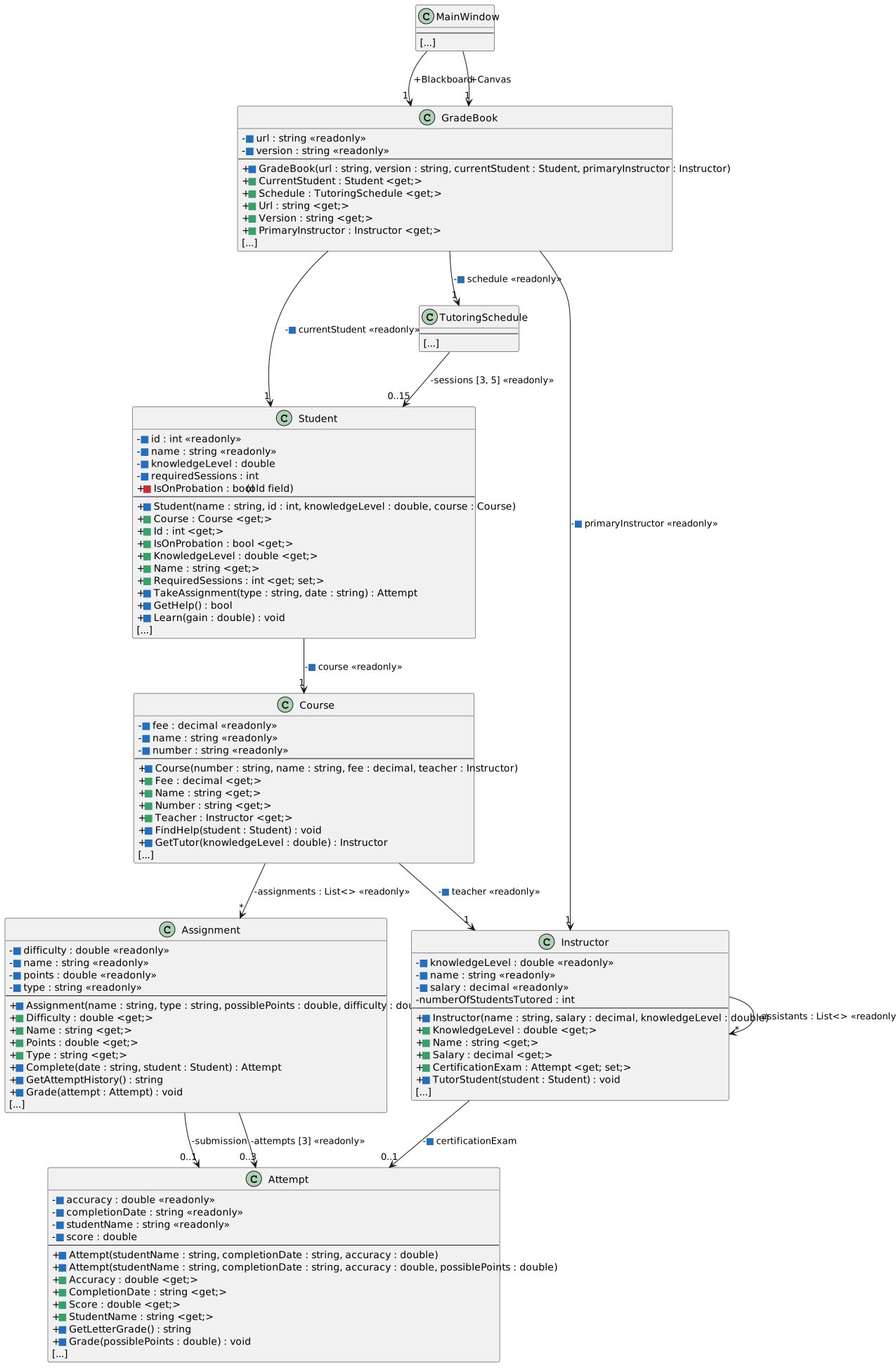
Ending structure — the complete Grade Book 2.7 design
NNew
CChanged
RRemoved
36.Submit your work
ABuild, check StyleCop feedback, zip your completed solution, and submit it using the course's normal assignment process