2.6 Zoo Learning Activity

Zoo 2.6 — Encapsulation and Constructors

Continue from your completed Zoo 2.5. Use the diagrams and the directions below to make the next set of changes.

1.Getting Started
A Copy your Zoo 2.5 ending code, renaming both the folder and the Visual Studio solution file for Zoo 2.6 using your last name. Open the copied solution and restore its NuGet packages.
B Update the window Title for Zoo 2.6 and your last name. Keep the project target at .NET Framework 4.8.
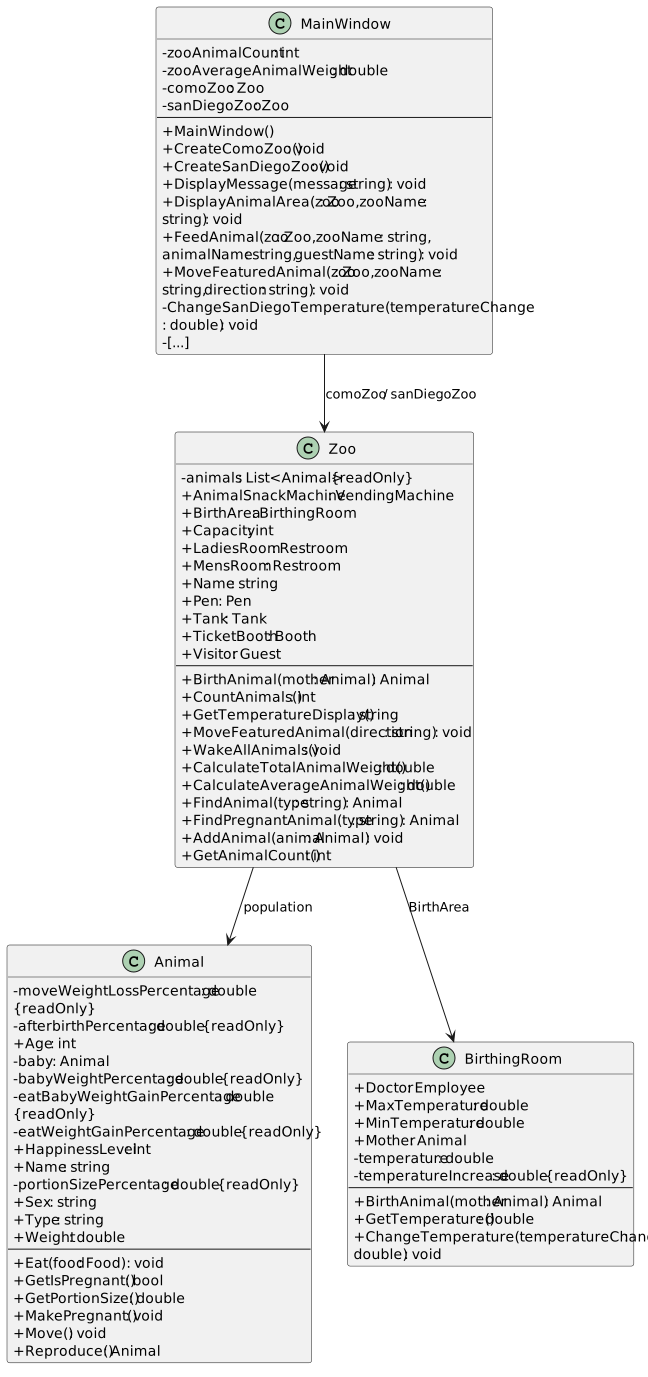
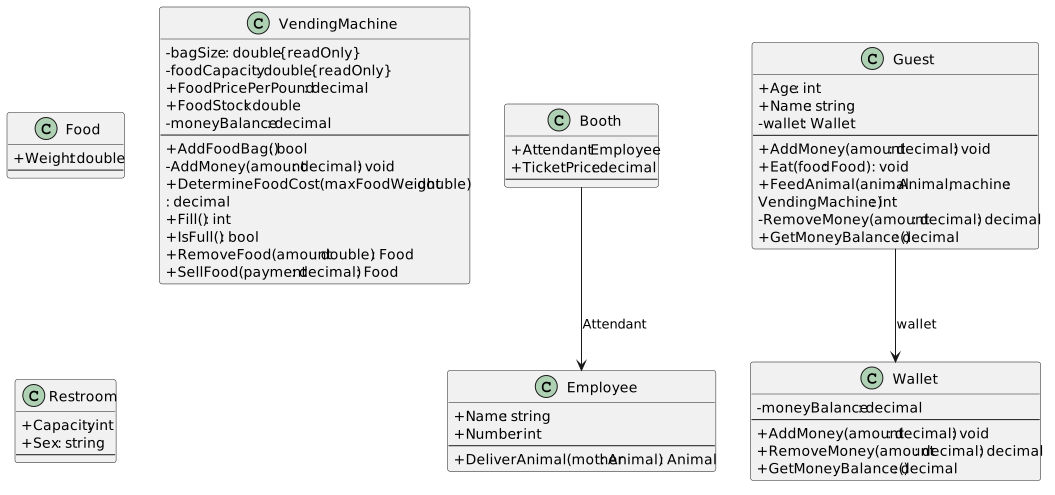
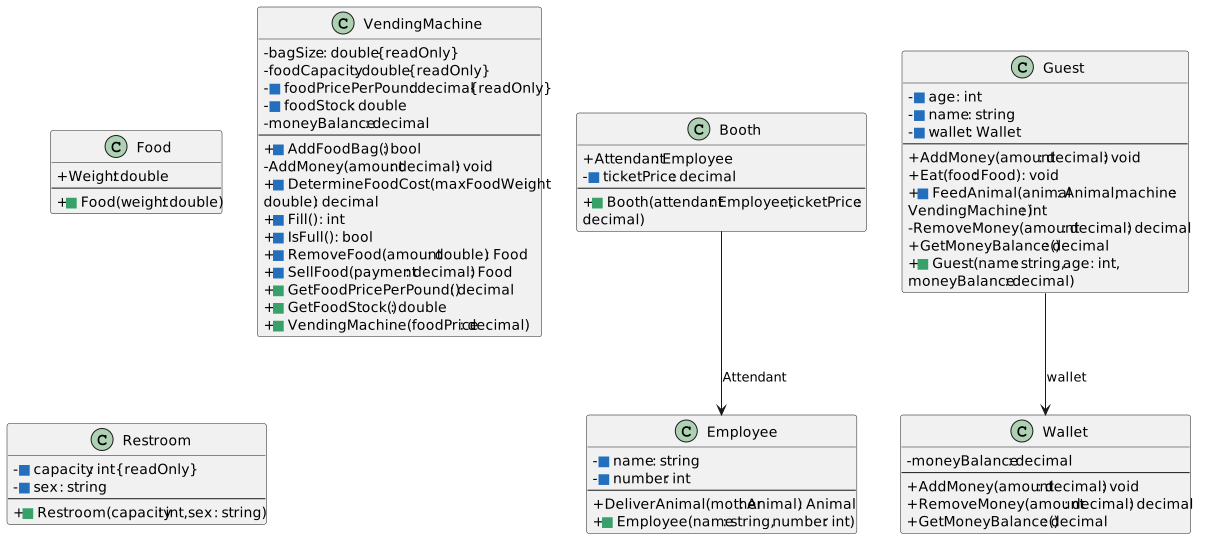
Starting structure — Zoo 2.5 core classes
  • New
  • Changed
  • Removed
Starting structure — Zoo 2.5 services
  • New
  • Changed
  • Removed
C Check Your Work
1 Select Build > Build Solution. Open View > Error List and resolve any errors introduced by this task.
2 Create both zoos and use their count buttons: expect Como 3 and San Diego 2.
3 Confirm San Diego’s starting temperature display is 77.0.
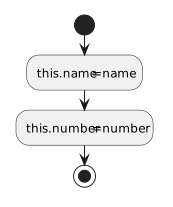
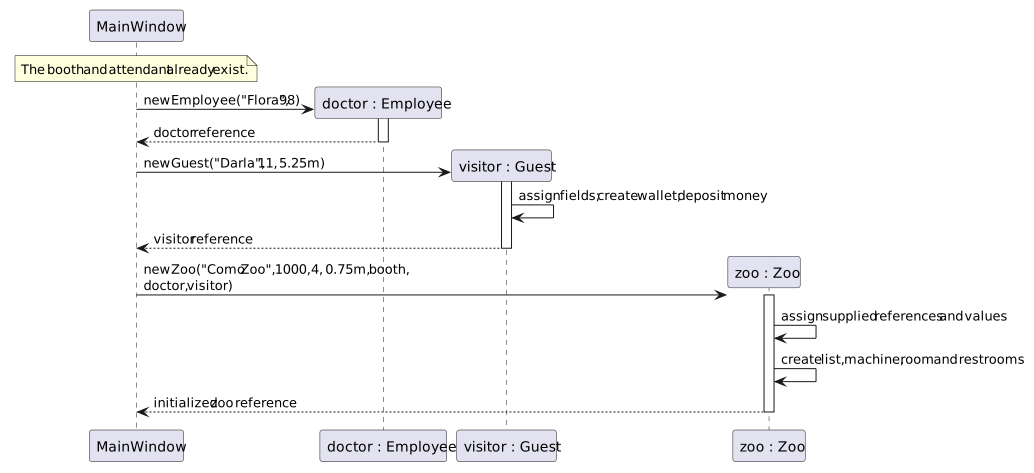
Create objects with their required starting information
Acceptance Criteria
  • Creation calls pass the existing scenario values as arguments.
  • Constructors assign the starting state and connect contained objects.
2.Define the Employee constructor
Problem

Currently MainWindow instantiates employees and assigns their field values, when it should be the responsibility of the class to handle assigning those values.

Solution

You will instantiate Employee by passing values into a constructor that assigns the required fields.

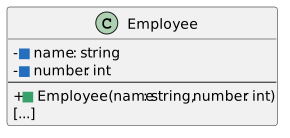
Employee constructor and affected fields
  • New
  • Changed
  • Removed
A Modify Employee.cs based on the class and activity diagrams.
1 Change Name and Number to private fields named name and number.
2 Define Employee(string name, int number) and assign both parameters to their corresponding fields.
Employee constructor assigns required starting state.
  • New
  • Changed
  • Removed
B Check Your Work
1 Open Employee.Employee in the source. Follow its statements from top to bottom using the sample values below; this is a paper/source trace, so do not run or edit the application for this check.
2 Use parameter name of Sam and number of 42.
3 Follow the assignments: this.name becomes Sam and this.number becomes 42.
3.Define the Booth constructor
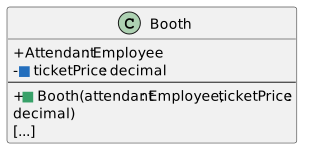
Booth constructor and affected fields
  • New
  • Changed
  • Removed
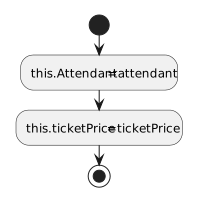
A Modify Booth.cs based on the class and activity diagrams.
1 Make TicketPrice private and rename it ticketPrice. Keep Attendant public for now.
2 Define Booth(Employee attendant, decimal ticketPrice), assign this.Attendant from attendant and assign this.ticketPrice from ticketPrice.
Booth constructor assigns required starting state.
  • New
  • Changed
  • Removed
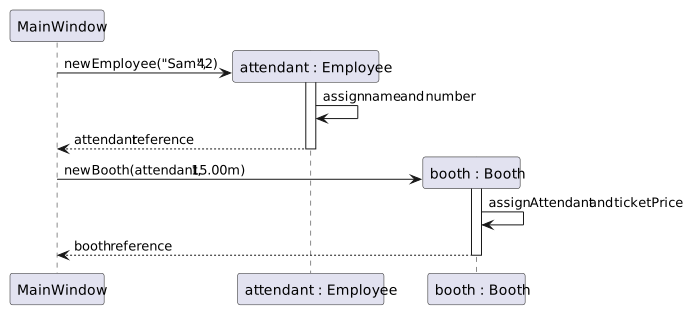
MainWindow creates one attendant and passes that same reference into Booth.
  • New
  • Changed
  • Removed
B Check Your Work
1 Open Booth.Booth in the source. Follow its statements from top to bottom using the sample values below; this is a paper/source trace, so do not run or edit the application for this check.
2 Use Sam’s existing Employee reference and ticket price 15.00m.
3 Confirm this.Attendant receives Sam’s reference and this.ticketPrice receives 15.00m. No second Employee is created.
4.Define the Guest constructor
Guest constructor and affected fields
  • New
  • Changed
  • Removed
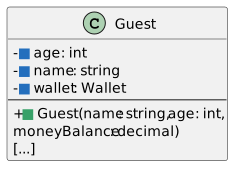
A Modify Guest.cs based on the class and activity diagrams.
1 Make Name and Age private fields named name and age. Remove new Wallet() from the wallet field declaration, leaving the private field.
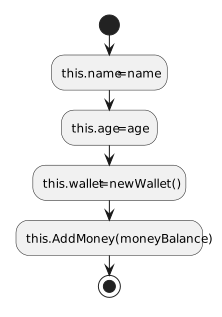
2 Define Guest(string name, int age, decimal moneyBalance). Assign name and age, instantiate this.wallet, then call this.AddMoney(moneyBalance).
Guest constructor assigns required starting state.
  • New
  • Changed
  • Removed
B Check Your Work
1 Open Guest.Guest in the source. Follow its statements from top to bottom using the sample values below; this is a paper/source trace, so do not run or edit the application for this check.
2 Use Darla, 11 and 5.25m as the constructor arguments.
3 Confirm this.name is Darla, this.age is 11 and the private wallet exists. Follow AddMoney: the wallet ends with moneyBalance of 5.25m.
5.Define the VendingMachine constructor
Problem

MainWindow is handling the instantiation of the animal snack machine and assigning its values, when the class should handle its required starting information.

Solution

You will instantiate VendingMachine by passing values into a constructor that assigns the required fields.

VendingMachine constructor and affected fields
  • New
  • Changed
  • Removed
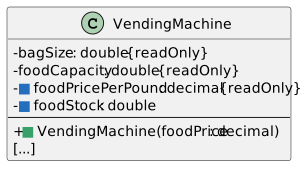
A Modify VendingMachine.cs based on the class and activity diagrams.
1 Make FoodPricePerPound private readonly as foodPricePerPound; make FoodStock private as foodStock. Update the class’s own references to those fields.
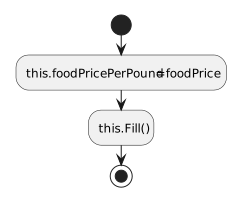
2 Define VendingMachine(decimal foodPrice). Assign foodPricePerPound from the parameter and call Fill so the existing loop supplies the initial stock.
VendingMachine constructor assigns required starting state.
  • New
  • Changed
  • Removed
B Check Your Work
1 Open VendingMachine.VendingMachine in the source. Follow its statements from top to bottom using the sample values below; this is a paper/source trace, so do not run or edit the application for this check.
2 Use food price 0.75m. Confirm this.foodPricePerPound receives 0.75m.
3 Follow this.Fill() from empty stock. Three 65-pound bags give this.foodStock of 195.0; another bag would exceed 250.0. Confirm this.moneyBalance stays 0.00m.
6.Define the BirthingRoom constructor
BirthingRoom constructor and affected fields
  • New
  • Changed
  • Removed
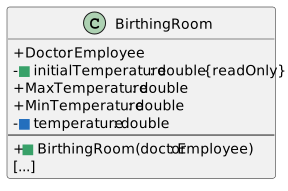
A Modify BirthingRoom.cs based on the class and activity diagrams.
1 Remove the initializer = 77.0 from the temperature field declaration. Add private readonly double initialTemperature = 77.0;
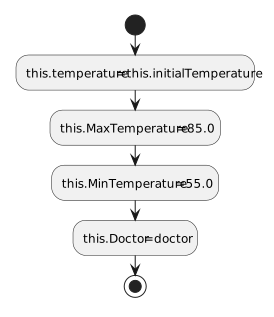
2 Define BirthingRoom(Employee doctor). Assign temperature from initialTemperature, set MaxTemperature to 85.0 and MinTemperature to 55.0, then assign Doctor from the existing doctor parameter.
BirthingRoom constructor assigns required starting state.
  • New
  • Changed
  • Removed
B Check Your Work
1 Open BirthingRoom.BirthingRoom in the source. Follow its statements from top to bottom using the sample values below; this is a paper/source trace, so do not run or edit the application for this check.
2 Pass Flora’s existing Employee reference. Confirm this.Doctor receives that reference.
3 Confirm this.temperature is 77.0, this.MaxTemperature is 85.0 and this.MinTemperature is 55.0.
7.Define the Restroom constructor
Restroom constructor and affected fields
  • New
  • Changed
  • Removed
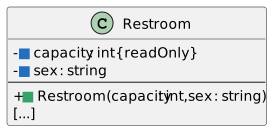
A Modify Restroom.cs based on the class and activity diagrams.
1 Make Capacity private readonly as capacity, and make Sex private as sex.
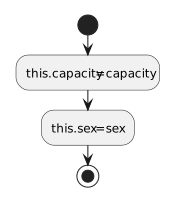
2 Define Restroom(int capacity, string sex) and assign the fields from the parameters.
Restroom constructor assigns required starting state.
  • New
  • Changed
  • Removed
B Check Your Work
1 Open Restroom.Restroom in the source. Follow its statements from top to bottom using the sample values below; this is a paper/source trace, so do not run or edit the application for this check.
2 Use capacity 4 and sex Female.
3 Follow the assignments to this.capacity and this.sex. Confirm this.capacity is 4 and this.sex is Female. Readonly initialization occurs inside the constructor.
8.Define the Animal constructor
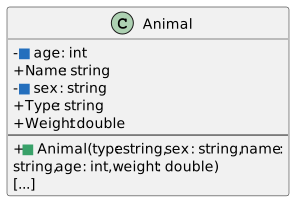
Problem

MainWindow is handling the instantiation of the animals and assigning their values, when the Animal class should handle assigning those values.

Solution

You will instantiate Animal by passing values into a constructor that assigns the required fields.

Animal constructor and affected fields
  • New
  • Changed
  • Removed
A Modify Animal.cs based on the class and activity diagrams.
1 Make Age and Sex private as age and sex; update the class’s own references. Keep the other current fields and behavior.
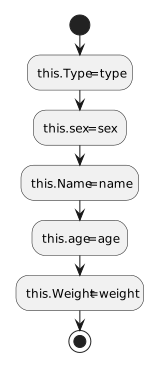
2 Define Animal(string type, string sex, string name, int age, double weight). Assign Type, sex, Name, age and Weight from the corresponding parameters.
Animal constructor assigns required starting state.
  • New
  • Changed
  • Removed
B Check Your Work
1 Open Animal.Animal in the source. Follow its statements from top to bottom using the sample values below; this is a paper/source trace, so do not run or edit the application for this check.
2 Use Dolly’s starting arguments: type Dingo, sex Female, name Dolly, age 4 and weight 35.3.
3 Confirm this.Type, this.sex, this.Name, this.age and this.Weight receive those respective values. Confirm this.baby remains null until MakePregnant runs.
9.Define the Food constructor
Problem

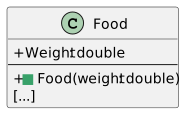
Food is instantiated in different places for different reasons, and its required weight should be assigned in Food itself.

Solution

You will instantiate Food by passing values into a constructor that assigns the required fields.

Food constructor and affected fields
  • New
  • Changed
  • Removed
A Modify Food.cs based on the class and activity diagrams.
1 Define Food(double weight).
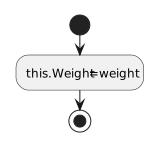
2 Assign the Weight field from the weight parameter.
Food constructor assigns required starting state.
  • New
  • Changed
  • Removed
B Check Your Work
1 Open Food.Food in the source. Follow its statements from top to bottom using the sample values below; this is a paper/source trace, so do not run or edit the application for this check.
2 Use weight 1.25.
3 Confirm the constructor assigns this.Weight to 1.25 before the new Food reference is returned to its caller.
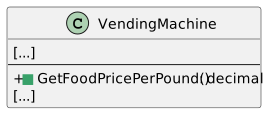
10.Define VendingMachine.GetFoodPricePerPound()
VendingMachine.GetFoodPricePerPound method signature
  • New
  • Changed
  • Removed
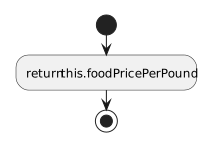
A Use the class signature and activity diagram.
1 Return this.foodPricePerPound using the return type shown in the class diagram.
VendingMachine.GetFoodPricePerPound returns the stored information.
  • New
  • Changed
  • Removed
B Check Your Work
1 Open VendingMachine.GetFoodPricePerPound() in the source. Follow its statements from top to bottom using the sample values below; this is a paper/source trace, so do not run or edit the application for this check.
2 Use this.foodPricePerPound of 0.75m. Follow the return statement: confirm the returned value is 0.75m.
3 Confirm the method contains no assignment that changes this.foodPricePerPound.
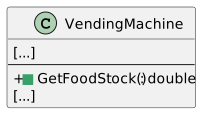
11.Define VendingMachine.GetFoodStock()
VendingMachine.GetFoodStock method signature
  • New
  • Changed
  • Removed
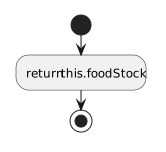
A Use the class signature and activity diagram.
1 Return this.foodStock using the return type shown in the class diagram.
VendingMachine.GetFoodStock returns the stored information.
  • New
  • Changed
  • Removed
B Check Your Work
1 Open VendingMachine.GetFoodStock() in the source. Follow its statements from top to bottom using the sample values below; this is a paper/source trace, so do not run or edit the application for this check.
2 Use this.foodStock of 195.0. Follow the return statement: confirm the returned value is 195.0.
3 Confirm the method contains no assignment that changes this.foodStock.
12.Update Guest.FeedAnimal(...)
A Use the new vending-machine read methods.
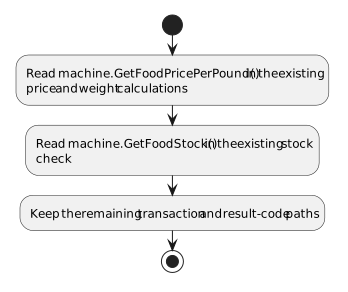
1 Replace every machine.FoodPricePerPound read with machine.GetFoodPricePerPound().
2 Replace the stock check’s machine.FoodStock read with machine.GetFoodStock(). Keep the wallet, payment, stock, refund and result-code logic.
Feeding reads machine configuration through methods.
  • New
  • Changed
  • Removed
B Check Your Work
1 Open Guest.FeedAnimal. Find both food-price reads, including the price-validity guard.
2 Confirm each calls GetFoodPricePerPound() rather than reading the old public FoodPricePerPound field.
3 Trace price 0.00m and confirm the invalid-price result occurs before division or payment. Trace valid Como price 0.75m and confirm the purchase path can continue.
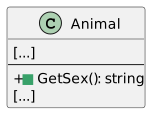
13.Define Animal.GetSex()
Animal.GetSex method signature
  • New
  • Changed
  • Removed
A Use the class signature and activity diagram.
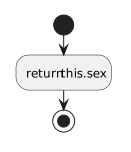
1 Return this.sex using the return type shown in the class diagram.
Animal.GetSex returns the stored information.
  • New
  • Changed
  • Removed
B Check Your Work
1 Open Animal.GetSex() in the source. Follow its statements from top to bottom using the sample values below; this is a paper/source trace, so do not run or edit the application for this check.
2 Use this.sex of "Female". Follow the return statement: confirm the returned value is "Female".
3 Confirm the method contains no assignment that changes this.sex.
14.Update Animal.MakePregnant()
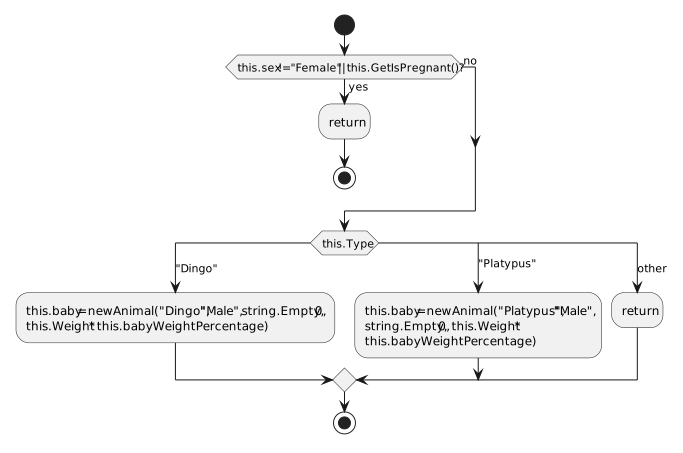
A Construct the unborn baby with its required information.
1 Keep the female/not-already-pregnant guard and existing Dingo/Platypus switch.
2 In each supported case, create this.baby using the Animal constructor: the case’s type, "Male", string.Empty, age 0 and this.Weight multiplied by this.babyWeightPercentage.
3 Remove the old post-switch Sex and Weight assignments; those values now come from the constructor.
MakePregnant passes the baby state into its constructor.
  • New
  • Changed
  • Removed
B Check Your Work
1 Open Animal.MakePregnant() in the source. Follow its statements from top to bottom using the sample values below; this is a paper/source trace, so do not run or edit the application for this check.
2 For Dolly’s weight 35.3, confirm the baby constructor receives weight approximately 3.53.
3 Confirm the baby’s initial Name is string.Empty.
4 Find the existing birth-handler assignment to baby.Name and confirm it supplies Baby after delivery.
15.Update VendingMachine.RemoveFood(double amount)
A Use Food’s constructor at the existing food-creation point.
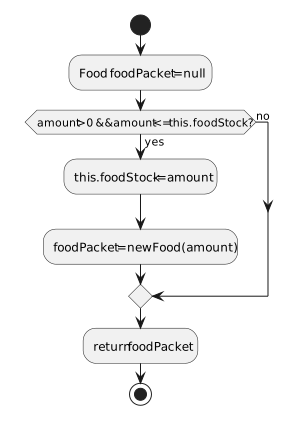
1 Replace new Food() followed by a Weight assignment with new Food(amount), assigned to foodPacket. Keep the amount/stock guard and stock subtraction.
RemoveFood creates Food with its weight immediately.
  • New
  • Changed
  • Removed
B Check Your Work
1 Open VendingMachine.RemoveFood in the source. Follow its statements from top to bottom using the sample values below; this is a paper/source trace, so do not run or edit the application for this check.
2 Use a valid positive food amount within this.foodStock. Confirm the success branch constructs a Food with that amount and reduces stock.
3 Trace an amount greater than this.foodStock. Confirm the branch returns null without constructing Food or reducing stock.
Open a zoo with its services connected
Acceptance Criteria
  • Zoo creates its own list, snack machine, birthing room and restrooms.
  • Existing employees, booth and visitor are passed into Zoo without duplicating them.
16.Define the Zoo constructor
Problem

MainWindow is handling the instantiation of the zoo, its snack machine, birth area and restrooms, and assigning their values.

Solution

You will move the zoo-owned setup into the Zoo constructor.

Zoo constructor and affected fields
  • New
  • Changed
  • Removed
A Modify Zoo.cs.
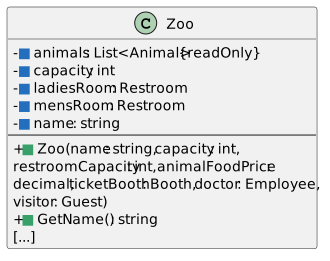
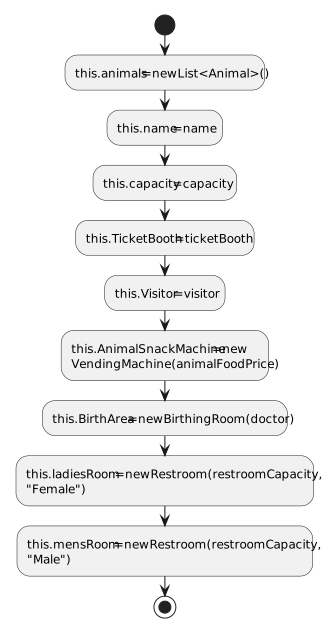
1 Remove new List<Animal>() from the private readonly animals field declaration. Make Capacity, LadiesRoom, MensRoom and Name private with lowercase names.
2 Define the constructor with the parameters shown in the class diagram. Initialize animals to a new list and assign name, capacity, TicketBooth and Visitor from the parameters.
3 Create AnimalSnackMachine using animalFoodPrice, BirthArea using doctor, and the two restrooms using restroomCapacity and the corresponding "Female" or "Male" string.
Zoo creates its owned objects and keeps supplied relationships.
  • New
  • Changed
  • Removed
B Check Your Work
1 Open Zoo.Zoo in the source. Follow its statements from top to bottom using the sample values below; this is a paper/source trace, so do not run or edit the application for this check.
2 Identify the incoming ticket-booth, doctor and visitor arguments. Follow each into its stored reference or into the BirthingRoom constructor.
3 Confirm the constructor reuses those incoming objects rather than replacing them with new Booth, Employee or Guest objects.
4 Identify the constructor’s own new VendingMachine(...) and new BirthingRoom(...) calls. Confirm each owned service is created once.
17.Define Zoo.GetName()
Zoo.GetName method signature
  • New
  • Changed
  • Removed
A Use the class signature and activity diagram.
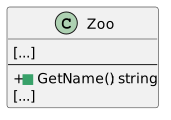
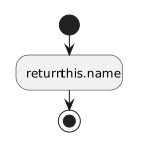
1 Return this.name using the return type shown in the class diagram.
Zoo.GetName returns the stored information.
  • New
  • Changed
  • Removed
B Check Your Work
1 Open Zoo.GetName() in the source. Follow its statements from top to bottom using the sample values below; this is a paper/source trace, so do not run or edit the application for this check.
2 Use this.name of "Como Zoo". Follow the return statement: confirm the returned value is "Como Zoo".
3 Confirm the method contains no assignment that changes this.name.
18.Update MainWindow.CreateComoZoo()
A Replace create-then-fill setup with constructor calls.
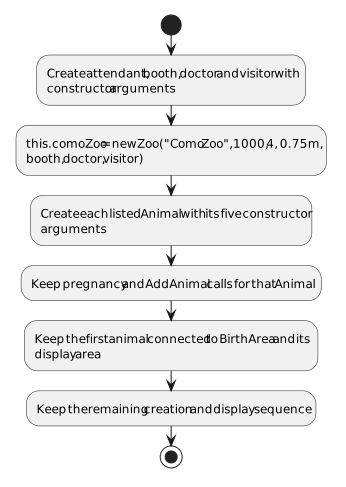
1 Replace the old zoo/service/restroom setup, before the first Animal creation, with the corresponding employee, booth, visitor and Zoo constructor calls. Use the example and table below.
2 Keep the existing population registration, pregnancy calls, BirthArea.Mother assignment, and all pen/tank array setup and display calls.
3 Replace each Animal creation and its following field assignments with the Animal constructor call from the animal table. Declare animal once and reuse it for later animals.
Como service and Zoo creation
Employee attendant = new Employee("Sam", 42);
Booth booth = new Booth(attendant, 15.00m);
Employee doctor = new Employee("Flora", 98);
Guest visitor = new Guest("Darla", 11, 5.25m);

this.comoZoo = new Zoo("Como Zoo", 1000, 4, 0.75m, booth, doctor, visitor);
Como Animal constructor arguments
type sex name age weight Call MakePregnant
Dingo Female Dolly 4 35.3 Yes
Dingo Female Dixie 3 33.8 Yes
Platypus Female Pammy 2 15.5 Yes
First Como animal
Animal animal = new Animal("Dingo", "Female", "Dolly", 4, 35.3);
CreateComoZoo supplies its scenario values through constructors.
  • New
  • Changed
  • Removed
B Check Your Work
1 Open MainWindow.CreateComoZoo and compare each new call with that class’s constructor signature.
2 Confirm arguments appear in the declared order and have matching types. Check the zoo, booth, employee, guest and animal calls separately.
3 Confirm setup does not assign private fields or repeat public-field assignments for values now supplied by constructors.
4 Confirm the existing list-registration and map-placement calls remain for this.comoZoo.
19.Update MainWindow.CreateSanDiegoZoo()
A Replace create-then-fill setup with constructor calls.
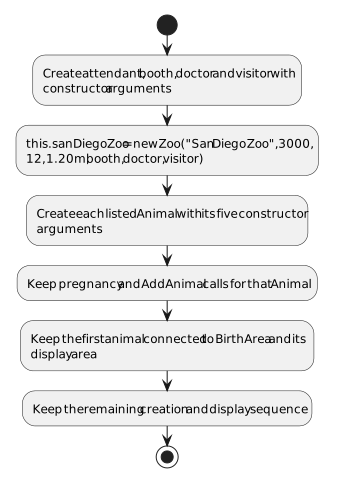
1 Replace the old zoo/service/restroom setup, before the first Animal creation, with the corresponding employee, booth, visitor and Zoo constructor calls. Use the example and table below.
2 Keep the existing population registration, pregnancy calls, BirthArea.Mother assignment, and all pen/tank array setup and display calls.
3 Replace each Animal creation and its following field assignments with the Animal constructor call from the animal table. Declare animal once and reuse it for later animals.

Use the same local variable declarations as the Como example, with these San Diego values. Each Employee, Booth and Guest entry below describes a constructor call; include new when creating that object.

San Diego setup values
Object / parameter Value
attendant Employee("Betty", 84)
booth Booth(attendant, 25.50m)
doctor Employee("Steve", 24)
visitor Guest("Dave", 13, 3.75m)
Zoo name "San Diego Zoo"
Zoo capacity 3000
restroomCapacity 12
animalFoodPrice 1.20m
San Diego Animal constructor arguments
type sex name age weight Call MakePregnant
Platypus Female Patti 5 3.27 Yes
Hummingbird Male Harold 1 0.5 No
CreateSanDiegoZoo supplies its scenario values through constructors.
  • New
  • Changed
  • Removed
B Check Your Work
1 Open MainWindow.CreateSanDiegoZoo and compare each new call with that class’s constructor signature.
2 Confirm arguments appear in the declared order and have matching types. Check the zoo, booth, employee, guest and animal calls separately.
3 Confirm setup does not assign private fields or repeat public-field assignments for values now supplied by constructors.
4 Confirm the existing list-registration and map-placement calls remain for this.sanDiegoZoo.
20.Update MainWindow.FeedAnimal(...)
A Read the zoo name through its public method.
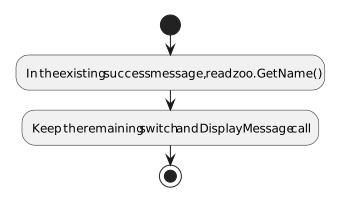
1 In the successful feeding message, replace zoo.Name with zoo.GetName(). Keep the search, transaction and result-code switch unchanged.
The existing successful-feeding message reads the zoo name through GetName.
  • New
  • Changed
  • Removed
B Check Your Work
1 Open Zoo.GetName(). Confirm it returns this.name.
2 Find each updated MainWindow name read. Confirm it calls zoo.GetName() rather than accessing the private name field.
3 Trace the Como result Como Zoo and San Diego result San Diego Zoo into their respective messages.
21.Update the existing creation and birth event handlers
A Use the read methods where the fields became private.
1 In both new-zoo handlers, replace the corresponding zoo.Name read with zoo.GetName(). Keep the creation-method calls and area-count messages.
2 In both birth handlers, replace baby.Sex with baby.GetSex(). Keep the birth guards, array placement, names, messages and temperature refresh.
Existing handler read replacements
Handler Read expression
newComoZooButton_Click this.comoZoo.GetName()
newSanDiegoZooButton_Click this.sanDiegoZoo.GetName()
birthDingoButton_Click baby.GetSex()
birthPlatypusButton_Click baby.GetSex()
B Check Your Work
1 Select Build > Build Solution. Open View > Error List and resolve any errors introduced by this task.
2 Create both zoos. Confirm population counts 3 and 2 and one starting map occupant per zoo.
3 Recreate San Diego Zoo. Confirm temperature 77.0, then increase once for 77.5 and decrease once for 77.0.
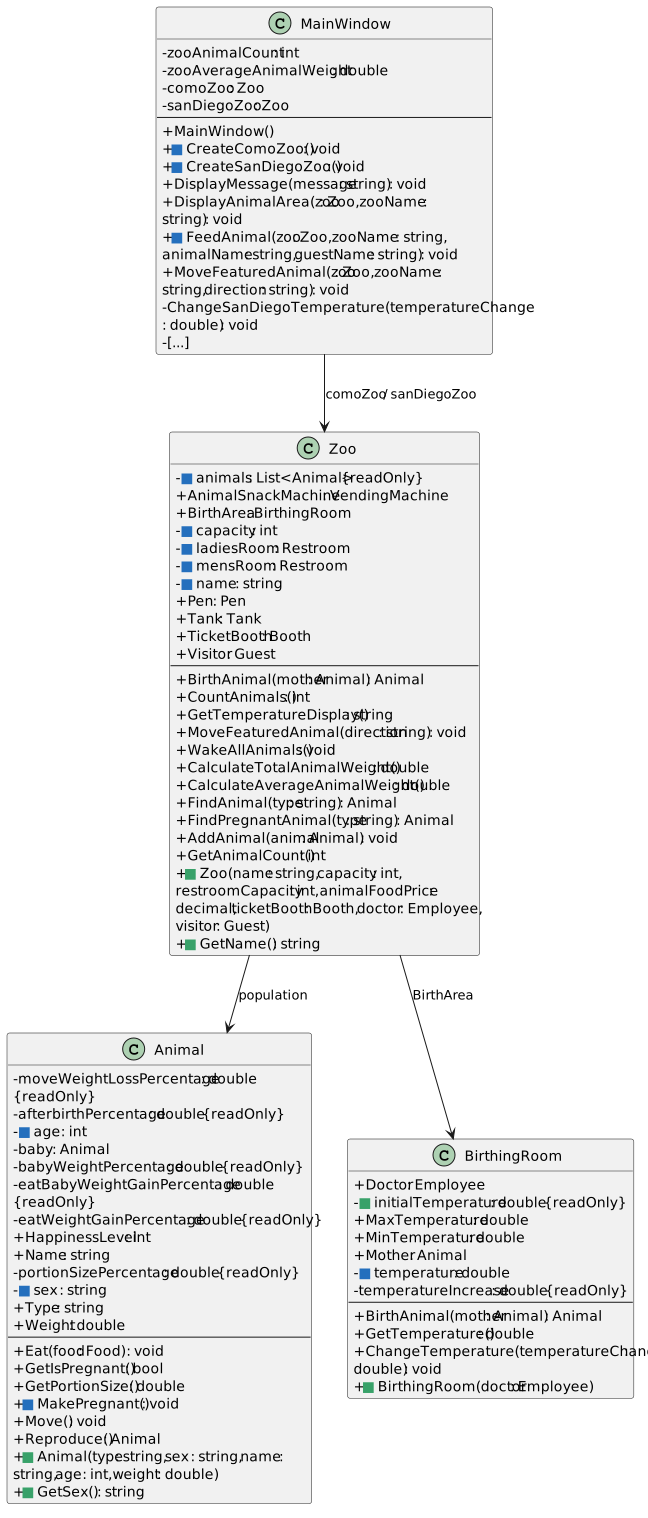
4 Click New Como Zoo to reset that zoo. Do not feed, refill, move or give birth before this test.
5 Feed Dolly once and confirm success. Recreate Como again before testing birth.
6 Give birth once. Confirm population 4 and the newborn in this.comoZoo.Pen.PenSpaces[0].
MainWindow passes existing objects into Zoo, whose constructor creates its owned services.
MainWindow supplies existing objects; Zoo creates its owned services.
  • New
  • Changed
  • Removed
22.Debug the Employee constructor
A Remove earlier breakpoints and start a fresh debugging session. Break on the first Employee creation in CreateComoZoo, then click New Como Zoo.
Watch before Employee construction
Expression Expected state
this.comoZoo null on this first creation
attendant Not assigned yet; null or unavailable
name Unavailable in MainWindow; constructor parameter
number Unavailable in MainWindow; constructor parameter
B Use F11 to enter Employee and F10 for assignments.
1 At the start of Employee’s constructor body, name is "Sam" and number is 42. this refers to the new Employee. Its name field is initially null and number field is initially 0.
2 Step through both assignments and return to MainWindow. attendant now refers to that Employee.
3 Follow Booth’s constructor and confirm its Attendant is the same reference. Press F5 to continue and remove these breakpoints.
C Check Your Work
1 At the preceding constructor breakpoint, inspect the local parameter name and field this.name before the assignment.
2 Press F10 over this.name = name;. Confirm the field now holds the parameter’s value.
3 Explain the two sides: name is the supplied argument; this.name is the field stored by this Employee object.
4 Press F5 to continue. Stop debugging and remove the breakpoint before the next check.
23.Follow creation of the zoo-owned services
A Set a breakpoint at the Zoo constructor’s first statement and click New Como Zoo. Use F11 to follow its contained-object construction.
Watch in the Zoo constructor
Expression Expected state at the first statement
name "Como Zoo"
animalFoodPrice 0.75m
doctor Flora’s existing Employee reference
visitor Darla’s existing Guest reference
this.animals null before the list assignment
this.AnimalSnackMachine null before machine creation
this.BirthArea null before room creation
this.ladiesRoom null before restroom creation
this.mensRoom null before restroom creation
B Follow the actual constructors.
1 Step over the list creation. Enter VendingMachine and observe foodPrice become 0.75m. Follow Fill: foodStock starts at 0 and becomes 65, 130 and 195; the next whole bag is rejected by the existing fit check.
2 Return to Zoo and enter BirthingRoom. Its initialTemperature is 77.0, temperature starts at 0 before its body assignment, and Doctor is assigned the same doctor parameter.
3 After both restroom assignments have executed in Zoo, expand this.ladiesRoom and this.mensRoom. Confirm their private capacity values are 4 and their sex values are "Female" and "Male". Press F5 to continue and remove these breakpoints.
C Check Your Work
1 At the preceding creation pause, inspect the constructed machine’s foodStock as 195.0.
2 Follow the source from new VendingMachine(...) into Fill(). Confirm constructor-driven filling produced that stock.
3 Confirm MainWindow no longer supplies the old initial FoodStock assignment.
4 Press F5 to continue. Stop debugging and remove the breakpoint before the next check.
24.Follow the Food constructor during feeding
A Recreate Como. Break on foodPacket = new Food(amount); in VendingMachine.RemoveFood, then click Darla, feed dingo.
Watch at the Food creation statement
Expression Expected state
amount Approximately 0.7066667
foodPacket null before the assignment
weight Unavailable in this method; Food constructor parameter
this.foodStock Already reduced by amount; subtraction precedes Food creation
B Use F11 into Food and F10 through its assignment.
1 In Food, weight is approximately 0.7066667 and this.Weight starts at 0. After the assignment it holds the supplied weight.
2 Return through RemoveFood and the existing sale/feeding path. Press F5 to continue, then remove the breakpoint.
C Check Your Work
1 At the preceding Food constructor breakpoint, compare parameter weight with this.Weight before and after the assignment.
2 Step out to the caller. Confirm the returned Food reference already has its required weight.
3 Continue the transaction and confirm the feeding success message.
4 Press F5 to continue. Stop debugging and remove the breakpoint before the next check.
Complete Zoo 2.6
25.Review the ending structure
A Use the ending diagrams to explain how the objects now control or expose their state.
Ending structure — Zoo 2.6 core classes
  • New
  • Changed
  • Removed
Ending structure — Zoo 2.6 service classes
  • New
  • Changed
  • Removed
26.Submit a zipped Visual Studio solution
A Save and build your .NET Framework 4.8 solution. Zip the solution and submit it to the Feedback System. Submit the Feedback System URL to the correct assignment in Canvas.