9.4 Command Pattern Lab

Overview

9.4 Command Pattern Lab

This assignment is based on Head First Design Patterns: p. 191-230

Work through the stories in order. Use the acceptance criteria to check each feature, and complete the nested tasks using the specified names, values, and scenarios.

Getting Started
1.Getting Started
A Download and extract the start code.

This start code does not have any functionality, but be aware that there is a DLL being referenced as a mock API.

9.4 Command LastName.zip

9.4 Command LastName.zip
Implement a simple LightCommand
Acceptance Criteria
Acceptance criteria
  • The completed implementation satisfies this requirement: Call the remote object's SetCommand method and pass in the lightOn Command object.
  • The completed implementation satisfies this requirement: Call the remote object's ButtonPressed method.
  • ICommand exposes the required contract: Execute().
  • LightOnCommand exposes the required contract: light: Light; LightOnCommand(light: Light); Execute().
Instructions
2.Implement a simple LightCommand
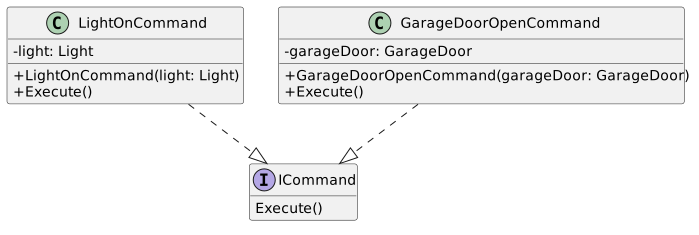
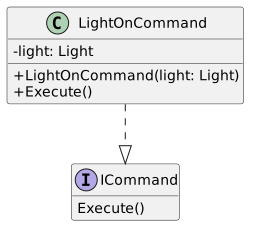
A Define an interface and class based on the class diagram below and put them in the Commands folder.
Class Diagram: ICommand; Members and relationships are shown in the editable reference; unrelated members may be omitted.
Class Diagram: ICommand
  • New
  • Changed
  • Removed

We don't know anything about the Light class just that is has methods we can use. In addition, there are other classes that have different methods. What they all have in common is that they do things....that's it. So we need to create a common way to interact with these classes/objects. These "command" classes will act as a "middle man" to invoke the proper methods.

<<interface>> ICommand
Execute()
LightOnCommand (implements ICommand)
- light: Light
+ LightOnCommand(light: Light)
+ Execute()
1 In the Execute() method, call the light's On() method.
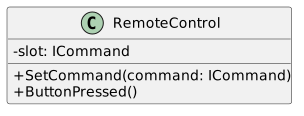
B Make changes to the RemoteControl class based on the diagram below.
Class Diagram: RemoteControl; Members and relationships are shown in the editable reference; unrelated members may be omitted.
Class Diagram: RemoteControl
  • New
  • Changed
  • Removed
RemoteControl
- slot: : ICommand
+ SetCommand(command: Icommand)
+ ButtonPressed()
C In the SetCommand method, assign the slot field to the command passed in.
D In the ButtonPressed method, call the slot object's Execute method.
E In the Main method....
1 Instantiate a RemoteControl object named remote.
2 Instantiate a Light object named light passing in "Living Room" as the argument.
3 Instantiate a LightOnCommand named lightOn and pass in the light object.
4 Call the remote object's SetCommand method and pass in the lightOn Command object.
5 Call the remote object's ButtonPressed method.
6 Call Console.Read()
F Check Your Work: Run the application. The line "The light is on" should show.
Add a GarageDoorOpenCommand.
Acceptance Criteria
Acceptance criteria
  • GarageDoorOpenCommand implements ICommand and stores the GarageDoor receiver.
  • Execute invokes the receiver’s opening behavior.
  • The remote can invoke the garage-door command through the same command contract as the light.
Instructions
3.Add a GarageDoorOpenCommand.
A Define a new class based on the diagram below.
Class Diagram: GarageDoor; Members and relationships are shown in the editable reference; unrelated members may be omitted.
Class Diagram: GarageDoor
  • New
  • Changed
  • Removed
GarageDoorOpenCommand (implements ICommand)
- garageDoor: : GarageDoor
+ GarageDoorOpenCommand(garageDoor: GarageDoor)
+ Execute()
B In the Execute method, call the garageDoor object's Up method.
C In the Main method...
1 Instantiate a GarageDoor object named garageDoor, passing in "Garage".
2 Instantiate a GarageDoorOpenCommand object named garageOpen and pass in the garageDoor object.
3 After the first call to ButtonPressed, call the SetCommand method and pass in the garageOpen Command object and then call…

After the first call to ButtonPressed, call the SetCommand method and pass in the garageOpen Command object and then call the ButtonPressed method.

D Check Your Work: Run the application. Your output should show the light being on and the garage door being open.

We have two objects that have different methods (On and Up) that have now been encapsulated to Command classes that handle the invocation.

Set up the RemoteControl so it can handle multiple commands.
Acceptance Criteria
Acceptance criteria
  • The completed implementation satisfies this requirement: Assign the onCommands array to a new ICommand array with 7 length.
  • ICommand exposes the required contract: Execute().
  • LightOnCommand exposes the required contract: light: Light; LightOnCommand(light: Light); Execute().
  • GarageDoorOpenCommand exposes the required contract: garageDoor: GarageDoor; GarageDoorOpenCommand(garageDoor: GarageDoor); Execute().
Instructions
4.Set up the RemoteControl so it can handle multiple commands.
A Add a placeholder class for slots with no functionality.
1 Add a class based on the diagram below.
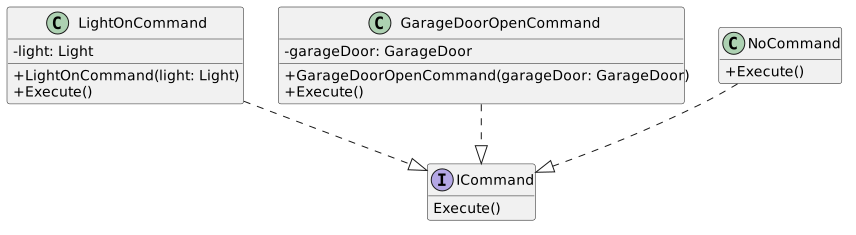
Class Diagram: NoCommand; Members and relationships are shown in the editable reference; unrelated members may be omitted.
Class Diagram: NoCommand
  • New
  • Changed
  • Removed
NoCommand (Implements ICommand)
+ Execute()
2 In the Execute method, print out "Command not implemented".
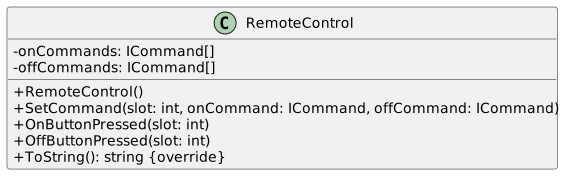
B Make changes to the RemoteControl class based on the class diagram below.
Class Diagram: RemoteControl; Members and relationships are shown in the editable reference; unrelated members may be omitted.
Class Diagram: RemoteControl
  • New
  • Changed
  • Removed
Remote Control
Remove -slot ICommand
Add - onCommandsRemove -slot ICommand
Add - onCommands: : ICommand[ ]
Add -offCommandsAdd -offCommands: : ICommand[ ]
Add + Remote Control)
Remove commandAdd + Remote Control)
Remove command: : ICommand parameter from + SetCommand method definition
Remove +Button Pressed
Add + On Button Pressed(slotfrom + SetCommand method definition
Remove +Button Pressed
Add + On Button Pressed(slot: : int)
Add + OffButton Pressed(slot)
Add + OffButton Pressed(slot::int)
Add + ToString())
Add + ToString(): : string <override>
C In the RemoteControl class...
1 In the constructor...

Assign the onCommands array to a new ICommand array with 7 length.

Assign the offCommands array to a new ICommand array with 7 length.

Instantiate a new ICommand object of type NoCommand named noCommand.

Define a for loop that loops 7 times, assigning each ICommand object in each array to the noCommand object.

This gives all objects in the arrays a default behavior. We can overwrite these later.

2 In the SetCommand method...

Assign the ICommand at the slot position of the onCommands array to the passed in onCommand.

This will overwrite the default Command stored in the array.

Assign the ICommand at the slot position of the offCommands array to the passed in offCommand.

3 In the OnButtonPressed method, call Execute on the ICommand at the slot in the onCommands array.
4 In the OffButtonPressed method, call Execute on the ICommand at the slot in the offCommands array.
5 In the ToString method, paste the code below:
StringBuilder stringBuilder = new StringBuilder();
stringBuilder.Append("\n----------------------- Remote Control -----------------------\n");
for (int i = 0; i < this.onCommands.Length; i++)
{
stringBuilder.Append(string.Format("{0,-35} {1, -5}\n", $"[slot {i + 1}] {this.onCommands[i].GetType().Name}", $"{this.offCommands[i].GetType().Name}"));
}
stringBuilder.Append("\n");
return stringBuilder.ToString();
D Define new command classes based on the diagram below.
Class Diagram: OffCommands; Members and relationships are shown in the editable reference; unrelated members may be omitted.
Class Diagram: OffCommands
  • New
  • Changed
  • Removed
LightOffCommand (implements ICommand)
- light: : Light
+ LightOffCommand(light: Light)
+ Execute()
GarageDoorClosedCommand(implement ICommand)
- garageDoor: : GarageDoor
+ GarageDoorClosedCommand(garageDoor: GarageDoor)
+ Execute()
E In the new classes, call the appropriate Receiver method (Close and Off).
F In the Main method...
1 Instantiate a new LightOffCommand named lightOff and pass in the light object.
2 Instantiate a new GarageDoorClosedCommand named garageClosed and pass in the garageDoor object.
3 Remove all the method calls causing errors.
4 Call the remote object's SetCommand method and pass in 0, lightOn and lightOff.
5 Call the remote object's SetCommand method and pass in 1, garageOpen and garageClosed.
6 Print out the remote object's ToString method.
7 Call the remote object's OnButtonPressed method and pass in 0.
8 Call the remote object's OffButtonPressed method and pass in 0.
9 Call the remote object's OnButtonPressed method and pass in 1.
10 Call the remote object's OffButtonPressed method and pass in 1.
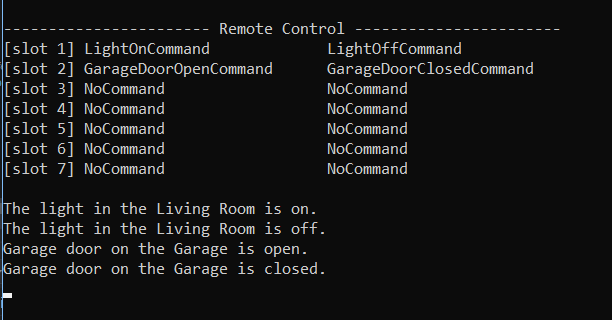
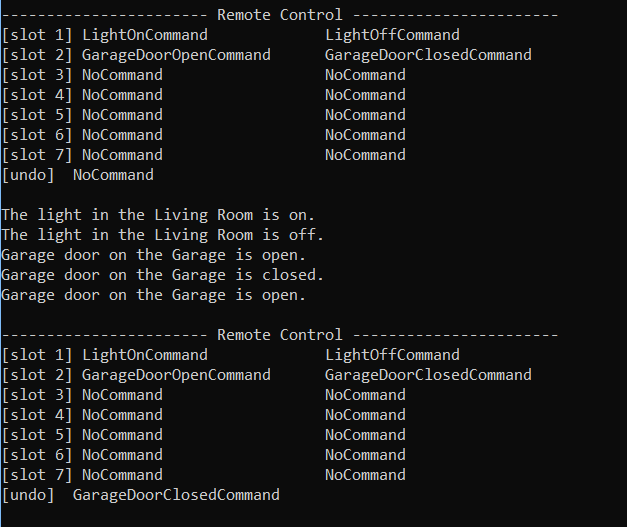
G Check Your Work: Run the application. Your output should look like the output below.
Output for 9.4 Command Pattern Lab. Use the adjacent task instructions to identify the required controls, output, or debugger values.
Output
- - - - - - - - - - - - - - - - - Remote Control - - - - - - - - - - - - - - - - -
[slot 1] LightOnCommand                    LightOffCommand
[slot 2] GarageDoor OpenCommand   GarageDoorClosedCommand
GarageDoor OpenCommand   GarageDoorClosedCommand
[slot 33] NoCommand                            NoCommand
[slot 4] NoCommand                            NoCommand
NoCommand                            NoCommand
[slot 55] NoCommand                            NoCommand
[slot 6] NoCommand                            NoCommand
NoCommand                            NoCommand
[slot 77] NoCommand                            NoCommand
The light in the Living Room is on.
The light in the Living Room is off.
Garage door on the Garage is open.
Garage door on the Garage is closed.The light in the Living Room is on.
The light in the Living Room is off.
Garage door on the Garage is open.
Garage door on the Garage is closed.
Add an Undo "button"
Acceptance Criteria
Acceptance criteria
  • The completed implementation satisfies this requirement: Add a field of type ICommand named undoCommand.
  • The completed implementation satisfies this requirement: Define a new method named undoButtonPressed. In it, call the undoCommand object's Undo method.
  • NoCommand exposes the required contract: Execute(); Undo().
  • ICommand exposes the required contract: Execute(); Undo().
Instructions
5.Add an Undo "button"
A Make changes to the application structure based on the diagram below.
Class Diagram: Undo; Members and relationships are shown in the editable reference; unrelated members may be omitted.
Class Diagram: Undo
  • New
  • Changed
  • Removed
Add + Undo() to the following following interface and classes
<<interface>> ICommand
NoCommand
LightOnCommand
LightOffCommand
GarageDoorOpenCommand
GarageDoorClosedCommandLightOffCommand
GarageDoorOpenCommand
GarageDoorClosedCommand
B In each Undo method, call the opposite method of the Execute method.

In the NoCommand class print out the same message as the Execute method.

C In the RemoteControl class...
1 Add a field of type ICommand named undoCommand.
2 In the constructor, assign undoCommand to the noCommand variable.
3 In the onButtonPressed method, assign the undoCommand to the ICommand at the slot in the onCommands array.
4 In the offButtonPressed method, assign the undoCommand to the ICommand at the slot in the offCommands array.

Now whenever a button is pushed the undoCommand with become whatever command that was pushed.

5 Define a new method named undoButtonPressed. In it, call the undoCommand object's Undo method.
6 In the ToString method, add the code below after the for loop.
stringBuilder.Append($"[undo]\t{this.undoCommand.GetType().Name}\n");
D In the Main method...
1 Call the remote object's UndoButtonPressed method after the last OffButtonPressed call.
2 Print out the remote object's ToString method.
E Check Your Work: Run the application. Your output should look like the output below.
Output for 9.4 Command Pattern Lab. Use the adjacent task instructions to identify the required controls, output, or debugger values.
Output
- - - - - - - - - - - - - - - - - Remote Control - - - - - - - - - - - - - - - - -
[slot 1] LightOnCommand                    LightOffCommand
[slot 2] GarageDoor OpenCommand   GarageDoorClosedCommand
GarageDoor OpenCommand   GarageDoorClosedCommand
[slot 33] NoCommand                            NoCommand
[slot 4] NoCommand                            NoCommand
NoCommand                            NoCommand
[slot 55] NoCommand                            NoCommand
[slot 6] NoCommand                            NoCommand
NoCommand                            NoCommand
[slot 77] NoCommand                            NoCommand
[undo] NoCommand
The light in the Living Room is on.
The light in the Living Room is off.
Garage door on the Garage is open.
Garage door on the Garage is closed.
Garage door on the Garage is open.
- - - - - - - - - - - - - - - - - Remote Control - - - - - - - - - - - - - - - - -
NoCommand
The light in the Living Room is on.
The light in the Living Room is off.
Garage door on the Garage is open.
Garage door on the Garage is closed.
Garage door on the Garage is open.
- - - - - - - - - - - - - - - - - Remote Control - - - - - - - - - - - - - - - - -
[slot 11] LightOnCommand                    LightOffCommand
[slot 2] GarageDoor OpenCommand   GarageDoorClosedCommand
GarageDoor OpenCommand   GarageDoorClosedCommand
[slot 33] NoCommand                            NoCommand
[slot 4] NoCommand                            NoCommand
NoCommand                            NoCommand
[slot 55] NoCommand                            NoCommand
[slot 6] NoCommand                            NoCommand
NoCommand                            NoCommand
[slot 77] NoCommand                            NoCommand
[undo] GarageDoorClosedCommandGarageDoorClosedCommand
Use state to control the Undo method.
Acceptance Criteria
Acceptance criteria
  • Press F10. The ceiling fan should be on medium.
  • Press F10. The ceiling fan should be off.
  • Press F10. The console should show the undo command being the FanOff command since it was the last thing that happened.
  • Press F10. The console should show the fan being on medium since we just "undid" the turning off of the fan.
  • Press F10. The ceiling fan should be on high.
Instructions
6.Use state to control the Undo method.
A Add classes based on the diagram below.
Class Diagram: CeilingFan; Members and relationships are shown in the editable reference; unrelated members may be omitted.
Class Diagram: CeilingFan
  • New
  • Changed
  • Removed

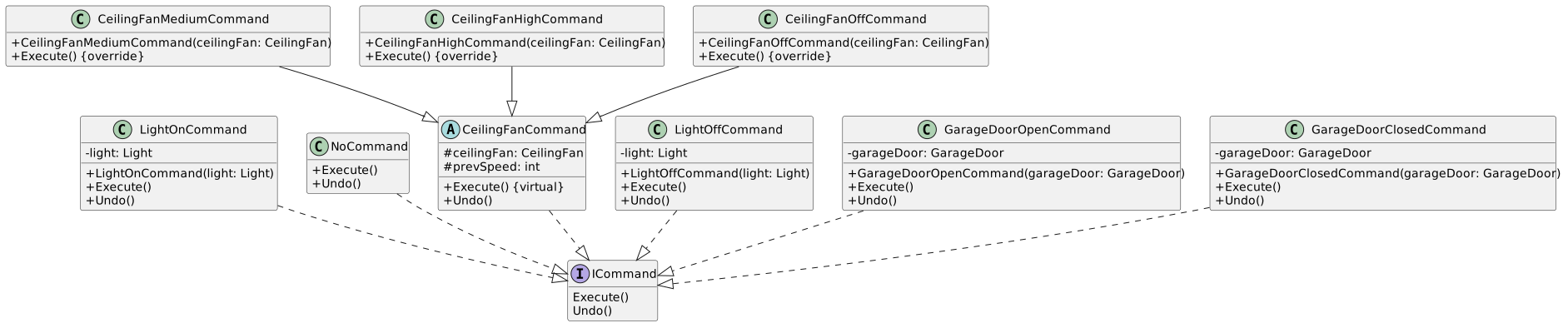
This structure differs from the book. We are going to use some inheritance to cut down on code duplication.

CeilingFanMediumCommand (inherits from CeilingFanCommand <abstractabstract>)
+ CeilingFanMediumCommand(ceiling Fan: Ceiling Fan)
+ Execute() <override>
CelingFanCommand <abstract> (implements ICommand)
# ceilingFan: CeilingFan
# prevSpeed: int
+ Execute() <virtual
+ Undo()
CeilingFanHighCommand (inherits from CeilingFanCommand <)
# ceilingFan: CeilingFan: CeilingFan
# prevSpeed: int: int
+ Execute() <virtual
+ Undo()
CeilingFanHighCommand (inherits from CeilingFanCommand <abstract>)
)
+ CeilingFanHighCommand (ceilingFan: Ceiling Fan)
+ Execute() <override>
CeilingFanOffCommand (inherits from CeilingFanCommand <abstractabstract>)
+ CeilingFanOffCommand(ceilingFan: Ceiling Fan)
+ Execute() <override>
B In the CeilingFanCommand class...
1 In the Execute method, assign prevSpeed to the ceilingFan object's Speed property.
2 In the Undo method, add an if/else block that checks if the prevSpeed is the ceilingFan object's High, Medium or Off speed.…

In the Undo method, add an if/else block that checks if the prevSpeed is the ceilingFan object's High, Medium or Off speed. In each case, call the Set method for that speed.

For instance, if the ceiling fan's previous speed was High, call SetHigh()

C In each of the Excute method in the child classes, call base.Execute() and then call the ceilingFan object's Set method for…

In each of the Excute method in the child classes, call base.Execute() and then call the ceilingFan object's Set method for the speed needed.

For example: In the CeilingFanHighCommand Execute method, call base.Execute and then this.ceilingFan.SetHigh().

D Replace all of the code in the Main method with the code below.
RemoteControl remoteControl = new RemoteControl();
CeilingFan ceilingFan = new CeilingFan("Living Room");
CeilingFanOffCommand ceilingFanOff = new CeilingFanOffCommand(ceilingFan);
CeilingFanMediumCommand ceilingFanMedium = new CeilingFanMediumCommand(ceilingFan);
CeilingFanHighCommand ceilingFanHigh = new CeilingFanHighCommand(ceilingFan);
remoteControl.SetCommand(0, ceilingFanMedium, ceilingFanOff);
remoteControl.SetCommand(1, ceilingFanHigh, ceilingFanOff);
remoteControl.OnButtonPressed(0);
remoteControl.OffButtonPressed(0);
Console.WriteLine(remoteControl.ToString());
remoteControl.UndoButtonPressed();
remoteControl.OnButtonPressed(1);
Console.WriteLine(remoteControl.ToString());
remoteControl.UndoButtonPressed();
Console.Read();
E Check Your Work:
1 Set a breakpoint in the Main method on the line that calls OnButtonPressed(0)
2 Press F10. The ceiling fan should be on medium.

Check the console output while stepping through.

3 Press F10. The ceiling fan should be off.
4 Press F10. The console should show the undo command being the FanOff command since it was the last thing that happened.
5 Press F10. The console should show the fan being on medium since we just "undid" the turning off of the fan.
6 Press F10. The ceiling fan should be on high.
7 Press F10. The console should show the HighCommand as the undo command since it was the last thing we did.
8 Press F10. The fan should now be on medium because the previous speed was medium before we changed it to high.
Make a "Macro" Command.
Acceptance Criteria
Acceptance criteria
  • The completed implementation satisfies this requirement: Set the third slot on the remote to the party commands.
  • ICommand exposes the required contract: Execute(); Undo().
  • MacroCommand exposes the required contract: commands: ICommand[]; MacroCommand(commands: ICommand[]); Execute(); Undo().
Instructions
7.Make a "Macro" Command.
A Add new Command classes.
1 Right-click the Commands folder and go to Add --> Existing Item...
2 Navigate to the Commands folder of your project in the file explorer and import the Stereo, TV and HotTub On/Off command classes.
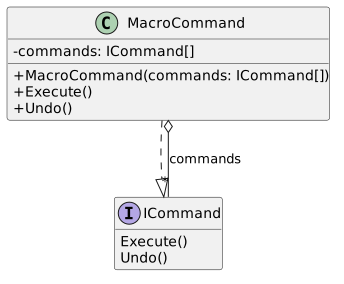
B Define a new class based on the diagram below.
Class Diagram: Macro Command; Members and relationships are shown in the editable reference; unrelated members may be omitted.
Class Diagram: Macro Command
  • New
  • Changed
  • Removed
MacroCommand (implements ICommand)
- commands: : ICommand[ ]
+ MacroCommand(commands+ MacroCommand(commands: : ICommand[ ])
+ Execute()
+ Undo())
+ Execute()
+ Undo()
C In the MacroCommand class...
1 In the Execute method, loop through the ICommand objects in the array and call Execute on each one.
2 In the Undo method, loop through the ICommand objects in the array and call Undo on each one.
D In the Main method after the last call to UndoButtonPressed....
1 Instantiate a Light, TV, Stero and HotTub.
2 Instantiate all the On/Off commands for each object.
3 Initialize a partyOn array with all the ON commands in it.
4 Initialize a partyOff array with all the OFF commands in it.
5 Instantiate a partyOnMacro command, passing in the partyOn array.
6 Instantiate a partyOffMacro command, passing in the partyOff array.
7 Set the third slot on the remote to the party commands.
8 Print to the console a message about starting the party and then call the OnButtonPressed method.
9 Print to the console a message about stopping the party and then call the OffButtonPressed method.
10 Print out the remote control's ToString.
11 Press the party on button again and then the undo button.
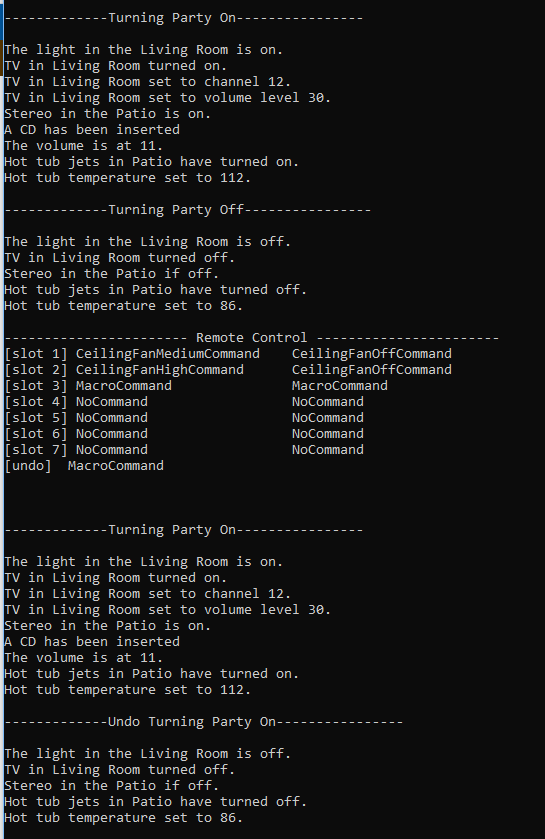
E Check Your Work: Run the application. The output should be similar to the output below.
Output for 9.4 Command Pattern Lab. Use the adjacent task instructions to identify the required controls, output, or debugger values.
Output
----------Turning Party On----------
The light in the Living Room is on.
TV in Living Room turned on.
TV in Living Room set to channel 12.
TV in Living Room set to volume level 30.
Stereo in the Living Room is on.
A CD has been inserted
The volume is at 11.
Hot tub jets in Living Room have turned on.
Hot tub temperature set to 112.
----------Turning Party Off---------
The light in the Living Room is off.
TV in Living Room turned off.
Stereo in the Living Room if off.
Hot tub jets in Living Room have turned off.
Hot tub temperature set to 86.
----------------------- Remote Control -----------------------
----------
The light in the Living Room is on.
TV in Living Room turned on.
TV in Living Room set to channel 12.
TV in Living Room set to volume level 30.
Stereo in the Living Room is on.
A CD has been inserted
The volume is at 11.
Hot tub jets in Living Room have turned on.
Hot tub temperature set to 112.
----------Turning Party Off---------
The light in the Living Room is off.
TV in Living Room turned off.
Stereo in the Living Room if off.
Hot tub jets in Living Room have turned off.
Hot tub temperature set to 86.
----------------------- Remote Control -----------------------
[slot 11] CeilingFanMediumCommand    CeilingFanOffCommand
[slot 2] CeilingFanHighCommand      CeilingFanOffCommand
CeilingFanHighCommand      CeilingFanOffCommand
[slot 33] MacroCommand               MacroCommand
[slot 4] NoCommand                  NoCommand
NoCommand                  NoCommand
[slot 55] NoCommand                  NoCommand
[slot 6] NoCommand                  NoCommand
NoCommand                  NoCommand
[slot 77] NoCommand                  NoCommand
[undo]  MacroCommand
----------Turning Party On----------
The light in the Living Room is on.
TV in Living Room turned on.
TV in Living Room set to channel 12.
TV in Living Room set to volume level 30.
Stereo in the Living Room is on.
A CD has been inserted
The volume is at 11.
Hot tub jets in Living Room have turned on.
Hot tub temperature set to 112.
----------Undo Turning Party Off---------
The light in the Living Room is off.
TV in Living Room turned off.
Stereo in the Living Room if off.
Hot tub jets in Living Room have turned off.
Hot tub temperature set to 86.MacroCommand
----------Turning Party On----------
The light in the Living Room is on.
TV in Living Room turned on.
TV in Living Room set to channel 12.
TV in Living Room set to volume level 30.
Stereo in the Living Room is on.
A CD has been inserted
The volume is at 11.
Hot tub jets in Living Room have turned on.
Hot tub temperature set to 112.
----------Undo Turning Party Off---------
The light in the Living Room is off.
TV in Living Room turned off.
Stereo in the Living Room if off.
Hot tub jets in Living Room have turned off.
Hot tub temperature set to 86.
Zip your application and submit it to Canvas.
8.Zip your application and submit it to Canvas.
A Zip your application and submit it to Canvas.
Completion review
9.Review the feature acceptance criteria
A Confirm the required results

Return to each story and verify its acceptance criteria. Preserve the submission format and destination stated in the activity; a reading, setup guide, lab, video demonstration, and oral final may require different evidence.

Implement a simple LightCommand Add a GarageDoorOpenCommand. Set up the RemoteControl so it can handle multiple commands. Add an Undo "button" Use state to control the Undo method. Make a "Macro" Command.