9.2 Template Pattern Lab

Overview

9.2 Template Pattern Lab

This assignment is based on Head First Design Patterns: p. 275-299

Work through the stories in order. Use the acceptance criteria to check each feature, and complete the nested tasks using the specified names, values, and scenarios.

Getting Started
1.Getting Started
A Download and extract the start code.

9.2 Template LastName.zip

9.2 Template LastName.zip
B Review the current state.
1 Open the solution and look at the Coffee and Tea classes. They are incredibly similar in their behavior.
2 Start the application to see what it does.
Inherit common behaviors.
Acceptance Criteria
Acceptance criteria
  • The completed implementation satisfies this requirement: Define a new abstract class named CaffeineBeverage.
  • The completed implementation satisfies this requirement: Define a public, abstract method named PrepareRecipe.
  • The completed implementation satisfies this requirement: Define a public method named BoilWater that write "Boiling water" to the Console.
  • CaffeineBeverage exposes the required contract: PrepareRecipe() abstract; BoilWater(); PourInCup().
Instructions
2.Inherit common behaviors.
A Define a new abstract class named CaffeineBeverage.
B Define a public, abstract method named PrepareRecipe.
C Define a public method named BoilWater that write "Boiling water" to the Console.
D Define a public method named PourInCup and paste the following code:
Console.WriteLine($"Pouring {this.GetType().Name.ToString()} into cup.");
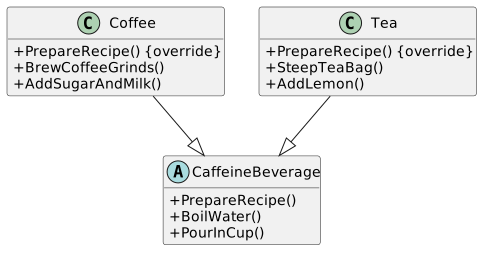
E Modify the Coffee and Tea classes based on the diagram below:
Class Diagram: Modify Sub-classes; Members and relationships are shown in the editable reference; unrelated members may be omitted.
Class Diagram: Modify Sub-classes
  • New
  • Changed
  • Removed
Mofications to current Coffee current Coffee class
Add <overrideoverride> to +PrepareRecipe()
Remove +BoilWater()
Remove +PourInCup()
Modifications to Tea Tea class
Add <overrideoverride> to +PrepareRecipe()
Remove +BoilWater()
Remove +PourInCup()
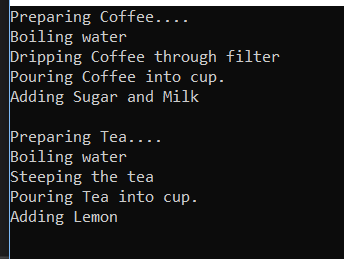
F Check Your Work: Start the application. The output should look like the image below.

By letting an inherited class handle common functionality, we were able to remove redundancy in the sub-classes.

Output for 9.2 Template Pattern Lab. Use the adjacent task instructions to identify the required controls, output, or debugger values.
Output
Preparing Coffee....
Boiling water
Dripping Coffee through filter
Pouring Coffee into cup.
Adding Sugar and Milk
Preparing Tea....
Boiling water
Steeping the tea
Pouring Tea into cup.
Adding LemonCoffee through filter
Pouring Coffee into cup.
Adding Sugar and Milk
Preparing Tea....
Boiling water
Steeping the tea
Pouring Tea into cup.
Adding Lemon
Make similar functionality in sub-classes part of inherited class.
Acceptance Criteria
Acceptance criteria
  • The completed implementation satisfies this requirement: Remove the PrepareRecipe methods from the Coffee and Tea classes.
  • CaffeineBeverage exposes the required contract: PrepareRecipe() abstract; AddCondiments() abstract; BoilWater(); Brew() abstract.
  • Coffee exposes the required contract: PrepareRecipe() override; Brew() override; AddCondiments() override.
  • Tea exposes the required contract: PrepareRecipe() override; Brew() override; AddCondiments() override.
Instructions
3.Make similar functionality in sub-classes part of inherited class.
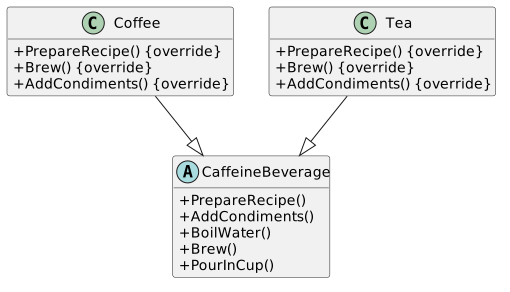
A Make changes based on the class diagram below:

The functionality of the Brew and AddCondiments methods should remain the same.

Class Diagram: Brew and Add; Members and relationships are shown in the editable reference; unrelated members may be omitted.
Class Diagram: Brew and Add
  • New
  • Changed
  • Removed
Modifications to CaffieneBeverage <CaffieneBeverage <abstract> class
Add +AddCondiments() <abstract>
Add +Brew() <abstract>
Modifications to Coffee class
Remove +BrewCoffeeGrinds()
Add +Brew() <override>
Remove +AddSugarAndMilk()
Add +AddCondiments() <override>
Modifcations to Tea class
Remove +SteepTeaBag()
Add +Brew() <override>
Remove +AddLemon()
Add +AddCondiments() <override>
B In the CaffeineBeverage class, make the PrepareRecipe method a full method and in the method body, call the methods.
C Remove the PrepareRecipe methods from the Coffee and Tea classes.
D Check Your Work: Start the application. The output should look like the same as it did previously.

In this step we moved the algorithm (PrepareRecipe) to a parent class and let the parent class handle common functionality and then deferred to the child classes when needed.

Use a "hook" to determine if a customer wants anything added.
Acceptance Criteria
Acceptance criteria
  • Enter n for coffee and press enter. No message should be shown and the Tea prompt should show.
  • Enter y for the tea. A message should appear about adding lemon.
  • CaffeineBeverage exposes the required contract: PrepareRecipe(); AddCondiments() abstract; BoilWater(); Brew() abstract.
  • Coffee exposes the required contract: Brew() override; CustomerWantsCondiment(): bool override; AddCondiments() override; GetUserInput(): string.
Instructions
4.Use a "hook" to determine if a customer wants anything added.
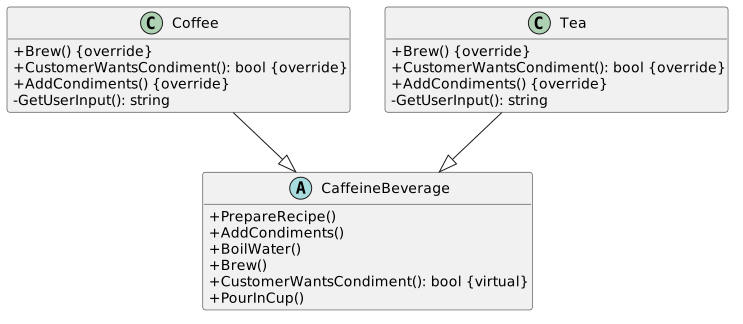
A Make changes based on the class diagram below:
Class Diagram: Hook; Members and relationships are shown in the editable reference; unrelated members may be omitted.
Class Diagram: Hook
  • New
  • Changed
  • Removed
Modifications to CaffeineBeverage <CaffeineBeverage <abstract> class
Add +CustomerWantsCondiment(): : bool <virtual>
Modifications to Coffee class
Add +CustomerWantsCondiment(): : bool <override>
Add -GetUserInput(): : string
Modifications to Tea to Tea class
Add +CustomerWantsCondiment(): : bool <override>
Add -GetUserInput(): : string
B In the CustomerWantsCondiment method in the CaffeineBeverage class, return true.

This is the default for any class that doesn't override this method.

C In the CaffeineBeverage class, check CustomerWantsCondiment before calling AddCondiments.
D In the Tea and Coffee class, copy and paste the code below into the CustomerWantsCondiment method:
string answer = this.GetUserInput();
return answer == "y" ? true : false;
E In the Tea class's GetUserInput copy and paste the code below:
bool exit = true;
string answer = "n";
Console.Write("Would you like lemon with your tea? (y/n) ");
while (exit)
{
answer = Console.ReadLine().Substring(0, 1).ToLower();
if (answer.CompareTo("n") == 0 || answer.CompareTo("y") == 0)
{
exit = false;
}
else
{
Console.WriteLine("Please enter either y or n.");
}
}
return answer;
F Copy and paste the code above into the Coffee class's GetUserInput, but change the question to: Would you like milk and…

Copy and paste the code above into the Coffee class's GetUserInput, but change the question to: Would you like milk and sugar with your coffee?

G Check Your Work:
1 Start the application.
2 Enter n for coffee and press enter. No message should be shown and the Tea prompt should show.
3 Enter y for the tea. A message should appear about adding lemon.
Zip your assignment and submit it to Canvas.
5.Zip your assignment and submit it to Canvas.
A Zip your assignment and submit it to Canvas.
Completion review
6.Review the feature acceptance criteria
A Confirm the required results

Return to each story and verify its acceptance criteria. Preserve the submission format and destination stated in the activity; a reading, setup guide, lab, video demonstration, and oral final may require different evidence.

Inherit common behaviors. Make similar functionality in sub-classes part of inherited class. Use a "hook" to determine if a customer wants anything added.