9.1 Observer Pattern Lab

Overview

9.1 Observer Pattern Lab

This assignment is based off of Head First Design Patterns: p.37-63

Work through the stories in order. Use the acceptance criteria to check each feature, and complete the nested tasks using the specified names, values, and scenarios.

Getting Started
1.Getting Started
A Download and extract the start code.

9.1 Observer LastName.zip

9.1 Observer LastName.zip
B Run the application. Select a person and click the Get Weather button.
C Select a different person and click the Get Weather button.

Every time we want to get new weather data we need to click the button. But the data is constantly being updated in the background causing different people have different knowledge of the weather. Additionally, some of them want a constant update of what the weather is like.
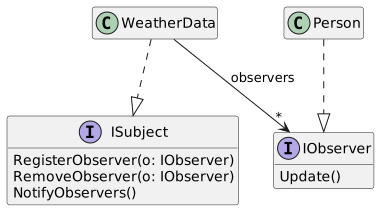
Define and implement interfaces based on the class diagram below. Leave the method bodies blank for now.
Acceptance Criteria
Acceptance criteria
  • ISubject defines registration, removal, and notification methods.
  • IObserver defines Update; WeatherData and Person implement the corresponding contracts.
Instructions
2.Define and implement interfaces based on the class diagram below. Leave the method bodies blank for now.
9.1 Observer 2 Class Interfaces; Members and relationships are shown in the editable reference; unrelated members may be omitted.
9.1 Observer 2 Class Interfaces
  • New
  • Changed
  • Removed
WeatherData is a class that implements ISubject
<<<<interface>> ISubject
RegisterObserver(o: IObserver)
RemoveObserver(o: IObserver)
NotifyObservers()
Person is a class that implements IObserver
<<<<interface>> IObserver
Update()
A Define and implement interfaces based on the class diagram below. Leave the method bodies blank for now.
Set up the Subject (WeatherData class)
Acceptance Criteria
Acceptance criteria
  • WeatherData stores its observers and supports registration and removal.
  • NotifyObservers invokes Update on the registered observers.
  • The specified weather-data change triggers notification.
Instructions
3.Set up the Subject (WeatherData class)
A Define a private field of type List<IObserver> named observers and instantiate it at the field level.
B In the RegisterObserver method, call Add on the observers list and pass in the IObserver parameter.
C In the RemoveObserver method, call Remove on the observers list and pass in the IObserver parameter.
D In the NotifyObservers method, write code that loops through the list of IObservers and calls their Update method.
E In the MeasurementsChanged method, call NotifyObservers at the end of the method.
Set up the Observer (Person class)
Acceptance Criteria
Acceptance criteria
  • Run the application, select a person and click the Subscribe button. The numbers should update automatically.
  • Select another person and click the Subscribe button. Their numbers should also change.
  • Select one of the previous people and click Unsubscribe. Their numbers should stop changing.
Instructions
4.Set up the Observer (Person class)
A Cut the code from the GetWeather method and paste it into the Update method,
B In the GetWeatherButton event handler, replace the call to GetWeather with Update.
C In the MainWindow.xaml...
1 Paste the code below in the XAML under the inner Grid tag.
<Button x:Name="subscribeButton" Content="Subscribe" HorizontalAlignment="Left" Margin="95, 0, 0, 10" VerticalAlignment="Bottom" Width="75"/>
<Button x:Name="unsubscribeButton" Content="Unsubscribe" HorizontalAlignment="Left" Margin="180, 0, 0, 10" VerticalAlignment="Bottom" Width="75"/>
2 Create event handlers for both buttons.
D In the SubscribeButton event handler. Get the selected person from the list and pass them in to the call to the…

In the SubscribeButton event handler. Get the selected person from the list and pass them in to the call to the weatherData's RegisterObserver method.

E In the UnsubscribeButton event handler. Get the selected person from the list and pass them in to the call to the…

In the UnsubscribeButton event handler. Get the selected person from the list and pass them in to the call to the weatherData's RemoveObserver method.

F Replace the code in the PopulateListBox method with the code below:
this.Dispatcher.Invoke(new Action(delegate () {
this.peopleListBox.ItemsSource = null;
this.peopleListBox.ItemsSource = this.people;
}));
G Check Your Work:
1 Run the application, select a person and click the Subscribe button. The numbers should update automatically.
2 Select another person and click the Subscribe button. Their numbers should also change.
3 Select one of the previous people and click Unsubscribe. Their numbers should stop changing.
Add an additional observer.
Acceptance Criteria
Acceptance criteria
  • HeatAlert implements IObserver and registers with WeatherData.
  • Its Update behavior matches the specified temperature alert conditions.
  • Both the person observer and the additional alert receive the required notifications.
Instructions
5.Add an additional observer.
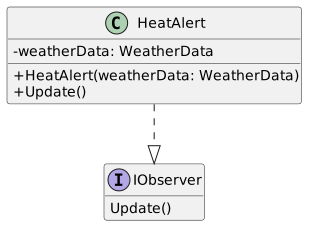
A Define a class named HeatAlert that implements IObserver.
Class Diagram: Heat Alert; Members and relationships are shown in the editable reference; unrelated members may be omitted.
Class Diagram: Heat Alert
  • New
  • Changed
  • Removed
HeatAlert is a class that implements IObserver
HeatAlert
-weatherDataHeatAlert
-weatherData: : WeatherData
+ HeatAlert(weatherData: WeatherData)
+ Update()
<<interface>> IObserver
Update()
B In the Update method, if the weatherData's HeatIndex is equal to 6. If it is, show a MessageBox with a message about it being too hot.
C In the MainWindow's constructor, instantiate a HeatAlert and pass it in to the weatherData's RegisterObserver method.
D Check Your Work: Run the application. After about 12 seconds a MessageBox should appear about it being too hot.

This shows how loose coupling works. The Subject doesn't care if the Observer is a Person or a HeatAlert. All it knows is that it's an Observer that has an Update method.

Zip the assignment and submit it to Canvas.
6.Zip the assignment and submit it to Canvas.
A Zip the assignment and submit it to Canvas.
Completion review
7.Review the feature acceptance criteria
A Confirm the required results

Return to each story and verify its acceptance criteria. Preserve the submission format and destination stated in the activity; a reading, setup guide, lab, video demonstration, and oral final may require different evidence.

Define and implement interfaces based on the class diagram below. Leave the method bodies blank for now. Set up the Subject (WeatherData class) Set up the Observer (Person class) Add an additional observer.