8.4 Composite Pattern Lab

Overview

8.4 Composite Pattern Lab

This assignment is based on the Head First Design Patterns book p. 316-366

Work through the stories in order. Use the acceptance criteria to check each feature, and complete the nested tasks using the specified names, values, and scenarios.

Getting Started
1.Getting Started
A Download and extract the start code.

8.4 Composite LastName.zip

8.4 Composite LastName.zip
B Explore the solution and run the application to see the functionality.
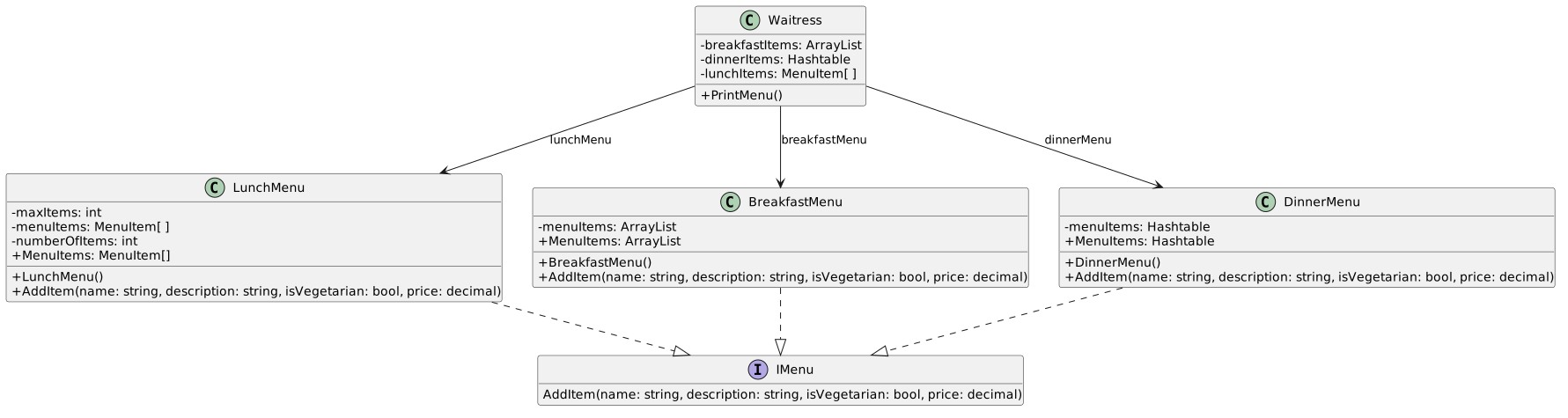
Class Diagram: Start; Members and relationships are shown in the editable reference; unrelated members may be omitted.
Class Diagram: Start
  • New
  • Changed
  • Removed
"Iterate" over a collection.
Acceptance Criteria
Acceptance criteria
  • The completed implementation satisfies this requirement: Define a new interface named IEnumerator
  • The completed implementation satisfies this requirement: Define a concrete class named BreakfastMenuEnumerator and have it implement the IEnumerator interface.
  • The completed implementation satisfies this requirement: Remove the line of code that assigns the breakfastItems field and the loop that loops through the breakfastItems field.
  • IEnumerator exposes the required contract: bool HasNext(); object Next().
Instructions
2."Iterate" over a collection.

There's an issue with the Waitress class knowing WAY too much about the different types of collections and how to loop through them. If more types of collections are added or more menus the class needs to add functionality. We don't want to change the collection types of the Waitress class handles. What we will do, then, is create an object that can "iterate" over a collection regardless of the type.

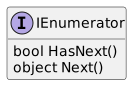
A Define a new interface named IEnumerator

In Java and in the Head First book this is referred to as Iterator. In C# they are known as an Enumerator. More on that later.

Class Diagram: IEnumerator; Members and relationships are shown in the editable reference; unrelated members may be omitted.
Class Diagram: IEnumerator
  • New
  • Changed
  • Removed
<<interface>> IEnumerator
Methods
bool HasNext()
object Next()
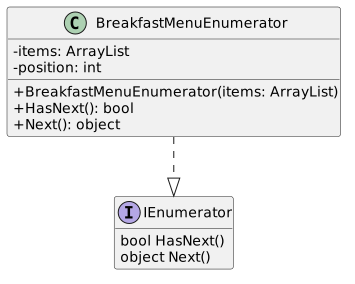
B Define a concrete class named BreakfastMenuEnumerator and have it implement the IEnumerator interface.
Class Diagram: BreakfastMenuEnumerator; Members and relationships are shown in the editable reference; unrelated members may be omitted.
Class Diagram: BreakfastMenuEnumerator
  • New
  • Changed
  • Removed
Class
BreakfastMenuEnumerator implements IEnumerator
fields
- itemsimplements IEnumerator
fields
- items: : ArrayList
- position: : int
methods
+ BreakfastMenuEnumerator(itemsmethods
+ BreakfastMenuEnumerator(items: : ArrayList)
+ HasNext())
+ HasNext(): : bool
+ Next()+ Next(): : object
C In the HasNext method, check if either the position is greater than or equal to the item's Capacity or if the item at the…

In the HasNext method, check if either the position is greater than or equal to the item's Capacity or if the item at the current position is null. If either of those is true, return false. Otherwise, return true.

D In the Next method, assign a local MenuItem variable named menuItem to the current item at the position, increment the…

In the Next method, assign a local MenuItem variable named menuItem to the current item at the position, increment the position by 1, and then return the menuItem.

You will need to cast the item as a MenuItem. ArrayLists are unique in that they can hold many types of items so you have to explicitly say what kind of object it is.

E Modify the class/interface based on the diagram below.
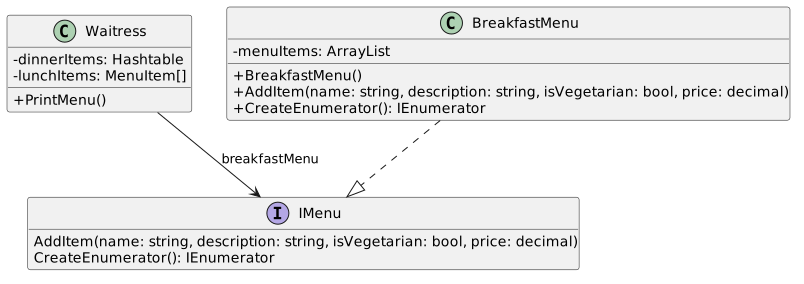
Class Diagram: CreateEnumerator; Members and relationships are shown in the editable reference; unrelated members may be omitted.
Class Diagram: CreateEnumerator
  • New
  • Changed
  • Removed

Implement the interface in the Menu classes but leave the generic exception in it for now.

Remove from Waitress Waitress class
remove field
- breakfastitems: : ArrayList
Remove from BreakfastMenu
remove method
+ MenuItemsfrom BreakfastMenu
remove method
+ MenuItems: : ArrayList
Add to BreakfastMenu
add method
+ CreateEnumerator()to BreakfastMenu
add method
+ CreateEnumerator(): : IEnumerator
Add to IMenu to IMenu interface
add method
+ CreateEnumerator(): : IEnumerator
F In the Waitress class....
1 Remove the line of code that assigns the breakfastItems field and the loop that loops through the breakfastItems field.
2 Define a new overloaded method named PrintMenu with a parameter of type IEnumerator named enumerator.
3 In the PrintMenu method with the parameter...

Define a while loop with the condition that checks the enumerator's HasNext.

Inside the loop, define a variable of type MenuItem named menuItem and assign it to the enumerator's Next method and then Console.WriteLine the menuItem's ToString.

Casting will need to be done.

4 In the PrintMenu method without the parameter...

At the beginning of the method, define a local variable of type IEnumerator named breakfastEnumerator and assign it to the breakfastMenu's CreateEnumerator method.

After the Console.WriteLine for Breakfast where the old loop was, call the PrintMenu method and pass in the breakfastEnumerator.

G In the BreakfastMenu class in the CreateEnumerator method, instantiate and return a new BreakfastMenuEnumerator, passing in…

In the BreakfastMenu class in the CreateEnumerator method, instantiate and return a new BreakfastMenuEnumerator, passing in the menuItems ArrayList.

H Check Your Work: Run the application. The output should be the same as before.

Now the Waitress class has no idea what an ArrayList even is. The implementation of "iterating" through the collection has been encapsulated.

Encapsulate the remaining iterations.
Acceptance Criteria
Acceptance criteria
  • The completed implementation satisfies this requirement: Remove the IEnumerator interface.
  • The completed implementation satisfies this requirement: Add a Reset method that assigns the position to 0.
  • The completed implementation satisfies this requirement: Remove the lunchItems and dinnerItems collection field definitions.
Instructions
3.Encapsulate the remaining iterations.

For the other menus we need to create other concrete enumerator classes to handle the different types of collections. Instead of doing that, though, we are going to use a type provided by the .NET framework to do that work for us.

A Remove the IEnumerator interface.
B In the IMenu interface, add a using to System.Collections.

The type that we want is the type we previously defined (someone already wrote it better than us).

C In the BreakfastMenuEnumerator...
1 Convert the Next() method into a property named Current
2 Rename the HasNext method to MoveNext.
3 Add a Reset method that assigns the position to 0.
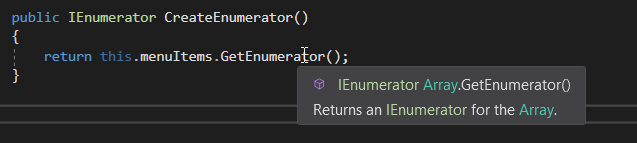
D In the LunchMenu CreateEnumerator method, call GetEnumerator on the menuItems and return it.

GetEnumerator gets the specific enumerator for that kind of collection.

Array Enumerator for 8.4 Composite Pattern Lab. Use the adjacent task instructions to identify the required controls, output, or debugger values.
Array Enumerator
Dictionary Enumerator for 8.4 Composite Pattern Lab. Use the adjacent task instructions to identify the required controls, output, or debugger values.
Dictionary Enumerator
public IEnumerator Create Enumerator()
{
return this.menuItems.GetEnumerator();
}
//note: IEnumerator Array.GetEnumerator() Returns an IEnumerator for the Array.
public IEnumerator Create Enumerator()
{
return this.menuItems.GetEnumerator();
}
//note: IDictionaryEnumerator Hashtable.GetEnumerator() Returns an IDictionaryEnumerator that iterates through the Hashtable.
E In the DinnerMenu CreateEnumerator method, call GetEnumerator on the menuItem's field and return it.

Since DinnerMenu's menuItems is a Hastable, calling GetEnumerator() may return a dictionary, in which case you would need to call this.menuItems.Values.GetEnumerator();

F In the Waitress class...
1 In the PrintMenu method with the parameter, change the HasNext call to MoveNext and the Next call to the Current property call.
2 Remove the lunchItems and dinnerItems collection field definitions.
3 Replace the lines of code that assigned the Items collections with calls to CreateEnumerator like the breakfastEnumerator.
4 Replace the loops with calls to PrintMenu, passing in the proper enumerator just like the breakfastEnumerator.
G Check Your Work: Run the application. The output should be the same as before.

The Waitress knows even less about collections now and we didn't have to write two more classes.

Set up the Composite Pattern structure.
Acceptance Criteria
Acceptance criteria
  • The completed implementation satisfies this requirement: Add a new folder named Composite to the solution and add the MenuComponent, Menu and MenuItem classes to it.
  • MenuComponent exposes the required contract: description: string; isVegetarian: bool; name: string; price: decimal.
  • MenuItem exposes the required contract: Print() override.
  • Menu exposes the required contract: menuComponents: ArrayList; Menu(description: string, name: string); Add(menuComponent: MenuComponent) override; Remove(menuComponent: MenuComponent) override.
Instructions
4.Set up the Composite Pattern structure.

We are going to switch gears and design a structure that allows the waitress to "iterate" over a number of different object types in a generic way. These objects will be "composed of" other objects. In this structure, a menu could have another menu with additional menu items.

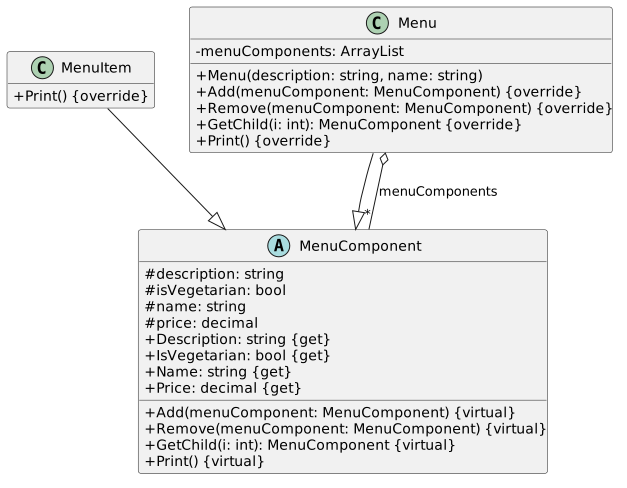
A Add classes and method stubs based on the diagram below.

We won't be using BreakfastMenu, LunchMenu, or DinnerMenu anymore, but don't delete them from the solution.

Class Diagram: Composite Structure; Members and relationships are shown in the editable reference; unrelated members may be omitted.
Class Diagram: Composite Structure
  • New
  • Changed
  • Removed
MenuComponent <abstract>
Fields
# description: string: string
# isVegetarian: bool: bool
# name: string: string
# price: decimal: decimal
# description: string
# isVegetarian: bool
# name: string
# price: decimal
Properties and Methods
+ DescriptionMethods
+ Description: : string <get>
+ IsVegetarian: : bool <get>
+ Name: : string <get>
+ Price: : decimal <get>
+ Add(menuComponent: MenuComponent) <virtual>
+ Remove(menuComponent: MenuComponent) <virtual>
+ GetChild(i: int): : MenuComponent <virtual>
+ Print() <virtual>
MenuItem inherits from MenuComponent
MenuItem
Methods
+ Print() <override>
Menu inherits from MenuComponent
Menu
Fields
- menuComponentsMenuComponent
MenuItem
Methods
+ Print() <override>
Menu inherits from MenuComponent
Menu
Fields
- menuComponents:
:
Methods
+ Menu(description: string, name: string)
+ Add(menuComponent: MenuComponent) <override>
+ Remove(menuComponent: MenuComponent) <override>
+ GetChild(i: int): : MenuComponent <override>
+ Print() <override>
MenuItem
B In each method of the MenuComponent class, throw a new NotSupportedException.
C Add a new folder named Composite to the solution and add the MenuComponent, Menu and MenuItem classes to it.
D In the Menu class, instantiate the menuComponents ArrayList at the field.
Implement Composite Pattern
Acceptance Criteria
Acceptance criteria
  • The completed implementation satisfies this requirement: Define a local variable of type IEnumerator named enumerator and call the menuComponent's GetEnumerator method.
  • The completed implementation satisfies this requirement: Define a while loop with a condition that checks the enumerator's MoveNext method.
  • CompositeWaitress exposes the required contract: allMenus: MenuComponent; CompositeWaitress(allMenus: MenuComponent); PrintMenu().
Instructions
5.Implement Composite Pattern
A In the MenuItem class's Print method, paste the code below that writes out a menu item summary.
string veg = this.IsVegetarian ? "(v)" : string.Empty;
Console.WriteLine($"\t{this.Name}{veg}, {this.Price}\n\t\t-- {this.Description}");
B In the Menu class's Print method....
1 Paste the code below to print out a menu summary.
Console.WriteLine($"\n{this.Name}, {this.Description}\n-------------------------");
2 Define a local variable of type IEnumerator named enumerator and call the menuComponent's GetEnumerator method.
3 Define a while loop with a condition that checks the enumerator's MoveNext method.
4 In the while loop, define a local variable of type MenuComponent named menuComponent and assign it to the enumerator's…

In the while loop, define a local variable of type MenuComponent named menuComponent and assign it to the enumerator's Current property, cast it as a MenuComponent and then call Print on the menuComponent.

C In the Menu class....
1 In the Add method, call add on the menuComponents object and pass in the menuComponent.
2 In the Remove method, call Remove on the menuComponents object and pass in the menuComponent.
3 In the GetChild method, return the MenuComponent at the index of i.
D Add a new waitress.
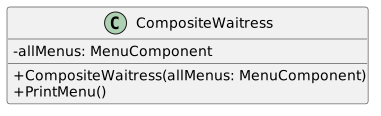
1 Define a new CompositeWaitress class based on the diagram below and put it in the Composite folder.
Class Diagram: CompositeWaitress; Members and relationships are shown in the editable reference; unrelated members may be omitted.
Class Diagram: CompositeWaitress
  • New
  • Changed
  • Removed
CompositeWaitress
Fields
- allMenusFields
- allMenus: : MenuComponent
Methods
+ CompositeWaitress(allMenusMethods
+ CompositeWaitress(allMenus: : MenuComponent)
+ PrintMenu())
+ PrintMenu()
2 In the constructor, assign allMenus to the parameter.
3 In the PrintMenu method, call Print on the allMenus object.
E In the Main method....
1 Instantiate all of the menus.
MenuComponent breakfastMenu = new Menu("BREAKFAST MENU", "Breakfast");
MenuComponent lunchMenu = new Menu("LUNCH MENU", "Lunch");
MenuComponent dinnerMenu = new Menu("DINNER MENU", "Dinner");
MenuComponent desertMenu = new Menu("DESERT MENU", "Desert");
MenuComponent allMenus = new Menu("ALL MENUS", "All menus combined");
2 Add the breakfast, lunch and dinner menus to the allMenus MenuComponent.
3 Instantiate all of the menu items and add them to their menus.
breakfastMenu.Add(new MenuItem("K&B's Pancake Breakfast", "Pancakes with scrambled eggs, and toast", true, 2.99m));
breakfastMenu.Add(new MenuItem("Regular Pancake Breakfast", "Pancakes with fried eggs, sausage", false, 2.99m));
breakfastMenu.Add(new MenuItem("Blueberry Pancakes", "Pancakes made with fresh blueberries", true, 3.49m));
breakfastMenu.Add(new MenuItem("Waffles", "Waffles, with your choice of blueberries or strawberries.", true, 3.59m));
lunchMenu.Add(new MenuItem("Vegetarian BLT", "(Fakin') Bacon with lettuce, tomato on whole wheat.", true, 2.99m));
lunchMenu.Add(new MenuItem("BLT", "Bacon with lettuce, tomato on whole wheat.", false, 2.99m));
lunchMenu.Add(new MenuItem("Soup of the day", "Soup of the day, with a side of potato salad.", false, 3.29m));
lunchMenu.Add(new MenuItem("Hotdog", "A hot dog, with saurkraut, relish, onions, topped with cheese", false, 3.05m));
dinnerMenu.Add(new MenuItem("Veggie Burger and Air Fries", "Veggie burger on a whole wheat bun, lettuce, tomato, and fries.", true, 3.99m));
dinnerMenu.Add(new MenuItem("Soup of the Day", "A cup of the soup of the day, with a side salad.", false, 3.69m));
dinnerMenu.Add(new MenuItem("Burrito", "A large burrito, with whole pinto beans, salsa, guacamole.", true, 4.29m));
desertMenu.Add(new MenuItem("Apple Pie", "Apple pie with a flaky crust, topped with vanilla icecream", true, 1.59m));
desertMenu.Add(new MenuItem("Cheesecake", "Creamy New York cheesecake, with a chocolate graham crust", true, 1.99m));
desertMenu.Add(new MenuItem("Sorbet", "A scoop of raspberry and a scoop of lime", true, 1.89m));
4 Add the desertMenu to the dinnerMenu.
5 Instantiate a new CompositeWaitress and call Print Menu.
6 Add a Console.Read() if you don't have one already.
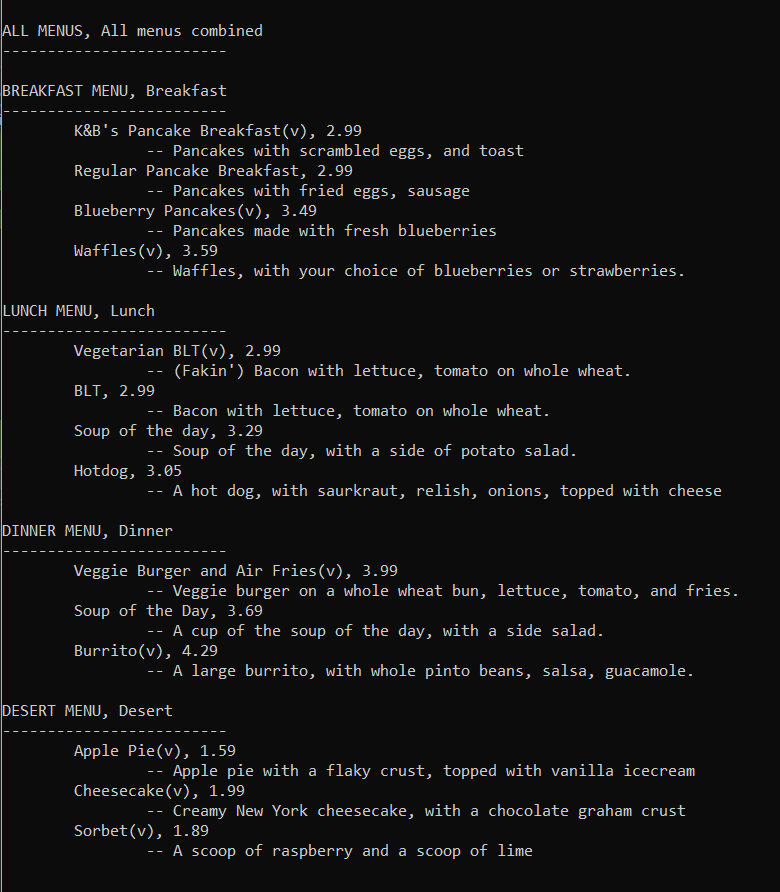
F Check Your Work: Run the application. The output should look like the image below.
Menu Output for 8.4 Composite Pattern Lab. Use the adjacent task instructions to identify the required controls, output, or debugger values.
Menu Output
All menus combinedcombined, ALL MENUS
-------------------------
BreakfastMENUS
-------------------------
Breakfast, BREAKFAST MENU
-------------------------
K&B's Pancake Breakfast(v), 2.99
-- Pancakes with scrambled eggsMENU
-------------------------
K&B's Pancake Breakfast(v), 2.99
-- Pancakes with scrambled eggs, and toast
Regular Pancake Breakfasttoast
Regular Pancake Breakfast, 2.99
-- Pancakes with fried eggs2.99
-- Pancakes with fried eggs, sausage
Blueberry Pancakes(v)Blueberry Pancakes(v), 3.49
-- Pancakes made with fresh blueberries
Waffles(v)3.49
-- Pancakes made with fresh blueberries
Waffles(v), 3.59
-- Waffles3.59
-- Waffles, with your choice of blueberries or strawberries.
Lunchyour choice of blueberries or strawberries.
Lunch, LUNCH MENU
-------------------------
Vegetarian BLT(v)MENU
-------------------------
Vegetarian BLT(v), 2.99
-- (Fakin') Bacon with lettuce, tomato on whole wheat.
BLT2.99
-- (Fakin') Bacon with lettuce, tomato on whole wheat.
BLT, 2.99
-- Bacon with lettuce2.99
-- Bacon with lettuce, tomato on whole wheat.
Soup of the dayon whole wheat.
Soup of the day, 3.29
-- Soup of the day3.29
-- Soup of the day, with a side of potato salad.
Hotdoga side of potato salad.
Hotdog, 3.05
-- A hot dog3.05
-- A hot dog, with saurkrautsaurkraut, relish, onions, topped with cheese
Dinnerwith cheese
Dinner, DINNER MENU
-------------------------
Veggie Burger and Air Fries(v)MENU
-------------------------
Veggie Burger and Air Fries(v), 3.99
-- Veggie burger on a whole wheat bun3.99
-- Veggie burger on a whole wheat bun, lettuce, tomato, and fries.
Soup of the Dayfries.
Soup of the Day, 3.69
-- A cup of the soup of the day3.69
-- A cup of the soup of the day, with a side salad.
Burrito(v)a side salad.
Burrito(v), 4.29
-- A large burrito4.29
-- A large burrito, with whole pinto beanswhole pinto beans, salsa, guacamole.
Desert.
Desert, DESERT MENU
-------------------------
Apple Pie(v)MENU
-------------------------
Apple Pie(v), 1.59
-- Apple pie with a flaky crust1.59
-- Apple pie with a flaky crust, topped with vanilla icecream
Cheesecake(v)with vanilla icecream
Cheesecake(v), 1.99
-- Creamy New York cheesecake1.99
-- Creamy New York cheesecake, with a chocolate graham crust
Sorbet(v)a chocolate graham crust
Sorbet(v), 1.89
-- A scoop of raspberry and a scoop of lime1.89
-- A scoop of raspberry and a scoop of lime
Zip up your assignment and submit it to Canvas.
6.Zip up your assignment and submit it to Canvas.
A Zip up your assignment and submit it to Canvas.
Completion review
7.Review the feature acceptance criteria
A Confirm the required results

Return to each story and verify its acceptance criteria. Preserve the submission format and destination stated in the activity; a reading, setup guide, lab, video demonstration, and oral final may require different evidence.

"Iterate" over a collection. Encapsulate the remaining iterations. Set up the Composite Pattern structure. Implement Composite Pattern