7.5 Builder Pattern Lab

Overview

7.5 Builder Pattern Lab

The Builder Pattern is discussed in Head First Design Patterns p. 600-601

Work through the stories in order. Use the acceptance criteria to check each feature, and complete the nested tasks using the specified names, values, and scenarios.

Prepare the toy builder
1.Download and extract the start code.

7.5 Builder LastName.zip

7.5 Builder LastName.zip
A Download and extract the start code.
Build a complete cowboy toy
Acceptance Criteria
Acceptance criteria
  • Toy implements IToyOutline and stores each chosen value.
  • Assembler receives IToyMaker and calls its construction methods; GetToy returns the completed toy.
  • Woody has Rugged head, Cowboy torso, Jeans legs, Western clothes, and a Bucket Hat.
  • Main assembles the toy and prints all of its details.
Instructions
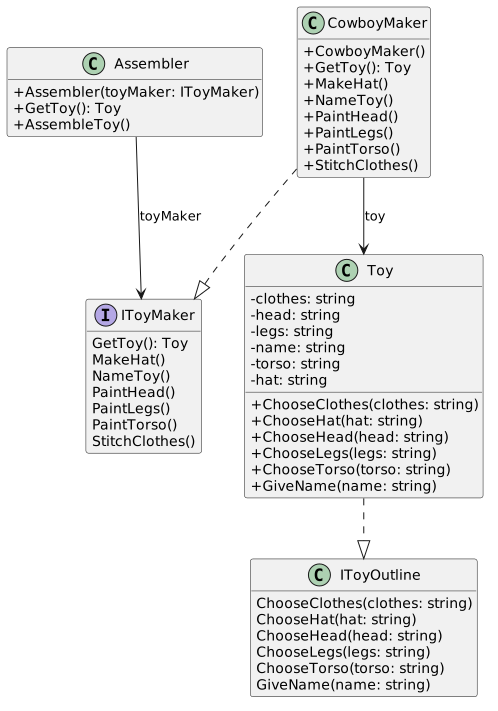
2.Add structure to your project based on the class diagram below:
Class Diagram: Starting Structure; Members and relationships are shown in the editable reference; unrelated members may be omitted.
Class Diagram: Starting Structure
  • New
  • Changed
  • Removed
IToyMaker ««interface»
»
Methods
GetToy(): : Toy
MakeHat()
NameToy()
PaintHead()
Paintlegs()
PaintTorso()
StitchClothes()
Assembler
Fields
- toyMaker Fields
- toyMaker : : IToyMaker
Methods
+ Assembler(toyMakerMethods
+ Assembler(toyMaker: : IToyMaker)
+ GetToy())
+ GetToy(): : Toy
+ AssembleToy()
CowboyMaker
Fields
- toy Fields
- toy : : Toy
Methods
+ CowboyMaker()
+ GetToy()Methods
+ CowboyMaker()
+ GetToy(): : Toy
+ MakeHat()
+ NameToy()
+ PaintHead()
+ Paintlegs()
+ PaintTorso()
+ StitchClothes()
IToyOutline««interface»
»
Methods
ChooseClothes(clothes: string)
ChooseHat(hat: string)
ChooseHead(head: string)
Chooselegs(legs: string)
ChooseTorso(torso: string)
GiveName(name: string)
Toy Implements IToyOutline
Fields
- clothesIToyOutline
Fields
- clothes: : string
- head- head: : string
- legs string
- name- legs string
- name: : string
- torso- torso: : string
- hat- hat: : string
Methods
+ ChooseClothes(clothes Methods
+ ChooseClothes(clothes : : string)
+ ChooseHat(hat)
+ ChooseHat(hat: : string)
+ ChooseHead(head)
+ ChooseHead(head: : string)
+ ChooseLegs(legs)
+ ChooseLegs(legs: : string)
+ ChooseTorso(torso)
+ ChooseTorso(torso: : string))
A Move the classes into their proper folders.
3.In each of the methods in the Toy class, assign the field to the parameter passed in.
A In each of the methods in the Toy class, assign the field to the parameter passed in.
4.In the CowboyMaker class...
A In the constructor, assign the toy field to a new instance of the Toy class.
B In the GetToy method, return the toy.
C In the MakeHat method, call the toy's ChooseHat method and pass in "Bucket Hat".
D In the PaintHead method, call the toy's ChooseHead method and pass in "Rugged".
E In the PaintLegs method, call the toy's ChooseLegs method and pass in "Jeans".
F In the PaintTorso method, call the toy's ChooseTorso method and pass in "Cowboy".
G In the StitchClothes method, call the toy's ChooseClothes method and pass in "Western".
H In the NameToy method, call the toy's GiveName method and pass in "Woody".
5.In the Assembler class...
A In the constructor, assign the toyMaker field to the passed in parameter.
B In the GetToy method, call the toyMaker's GetToy method.
C In the AssembleToy method, call all of the toyMaker's methods.
6.In the Main method...
A Instantiate a new CowboyMaker.
B Instantiate a new Assembler named assembler and pass in the CowboyMaker
C Call the assembler's AssembleToy method.
D Define a local Toy type variable named toy and assign it to the call to the assembler's GetToy method.
E Call Console.WriteLine and pass in the toy object with ToString()
F Call Console.Read()
G In the Toy class, paste the method below:
public override string ToString()
{
return $"{this.name}:\n\tHead: {this.head}\n\tTorso: {this.torso}\n\tLegs: {this.legs}\n\tClothes: {this.clothes}\n\tHat: {this.hat}\n";
}
H Check Your Work:
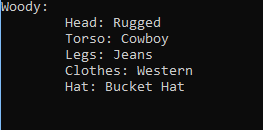
1 Run the application. Your output should look like the output below.
Output: Woody for 7.5 Builder Pattern Lab. Use the adjacent task instructions to identify the required controls, output, or debugger values.
Output: Woody
Line 11: : Woody:
Line 2:         :         Head: Rugged
Line 3:         :         Torso: Cowboy
Line 4:         :         Legs: Jeans
Line 5:         :         Clothes: Western
Line 6:         :         Hat: Bucket Hat
Build a spaceman with the same assembler
Acceptance Criteria
Acceptance criteria
  • SpacemanMaker implements IToyMaker and owns a new Toy.
  • The construction methods supply your selected spaceman values.
  • Main assembles and prints both toys; their distinct values are retained.
Instructions
7.Make a Spaceman that can be friends with the Cowboy.
A Define a new class named SpacemanMaker, have it implement IToyMaker, and put it in the proper folder.
B Define a private Toy field named toy.
C Define a constructor and instantiate toy.
D Return the toy in the GetToy method.
E Fill out the methods, passing in arguments of your choosing.
F In Main after the Console.WriteLine()....
1 Instantiate a SpacemanMaker.
2 Assign assembler to a new instance of Assembler, passing in the spacemanMaker object.
3 Call the AssembleToy method and the GetToy method.
4 Call Console.WriteLine, passing in the new toy.
G Check Your Work:
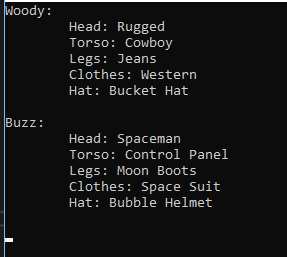
1 Run the application. Your console output should resemble the output below.
Output: Buzz Console for 7.5 Builder Pattern Lab. Use the adjacent task instructions to identify the required controls, output, or debugger values.
Output: Buzz Console
Line 11: : Woody:
Line 2:          :          Head: Rugged
Line 3:          :          Torso: Cowboy
Line 4:          :          Legs: Jeans
Line 5:          :          Clothes: Western
Line 6:          :          Hat: Bucket Hat
Line 77:
:
Line 88: : Buzz:
Line 9:          :          Head: Spaceman
Line 10:         :         Torso: Control Panel
Line 1111:         :         Legs: Moon Boots
Line 1212:         :         Clothes: Space Suit
Line 1313:         :         Hat: Bubble Helmet
Submit the toy builder
8.Zip your assignment and submit it to Canvas.
A Zip your assignment and submit it to Canvas.
Completion review
9.Review the feature acceptance criteria
A Confirm the required results

Return to each story and verify its acceptance criteria. Preserve the submission format and destination stated in the activity; a reading, setup guide, lab, video demonstration, and oral final may require different evidence.

Build a complete cowboy toy Build a spaceman with the same assembler