Acceptance criteria
- Comparison delegates allow animals to be sorted by age as well as the existing values.
Make sure the zoo only starts with these animals and guests.
// Animals for sorting
this.AddAnimal(new Chimpanzee("Bobo", 10, 128.2, Gender.Male));
this.AddAnimal(new Chimpanzee("Bubbles", 3, 103.8, Gender.Female));
this.AddAnimal(new Dingo("Spot", 5, 41.3, Gender.Male));
this.AddAnimal(new Dingo("Maggie", 6, 37.2, Gender.Female));
this.AddAnimal(new Dingo("Toby", 0, 15.0, Gender.Male));
this.AddAnimal(new Eagle("Ari", 12, 10.1, Gender.Female));
this.AddAnimal(new Hummingbird("Buzz", 2, 0.02, Gender.Male));
this.AddAnimal(new Hummingbird("Bitsy", 1, 0.03, Gender.Female));
this.AddAnimal(new Kangaroo("Kanga", 8, 72.0, Gender.Female));
this.AddAnimal(new Kangaroo("Roo", 0, 23.9, Gender.Male));
this.AddAnimal(new Kangaroo("Jake", 9, 153.5, Gender.Male));
this.AddAnimal(new Ostrich("Stretch", 26, 231.7, Gender.Male));
this.AddAnimal(new Ostrich("Speedy", 30, 213.0, Gender.Female));
this.AddAnimal(new Platypus("Patti", 13, 4.4, Gender.Female));
this.AddAnimal(new Platypus("Bill", 11, 4.9, Gender.Male));
this.AddAnimal(new Platypus("Ted", 0, 1.1, Gender.Male));
this.AddAnimal(new Shark("Bruce", 19, 810.6, Gender.Female));
this.AddAnimal(new Shark("Anchor", 17, 458.0, Gender.Male));
this.AddAnimal(new Shark("Chum", 14, 377.3, Gender.Male));
this.AddAnimal(new Squirrel("Chip", 4, 1.0, Gender.Male));
this.AddAnimal(new Squirrel("Dale", 4, 0.9, Gender.Male));

// Guests for sorting
this.AddGuest(new Guest("Greg", 35, 100.0m, WalletColor.Crimson, Gender.Male, new Account()), new Ticket(0m, 0, 0));
this.AddGuest(new Guest("Darla", 7, 10.0m, WalletColor.Brown, Gender.Female, new Account()), new Ticket(0m, 0, 0));
this.AddGuest(new Guest("Anna", 8, 12.56m, WalletColor.Brown, Gender.Female, new Account()), new Ticket(0m, 0, 0));
this.AddGuest(new Guest("Matthew", 42, 10.0m, WalletColor.Brown, Gender.Male, new Account()), new Ticket(0m, 0, 0));
this.AddGuest(new Guest("Doug", 7, 11.10m, WalletColor.Brown, Gender.Male, new Account()), new Ticket(0m, 0, 0));
this.AddGuest(new Guest("Jared", 17, 31.70m, WalletColor.Brown, Gender.Male, new Account()), new Ticket(0m, 0, 0));
this.AddGuest(new Guest("Sean", 34, 20.50m, WalletColor.Brown, Gender.Male, new Account()), new Ticket(0m, 0, 0));
this.AddGuest(new Guest("Sally", 52, 134.20m, WalletColor.Brown, Gender.Female, new Account()), new Ticket(0m, 0, 0));Currently when we sort we are always calling the animal sort, but now that we have guests to sort we will have to add another parameter to test against. We will be implementing it later on.
Change the index arguments based on the structure: "sort animals bubble weight". The result should look like the following when it is written to the console:
SORT TYPE: BUBBLE
SORT BY: ANIMALS
SORT VALUE: WEIGHT
SWAP COUNT: 108
COMPARE COUNT: 210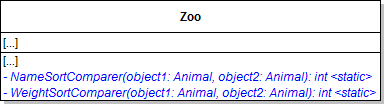
Pass in the names of the two animals.
double weight1 = animal1.Weight;
double weight2 = animal2.Weight;

return weight1 == weight2 ? 0 : weight1 > weight2 ? 1 : -1;Func<Animal, Animal, int> named compareFunc.If the sortValue is "name", set the variable to the NameSortComparer method. Otherwise, set the variable to the WeightSortComparer method.
The difference between each pair of Sort methods is what to compare (either weight or name) and how to compare them (either using the string compare method for names or the comparison operators for weight). The methods' algorithms are identical otherwise. Now that we have moved the logic of what to compare and how to compare them into their own methods (the Name and Weight sort comparer methods), we can reduce each pair of Sort algorithms to 1 and take in a comparing method as a parameter. This allows us to abide by DRY while still sorting by different values! It also allows us to easily make new ways to compare things while still using the same Sorting algorithms!

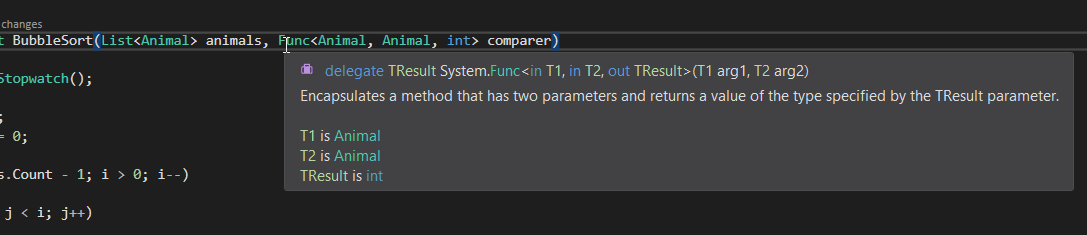
if (comparer(animals[j], animals[j + 1]) > 0)
{
    // swap code and swapCounter
}The command should be modeled after "sort animals bubble weight". Ensure that the animals are sorted correctly each time.
Ensure that the animals are sorted correctly each time. Restart the zoo between sorts for better results.
Leave it empty for now.
These changes - changing animals to objects - will make the sort methods generic so that they can be used to sort any collection of objects that supports the IList interface.
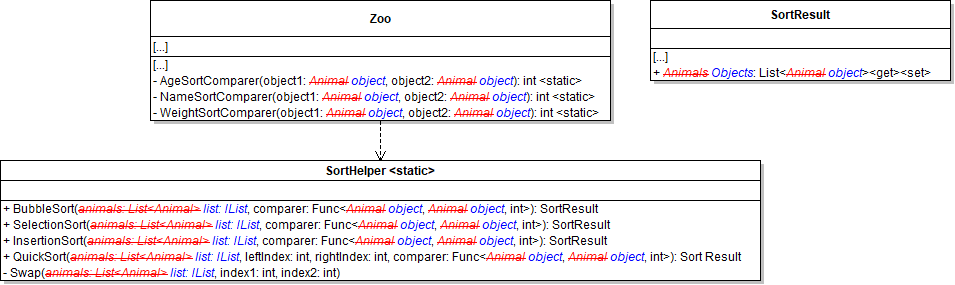
Func<object, object, int>Have the method accept two objects and compare the sum of their Wallet and CheckingAccount money balances.
To do so, set the Objects to the code below:
6.4.1 How to Use Extension Methodslist.Cast<object>().ToList()Within these methods call the SortObjects method and pass in the appropriate list from the zoo.
Use them to assign the correct sort comparer.
M. Modify the binary search:
List<Animal> and assign it to the sortResult's Objects property.Use "sort guests selection guestName" as a template.
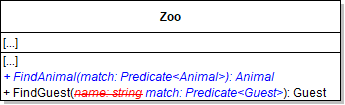
Pass the match Predicate parameter through.
For example, if you want to find an animal with a specified name, your lambda expression might look like the code below:
6.4.3 How to Use Lambda ExpressionsAnimal animal = zoo.FindAnimal(a => a.Name == name);Then show that animal (the show command uses the FindAnimal method). Both commands should work as before.
Then show that guest (the show command uses the FindGuest method). Both commands should work as before.
Open the WPF application, select an animal, then click the adopt button. The first guest without an adopted animal in the list should adopt that animal. Show the cage to make sure the guest and the animals are all drawn.
Ensure you get a message about no available guests.
Use a different sorting algorithm each time you sort.
Use a different sorting algorithm each time you sort.
© 2026 Northcentral Technical College