Acceptance criteria
- Movement notifications trigger cage redraws through delegates.
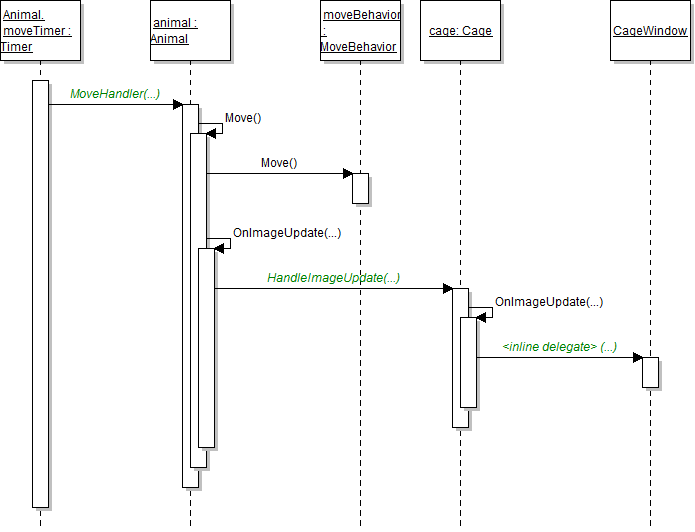
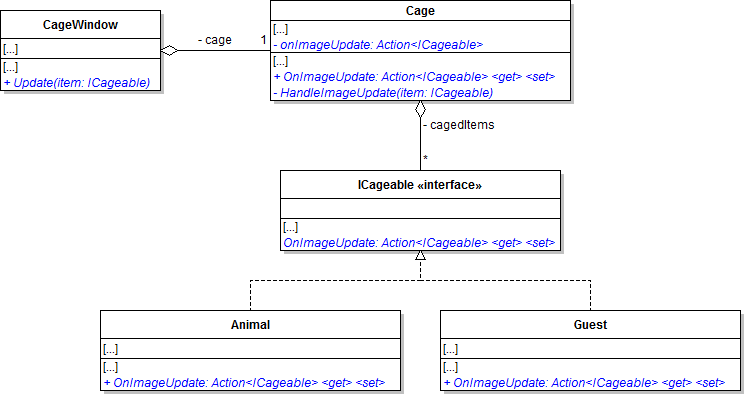
Then call the cage's OnImageUpdate method. This will bubble the caged item's notification up to the cage window.
Then call the cage's OnImageUpdate method. This will bubble the caged item's notification up to the cage window.
This will store the object in the viewbox for future reference.
try
{
    this.Dispatcher.Invoke(new Action(delegate()
    {
        // code here
    }));
}
catch (TaskCanceledException)
{
}If the current viewbox's tag matches the item parameter, remove that viewbox from the cage grid and break. After looping, draw the item.
In it, just set the cage's OnImageUpdate delegate to null. This will help with serialization by removing any references the delegate might have to the window's Update method.
Instead of adding the viewbox to the cage grid's children, insert it at the zIndex spot. Use the Insert method.
In the loop, pass the variable in to the DrawItem method, and then increment the variable.
Increment it inside the loop but after the if block. Then pass it in to the DrawItem method.
Show their cage. The overlapping animals should no longer flip back and forth between the foreground and the background.
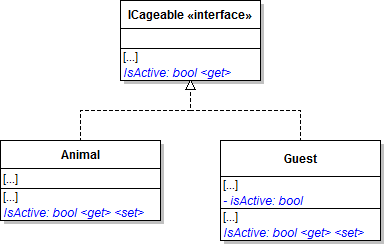
The getter should return true if either isActive is true or the guest's adoptedAnimal is not null.
Have the guest adopt an animal. The guest should appear in the cage window. Have the guest un-adopt their animal. The guest should disappear from the cage window.
The guest should appear in the cage window. Remove the adopted animal from the zoo. Both the animal and the guest should disappear from the cage window.
The guest should appear in the cage window. Remove the guest from the zoo. The guest should disappear from the cage window.
© 2026 Northcentral Technical College