Acceptance criteria
Guest-change delegates refresh the guest list display automatically.
Guest-change delegates refresh the guest list display automatically.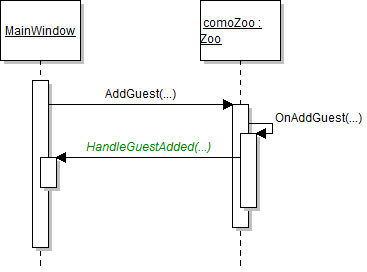
MainWindow, Zoo, and Guest classes as specified in the diagram below.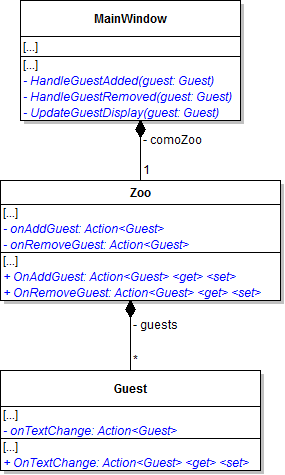
onAddGuest, onRemoveGuest, and onTextChange fields as NonSerialized.The MainWindow will plug methods into these delegates, so they cannot be serialized.
Zoo classOnAddGuest delegate in the AddGuest method and pass in the guest as the argument.OnRemoveGuest delegate in the RemoveGuest method and pass in the guest.OnTextChange delegate in the guest's name, age, and adopted animal properties.Remember to do null checks for the delegate.
MainWindow to the zoo and the guest. Review the sequence diagram below to complete the following steps.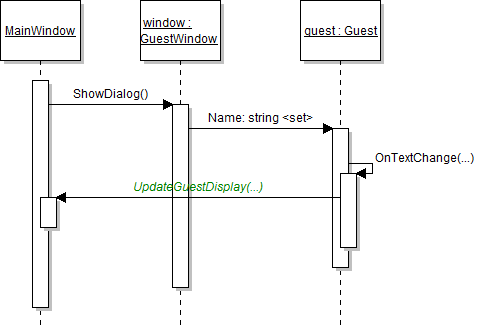
AttachDelegates method, plug the HandleGuestAdded method in to the zoo's OnAddGuest delegate and plug the HandleGuestRemoved method in to the zoo's OnRemoveGuest delegate.HandleGuestAdded method, add the guest to the list box's Items and then plug the UpdateGuestDisplay method into the guest's OnTextChange delegate.This will bubble any text changes on the guest (name, age, etc.) up to the window.
UpdateGuestDisplay methodint index = this.guestListBox.Items.IndexOf(guest);
if (index >= 0)
{
// disconnect the guest
this.guestListBox.Items.RemoveAt(index);
// create new guest item in the same spot
this.guestListBox.Items.Insert(index, guest);
// re-select the guest
this.guestListBox.SelectedItem = this.guestListBox.Items[index];
}HandleGuestRemoved method, remove the guest from the list box's Items and then unplug the UpdateGuestDisplay method from the guest's OnTextChange delegate.This will unattach the method and delegate when a guest is removed so that the guest doesn't have any "kite strings" still hanging onto it.
PopulateGuestListBox method on MainWindow.xaml.cs and all calls to it.MainWindow's ClearWindow method, instead of setting the list boxes' ItemsSource to null, call the Clear method on the list boxes' Items collection.OnDeserialized method, reattach delegates by looping through all the guests in the zoo and call the OnAddGuest delegate for each guest.This simulates the adding of deserialized (saved) guests so that they will appear in the list box.
Zoo.Change her name. The guest's name should change in the list box in the MainWindow when you tab out of the name text box in the GuestWindow. The same should happen for age.
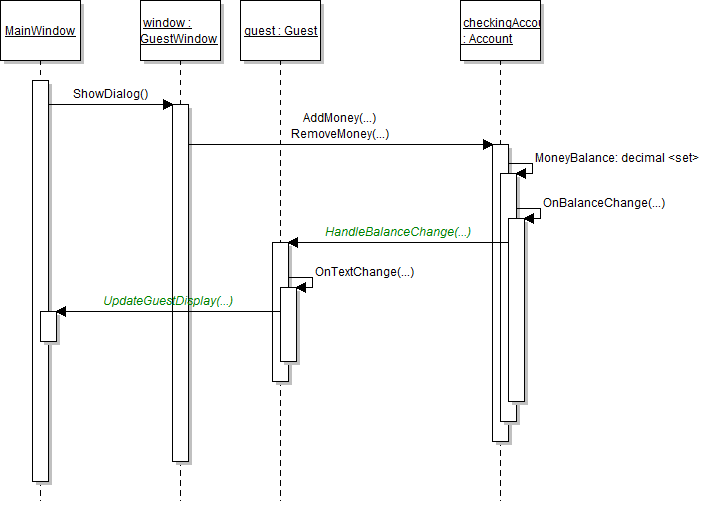
MoneyCollector classes as specified in the diagram below.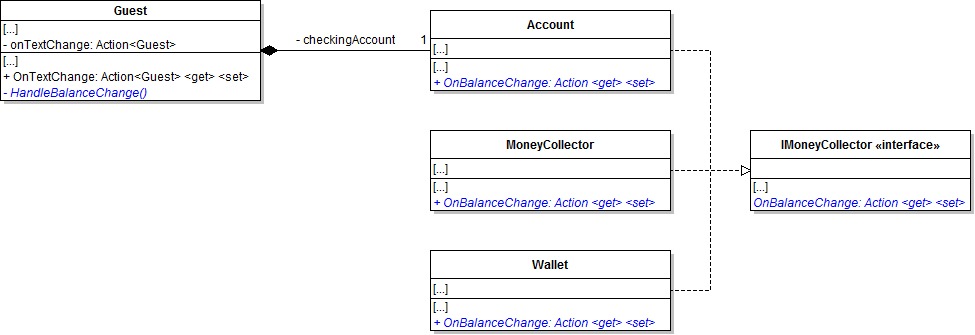
MoneyCollector, call the OnBalanceChange delegate when the balance is changed (i.e. in the MoneyBalance setter).HandleBalanceChange method in to the checking account's OnBalanceChange delegate.HandleBalanceChange method, call the guest's OnTextChange delegate.This will bubble up the checking account's balance change notification.
MoneyCollector, ensure that anytime the money balance is updated it references the property and not the field.Wallet class as specified in the diagram below.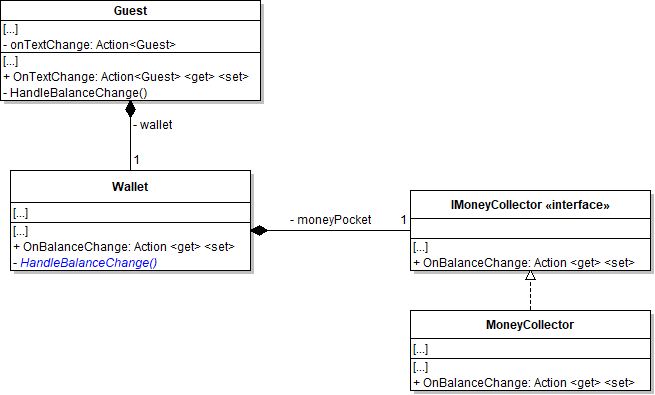
HandleBalanceChange method in to the wallet's moneyPocket's OnBalanceChange delegate.Wallet's HandleBalanceChange method, call the wallet's OnBalanceChange delegate.HandleBalanceChange method in to the wallet's OnBalanceChange delegate.Zoo.Ensure that her account money balance changes immediately in the list box in the MainWindow.
Ensure that her wallet money balance changes immediately in the list box in the MainWindow.
Animal-change delegates refresh the animal list display automatically.if (this.OnTextChange != null)
{
this.OnTextChange(this);
}Previously we have added null checks to ensure that the delegate actually has a method plugged into it before executing it like this:
Instead, we can shorten this using what is called a Null Conditional Operator which looks like this:
this.OnTextChange?.Invoke(this);NonSerialized delegate for notifying subscribers of all text changes named onTextChange and have a corresponding Property.MainWindow should have a method for updating the animal display named UpdateAnimalDisplay.Zoo should have NonSerialized delegates for notifying subscribers of addition and removal of animals named onAddAnimal an onRemoveAnimal and corresponding corresponding Properties.MainWindow should have methods for handling the addition and removal of animals named HandleAnimalAdded and HandleAnimalRemoved.IsPregnant property in the Animal class and change all references from the field reference to the property.OnTextChange, OnAddAnimal and OnRemoveAnimal in their appropriate places.Zoo should simulate the adding of animals after it is deserialized (loaded).The animal's name, age, and weight should update in the list box in the MainWindow after tabbing out of the text boxes in the AnimalWindow. The animal's pregnancy status should update in the list box in the MainWindow after making the animal pregnant in the AnimalWindow.
The animal you edited previously should be loaded properly and should appear in the list box.
MainWindowMainWindowWallet BalanceGuest's information.Guest's information.MainWindowMainWindowMainWindowMainWindow© 2026 Northcentral Technical College