6.2A Zoo Assignment

6.2A Zoo Assignment
Use delegates to update the birthing room temperature in console.
Acceptance Criteria
Acceptance criteria
  • A temperature-change delegate notifies the console when the birthing room temperature changes.
1.Use delegates to update the birthing room temperature in console.
Problem
Solution
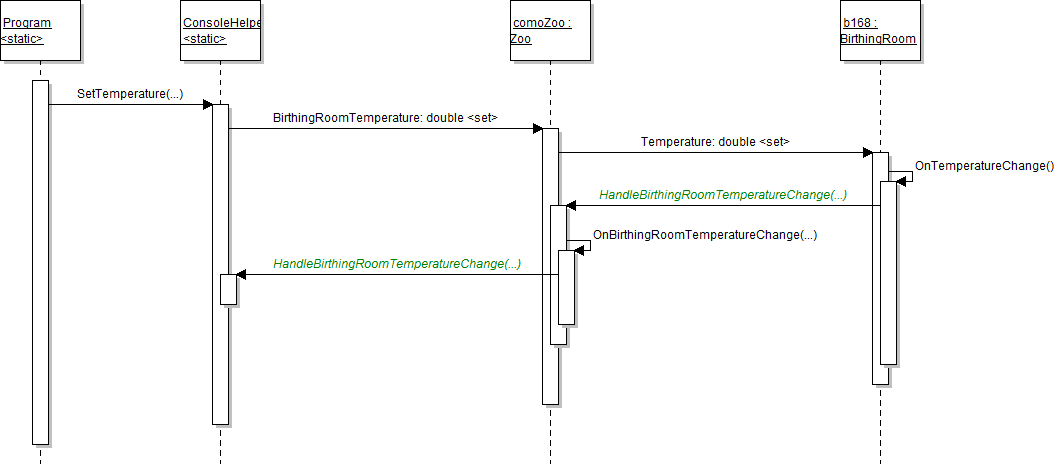
Sequence Diagram: Console Temperature. Reference figure for use delegates to update the birthing room temperature in console.
Sequence Diagram: Console Temperature
6.2.1 How to Use Event Driven Programming 6.2.2 How to Use Delegates 6.2.3 How to Use Actions 6.2.4 How to Implement the Observer Pattern 6.2.5 Why we Use the Observer Pattern
A Make changes to the BirthingRoom, Zoo, and ConsoleHelper classes as specified in the diagram below.
public Action<double, double> OnTemperatureChange { get; set; }
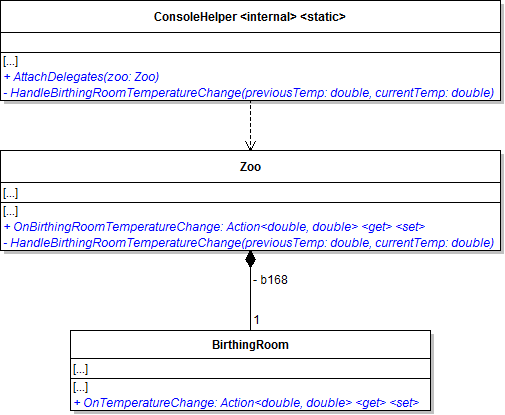
Class Diagram: Temperature Change Delegates. Reference figure for use delegates to update the birthing room temperature in console.
Class Diagram: Temperature Change Delegates
B In the BirthingRoom's Temperature setter
1 Store the current temperature field value in a local variable named previousTemp before setting the field to the new value.
2 After setting the temperature, call the OnTemperatureChange delegate and pass in the previousTemp variable and temperature field.
3 Check if the delegate is not null before calling it.
C Bubble the birthing room temperatures up through the zoo.
1 In the zoo's constructor, after instantiating b168, plug in the HandleBirthingRoomTemperatureChange method to b168's OnTemperatureChange delegate.

This attaches the method to the delegate so that whenever the delegate (property) is called, the method will run.

this.b168.OnTemperatureChange += this.HandleBirthingRoomTemperatureChange;
2 In the HandleBirthingRoomTemperatureChange method, call the OnBirthingRoomTemperatureChange delegate.

Pass the previousTemp and currentTemp parameters through.

D Update the console.
1 In the ConsoleHelper's HandleBirthingRoomTemperatureChange method, write out the previousTemp and currentTemp to the console.
Console.WriteLine($"Previous temperature: {previousTemp:0.0}.");
Console.WriteLine($"New temperature: {currentTemp:0.0}.");
2 In the AttachDelegates method, plug in the HandleBirthingRoomTemperatureChange method to the zoo's OnBirthingRoomTemperatureChange delegate.
3 The SetTemperature method now only needs to set the birthing room temperature and catch any exceptions that might occur.

Remove any code that writes temperatures to the console. Replace the code in the try block with the code below.

zoo.BirthingRoomTemperature = double.Parse(temperature);
E In the Main method of Program.cs, call the AttachDelegates method after
1 Initially creating the zoo
2 Restarting the zoo
3 Loading a zoo
F Check your work
1 Set a breakpoint on the call to AttachDelegates in the Program.cs.
2 Run the console application.
3 Press F11 to step into AttachDelegates.
4 Press F10 to step over the line of code that plugs the Handle method into the OnChange method.

The OnBirthingRoomTemperature change delegate (property) now is the HandleBirthingRoomTemperatureChange method in the ConsoleHelper class.
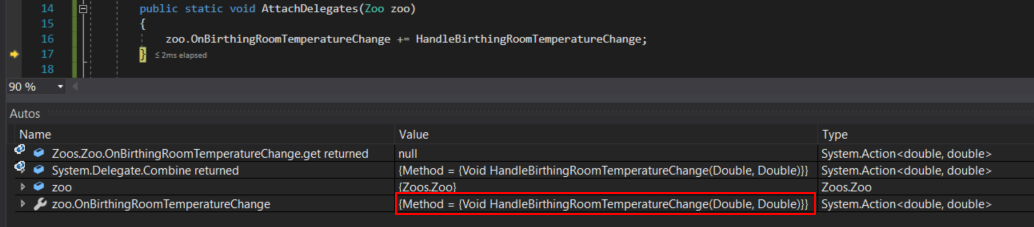
Snip: OnChange Delegate Becomes Handle. Reference figure for use delegates to update the birthing room temperature in console.
Snip: OnChange Delegate Becomes Handle
5 Set a breakpoint in the SetTemperature method in the ConsoleHelper class on the line that sets the BirthingRoomTemperature.
6 Click Continue and type in the command 'temp 60'
7 Press F11 until you get to the null check for the OnTemperatureChange delegate in the Temperature property.

Ensure that the OnTemperatureChange delegate has the method HandleBirthingRoomTemperatureChange plugged into it.

8 Press F11 to step through the OnTemperatureChange getter and then into the HandleBirthingRoomTemperatureChange method in the Zoo class.

Ensure the OnBirthingRoomTemperatureChange delegate has the

HandleBirthingRoomTemperatureChange method plugged into it.
9 Press F11 to step through the OnBirthingRoomTemperatureChange getter and then into the HandleBirthingRoomTemperatureChange method in the ConsoleHelper class.
10 Click Continue. Ensure that the console has written the previous temp of 77 and the new temp of 60.
Use delegates to update the birthing room temperature in the window
Acceptance Criteria
Acceptance criteria
  • The temperature-change delegate updates the WPF controls automatically.
2.Use delegates to update the birthing room temperature in the window
Problem
Solution
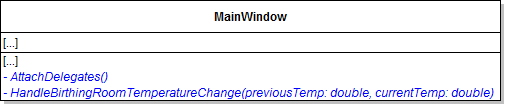
A Make changes to MainWindow.xaml.cs as specified in the diagram below.
Class Diagram: MainWindow. Reference figure for use delegates to update the birthing room temperature in the window.
Class Diagram: MainWindow
B Move the code from the ConfigureBirthingRoomControls method into the HandleBirthingRoomTemperatureChange and remove the ConfigureBirthingRoomControls method and all references to it.
C In the HandleBirthingRoomTemperatureChangeChange method, change any references to BirthingRoom.Temperature to the currentTemp parameter.
D In the AttachDelegates method, plug in the HandleBirthingRoomTemperatureChange method to the zoo's OnBirthingRoomTemperatureChange delegate.
E Call the AttachDelegates method after creating a zoo in window_Loaded, restarting the zoo in restartButton_Click, and loading the zoo in the LoadZoo.
F Check your work
1 Run the WPF application.
2 Increase and decrease the birthing room temperature.

The label, border height, and border background color all should change as the temperature changes.

3 Close the application.
Fix serialization of the zoo
Acceptance Criteria
Acceptance criteria
  • Delegates are excluded from serialization and the required handlers are reattached after loading.
3.Fix serialization of the zoo
Problem
Solution
A Change the zoo's OnBirthingRoomTemperatureChange auto-property to be a full property with a backing private field.

Mark the private field as NonSerialized.
B Check your work
1 Run the WPF application.
2 Click the save button.
3 Increase or decrease the birthing room temperature.
4 Click the load button and load your previous save.
5 Increase and decrease the birthing room temperature.
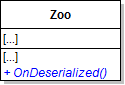
C Add the OnDeserialized method to the Zoo class as specified in the diagram below.
Class Diagram: OnDeserialized. Reference figure for fix serialization of the zoo.
Class Diagram: OnDeserialized
D Write the OnDeserialized method.
1 Call the OnBirthingRoomTemperatureChange delegate.

Pass in the birthing room's current temperature for both parameters.

E Call the OnDeserialized method at the end of the MainWindow's AttachDelegates method.
F Check your work
1 Run the WPF application.
2 Change the birthing room temperature and take note of the new temperature.

Then close the application. It should close successfully.

3 Restart the WPF application.

The auto-saved zoo should be loaded. The label and border should be updated automatically now to the previously save temperature.

Demonstrate your work
4.Record a video showing
A Your Console Application
1 Show that changing the BirthingRoom's Temperature automatically writes the old and new temperatures to the console
Subtasks
  • A. Set a breakpoint in the BirthingRoom's Temperature setter on the line that calls its OnTemperatureChange delegate
  • B. Set a breakpoint in the Zoo's HandleBirthingRoomTemperatureChange on the line that calls the Zoo's OnBirthingRoomTemperatureChange delegate
  • C. Set a breakpoint at the beginning of the ConsoleHelper's HandleBirthingRoomTemperatureChange method
  • D. Start your Console Application and enter the command "temp 60"
  • E. Press F11 to navigate through the breakpoints and ensure:
  • E.1. You encounter the breakpoints in the same order it was set from A - C
  • E.2. The previous and new temperatures are printed to the console
  • F. Remove only the breakpoint set in C
B Your WPF Application
1 Show that changing the temperature still correctly changes the temperature controls using delegates
Subtasks
  • A. Make sure you've set breakpoints specified by Step A1A and Step A1B
  • B. Set another breakpoint at the start of the MainWindow's HandleBirthingRoomTemperatureChange method
  • C. Start your application and change the temperature
  • D. Press F11 to navigate through the breakpoints and ensure:
  • D.1. You encounter the breakpoints in the same order it was set from A - B
  • D.2. The correct new temperature is displayed
  • D.3. The temperature border's height adjusts to the new value
  • D.4. The temperature border's color slightly changes
  • E. Remove all breakpoints (which can be done quickly by going to Debug -> Delete All Breakpoints)
  • F. Note your current temperature
  • G. Close the WPF application
2 Show that zoo temperatures load correctly on start up
Subtasks
  • A. Start your WPF application again
  • B. Ensure that the auto-loaded zoo still starts with the previous temperature value, color, and height.
3 Show that zoo temperatures load correctly with manual load
Subtasks
  • A. Change the temperature
  • B. Manually save the zoo
  • C. Change the temperature again
  • D. Load the zoo you saved in Step B and ensure it has the previous temperature value, color, and height.
Prepare and submit your work
5.Submission Steps
A Ensure that your application has no compiler errors or warnings
B Ensure that your code is StyleCop compliant
C Remove all bin and obj folders from your solution
D Zip your solution
E Submit your zipped solution to the Feedback System
F Submit your Feedback System results link to Canvas
G Submit your video recording to your f-channel
Source credit

© 2026 Northcentral Technical College