5.3B Zoo Assignment

5.3B Zoo Assignment
Use an insertion sort to sort animals by weight
Acceptance Criteria
Acceptance criteria
  • Insertion sort orders animals by weight.
1.Use an insertion sort to sort animals by weight

Insertion Sort: The insertion sort builds a sorted list from the start of the unsorted list. It loops through the remaining unsorted items in the list; each time through, it grabs the next unsorted item, and then loops back through the sorted part of the list to find the correct spot for the current unsorted item. After it finds the correct spot, it "inserts" the item into that spot.
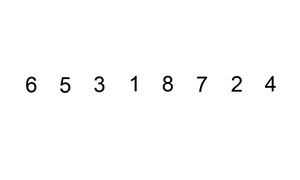
Gif: Insertion Sort. Reference figure for use an insertion sort to sort animals by weight.
Gif: Insertion Sort

By Swfung8 (Own work) [CC BY-SA 3.0 (http://creativecommons.org/licenses/by-sa/3.0) or GFDL (http://www.gnu.org/copyleft/fdl.html)], via Wikimedia Commons

5.3.7 How to Use Insertion Sort
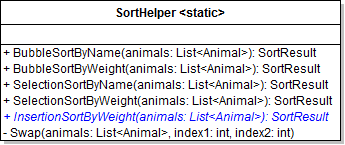
A Add the InsertionSortByWeight method to the SortHelper as specified in the diagram below.
Class Diagram: InsertionSortByWeight. Reference figure for use an insertion sort to sort animals by weight.
Class Diagram: InsertionSortByWeight
B In the zoo's SortAnimals method, call the InsertionSortByWeight method in the "insertion" case if the sortValue is "weight".
C Initialize a swapCounter and return a SortResult as done in the previous algorithms.
D Write the insertion sort algorithm
1 Write an outer loop that starts at 1, loops while the value of the loop is less than the Count of the animals list, and increments by 1.
2 Write an inner loop that starts at the same place as the outer loop, loop while the value of the loop is greater than 0 and the current animal's Weight is less than the previous animal's Weight, and decrement the loop by 1.
3 In the inner loop, Swap the index at the inner loop value and the index at one less than the inner loop value and increment the swapCounter by 1.
E Check Your Work
1 Set a breakpoint at the beginning of the outer for loop.
2 Run the console application and type 'sort insertion weight'.
3 Ensure you have the animals list in a Watch window.
4 Press F10 to 'step into' the inner for loop.
5 Press F10 again to step into the condition of the inner for loop.

The value is greater than 0 and the second animal in the list's Weight (103.8) is less than the first animal's (128.2) so the loop will execute.

6 Press F10 to step into the inner for loop body and over the Swap call.

Bobo and Bubbles should swap index positions in the list.

7 Press F10 to go back to the for loop.

The value of the inner for loop becomes 0 (the beginning of the list) so the condition fails and you should be brought back to the outer loop.

8 'Step into' the inner for loop again.

This time the value should be 2 and the second animal in the unsorted list is 41.3 and the first is 128.2.

9 Step through the inner for loop body. Spot should switch index positions with Bobo.
10 Press F10 to go back into the inner for loop.

This time the value is greater than 0 AND the Weight of the second animal (41.3) is less than the first animal (103.8) so the loop executes again and Spot should swap with Bubbles. The loop should break because it reaches the beginning of the list.

11 Continue pressing F10 and watch the Watch window to see how animals are "inserted" into their proper place.
12 Remove the breakpoint and click Continue.

The animals should be sorted in ascending order by weight with a swap count of 108.
Use an insertion sort to sort animals by name
Acceptance Criteria
Acceptance criteria
  • Insertion sort orders animals by name.
2.Use an insertion sort to sort animals by name
Problem
Solution
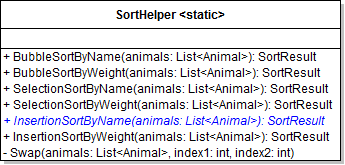
A Add the InsertionSortByName method to the SortHelper as specified in the diagram below.
Class Diagram: InsertionSortByName. Reference figure for use an insertion sort to sort animals by name.
Class Diagram: InsertionSortByName
B In the zoo's SortAnimals method, call the InsertionSortByName method in the "insertion" case if the sortValue is "name".
C Write the insertion sort algorithm to sort the animals by their names.

It is the same as the algorithm for weight, but it compares the name values instead of the weight values.
D Check Your Work
1 Run the console application.
2 Type "sort insertion name." The animals should be sorted by name in ascending order. The swap count should be 108.
View the number of compares and elapsed time per sort in addition to swaps
Acceptance Criteria
Acceptance criteria
  • Sort results report comparisons and elapsed milliseconds as well as swaps.
3.View the number of compares and elapsed time per sort in addition to swaps
Problem
Solution
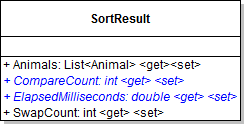
A Update the SortResult class in the Zoos project as specified in the diagram below.
Class Diagram: SortResult. Reference figure for view the number of compares and elapsed time per sort in addition to swaps.
Class Diagram: SortResult
B In the "sort" case, write to the console underneath the swap count, the sortResult's CompareCount and the ElapsedMilliseconds.

It should look like the following:

"COMPARE COUNT: " + [SortResult variable].CompareCount
"TIME: " + [SortResult variable].ElapsedMilliseconds
C Initialize a compare counter variable in each method, increment it at the point of comparison in the algorithm and assign the CompareCount property in the object initializer.
D In each sort method, initialize a Stopwatch variable (in the System.Diagnostics namespace).

Start the stopwatch at the beginning of the method, and stop it at the end of the method. Assign the ElapsedMilliseconds property in the object initialzer to the Stopwatch's Elapsed.TotalMilliseconds property.

5.3.8 How to Use the Stopwatch
E Check Your Work
1 Run the console application.
2 Type in "sort bubble weight." The animals should be sorted by weight in ascending order.

The swap count should be 108, and the compare count should be 210.

3 Restart the Zoo.
4 Type in "sort insertion weight".

The animals should be sorted by weight in ascending order. The swap count should be 108, and the compare count should be 20.

5 Restart the Zoo.
6 Type in "sort selection weight." The animals should be sorted by weight in ascending order.

The swap count should be 16, and the compare count should be 210.
Use a binary search to find an animal by name
Acceptance Criteria
Acceptance criteria
  • Binary search finds animals by name in a sorted collection.
4.Use a binary search to find an animal by name
Problem
Solution
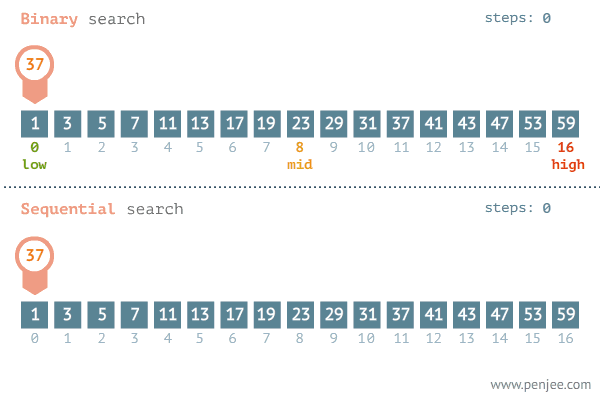
Gif: Binary Search vs. Sequential Search. Reference figure for use a binary search to find an animal by name.
Gif: Binary Search vs. Sequential Search

Penjee via https://blog.penjee.com/binary-vs-linear-search-animated-gifs/

5.3.9 How to Use a Binary Search
A Modify the switch statement in the Main method in Console.
1 Add a search case.
2 Within the "search" case add an if-statement that tests if the second word passed in is either "binary" or "linear."
B Within the if-statement that tests if the search is "linear."
1 Initialize a loop counter variable to 0 and get the passed-in animal's name.
2 Get the animal name by storing the results of calling InitialUpper and passing commandWords[2] in a local variable.
3 Loop through the zoo's list of animals.

Each time through, increment the loop counter and check if the current animal's name matches the passed-in name.

4 If the names match, write to the console saying the animal was found and how many loops were completed.

Then break. The message should look like the following.

[animal name] found. [number of loops] loops complete.
C Within the if-statement that tests if the search is "binary."
1 Get the animal name by storing the results of calling InitialUpper and passing commandWords[2] in a local variable.
2 Initialize a loop counter variable to 0 and get the passed-in animal name.

Also, store a copy of the zoo's animals from a SortResult object in a variable, as shown in the code below.

SortResult animals = zoo.SortAnimals("bubble", "name");
3 Intialize a minPosition variable to 0 and a maxPosition variable to one less than the number of animals in the list.
4 Write a while loop
Subtasks
  • A. The while loop should execute while the minPosition is less than or equal to the maxPosition.
  • B. Get the middle position by adding minPosition and maxPosition together (this will need to be in parentheses) and dividing by 2. Store this in an int type named middlePosition.
  • C. Increment to loop counter.
  • D. Use string.Compare to compare the name being searched for with the name of the animal at the middlePosition. Store the result in an int type named compare.
Subtasks
  • E. If the compare result is greater than 0, assign the minPosition to one more than the middlePosition.
Subtasks
  • F. If the compare result is less than 0, assign the maxPosition to one less than the middlePosition.
Subtasks
  • G. In the else statement, write a console message saying the animal was found and how many loops were completed then break out of the loop.
D Check Your Work
1 Run the console application.

Type "search linear Ted". Ensure that Ted is found and that it takes 16 loops to complete.

2 Set a breakpoint on the while loop in the binary search code.
3 Type "search binary Ted".
4 Put a Watch on minPosition, maxPosition, middlePosition and the compare variable.
5 F10 through the while loop.

The minPosition should be 0, the maxPosition should be 20, the middlePosition should become 10 and the compare variable should be 1 (indicating it is greater than the animal name at the middle position). The minPosition should become 11 because we now only care about the ranges from 11 to 20.

6 F10 through the while loop again.

Now the middle position becomes 15 and the minPosition becomes 16. The range was cut in half again.

7 F10 through the while loop again. The middle position become 18 and the minPosition becomes 19.
8 F10 through the while loop again.

The middle position becomes 19 and since the animal at position 19 IS Ted, the string compare will come back as 0 and the else statement will execute.

9 Remove the breakpoint and click Continue. The console should say that Ted was found and it took 4 loops.
10 Do a binary search for bruce. It should take 4 loops as well.
Demonstrate your work
5.Record a video showing
A The Zoo class' SortAnimals method
B Your Console Application
1 Show that sorting commands correctly sorts the zoo's list of animals by typing
Subtasks
  • A. sort bubble name
  • B. sort selection name
  • C. sort insertion name
  • D. sort insertion weight
2 Show that the search commands correctly searches for an animal by typing
Subtasks
  • A. search linear Ted
  • B. search binary Ted
Prepare and submit your work
6.Submission Steps
A Ensure that your application has no compiler errors or warnings
B Ensure that your code is StyleCop compliant
C Remove all bin and obj folders from your solution
D Zip your solution
E Submit your zipped solution to the Feedback System
F Submit your Feedback System results link to Canvas
G Submit your video recording to your f-channel
Source credit

© 2026 Northcentral Technical College