Acceptance criteria
- The show cage console command displays the cage and its occupants as text, including their current positions.
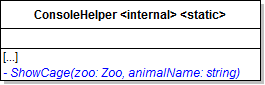
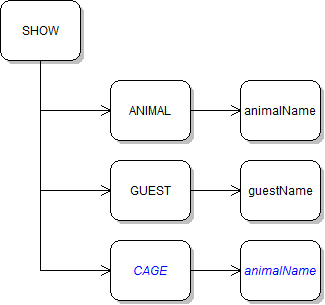
{AnimalType.Name} cage ({Width} x {Height})For each item, use string interpolation to add the following information to the result variable:
{Environment.NewLine}{cagedItem} ({cagedItem.XPosition} x {cagedItem.YPosition})If it is, write a message to the Console.
If it is, write a message to the Console.
The cage's information and both dingoes' information should be written to the console.
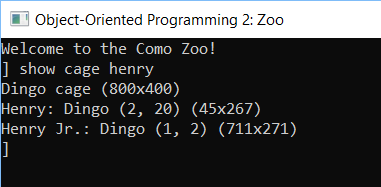
Notice that the dingoes' XPositions have changed. This is because animals are always moving when the application is running, whether a cage window is open in the WPF application or not.
Press enter on the show cage command again to show the new values.
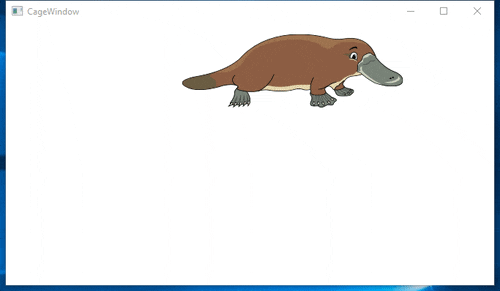
The platypus should appear in the cage window, but it should not move because it overrides the mammal's Move method without calling base.
Then it switches its vertical direction.
The shark should be moving diagonally across the cage window. When it hits the left or right edge, it should change horizontal direction (and only horizontal direction). When it hits the top or bottom edge, it should change vertical direction (and only vertical direction).
It should be moving in the same way as the shark. The result should look similar to the image below.
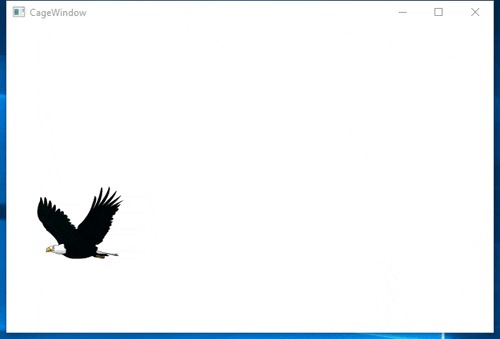
The eagle should be steadily moving horizontally across the window. It should be moving alternately up and down each time it moves.
The result should look similar to the image below.
The hummingbird should appear in the cage window, but it should not move because it overrides the bird's Move method without calling base.
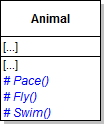
Then call this.Pace() in the Move method of the following classes:
Then, remove the code in the Move method and call this.Swim() in the Move method of the following classes:
Then, remove the code in the Move method and call this.Fly() in the Move method of the Bird class.
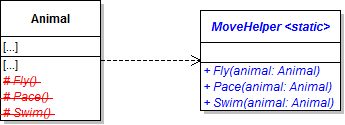
All references to "this" in the code should be changed to refer to the passed-in animal.
Pass in the current animal when calling the method.
© 2026 Northcentral Technical College