Acceptance criteria
- WPF users can remove animals and guests through the specified controls.
MainWindow underneath the animals list box. Name it removeAnimalButton and add a click event.Animal animal = this.animalListBox.SelectedItem as Animal;If they do, remove the animal.
if (MessageBox.Show(string.Format("Are you sure you want to remove animal: {0}?", animal.Name), "Confirmation", MessageBoxButton.YesNo) == MessageBoxResult.Yes)PopulateAnimalListBox method after removing the animal from the zoo.Animal-window control events transfer the user's input to the animal.Name property to the Text property of the nameTextBox (your name for it may be different).int.Parse(text) or double.Parse(text)makePregnantButton.makePregnantButton eventMakePregnant method.IsEnabled property.pregnancyStatusLabel Content property to "Yes".In the event handler, set the animal's Gender to the SelectedItem in the gender combo box.
genderComboBox_SelectionChanged event handler, use a ternary operator to see if the animal's Gender is female and if it is, enable the Make Pregnant button, otherwise, disable it.animalListBox by adding a P to the end of the Animal class's ToString override.To do this, use a ternary operator to test the status if IsPregnant and if true, add " P" otherwise add string.Empty.
Name: SpotAge: 5Weight: 50Yes and that the button is disabled.'P' label added to it.Animal properties apply the required validation rules.Age must be between 0 and 100, inclusive.If it is not, throw an appropriate exception type (ArgumentOutOfRange) and include a user-friendly message.
Therefore, no validation is necessary.
If the inputted value does not match the regular expression, throw an appropriate exception type (Format) with a user-friendly message.
if (!Regex.IsMatch(value, @"^[a-zA-Z ]+$"))Weight must be between 0 and 1000.If it is not, throw an appropriate exception type and include a user-friendly message.
Show the exception's message to the user.
AddAnimal method in the ConsoleHelper.AddAnimal method, define a local variable named success of type bool and assign it to false.Age in a try/catch that catches an ArgumentOutOfRangeException and writes a message to the Console.true after assigning the Age property.false.Weight property.false between the Age and Weight property while loops.Name: Wa1ter Wh1teAge: 200Weight: 2000'add animal'.Test the following values to make sure that validation works. Ensure the Console application continually asks for a valid value when bad values are given.
Name: Wa1ter Wh1teAge: 1000Weight: 2000GuestWindow to the ZooScenario project, as specified in the diagram below.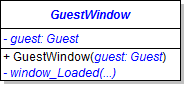
addGuestButton to the main window underneath the guest list box. Add a click event.addGuest's content after the addAnimalButton's click event.Initialize the controls to the guest's values in the window_Loaded event.
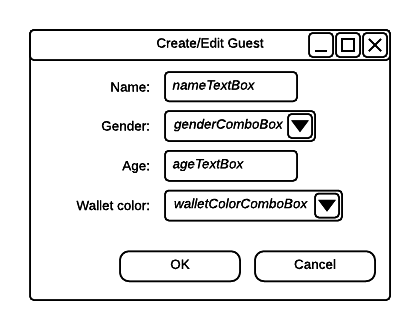
Make the Cancel button the cancel button. Add a click event to the OK button; in it, set the window's DialogResult to true.
Text of the text box.SelectedItem in the combo box.Age must be between 0 and 120.If it is not, throw an appropriate exception type and include a user-friendly message.
Name must only include letters and spaces.If it is not, throw an appropriate exception type and include a user-friendly message.
AddGuest method in the ConsoleHelper, add a while loop to the Age property like you did in the AddAnimal method.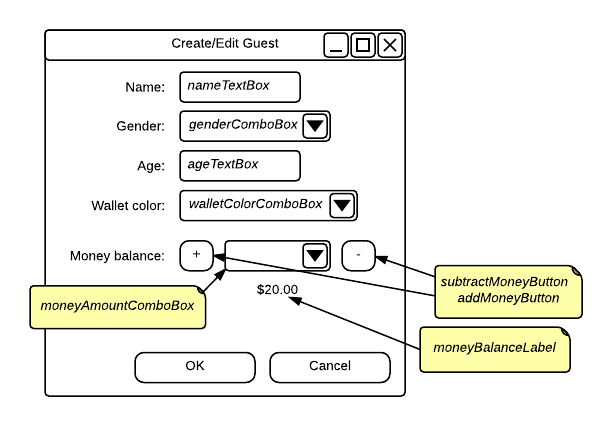
window_Loaded eventmoneyBalanceLabel's Content to the guest's wallet money balance.Items list:Example: moneyAmountComboBox.Items.Add(1);moneyAmountComboBox's SelectItem property to the moneyAmountComboBox's Items property's 1st item in the array [0].addMoneyButton.Text of the combo box and passing it into the wallet's AddMoney method.moneyBalanceLabel's Content to the current money balance.subtractMoneyButton.Text of the combo box and passing it into the wallet's RemoveMoney method.moneyBalanceLabel's content to the current money balance.Model the account after the previous steps that set the wallet's money balance.
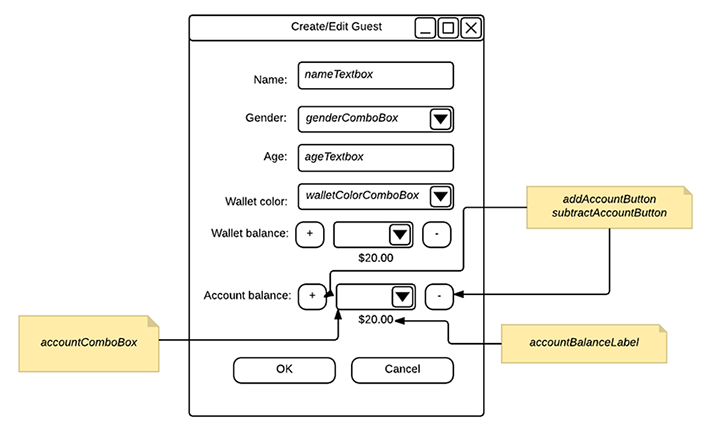
window_Loaded event handler, assign the combo box's SelectedItem property to the first position in Items and add the following values to the combo box:NewZoo no longer creates the animals and guests that users now supply themselves.NewZoo method, remove all of the code that creates and adds animals and guests.Only the zoo and the employees should be created.
'add animal'Name: 5+r33+Age: 1000Weight: 2000AnimalWindowName: L!n+Age: 259Weight: 2023IsPregnant label changed to Yes and that the button is disabled.Animal to the Zoo and ensure the list box reflects the values you've enteredGuestWindowName: D-FL8Age: 247Name and Age fields© 2026 Northcentral Technical College