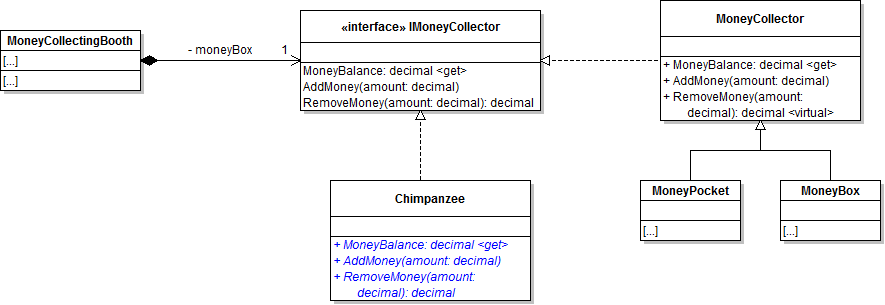
AMake the Chimpanzee class implement the IMoneyCollector interface.
Class Diagram: Chimpanzee
1The Chimp's MoneyBalance property should always return 0m.
2In the AddMoney method, write a comment to buy some bananas. The method should do nothing else.
3Have the RemoveMoney method return 0.
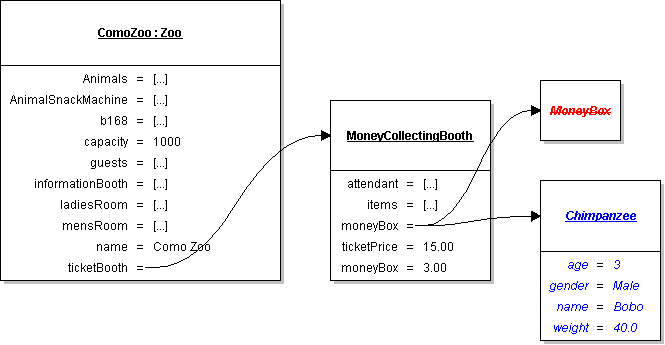
BInstantiate the money collecting booth's money box as a Chimpanzee in the constructor of the MoneyCollectingBooth.
Object Diagram: Chimpanzee
CCheck Your Work
1Set breakpoints where appropriate to step through the code for the money collecting booth's money box.
2Run the WPF application.
3Ensure that the AddMoney and RemoveMoney methods step into the Chimpanzee class and do not have the expected functionality of an actual money collector.
The Chimpanzee should be more interested in bananas than collecting money.
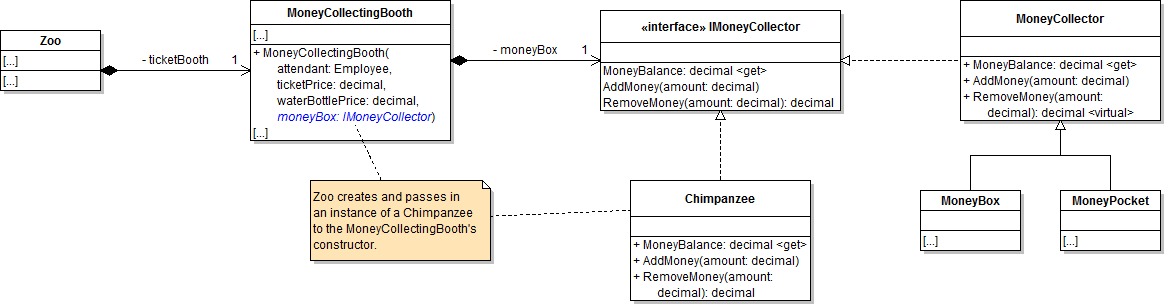
DIn the MoneyCollectingBooth's constructor add the moneyBox of type IMoneyCollector as a parameter.
Class Diagram: MoneyCollectingBooth
1Use the passed-in IMoneyCollector parameter within the MoneyCollectingBooth's constructor instead of instantiating a new Chimpanzee.
EIn the zoo's constructor, instantiate the ticket booth's money box as a Chimpanzee.
1Check Your Work
Subtasks
A. Run the WPF application. Ensure that the MoneyCollectingBooth's behavior remains the same. The Chimpanzee should still like bananas more than money.
FRemove the chimp from his money collecting duties
1In the Zoo's constructor, change the ticketBooth's Chimpanzee to an actual MoneyBox.
2Remove the implementation of the IMoneyCollector from the Chimpanzee class and any methods/properties relating to money stuffs.
GCheck Your Work
1Set a breakpoint on the call to AddMoney in the MoneyCollectingBooth class and run the WPF application.
2Ensure that the AddMoney method steps into the MoneyCollector class and has the expected functionality of a money collector.
Implement the dependency inversion principle in the VendingMachine
Acceptance Criteria
Acceptance criteria
The zoo supplies the vending machine's money collector from outside the vending machine.
2.Implement the dependency inversion principle in the VendingMachine
Problem
Solution
AModify the Vending Machine's constructor.
Class Diagram: Vending Machine Constructor
1Add a moneyBox parameter of type IMoneyCollector.
2In the constructor, assign the moneyBox field to the passed-in moneyBox.
BIn the zoo's constructor create a new moneyBox for the animalSnackMachine.
CCheck Your Work
1Set breakpoints where appropriate to step through the code for the vending machine's money box.
2Run the WPF application.
3Ensure behavior of the Vending Machine's money box stays the same.
Give the vending machines an account.
Acceptance Criteria
Acceptance criteria
The vending machine uses an account implementation for its money collector.
3.Give the vending machines an account.
Problem
Solution
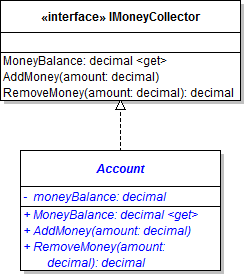
ACreate an Account class in a new project called Accounts as specified in the diagram below.
Class Diagram: Account.
BIn the account's RemoveMoney method, subtract the passed-in amount from the money balance and return the passed-in amount.
This allows the account balance to go negative.
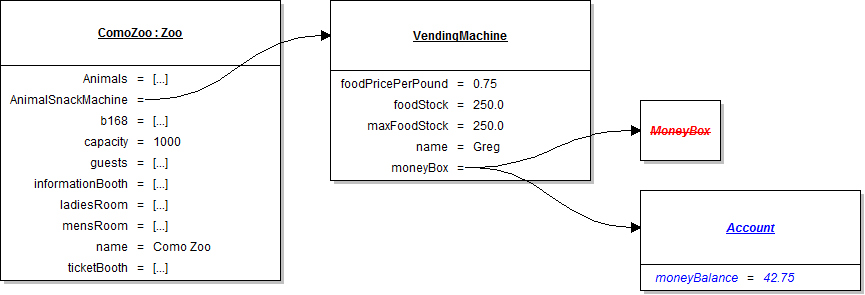
CIn the zoo's constructor, instead of instantiating a MoneyBox in the animalSnackMachine, create a new Account in its place.
Object Diagram: Account
DMake the MoneyCollector class abstract.
ECheck Your Work
1Set breakpoints where appropriate to step through the code for the vending machine's account.
2Run the WPF application.
3Ensure that when stepping into the VendingMachine's AddMoney method, it steps into the Account's AddMoney method.
Select a guest to feed an animal and an animal to be fed.
Acceptance Criteria
Acceptance criteria
The selected guest feeds the selected animal instead of relying on hard-coded selections.
4.Select a guest to feed an animal and an animal to be fed.
Problem
Solution
AIn the click event of the feedAnimalButton, get the selected guest and animal.
1Get the selected item in the guest list box and cast it as a guest.
Guest guest = this.guestListBox.SelectedItem as Guest;
2Get the selected item in the animal list box and cast it as an animal.
BIf both the guest and the animal are not null, have the guest feed the animal and call the PopulateAnimalListBox method and the PopulateGuestListBox method.
Otherwise, tell the user that they must choose both a guest and an animal to feed an animal.
CAfter the if-statement to check nullability, assign the SelectedItem of the guestListBox and the SelectedItem of animalListBox to the guest and animal variable respectively in order to keep both the guest and the animal selected after the button click.
DCheck Your Work
1Run the WPF application. Click the Feed animal button.
2A message box should appear telling the user to choose a guest and an animal.
3Select only an animal.
4The same message box should appear.
5Select an animal and a guest.
6Click the feed animal button.
7The selected guest should feed the selected animal.
Give guests a checking account
Acceptance Criteria
Acceptance criteria
Guests use checking accounts that support the required negative balances.
5.Give guests a checking account
Problem
Solution
ATest the application: Choose Greg from the guest list and have him feed a shark from the animal list until he is out of money.
Ensure the following:
Greg's money balance starts out at $150.35.
The zoo has a shark which weighs 390 lbs.
1Greg will no longer be able to feed animals when the wallet money balance reaches zero.
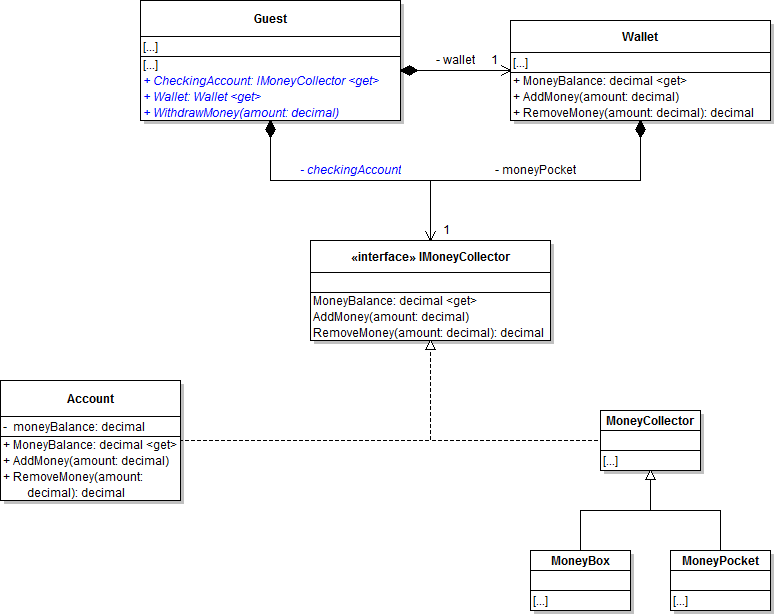
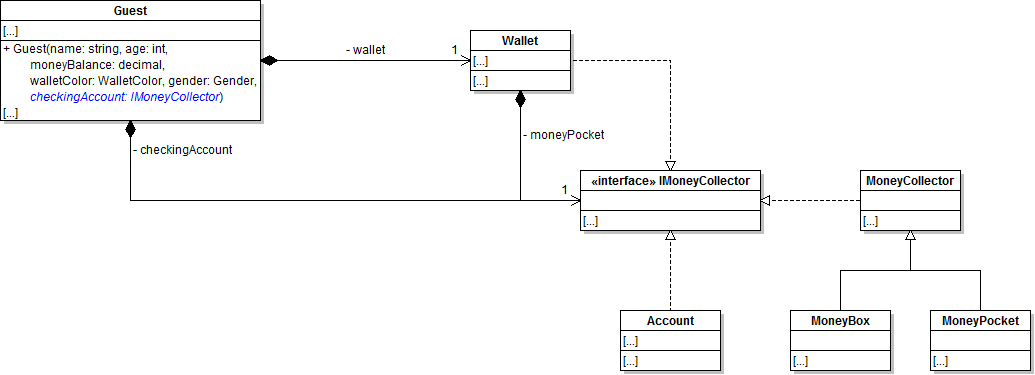
BAdd a field to the Guest class called checkingAccount of type IMoneyCollector.
Class Diagram: Checking Account
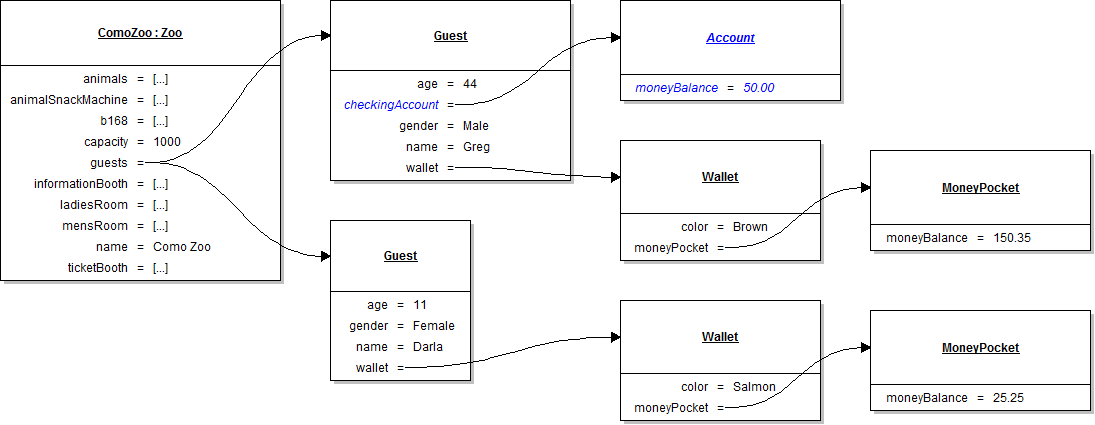
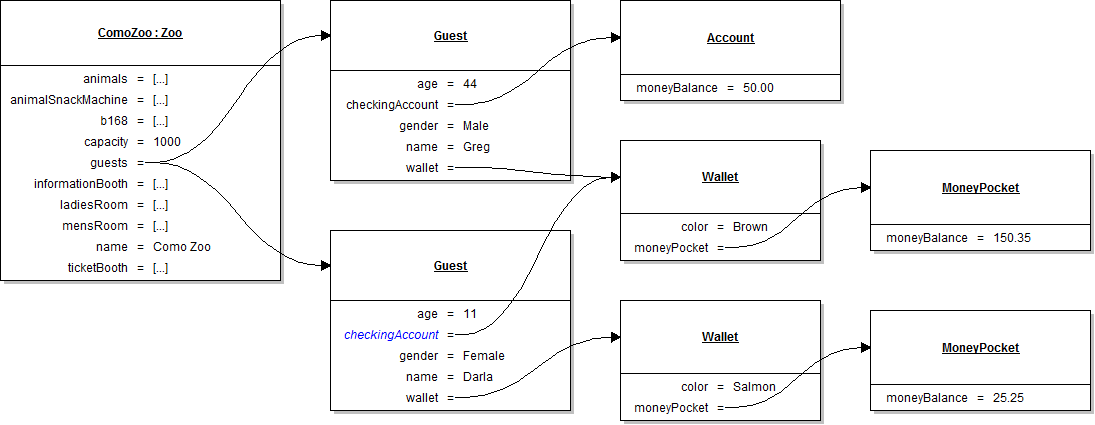
CIn the guest's constructor, instantiate the checking account as an Account.
Object Diagram: Instantiate Account
DCreate the WithdrawMoney method.
1Define the WithdrawMoney method in the Guest class.
2In the method, remove the passed-in amount from the guest's checking account.
3Add the amount removed to the guest's wallet.
EUse the WithdrawMoney method.
1In the guest's FeedAnimal method, after getting the food price, check if the wallet's money balance is less than the food price.
If so, withdraw 5 times the amount of the food price.
2In the guest's VisitTicketBooth method, check that the wallet's money balance is less than the ticket price and the water bottle price.
If it is, withdraw twice the amount of the TicketPrice to cover the cost..
FAdd the checking account balance to the guest's ToString method. Make sure that it looks like the following
Name: Age [$MoneyBalance / $Account]
Greg: 44 [$150.35 / $50.00]
GCheck Your Work
1Change Greg's MoneyBalance to $15 and the Shark's Weight to 2000.
2Set a breakpoint at the end of the VIsitTicketBooth method.
3Run the WPF application.
4When the Greg visits the ticket booth, ensure that money is withdrawn from his account to his wallet ($30) in order to pay for the ticket and water bottle ($45 total).
At the end of the VisitTicketBooth method he should have $27 and his CheckingAccount should have $20.
5Press Continue. In the application interface, choose Greg from the guest list and the shark from the animals list.
6Click the FeedAnimal button.
7Ensure that Greg pulls money from his checking account to cover the cost.
It's $30 to feed a Shark so his wallet balance should be $147 (he pulled out $150, plus the $27 would be $177, minus the $30 to feed would be $147) and his account balance should be -$130.00 ($20 - $150).
Guest dependency inversion principle.
Acceptance Criteria
Acceptance criteria
Greg's wallet can serve as Darla's account through the shared money-collection contract.
6.Guest dependency inversion principle.
Problem
Solution
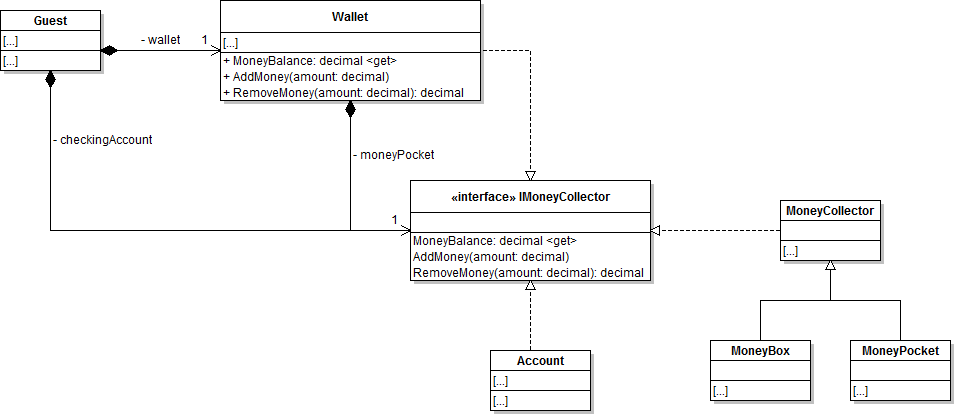
AHave the Wallet class implement IMoneyCollector.
Class Diagram: Wallet
BModify the Guest constructor.
Class Diagram: Guest Constructor
1Create an account parameter of type IMoneyCollector. Assign the checking account using the passed-in account.
CModify the NewZoo method.
Object Diagram: Zoo Guests
1Before instantiating Greg, create a new Account and store it in a variable.
2Add $50 to Greg's checking account using the account's AddMoney method.
3When instantiating Darla pass in Greg's Wallet (using the Wallet property) into her account parameter.
DCheck Your Work
1Make the Kangaroo weight 90lbs.
2Run the WPF application.
3Darla's wallet should have $7.25 after paying for a ticket and water bottle and her "account" should be $27, the same as Greg's wallet.
4In the application interface, choose Darla from the guest list and the Kangaroo from the animals list.
5Click the FeedAnimal button.
6Darla should successfully feed the Kangaroo using the money in her wallet.
7Click the FeedAnimal button 5 more times.
8Ensure that Darla pulls money from Greg's wallet to cover the cost.
Her new wallet balance should be $5.94 and her account balance and Greg's wallet should be $20.15.
9Continue clicking the FeedAnimal button.
Eventually Darla will use up all of her money both in her wallet and in Greg's wallet (since it's actually a Wallet and not really an Account) and she will no longer be able to feed any animals.
10Click Greg and another animal and the Feed animal button.
Greg will should pull money from his account into his wallet and Darla's "account" should be replenished as well.
Prepare and submit your work
7.Submit a zipped Visual Studio solution after completing the following
AEnsure that the application has no compiler errors or warnings.
BMake the code StyleCop compliant.
CRemove all bin and obj folders from the entire solution.
Demonstrate your work
8.Record a video of your applications showing
AYour Account Project
1StyleCop works
2Implements the IMoneyCollector interface
B4D - Check Your Work
C6D - Check Your Work
Prepare and submit your work
9.Submission Steps
AEnsure that your application has no compiler errors or warnings
BEnsure that your code is StyleCop compliant
CRemove all bin and obj folders from your solution
DZip your solution
ESubmit your zipped solution to the Feedback System
FSubmit your Feedback System results link to Canvas