Acceptance criteria
- Window controls increase and decrease the birthing room temperature.
MainWindow.MainWindow, as specified in the wireframe below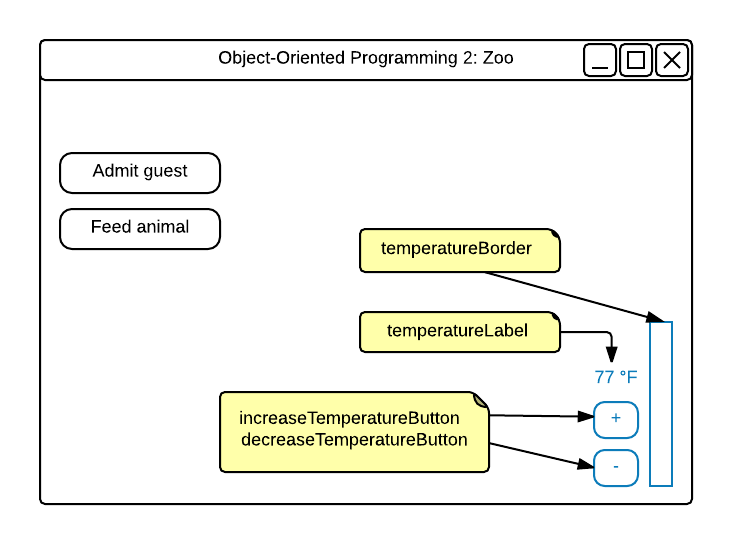
Background: RedBorderBrush: BlackBorderThickness: 1HorizontalAlignment: RightVerticalAlignment: Bottom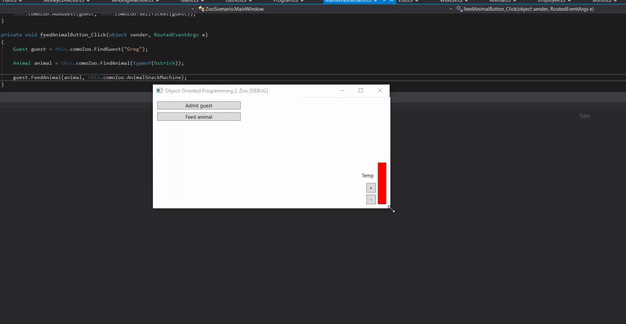
BirthingRoomTemperature property.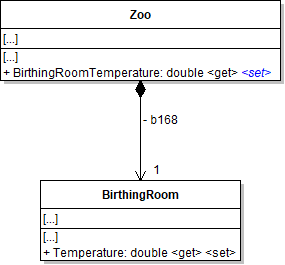
MainWindow's CreateComoZoo method, after instantiating the Zoo, set the height of the border to twice the BirthingRoomTemperature.Set the label's Content to the BirthingRoomTemperature.
MainWindow.xaml, as in the code below<RepeatButton ... />
ConfigureBirthingRoomControls per the class diagram below.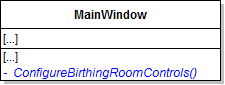
ConfigureBirthingRoomControls method instead.The temperature currently displays as a whole number (e.g. 77). We want to display the temperature as 77.0 °F. Use string.Format to accomplish this task.
M. Check Your Work:
BirthingRoom's minTemperature and maxTemperature public and static.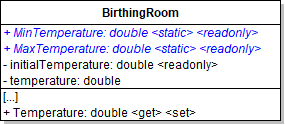
MinTemperature and MaxTemperature within the BirthingRoom class to reference the now static fields.ConfigureBirthingRoomControls method.double colorLevel = ((this.comoZoo.BirthingRoomTemperature - BirthingRoom.MinTemperature) * 255) / (BirthingRoom.MaxTemperature - BirthingRoom.MinTemperature);
this.temperatureBorder.Background = new SolidColorBrush(Color.FromRgb(
Convert.ToByte(colorLevel),
Convert.ToByte(255 - colorLevel),
Convert.ToByte(255 - colorLevel)));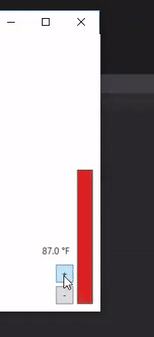
commandWords and set it to result of splitting the command, as shown in the code belowstring[] commandWords = command.Split();commandWords array (commandWords[0]).The first item in the array represents the main command the user wants to run.
"temp" command."temp".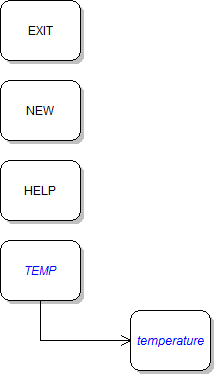
commandWords array.Parse the string as a double, as shown in the code below:
Double.Parse(commandWords[1]);It should look like the following when it is written to the console:
Previous temperature: 70.0 °F.New temperature: 77.0 °F.Be sure to include directions for how to use the parameter. It should look like the following:
TEMP: Sets the birthing room temperature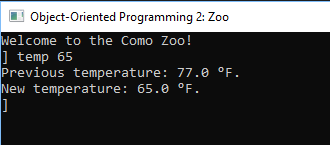
BirthingRoom class.You must do this in order to get this step to work. We will be adding this validation back in at a later step.
This means that the temperature should only be in between those two temperatures.
It should look like the following:
The birthing room temperature must be between 35 and 95 degrees.Show a message box in each block telling the user that the birthing room temperature must be between 35 and 95 degrees.
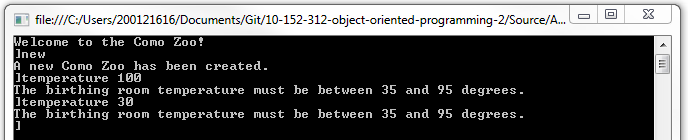
Temperature validation resides in the BirthingRoom setter and invalid values throw exceptions at this stage.Temperature property, if the value is less than the minimum temperature, throw a new Exception and pass an error message as shown in the code belowthrow new Exception("The temperature must be above 35 degrees.");Exception and pass an appropriate error message.Catch Exceptions and write the exception's message to the console, as shown in the code below:
case "temp":
    try
    {
      // existing code here
    }
    catch (Exception ex)
    {
        Console.WriteLine(ex.Message);
    }
break;Move the existing code in each inside the try block. Show a message box with the exception's message inside the catch block.
ArgumentOutOfRangeException instead of an Exception for both thrown exceptions.Use the constructor that takes a parameter name and message, passing in the following values (or similar ones):
paramName: "temperature""The temperature must be above 35 degrees."ArgumentOutOfRangeException instead of an Exception, as shown in the code belowcatch (ArgumentOutOfRangeException ex)
{
// code here
}FormatException, as shown in the code below.Display a message to the user in the console stating that a number must be submitted as a parameter in order to change the temperature. No variable is needed for the FormatException because it would not be used.
try
{
// code here
}
catch (ArgumentOutOfRangeException ex)
{
    // code here
}
catch (FormatException)
{
// code here
}IndexOutOfRangeException, as shown in the code below.Display a message to the user stating that a parameter must be entered in order for the temperature command to work. No variable is needed for the IndexOutOfRangeException because it would not be used.
try
{
    // code here
}
catch (ArgumentOutOfRangeException ex)
{
    // code here
}
catch (FormatException)
{
    // code here
}
catch (IndexOutOfRangeException)
{
// code here
}NullReferenceException.Display a message to the user stating that a new zoo must be created before they can change the temperature.
'new' command first. Ensure that the NullReferenceException is caught and the message about creating a new Zoo is shown to the user.'new' command. Attempt to change the temperature by typing in 'temp fifty'. The FormatException should be caught and a message stating that a number must be entered as a parameter should appear.ArgumentOutOfRangeException should appear. Change the temperature to 70. The change should be successful.'temp' to the console. The error message specified when an IndexOutOfRange Exception is caught should appear.CreateComoZoo method in the MainWindow.Name the method NewZoo.
Zoo.NewZoo method from the MainWindow.xaml.cs into the Zoo class.comoZoo field throughout the method, instantiate a zoo variable and refer to that.Then return the variable.
ConfigureBirthingRoomControls in the NewZoo method.CreateComoZoo method and any references to it from the MainWindow.MainWindow.xaml and select the window.window_Loaded event to the MainWindow.xaml.cs.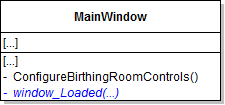
NewZoo method on the Zoo class.this.comoZoo = Zoo.NewZoo();ConfigureBirthingRoomControls method.Console window loads.Program.cs before the while loop, assign the zoo field to the result of calling the static NewZoo method."new" command to be the "restart" command.Instead of setting the variable to a new zoo, set it to the result of calling the static NewZoo method.
RESTART: Creates a new zoo.NullReferenceException in the 'temp' command.We no longer need it since we've ensured a new zoo will always be instantiated.
The command should run successfully without first running the 'new' or 'restart' command.
AddGuest method in the zoo, throw a NullReferenceException if the ticket is null.Pass in a message stating that the guest couldn't be admitted because they did not have a ticket.
admitGuestButton_Click, catch the NullReferenceException. Show the exception's message in the message box.The guest should be added the first three times, but the message about a missing ticket should pop up the fourth time.
increaseTemperatureButton until it reaches 95.0 °FdecreaseTemperatureButton until it reaches 35.0 °FConsole Application'temp fifty' command should write an error message specified when a FormatException is caught'temp 100' command should write an error message specified when an ArgumentOutOfRangeException is caught'temp' command should write an error message specified when an IndexOutOfRangeException is caught'temp 45' command should be successful and a message about the previous and new temperature should be written'restart' command should create a new zoo'help' command should include the 'restart' and 'temp' command and no longer have the 'new' command© 2026 Northcentral Technical College