3.5 Zoo Learning Activity

Under Construction

This page is currently being built. Please check back soon.
A platypus
3.5 Zoo Learning Activity — overview

Work through the user stories in order. Each story states the goal and acceptance criteria; its nested tasks retain the detailed implementation and verification steps.

1.Gather your resources
A Open the assignment resources
Set up the checkpoint
2.Copy your 3.4 ending code, renaming both the folder and the Visual Studio solution file
A Verify the required change or observation

Check the result against this instruction: Copy your 3.4 ending code, renaming both the folder and the Visual Studio solution file

Include living animals and reproducing toys
Problem

We want to be able to count the WuvLuv as an "animal" in the Zoo and use it like we would an animal, but it isn't really an animal, it's a toy. It has similarities with an animal in that it can "Reproduce", but still isn't technically an animal.

Solution

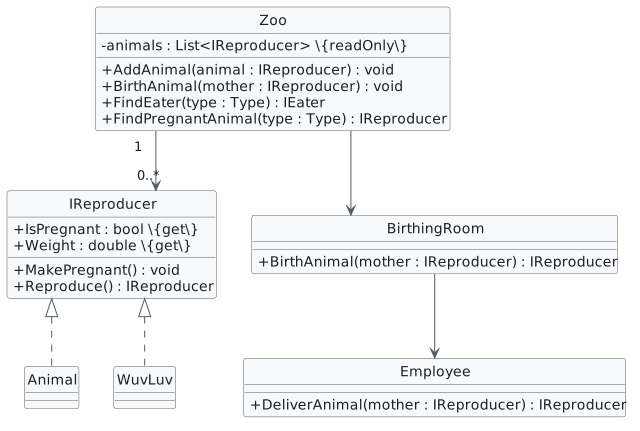
We will define an interface named IReproducer that both Animals and WuvLuvs can implement and change the Zoo's list type to be able to handle anything that is an IReproducer.

3.5.1 How to Utilize Polymorphism 3.5.3 How to Apply Polymorphism Using Interfaces 3.5.4 How to Achieve Encapsulation Using Interfaces
3.Review the feature design
A Identify the contracts and expected behavior

This focused design shows the members or flow relevant to this feature. Keep unchanged members from your preceding checkpoint; follow the tasks below for the order of intermediate edits.

Reproduction without Animal inheritance. interface IReproducer { + IsPregnant : bool {get} + Weight : double {get} + MakePregnant() : void + Reproduce() : IReproducer } class Zoo { - animals : List<IReproducer> {readOnly} + AddAnimal(animal : IReproducer) : void + BirthAnimal(mother : IReproducer) : void + FindEater(type : Type) : IEater + FindPregnantAnimal(type : Type) : IReproducer } class Employee { + DeliverAnimal(mother : IReproducer) : IReproducer } class BirthingRoom { + BirthAnimal(mother : IReproducer) : IReproducer } IReproducer <|.. Animal IReproducer <|.. WuvLuv Zoo "1" --> "0..*" IReproducer Zoo --> BirthingRoom BirthingRoom --> Employee
Reproduction without Animal inheritance
  • New
  • Changed
  • Removed
4.In the MainWindow at the end of the newComoZooButton_Click, add the following line of code:
this.comoZoo.AddAnimal(new WuvLuv("Purple"));

Observe the error. We cannot add a WuvLuv to an Animal type list because a WuvLuv isn't an Animal. But we want to, though! And we will.

A Verify the required change or observation

Check the result against this instruction: In the MainWindow at the end of the newComoZooButton_Click, add the following line of code:

5.Delete that line of code
A Verify the required change or observation

Check the result against this instruction: Delete that line of code.

6.Instead of having a WuvLuv inherit from Animal (because it isn't an Animal), we will define an IReproducer interface and have both the Animal class and WuvLuv class implement it
A Make changes to the class structure using this story’s design reference
B In the Reproduce method in the Mammal class, change the local baby variable type to IReproducer. This will cause an error we will fix in the next step
7.The error on FeedNewborn means that the baby object is a more basic "form" of something and FeedNewborn wants a particular thing; an Animal in this case. We don't necessarily care if the baby is an Animal or not, really, we just need to make sure it can Eat
3.5.5 How to Upcast An Object
A Change the parameter of the FeedNewborn method from Animal to IEater
B In the call to FeedNewborn, cast the baby object as an IEater. What this does is change the accessible behaviors from IReproducer to an IEater. The IEater reference exposes eating-related members; the object retains its runtime type and other capabilities
this.FeedNewborn(baby as IEater);
8.This is still a problem, though, because an IEater doesn't have a method named Nurse and it trying to use it in FeedNewborn
A Replace the code in the FeedNewborn method with the code below
double milkWeight = this.Weight * this.milkWeightPercentage;
Food milk = new Food(milkWeight);
newborn.Eat(milk);
this.Weight -= milkWeight;
B Delete the Nurse method from the Mammal and Animal classes
C Build your solution. You will get errors that we will fix in the next step
9.Fix how the IReproducer is being returned
3.5.6 How to Type Check an Object
A In the MainWindow, change the type of the WuvLuv baby from WuvLuv to IReproducer
B In the DeliverAnimal method in the Employee class, change the baby object's type to an IReproducer
C Since the baby is an IReproducer, we lost the ability to assign its Name. First, check if the baby is an Animal type, and then cast it as an Animal and assign Name
if (baby is Animal)
{
    (baby as Animal).Name = "Baby";
}
D Check if the baby is an IMover and then cast the baby as an IMover and call Move on it
E Change the return type of the DeliverAnimal method from Animal to IReproducer and change the parameter type from Animal to IReproducer. Changing the parameter of this method will allow us to pass in a non-animal type to this method (like a WuvLuv)
10.Modify the BirthAnimal methods
A Modify the BirthAnimal method in the BirthingRoom class the same way we did DeliverAnimal
B Change the type of the baby object from Animal to IReproducer
C Modify the BirthAnimal method in the Zoo class to take a parameter of type IReproducer instead of Animal
D In the BirthAnimal method in the Zoo class, change the type of the baby object from Animal to IReproducer
E Build your code. You should have an error because we can't add an IReproducer to an Animal type list. We will fix this in the next step
11.Modify the Zoo's list of Animals to be a list of IReproducers
A Change the animals list and the AddAnimal method using this story’s design reference
B In the TotalAnimalWeight property, change the type in the foreach loop from Animal to IReproducer
12.Modify the AddAnimal method
A If the animal is an IEater, add it to the list of eaters as an IEater
B If the animal is an IMover, add it to the list of movers as an IMover
13.We can finally add a WuvLuv to the list of animals
A In the MainWindow at the end of the newComoZooButton_Click, paste the following code:
WuvLuv wuvLuv = new WuvLuv("Purple");
wuvLuv.MakePregnant();
this.comoZoo.AddAnimal(wuvLuv);
B Delete the code inside the birthWuvLuvButton_Click and replace it with code that calls BirthAnimal just like you would a Dingo or a Platypus
14.Modify the Find methods
Review this feature’s design and requirements
A Rename the FindAnimal method to FindEater and loop through the eaters list and return an IEater
B Have the FindPregnantAnimal method return an IReproducer
15.Check Your Work (ComoZoo):
A Set a breakpoint in the MainWindow in the birthWuvLuvButton_Click on the line of code that calls BirthAnimal
B Start the application. Click the 'New Como Zoo' button. Click the 'Birth WuvLuv' button
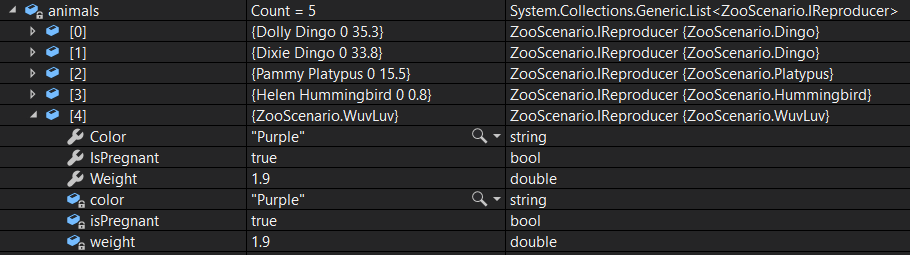
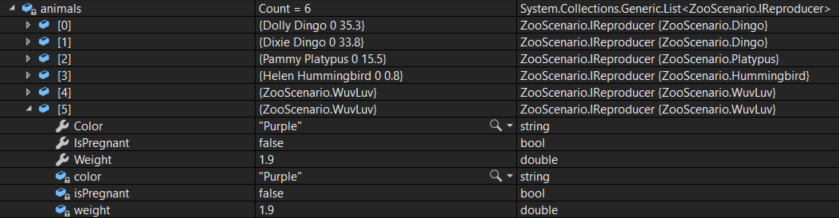
C Ensure that the Zoo now has a WuvLuv added to its list of animals
CYW - Animals List; compare object identities, field values, and execution position with your debugger.
CYW - Animals List
D Press F11. Step through the FindPregnantAnimal method and ensure the WuvLuv is returned
E Step into the BirthAnimal method. Ensure that the mother parameter is the WuvLuv object
F Step into the BirthArea's BirthAnimal method
G Step into the DeliverAnimal method
H Step into the Reproduce method. Ensure that the debugger steps into the WuvLuv class
I Step through the Reproduce method and back to the DeliverAnimal method
J Step through the DeliverAnimal method. Ensure the WuvLuv isn't named or Moves
K Step through the remaining code and back to the MainWindow. Ensure that the baby WuvLuv has been added to the list
Debugger checkpoint on source page 6; compare object identities, field values, and execution position with your debugger.
Debugger checkpoint on source page 6
Hatch different kinds of newborns
Problem

We have a birds, platypodes and wuvluvs that all "hatch" things, but in different ways.

Solution

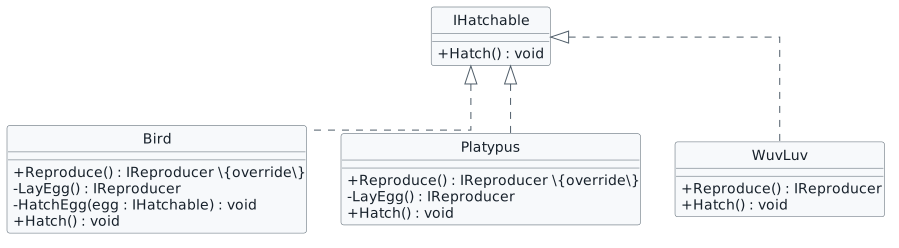
We will use an interface and casting to control how different things hatch.

16.Review the feature design
A Identify the contracts and expected behavior

This focused design shows the members or flow relevant to this feature. Keep unchanged members from your preceding checkpoint; follow the tasks below for the order of intermediate edits.

Hatching contracts. interface IHatchable { + Hatch() : void } class Bird { + Reproduce() : IReproducer {override} - LayEgg() : IReproducer - HatchEgg(egg : IHatchable) : void + Hatch() : void } class Platypus { + Reproduce() : IReproducer {override} - LayEgg() : IReproducer + Hatch() : void } class WuvLuv { + Reproduce() : IReproducer + Hatch() : void } IHatchable <|.. Bird IHatchable <|.. Platypus IHatchable <|.. WuvLuv
Hatching contracts
  • New
  • Changed
  • Removed
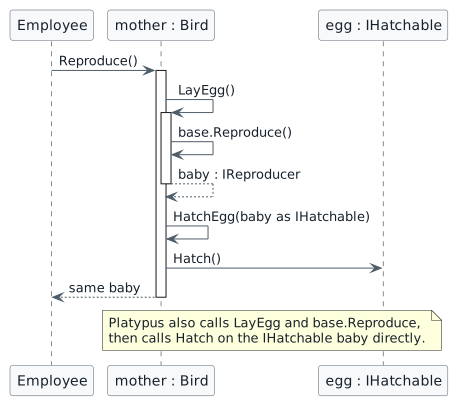
Return and hatch the same newborn. participant Employee participant "mother : Bird" as mother participant "egg : IHatchable" as egg Employee -> mother : Reproduce() activate mother mother -> mother : LayEgg() activate mother mother -> mother : base.Reproduce() mother --> mother : baby : IReproducer deactivate mother mother -> mother : HatchEgg(baby as IHatchable) mother -> egg : Hatch() mother --> Employee : same baby deactivate mother note over mother, egg Platypus also calls LayEgg and base.Reproduce, then calls Hatch on the IHatchable baby directly. end note
Return and hatch the same newborn
  • New
  • Changed
  • Removed
17.Define an interface and implement it using this story’s design reference
Review this feature’s design and requirements
A Verify the required change or observation

Check the result against this instruction: Define an interface and implement it using this story’s design reference.

18.Modify the WuvLuv class
A In the Reproduce method, change the type of the baby object from WuvLuv to IReproducer
B In the Reproduce method, if the baby object is an IHatchable, cast it as an IHatchable and call Hatch on it
19.Modify the Platypus class
A Modify the class using this story’s design reference, making sure the cast as IHatchable where needed
20.Modify the Bird class
A Modify the class using this story’s design reference, making sure the cast as IHatchable where needed
21.Check Your Work (Como Zoo):
A Set a breakpoint in the Employee class on the line that calls Reproduce
B Start the application. Click the 'New Como Zoo' button. Click the 'Birth hummingbird' button
C Press F11. Ensure the debugger steps into the Reproduce method in the Bird class
D Step into the LayEgg method
E Step over the call to the base Reproduce method. Ensure that the LayEgg method returns a 0.12784 lb baby
F Step into the call to HatchEgg. Ensure the egg is the baby object
G Step though the Hatch method and back to the Employee class. Ensure the baby returned is the 0.12784lb baby
22.Check Your Work (San Diego Zoo):
A Set a breakpoint in the Employee class on the line that calls Reproduce
B Start the application. Click the 'New San Diego Zoo' button. Click the 'Birth platypus' button
C Press F11. Ensure the debugger steps into the Platypus class
D Step into the LayEgg method
E Step over the call to the base Reproduce method. Ensure that it returns a baby object that is 0.32046lbs
F Step into the call to Hatch and through the method
G Return to the Employee class. Ensure that the baby returned is the 0.32046lb Platypus
Submit your work
23.Ensure that your code is StyleCop compliant
A Verify the required change or observation

Check the result against this instruction: Ensure that your code is StyleCop compliant.

24.Zip the solution and submit to the Feedback System
A Verify the required change or observation

Check the result against this instruction: Zip the solution and submit to the Feedback System.

25.Submit the Feedback System url to the correct assignment in Canvas
A Verify the required change or observation

Check the result against this instruction: Submit the Feedback System url to the correct assignment in Canvas.

Completion checklist
26.Review the required evidence
A Check every acceptance criterion

Return to each user story and confirm that you can demonstrate its acceptance criteria. Use the task checkboxes to track completion; a checked box is not a substitute for testing or inspecting the required evidence.

Include living animals and reproducing toys Hatch different kinds of newborns
B Build and inspect the final solution

Remove temporary lines used only to demonstrate compile-time errors. Build without errors or warnings, check StyleCop compliance, and rerun the required scenario paths.

C Follow this activity’s submission instructions

Use the submission or attendance instructions in this page. For a Feedback System submission, upload the requested ZIP, review and resolve the feedback, and submit the resulting URL to the matching Canvas activity. For a Canvas quiz, enter only the requested answers; for an oral final, complete the scheduling and attendance steps.