2.6 Grade Book Assignment

Grade Book 2.6 — Construct Ready-to-Use Objects

Use your completed Grade Book 2.5 as the starting project. Keep the lists, fixed attempt history, weekly schedule, and existing feedback while moving required setup into constructors.

1.Copy the previous version
A Copy your completed Grade Book 2.5 folder, rename the copy and solution for Grade Book 2.6 using your last name, open the copied solution, and restore NuGet packages

Update the window title in MainWindow.xaml to identify Grade Book 2.6 and your last name. In Properties/AssemblyInfo.cs, update both assembly version values to 2.6.0.0. Keep the existing .NET Framework 4.8 project configuration.
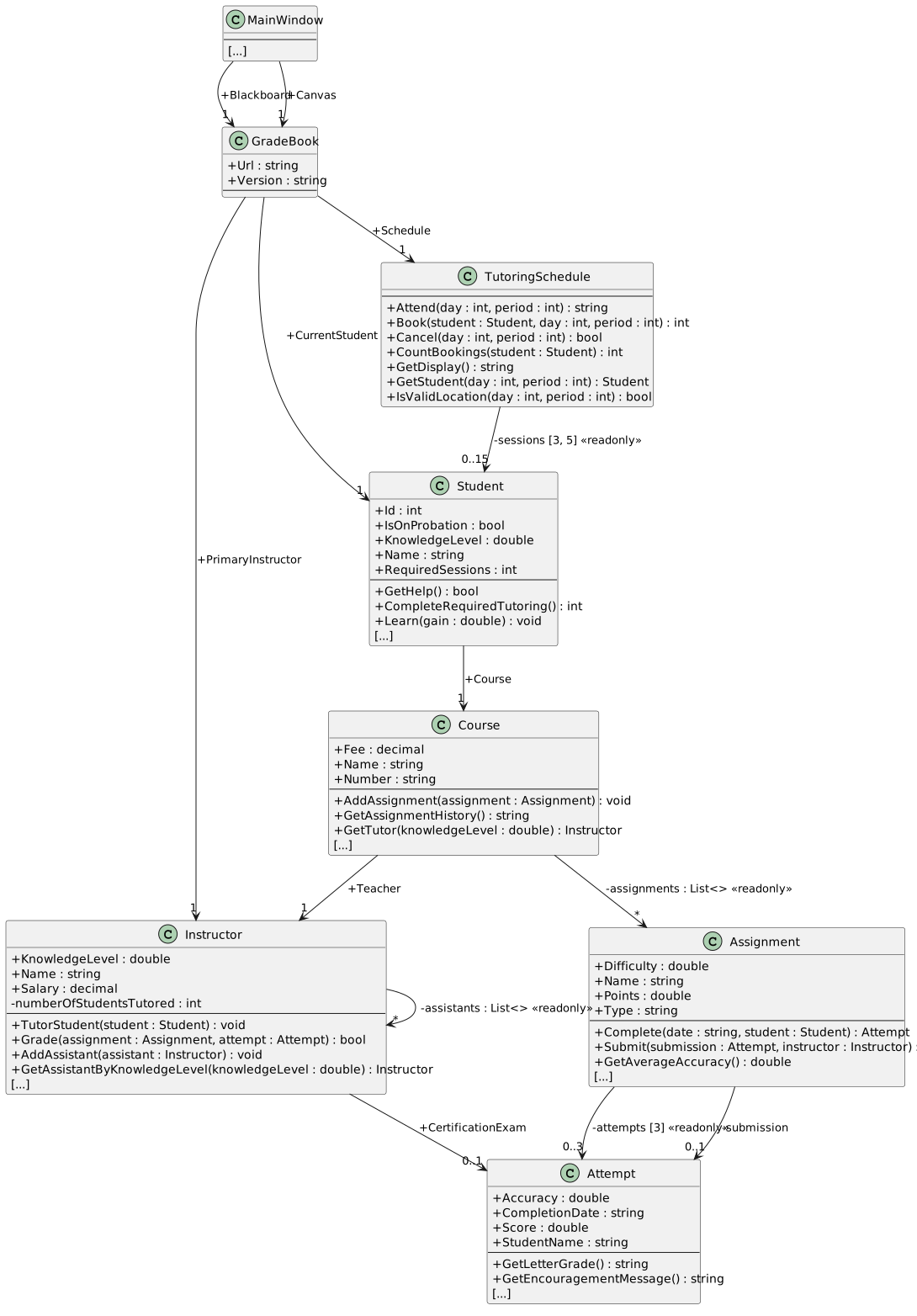
Grade Book 2.5 structure. Existing public fields, private collections and methods before constructor changes. Object-reference fields are shown only on arrows with visibility; List<> identifies lists and brackets show fixed array dimensions. Properties and constructors share the methods compartment.
Starting structure — your completed Grade Book 2.5
  • New
  • Changed
  • Removed
Keep the student's attempt evidence together
2.Give Attempt its starting evidence
A In Attempt.cs, add the three-parameter constructor shown in the focused class diagram

Place this declaration inside the Attempt class, outside its existing methods. The UML + means public; C# places each parameter's type before its name. A constructor has no void or other return type. This first example shows the declaration and assignment pattern; use the focused diagrams for the remaining constructors.

The first constructor declaration
public Attempt(string studentName, string completionDate, double accuracy)
{
    this.StudentName = studentName;
    this.CompletionDate = completionDate;
    this.Accuracy = accuracy;
}

Use the constructor's parameters to initialize the matching fields. Make Accuracy, CompletionDate, and StudentName readonly. Keep Score writable because grading assigns it after an ordinary submission is created.

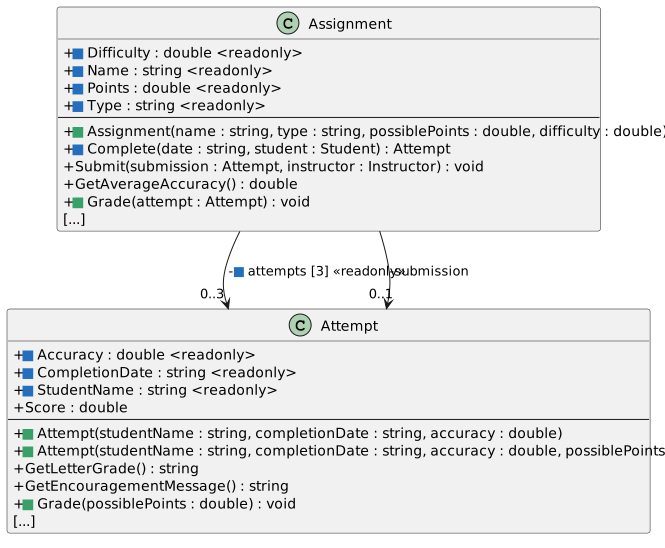
Focused constructor changes for Attempt, Assignment. Green marks new constructors or methods; blue marks changed fields and methods. Object-reference fields are shown only on arrows with visibility; List<> identifies lists and brackets show fixed array dimensions. Properties and constructors share the methods compartment.
Attempt and Assignment — constructor and grading changes
  • New
  • Changed
  • Removed
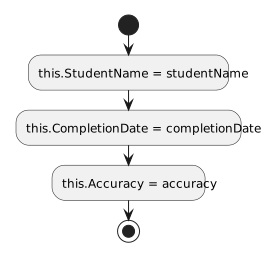
The three-argument Attempt constructor assigns its three evidence fields. It contains no overload-selection decision.
The two Attempt constructor paths
  • New
  • Changed
  • Removed
3.Calculate a score inside Attempt
A In Attempt.cs, add Grade(possiblePoints) using the activity diagram

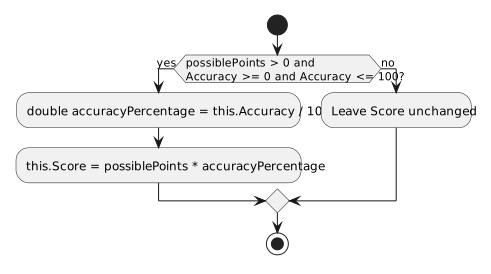
Move the score calculation from Instructor.Grade into this new method. Here this refers to the Attempt being graded, so read its own accuracy and assign its own score. Keep the input checks shown in the diagram and keep the unrounded result.

Attempt.Grade validates the possible points and accuracy, then computes an unrounded score.
Attempt.Grade activity
  • New
  • Changed
  • Removed
4.Construct a certification attempt with a score
A In Attempt.cs, add the four-parameter constructor overload shown in the focused class diagram

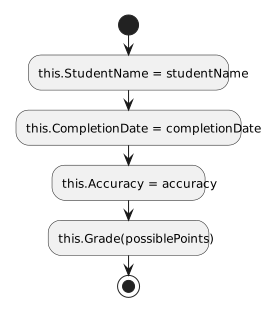
Initialize the same evidence fields as the three-parameter constructor, then call Grade with possiblePoints. The compiler chooses the matching constructor declaration from the supplied arguments; neither constructor contains an argument-count if statement. This overload will initialize certification exams. The ordinary submission path continues to use the three-parameter constructor and receives its score through the grading workflow.

The four-argument Attempt constructor assigns its evidence fields and calls Grade. It contains no overload-selection decision.
The four-argument Attempt constructor
  • New
  • Changed
  • Removed
5.Give Assignment its required setup
A In Assignment.cs, add the constructor from the focused diagram

Use the parameters to initialize Name, Type, Points, and Difficulty, and make those fields readonly. Move the attempts array instantiation from its field initializer into this constructor. Each Assignment still gets its own array of three Attempt references.

Constructor parameter to field
Parameter Field
name Name
type Type
possiblePoints Points
difficulty Difficulty
6.Create the submission after computing accuracy
A In Assignment.cs, update Complete using the activity diagram

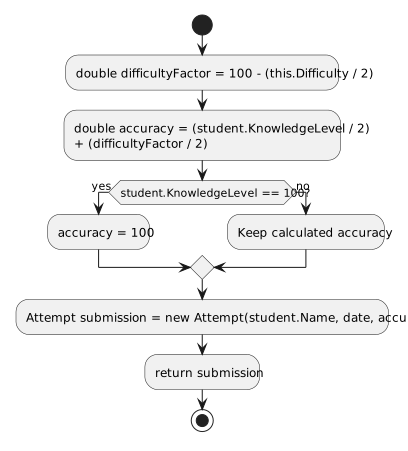
Store the calculated percentage in a local accuracy variable, including the existing full-knowledge condition. Move the line that instantiates submission below that calculation. Use the Attempt constructor to assign the student's name, completion date, and accuracy; remove the old assignments to the attempt's now-readonly fields.

Assignment.Complete computes accuracy using current student knowledge, handles full mastery, and constructs the submission with three arguments.
Assignment.Complete activity
  • New
  • Changed
  • Removed
7.Have Assignment provide its points
A In Assignment.cs, add Grade(attempt) using the activity diagram

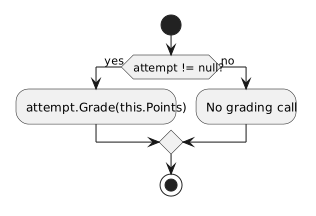
The Assignment knows its available points. For a non-null Attempt, call that object's Grade method and pass this.Points.

Assignment.Grade forwards its available points to a non-null attempt.
Assignment.Grade activity
  • New
  • Changed
  • Removed
8.Keep the instructor's passing decision
A In Instructor.cs, update Grade using the activity diagram

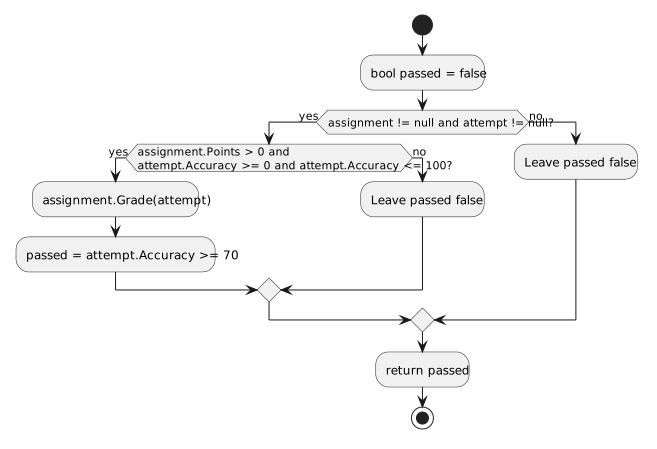
Retain the existing null checks, accuracy and points checks, and Boolean return. Call assignment.Grade(attempt) where the instructor previously calculated the score. Keep the passing threshold at 70 percent.

Instructor.Grade retains null and range checks, delegates scoring through Assignment, and returns the pass decision at seventy percent.
Instructor.Grade activity
  • New
  • Changed
  • Removed
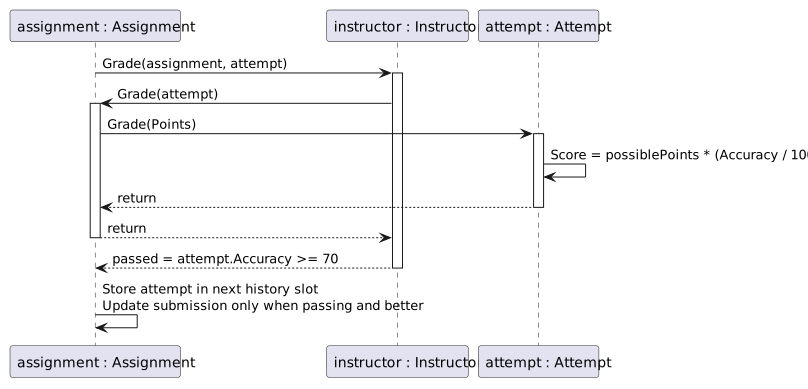
Successful grading path: Submit calls Instructor.Grade, which delegates through Assignment.Grade to Attempt.Grade. Score calculation stays unrounded, while Submit retains its history and best-passing-submission behavior.
Grading sequence — valid assignment and attempt
  • New
  • Changed
  • Removed
B Source trace — identify the object represented by this at each grading call

This is a source trace until the creation handlers are updated. Follow the sequence without running the incomplete project: Instructor.Grade chooses the passing result, Assignment.Grade supplies its points, and Attempt.Grade writes its score. The existing Submit method still stores unsuccessful attempts in history and only updates submission for a passing attempt that is better than the previous passing submission.

Create a connected course and tutoring setup
9.Initialize each instructor and its assistant list
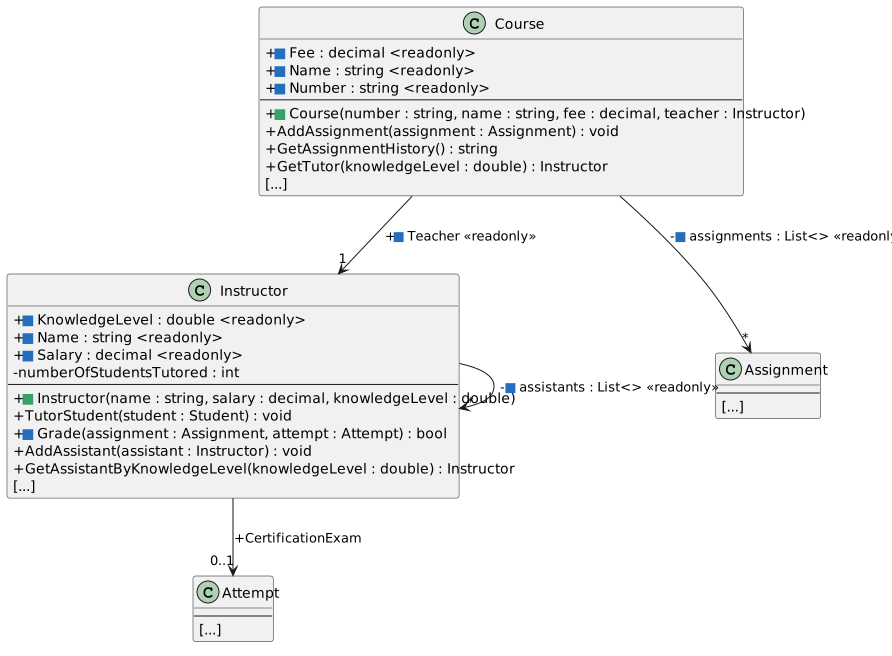
A In Instructor.cs, add the constructor shown in the focused class diagram

Initialize Name, Salary, and KnowledgeLevel from the matching parameters and make those fields readonly. Move the private assistants list instantiation into the constructor. Keep CertificationExam writable and keep numberOfStudentsTutored as the mutable private count.

Focused constructor changes for Instructor, Course. Green marks new constructors or methods; blue marks changed fields and methods. Object-reference fields are shown only on arrows with visibility; List<> identifies lists and brackets show fixed array dimensions. Properties and constructors share the methods compartment.
Instructor and Course constructor changes
  • New
  • Changed
  • Removed
10.Initialize the course with its teacher
A In Course.cs, add the constructor shown in the focused class diagram

Initialize Number, Name, Fee, and Teacher from the parameters and make those fields readonly. Move the private assignments list instantiation into the constructor. For the debugger trace below, assign Number, Name, Fee, and Teacher in that order, then instantiate assignments last. Keep GetTutor public: existing tutoring handlers still call it to display the selected tutor's details.

11.Initialize the student with an existing course
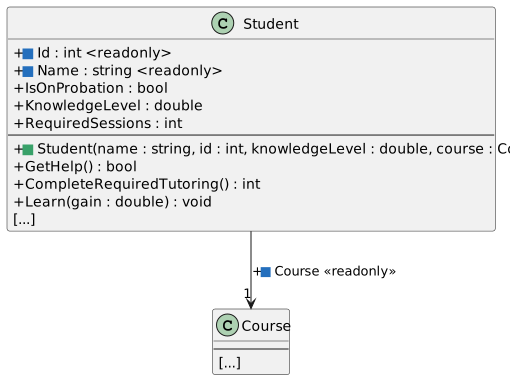
A In Student.cs, add the constructor shown in the focused class diagram

Initialize Name, Id, KnowledgeLevel, and Course. Make only Name, Id, and Course readonly; tutoring and assignment completion still change knowledge. Keep RequiredSessions and IsOnProbation as ordinary writable fields for this version.

Focused constructor changes for Student. Green marks new constructors or methods; blue marks changed fields and methods. Object-reference fields are shown only on arrows with visibility; List<> identifies lists and brackets show fixed array dimensions. Properties and constructors share the methods compartment.
Student constructor and fields
  • New
  • Changed
  • Removed
12.Create the schedule's fixed grid inside its constructor
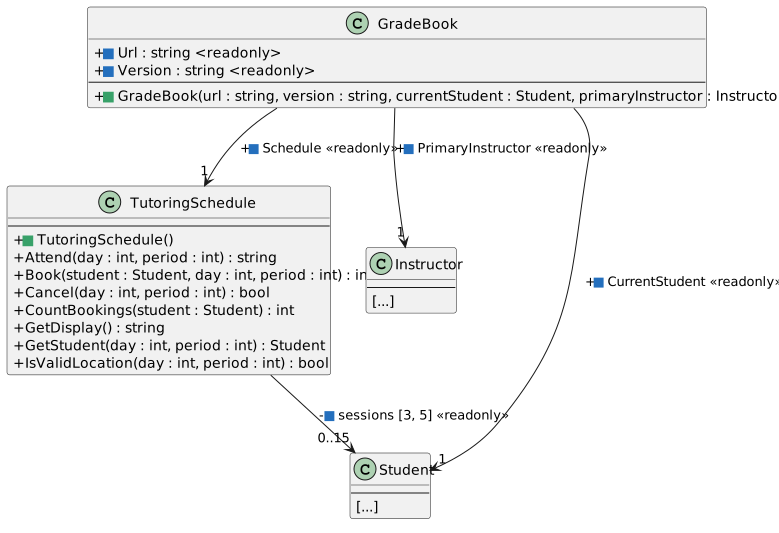
A In TutoringSchedule.cs, add the parameterless constructor shown in the focused diagram

Move new Student[3, 5] from the sessions field initializer into this constructor. Keep the field private and readonly. This is a new empty grid of Student references, with three period rows and five weekday columns; it does not create fifteen students.

Focused constructor changes for TutoringSchedule, GradeBook. Green marks new constructors or methods; blue marks changed fields and methods. Object-reference fields are shown only on arrows with visibility; List<> identifies lists and brackets show fixed array dimensions. Properties and constructors share the methods compartment.
TutoringSchedule and GradeBook constructor changes
  • New
  • Changed
  • Removed
13.Connect the supplied objects and create a schedule
A In GradeBook.cs, add the constructor shown in the focused diagram

Initialize Url, Version, CurrentStudent, and PrimaryInstructor from the matching parameters. Create Schedule with a new TutoringSchedule inside the constructor. Make all five fields readonly. The student and instructor references are supplied objects, while the schedule is a new contained object created for this GradeBook.

14.Construct the objects in dependency order

Create the instructor before its course, the course before its student, and the GradeBook after those objects exist. The Course teacher and GradeBook primary instructor must reference the same Instructor instance.

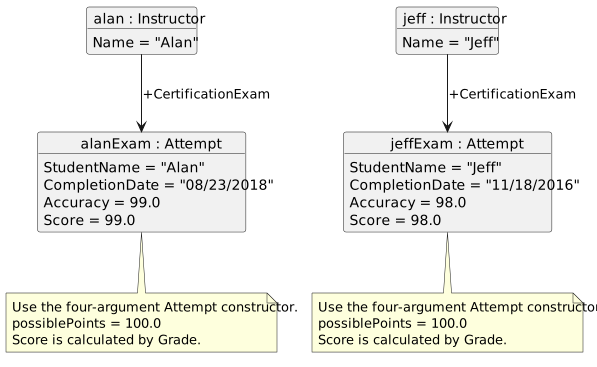
Certification attempts created in Grade Book 2.6. Alan's exam uses name Alan, date 08/23/2018, accuracy 99 and possible points 100, producing score 99. Jeff's uses name Jeff, date 11/18/2016, accuracy 98 and possible points 100, producing score 98.
Certification attempts for Blackboard and Canvas
  • New
  • Changed
  • Removed
A In MainWindow.xaml.cs, update newBlackboardButton_Click using the constructor diagrams and the existing setup values
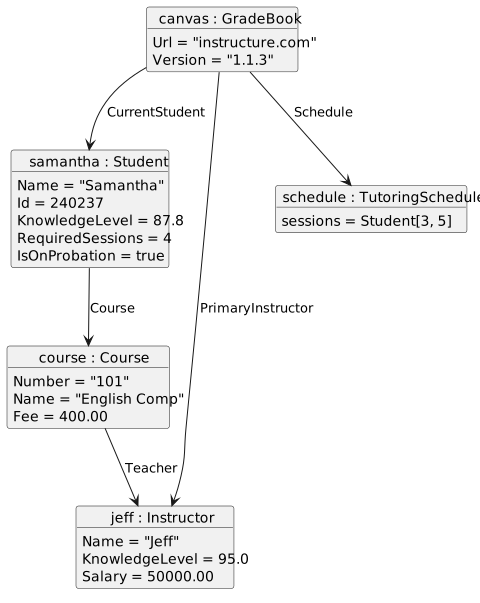
B In MainWindow.xaml.cs, update newCanvasButton_Click using the constructor diagrams and the shared-reference object diagram
Canvas setup shares the same Jeff instructor between Course.Teacher and GradeBook.PrimaryInstructor. Samantha.Course references English Comp. GradeBook owns a separate three by five schedule.
Canvas shares its student, course, and instructor references
  • New
  • Changed
  • Removed
C Build the completed changes and resolve compiler and StyleCop feedback

Ensure no old parameterless business-object creation remains except new TutoringSchedule(), whose explicit parameterless constructor is required. Ensure no caller assigns a readonly field after construction. Retain the existing public-field suppression attributes while this version still uses public fields.

15.Check Your Work — step through course construction
A Set a breakpoint on this.Number = number inside the Course constructor and a second breakpoint on the first statement of newCanvasButton_Click

Start debugging and click New Canvas. When execution pauses in MainWindow, open Watch 1 and add the expressions below. They are unavailable before the Course constructor's frame is active. Disable the MainWindow breakpoint before continuing.

Watch before entering the constructor
Expression Before its frame is active At the breakpoint
number Unavailable "101"
name Unavailable "English Comp"
fee Unavailable 400.00
teacher.Name Unavailable "Jeff"
this.Teacher Unavailable in this constructor's frame null
this.assignments Unavailable in this constructor's frame null
1 Press F5 to reach the Course constructor breakpoint

At the breakpoint, this is the new Course, not MainWindow. The teacher parameter already references Jeff, but the highlighted this.Number = number statement has not executed yet. An unavailable expression has no accessible variable or member in the current frame; it is different from a field whose current value is null.

2 Use F10 to execute each constructor assignment until the list-instantiation statement is highlighted

Observe the parameters becoming field values. After this.Teacher = teacher executes, this.Teacher and teacher refer to Jeff. While this.assignments = new List<Assignment>() is highlighted, the field is still null. Press F10 to execute that statement, then expand the field in Watch and confirm its Count is 0.

3 Disable the constructor breakpoint and press F5 to finish creating Canvas

The existing handler adds the Plan, Midterm, and Final assignments after course construction. Confirm Canvas created. appears and the schedule has fifteen available cells. Stop debugging before the next check.

16.Check Your Work — preserve grading and history
A Set a breakpoint on the line that instantiates submission in Assignment.Complete and another on the TakeAssignment call in takeFinalButton_Click

Start debugging, click New Blackboard, then Take final. At the handler breakpoint, open Watch 1 and add these expressions before entering Assignment.Complete. Disable the handler breakpoint, leaving the submission breakpoint enabled.

Watch at a fresh Blackboard final attempt
Expression At the submission-instantiation breakpoint After F10 executes that statement
difficultyFactor 67.6 67.6
accuracy 66.55 66.55
submission Not assigned by this statement yet; Watch may show null, an uninitialized value, or an unavailable expression A new Attempt
submission.StudentName No usable Attempt reference yet; unavailable or cannot evaluate through null "Arthur"
submission.CompletionDate No usable Attempt reference yet; unavailable or cannot evaluate through null "12/18/2018"
submission.Accuracy No usable Attempt reference yet; unavailable or cannot evaluate through null 66.55
submission.Score No usable Attempt reference yet; unavailable or cannot evaluate through null 0
1 Press F5 to reach the submission-instantiation breakpoint

The highlighted instantiation has not executed. Press F10 once to create the Attempt with three arguments. Its score is still zero because the constructor stores evidence without grading it.

2 Disable the breakpoint and press F5 to complete the action, then show Blackboard history

The final attempt receives an unrounded score of 66.55 and grade F. It is retained in history even though it is not a passing submission. Its displayed history accuracy uses the existing two-decimal format. The average for this one attempt is 66.55 percent. Stop debugging.

17.Check Your Work — use the connected objects
A Start a fresh run, create Blackboard, and click Take midterm four times

The first three clicks create attempts at 79.58%, 82.08%, and 84.58% displayed accuracy, with grades C, B, and B. Best accuracy is 84.58% and average accuracy is 82.08%. The fourth reports that no further attempt is available, creates no attempt, and adds no knowledge; Arthur remains at knowledge 80.5. The Plan and Final each have their own separate three-slot history.

B Create fresh Canvas and complete its required tutoring

Samantha starts at knowledge 87.8 with four sessions required. She completes two sessions with Jeff, reaches knowledge 95, and still requires two sessions. The feedback reports that no tutor has a higher knowledge level and includes the tutor and student details. Pressing Complete Samantha tutoring again completes zero sessions and preserves those values.

C Create fresh Canvas again, reserve Monday period 1, and attend it

The reservation clears only after successful tutoring, the displayed count becomes 0, and Samantha now has knowledge 92.8 with three sessions required. Tutor details remain in the attendance feedback. The attempt history stays array-backed and the schedule remains a rectangular array.

18.Review the resulting structure
A Compare your classes with the ending diagram

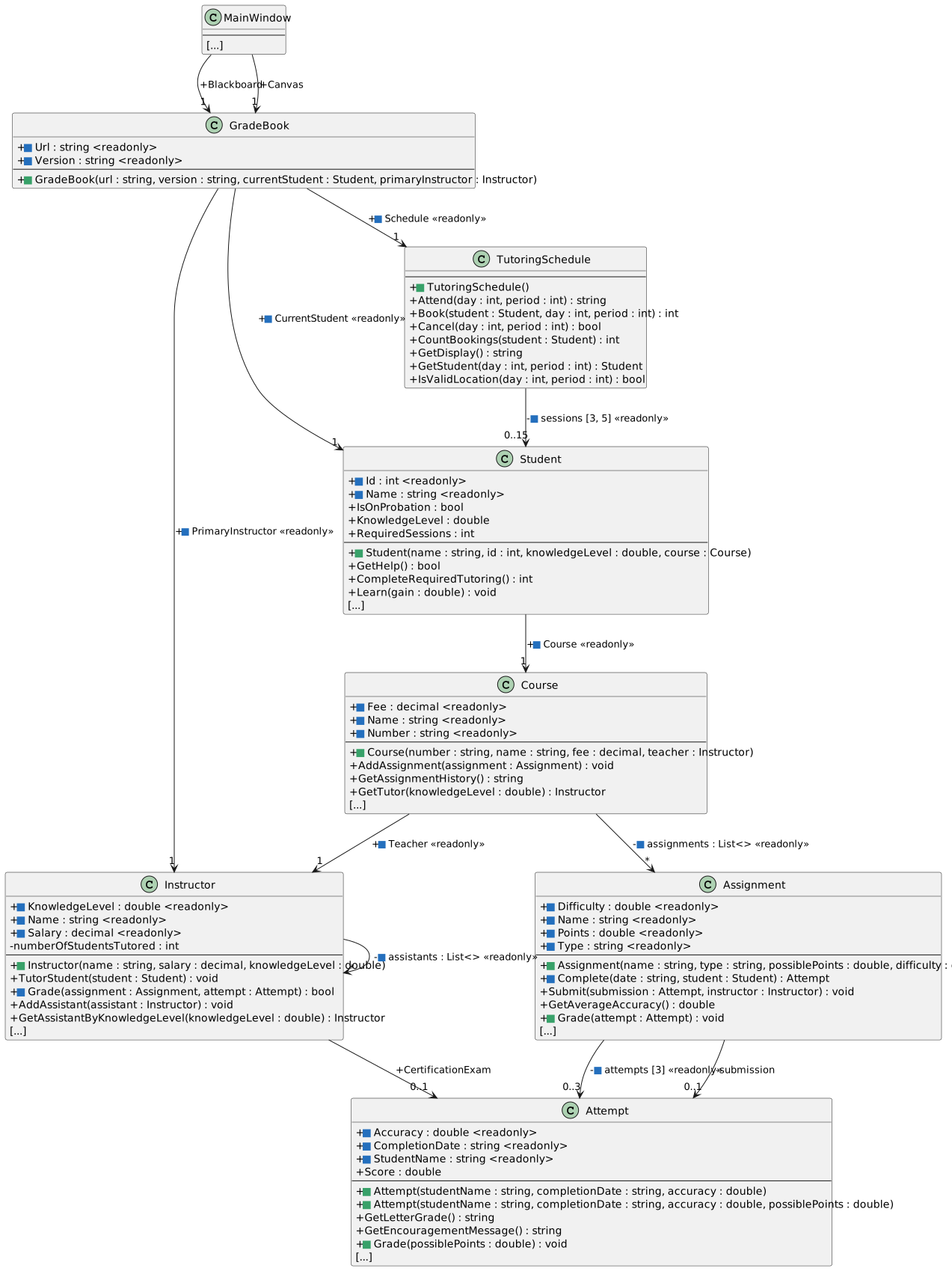
Green squares mark new members; blue squares mark changes to existing members. Other fields and methods remain in the project even where the diagrams abbreviate them.

Grade Book 2.6 structure. New constructors and grading methods are green; changed readonly fields, initialization and delegation are blue. Unrelated methods are abbreviated. Object-reference fields are shown only on arrows with visibility; List<> identifies lists and brackets show fixed array dimensions. Properties and constructors share the methods compartment.
Ending structure — constructors and grading delegation
  • New
  • Changed
  • Removed
19.Submit your completed solution
A Build, address StyleCop feedback, zip your solution, and submit it through the course Feedback System

Submit the resulting Feedback System URL to the Grade Book 2.6 assignment in Canvas.