2.5 Grade Book Assignment

Grade Book 2.5 — Protect the Collections

Keep the assignment histories, averages, tutoring details, and weekly reservations from your completed Grade Book 2.4. This lesson gives each class control over the collections and state that belong to it.

1.Copy the previous version
A Copy your completed Grade Book 2.4 folder, rename the copy and solution for Grade Book 2.5 using your last name, open the copied solution, and restore NuGet packages

Update the window Title in MainWindow.xaml from 2.4 to 2.5, retaining your last name. Keep .NET Framework 4.8. Update AssemblyVersion and AssemblyFileVersion in Properties/AssemblyInfo.cs to 2.5.0.0.
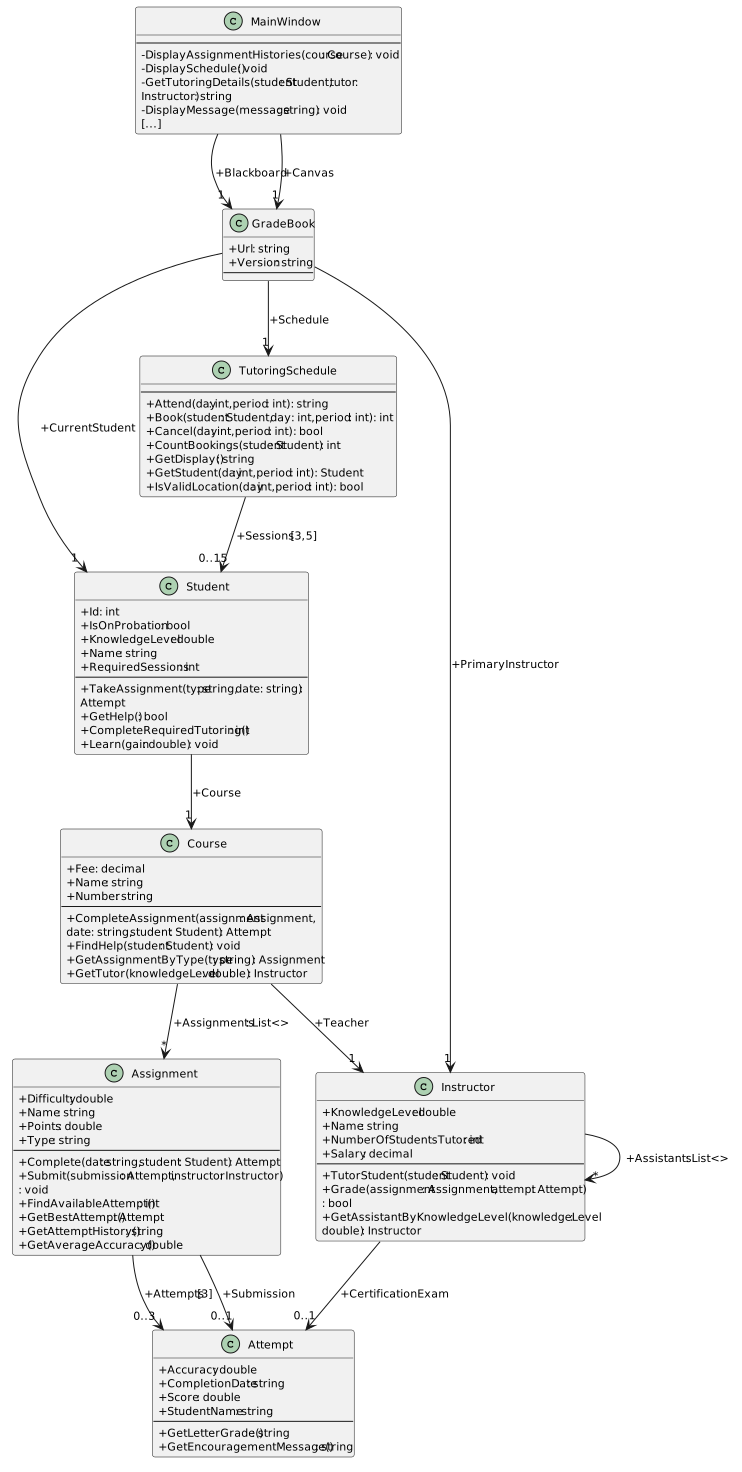
Current Grade Book 2.4 structure before encapsulation. Object-reference fields are shown only on arrows with visibility; List<> identifies lists and brackets show fixed array dimensions. Properties and constructors share the methods compartment.
Starting structure — your completed Grade Book 2.4
  • New
  • Changed
  • Removed
Keep valid assignments and assistants
2.Make the collection fields private
A Use the focused diagram and table to revise the fields in their declaring classes

Keep the existing using System.Collections.Generic directives in Course.cs and Instructor.cs.

Fields controlled by their own class
Class Old field New declaration and initializer
Course Assignments private readonly List<Assignment> assignments = new List<Assignment>();
Instructor Assistants private readonly List<Instructor> assistants = new List<Instructor>();
Instructor NumberOfStudentsTutored private int numberOfStudentsTutored;
Assignment Attempts private readonly Attempt[] attempts = new Attempt[3];
Assignment Submission private Attempt submission;
TutoringSchedule Sessions private readonly Student[,] sessions = new Student[3, 5];

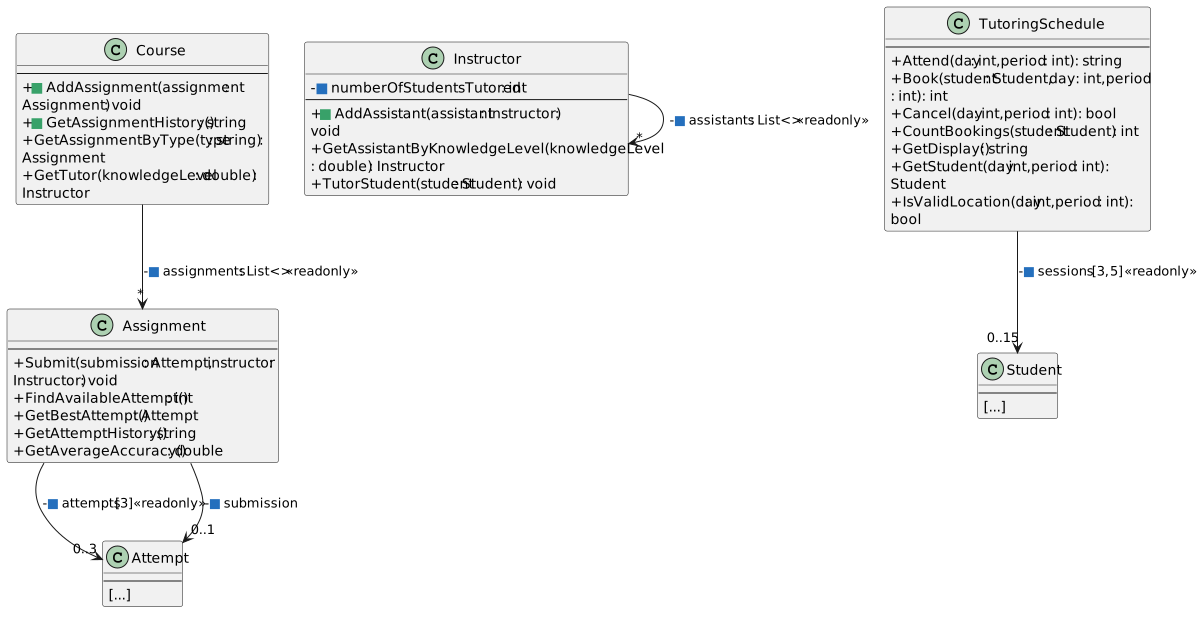
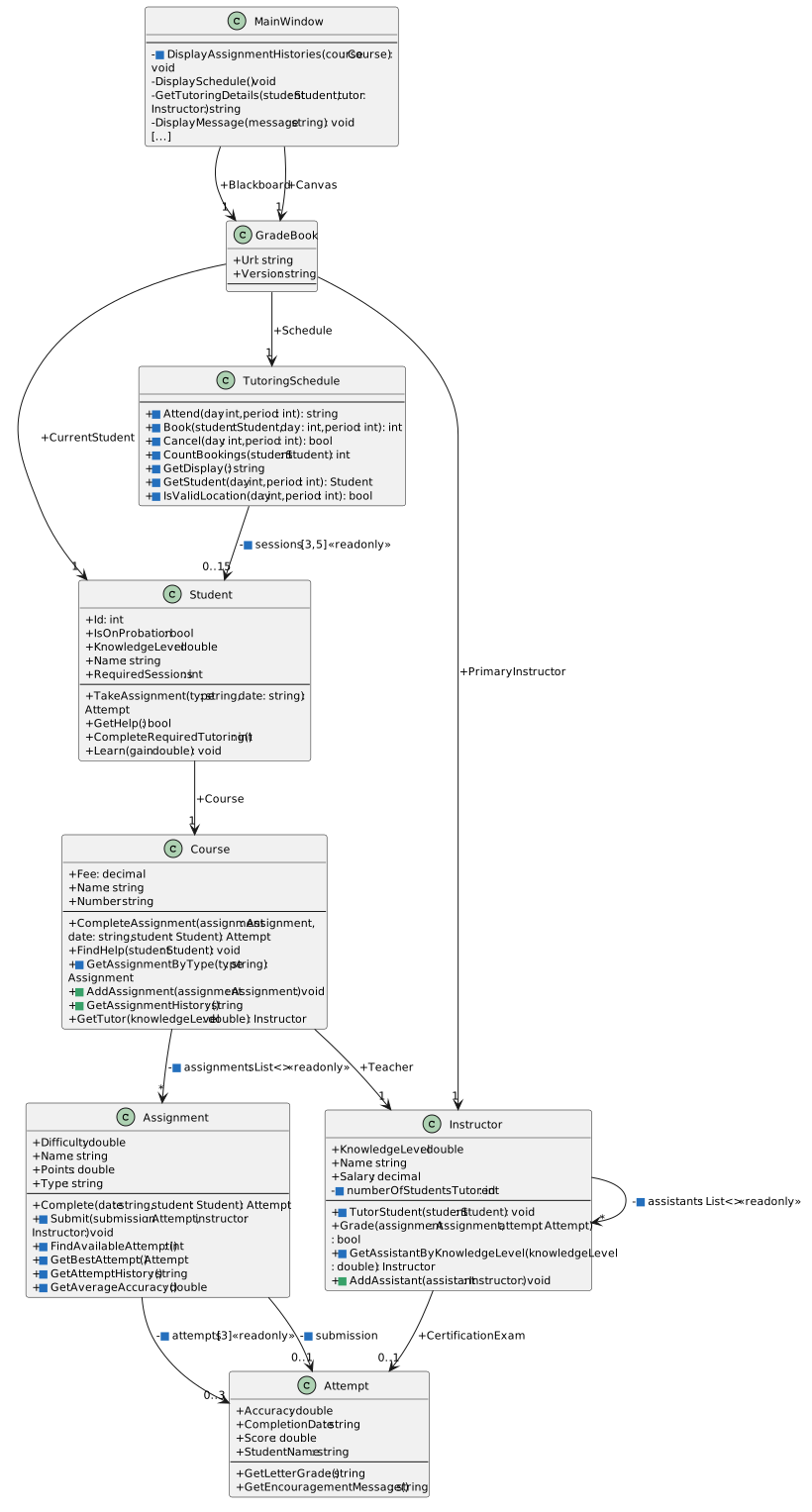
In the class diagram, - means private, + means public, and <<readonly>> means include the C# readonly keyword in the field declaration. Keep the classes themselves public.

Focused 2.5 encapsulation changes. Blue marks changed private fields, green marks new public methods. Public GetTutor remains callable by MainWindow. Object-reference fields are shown only on arrows with visibility; List<> identifies lists and brackets show fixed array dimensions. Properties and constructors share the methods compartment.
Fields and public operations for controlled access
  • New
  • Changed
  • Removed
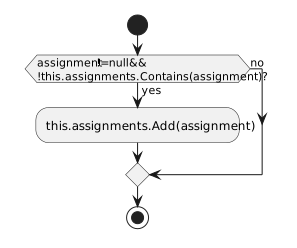
3.Course.AddAssignment — Register an assignment
A In Course.cs, add AddAssignment using the focused signature and activity diagram
AddAssignment adds a non-null reference only when the private assignment list does not contain that reference. Both outcomes end the method.
Add an assignment through its course
  • New
  • Changed
  • Removed
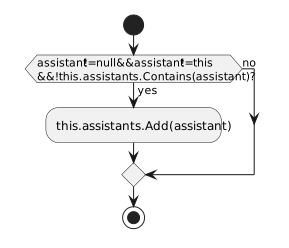
4.Instructor.AddAssistant — Register an assistant
A In Instructor.cs, add AddAssistant using the focused signature and activity diagram
AddAssistant rejects null, the current instructor object, and references already present in the private assistant list.
Keep null, self, and duplicate references out of the assistant list
  • New
  • Changed
  • Removed
5.Course.GetAssignmentByType — Search the private list
A In Course.cs, update GetAssignmentByType to use this.assignments for Count, indexing, and the returned matching entry

Keep its existing null check, first-match break, and null result when no matching type exists.

6.Instructor.GetAssistantByKnowledgeLevel — Search the private list
A In Instructor.cs, change the foreach source in GetAssistantByKnowledgeLevel to this.assistants

Keep its first suitable assistant result, knowledge comparison, null check, and break.

7.Instructor.TutorStudent — Own the tutoring count
A In Instructor.cs, update TutorStudent to increment this.numberOfStudentsTutored after a successful session

Keep the existing guards, capped knowledge gain, and RequiredSessions decrement.

Keep the same learning records and reservations
8.Assignment.Submit — Use the private attempt state
A In Assignment.cs, update Submit for the renamed private fields

Change the stored history reference to this.attempts and the best passing submission field references to this.submission. The submission parameter still names the incoming attempt; keep the this prefix when referring to the field.

9.Assignment.FindAvailableAttempt — Use the private attempt state
A In Assignment.cs, update FindAvailableAttempt for the renamed private fields

Use this.attempts for Length and indexing. Keep the first empty index result and -1 when all three slots are occupied.

10.Assignment.GetBestAttempt — Use the private attempt state
A In Assignment.cs, update GetBestAttempt for the renamed private fields

Read this.attempts in the existing indexed loop. Keep its comparison and null result for an empty history.

11.Assignment.GetAttemptHistory — Use the private attempt state
A In Assignment.cs, update GetAttemptHistory for the renamed private fields

Read this.attempts for the existing three-slot display. Keep Available, the letter grades, best accuracy, average accuracy, and line breaks.

12.Assignment.GetAverageAccuracy — Use the private attempt state
A In Assignment.cs, update GetAverageAccuracy for the renamed private fields

Traverse this.attempts. Keep the existing initialized locals, null filtering, count > 0 guard, and returned average.

13.TutoringSchedule.Attend — Use the private schedule
A In TutoringSchedule.cs, update Attend to use this.sessions wherever it currently uses this.Sessions

Keep the invalid-location and empty-cell guards, the two separate reservation-retained messages, the successful-session update, and the final feedback.

14.TutoringSchedule.Book — Use the private schedule
A In TutoringSchedule.cs, update Book to use this.sessions wherever it currently uses this.Sessions

Keep the return codes, occupied-cell check, zero-required-sessions check, same-day search, and selected-cell assignment.

15.TutoringSchedule.Cancel — Use the private schedule
A In TutoringSchedule.cs, update Cancel to use this.sessions wherever it currently uses this.Sessions

Keep both guards and clear only the selected occupied cell.

16.TutoringSchedule.CountBookings — Use the private schedule
A In TutoringSchedule.cs, update CountBookings to use this.sessions wherever it currently uses this.Sessions

Keep the foreach reference comparison and count only cells referring to the supplied non-null student.

17.TutoringSchedule.GetDisplay — Use the private schedule
A In TutoringSchedule.cs, update GetDisplay to use this.sessions wherever it currently uses this.Sessions

Keep the period and weekday loops, row labels, [ ] and [X] cells, and line breaks.

18.TutoringSchedule.GetStudent — Use the private schedule
A In TutoringSchedule.cs, update GetStudent to use this.sessions wherever it currently uses this.Sessions

Keep the location check, null return for an invalid location, and selected-cell reference return.

19.TutoringSchedule.IsValidLocation — Use the private schedule
A In TutoringSchedule.cs, update IsValidLocation to use this.sessions wherever it currently uses this.Sessions

Keep the existing bounds expression and both GetLength dimensions.

Read the complete history through the course
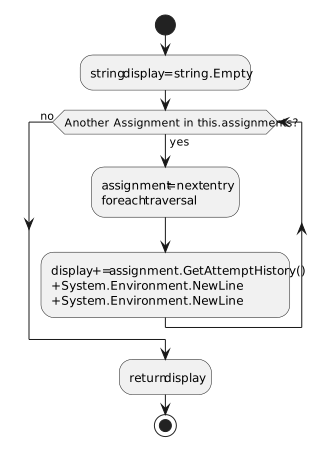
20.Course.GetAssignmentHistory — Assemble the history
A In Course.cs, add GetAssignmentHistory using the focused signature and activity diagram
Course GetAssignmentHistory traverses its private assignment list, appends each complete attempt history and two line breaks, and returns the combined text.
Course assembles histories from its private list
  • New
  • Changed
  • Removed
21.MainWindow.DisplayAssignmentHistories — Display the returned history
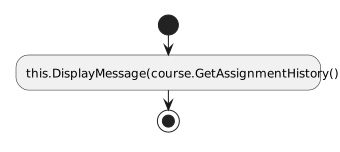
A In MainWindow.xaml.cs, replace the list traversal inside DisplayAssignmentHistories with the single display call in the activity diagram

Keep the method's existing Course parameter and private void signature. The two history event handlers already call this method and keep their current guards.

MainWindow delegates history assembly to Course and displays its returned string.
Delegate history assembly to Course
  • New
  • Changed
  • Removed
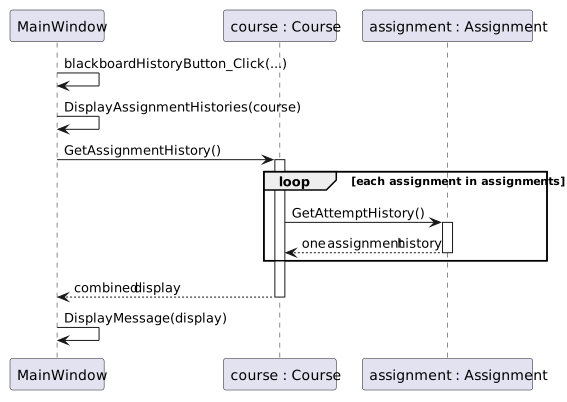
The existing Blackboard history button calls MainWindow, which asks Course for its privately stored assignment histories. Each Assignment supplies its existing history and average.
The existing history button now reads the private list through Course
  • New
  • Changed
  • Removed
22.Connect the creation event handlers to the new methods
A In MainWindow.xaml.cs, update newBlackboardButton_Click using the diagrams

Use the public operations shown in the controlled-access class diagram. Preserve the configured objects, values, and creation confirmation.

B In MainWindow.xaml.cs, update newCanvasButton_Click using the diagrams

Follow the controlled-access class diagram and keep the existing Canvas objects, setup values, and schedule display refresh.

C Build the solution and resolve any remaining references to the old public collection fields

The existing buttons and Click names stay in MainWindow.xaml. Keep the tutoring handlers, complete-tutoring feedback, attendance details, and their GetTutoringDetails calls.

23.Follow a request into a private collection
A Set a breakpoint on the if statement in Course.AddAssignment and start debugging

Before clicking New Blackboard, add the following Watch expressions. Some are unavailable outside the method; unavailable means out of scope, not null.

Registration Watch expressions
Expression What to observe inside Course.AddAssignment
this The Web Design Course receiving the assignment
assignment The current Assignment parameter
this.assignments.Count 0 before adding Plan, then 1 after the Add statement
assignment.Name Plan on the first call
1 Click New Blackboard and inspect the first AddAssignment call when the breakpoint is reached

The highlighted if has not executed yet. Here this is the Course, not MainWindow. Use F10 until the Add statement is highlighted; it has not executed while highlighted. Press F10 to execute that statement, then confirm Count is 1 and entry [0] refers to the same object as assignment. Depending on debugger sequence points, stepping may also pause on a brace. On the next two calls the names are HTML Exercises and Website 1.

2 Disable the breakpoint and press F5 to finish creation before clicking another button

Blackboard created. appears in the status area. Do not call AddAssignment or change collection contents through Watch.

B Use the AddAssignment and AddAssistant diagrams as a source trace for the following requests

These are source traces, not extra UI actions. The supplied creation buttons do not send these invalid requests.

Rejected registration source traces
Request Condition result Stored entries
AddAssignment(null) false Unchanged
AddAssignment with the same stored reference again false Unchanged
AddAssistant(null) false Unchanged
AddAssistant with the receiving instructor itself false Unchanged
AddAssistant with the same stored reference again false Unchanged
24.Check Your Work — Histories and tutoring still work
A Create fresh Blackboard, click Take midterm three times, and show its attempt history

The Plan and Website 1 histories still have three Available slots. HTML Exercises has three completed attempts. Its best accuracy is 84.58% and its average accuracy is 82.08%. A fourth Take midterm click reports that the assignment or instructor is unavailable, or all three attempts have been used; the history remains unchanged.

B Create fresh Blackboard and click Tutor Arthur once

Expect Tutoring session completed. Sheldon is the selected tutor with knowledge level 75.3; Arthur's knowledge is 70.5 and two required sessions remain. The tutor details remain part of the existing feedback.

C Create fresh Canvas, select Monday and period 1, then click Book selected student and Attend

The first booking shows [X] and Samantha reservations: 1. Attendance uses Jeff, raises Samantha's knowledge from 87.8 to 92.8, reduces required sessions to 3, clears the cell, and refreshes the reservation count to 0. The feedback still includes the tutor and student knowledge levels.

D Create fresh Canvas, book Monday period 1, and click Complete Samantha tutoring

Two sessions complete: Samantha reaches knowledge 95 with two required sessions remaining. The existing completion feedback explains that no tutor has a higher knowledge level. Direct tutoring leaves the reservation in place. Click Attend: it reports No tutor has a higher knowledge level. Reservation retained. The cell stays [X] and the count stays 1. Cancel reservation clears it; a second cancellation reports that no reservation was canceled.

E Create fresh Blackboard, click Tutor Arthur three times, then click it once more

The fourth click reports No tutoring sessions are required. Arthur remains at knowledge 80.3 with zero required sessions. This is distinct from the no-more-knowledge outcome in Canvas.

25.Review the completed structure
A Use the ending diagram to explain which class owns each list or array and which public methods the other classes can call
Grade Book 2.5 structure. Blue squares identify changed fields and methods; green squares identify new methods. Arrays remain three attempts and a three-by-five schedule. Object-reference fields are shown only on arrows with visibility; List<> identifies lists and brackets show fixed array dimensions. Properties and constructors share the methods compartment.
Ending structure — private state and controlled public methods
  • New
  • Changed
  • Removed
26.Submit your completed Grade Book 2.5
A Build the solution and check the applicable StyleCop feedback
B Zip your completed solution, submit it to the Feedback System, and submit the resulting Feedback System URL to the Grade Book 2.5 assignment in Canvas