Under Construction
This page is currently being built. Please check back soon.
This page is currently being built. Please check back soon.
Use the goals, acceptance criteria, and nested tasks below to prepare and complete this activity. Follow the stated scope carefully.
Download the starting code.
Date Night 2.1.zip
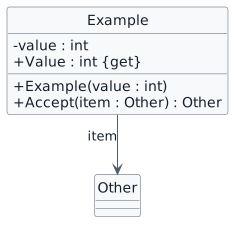
Check the result against this instruction: Represent the Car class methods in a class diagram. Don't represent fields.
Check the result against this instruction: Represent all of the missing fields by putting [...] in the Attributes section.
Open or render your diagram, inspect every label and relationship, and compare it with the code or debugger state. Resolve syntax errors, clipped labels and unreadable crossings before submission.
![Object identity and list order example. object "items : List<Example>" as items object "first : Example" as first { value = 7 } object "second : Example" as second { value = 9 } items --> first : [0] items --> second : [1]](Diagrams/DiagramObjectNotation.light.svg)
Check the result against this instruction: Set a breakpoint at the end of the GoTo method in the Car class.
Check the result against this instruction: Start the application and click 'New Harry and Sally date' and then 'Harry, prepare for date'.
There should only be three object nodes when finished.
Check the result against this instruction: Represent the driver object, the driver object's primitive fields and their object fields (folded in) except for Vehicle and CarKey. Fold in the Gps field for the Vehicle.
Open or render your diagram, inspect every label and relationship, and compare it with the code or debugger state. Resolve syntax errors, clipped labels and unreadable crossings before submission.
Check the result against this instruction: Set a breakpoint at the beginning of the DriveTo method in the Pursuer class.
Check the result against this instruction: Start the application and click 'New Harry and Sally date' and then 'Harry, go on mini golf date'.
The beginning object node should be: Harry: Pursuer
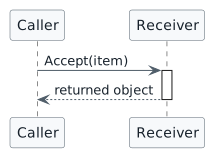
Check the result against this instruction: Create a sequence diagram that represents the flow of the application in the if statement, not including the call to this.Friend.GoTo().
Open or render your diagram, inspect every label and relationship, and compare it with the code or debugger state. Resolve syntax errors, clipped labels and unreadable crossings before submission.
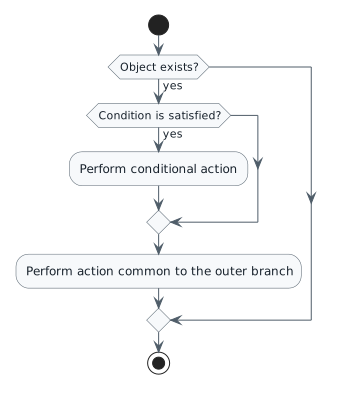
There should be a total of 8 nodes without the start and end scenario circles.
Check the result against this instruction: Represent the ServeIceCream method in an Activity Diagram.
Open or render your diagram, inspect every label and relationship, and compare it with the code or debugger state. Resolve syntax errors, clipped labels and unreadable crossings before submission.
Submit to the Feedback System and Canvas
Return to each user story and confirm that you can demonstrate its acceptance criteria. Use the task checkboxes to track completion; a checked box is not a substitute for testing or inspecting the required evidence.
Represent the class view Represent the object view Represent the sequence view Represent the activity viewUse the submission or attendance instructions in this page. For a Feedback System submission, upload the requested ZIP, review and resolve the feedback, and submit the resulting URL to the matching Canvas activity. For a Canvas quiz, enter only the requested answers; for an oral final, complete the scheduling and attendance steps.