Overview
1.Getting Started
A
Copy your 1.2 ending code, renaming both the folder and the Visual Studio solution file
B
The class diagram below represents the structure of the application at the start of this assignment
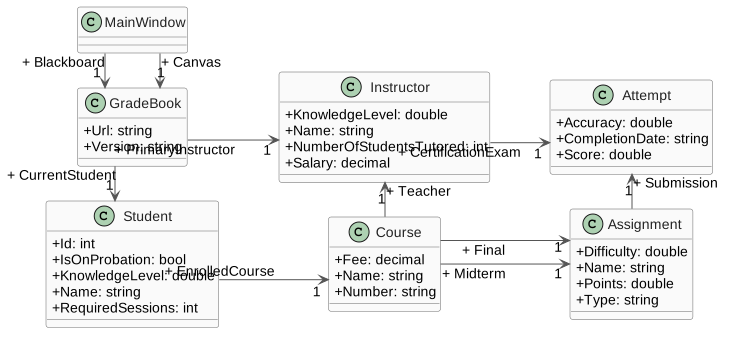
- New
- Changed
- Removed
2.Have Arthur and Samantha take their Finals
A
Add assignment completion abilities
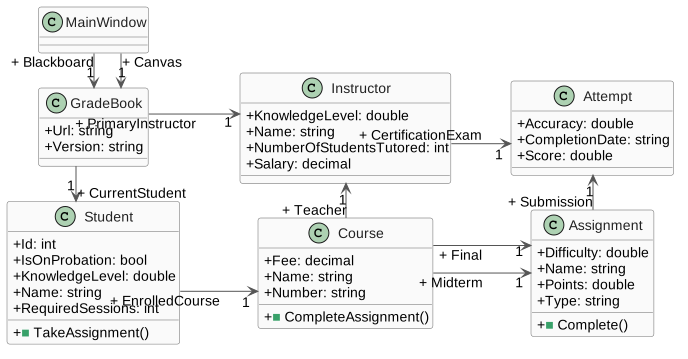
- New
- Changed
- Removed
1
Modify the class structure as shown in the class diagram above
2
Use the following code to add the button for taking the
Blackboard final and create an event handler<Button x:Name="takeFinalButton" Content="Take final" Click="takeFinalButton_Click"/>
3
Use the following code to add the button for taking the Canvas final and create an event handler
<Button x:Name="writeFinalPaperButton" Content="Write final paper" Click="writeFinalPaperButton_Click"/>
B
Insert method calls in the application based on the sequence diagram below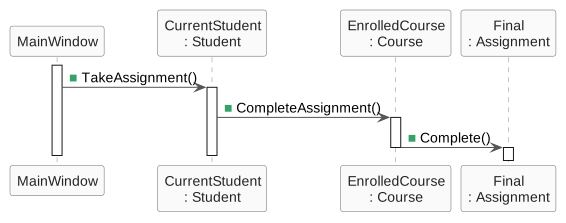
- New
- Changed
- Removed
1
The
takeFinalButton_click is for this.Blackboard, and the writeFinalPaperButton_click is for this.CanvasC
Modify the Assignment's
Complete method1
Assign the
Submission field to a new instance of the Attempt class2
Assign the
Submission's Accuracy to 70.0D
Check Your Work (
Blackboard):1
Set a breakpoint on the closing curly brace of the
takeFinalButton_Click method2
Start the application. Click the
New Blackboard button. Click the 'Take Final' button3
Ensure Arthur's Website 1 Final
Submission is at 70 AccuracyE
Check Your Work (Canvas):
1
Set a breakpoint on the closing curly brace of the
writeFinalPaperButton_Click method2
Start the application. Click the
New Canvas button. Click the 'Write Final Paper' button3
Ensure Samantha's Term Paper Final
Submission is at 70 Accuracy3.Tutor Arthur and Samantha
A
Add tutoring capabilities
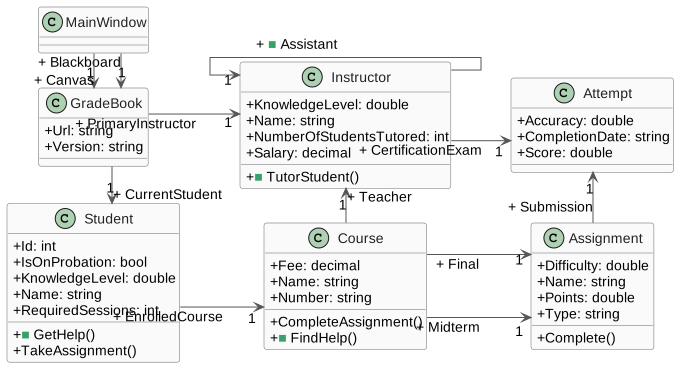
- New
- Changed
- Removed
1
Modify the class structure based on the class diagram above
2
Use the following code to add a button for tutoring Arthur under the
Blackboard buttons, and create an event handler<Button x:Name="tutorArthurButton" Content="Tutor Arthur" Click="tutorArthurButton_Click"/>
3
Use the following code to add a button for tutoring Samantha under the Canvas buttons, and create an event handler
<Button x:Name="tutorSamanthaButton" Content="Tutor Samantha" Click="tutorSamanthaButton_Click"/>
B
In the
newBlackboardButton_Click method, create a separate PrimaryInstructor for the Blackboard GradeBook and create an Assistant for the Course's Teacher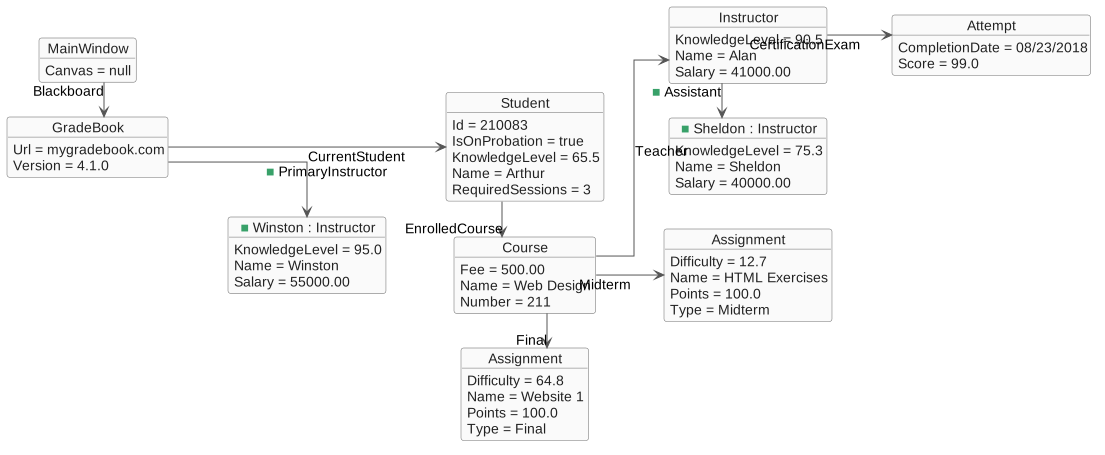
- New
- Changed
- Removed
1
After assigning
this.Blackboard.Version and before creating this.Blackboard.CurrentStudent, add the following code to create Winston as the Blackboard GradeBook's PrimaryInstructorthis.Blackboard.PrimaryInstructor = new Instructor();
this.Blackboard.PrimaryInstructor.Name = "Winston";
this.Blackboard.PrimaryInstructor.Salary = 55000.00m;
this.Blackboard.PrimaryInstructor.KnowledgeLevel = 95.0;2
After creating Alan's
CertificationExam, add the following code to create Sheldon as Alan's Assistantthis.Blackboard.CurrentStudent.EnrolledCourse.Teacher.Assistant = new Instructor();
this.Blackboard.CurrentStudent.EnrolledCourse.Teacher.Assistant.KnowledgeLevel = 75.3;
this.Blackboard.CurrentStudent.EnrolledCourse.Teacher.Assistant.Name = "Sheldon";
this.Blackboard.CurrentStudent.EnrolledCourse.Teacher.Assistant.Salary = 40000.00m;C
In the
newCanvasButton_Click method, create a separate PrimaryInstructor for the Canvas GradeBook and create an Assistant for the Course's Teacher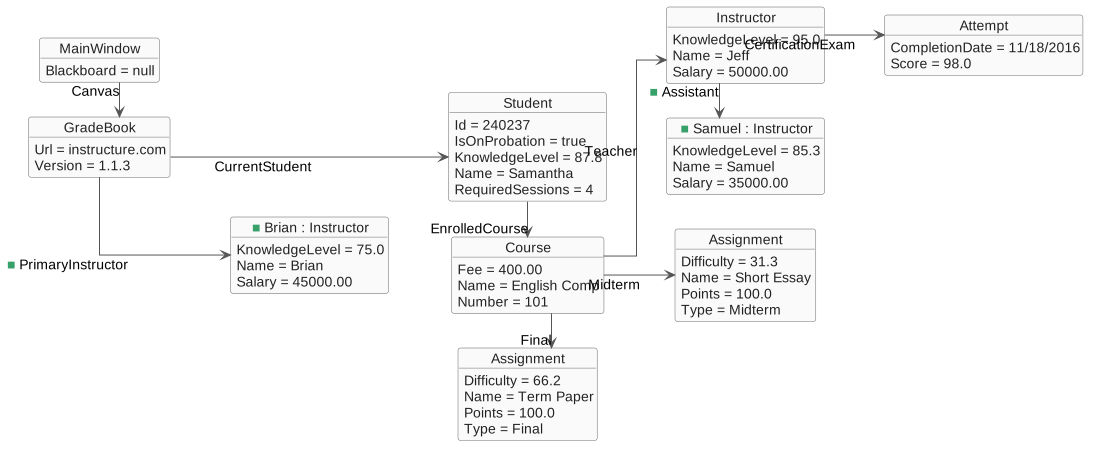
- New
- Changed
- Removed
1
After assigning
this.Canvas.Version and before creating this.Canvas.CurrentStudent, add the following code to create Brian as the Canvas GradeBook's PrimaryInstructorthis.Canvas.PrimaryInstructor = new Instructor();
this.Canvas.PrimaryInstructor.Name = "Brian";
this.Canvas.PrimaryInstructor.Salary = 45000.00m;
this.Canvas.PrimaryInstructor.KnowledgeLevel = 75.0;2
After creating Jeff's
CertificationExam, add the following code to create Samuel as Jeff's Assistantthis.Canvas.CurrentStudent.EnrolledCourse.Teacher.Assistant = new Instructor();
this.Canvas.CurrentStudent.EnrolledCourse.Teacher.Assistant.Name = "Samuel";
this.Canvas.CurrentStudent.EnrolledCourse.Teacher.Assistant.KnowledgeLevel = 85.3;
this.Canvas.CurrentStudent.EnrolledCourse.Teacher.Assistant.Salary = 35000.00m;D
Insert method calls in the application based on the sequence diagram below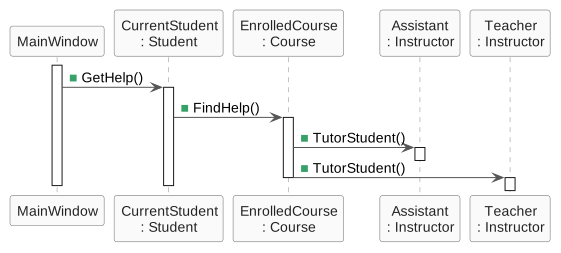
- New
- Changed
- Removed
E
In the
Instructor's TutorStudent method, assign the NumberOfStudentsTutored to 1F
In the Student's
GetHelp method, assign the IsOnProbation field to false after they find helpG
Check Your Work (
Blackboard):1
Set a breakpoint on the closing curly brace of the
tutorArthurButton_Click method2
Start the application. Click the
New Blackboard button. Click the Tutor Arthur button3
Ensure the Student's
IsOnProbation field is false4
Ensure Alan's
NumberOfStudentsTutored is 15
Ensure
Blackboard.PrimaryInstructor is Winston with a Salary of 55000.00 and a KnowledgeLevel of 95.06
Ensure
Blackboard.CurrentStudent.EnrolledCourse.Teacher is Alan and Alan's Assistant is SheldonH
Check Your Work (Canvas):
1
Set a breakpoint on the closing curly brace of the
tutorSamanthaButton_Click method and the newCanvasButton_Click2
Start the application. Click the
New Canvas button3
Ensure
Canvas.PrimaryInstructor is Brian with a Salary of 45000.00 and a KnowledgeLevel of 75.04
Click the
Tutor Samantha button5
Ensure the Student's
IsOnProbation field is false6
Ensure Jeff's
NumberOfStudentsTutored is 17
Ensure
Canvas.CurrentStudent.EnrolledCourse.Teacher is Jeff and Jeff's Assistant is Samuel4.The class diagram below represents the structure of the application at the end of this assignment
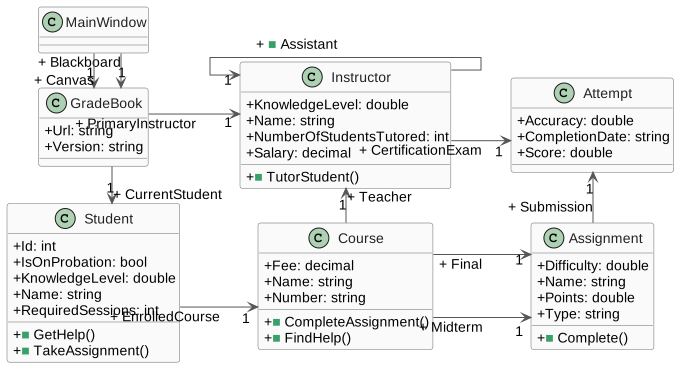
- New
- Changed
- Removed
5.Submit a zipped Visual Studio solution
A
Ensure all code is StyleCop compliant
B
Zip the solution and submit to the Feedback System
C
Submit the Feedback System url to the correct assignment in Canvas