Overview
1.Download the starting code
A
Download the 1.3 Date Night starting zip file
B
Extract the contents of the zip file to a Date Night OneDrive folder
C
Rename the "Date Night 1.3 LastName" folder, replacing LastName with your last name
D
Within the folder renamed in the previous step, rename the file "Date Night 1.3 LastName.sln" file, replacing LastName with your last name
E
Right click the Solution and select 'Restore NuGet Packages'
2.Create a class diagram
A
Using the given starting code, create a UML class diagram including all fields and methods to represent the classes listed below
1
Atm
2
City
3
Fold in House1
4
Fold in House2
5
Car
6
GasStation
7
Pursuer
8
Fold in Friend
9
Fold in Home
10
HairSalon
3.Create an object diagram
A
Set a breakpoint on line 116 of the MainWindow.xaml.cs file. Start the application and click the 'New Harry and Sally date' button
B
Create nodes for and show relationships between Harry and his sub-objects. "Fold in" the following objects:
1
Harry's Friend
2
Harry's Home
3
Harry's Hometown's House1
4
Harry's Hometown's House2
4.Create a sequence diagram
A
Using the given starting code, create a UML sequence diagram to represent the flow of the PrepareForDate method. Your diagram should start with the node below
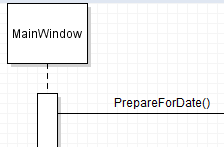
5.Save diagrams and submit
A
Save the diagrams by clicking File | Save in Violet
1
Make sure they all have the naming convention of the .html file is: Date Night 1.3 LastName
B
Zip all the html files into a single .zip file and submit the .zip file to the Feedback System
1
Make sure to zip the html files and not a folder with the html files inside
2
Make sure the naming convention of the .zip file is: Date Night 1.3 LastName
C
Correct any mistakes based on Feedback
D
Submit the resulting Feedback to Canvas as a URL