12.5 Assignment - Securing API With JWT

Overview

12.5 Assignment - Securing API With JWT

In this assignment you will be adding the ability to delete an entity by invoking an HttpDelete request to your web service application from the 12.4 assignment. You will also be securing your application using a JSON Web Token.

Work through the stories in order. Use the acceptance criteria to check each feature, and complete the nested tasks using the specified names, values, and scenarios.

Checkpoint reference
Operation Checkpoint response
GET 200 OK with the requested data.
POST 200 OK with the created result, as required here.
PUT (12.4 onward) 200 OK after the update.
DELETE (12.5) 204 No Content after deletion.
Delete a record
Acceptance Criteria
Acceptance criteria
  • The DELETE endpoint removes the requested record.
  • A successful deletion returns HTTP 204 with no response body.
  • A subsequent query confirms the record is absent.
Instructions
1.Create at least one DELETE request.
A In the DataService class create a method to delete the chosen entity.
B In the API controller create a method that will call the DataService's method to delete the chosen entity.
1 Add a DELETE attribute that configures the URL to point to that specific API call.
2 Return a new status code result 204.
C Check your work in Postman and ensure that the new DELETE request works as expected.
Issue and validate JSON Web Tokens
Acceptance Criteria
Acceptance criteria
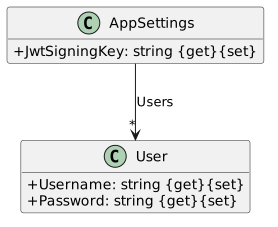
  • AppSettings contains JwtSigningKey and Users; User contains Username and Password.
  • The authentication service validates the configured signing key and token settings.
  • The anonymous token endpoint validates the supplied test credentials before issuing a token.
Instructions
2.Add User and Appsettings classes to the application.
App Settings Classes; Members and relationships are shown in the editable reference; unrelated members may be omitted.
App Settings Classes
  • New
  • Changed
  • Removed
A Add User and Appsettings classes to the application.
3.Configure JWT authentication service.
A Add the JWTSigningKey and User properties and their values to the appsettings.json file. Ensure the User object contains…

Add the JWTSigningKey and User properties and their values to the appsettings.json file. Ensure the User object contains username and password properties with values.

B Register a JWT authentication schema.
1 In the Startup classes ConfigureServices method

Configure the appsettings.json file.

Add authentication settings to the JWTSigningKey.

Map the appsettings.json file to the AppSettings class.

2 In the Startup class Configure method call the app's UseAuthentication method.
4.Generate a JSON Web Token.
A Create an APIController that implements the BaseController class in in the Controllers folder.
1 Add a Route attribute, an ApiController attribute, and an AllowAnonymous attribute at the class level.
2 Add fields to represent the AppSettings and Users class, and set their values in the controller's constructor.
3 Create a GetToken method.

Add an HttpPost attribute with a route at the method level.

Authenticate the user.

If user authentication is successful, generate the JWT Token using the JWTSigningKey and User credentitals.

Protect and verify the API endpoints
Acceptance Criteria
Acceptance criteria
  • Protected controllers use Authorize while the token endpoint remains accessible for authentication.
  • Postman can obtain a token with the configured test credentials and use Bearer authorization for the protected calls.
  • A missing or invalid token cannot access protected data.
Instructions
5.Only allow users that have a JWT to invoke API calls by adding the Authorize attribute to the necessary controllers.
A Only allow users that have a JWT to invoke API calls by adding the Authorize attribute to the necessary controllers.
6.Check your work in Postman and ensure the request to get a token works properly.
A Check your work in Postman and ensure the request to get a token works properly.
Deploy and document the secured service
Acceptance Criteria
Acceptance criteria
  • The deployed service supports the new DELETE and token operations.
  • The endpoint document describes the new calls and course test credentials required for review.
  • The required ZIP contains the completed project copy and Word document, with node_modules removed.
Instructions
7.Deploy your updated application.
A Deploy your updated application.
8.Check that your deployed application works in Postman.
A Check that your deployed application works in Postman.
9.Add the newly created calls to the document of API calls created in the 12.4 assignment. Be sure to indicate the username…

Add the newly created calls to the document of API calls created in the 12.4 assignment. Be sure to indicate the username and password values needed to request a token.

A Add the newly created calls to the document of API calls created in the 12.4 assignment. Be sure to indicate the username…

Add the newly created calls to the document of API calls created in the 12.4 assignment. Be sure to indicate the username and password values needed to request a token.

10.Submit a zipped folder of a copy of your application containing your completed application and the Word document, and with…

Submit a zipped folder of a copy of your application containing your completed application and the Word document, and with the node_modules folder removed.

A Submit a zipped folder of a copy of your application containing your completed application and the Word document, and with…

Submit a zipped folder of a copy of your application containing your completed application and the Word document, and with the node_modules folder removed.

Completion review
11.Review the feature acceptance criteria
A Confirm the required results

Return to each story and verify its acceptance criteria. Preserve the submission format and destination stated in the activity; a reading, setup guide, lab, video demonstration, and oral final may require different evidence.

Delete a record Issue and validate JSON Web Tokens Protect and verify the API endpoints Deploy and document the secured service