Acceptance criteria
- The .NET Framework console project uses the requested name and packages.
- App.config and APIManager supply the base path and your own API credentials.
12.2 Lab
In this lab, you will invoke the API calls to The Movie Database in Visual Studio using C#. These calls will be the same calls invoked in Postman in the 12.1 Lab.
Work through the stories in order. Use the acceptance criteria to check each feature, and complete the nested tasks using the specified names, values, and scenarios.
After your project opens, click on Tools After the project opens, click on Tools in the control bar on the top of your project. Select NuGet Package Manager > Package Manager Console and install the following NuGet packages
install-package Newtonsoft.Json
install-package System.Net.HttpAfter your project opens, click on Tools After the project opens, click on Tools in the control bar on the top of your project. Select NuGet Package Manager > Package Manager Console and install the following NuGet packages
In Solution Explorer, open the App.config file for editing. Add the following two sections to it, after the existing
<startup>
section, then save the file. This stores the credentials needed for the application to connect to TheMovieDB's API.
<connectionStrings>
<clear />
<add name="default"   connectionString="https://api.themoviedb.org/3/" />
</connectionStrings>
<!--Add in your own API Key value received in 12.1 Lab to the value of the APIKey-->
<appSettings>
<add key="APIKey" value="" />
</appSettings>
In Solution Explorer, open the App.config file for editing. Add the following two sections to it, after the existing
<startup>
section, then save the file. This stores the credentials needed for the application to connect to TheMovieDB's API.
using System;
using System.Collections.Generic;
using System.Text;
namespace _12._2LabTheMovieDB
{
/// <summary>
/// The class that is used to represent an API Manager.
/// </summary>
public class APIManager
{
/// <summary>
/// The field that is used to represent the connection string to the API.
/// </summary>
private string connectionString;
/// <summary>
/// The field that is used to represent the API Key.
/// </summary>
private string apiKey;
/// <summary>
/// Initializes a new instance of the APIManager class.
/// </summary>
/// <param name="connectionString">The specified connection string.</param>
/// <param name="apiKey">The specififed api key.</param>
public APIManager(string connectionString, string apiKey)
{
this.connectionString = connectionString;
this.apiKey = apiKey;
}
/// <summary>
/// Gets the connection string.
/// </summary>
public string ConnectionString => this.connectionString;
/// <summary>
/// Gets or sets the api key.
/// </summary>
public string APIKey
{
get => this.apiKey;
set => this.apiKey = value;
}
/// <summary>
/// Gets or sets the request token.
/// </summary>
//public Token RequestToken { get; set; }
}
}Create a new Movie class and add it to a new Models folder. Then create a MovieDTO class and add it to a new DTO folder. The MovieDTO class represents a data transfer object that will be used to accept the response from the GET request. The Movie class will be used to display properties from the MovieDTO object to the user.
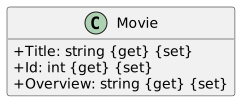
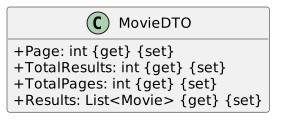
When accepting responses from API requests, it is important that the classes you use to receive the GET request JSON object are modeled exactly as the received JSON object. To assist with this, you can use the JSONProperty attribute for when the JSON object is deserialized into a C# object. Add the following attributes to each of the properties in the MovieDTO class, as shown below.
/// <summary>
/// Gets or sets the page.
/// </summary>
[JsonProperty("page")]
public int Page { get; set; }
/// <summary>
/// Gets or sets the total results.
/// </summary>
[JsonProperty("total_results")]
public int TotalResults { get; set; }
/// <summary>
/// Gets or sets the total number of pages.
/// </summary>
[JsonProperty("total_pages")]
public int TotalPages { get; set; }
/// <summary>
/// Gets or sets the list of returned movies.
/// </summary>
[JsonProperty("results")]
public List<Movie> Results { get; set; }
You will need to add a Newtonsoft.Json using
Create a new folder named Controllers. In the Controllers folder, create a new class named APIController that inherits from the controller interface. This is where we will create and initialize the HttpClient that will be used to send our requests, and where we will create our calls to send those requests.
using System;
using System.Collections.Generic;
using System.Net.Http;
using System.Net.Http.Headers;
using System.Text;
using System.Web.Mvc;
using _12._1LabTheMovieDB.Models;
using _12._2TheMovieDB;
using _12._2TheMovieDB.Models;
using Newtonsoft.Json;
namespace _12._1LabTheMovieDB.Controllers
{
/// <summary>
/// The class that is used to represent the API Controller.
/// </summary>
public class APIController : Controller
{
/// <summary>
/// Creates a new http client.
/// </summary>
private static HttpClient httpClient = new HttpClient();
/// <summary>
/// Gets or sets the API Manager.
/// </summary>
public static APIManager APIManager { get; set; }
/// <summary>
/// Gets the list of movies using the discover GET call.
/// </summary>
/// <returns>The list of movies.</returns>
public static List<Movie> GetMovies()
{
}
/// <summary>
/// Sends the GET requests.
/// </summary>
/// <typeparam name="T">The specified type.</typeparam>
/// <param name="method">The request method.</param>
/// <param name="request">The request url path to be added to the connection string.</param>
/// <returns>The API response.</returns>
public static string SendRequest<T>(string method, string request)
{
}
/// <summary>
/// Parses the json object into a usable C# object.
/// </summary>
/// <typeparam name="T">The specified type to be converted to.</typeparam>
/// <param name="res">The json object to be converted.</param>
/// <returns>The converted object.</returns>
private static T ParseResponse<T>(string res)
{
}
}
}
You will need to install the Microsoft.AspNet.Mvc package to your project
Add these using statements: using System.Net.Http; using System.Net.Http.Headers;
Create a new AuthenticationHeaderValue, passing in "APIKey", and the APIManager's APIKey property. Set the result to the httpClient's DefaultRequestHeaders Authorization property.
Create a try...catch block.
In the try block.
Get the Result of the httpClient's GetAsync method passing in the request parameter. Set the result equal to response variable of type HttpResponseMessage.
Set the response's Content property equal to a content variable of type HttpContent.
Get the Result of the content ReadAsStringAsync method and set the result to a result variable of type string. Return the result.
In the catch block, pass in a HttpRequestException and throw the passed in exception.
The SentRequests method should look like the below code.
httpClient.DefaultRequestHeaders.Authorization = new AuthenticationHeaderValue("APIKey", APIManager.APIKey);
try
{
HttpResponseMessage response = httpClient.GetAsync(request).Result;
HttpContent content = response.Content;
response.EnsureSuccessStatusCode();
string result = content.ReadAsStringAsync().Result;
return result;
}
catch (HttpRequestException e)
{
throw e;
}Add Newtonsoft.Json using statement
Call JsonConvert's DeserializeObject method passing in the res parameter. Set the results equal to a entity variable of type T. Return entity.
T entity = JsonConvert.DeserializeObject<T>(res);
return entity;Paste in the following code to set the full connection string to be passed into the GET request.
string fullConnectionString = APIManager.ConnectionString + "discover/movie?api_key=" + APIManager.APIKey;Call SendRequest passing in "GET" and the fullConnectionString variable. Set the results to a request variable of type string.
Call the ParseResponse method passing in the request variable. Set the results equal to a movieDTO variable of type MovieDTO.
Set the movieDTO Results property to a movies variable of type List<Movie>. Return movies.
The GetMovies method should look like the below code.
// Create a connection URL to be sent to the GET requests.
string fullConnectionString = APIManager.ConnectionString + "discover/movie?api_key=" + APIManager.APIKey;
// Send the GET request with the connection URL.
string request = SendRequest<string>("GET", fullConnectionString);
// Convert the GET request response from a JSONObject to a usable C# object.
MovieDTO movieDTO = ParseResponse<MovieDTO>(request);
// Set the movieDTO Results to a more user friendly list of movies.
List<Movie> movies = movieDTO.Results;
return movies;// Gets the app settings of the app.config file.
var configFile = ConfigurationManager.OpenExeConfiguration(ConfigurationUserLevel.None);
var settings = configFile.AppSettings.Settings;
// Creates a new api manager with the api url and api key from app.config
APIController.APIManager = new APIManager(ConfigurationManager.ConnectionStrings["default"].ConnectionString, settings["APIKey"].Value);Add a System.Configuration using statement.
If the case is "discover"
Call the APIController's GetMovies method, and set the result equal to a movies variable of type List<Movie>.
Foreach Movie in the movies list, write to the console the movie's Id, Title, and Overview.
Direct the user to hit Enter to exit the application, and have the console read the line, to prevent the app from closing right away.
If the case is default, break.
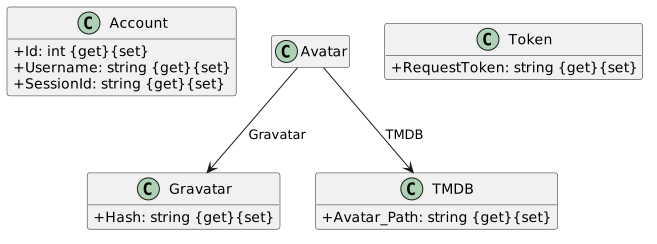
using System;
using System.Collections.Generic;
using System.Linq;
using System.Text;
using System.Threading.Tasks;
using Newtonsoft.Json;
namespace _12._2TheMovieDB.Models
{
public class AccountDTO
{
/// <summary>
/// Gets or sets the avatar.
/// </summary>
[JsonProperty("avatar")]
public Avatar Avatar { get; set; }
/// <summary>
/// Gets or sets the account id.
/// </summary>
[JsonProperty("id")]
public int Id { get; set; }
/// <summary>
/// Gets or sets the iso639 1.
/// </summary>
[JsonProperty("iso_639_1")]
public string Iso639_1 { get; set; }
/// <summary>
/// Gets or sets the iso3166 1.
/// </summary>
[JsonProperty("iso_3166_1")]
public string Iso3166_1 { get; set; }
/// <summary>
/// Gets or sets the account name.
/// </summary>
[JsonProperty("name")]
public string Name { get; set; }
/// <summary>
/// Gets or sets whether to include adult films.
/// </summary>
[JsonProperty("include_adult")]
public bool IncludeAdult { get; set; }
/// <summary>
/// Gets or sets the user name.
/// </summary>
[JsonProperty("username")]
public string Username { get; set; }
}
}
using System;
using System.Collections.Generic;
using System.Linq;
using System.Text;
using System.Threading.Tasks;
using Newtonsoft.Json;
namespace _12._2TheMovieDB.Models
{
/// <summary>
/// The class that is used to represent a favorite movie data transfer object.
/// </summary>
public class FavoriteMovieDTO
{
/// <summary>
/// Gets or sets the media type.
/// </summary>
[JsonProperty("media_type")]
public string MediaType { get; set; }
/// <summary>
/// Gets or sets the media id.
/// </summary>
[JsonProperty("media_id")]
public int MediaId { get; set; }
/// <summary>
/// Gets or sets whether it is a favorite.
/// </summary>
[JsonProperty("favorite")]
public bool Favorite { get; set; }
}
}
using System;
using System.Collections.Generic;
using System.Linq;
using System.Text;
using System.Threading.Tasks;
using Newtonsoft.Json;
namespace _12._2TheMovieDB
{
/// <summary>
/// The class that is used to represent the token to pass.
/// </summary>
public class RequestTokenDTO
{
/// <summary>
/// Gets or sets the success status.
/// </summary>
[JsonProperty("success")]
public bool Success { get; set; }
/// <summary>
/// Gets or sets when the token expires at.
/// </summary>
[JsonProperty("expires_at")]
public string ExpiresAt { get; set; }
/// <summary>
/// Gets or sets the request token.
/// </summary>
[JsonProperty("request_token")]
public string RequestToken { get; set; }
}
}
using System;
using System.Collections.Generic;
using System.Linq;
using System.Text;
using System.Threading.Tasks;
using Newtonsoft.Json;
namespace _12._2TheMovieDB
{
/// <summary>
/// The class that is used to represent a session.
/// </summary>
public class Session
{
/// <summary>
/// Gets or sets the success message.
/// </summary>
[JsonProperty("success")]
public bool Success { get; set; }
/// <summary>
/// Gets or sets the session id.
/// </summary>
[JsonProperty("session_id")]
public string SessionId { get; set; }
}
}/// <summary>
/// The method that is used to get the authorization bearer token.
/// </summary>
/// <returns>The resulting token.</returns>
public static Token GetToken()
{
}
/// <summary>
/// The method that is used to get the account details.
/// </summary>
/// <param name="account">The specified account.</param>
/// <returns>The resulting account details.</returns>
public static Account GetAccount(Account account)
{
}
/// <summary>
/// Gets the favorite movies of the specified account.
/// </summary>
/// <param name="account">The specified account.</param>
/// <returns>The list of favorite movies.</returns>
public static List<Movie> GetFavoriteMovie(Account account)
{
}
/// <summary>
/// The method that is used to create a new session id.
/// </summary>
/// <param name="requestToken">The speciifed and authorized request token.</param>
/// <returns>The newly created session id.</returns>
public static string CreateNewSession(Token requestToken)
{
}
/// <summary>
/// The method that is used to add a favorite movie.
/// </summary>
/// <param name="movieId">The specified movie to be added.</param>
/// <param name="account">The account of the movie to be added to.</param>
public static void AddFavoriteMovie(int movieId, Account account)
{
}
/// Sends the POST requests.
/// </summary>
/// <typeparam name="T">The specififed type to be passed into the body.</typeparam>
/// <param name="method">The specified request method.</param>
/// <param name="request">The request URL.</param>
/// <param name="entity">The specified entity to be passed into the body of the request.</param>
/// <returns>The results from the POST request.</returns>
public static string SendRequest<T>(string method, string request, T entity)
{
}Set a result variable of type string equal to an empty string.
Create a new AuthenticationHeaderValue, passing in "APIKey", and the APIManager's APIKey property. Set the result to the httpClient's DefaultRequestHeaders Authorization property.
Convert the C# object into a JSON object that can be accepted by the API, with the JsonConvert.SerializeObject() method.
var entityAsJson = JsonConvert.SerializeObject(entity);Add the below code, setting the content and headers of the request.
HttpContent content = new StringContent(entityAsJson, Encoding.UTF8, "application/json");
httpClient.DefaultRequestHeaders.Accept.Clear();
httpClient.DefaultRequestHeaders.Accept.Add(new MediaTypeWithQualityHeaderValue("application/json"));
Create a try...catch block.
In the try block..
Get the Result of the httpClient's PostAsync method, passing in the fullConnectionString and content variables. Set it to a new response variable of type HttpResponseMessage.
If the response's SuccessStatusCode property is true...
Get the response's Content and set it to the content variable.
Get the result of the content's ReadAsStringAsync method, and set it to the result variable
Else, write to the console the reponse's StatusCode, and that the application failed to post the data.
Return result
In the catch block throw the passed in exception.
The overloaded SendRequests method should look like the below code.
string result = "";
httpClient.DefaultRequestHeaders.Authorization = new AuthenticationHeaderValue("APIKey", APIManager.APIKey);
var entityAsJson = JsonConvert.SerializeObject(entity);
HttpContent content = new StringContent(entityAsJson, Encoding.UTF8, "application/json");
httpClient.DefaultRequestHeaders.Accept.Clear();
httpClient.DefaultRequestHeaders.Accept.Add(new MediaTypeWithQualityHeaderValue("application/json"));
try
{
HttpResponseMessage response = httpClient.PostAsync(request, content).Result;
if (response.IsSuccessStatusCode)
{
content = response.Content;
result = content.ReadAsStringAsync().Result;
}
else
{
Console.WriteLine($"Failed to post data. Status code:{response.StatusCode}");
}
return result;
}
catch (Exception ex)
{
throw ex;
}// Create the connection URL for the GET request.
string fullConnectionString = APIManager.ConnectionString + "authentication/token/new?api_key=" + APIManager.APIKey;
// Send the request URL.
string request = SendRequest<string>("GET", fullConnectionString);
// Parse the JSON response into a usable C# object.
RequestTokenDTO response = ParseResponse<RequestTokenDTO>(request);
// Create a new token that can be used in the application.
Token token = new Token();
// Set the request token property.
token.RequestToken = response.RequestToken;
return token;// Create the connection URL for the GET request
string fullConnectionString = string.Format(APIManager.ConnectionString + "account?api_key=" + APIManager.APIKey + "&session_id={0}", account.SessionId);
// Send the GET request with the connection URL.
string request = SendRequest<string>("GET", fullConnectionString);
// Parse the JSON response into a usable C# object.
AccountDTO response = ParseResponse<AccountDTO>(request);
// Create a new account, to be used instead of the DTO object and set its properties.
Account newAccount = new Account();
newAccount.SessionId = account.SessionId;
newAccount.Id = response.Id;
newAccount.Username = response.Username;
return newAccount;// Create the connection URL for the GET request.
string fullConnectionString = APIManager.ConnectionString + "account/" + account.Id + "/favorite/movies?api_key=" + APIManager.APIKey + "&session_id=" + account.SessionId;
// Send the GET request with the connection URL
string request = SendRequest<string>("GET", fullConnectionString);
// Parse the response into a usable C# object.
MovieDTO response = ParseResponse<MovieDTO>(request);
// Set the response results to a user friendly movies list.
List<Movie> movies = response.Results;
return movies;In the CreateNewSession, add the following code to send a POST request to create a new session id that can be used to view account details.
// Create a new request token to send with the POST request.
RequestTokenDTO token = new RequestTokenDTO();
// Set the token's request token property.
token.RequestToken = requestToken.RequestToken;
// Create the connection URL.
string fullConnectionString = APIManager.ConnectionString + "authentication/session/new?api_key=" + APIManager.APIKey;
// Send the POST request with the connection URL and request token.
string request = SendRequest("POST", fullConnectionString, token).ToString();
// Convert the JSON object response into a usable C# object, and set it's properties.
Session session = ParseResponse<Session>(request);
string sessionId = session.SessionId;
return sessionId;In the AddFavoriteMovie method, add the following code to send a POST request to add the specified movie to the user's list of favorite movies.
// Create the connection URL.
string fullConnectionString = APIManager.ConnectionString + "account/" + account.Id + "/favorite?api_key=" + APIManager.APIKey + "&session_id=" + account.SessionId;
// Create a new favorite movie data transfer object to be passed into the POST request, and set its properties.
FavoriteMovieDTO favoriteMovie = new FavoriteMovieDTO();
favoriteMovie.Favorite = true;
favoriteMovie.MediaId = movieId;
favoriteMovie.MediaType = "movie";
// Send the POST request with the connection URL and specified favorite movie.
string request = SendRequest("POST", fullConnectionString, favoriteMovie);In the Program class Main method add functionality to allow a user to request a token, view their account details, add a favorite movie, and view their favorite movies.
In the introduction of the application, advise the user that they can type 'discover' to get a list of movies, or 'token' to request a user token.
Call the API Controller's GetToken method and set it to the APIController's APIManager's RequestToken.
Add the following code, directing the user to go to the provided website to authorize their token.
Console.WriteLine("Please go to this website to grant access to your account: https://www.themoviedb.org/authenticate/" + APIController.APIManager.RequestToken.RequestToken);
Console.WriteLine("Once you have been granted access using your authorization token, type 'account' to get your personal account details.");
Add a nested switch statement on the user's input.
If the case is "account", create a new session and get the account details.
Call APIController's CreateNewSession, passing in the APIController's APIManager's RequestToken and set it to the account variable's SessionId
Call the APIController's GetAccount method, passing in the account variable. Set the results to the account variable.
Paste the following code in, displaying the user's account information.
Console.WriteLine("Your account details: Id: " + account.Id + " Username: " + account.Username);
string userInput = Console.ReadLine();Start the application, you should be prompted to either enter "discover" or "token". Enter "token".
Copy the provided URL into your browser, and grant yourself access to your account.
After you have granted yourself access, type "account", your user id and username should display.
Hit Enter to exit.
After the code displaying the user's account details in the account, and before the ReadLine method in the account case of the nested switch statement, prompt the user to type "add" to add a movie to their list of favorites.
Prompt the user to enter a movie id
Read the user input and set it to a movieId variable of type string.
Call the APIController's AddFavoriteMovie method, passing the movieId and account variables.
Parse the movieId to type int.
Confirm to the user that the movie has been added, and to either type 'add' to add another movie, or 'view' to view their favorite movies.
Read the user's input.
Call APIController's GetFavoriteMovie method passing in the account variable. Set the result equal to a favoriteMovies variable of type List<Movie>.
For each movie in favorite movies, display the movie's Id, Title, and Overview.
Prompt the user to press Enter to exit.
Read the line.
After you have granted yourself access, type "account", your user id and username should display. You should also be prompted to add a favorite movie. Enter "add".
Return to each story and verify its acceptance criteria. Preserve the submission format and destination stated in the activity; a reading, setup guide, lab, video demonstration, and oral final may require different evidence.
Configure the TMDB console client Retrieve and display movies Authenticate and update favorites