Work through the stories in order. Use the acceptance criteria to check each feature, and complete the nested tasks using the specified names, values, and scenarios.
Describe editable properties with attributes
Acceptance Criteria
Acceptance criteria
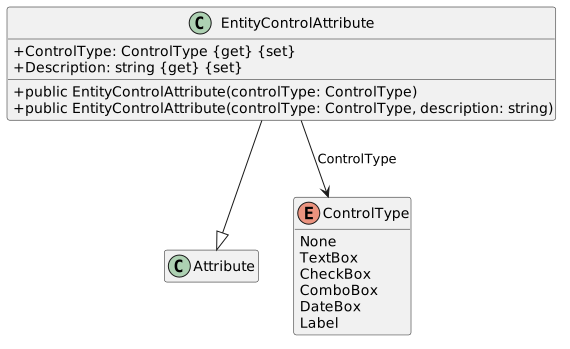
ControlType contains the values in the reference.
EntityControlAttribute derives from Attribute and its constructors assign ControlType and Description.
The required product properties are decorated with appropriate control metadata.
AAdd the following classes to the ReflectionScenario project:
Class Diagram: Class ControlType
NNew
CChanged
RRemoved
BIn the EntityControlAttribute constructors, assign the corresponding properties to the passed in parameters.
3.Add custom attributes to properties.
AGo through each of the classes in the Products folder and add custom attributes of type EntityControlAttribute to each…
Go through each of the classes in the Products folder and add custom attributes of type EntityControlAttribute to each property. Pass in a ControlType and a description (if the name can be cleaned up) for each one.
BCYW:
1Start the solution and click one of the product types.
2The memberListBox should be populated with properties of that type with a EntityControlAttribute.
Read attribute values with reusable reflection helpers
Acceptance Criteria
Acceptance criteria
HasAttribute returns whether the requested attribute exists.
GetAttributePropertyValue returns the requested property value when the attribute and property are present, otherwise null.
GetAttributePropertyValueAsString exposes the string representation used by the UI.
Instructions
4.Define the reflection helper methods.
ACreate the ReflectionUtil class:
Class Diagram: Class ReflectionUtil
NNew
CChanged
RRemoved
BWrite the GetAttributePropertyValue method:
1Assign a result variable of type object to null.
2Read all of the attributes of the specified type from the passed in memberInfo by calling GetCustomAttributes. Pass in the…
Read all of the attributes of the specified type from the passed in memberInfo by calling GetCustomAttributes. Pass in the attributeType and false as arguments. Store the result in an array of attributes.
3If there are any attributes in the array of attributes:
Assign an attribute variable to the first attribute.
Get the property from the attribute and store it in a variable.
If the property is found, get the value from the property and store it in the result variable.
4Return the result variable.
CWrite the HasAttribute method:
1Call GetCustomAttributes on the passed in memberInfo. Pass in the attributeType and false as arguments. Store the result in an array.
2Return if the length of the array is greater than 0.
DWrite the GetAttributePropertyValueAsString method:
1Return the result of the call to the GetAttributePropertyValue method as a string.
Explore type and property metadata in the window
Acceptance Criteria
Acceptance criteria
The loaded window lists types from the executing assembly.
Selecting a type clears the prior property list and enumerates that type’s properties.
Each displayed property includes the discovered EntityControlAttribute control type.
Instructions
5.Create MainWindow functionality.
AAdd two list boxes to the MainWindow: typeListBox and memberListBox.
BCreate a loaded event handler for the window:
1Get the current assembly by calling Assembly.GetExecutingAssembly().
2Get all of the types in the current assembly with GetTypes.
3Loop through all of the types in the current assembly and add each one to the typeListBox.
CCreate a SelectionChanged event for the typeListBox:
1Clear the memberListBox items.
2Get the selected item from the typeListBox and cast it as a type.
3Get the properties of the selected type using GetProperties. Store it in a variable named properties.
4Looping through the PropertyInfo objects in the properties array:
Using ReflectionUtil.HasAttribute, check if the current property has an attribute of type EntityControlAttribute. If it does:
Use ReflectionUtil.GetAttributePropertyValueAsString to get the value of the ControlType property of the EntityControlAttribute on the current property. Store it in a string variable named controlType.
Repeat the step above but get the value of the Description property of the EntityControlAttribute. Store the result in a variable named description.
Add the name of the property and the attribute value to the memberListBox's items.
$"{p.Name} - {description} - {controlType}"
DCYW:
1Run the application. Ensure that the types populate the typeListBox
2Click on a type. Nothing should show up in the memberListBox. This is because none of the properties in the classes have the…
Click on a type. Nothing should show up in the memberListBox. This is because none of the properties in the classes have the EntityControlAttribute on them.
Completion review
6.Review the feature acceptance criteria
AConfirm the required results
Return to each story and verify its acceptance criteria. Preserve the submission format and destination stated in the activity; a reading, setup guide, lab, video demonstration, and oral final may require different evidence.