In this assignment, you will build one Violet activity diagram in stages. The diagram shows an AI recommending Pawn1 or Pawn2 after a dice roll. A person checks the recommendation before making the actual move. Keep editing the same diagram as you work; the three pictures are checkpoints, not three separate submissions.
Your only submission is the completed, editable activity diagram. You will not write an AI program or submit a written explanation.
An activity diagram shows the order in which actions and decisions happen. Start at the top of the diagram and leave room below and on both sides for the branches you will add later.
Open Violet UML Diagramming Tool. Choose File > New > Activity diagram, or select Activity diagram from Violet's opening screen. Save your work as you build it.
Place a solid black start node near the top center. Below it, place an activity labeled Roll Dice. Connect the start node to Roll Dice with a downward arrow. A start node marks where this sequence begins; the activity names the first action the player takes.
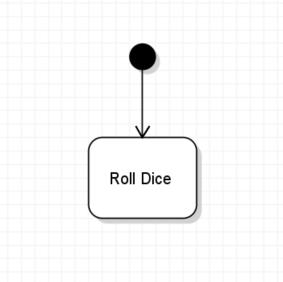
Your diagram should now match the first picture. Keep these two nodes when you build the next part.
After the roll, the AI considers a move and recommends one of two pawns in this simplified example. A decision node is a diamond that divides the flow into alternative paths. Only one recommendation path is followed for a particular turn.
Place a decision node below Roll Dice and label it Evaluate best move. Draw a downward arrow from Roll Dice into the top of the diamond. In this diagram, the decision represents the AI choosing which pawn to recommend after considering the roll and the game state. You are showing the decision's place in the flow, not implementing how the AI chooses.
Place an activity labeled Recommend Pawn1 below and to the left of the diamond. Place Recommend Pawn2 below and to the right. Draw one arrow from Evaluate best move to each activity. Make the paths easy to follow without crossing the arrows. These two activities are alternative recommendations, not two pawns that move at once.
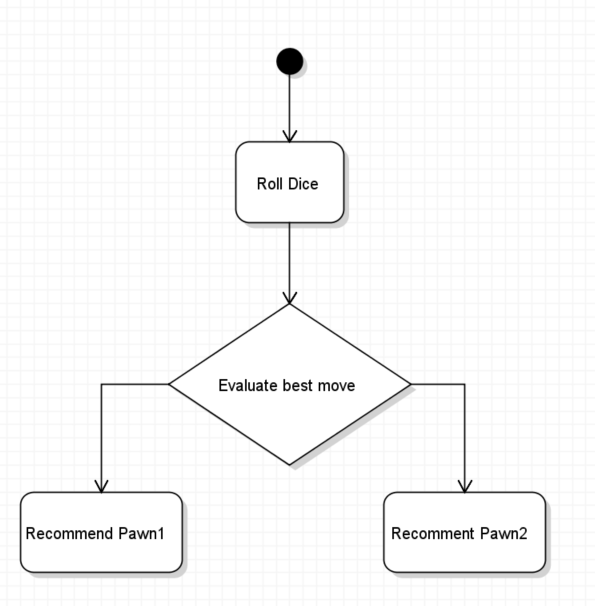
Compare your diagram to the second picture. It adds to the first: the start node and Roll Dice are still at the top, with one decision and its two direct branches below them. Do not start a new diagram for the next task.
An AI recommendation is a suggestion. The player must consider whether it makes sense with the current board and the rules before making a move. The next decision belongs to the human player. The player may choose Pawn1 or Pawn2 after checking the suggestion, including when the player's choice differs from the AI's recommendation.
Leave the two recommendation activities in place. Below them, place a second decision node labeled Evaluate AI Response. Draw arrows from both Recommend Pawn1 and Recommend Pawn2 toward the top of this decision, joining their routes above it as shown in the completed checkpoint. Follow either recommendation path downward to the same review step. The branches do not mean that the AI gives both answers during one turn.
Place Move Pawn1 below and to the left of Evaluate AI Response, and Move Pawn2 below and to the right. Draw one arrow from the decision to each move. These are the possible actions after the player checks the AI's suggestion. The recommendation alone does not move a pawn.
Place an end node below the move activities. Connect both Move Pawn1 and Move Pawn2 to it. For one turn, follow a single path: Roll Dice, one AI recommendation, the player's review, one pawn move, and the end.
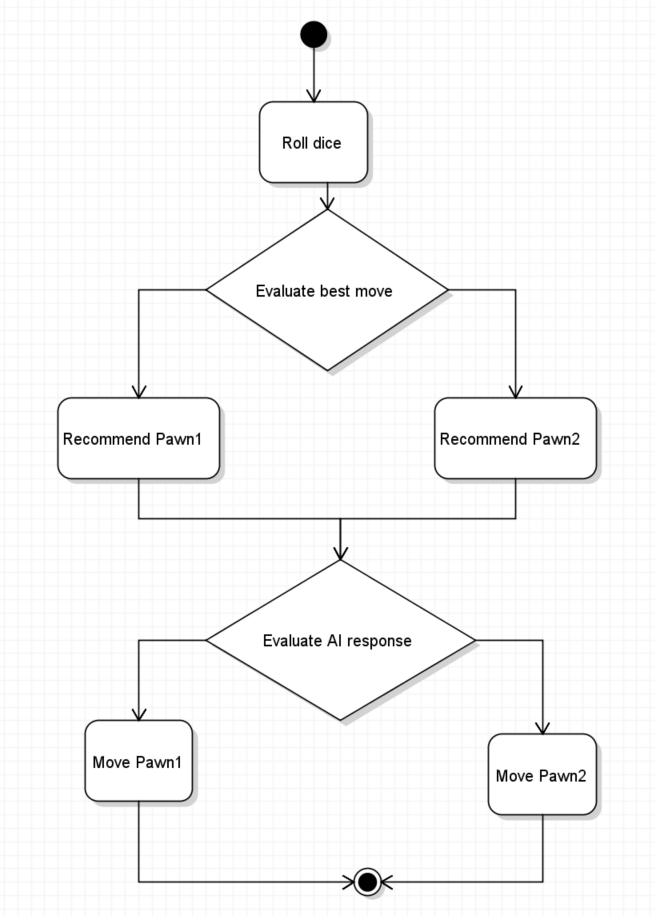
Trace both kinds of choices. Either AI recommendation reaches Evaluate AI Response before any pawn moves. Either human move then reaches the end node. Check that there is no direct arrow from a recommendation to a move that skips the human review.
Choose File > Save. Use the base filename Parcheesi 0.7 LastName, replacing LastName with your last name. Keep Violet's activity-diagram file extension; in the desktop version used for these assignments, the filename ends with .activity.violet.html. Submit the editable file rather than a screenshot.
ZIP the .activity.violet.html file itself without placing it inside another folder. Name the ZIP Parcheesi 0.7 LastName.activity.violet.html.zip and submit it to the Feedback System. Include only the completed activity diagram.
Read the feedback. Correct any reported issues in Violet, save the corrected file, ZIP it again, and resubmit it.
Submit the resulting Feedback System URL to Canvas as directed by your course. No separate written response or extra diagram is required.