Currently, whenever a guest feeds an animal they also poke it - behavior that the Como Zoo prohibits. This behavior is allowed to occur because the guest has access to the all of the animal's public properties and methods; the guest should instead only have access to properties and methods related to eating. In this task, you will define an interface for eaters, have the Animal class implement that interface, and then use the interface to restrict the properties and methods that guests have access to. You will check your work by setting a breakpoint, stepping through the code, and ensuring that the feeding functionality remains the same.
Applying Polymorphism Using Inheritance (10:45)
Applying Polymorphism Using Interfaces (12:03)
- Create a new folder called Interfaces in the ZooScenario project by right-clicking on the project name, hovering over the Add menu, and clicking New Folder.
- Create a new interface in the Interfaces folder by right-clicking on the folder, hovering over the Add menu, and clicking New Item...
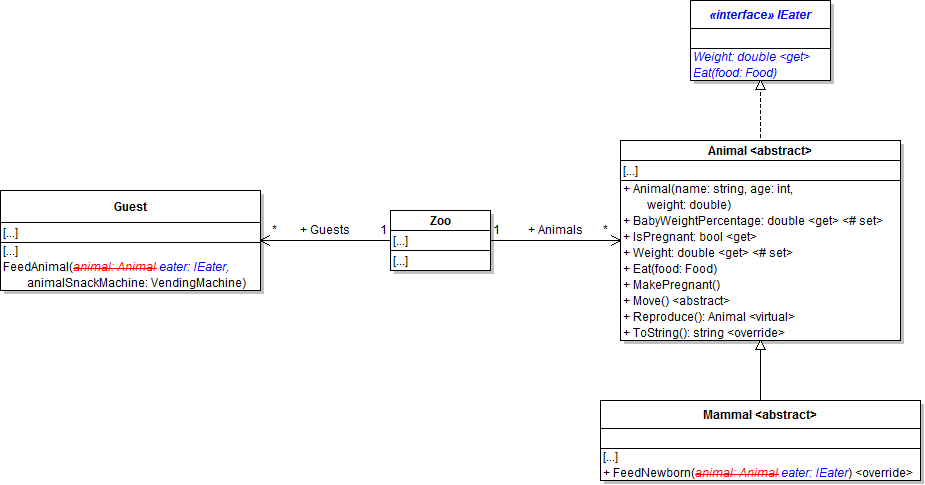
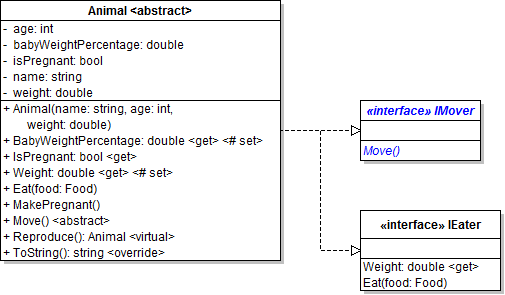
- Define the IEater interface as shown in the code and class diagram below.
- Check your work: Build the solution and ensure that the code compiles without errors or warnings.
- Have the Animal class implement the IEater interface, as shown in the code below.
- Check your work: Build the solution and ensure that the code compiles without errors or warnings.
- Use the IEater type in the guest's FeedAnimal method.
- Modify the animal parameter in the guest's FeedAnimal method so that it is of type IEater and rename it to eater, as shown in the code below and the class diagram above.
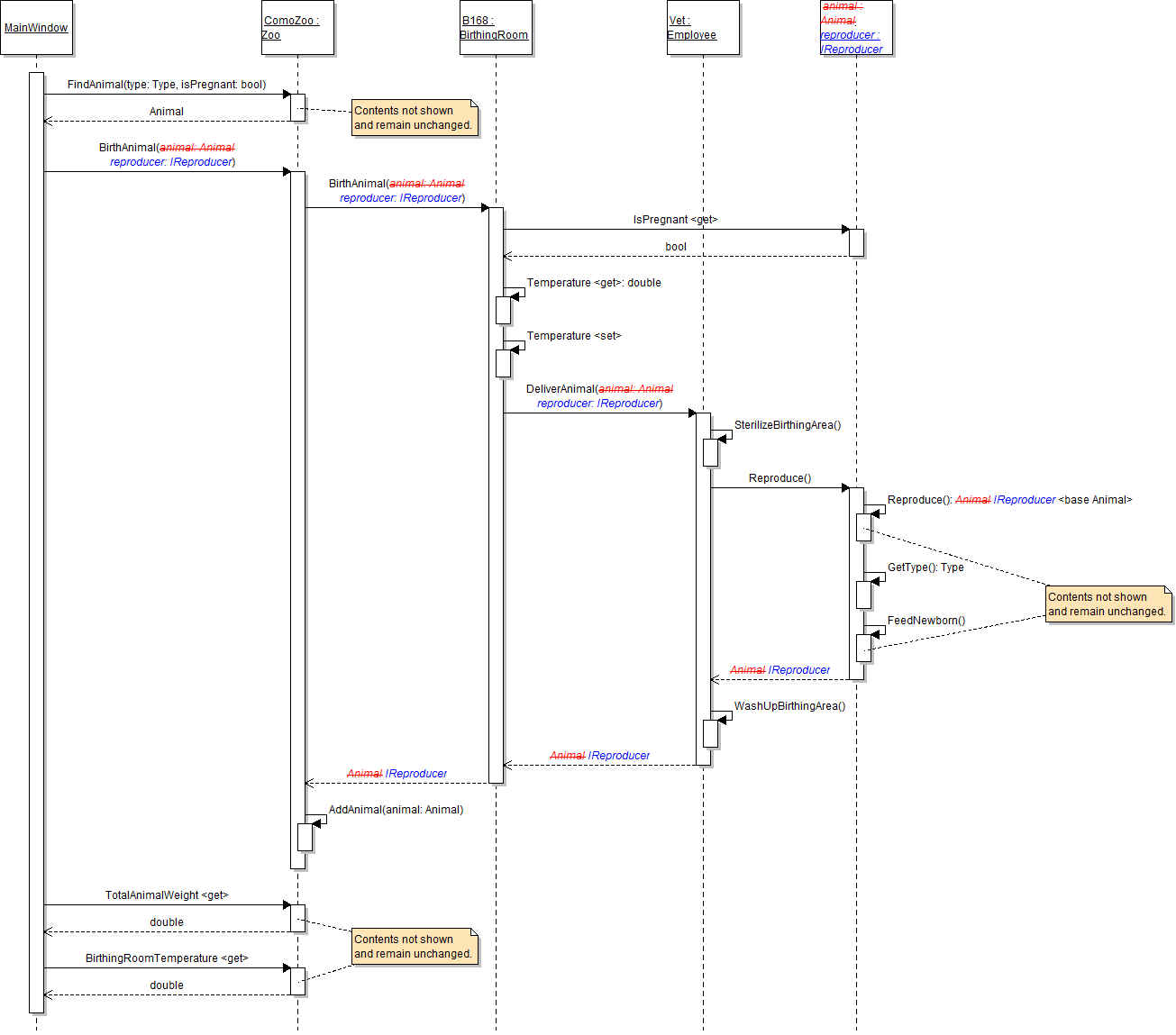
- Remove the call to the eater's Move method, as shown in the sequence diagram below.
- Check your work:
- Set a breakpoint in the guest's FeedAnimal method on the line that calls the DetermineFoodPrice method.
- Start the application. Click the New zoo button, then click the Darla, feed dingo button.
- Inspect the eater parameter and ensure that it is Dolly the dingo.
- Step through the body of the FeedAnimal method. After stepping through the call to the eater's Eat method, inspect the eater's weight. It should now be 36.006..., which is the same behavior as when the eater was an animal.
- Use the IEater type in the mammal's FeedNewborn method.
- Modify the animal parameter in the mammal's FeedNewborn method so that it is of type IEater and rename it to eater, as shown in the class diagram above.
- Check your work:
- Set a breakpoint in the mammal's FeedNewborn method on the line that calls the newborn's Eat method.
- Start the application. Click the New zoo button, then click the Birth dingo button.
- Inspect the newborn parameter and ensure that it is a baby dingo. Its weight should be 3.53.
- Step into and the body of the Eat method to ensure it is called correctly. After stepping through the call to the newborn's Eat method, inspect the newborn's weight. It should now be 3.684..., which is the same behavior as when the newborn was an animal instead of an IEater.
- Ensure that all code is StyleCop compliant.

Ensure Visual C# is selected in the left-hand pane. Then select Interface from the list in the center pane. Name the new interface IEater.cs and click Add.
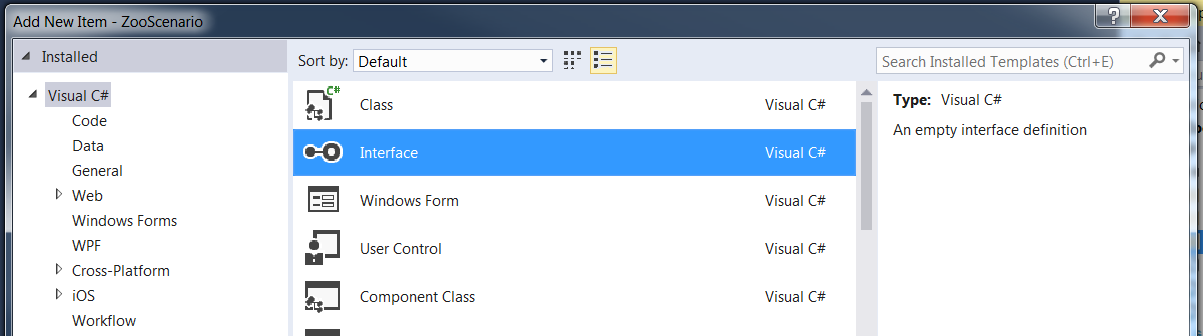
Tip: You can also create a new interface by adding a new class and changing the class keyword to the interface keyword in the line that defines the class near the top of the file.
/// <summary>
/// The interface which is used to define the role of an eater.
/// </summary>
public interface IEater
{
    /// <summary>
    /// Gets the weight of the eater.
    /// </summary>
    double Weight
    {
        get;
    }

    /// <summary>
    /// Eats the specified food.
    /// </summary>
    /// <param name="food">The food to eat.</param>
    void Eat(Food food);
}
Note: Properties and methods in interfaces are not implemented; rather, they are only defined on the interface, which is why they don't have a body. Members of interfaces also have no visibility modifier because the members must be public.
public class Animal : IEater
Note: You don't have to make any other changes to the Animal class because it already implements the members of the IEater interface (i.e. the getter of the Weight property and the Eat method).
public void FeedAnimal(IEater eater, VendingMachine animalSnackMachine)
{
    // method body here
}Interfaces and Encapsulation (4:38)
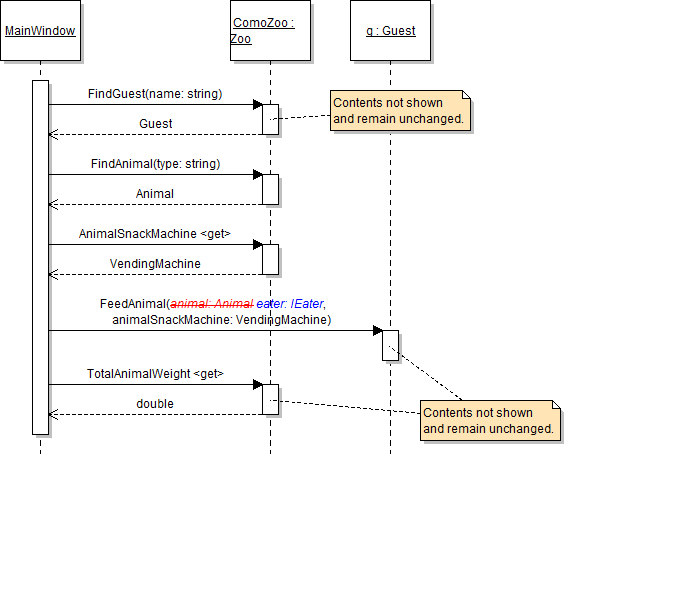
Note: Calling the Move method on the eater parameter caused a build error because the IEater interface does not have a Move method.
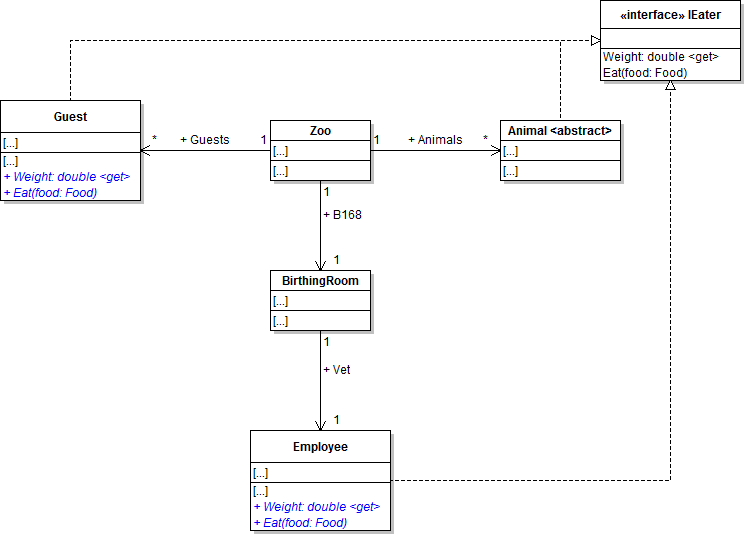
Guests and employees, as humans, should also have the ability to eat. In this task, you will implement the IEater interface in the Guest and Employee classes. You will check your work by ensuring that the solution builds without compiler errors or warnings.
- Make guests be eaters.
- Have the Guest class implement the IEater interface as shown in the class diagram below.
- Define a Weight property with a getter. Return 0.0.
- Define the Eat method so that it conforms to the IEater interface. In the method body, simply write a code comment stating what the method might do.
- Make employees be eaters.
- Have the Employee class implement the IEater interface as shown in the class diagram above.
- Define a Weight property with a getter. Return 0.0.
- Define the Eat method so that it conforms to the IEater interface. In the method body, simply write a code comment stating what the method might do.
- Check your work: Build the solution and ensure that the code compiles without errors or warnings.
In this task, you will define an interface for movers, have the Animal class implement that interface, and then use the interface. You will check your work by setting a breakpoint, stepping through the code, and ensuring that the reproducing functionality remains the same.
- Define the IMover interface as shown in the class diagram below.
- Have the Animal class implement the IMover interface. When a class implements multiple interfaces, simply separate them with a comma, as shown in the code below.
- Use the IMover type in the animal's Reproduce method.
- Before calling the baby's Move method, first use type-checking to see if the baby implements the IMover interface, as shown in the code below.
- Then, if the baby implements the IMover interface (i.e. if the boolean expression is true), cast the baby as an IMover and call its Move method. This can be done in one line, as shown in the code below.
- Ensure that all code is StyleCop compliant.
- Check your work:
- Set a breakpoint in the animal's Reproduce method on the line that checks if the baby is an IMover.
- Start the application. Click the New zoo button, then click the Birth dingo button.
- Step over the if statement and ensure it evaluates to true.
- Step into the Move method. The mammal's Move method should run and the baby should pace.
public class Animal : IEater, IMover
// If the baby is a mover...
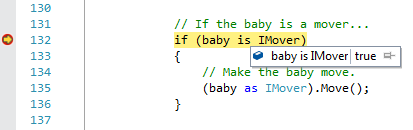
if (baby is IMover)
{

}Casting (11:27) [repeat from 4.1, 6.1]
// If the baby is a mover...
if (baby is IMover)
{
    // Make the baby move.
    (baby as IMover).Move();
}Tip: You can inspect the evaluation of the boolean expression by hovering over the keyword is, as shown in the image below.
During the sequence when an animal gives birth, every object that gets access to the pregnant animal (e.g. the zoo, the birthing room, the vet, etc.) has access to all of the animal's public properties and methods, even though several of them are not necessary for the birthing process. In this task, you will define an interface for reproducers, have the Animal class implement that interface, and use it to limit other objects' access to properties and methods. You will check your work by setting a breakpoint, stepping through the code, and ensuring that the birthing functionality remains the same.
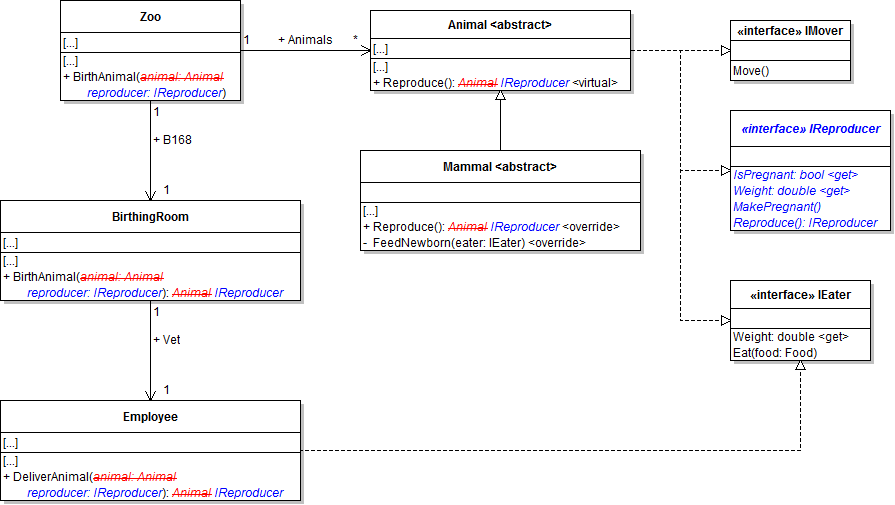
- Define the IReproducer interface as shown in the class diagram below.
- Check your work: Build the solution and ensure that the code compiles without errors or warnings.
- Have the Animal class implement the IReproducer interface, as shown in the class diagram above.
- Use the IReproducer interface in the zoo's BirthAnimal method.
- Modify the animal parameter to be of type IReproducer and rename it to reproducer, as shown in the class diagram above and the sequence diagram below.
- Modify the baby variable so that it is of type IReproducer instead of type Animal, as shown in the code below.
- Use type-checking to check if the baby is an animal before adding it to the zoo's list of animals. Cast the baby as an animal when adding it to the list, as shown in the code below.
- Use the IReproducer interface in the birthing room's BirthAnimal method.
- Modify the animal parameter to be of type IReproducer and rename it to reproducer, as shown in the class diagram and sequence diagram above.
- Make the return type be IReproducer instead of Animal, as shown in the class diagram and sequence diagram above.
- Declare the baby variable as an IReproducer instead of an Animal.
- Use the IReproducer interface in the employee's DeliverAnimal method.
- Modify the animal parameter to be of type IReproducer and rename it to reproducer, as shown in the class diagram and sequence diagram above.
- Make the return type be IReproducer instead of Animal, as shown in the class diagram and sequence diagram above.
- Declare the baby variable as an IReproducer instead of an Animal.
- Use the IReproducer interface in the animal's Reproduce method.
- Make the return type be IReproducer instead of Animal, as shown in the class diagram and sequence diagram above.
- Modify the baby variable so that it is of type IReproducer. Cast the result of calling the CreateInstance method as an IReproducer instead of an Animal, as shown in the code below.
- Use the IReproducer interface in the mammal's Reproduce method.
- Make the return type be IReproducer instead of Animal, as shown in the class diagram and sequence diagram above.
- Modify the baby variable so that it is of type IReproducer.
- Ensure that all code is StyleCop compliant.
- Check your work:
- Set a breakpoint in the birthDingoButton_Click on the line that calls the Como Zoo's BirthAnimal method.
- Start the application. Click the New zoo button, then click the Birth dingo button.
- Step into the call to the Como Zoo's BirthAnimal method. Ensure that the reproducer parameter is Dolly the dingo.
- Step into the birthing room's BirthAnimal method and the vet's DeliverAnimal method. In both methods, ensure the reproducer parameter is Dolly the dingo.
- Step into the reproducer's Reproduce method. You should step into the Reproduce method of the Mammal class.
- Step into the call to base. You should step into the Reproduce method of the Animal class. Step over the instantiation of the baby variable. Ensure it is of type Dingo and its field values are as follows:
- age: 0
- name: "Baby"
- weight: 3.53
- Step through the rest of the method bodies to return to the zoo's BirthAnimal method. Step through the rest of the method body. The boolean expression should evaluate to true, and the baby should be added to the zoo's list of animals.
// Birth animal.
IReproducer baby = this.b168.BirthAnimal(reproducer);
// If the baby is an animal...
if (baby is Animal)
{
    // Add the baby to the zoo's list of animals
    this.AddAnimal(baby as Animal);
}IReproducer baby = Activator.CreateInstance(this.GetType(), "Baby", 0, this.Weight * (this.BabyWeightPercentage / 100)) as IReproducer;
- Ensure that all code is StyleCop compliant.
- Browse to the project folder and add it to a newly created zip archive.
- Submit the zipped project folder to the correct assignment in Blackboard.