Currently, all animals reproduce in the same way, in that they all give birth to a baby, lose weight, and then feed their newborn baby. However, two of the zoo's animal types - hummingbirds and platypuses - lay eggs rather than giving birth to a live animal. As such, it would be very difficult for these two types of animals to feed their newborn babies immediately after they have been born (because they are still in their shells). In this task, you will override the Reproduce method in the Mammal class to prevent hummingbirds from feeding their newborn babies. You will also add a condition to prevent platypuses from feeding their newborn babies. You will check your work by stepping through the method calls to ensure that the reproducing behavior is customized based upon the animal's type.
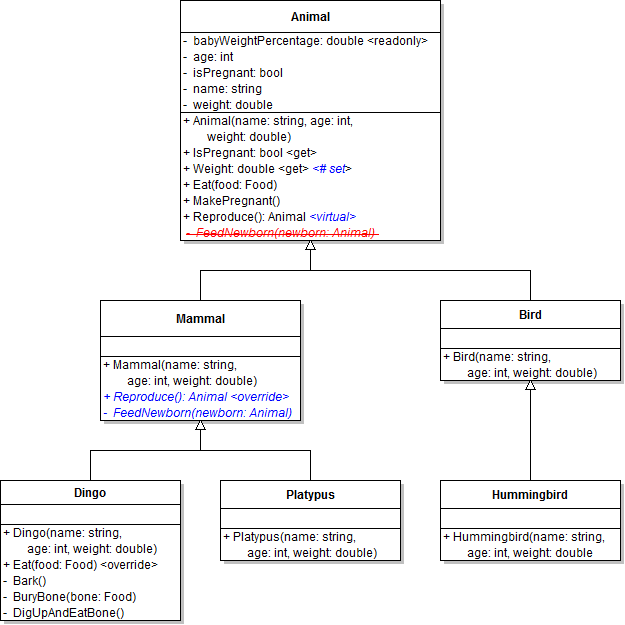
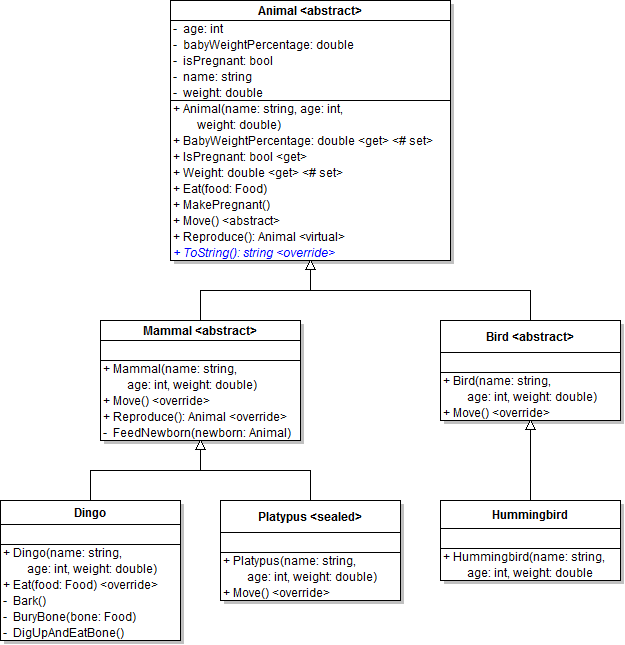
- Make the animal's Reproduce method virtual, as shown in the class diagram below.
- Check your work: Build the solution and ensure that the code compiles without errors or warnings.
- Override the Reproduce method in the Mammal class, as shown in the class diagram above. In the method, return the result of calling base on the Reproduce method, as shown in the code below.
- Define a protected setter for the animal's Weight property, as shown in the code below and class diagram above. Having a protected setter means that only the Animal class or its descendant classes can change the value of the weight field using the Weight property. Other classes do not have access to the setter because it is not public.
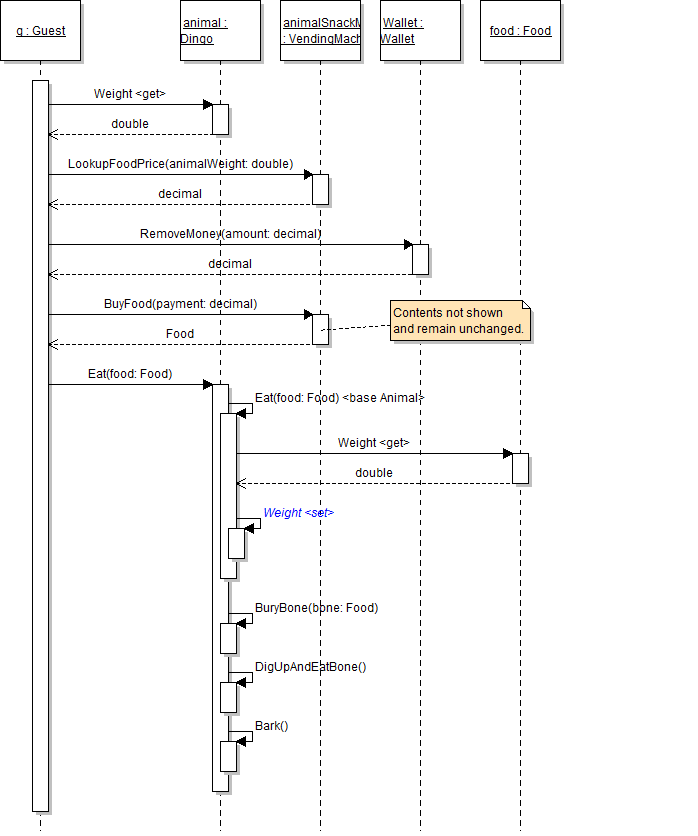
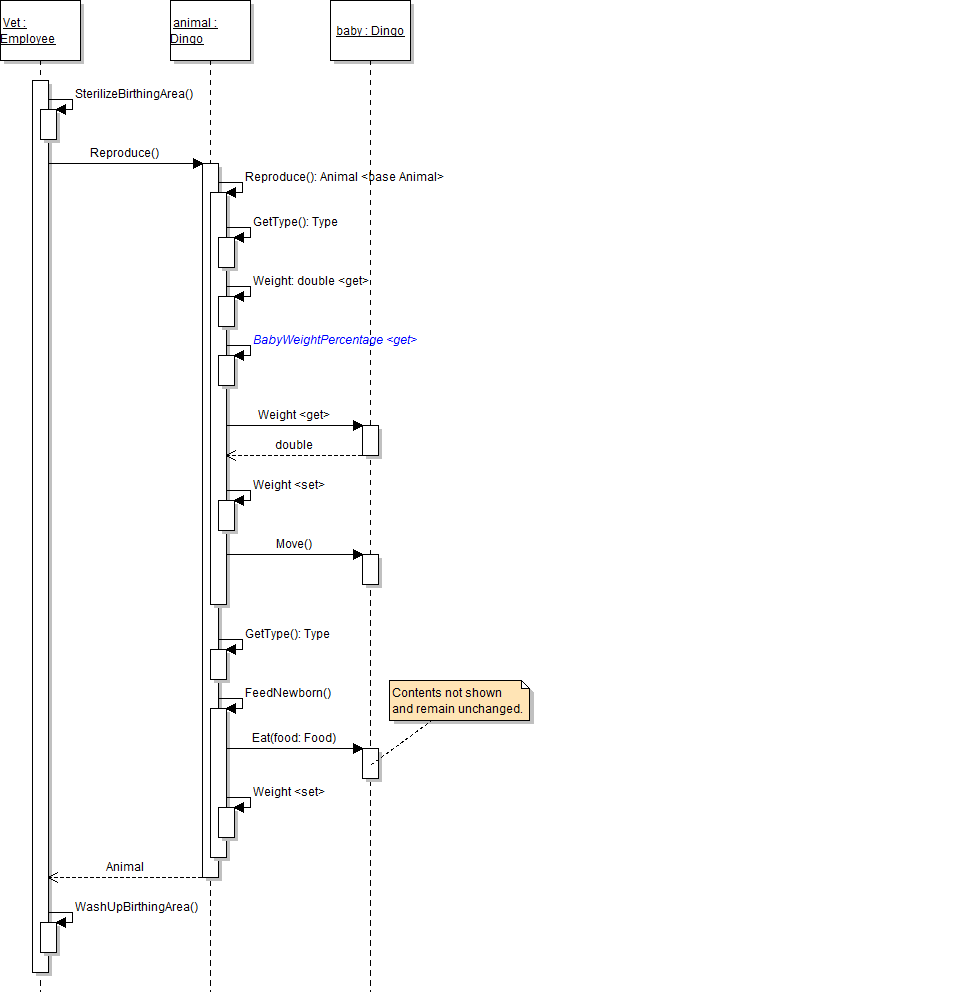
- Now that the animal's Weight property has a setter, use the property to increase the animal's weight in the Eat method, as shown in the code and sequence diagram below.
- Just as you used the Weight property's setter in the Eat method, use the property to increase the animal's weight in the Reproduce method.
- Check your work: Build the solution and ensure that the code compiles without errors or warnings.
- Refactor the FeedNewborn method.
- Move the FeedNewborn method from the Animal class to the Mammal class, as shown in the class diagram above. You can do this by simply cutting and pasting the method.
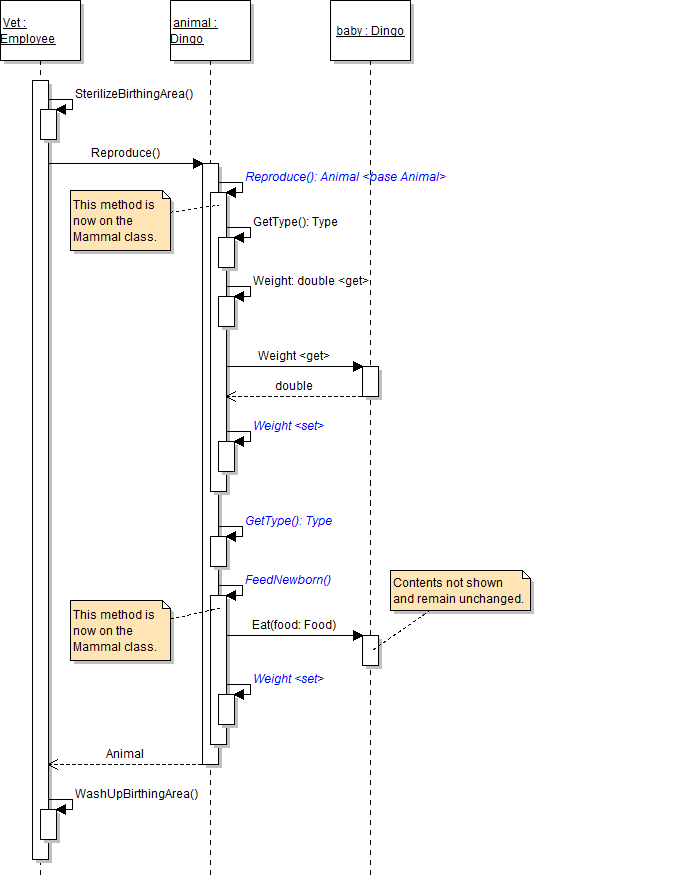
- Move the call to the FeedNewborn method from the animal's Reproduce method to the mammal's Reproduce method, as shown in the code and sequence diagram below.
- Check your work:
- In the birthDingoButton_Click, pass typeof(Platypus) into the call to the FindAnimal method.
- Set a breakpoint in the mammal's Reproduce method on the line that calls the FeedNewborn method.
- Start the application. Click the New zoo button, then click the Birth dingo button. Inspect the current object and ensure that it is platypus. But there is a problem - platypuses lay eggs and therefore cannot feed their newborn babies until they hatch out of their eggs.
- In the mammal's Reproduce method, add an if statement to check if the type of the current animal is not the Platypus type before calling the FeedNewborn method, as shown in the code below.
- Check your work:
- In the birthDingoButton_Click, pass typeof(Dingo) into the call to the FindAnimal method.
- Set a breakpoint in the employee's DeliverAnimal method on the line that calls the animal's Reproduce method.
- Start the application. Click the New zoo button, then click the Birth dingo button.
- Step into the call to the Reproduce method. Because the current object is a dingo (and therefore a mammal), you step into the mammal's Reproduce method.
- Step over the call to base.Reproduce. Because the current object is a dingo and is not a platypus, the boolean expression in the if statement should evaluate to true, and the animal should feed its newborn.
public override Animal Reproduce()
{
    return base.Reproduce();
}Alternate Visibility of Property Set Methods (8:01)
public double Weight
{
    get
    {
        return this.weight;
    }
    protected set
    {
        this.weight = value;
    }
}
Note: Try to use the following code in the newZooButton_Click to set the Weight property of one of the animals. The code should not compile because the setter of the property is only available to the Animal class and classes that descend from it.
animal.Weight = 30.0;
public virtual void Eat(Food food)
{
    // Increase weight as a result of eating food
    this.Weight += food.Weight;
}
public override Animal Reproduce()
{
    Animal baby = base.Reproduce;

    this.FeedNewborn(baby);

    return baby;
}
Animal baby = base.Reproduce();

if (this.GetType() != typeof(Platypus))
{
    this.FeedNewborn(baby);
}

return baby;
Note: This if statement violates several object-oriented design principles, but addressing those issues is out of the scope of this course. It will be addressed in Object-Oriented Programming 2.
The zoo's animals need a way to move around, but each type of animal moves in a different way. So the Animal class needs to define a method in such a way that forces each descendant class to implement the method in their own way. In this task, you will make the Animal class abstract, define an abstract Move method, and override that method in the Bird and Mammal classes. You will check your work by building the solution throughout, stepping through the method calls, and ensuring that the methods are called correctly and are called on the correct objects.
Abstract Classes, Abstractions of Classes (5:26)
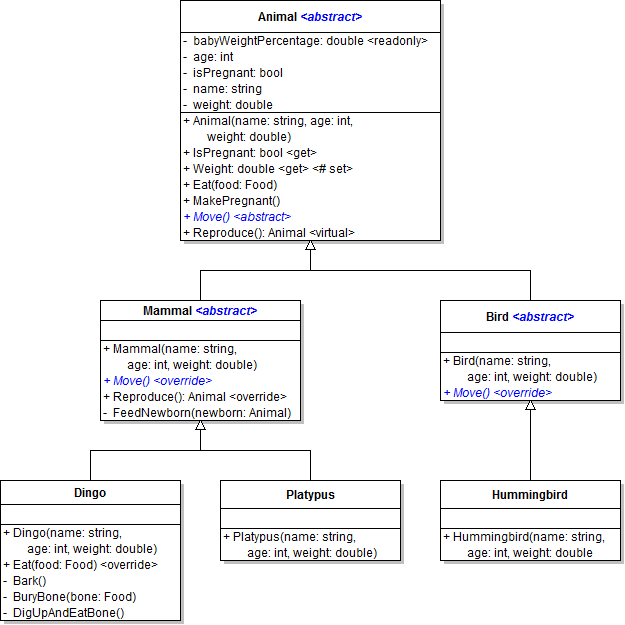
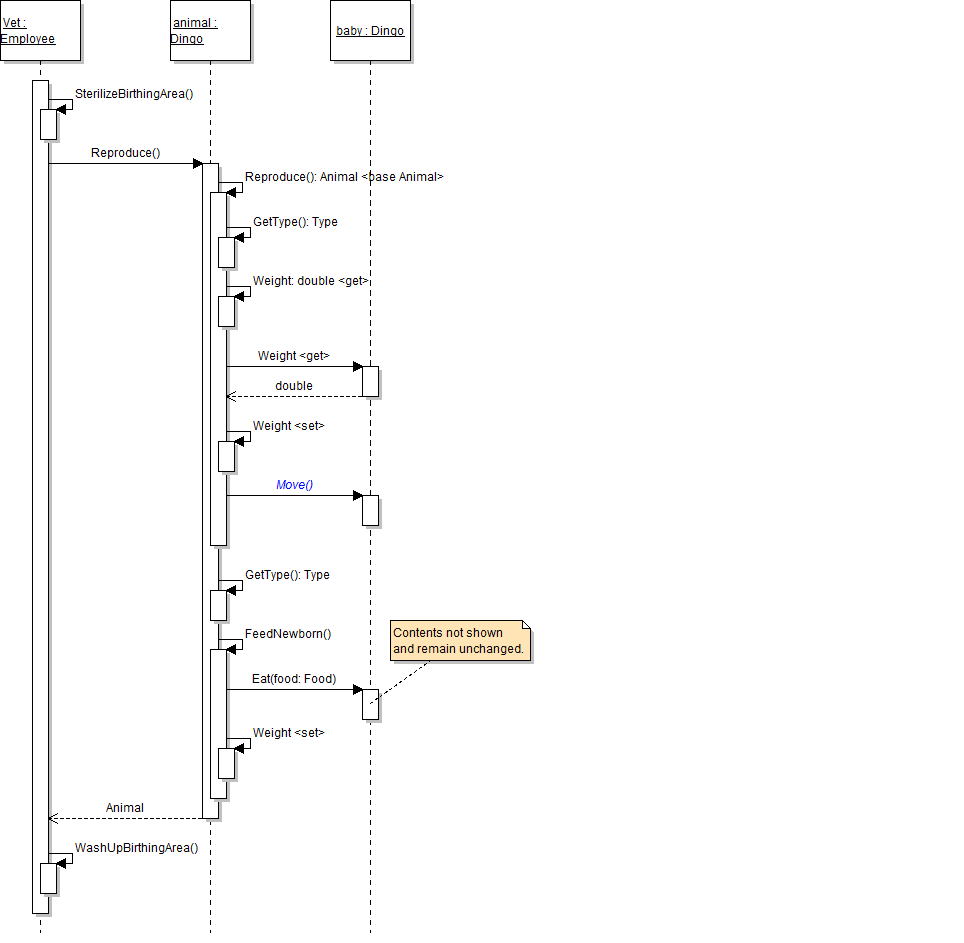
- Make the Animal class abstract, as shown in the code and class diagram below. Abstract classes cannot be created, and the abstract keyword is useful to apply to superclasses that you do not want be instantiated.
- Now make the Bird and Mammal classes abstract, as they very generic and should never be instantiated.
- Check your work: Build the solution and ensure that the code compiles without errors or warnings.
- Define the abstract Move method in the Animal class, as shown in the code below and the class diagram above.
- Check your work: Build the solution. The build should fail because the descendants of the Animal class do not implement the Move method.
- Override the Move method in the Mammal class, as shown in the code below and the class diagram above. In the method, simply write a code comment stating what the animal does.
- Override the Move method in the Bird class, as shown in the code below and the class diagram above. In the method, simply write a code comment stating what the animal does.
- Check your work: Build the solution and ensure that the code compiles without errors or warnings.
- In the animal's Reproduce method, call the baby's Move method after setting the mother's field and property values, as shown in the sequence diagram below.
- Check your work:
- Set a breakpoint in the animal's Reproduce method on the line that calls the baby's Move method.
- Start the application. Click the New zoo button, then click the Birth dingo button.
- Step into the baby's Move method. Note that you step into the Mammal.cs file because the baby was a dingo (and therefore a mammal). You do not step into the animal's Move method because there is no method body to step into.
- Within the guest's FeedAnimal method, call the animal's Move method after the animal eats the food.
- Check your work:
- Set a breakpoint in the guest's FeedAnimal method on the line that calls the animal's Move method.
- Start the application. Click the New zoo button, then click the Darla, feed dingo button.
- Ensure that the animal moves after eating the food.
public abstract class Animal
{
    // class members here
}
public abstract void Move();
Note: Abstract methods can only be declared in abstract classes; they do not have a method body, and therefore they must be implemented in classes that descend from the class in which they are defined. This is because a method must have a body in order to step into it.
public override void Move()
{
    // The animal paces.
}public override void Move()
{
// The animal flies.
}
The Platypus class will never require any other classes to descend from it; you can ensure that no other classes descend from it by making it a sealed class. In this task, you will designate the class as sealed. You will check your work by ensuring the application will build.
- Redefine Platypus as a sealed class so that it can have no descendents, as shown in the code and class diagram below.
- Redefine the Hummingbird class to descend from Platypus.
- Change the Hummingbird class back to descend from Bird.
- Check your work: Build the solution and ensure that the code compiles without errors or warnings.
public sealed class Platypus : Mammal
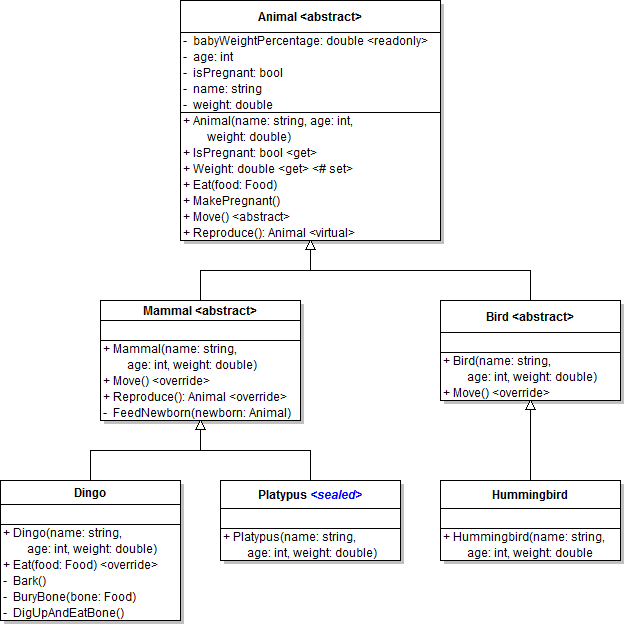
Note: Note the resulting error that Hummingbird cannot derive from sealed type Platypus.
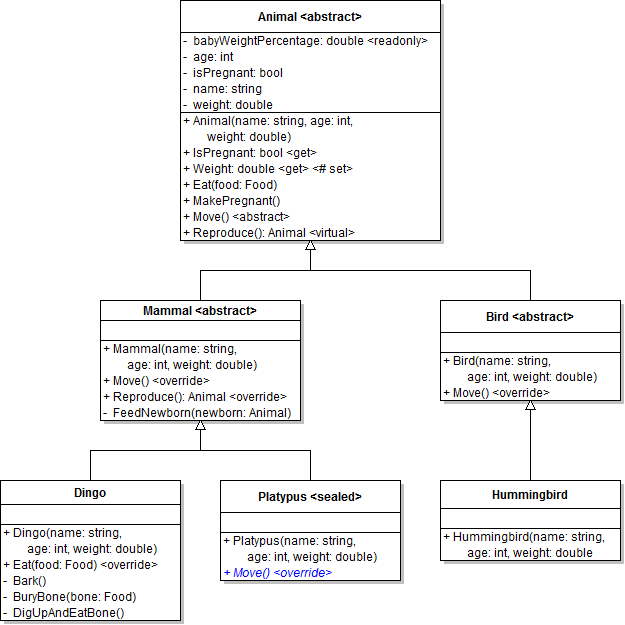
As it stands, all mammals in the zoo pace around as their type of movement. However, the zoo has a mammal, the platypus, that swims instead of paces. In this task, you will override the Move method in the Platypus class. You will check your work by setting a breakpoint, birthing a platypus, and ensuring that the baby platypus swims rather than paces.
Note: Before beginning this step, modify the Birth dingo button to find a platypus. Set a breakpoint when calling the baby's Move method in the animal's Reproduce method. Start the application and click the appropriate buttons. Step into the Move method. Note that you stepped into the mammal's Move method, but that is only for mammals that pace - playtpuses swim.
- Override the Move method in the Platypus class, as shown in the class diagram below. In the method, simply write a code comment stating that the animal swims.
- Check your work:
- Ensure that the birthDingoButton_Click finds a platypus instead of a dingo. Then set a breakpoint in the animal's Reproduce method on the line that calls the baby's Move method.
- Start the application. Click the New zoo button, then click the Birth dingo button.
- Ensure that the baby is a platypus. Then step into the baby's Move method. You should step into the Platypus.cs file and the platypus's Move method (because the baby was a platypus and the Platypus class has an overridden version of the Move method).
- In the birthDingoButton_Click, find a dingo instead of a platypus.
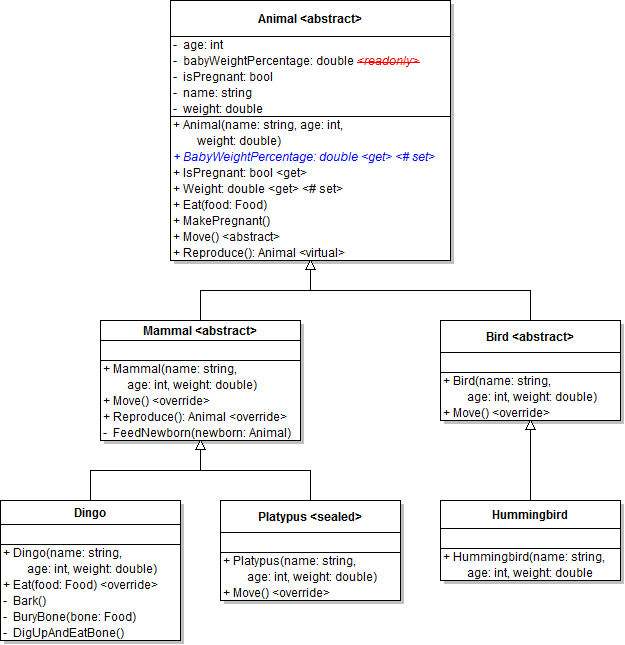
The readonly babyWeightPercentage field is set to the same value for every type of animal in the zoo, but in reality, that value varies depending on what type of animal is giving birth. In this task, you will implement a property for the babyWeightPercentage field in order to customize the value based upon the animal's type. You will check your work by setting a breakpoint, inspecting the animals in the zoo, and ensuring that the value of each animal's BabyWeightPercentage property is correct.
- Remove the readonly keyword from the animal's babyWeightPercentage field, as shown in the class diagram below.
- Define the BabyWeightPercentage property with a getter and protected setter, as shown in the class diagram above.
- Check your work: Build the solution and ensure that the code compiles without errors or warnings.
- Customize the baby weight percentage for each animal type.
- In the dingo's constructor, set the BabyWeightPercentage property to 10.0.
- In the platypus's constructor, set the BabyWeightPercentage property to 12.0.
- In the hummingbird's constructor, set the BabyWeightPercentage property to 17.5.
- Check your work: Build the solution and ensure that the code compiles without errors or warnings.
- Now that the animal has a BabyWeightPercentage property, use the property to in the call to the CreateInstance method, as shown in the sequence diagram below.
- Check your work:
- Set a breakpoint on the ending curly brace of the newZooButton_Click.
- Start the application. Click the New zoo button.
- Inspect the four animals in the zoo's list of animals. Ensure that both dingoes have a BabyWeightPercentage of 10.0, the platypus has a BabyWeightPercentage of 12.0, and the hummingbird has a BabyWeightPercentage of 17.5.
When debugging, it is useful to be able to see an object's information at a glance in a simple string representation. In this task, you will override the Object class's ToString method in the Animal class. You will check your work by setting a breakpoint, inspecting an animal object, and ensuring that the object's string representation is correct.
- Override the ToString method in the Animal class, as shown in the code and class diagram below.
- In the ToString method, return a string representation of the animal that includes its name, type, age, and weight, as shown in the code below.
- Check your work:
- Set a breakpoint in the newZooButton_Click on the line that adds Dolly to the zoo's list.
- Start the application. Click the New zoo button.
- Inspect the animal variable. Note that the way the object is represented in the debugger has changed. Instead of showing {ZooScenario.Dingo}, the representation now includes the animal's name, type, age, and weight, as shown in the image below.
public override string ToString()
{

}
return this.name + ": " + this.GetType().Name + " (" + this.age + ", " + this.Weight + ")";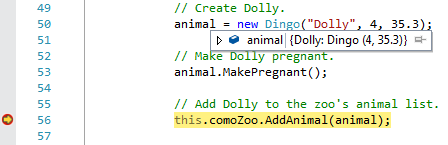
- Ensure that all code is StyleCop compliant.
- Browse to the project folder and add it to a newly created zip archive.
- Submit the zipped project folder to the correct assignment in Blackboard.