In biology, animals are already classified into hierarchies that become more specific the further down the chain you go. It makes sense, then to implement a similar hierarchy in the zoo and create specific animal types that descend from the generic Animal class. In this task, you will define a class to represent a dingo and have that class inherit from the Animal class so that it can gain the functionality of the Animal class. You will check your work by ensuring that the solution builds without compiler errors or warnings.
Defining Inherited Classes (13:40)
Inheritance in the .NET Framework (6:23)
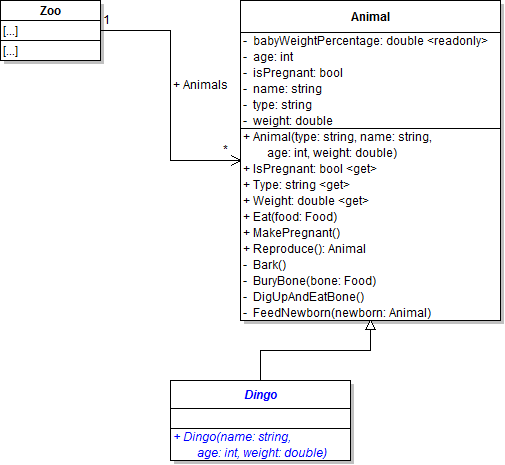
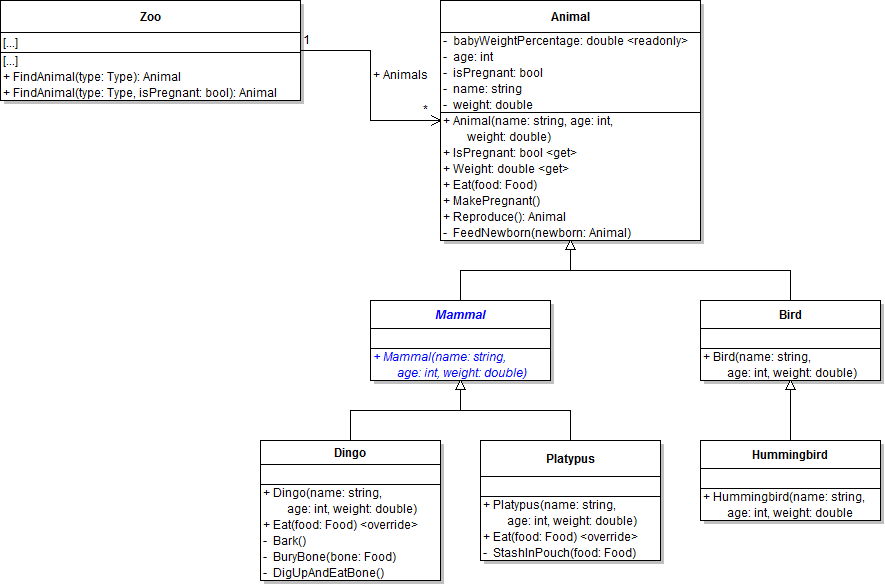
- Define the Dingo class and have it inherit from the Animal class, as shown in the code and class diagram below.
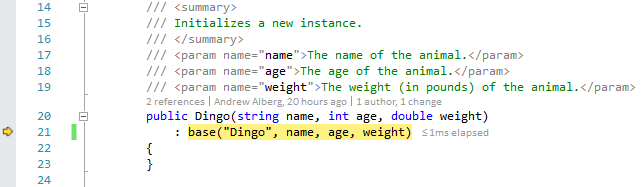
- Call base in the constructor. Pass the string "Dingo" and the three parameters into the dingo constructor's call to base, as shown in the code below.
- Ensure that all code is StyleCop compliant.
- Check your work: Build the solution and ensure that the code compiles without errors or warnings.
public class Dingo : Animal
{
    public Dingo(string name, int age, double weight)
    {
    }
}
Overriding Constructors (13:00)
public Dingo(string name, int age, double weight)
    : base("Dingo", name, age, weight)
{
}
Note: The hard-coded string is the type parameter. This value can be hard-coded in this case because you know that the type is going to be "Dingo" because you are in the Dingo class.
Now that a specific Dingo class exists, you can use the class to instantiate objects rather than the Animal class. In this task, you will instantiate Dolly and Dixie using the Dingo class instead of the Animal class. You will check your work by setting a breakpoint, stepping through the constructors, and ensuring that the dingoes are instantiated correctly.
- In the newZooButton_Click, instantiate Dolly and Dixie as instances of the Dingo class instead of the Animal class, as shown in the code and object diagram below. The only part of the code that changes is that you call the Dingo constructor instead of the Animal constructor.
- Check your work:
- Set a breakpoint in the newZooButton_Click on the line that instantiates Dolly.
- Start the application. Click the New zoo button.
- Press F11 to step into the dingo constructor. Note that the debugger goes to the call to base, as shown in the image below.
- Press F11 to step into the animal constructor. Step through the rest of the constructor to set the field values. Then return to the caller (i.e. the dingo constructor, as specified in the call stack).
- Step through the empty dingo constructor. Note that even though the dingo constructor is called first and then it calls the animal constructor, it is the body of the animal constructor that runs before the body of the dingo constructor.
- Return to the caller of the dingo constructor, step over the line that instantiates Dolly, and inspect the animal variable. Dolly's field values should remain the same as they were when she was instantiated as an Animal, but note that she is now an instance of the Dingo class rather than the Animal class.
// Define an animal variable.
Animal animal;

// Create Dolly.
animal = new Dingo("Dolly", 4, 35.3);

// Make Dolly pregnant.
animal.MakePregnant();

// Add Dolly to the zoo's animal list.
this.comoZoo.AddAnimal(animal);

// Create Dixie.
animal = new Dingo("Dixie", 3, 33.8);

// Make Dixie pregnant.
animal.MakePregnant();

// Add Dixie to the zoo's animal list.
this.comoZoo.AddAnimal(animal);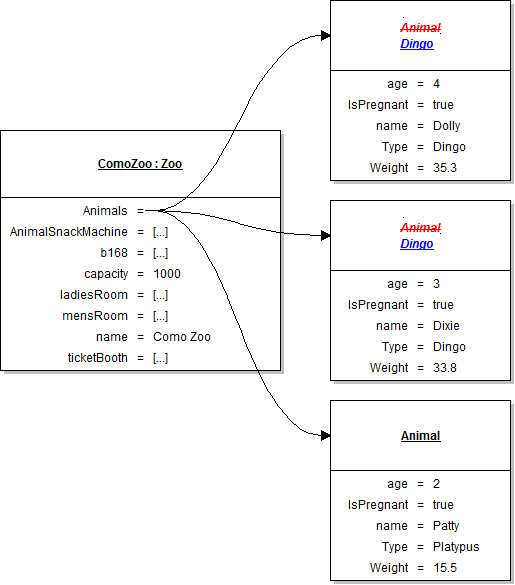
In addition to having dingoes, the Como Zoo also has a platypus. In this task, you will define a class to represent a platypus and have that class inherit from the Animal class so that it can gain the functionality of the Animal class. You will check your work by ensuring that the solution builds without compiler errors or warnings.
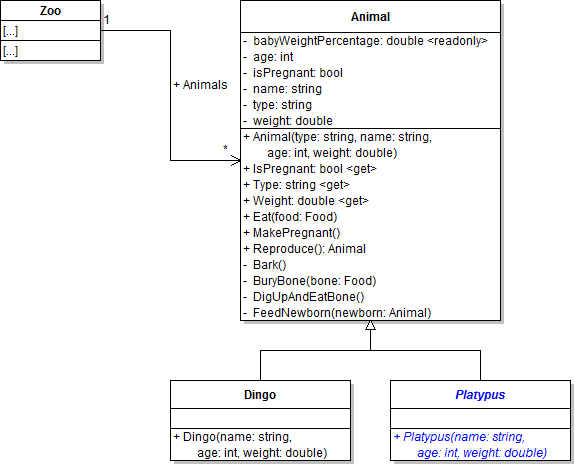
- Define the Platypus class and have it inherit from the Animal class, as shown in the code and class diagram below.
- Call base in the constructor. Pass the string "Platypus" and the three parameters into the platypus constructor's call to base, as shown in the code below.
- Ensure that all code is StyleCop compliant.
- Check your work: Build the solution and ensure that the code compiles without errors or warnings.
public Platypus(string name, int age, double weight)
    : base("Platypus", name, age, weight)
{
}Now that a specific Platypus class exists, you can use the class to instantiate objects rather than the Animal class. In this task, you will instantiate Patty using the Platypus class instead of the Animal class. You will check your work by setting a breakpoint, stepping through the constructors, and ensuring that the dingoes are instantiated correctly.
- In the newZooButton_Click, instantiate Patty as an instance of the Platypus class instead of the Animal class, as shown in the code and object diagram below. The only part of the code that changes is that you call the Platypus constructor instead of the Animal constructor.
- Check your work:
- Set a breakpoint in the newZooButton_Click on the line that instantiates Patty.
- Start the application. Click the New zoo button.
- Press F11 to step into the platypus constructor. Press F11 to step into the animal constructor. Step through the rest of the constructor to set the field values.
- Return to the caller of the platypus constructor, step over the line that instantiates Patty , and inspect the animal variable. Patty's field values should remain the same as they were when she was instantiated as an Animal, but note that she is now an instance of the Platypus class rather than the Animal class.
// Create Patty.
animal = new Platypus("Patty", 2, 15.5);

// Make Patty pregnant.
animal.MakePregnant();

// Add Patty to the zoo's animal list.
this.comoZoo.AddAnimal(animal);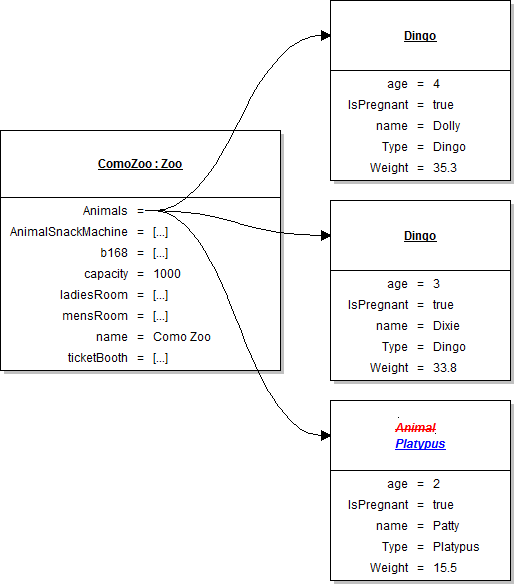
When an animal gives birth to a baby, that baby should be instantiated as the same type as its mother using the newly defined animal subclasses of dingo and platypus. In this task, you will implement code to create an instance of a class using the mother animal's type. You will check your work by setting a breakpoint, inspecting the current animal's type, and ensuring that the baby object is of the same type and is instantiated correctly.
- In the animal's Reproduce method, use the code below to instantiate the baby animal.
- The CreateInstance method returns an object of type object, but you need it to be of type Animal. You can achieve this by casting the result of the CreateInstance method as an Animal, as shown in the code below.
- Check your work:
- Set a breakpoint in the animal's Reproduce method on the line that calls the CreateInstance method.
- Start the application. Click the New zoo button, then click the Birth dingo button.
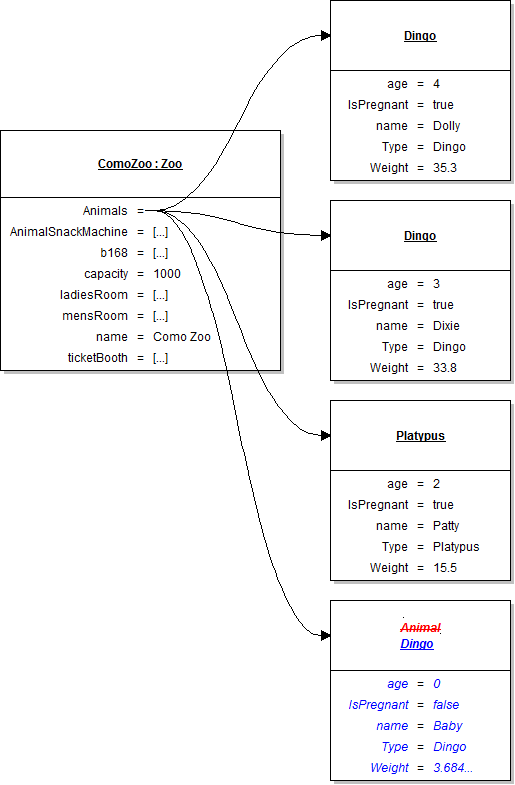
- Inspect the current object - "this" - to ensure that it is of type Dingo. Then step over the call to CreateInstance. Inspect the baby variable to ensure that it is also of type Dingo, which occurred because the CreateInstance method used the current object's type to create the baby animal.
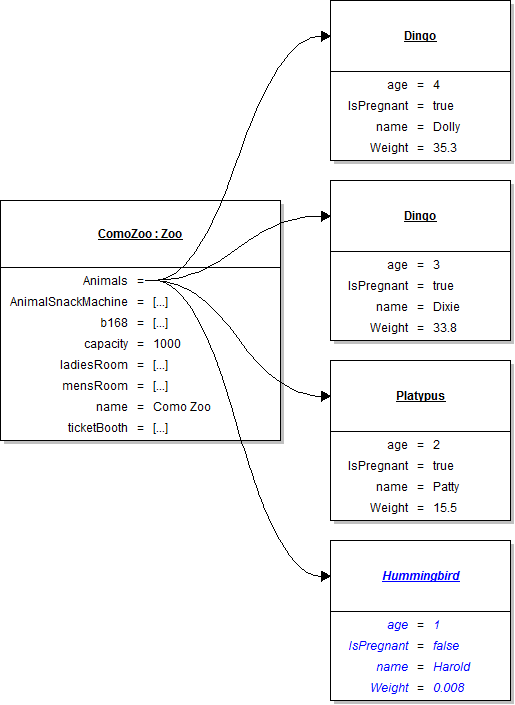
- Step through the rest of the sequence of method calls and ensure that the baby animal is added to the zoo's list of animals in the zoo's BirthAnimal method. The object diagram below represents the state of the zoo's animals after the baby is added. Inspect the zoo's list of animals to ensure the animals in the list match the diagram.
- Stop the application. In the birthDingoButton_Click, pass "Platypus" into the call to FindAnimal instead of "Dingo". This will allow you to test your code with a pregnant platypus in addition to a pregnant dingo.
- Start the application. Click the New zoo button, then click the Birth dingo button.
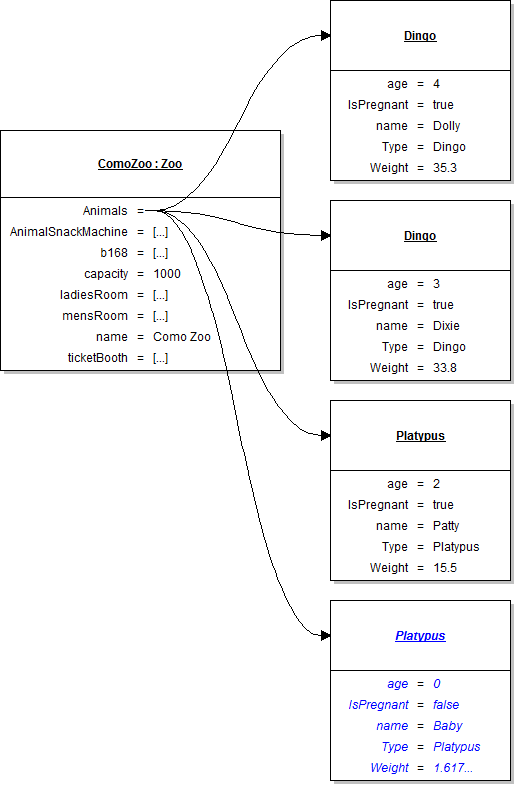
- Inspect the current object - "this" - to ensure that it is of type Platypus. Then step over the call to CreateInstance. Inspect the baby variable to ensure that it is also of type Platypus, which occurred because the CreateInstance method used the current object's type to create the baby animal.
- Step through the rest of the sequence of method calls and ensure that the baby animal is added to the zoo's list of animals in the zoo's BirthAnimal method. The object diagram below represents the state of the zoo's animals after the baby is added. Inspect the zoo's list of animals to ensure the animals in the list match the diagram.
// Create the baby.
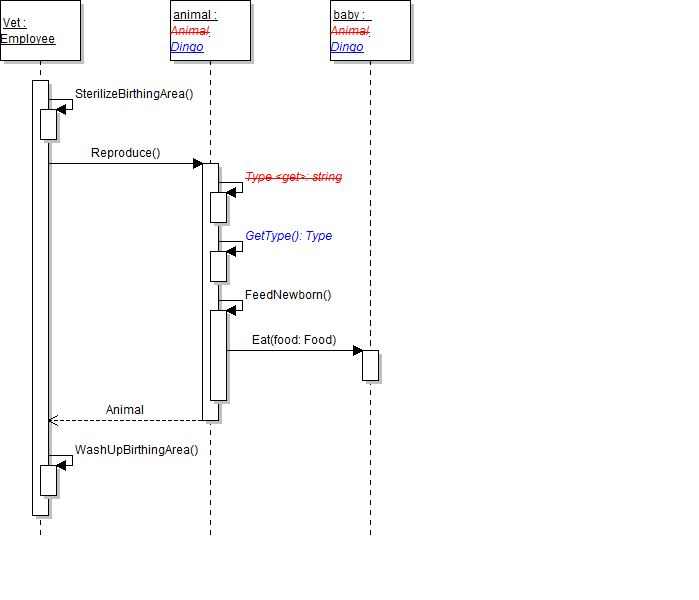
Animal baby = Activator.CreateInstance(this.GetType(), "Baby", 0, this.Weight * (this.babyWeightPercentage / 100));
Note: This code creates an object of the same type, or class, as the current object. The GetType() method is called to get the type of the current object, as shown in the sequence diagram below. That value is then passed to the CreateInstance method.
Casting (11:27) [repeat from 4.1]
// Create the baby.
Animal baby = Activator.CreateInstance(this.GetType(), "Baby", 0, this.Weight * (this.babyWeightPercentage / 100)) as Animal;
Now that animals are created with specific types (e.g. Dingo and Platypus), those types can be used to find an animal of a specific type in the zoo's list rather than using a string. In this task, you will use the Type class and the GetType method in one of the FindAnimal methods to find the first pregnant animal of the specified type. You will check your work by setting a breakpoint, stepping through the method, and ensuring that the correct animal is found.
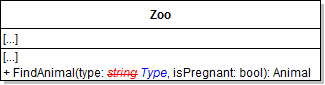
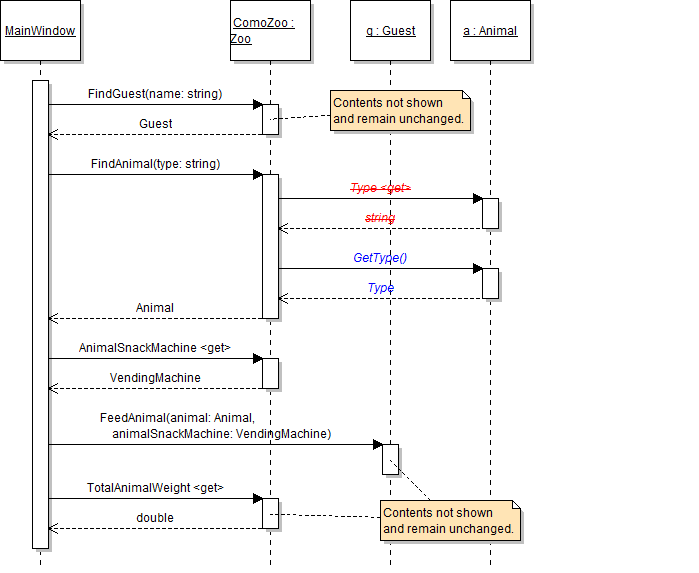
- In the zoo's FindAnimal method with two parameters, change the definition of the type parameter so that it is of type Type, as shown in the code and class diagram below.
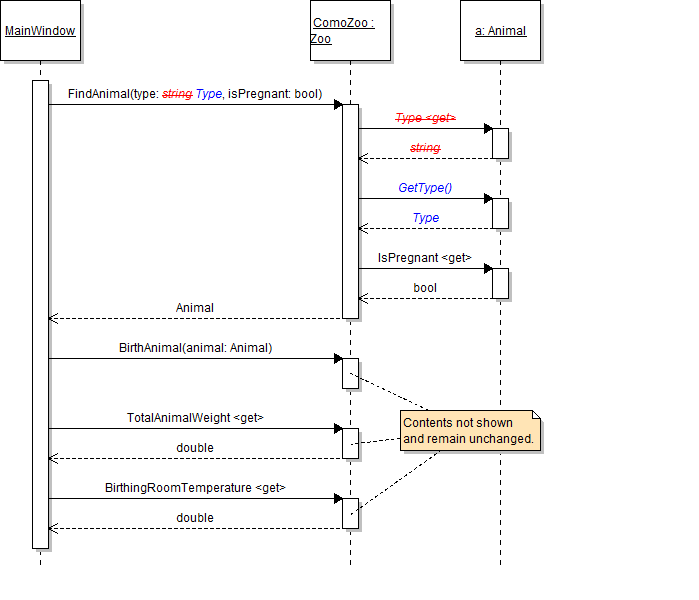
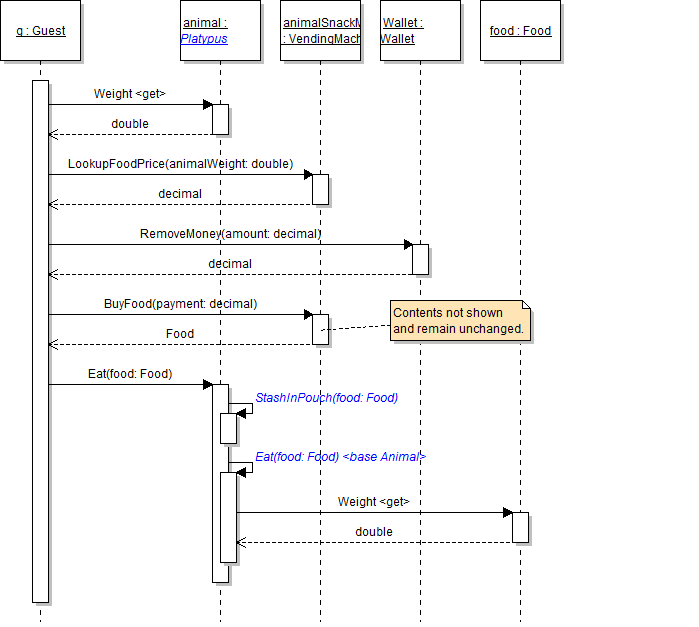
- In the method's boolean expression that compares the type parameter to the current animal's type, call the GetType method instead of calling the Type property, as shown in the code and sequence diagram below.
- In the birthDingoButton_Click, pass the Dingo type into the call to the FindAnimal method instead of the string "Dingo", as shown in the code below.
- Check your work:
- Set a breakpoint in the birthDingoButton_Click on the line that calls the FindAnimal method.
- Start the application. Click the New zoo button, then click the Birth dingo button.
- Step into the FindAnimal method. Inspect the type parameter to ensure that it is the Dingo type, as shown in the image below.
- Step through the foreach loop. Note that the first animal, Dolly, is a pregnant dingo, so the boolean expression in the if statement will evaluate to true.
public Animal FindAnimal(Type type, bool isPregnant)
{
    // code here
}
if (a.GetType() == type && a.IsPregnant == isPregnant)
{
    // code here
}
Animal animal = this.comoZoo.FindAnimal(typeof(Dingo), true);
Note: The typeof keyword returns the custom type associated with the specified class (in this case, the Dingo class).
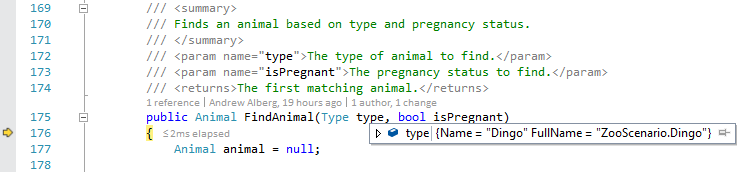
In this task, you will use the Type class and the GetType method in the other FindAnimal method to find the first animal of the specified type. You will check your work by setting a breakpoint, stepping through the method, and ensuring that the correct animal is found.
- In the zoo's FindAnimal method with one parameter, change the definition of the type parameter so that it is of type Type, as shown in the class diagram below.
- In the method's boolean expression that compares the type parameter to the current animal's type, call the GetType method instead of calling the Type property, as shown in the code and sequence diagram below.
- In the darlaFeedDingoButton_Click, pass the Dingo type into the call to the FindAnimal method instead of the string "Dingo".
- Check your work:
- Set a breakpoint in the darlaFeedDingoButton_Click on the line that calls the FindAnimal method.
- Start the application. Click the New zoo button, then click the Darla, feed dingo button.
- Step into the FindAnimal method. Inspect the type parameter to ensure that it is the Dingo type. Step through the foreach loop. Note that the first animal, Dolly, is a dingo, so the boolean expression in the if statement will evaluate to true.
- Return to the caller. Inspect the animal variable and ensure that it is Dolly the dingo.
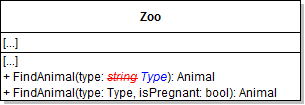
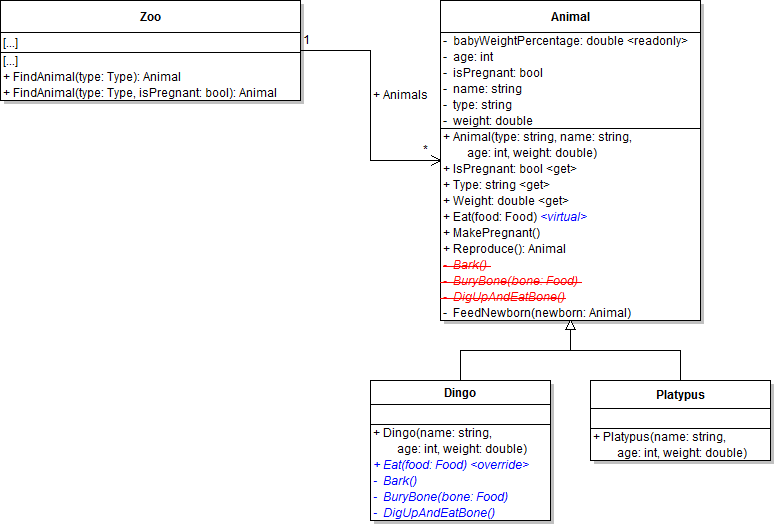
The animal's Eat method currently contains an ugly if statement that checks if the current animal is a dingo before calling the eating methods that relate to dingoes. This code is an attempt to customize the way that dingoes eat (as opposed to other types of animals), but this same functionality can be achieved by overriding methods in descendant classes. In this task, you will override the Eat method in the Dingo class in order to customize its behavior. You will check your work by stepping through each method call to ensure that they are called correctly and by ensuring the animal still gains weight correctly.
- Make the animal's Eat method virtual, as shown in the code and class diagram below. Making this method virtual allows it to be overridden by descendant classes.
- Move the Bark, BuryBone, and DigUpAndEatBone methods from the Animal class to the Dingo class, as shown in the class diagram above. You can do this by simply cutting and pasting the methods.
- Override the Eat method in the Dingo class, as shown in the code below and class diagram above. This allows the Dingo class to customize how a dingo eats (as compared to other descendant classes). Then move the calls to the Bark, BuryBone, and DigUpAndEatBone methods from the animal's Eat method to the dingo's Eat method. Leave the weight gaining code in the animal's Eat method.
- In the dingo's Eat method, call base on the Eat method, as shown in the code and sequence diagram below. Calling base is the equivalent of calling the Eat method on the animal because "base" is the class that the current object's type descends from.
- Check your work:
- Set a breakpoint in the guest's FeedAnimal method on the line that calls the animal's Eat method.
- Start the application. Click the New zoo button, then click the Darla, feed dingo button.
- Note that the animal parameter is a dingo and its weight is 35.3. Then step into the Eat method. Note that you stepped into the dingo's Eat method (because the animal is a dingo).
- Step into the call to base.Eat. Note that you step into the animal's Eat method, which includes the code to make the animal gain weight. Examine the call stack, which should look similar to the image below, to ensure that both Eat methods have been called.
- Step through the rest of the code in both Eat methods and return to the FeedAnimal method. Step over the call to the Eat method. Inspect the animal variable and ensure that its weight is now 36.006....
public virtual void Eat(Food food)
{
    // code here
}
public override void Eat(Food food)
{
    this.BuryBone(food);

    this.DigUpAndEatBone();

    this.Bark();
}public override void Eat(Food food)
{
base.Eat(food);
// other method calls here
}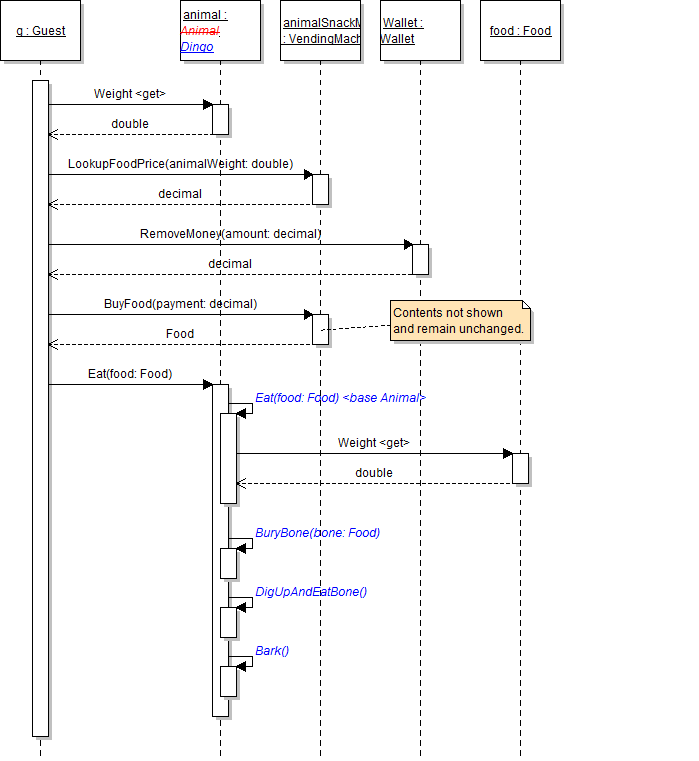

Dingoes now have their own way of eating, but platypuses simply eat their food without any fanfare. In this task, you will override the Eat method in the Platypus class and define and call eating methods specific to platypuses in order to customize their behavior. You will check your work by stepping through each method call to ensure that they are called correctly and by ensuring the animal still gains weight correctly.
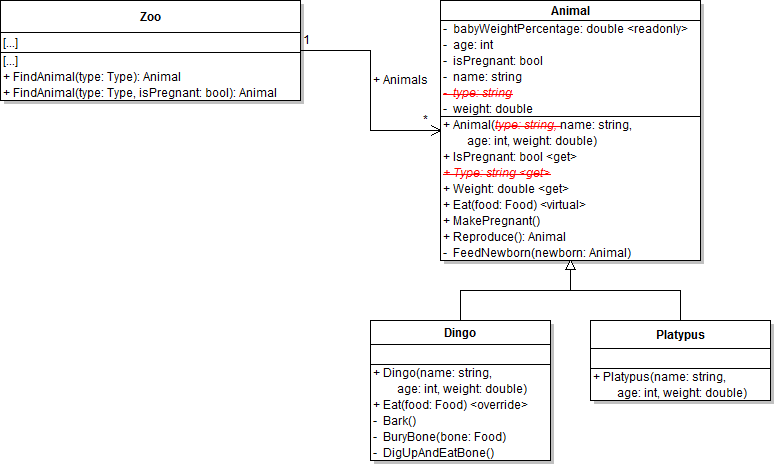
- Define the StashInPouch method in the Platypus class, as shown in the class diagram below. In the method body, simply write a comment stating what the playtpus might do.
- Override the Eat method in the Platypus class, as shown in the class diagram above.
- In the platypus's Eat method, call the StashInPouch method then call base on the Eat method, as shown in the sequence diagram below.
- Check your work:
- In the darlaFeedDingoButton_Click, pass typeof(Platypus) into the call to the FindAnimal method.
- Set a breakpoint in the guest's FeedAnimal method on the line that calls the animal's Eat method.
- Start the application. Click the New zoo button, then click the Darla, feed dingo button.
- Note that the animal parameter is a platypus and its weight is 15.5. Then step into the Eat method. Note that you stepped into the platypus's Eat method (because the animal is a platypus).
- Step into the call to base.Eat. Note that you step into the animal's Eat method, which includes the code to make the animal gain weight. Contrast the call stack now, which contains calls to the platypus's Eat method and the animal's Eat method, to the call stack from last step, which contained calls to the dingo's Eat method and the animal's Eat method.
- Step through the rest of the code in both Eat methods and return to the FeedAnimal method. Step over the call to the Eat method. Inspect the animal variable and ensure that its weight is now 15.806....
- Stop the application. In the darlaFeedDingoButton_Click, pass typeof(Dingo) into the call to the FindAnimal method.
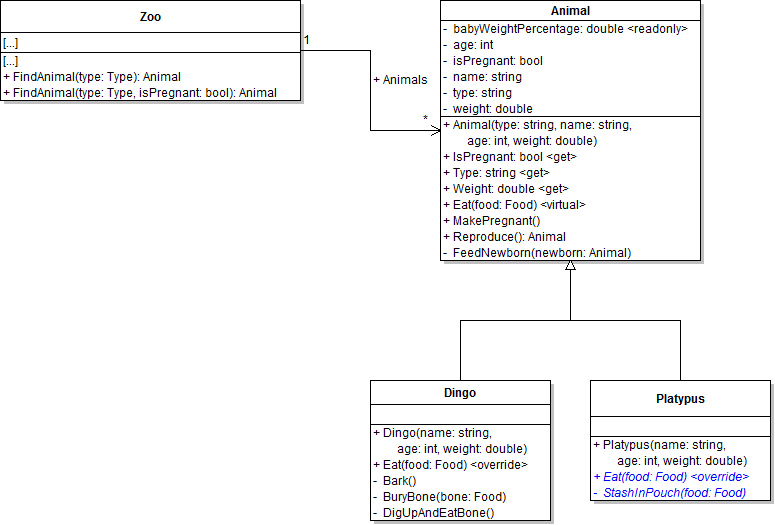
The animal's type field and Type property are no longer necessary because an animal's type can be determined by the class that was used to instantiate it. In this task, you will remove the type field and Type property from the Animal class. You will check your work by ensuring that the solution builds without compiler errors or warnings.
- Remove the type parameter and the line that sets the type field from the constructor in the Animal class. Also remove the hard-coded "Dingo" and "Platypus" strings passed in to base in the appropriate constructor. The dingo constructor should now look like the code below. The platypus constructor will look similar.
- Check your work: Build the solution and ensure that the code compiles without errors or warnings.
- Remove the type field and the Type property from the Animal class, as shown in the class diagram below.
- Check your work: Build the solution and ensure that the code compiles without errors or warnings.
public Dingo(string name, int age, double weight)
    : base(name, age, weight)
{
}
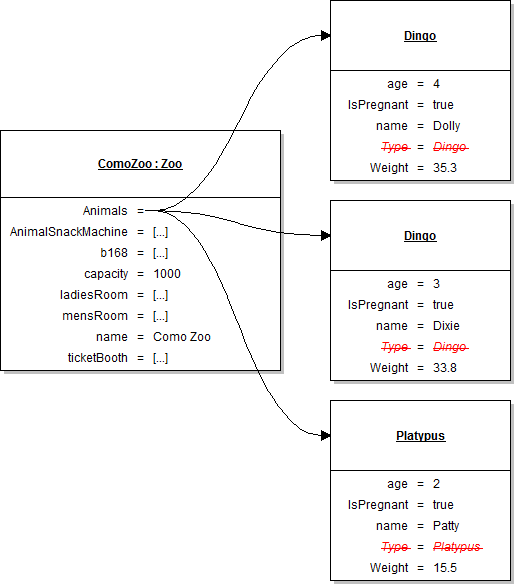
Note: The state of the animals created in the newZooButton_Click is shown in the object diagram below. This change occurs because their type field is no longer set.
The Como Zoo just added a hummingbird to its collection of animals, but it has no way to represent this addition in the application. In this task, you will define classes to represent birds and hummingbirds, and you will instantiate Harold the hummingbird. You will check your work by stepping through the constructor calls and ensuring that Harold is instantiated correctly.
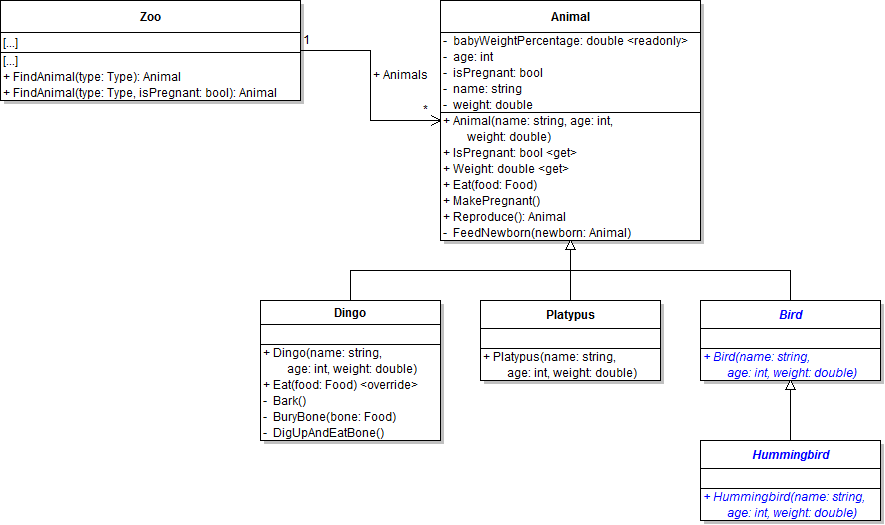
- Define the Bird class and have it inherit from the Animal class, as shown in the class diagram below. Call base in the constructor and pass the three parameters through.
- Check your work: Build the solution and ensure that the code compiles without errors or warnings.
- Define the Hummingbird class and have it inherit from the Bird class, as shown in the class diagram above. Call base in the constructor and pass the three parameters through.
- Check your work: Build the solution and ensure that the code compiles without errors or warnings.
- In the newZooButton_Click after adding Patty to the list, use the animal variable to instantiate Harold the hummingbird and add him to the list, as shown in the object diagram below.
- Check your work:
- Set a breakpoint in the newZooButton_Click on the line that instantiates Harold the hummingbird.
- Start the application. Click the New zoo button.
- Step into the hummingbird constructor. Step into the bird constructor. Step into the animal constructor. Note in the call stack that all three constructors in the hierarchy are called.
- Return to the newZooButton_Click and step over the line that instantiates Harold. Inspect the animal variable and ensure that Harold's field values match those specified in the object diagram above. Also ensure that Harold is successfully added to the zoo's list.
Dingoes and platypuses, as mammals, both fall into the same classification, but there is no representation of that classification in the application's animal hierarchy. In this task, you will define a class to represent mammals and have the Dingo and Platypus classes inherit from the Mammal class instead of the Animal class. You will check your work by stepping through the constructor calls and ensuring that the mammal objects are instantiated correctly.
- Define the Mammal class and have it inherit from the Animal class, as shown in the class diagram below. Call base in the constructor and pass the three parameters through.
- Check your work: Build the solution and ensure that the code compiles without errors or warnings.
- Have the Dingo and Platypus classes inherit from the Mammal class instead of the Animal class, as shown in the class diagram above.
- Check your work:
- Set a breakpoint in the newZooButton_Click on the line that instantiates Dolly the dingo.
- Start the application. Click the New zoo button.
- Step into the dingo constructor. Then step into the dingo constructor's call to base, which takes you to the mammal constructor now that the Dingo class inherits from the Mammal class. Then step into the mammal constructor's call to base, which takes you to the animal constructor.
- Return to the newZooButton_Click. Step into all three constructors when instantiating Dixie. Ensure she is instantiated correctly and is added to the zoo's list.
- Step into all three constructors (this time being platypus, then mammal, then animal) when instantiating Patty. Ensure she is instantiated correctly and is added to the zoo's list.
- Ensure that all code is StyleCop compliant.
- Browse to the project folder and add it to a newly created zip archive.
- Submit the zipped project folder to the correct assignment in Blackboard.