One of the main principles of object-oriented programming is encapsulation, which protects data and hides implementation from outside users. The private access modifier, which makes a field or method available only to the class in which it is defined, is a key component of implementing encapsulation. In this task, you make methods private if they are only called in the class in which they are defined. You will check your work by setting a breakpoint, stepping through the code, and ensuring that the functionality remains the same after making the methods private.
The Private Visibility Modifier (17:38)
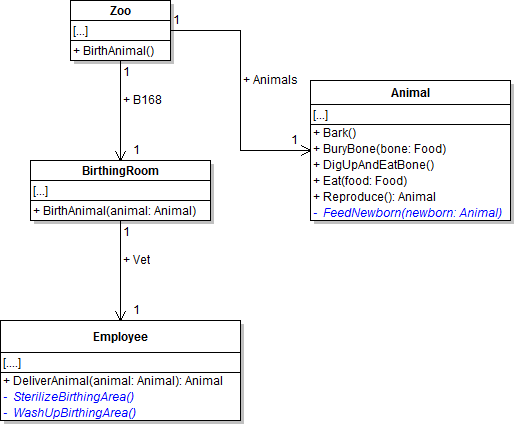
- Make the employee's SterilizeBirthingArea and WashUpBirthingArea methods and the animal's FeedNewborn method private, as shown in the code and class diagram below.
- Check your work:
- Set a breakpoint in the employee's DeliverAnimal method on the line that calls the SterilizeBirthingArea method.
- Start the application.
- Click the New zoo button. Then click the Birth dingo button.
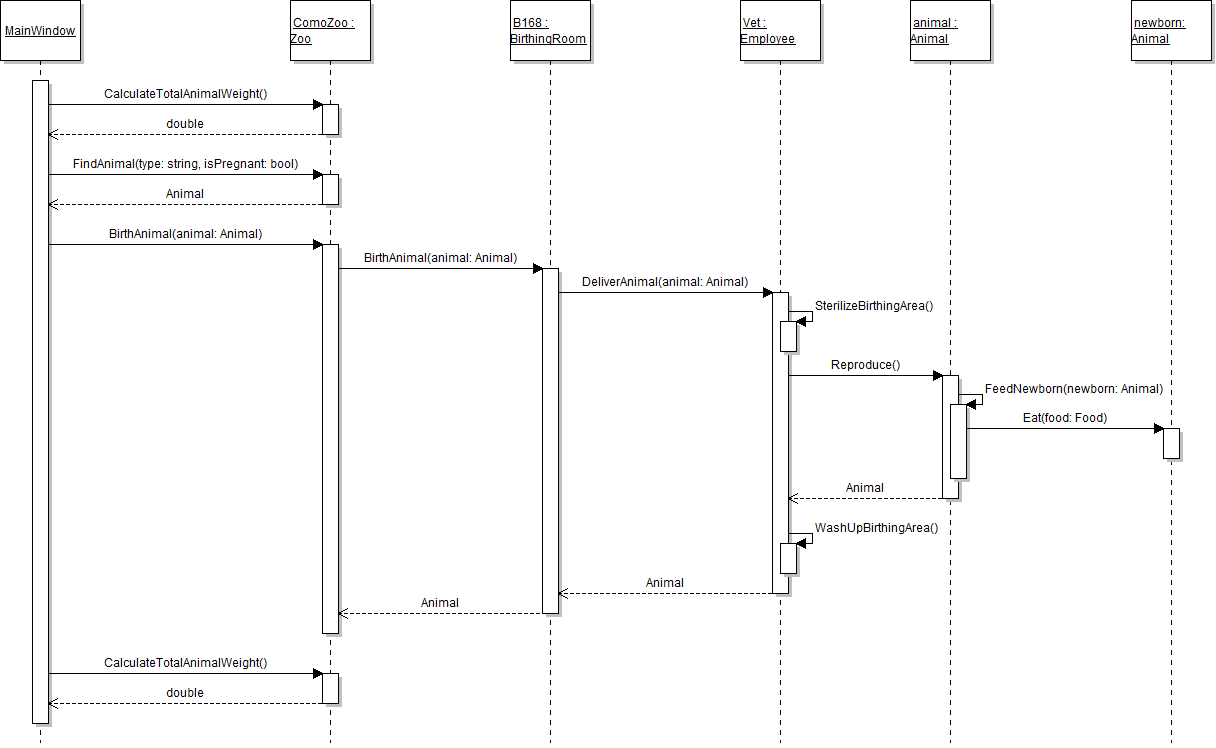
- Press F11 to step into the SterilizeBirthingArea method, the animal's Reproduce and FeedNewborn methods, and the WashUpBirthingArea method.
private void SterilizeBirthingArea()
{
    // code here
}
Note: The behavior is the same even though the method is now private. Methods that are called only on the same object, as the SterilizeBirthingArea, WashUpBirthingArea, and FeedNewborn methods are in the sequence diagram below, can be made private.
Note: Methods that are only referenced internally can be made private. You can easily see references to methods by using CodeLens, which is the small, gray line immediately above the method definition. Clicking on the number of references will bring up a list of classes and line numbers where the method is called, as shown in the image below.

Warning: CodeLens is available only in Visual Studio Enterprise and Visual Studio Professional editions. It is not available in Visual Studio Community edition.
Just as methods can be made private if they are only referenced internally, fields should be treated the same way. In this task, you will make the employee's AnimalDeliveryCount field private because it is only referenced in the Employee class. You will check your work by ensuring that the solution builds without compiler errors or warnings.
- Make the employee's AnimalDeliveryCount field private.
- Ensure that all code is StyleCop compliant.
- Make the AnimalDeliveryCount field lowercase.
- Check your work: Build the solution. Note that the application failed to build due to references to AnimalDeliveryCount within the Employee class.
- Update the references to AnimalDeliveryCount within the Employee class so they are all lowercase and match the field.
- Check your work: Build the solution and ensure that the code compiles without errors or warnings.
Note: Stylecop generates a warning when a private field begins with a capital letter.
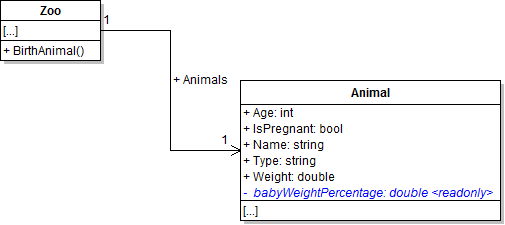
Just as methods can be made private if they are only referenced internally, fields should be treated the same way. In this task, you will make the animal's BabyWeightPercentage field private because it is only used inside the Animal class. You will check your work by setting a breakpoint, stepping through the code, and ensuring that the functionality remains the same after making the field private.
- Make the animal's BabyWeightPercentage field private and lowercase the first letter, as shown in the code and class diagram below. Update the name of the field by placing the cursor over the field, pressing Ctrl + R, R to rename, changing the name by lowercasing the first letter, and pressing Enter.
- Check your work:
- Set a breakpoint in the animal's Reproduce method on the line that sets the baby animal's weight.
- Start the application.
- Click the New zoo button. Then click the Birth dingo button.
- Press F10 to step over the line of code that sets the baby's weight. The baby's weight should be set to 3.53, just as it was before the field was made private.
private readonly double babyWeightPercentage;
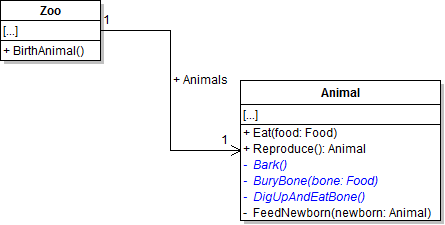
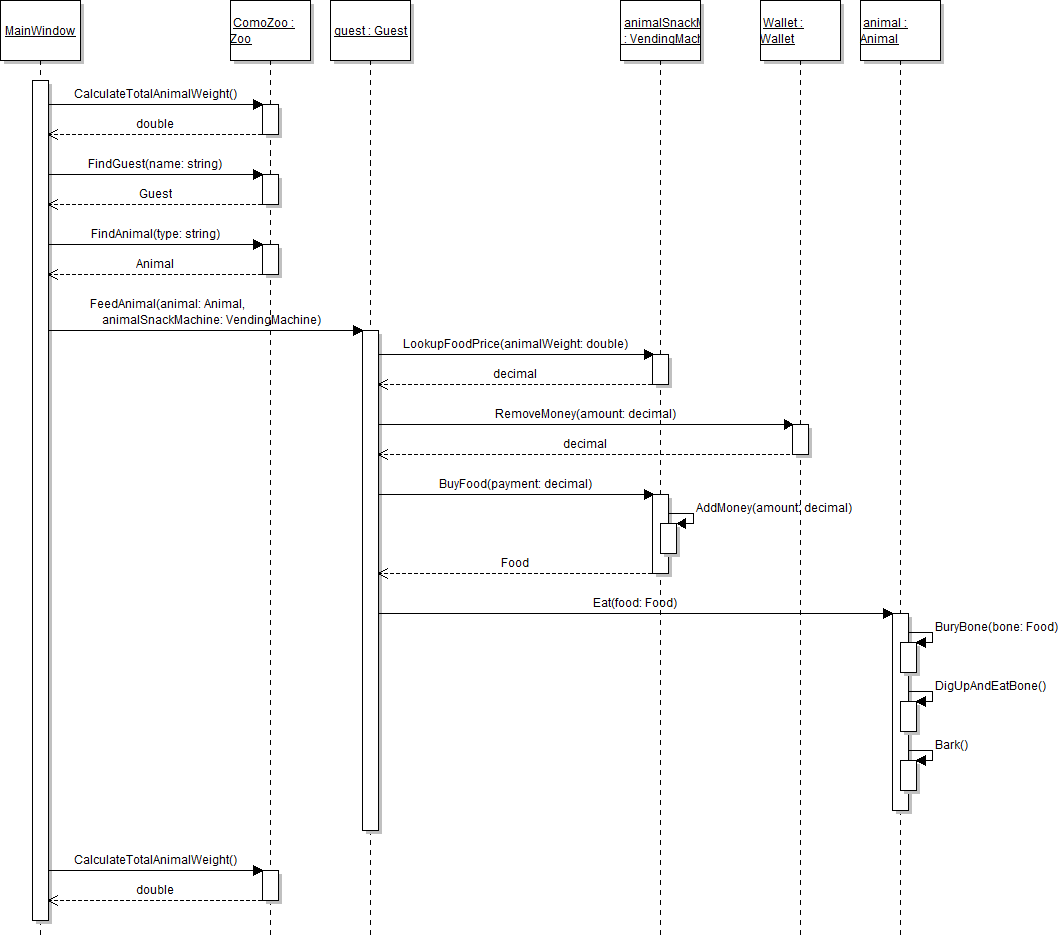
The animal has a few methods related to eating that can be made private in addition to its method that feeds a newborn baby. In this task, you will make the animal's Bark, BuryBone, and DigUpAndEatBone methods private. You will check your work by setting a breakpoint, stepping through the code, and ensuring that the functionality remains the same after making the methods private.
- Make the animal's Bark, BuryBone, and DigUpAndEatBone methods private, as shown in the class diagram below.
- Check your work:
- Set a breakpoint in the animal's Eat method on the line that calls the BuryBone method.
- Start the application.
- Click the New zoo button. Then click the Darla, feed dingo button.
- Press F11 to step into the BuryBone, DigUpAndEatBone, and Bark methods. Note that the behavior is the same even though the method is now private. Methods that are called only on the same object, as the BuryBone, DigUpAndEatBone, and Bark methods are in the sequence diagram below, can be made private.
Just as methods can be made private if they are only referenced internally, fields should be treated the same way. In this task, you will make the booth's MoneyBalance field private. You will check your work by ensuring that the solution builds without compiler errors or warnings.
- Make the booth's MoneyBalance field private and lowercase the first letter, as shown in the class diagram below.
- In the newZooButton_Click in MainWindow.xaml.cs, remove the line of code that sets the ticket booth's money balance.
- Booth.MoneyBalance is never used in 5.1 - set to initial value?
- Check your work: Build the solution and ensure that the code compiles without errors or warnings.
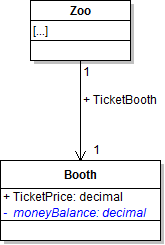
Note: The booth's moneyBalance field is now private, so it cannot be set from outside of the Booth class.
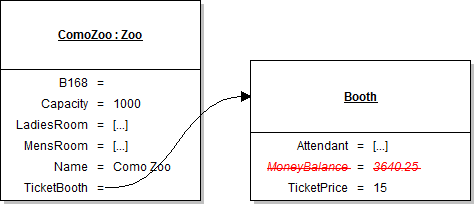
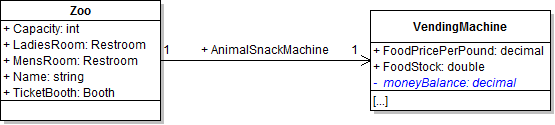
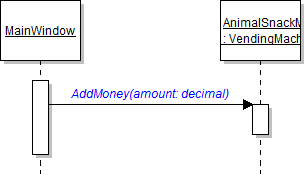
Having a public money balance field for the vending machine can be dangerous because any object could very easily change the money balance simply by adding any amount to it or removing any amount from it. A better way for other objects to access the money balance is through the machine's AddMoney method. In this task, you will make the vending machine's MoneyBalance field private and initially set the machine's balance using its AddMoney method. You will check your work by setting a breakpoint, stepping through the code, and ensuring that the animal snack machine's money balance is set correctly.
- Make the vending machine's MoneyBalance field private and lowercase the first letter, as shown in the class diagram below.
- In the newZooButton_Click in MainWindow.xaml.cs, call the animal snack machine's AddMoney method after setting its other field values, as shown in the sequence diagram below. Pass in 42.75m. This adds $42.75 to the machine's money balance, which means the money balance is set to the same amount as before the field was made private.
- Check your work:
- Set a breakpoint in the newZooButton_Click on the line that calls the animal snack machine's AddMoney method.
- Start the application.
- Click the New zoo button.
- Press F11 to step into the AddMoney method. Note that the moneyBalance is 0. Press F10 to step over the line of code that adds to the money balance. Note that the money balance is now 42.75.
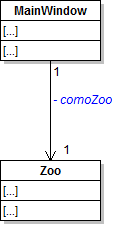
In this task, you will make the MainWindow's ComoZoo field private. You will check your work by setting a breakpoint and ensuring that the comoZoo and its contained objects are instantiated as they were before the change.
- Make the MainWindow's ComoZoo field private and rename it so that its first letter is lowercase, as shown in the class diagram below.
- Check your work:
- Set a breakpoint on the closing curly brace of the newZooButton_Click.
- Start the application.
- Click the New zoo button.
- Use the Locals window or inspect the comoZoo field to ensure that the comoZoo and all of its contained objects (TicketBooth, B168, AnimalSnackMachine, animals, guests, etc.) are instantiated as they were before making the comoZoo field private.
- Ensure that all code is StyleCop compliant.
- Browse to the project folder and add it to a newly created zip archive.
- Submit the zipped project folder to the correct assignment in Blackboard.