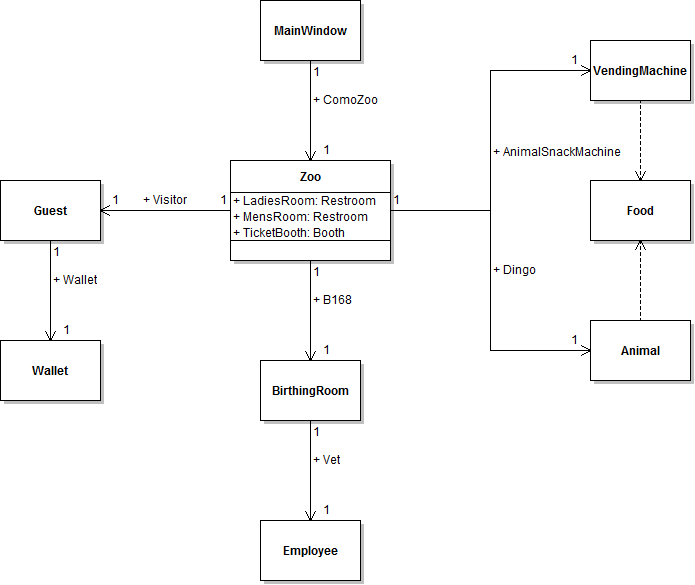
Once a pregnant animal reproduces, it should produce a baby animal and return it to the vet for a check up. In this task, you will define a return type for the animal's Reproduce method, create a new Animal object in the method, and then return the object to the method's caller (i.e. the Vet field). You will check your work by setting a breakpoint, stepping through the code, and ensuring that the Reproduce method returns a new Animal object and that the object is caught when the method is called in the DeliverAnimal method.
Accepting Return Values from Methods (15:27)
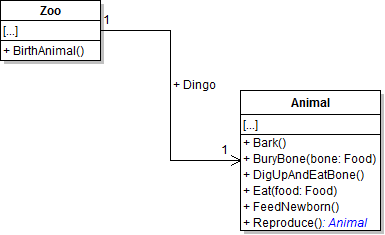
- Add a return type of Animal to the animal's Reproduce method, as shown in the code and class diagram below. The returned object represents the baby animal.
- Build the solution. The build should fail because the Reproduce method needs to return an object of type Animal but it does not return anything.
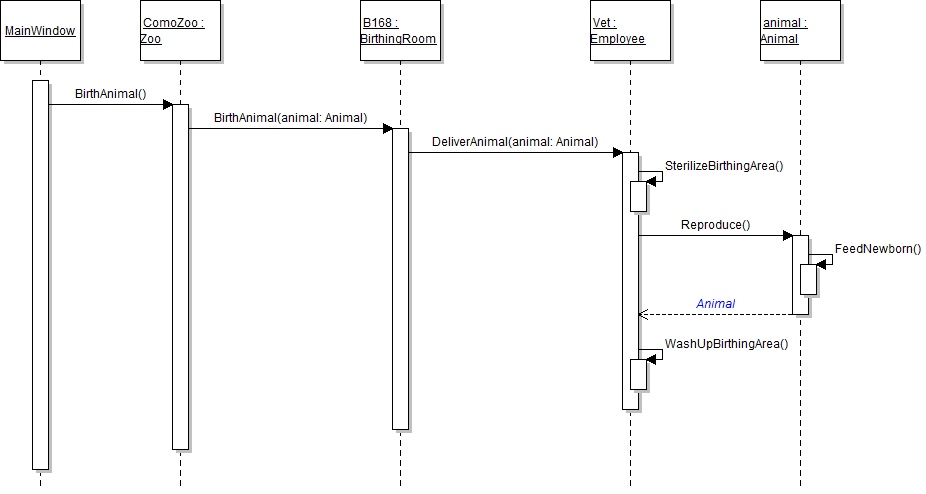
- In the Reproduce method before calling the FeedNewborn method, define and instantiate a local animal variable named baby. Then, after calling the FeedNewborn method, return the baby variable, as shown in the code and sequence diagram below.
- Check your work:
- Set a breakpoint in the employee's DeliverAnimal method on the line of code that calls the animal's Reproduce method.
- Start the application.
- Click the New zoo button. Then click the Birth dingo button.
- Press F11 to step into the Reproduce method. Step over the lines of code that instantiate the baby variable and call the FeedNewborn method. Ensure that the baby variable is instantiated to a new Animal instance.
- Press F10 to step through the rest of the Reproduce method and return to the DeliverAnimal method. The Reproduce method returned an Animal object, but that object is not being caught by the method call, and so the DeliverAnimal method does not have access to the baby animal.
- Catch the result of the the Reproduce method call by defining a local variable of type Animal called baby and setting it to the result of calling the method, as shown in the code below. This code catches the animal that the Reproduce method returned so that the DeliverAnimal method can use it later.
- Ensure that all code is StyleCop compliant.
- Check your work:
- Set a breakpoint in the employee's DeliverAnimal method on the line of code that calls the animal's Reproduce method.
- Start the application.
- Click the New zoo button. Then click the Birth dingo button.
- Press F10 to step over the call to the Reproduce method. Ensure that the baby variable is instantiated. None of the object's field values were set, so they should all be the default values as specified in the list below.
- Age: 0
- IsPregnant: false
- Name: null
- Type: null
- Weight: 0.0
public Animal Reproduce()
{
    this.FeedNewborn();
}
public Animal Reproduce()
{
    // Define and instantiate baby animal
    Animal baby = new Animal();

    // Feed the new baby
    this.FeedNewborn();

    // Return the baby animal
    return baby;
}
Don't Drop the Baby! Parameters and Returns, Revisited (8:22)
Animal baby = animal.Reproduce();
Once the vet is finished with the baby animal, they need to return the baby to the birthing room. In this task, you will define a return type for the employee's DeliverAnimal method and return the baby animal to the method's caller (i.e. the B168 field). You will check your work by setting a breakpoint, stepping through the code, and ensuring that the DeliverAnimal method returns an Animal object and that the object is caught when the method is called in the BirthAnimal method.
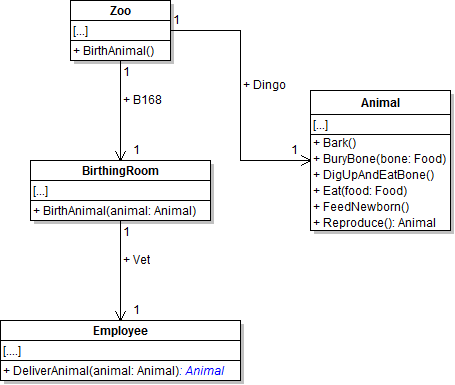
- Add a return type of Animal to the employee's DeliverAnimal method, as shown in the class diagram below. The returned object represents the baby animal.
- In the DeliverAnimal method, return the baby variable as shown in the sequence diagram below. The line that returns an object or value must be the last line of the method, so put the line that returns the baby at the end of the method.
- In the birthing room's BirthAnimal method, catch the Animal object that the DeliverAnimal method returns. Do this by defining an Animal variable named baby and setting it to the result of calling the DeliverAnimal method.
- Ensure that all code is StyleCop compliant.
- Check your work:
- Set a breakpoint in the birthing room's BirthAnimal method on the line that calls the DeliverAnimal method.
- Start the application.
- Click the New zoo button. Then click the Birth dingo button.
- Press F10 to step over the call to the DeliverAnimal method. Ensure that the baby variable is instantiated and its fields are set to default values.
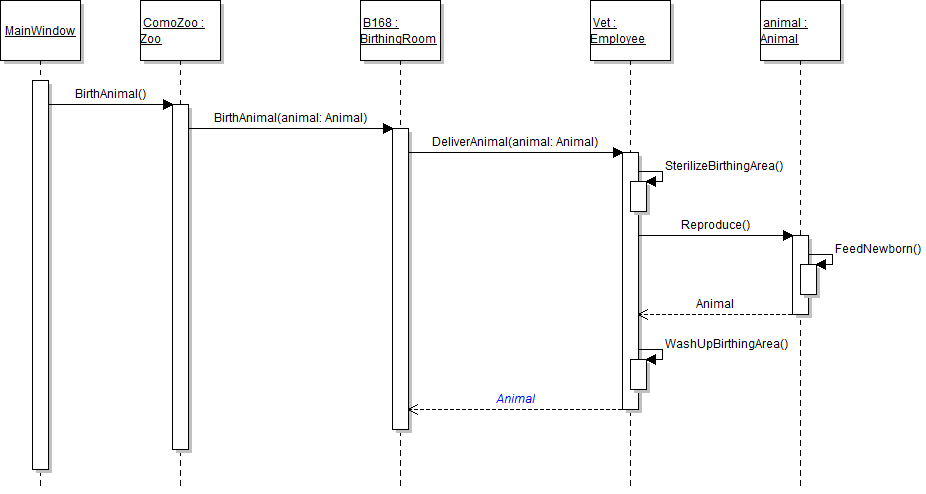
Finally, the birthing room needs to return the baby animal to the zoo. In this task, you will define a return type for the birthing room's BirthAnimal method and return the baby animal to the method's caller (i.e. the ComoZoo). You will check your work by setting a breakpoint, stepping through the code, and ensuring that the birthing room's BirthAnimal method returns an Animal object and that the object is caught when the method is called in the zoo's BirthAnimal method.
- Add a return type of Animal to the birthing room's BirthAnimal method, as shown in the class diagram below. The returned object represents the baby animal.
- In the birthing room's BirthAnimal method, immediately return the result of calling the DeliverAnimal method, as shown in the code and sequence diagram below.
- In the zoo's BirthAnimal method, catch the Animal object that the birthing room's BirthAnimal method returns. Do this by defining an Animal variable named baby and setting it to the result of calling the BirthAnimal method on B168.
- Ensure that all code is StyleCop compliant.
- Check your work:
- Set a breakpoint in the zoo's BirthAnimal method on the line that calls the birthing room's BirthAnimal method.
- Start the application.
- Click the New zoo button. Then click the Birth dingo button.
- Press F10 to step over the call to the BirthAnimal method. Ensure that the baby variable is instantiated and its fields are set to the default values.
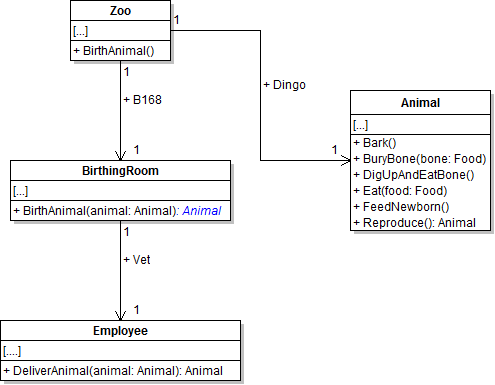
public Animal BirthAnimal(Animal animal)
{
    return this.Vet.DeliverAnimal(animal);
}
Tip: When a method contains a single line of code or method call, the return can be combined with the method call as in the code above. Defining a variable to temporarily store the result of the DeliverAnimal method and then returning the variable adds an unnecessary line of code. However, the code can be written either way.
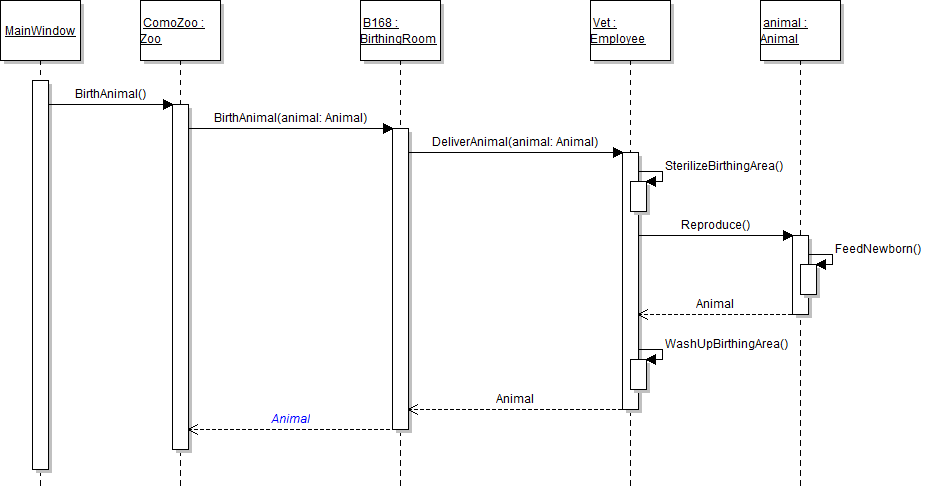
The vending machine's DetermineFoodPrice method logically should return the price of the animal's food. In this task, you will define a return type for the vending machine's DetermineFoodPrice method and return the price to the method's caller (i.e. the guest). You will check your work by ensuring that the solution builds without compiler errors or warnings.
- Add a return type of decimal to the vending machine's DetermineFoodPrice method, as shown in the code and class diagram below. The returned value represents the food price.
- In the DetermineFoodPrice method, return the value 1m, as shown in the code and sequence diagram below.
- Ensure that all code is StyleCop compliant.
- Check your work: Build the solution and ensure that the code compiles without errors or warnings.
public decimal DetermineFoodPrice(double animalWeight)
{

}
public decimal DetermineFoodPrice(double animalWeight)
{
    return 1m;
}
Note: This hard-coded value is being used to show that a single, hard-coded value can be returned from a method in addition to an object or variable. The actual price will be determined in a future assignment.
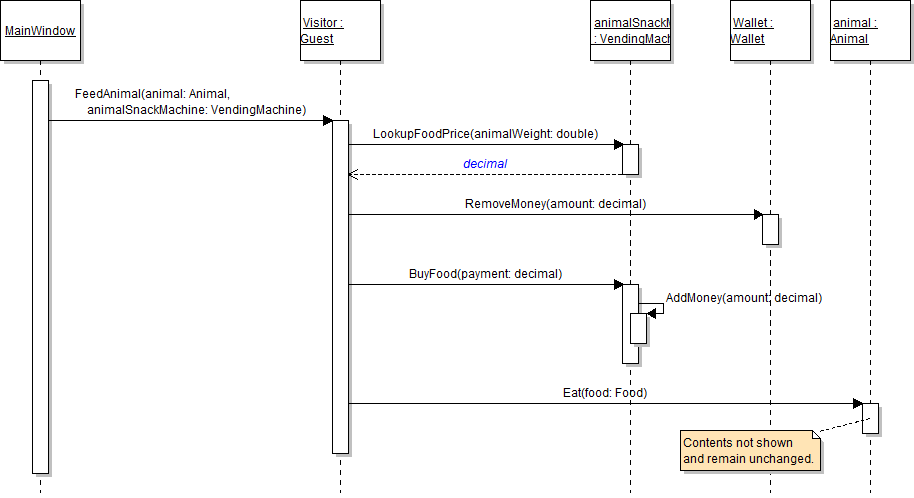
After retrieving the price of the animal's food, the guest should then use that amount when telling the wallet how much money to remove. In this task, you will catch the decimal value returned by the DetermineFoodPrice method and pass that value when calling the wallet's RemoveMoney method. You will check your work by setting a breakpoint, stepping through the code, and ensuring that the correct value is returned from the DetermineFoodPrice method and that same value is passed to the RemoveMoney method.
- In the guest's FeedAnimal method, define a price variable of type decimal and set it to the result of calling the animalSnackMachine's DetermineFoodPrice method, as shown in the code below.
- Then, pass the price variable into the call to the wallet's RemoveMoney method. This tells the wallet to remove an amount of money equal to the price of the animal's food.
- Check your work:
- Set a breakpoint in the guest's FeedAnimal method on the line that calls the DetermineFoodPrice method.
- Start the application.
- Click the New zoo button. Then click the Darla, feed dingo button.
- Press F10 to step over the call to the DetermineFoodPrice method. Ensure that the value of the price variable is 1.
- Press F11 to step into the RemoveMoney method. Examine the amount parameter and ensure that its value is 1, which is the value of the price variable that was passed in when the RemoveMoney method was called.
decimal price = animalSnackMachine.DetermineFoodPrice(animal.Weight);
The wallet's RemoveMoney method should return to the guest the amount of money that it actually removed from its money balance. In this task, you will define a return value for the guest's RemoveMoney method. You will check your work by ensuring that the solution builds without compiler errors or warnings.
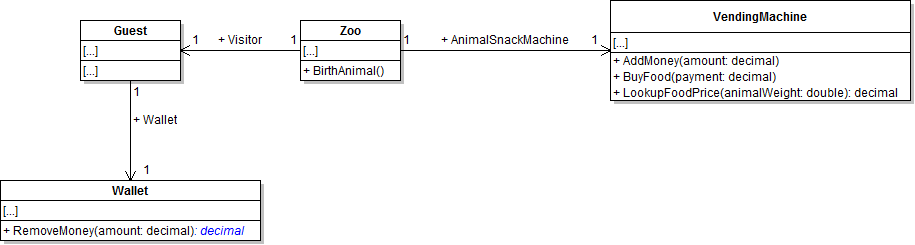
- Add a return type of decimal to the wallet's RemoveMoney method, as shown in the class diagram below. The returned value represents the amount of money removed from the money balance.
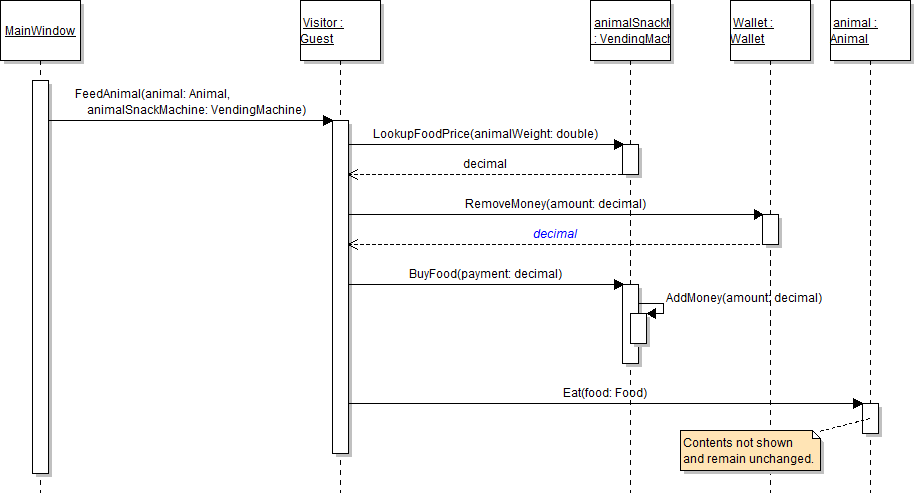
- In the RemoveMoney method, return the value of the amount parameter, as shown in the code and sequence diagram below. The amount parameter represents the amount that should be removed from the money balance, and the decimal return value represents the amount that was actually removed from the money balance. At this point, those things are the same value, and so you can simply return the value of the parameter.
- Ensure that all code is StyleCop compliant.
- Check your work: Build the solution and ensure that the code compiles without errors or warnings.
public decimal RemoveMoney(decimal amount)
{
    return amount;
}
The value returned from the RemoveMoney method represents the payment for the animal food, so that value should be passed along to the BuyFood method when it is called. In this task, you will catch the decimal value returned by the RemoveMoney method and pass that value when calling the animalSnackMachine's BuyFood method. You will check your work by setting a breakpoint, stepping through the code, and ensuring that the correct value is returned from the RemoveMoney method and that same value is passed to the BuyFood method.
- In the guest's FeedAnimal method, define a payment variable of type decimal and set it to the result of calling the wallet's RemoveMoney method.
- Then, pass the payment variable into the call to the animalSnackMachine's BuyFood method. This gives the amount of money removed from the wallet (the payment) to the animalSnackMachine as payment for the animal food.
- Check your work:
- Set a breakpoint in the guest's FeedAnimal method on the line that calls the RemoveMoney method.
- Start the application.
- Click the New zoo button. Then click the Darla, feed dingo button.
- Press F10 to step over the call to the RemoveMoney method. Ensure that the value of the payment variable is 1.
- Press F11 to step into the BuyFood method. Examine the payment parameter and ensure that its value is 1, which is the value of the payment variable that was passed in when the BuyFood method was called.
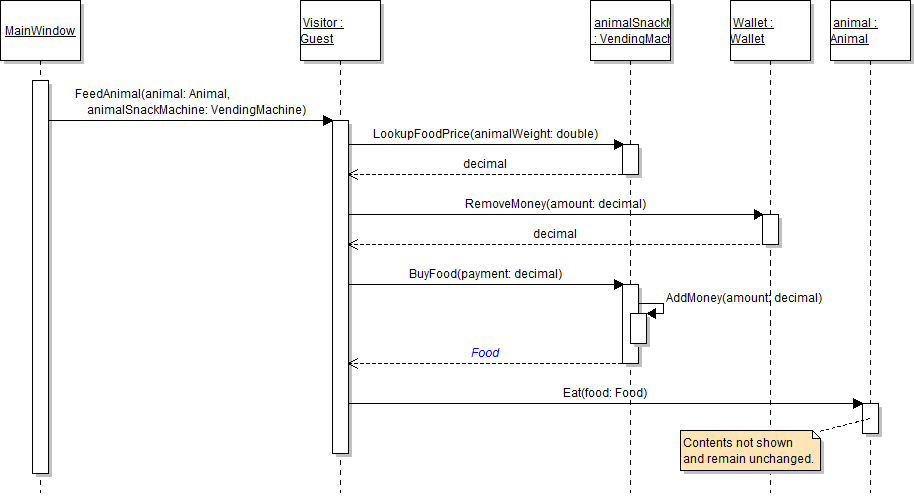
The instantiation of the food variable should occur in the BuyFood method, which should then return that food object to the guest. In this task, you will define a return type for the BuyFood method, create a new Food object in the method, and then return that object to the method's caller (i.e. the guest). You will also catch that object where the method is called and pass it along to the animal's Eat method. You will check your work by setting a breakpoint, stepping through the code, and ensuring that the food variable is instantiated, its fields are set to the correct values, and the object is passed to the Eat method correctly.
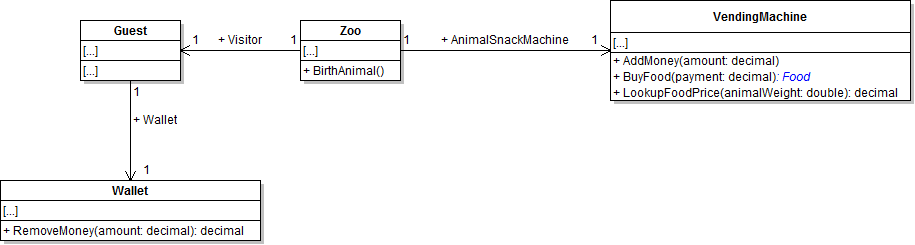
- Add a return type of Food to the vending machine's BuyFood method, as shown in the class diagram below. The returned value represents the food purchased from the vending machine.
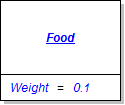
- In the BuyFood method after calling the AddMoney method, define a food variable and instantiate it. Then set its Weight value as specified in the object diagram below. Then return the food variable as shown in the sequence diagram below.
- In the guest's FeedAnimal method, set the food variable to the result of calling the BuyFood method instead of instantiating it to a new instance of the Food class.
- Ensure that all code is StyleCop compliant.
- Check your work:
- Set a breakpoint in the guest's FeedAnimal method on the line that calls the BuyFood method.
- Start the application.
- Click the New zoo button. Then click the Darla, feed dingo button.
- Press F10 to step over the call to the BuyFood method. Ensure that the food variable is instantiated. The value of the BestIfEatenBy field should be "Friday". The value of the Weight field should be 0.1.
- Press F11 to step into the animal's Eat method. Examine the food parameter and ensure that it is a Food object and that its fields are set to the same values as that of the food object that was passed in to the method - "Friday" for BestIfEatenBy and 0.1 for Weight.
- Ensure that all code is StyleCop compliant.
- Browse to the project folder and add it to a newly created zip archive.
- Submit the zipped project folder to the correct assignment in Blackboard.