Constructors can be called inline within other constructors, just as methods can be called inline within other methods and return values can be used without defining an intermediate variable. In this task, you will call the coat constructor inline within the call to the patron constructor. You will check your work by setting a breakpoint, stepping into the constructors, and ensuring that the coat and patron objects are created correctly.
- In the newRestaurantButton_Click, move the code that instantiates the patron's coat inline within the call to the Patron constructor. The call to the Coat constructor will act as the last parameter of the Patron constructor.
- Check your work:
- Set a breakpoint in the newRestaurantButton_Click on the line that instantiates the patron.
- Start the application. Click the New restaurant button.
- Press F11 to step into the coat constructor. Ensure that each field is set correctly. Then return to the newRestaurantButton_Click.
- Press F11 to step into the patron constructor. Ensure that the coat parameter contains the brown, XL coat object that was instantiated and passed into the constructor.
The server's Name field needs to be made private. In this task, you will make the field private and define a read-only property to "wrap" the field. You will check your work by setting a breakpoint, stepping into the property, ensuring that the result of calling the property is the same as the result of calling the previously public field.
- Make the Name field private and rename it so that the first letter is lowercase, as shown in the class diagram below.
- Define a Name property with a getter to "wrap" the server's name field, as shown in the class diagram above.
- Ensure that all code is StyleCop compliant.
- Check your work:
- Set a breakpoint in the FindServer method with the name parameter on the line that defines the if statement.
- Start the application. Click the New restaurant button, then click the Heidi, seat the regular button.
- Uncheck the "Step over properties and operators" option. Then press F11 to step into the Name property. The property should return the value of the name field, which is "Svanhilde".
- Press F10 to step through the rest of the FindServer method to find Heidi.
- Return to the SeatTheRegular method and ensure that the server variable contains Heidi the waitress.
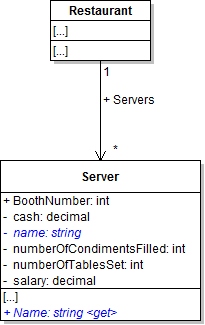
Note: The Name property is now called from the FindServer method, as shown in the sequence diagram below.
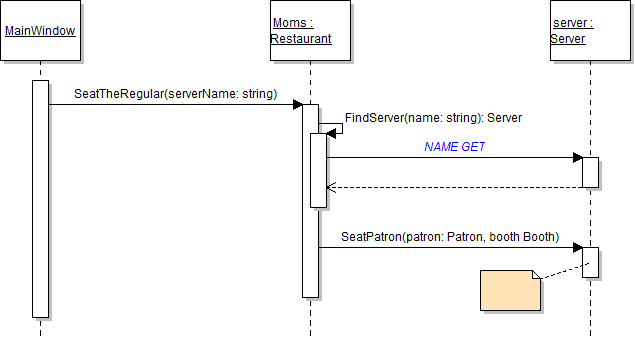
Note: The FindServer method, which calls the Name property, is also called in the serve lunch sequence, as shown in the diagram below.
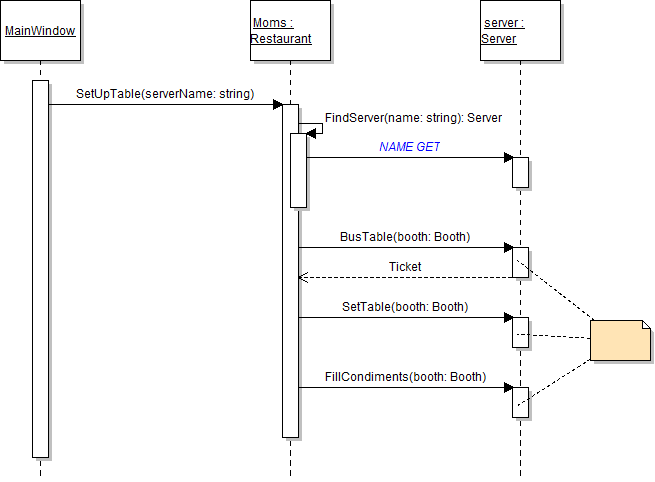
The server's BoothNumber field, the patron's Booth field, and the booth's Number field all need to be made private. In this task, you will make those fields private and define read-only properties to give other objects access to the data stored in the fields. You will check your work by setting a breakpoint, stepping into the properties, and ensuring that the result of calling the property is the same as the result of calling the previously public field.
- Make the server's BoothNumber field, the booth's Number field, and the patron's Booth field private and rename them so that the first letter is lowercase, as shown in the class diagram below.
- Define a BoothNumber property with a getter to "wrap" the server's boothNumber field, as shown in the class diagram above.
- Define a Booth property with a getter to "wrap" the patron's booth field, as shown in the class diagram above.
- Define a Number property with a getter to "wrap" the booth's number field, as shown in the class diagram above.
- Remove the StyleCop suppression message from the top of the Patron and Server classes.
- Ensure that all code is StyleCop compliant.
- Check your work:
- Set a breakpoint in the FindServer method with the patron parameter on the line that defines the if statement.
- Start the application. Click the New restaurant button, then click the Heidi, seat the regular button, then click the Serve lunch to the regular button.
- Step into the server's BoothNumber property, which should return the value of the boothNumber field. Then return to the caller.
- Step into the patron's Booth property, which should return the object stored in the booth field. Then return to the caller.
- Then step into the booth's Number property, which should return the value of the booth field. Then return to the caller.
- The patron's booth's number is 2, which should not match the current server's booth number (which is 1). Step through the rest of the loop to find the correct server.
- Return to the TendToTheRegular method. Ensure that the server variable contains Heidi.
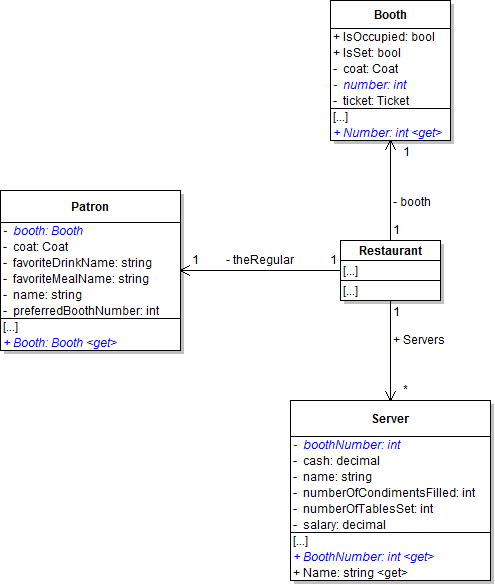
Note: These three properties are now called in the places shown in the sequence diagram below.
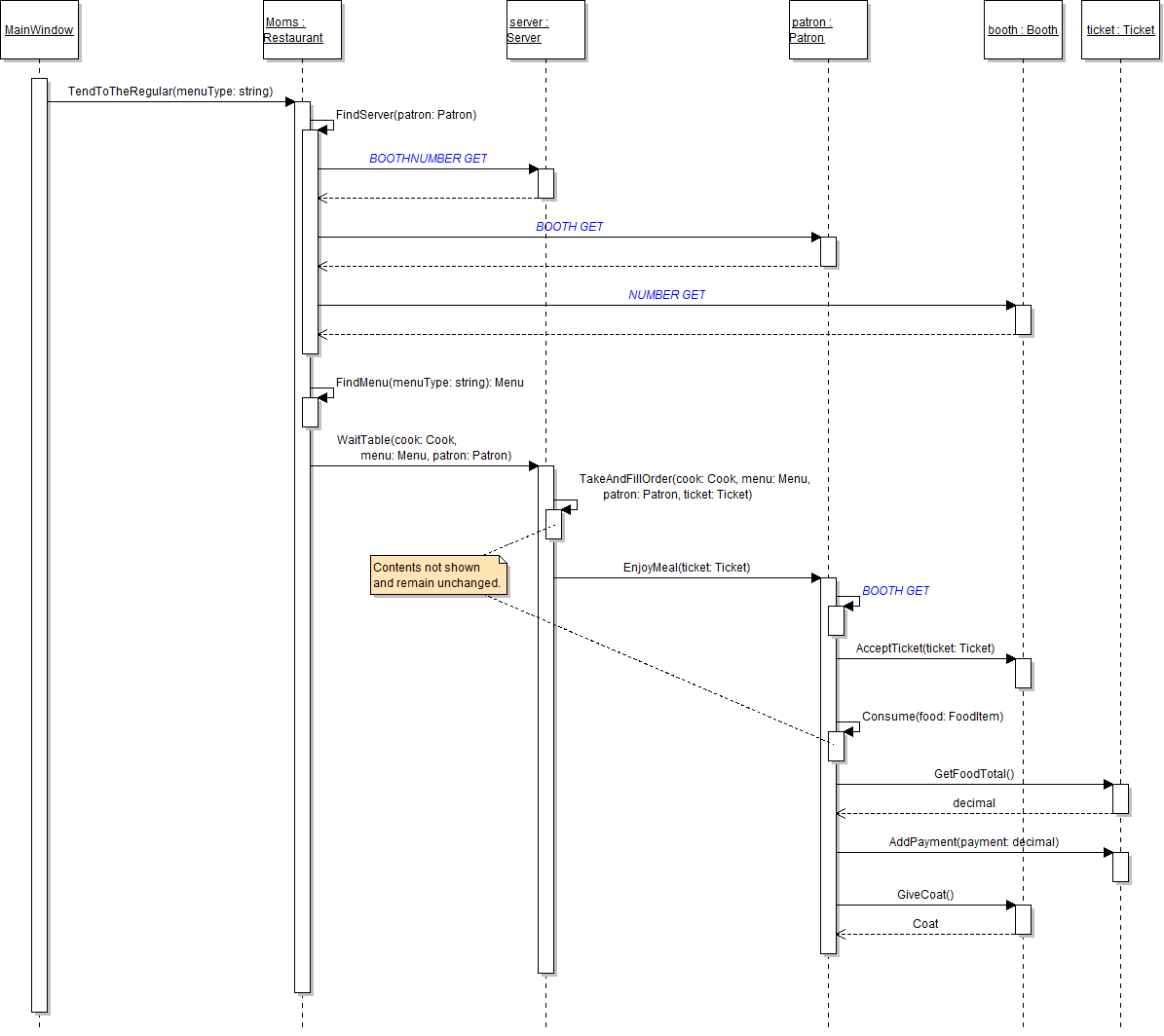
Note: All of the fields in these classes are now private, which means that the suppression message is no longer needed.
The booth's IsSet field and the menu item's Price field need to be made private. In this task, you will define read-only properties for the fields to give other objects access to the data. You will check your work by setting breakpoints, stepping into the properties, and ensuring that the result of calling the property is the same as the result of calling the previously public field.
- Make the booth's IsSet field and the menu item's Price field private and rename them so that the first letter is lowercase, as shown in the class diagram below.
- Define the booth's IsSet property and the menu item's Price property as shown in the class diagram above.
- Ensure that all code is StyleCop compliant.
- Check your work:
- Set a breakpoint in the ticket's GetFoodTotal method on the line that calls the Price property.
- Start the application. Click the New restaurant button; then click the Heidi, seat the regular button; then click the Serve lunch to the regular button.
- Step into the menu item's Price property, which should return the value of the price field. Then return to the caller.
- Step through the rest of the accumulator loop to get the food total, which should be 14.98.
- Without stopping the application, set a breakpoint in the server's SetTable method on the line that defines the if statement. Remove the breakpoint from the ticket's GetFoodTotal method.
- Click Continue. Then click the Heidi, set up table button.
- Step into the booth's IsSet property, which should return the value of the isSet field. Then return to the caller.
- Step through the rest of the if statement. The booth is not set, so the boolean expression should evaluate to true and the server should wash and set the table.
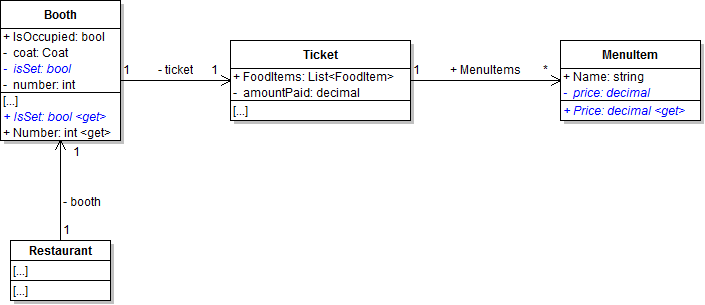
Note: The properties are now called in the places shown in the sequence diagram below.
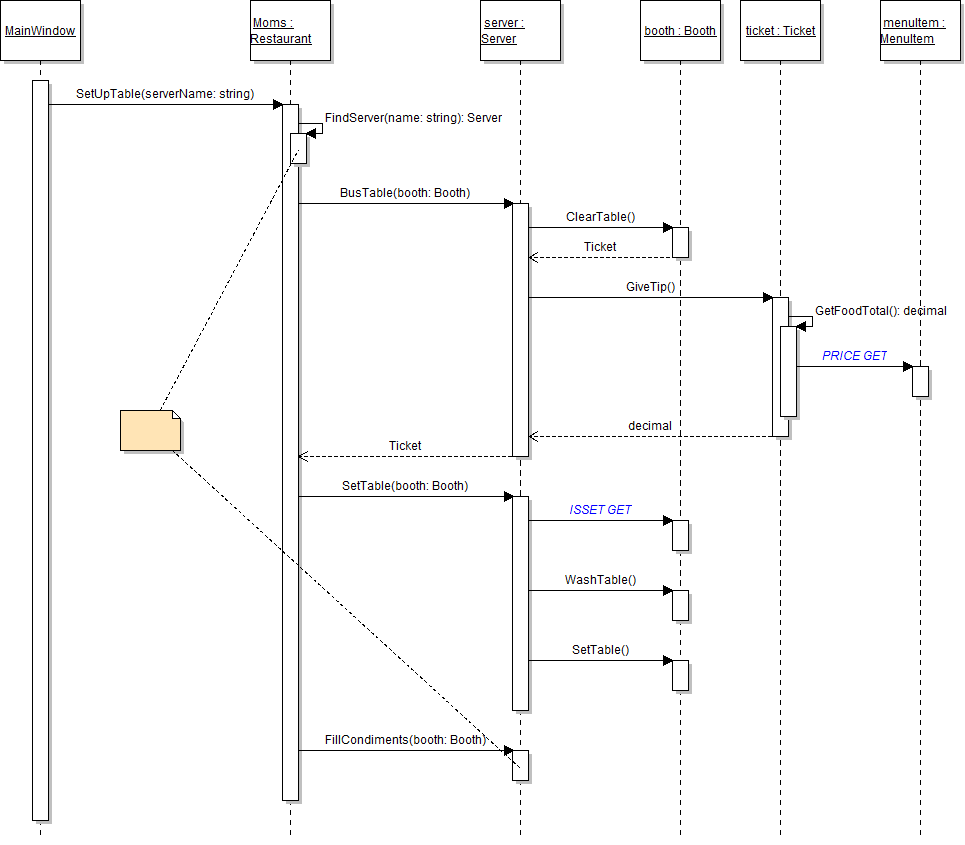
Note: The Price property is also called in the serve lunch sequence, as shown below.
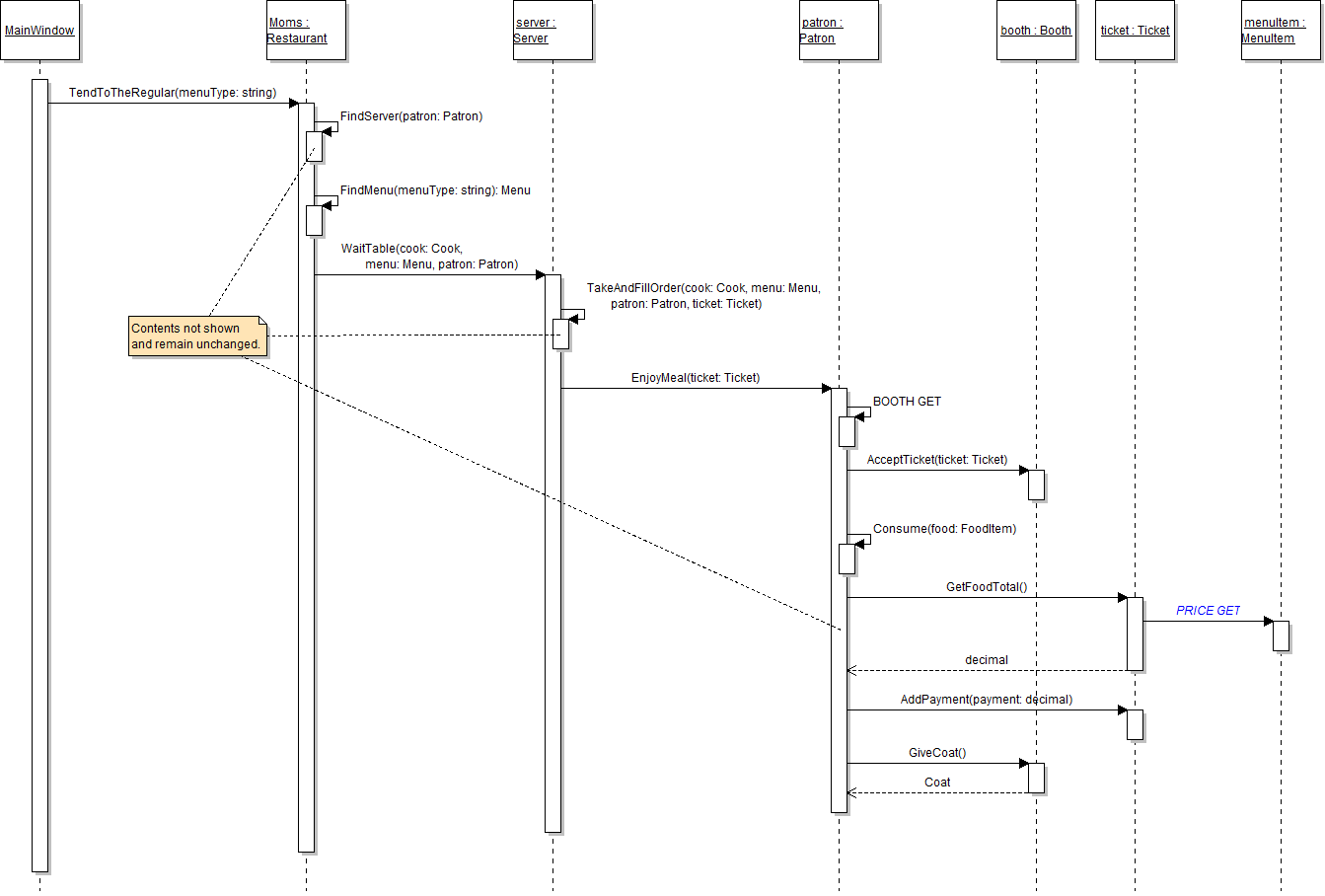
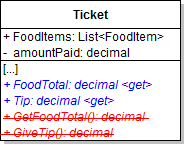
The Ticket class has two methods that calculate a value that could be turned into calculated properties. In this task, you will modify the ticket's GetFoodTotal and GiveTip methods to become read-only properties. You will check your work by setting a breakpoint, stepping into the methods, and ensuring that the properties return the correct values.
- In the Ticket class, define the FoodTotal property as shown in the class diagram below. Copy the contents of the GetFoodTotal method and paste them into the getter of the property.
- Define the Tip property on the Ticket class as shown in the class diagram above. Copy the contents of the GiveTip method into the getter of the property.
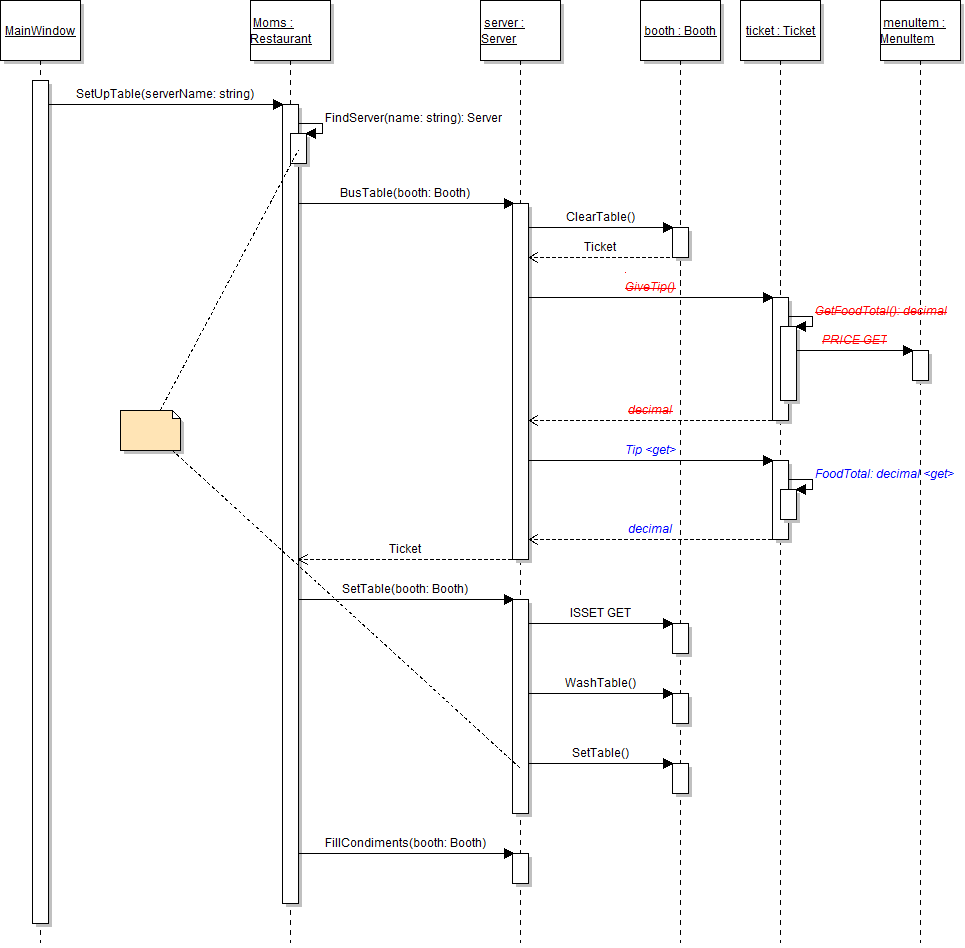
- In the getter of the Tip property, refer to the FoodTotal property instead of calling the GetFoodTotal method.
- In the patron's EnjoyMeal method, call the ticket's FoodTotal property instead of the GetFoodTotal method. Continue to store the result in the foodTotal variable.
- In the server's BusTable method, call the ticket's Tip property instead of the GiveTip method, as shown in the sequence diagram below. Continue to add the result to the cash field.
- Remove the GetFoodTotal and GiveTip methods from the Ticket class, as shown in the class diagram above.
- Ensure that all code is StyleCop compliant.
- Check your work:
- Set a breakpoint in the server's BusTable method on the line that calls the ticket's Tip property.
- Start the application. Click the New restaurant button; then click the Heidi, seat the regular button; then click the Serve lunch to the regular button; then click the Heidi, set up table button.
- Step into the ticket's Tip property, then step into the FoodTotal property. Step through the FoodTotal getter and ensure that the total is calculated correctly and comes to 14.98.
- Return to the Tip property and then return to the BusTable method. Ensure that the value of the Tip property is 3.00 and that amount is added to the server's cash field.
The menu item's Name field needs to be made private. In this task, you will make the field private and define a read-only property to "wrap" the field. You will check your work by setting a breakpoint, stepping into the property, and ensuring that the result of calling the property is the same as the result of calling the previously public field.
- Make the menu item's Name field private and rename it so that the first letter is lowercase, as shown in the class diagram below.
- Define a Name property on the MenuItem class to "wrap" the name field, as shown in the class diagram above.
- Remove the StyleCop suppression message from the top of the MenuItem class.
- Ensure that all code is StyleCop compliant.
- Check your work:
- Set a breakpoint in the menu's FindMenuItem method on the line that defines the if statement.
- Start the application. Click the New restaurant button; then click the Heidi, seat the regular button; then click the Serve lunch to the regular button.
- Step into the menu item's Name property, which should return the value of the name field. Then return to the caller.
- The name of the current menu item should match the name parameter, so the boolean expression should evaluate to true and the first menu item - lemonade - should be returned.
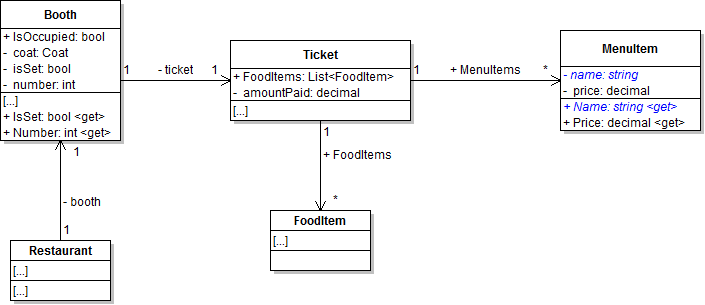
Note: The Name property is now called from the FindMenuItem method, as shown in the sequence diagram below.
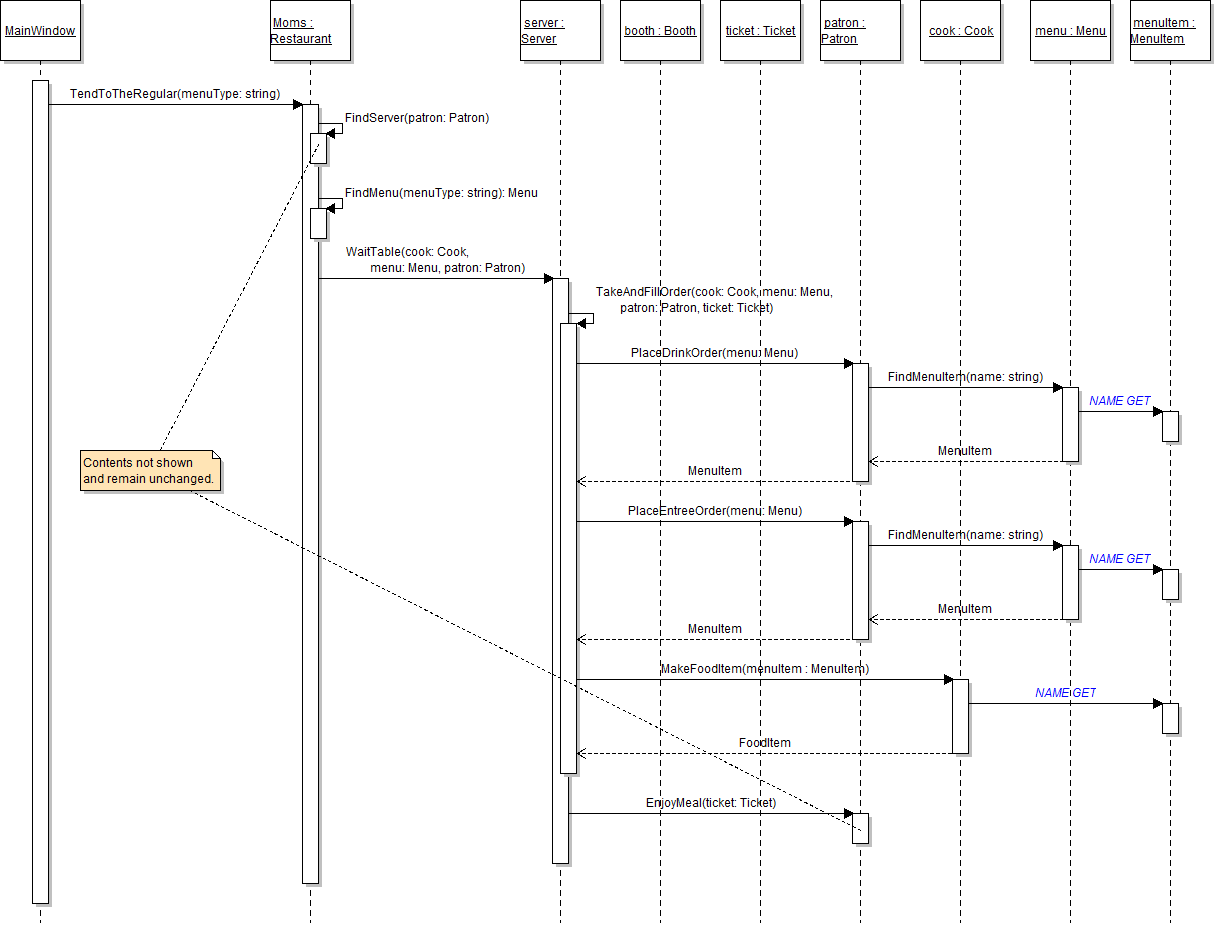
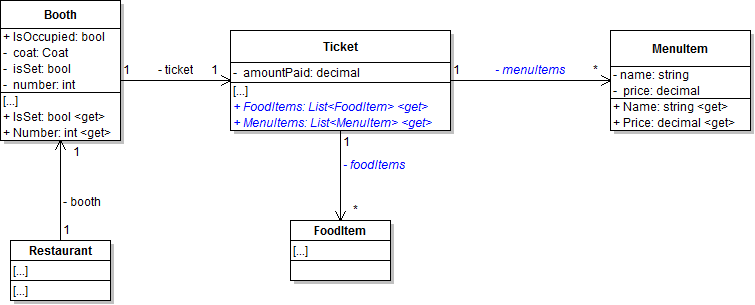
The ticket's FoodItems and MenuItems fields need to be made private. In this task, you will make the fields private and define read-only properties to "wrap" the fields. You will check your work by setting a breakpoint, stepping into the properties, and ensuring that items are still added to the lists correctly and that other objects still loop through the lists correctly.
- Make the ticket's MenuItems and FoodItems fields private and rename them so that the first letter is lowercase, as shown in the class diagram below.
- Define the FoodItems and MenuItems read-only properties on the Ticket class as shown in the class diagram above.
- Remove the StyleCop suppression message from the top of the Ticket class.
- Ensure that all code is StyleCop compliant.
- Check your work:
- Set a breakpoint in the server's TakeAndFillOrder method on the line that adds the first menu item to the MenuItems list.
- Start the application. Click the New restaurant button; then click the Heidi, seat the regular button; then click the Serve lunch to the regular button.
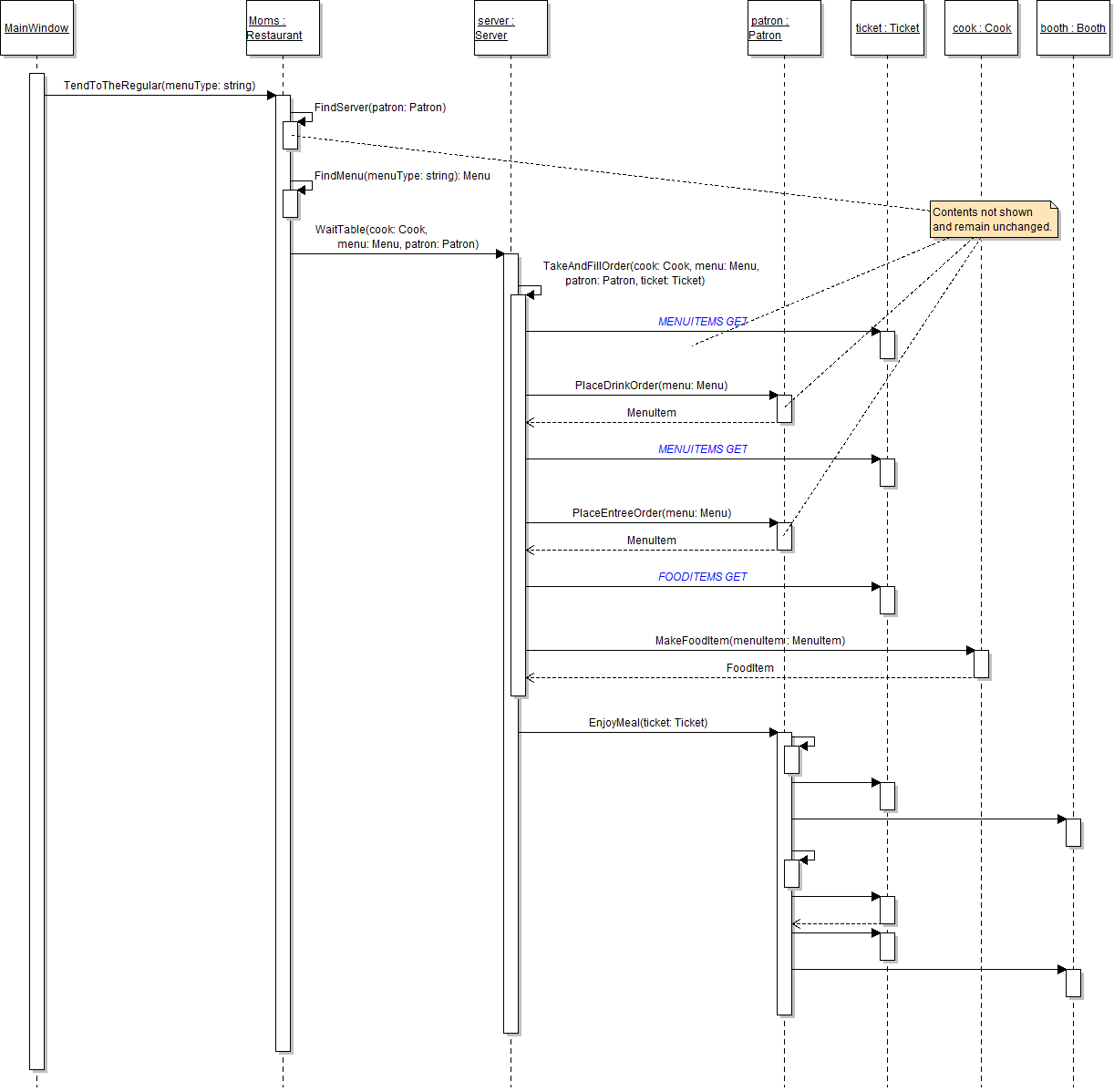
- Step into the ticket's MenuItems property, which should return the private menuItems list. Then return to the caller.
- Step over the line that adds the menu item to the list. Ensure that the MenuItems list now contains one item.
- Step over the code that adds the second item to the list. Ensure that you step into the MenuItems property and that the list now contains two items.
- Step into the line of code that makes the food item and adds it to the list. You should first step into the FoodItems property, then into the MakeFoodItem method, then into the menu item's Name property, and then into the FoodItem constructor.
- Step through the rest of the loop to make all of the food items. Ensure that the FoodItems list contains two items, a lemonad and a meatloaf.
Note: The reference to the menu items list in the ticket's GetFoodTotal method might have changed to the private field. If so, change it back to reference the MenuItems property. This won't change the functionality of the code, but it's a good idea and generally considered best practice to reference a property whenever possible, even if the field is available to you.
Note: The two properties are now called from the server's TakeAndFillOrder method, as shown in the sequence diagram below.
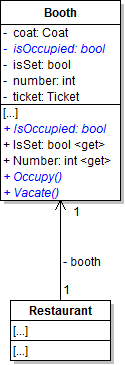
The booth's IsOccupied field needs to be made private. In this task, you will make the field private, define a read-only property to wrap the field, and define wrapper methods to set the occupancy status of the booth. You will check your work by setting breakpoints, stepping into the property and methods, and ensuring that the field is accessed and set correctly.
- Make the booth's IsOccupied field private and rename it so that the first letter is lowercase, as shown in the class diagram below.
- Define the read-only IsOccupied property on the Booth class, as shown in the class diagram above.
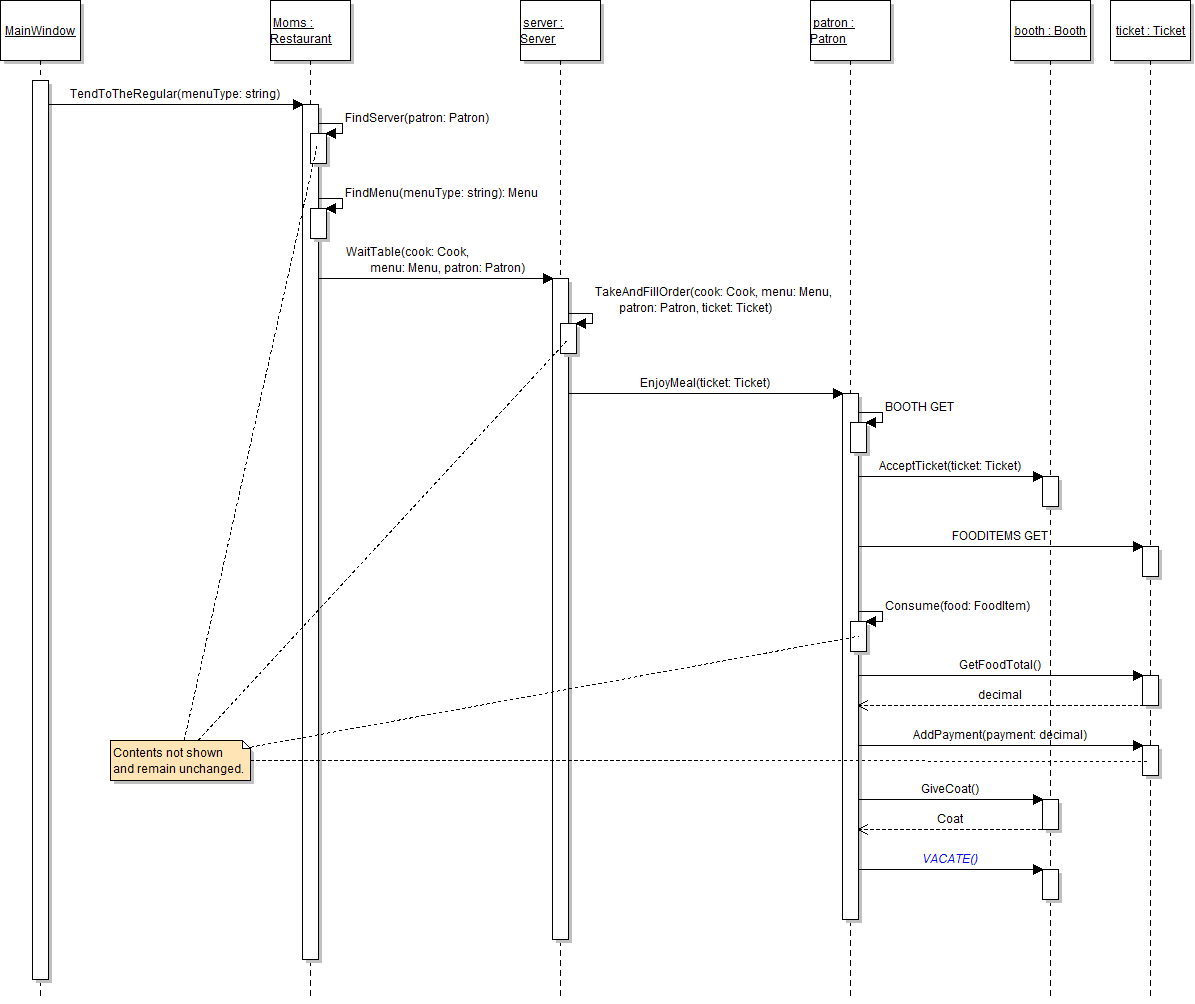
- Define the Occupy and Vacate wrapper methods on the Booth class, as shown in the class diagram above. In the Occupy method, set the isOccupied field to true. In the Vacate method, set the isOccupied field to false.
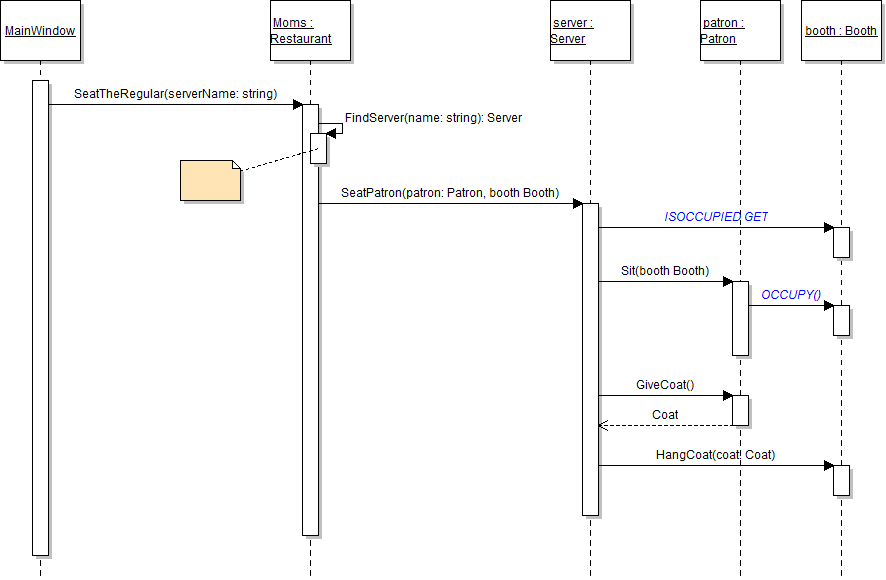
- Call the booth's Occupy method from the patron's Sit method, as shown in the sequence diagram above. Use the method call to replace the line of code that sets the booth's now-private IsOccupied field.
- Call the booth's Vacate method from the patron's EnjoyMeal method, as shown in the sequence diagram below. Use the method call to replace the line of code that sets the booth's now-private IsOccupied field.
- Remove the StyleCop suppression message from the top of the Booth class.
- Ensure that all code is StyleCop compliant.
- Check your work:
- Set a breakpoint in the server's SeatPatron method on the line that defines the if statement. Also set a breakpoint in the patron's EnjoyMeal method on the line that calls the booth's Vacate method.
- Start the application. Click the New restaurant button, then click the Heidi, seat the regular button.
- Step into the booth's IsOccupied property, which should return the value of the isOccupied field. Then return to the caller.
- The booth isn't occupied, so step into the if statement and into the patron's Sit method.
- Step into the booth's Occupy method and ensure that the isOccupied field is set correctly.
- Click Continue. Then click the Serve lunch to the regular button.
- Step into the booth's Vacate method. Ensure that the isOccupied field changes from true to false.
Note: The property is now called from the server's SeatPatron method, as shown in the sequence diagram below.
Tip: After completing this step, remember to remove both breakpoints. You can accomplish this quickly by clicking Debug | Delete All Breakpoints or by pressing Ctrl + Shift + F9.
Properties and wrapper methods are similar and can sometimes be interchangeable, though each offers different benefits. In this task, you will change a wrapper method for the patron's coat field to be a full property. You will check your work by setting a breakpoint, stepping into the property, and ensuring that the coat field is accessed and set correctly.
- Define a full property, with a getter and a setter, on the Patron class to wrap the coat field, as shown in the class diagram below.
- Remove the GiveCoat method from the Patron class, as shown in the class diagram above.
- Update the SeatPatron method in the Server class.
- Replace the call to the GiveCoat method with a call to the patron's Coat property, as shown in the sequence diagram below.
- After calling the booth's HangCoat method, set the patron's Coat property to null.
- Ensure that all code is StyleCop compliant.
- Check your work:
- Set a breakpoint in the server's SeatPatron method on the line that calls the booth's HangCoat method.
- Start the application. Click the New restaurant button, then click the Heidi, seat the regular button.
- Step into the getter of the patron's Coat property, which should return the object stored in the coat field. Then return to the caller.
- Step into the HangCoat method, which should set the booth's coat field to the passed in coat. Then return to the caller.
- Step into the setter of the patron's Coat property, which should set the coat field to null.
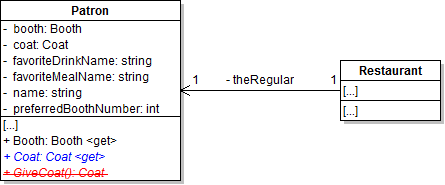
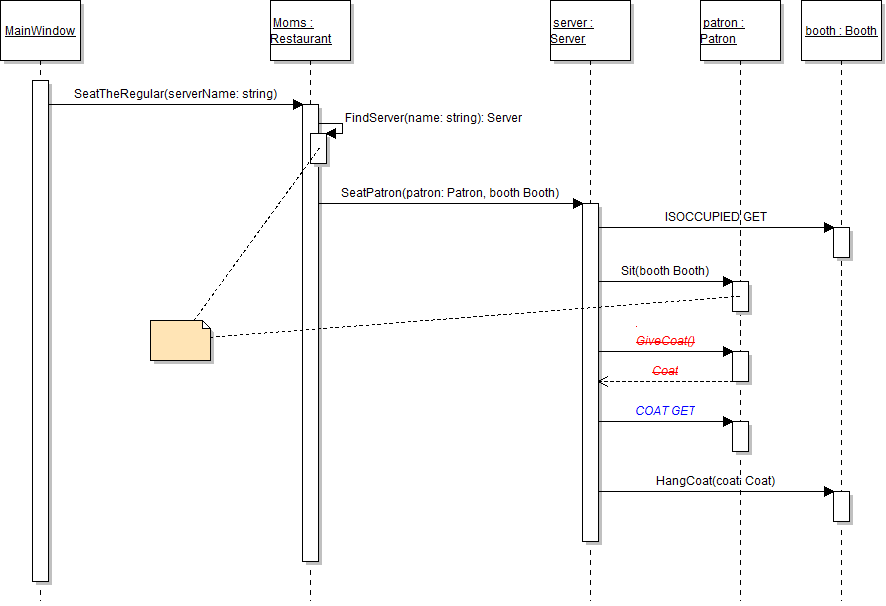
Note: This updated version of the code is a step back in terms of functionality because the server now has to set the patron's Coat property to null instead of the patron handling that himself inside of the GiveCoat method. This change was made to show the relative benefits and disadvantages of using properties versus wrapper methods.
The basket's BreadstickCapacity and BreadstickCount fields need to be made private. In this task, you will make the fields private and define properties to allow limited access to the fields. You will check your work by setting a breakpoint, stepping into the properties, and ensuring that the fields are accessed and set correctly.
- Make the basket's BreadstickCapacity and BreadstickCount fields and the oven's BreadstickBatchSize field private and rename them so that the first letter is lowercase, as shown in the class diagram below.
- Define the read-only BreadstickBatchSize property on the Oven class, as shown in the class diagram above.
- Add properties to the Basket class.
- Define the read-only BreadstickCapacity property to wrap the breadstickCapacity field on the Basket class, as shown in the class diagram above.
- Define the full BreadstickCount property with a getter and a setter to wrap the breadstickCount field, as shown in the class diagram above.
- In the setter of the BreadstickCount property, check to see if the value is greater than the current breadstick capacity. If so, set the breadstickCount field to the current breadstick capacity. Otherwise, set the breadstickCount field to the value.
- In the Basket constructor, set the private breadstickCapacity field instead of the property. In the Oven constructor, set the private breadstickBatchSize field instead of the property.
- Remove the StyleCop suppression message from the top of the Basket and Oven classes.
- Ensure that all code is StyleCop compliant.
- Check your work:
- Set a breakpoint in the cook's MakeDailyBreadsticks method on the line that defines the while loop.
- Start the application. Click the New restaurant button, then click the Prepare daily food button.
- Step into the getters of the BreadstickCapacity and the BreadstickCount properties. Both should return the value of the respective fields. Then return to the caller.
- Step into the MakeBreadsticks method and then the AddBreadsticks method. Step over the lines that calculate the number of breadsticks needed and the most available. The needed breadsticks should be 45 and the most available should be 18.
- Step into the BreadstickCount property. You should first step into the getter and then the setter. The value is less than the breadstick capacity, so ensure that the else statement runs and sets the breadstickCount to the value. Then return to the caller.
- Ensure that the value of the breadstickCount field changes from 0 to 18 and that the value returned from the AddBreadsticks method is 0.
Note: Do not use the renaming feature of Visual Studio to rename the fields for this step. Using the feature will update the references throughout the Basket and Oven classes, but you want to keep the most of the references capitalized so that they will refer to the properties when you define them.
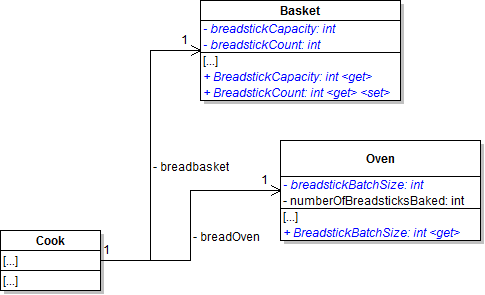
Note: The property is now called from the BakeBreadsticks method, as shown in the sequence diagram below.
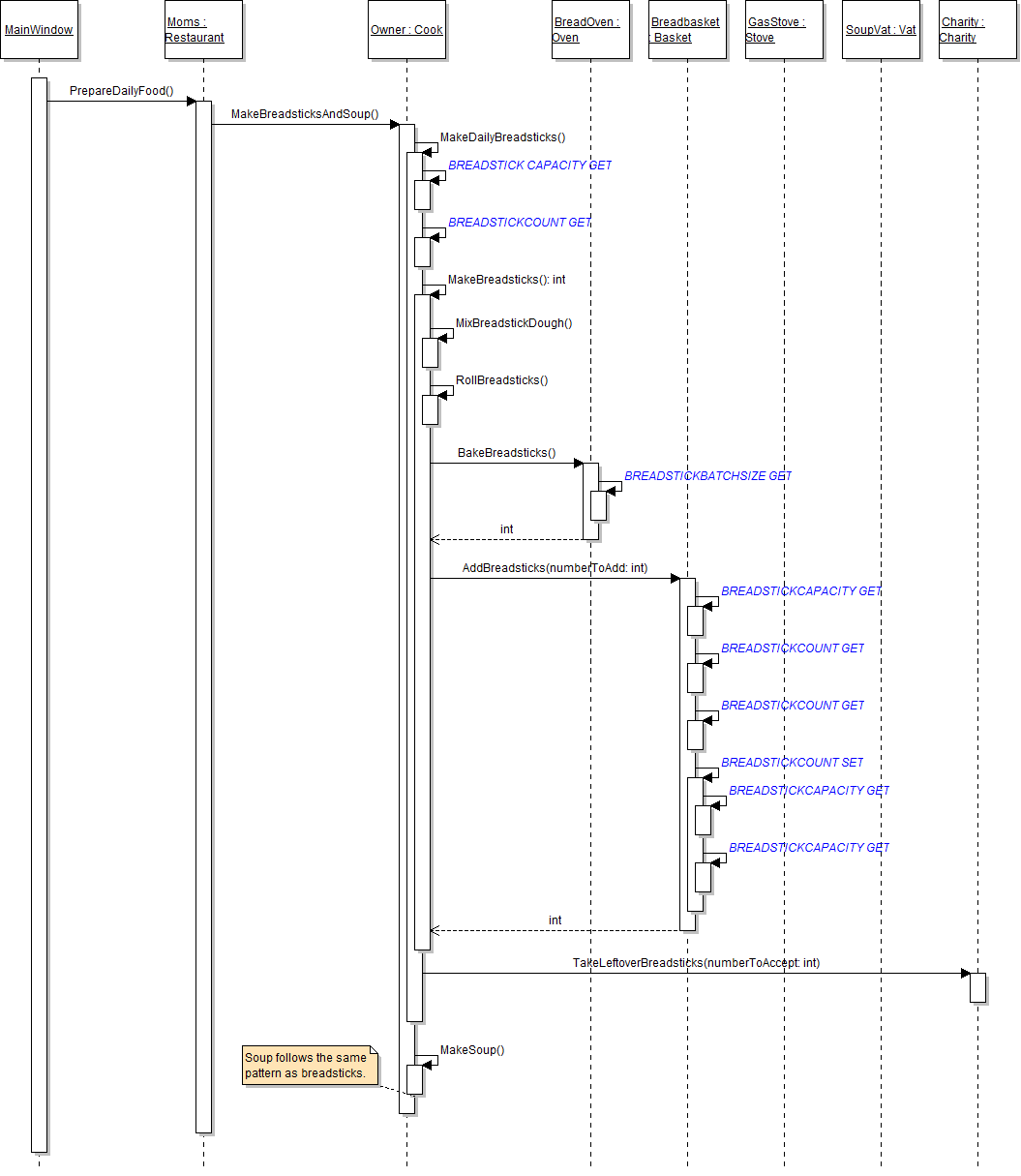
Note: The property is now called in the places as shown in the sequence diagram above.
Note: The property is now called in the places as shown in the sequence diagram above.
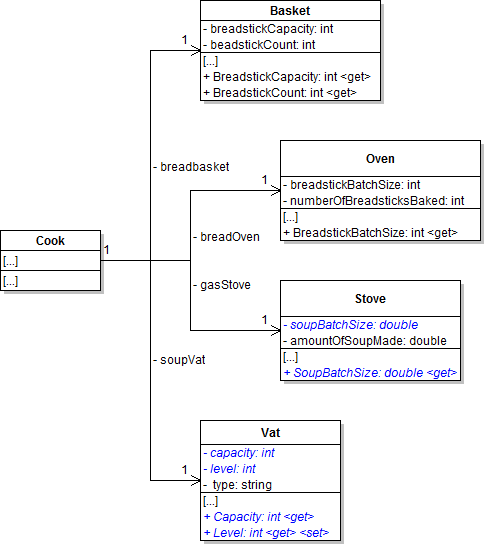
The vat's Capacity and Level fields need to be made private. In this task, you will make the fields private and define properties to allow limited access to the fields. You will check your work by setting a breakpoint, stepping into the properties, and ensuring that the fields are accessed and set correctly.
- Make the vat's Capacity and Level fields and the stove's SoupBatchSize field private and rename them so that the first letter is lowercase, as shown in the class diagram below.
- Define the read-only SoupBatchSize property on the Stove class, as shown in the class diagram above.
- Add properties to the Vat class.
- Define the read-only Capacity property to wrap the capacity field on the Vat class, as shown in the class diagram above.
- Define the full Level property with a getter and a setter to wrap the level field, as shown in the class diagram above.
- In the setter of the Level property, check to see if the value is greater than the current capacity. If so, set the level field to the current capacity. Otherwise, set the level field to the value.
- In the Vat constructor, set the private capacity field instead of the property. In the Stove constructor, set the private soupBatchSize field instead of the property.
- Remove the StyleCop suppression message from the top of the Vat and Stove classes.
- Ensure that all code is StyleCop compliant.
- Check your work:
- Set a breakpoint in the cook's MakeDailySoup method on the line that defines the while loop.
- Start the application. Click the New restaurant button, then click the Prepare daily food button.
- Step into the getters of the Capacity and the Level properties. Both should return the value of the respective fields. Then return to the caller.
- Step into the MakeSoup method and then the FillSoup method. Step over the lines that calculate the amount of soup needed and the most available. The needed soup should be 30 and the most available should be 11.76.
- Step into the Level property. You should first step into the getter and then the setter. The value is less than the capacity, so ensure that the else statement runs and sets the level field to the value. Then return to the caller.
- Ensure that the value of the level field changes from 0 to 11.76 and that the value returned from the FillSoup method is 0.
Note: Do not use the renaming feature of Visual Studio to rename the fields for this step. Using the feature will update the references throughout the Vat and Stove classes, but you want to keep the most of the references capitalized so that they will refer to the properties when you define them.
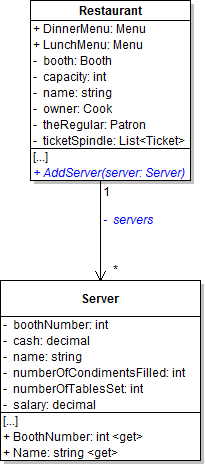
The restaurant's list of servers needs to be made private. In this task, you will make the field private and define and call a wrapper method for adding servers to the private list. You will check your work by setting a breakpoint, stepping into the wrapper method, and ensuring that both servers are instantiated and added to the list correctly.
- Make the restaurant's Servers field private and rename it so that the first letter is lowercase, as shown in the class diagram below.
- Define the AddServer method as shown in the class diagram above. In the method, simply add the passed-in server to the now-private servers list.
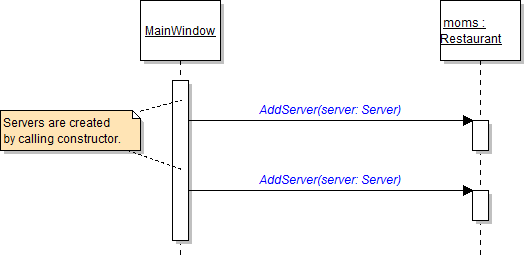
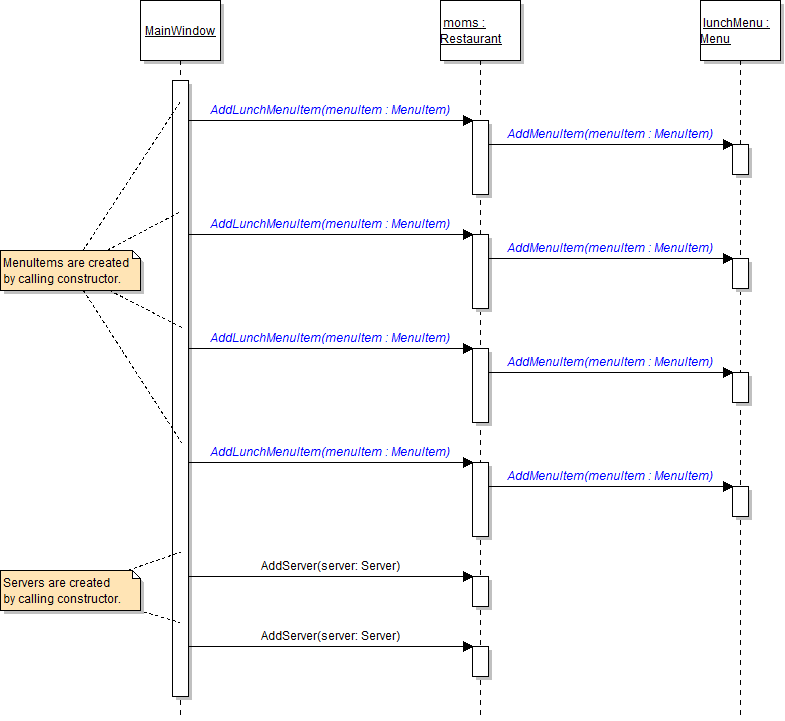
- In the newRestaurantButton_Click, call the AddServer method on the moms field to add Svanhilde and Heidi to the list instead of calling the Add method on the now-private servers field, as shown in the sequence diagram below.
- Ensure that all code is StyleCop compliant.
- Check your work:
- Set a breakpoint in the newRestaurantButton_Click on the line that calls the AddServer method the first time.
- Start the application. Click the New restaurant button.
- Step into the AddServer method. Ensure that the server parameter contains Svanhilde and that the object is added to the servers list. Then return to the caller.
- Step over the line of code that adds Heidi to the servers list. Ensure that the restaurant's servers list contains two objects - Svanhilde and Heidi.
The restaurant's menu fields and the menus' list of menu items need to be made private. In this task, you will make the fields private and define and call wrapper methods for adding menu items to the private lists. You will check your work by setting a breakpoint, stepping into the wrapper methods, and ensuring that the objects are instantiated correctly and that they are added to the lunch menu's list of menu items.
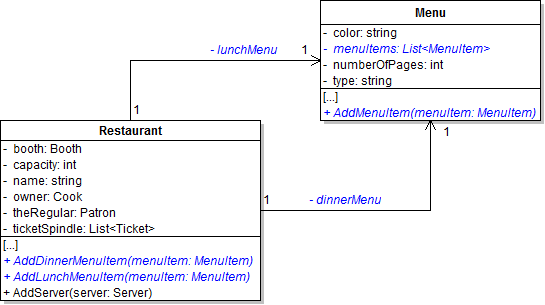
- Make the restaurant's LunchMenu and DinnerMenu fields and the menu's MenuItems field private and rename them so that the first letter is lowercase, as shown in the class diagram below.
- Define the AddMenuItem wrapper method on the Menu class as shown in the class diagram above. In the method, simply add the passed-in menu item to the private menuItems list.
- Define the AddLunchMenuItem wrapper method on the Restaurant class as shown in the class diagram above. In the method, simply call the lunch menu's AddMenuItem method and pass the menuItem parameter through.
- Define the AddDinnerMenuItem wrapper method on the Restaurant class as shown in the class diagram above. In the method, simply call the dinner menu's AddMenuItem method and pass the menuItem parameter through.
- In the newRestaurantButton_Click, call the AddLunchMenuItem method on the moms field to add the four menu items to the lunch menu's list of items instead of calling the Add method on the now-private menuItems field, as shown in the sequence diagram below.
- Remove the StyleCop suppression message from the top of the Restaurant and Menu classes.
- Ensure that all code is StyleCop compliant.
- Check your work:
- Set a breakpoint in the newRestaurantButton_Click on the line that calls the AddLunchMenuItem method the first time.
- Start the application. Click the New restaurant button.
- Step into the AddLunchMenuItem method and then into the AddMenuItem method. Ensure that the menuItem parameter contains the lemonade item and that the object is added to the menuItems list. Then return to the newRestaurantButton_Click.
- Step over the lines of code that add the other three items to the lunch menu's list. Ensure that the restaurant's lunch menu's list of menu items contains four objects - lemonade, coffee, turkey club, and meatloaf.
Remove the StyleCop suppression message from the top of any classes that still have it.
Tip: Use Visual Studio's Find in Files feature by pressing CTRL+SHIFT+F and entering FieldsMustBePrivate.
- Build the application and ensure that it has no compiler errors or warnings.
- Ensure that all code is StyleCop compliant.
- Browse to the project folder and add it to a newly created zipped archive.
- Submit the zipped project folder to the correct assignment in Blackboard.