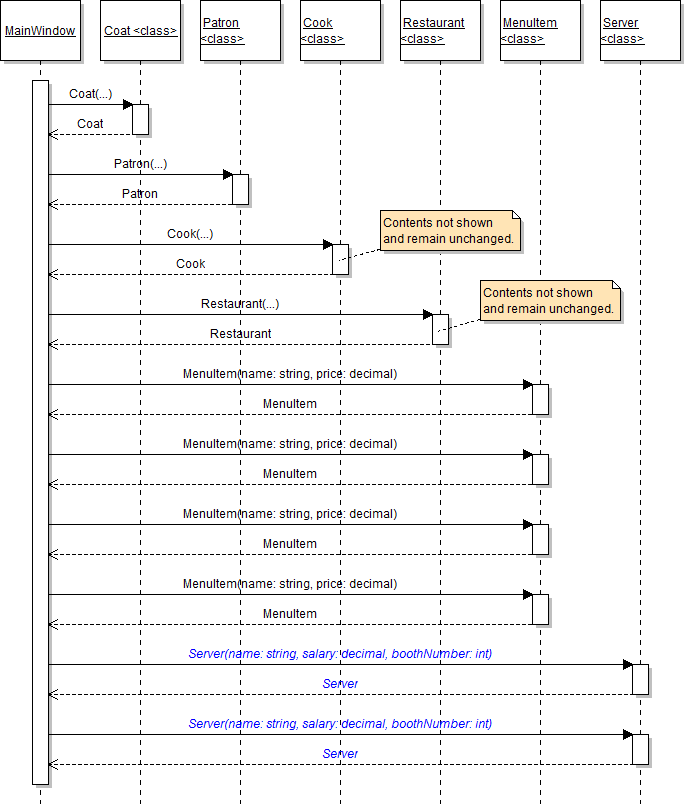
The purpose of this week's assignment is to change the way that objects are instantiated by implementing constructors in each class. Because some object instantiation will occur inside of the constructors, it no longer needs to occur in the MainWindow's newRestaurantButton_Click. In this task, you will remove all of the instantiation code from the button click. You will check your work by ensuring that the solution builds without compiler errors or warnings.
- Remove all of the code from the newRestaurantButton_Click. The body of the method should be empty.
- Check your work: Build the solution and ensure that the code compiles without errors or warnings.
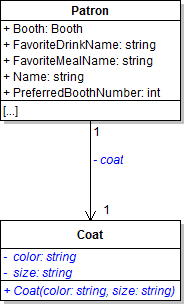
The Coat class needs a constructor in order for instances of the class to be created. In this task, you will define a constructor for the Coat class, make some of its fields private, and instantiate a coat object. You will check your work by setting a breakpoint, stepping into the constructor, and ensuring that the object is instantiated correctly.
- Define the constructor for the Coat class as shown in the class diagram below.
- Make the coat, color and size fields private and rename them so that the first letter is lowercase, as shown in the class diagram above.
- In the body of the constructor, set the color field to the color parameter and set the size field to the size parameter.
- Check your work: Build the solution and ensure that the code compiles without errors or warnings.
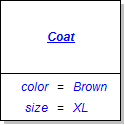
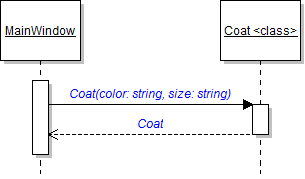
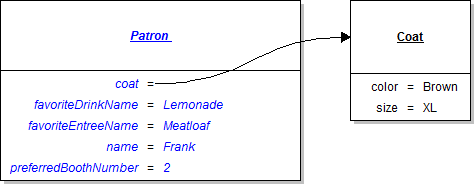
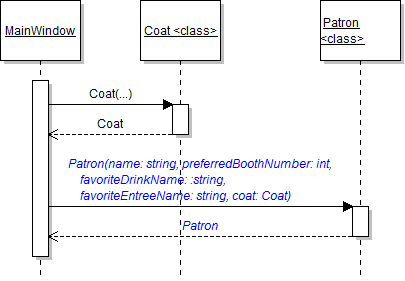
- In the newRestaurantButton_Click, define a variable of type Coat called coat and instantiate it to a new Coat object, as shown in the object and sequence diagrams below.
- Ensure that all code is StyleCop compliant.
- Check your work:
- Set a breakpoint in the newRestaurantButton_Click on the line that instantiates the coat.
- Start the application. Click the New restaurant button.
- Press F11 to step into the coat constructor. The value of the color parameter should be "Brown", and the value of the size parameter should be "XL".
- Press F10 to return to the newRestaurantButton_Click and over the line of code that instantiates the coat variable. Ensure that the coat variable is instantiated correctly and that the values of its fields are correct.
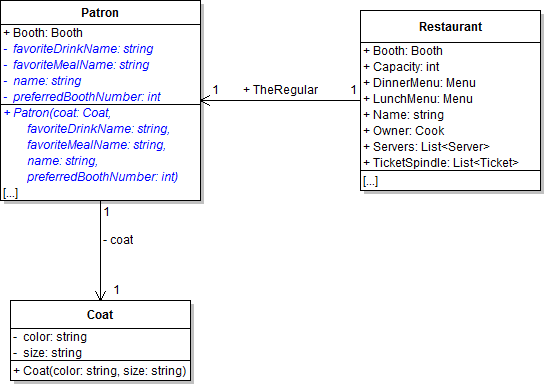
The patron needs a constructor to create instances of the class and set its fields. In this task, you will define a constructor for the Patron class and use it to instantiate the restaurant's regular. You will also make some of the fields private. You will check your work by setting a breakpoint, stepping into the constructor, and ensuring that the object is created correctly.
- Define the constructor for the Patron class as shown in the class diagram below.
- Make the favoriteDrinkName, favoriteMealName, name, and preferredBoothNumber fields private and rename them so that the first letter is lowercase, as shown in the class diagram above.
- In the body of the constructor, set the coat, favoriteDrinkName, favoriteMealName, name, and preferredBoothNumber fields to the appropriate parameter.
- Check your work: Build the solution and ensure that the code compiles without errors or warnings.
- In the newRestaurantButton_Click after instantiating the coat, define a variable of type Patron called patron and instantiate it to a new Patron object, as shown in the object and sequence diagrams below. Pass the coat variable as the coat parameter.
- Ensure that all code is StyleCop compliant.
- Check your work:
- Set a breakpoint in the newRestaurantButton_Click on the line that instantiates the patron.
- Start the application. Click the New restaurant button.
- Press F11 to step into the patron constructor. Ensure that each of the parameter values matches the values passed in to the constructor.
- Press F10 to return to the newRestaurantButton_Click and over the line of code that instantiates the patron. Ensure that the patron variable is instantiated correctly and that the values of the the fields are correct.
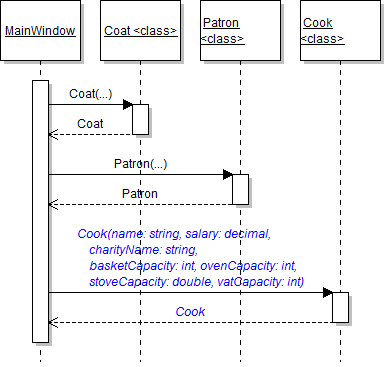
The cook needs a constructor to create instances of the class and set its fields. In this task, you will define a constructor for the Cook class and use it to instantiate the restaurant's cook. You will also make some of the fields private. You will check your work by setting a breakpoint, stepping into the constructor, and ensuring that the object is created correctly.
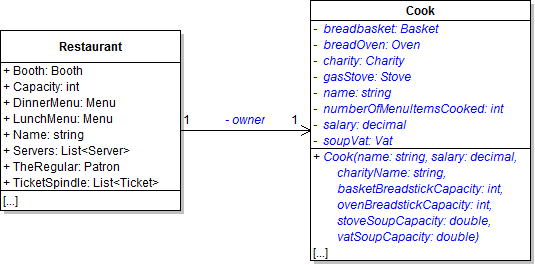
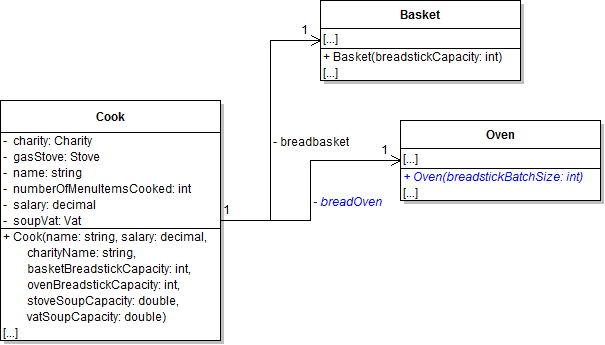
- Define the constructor for the Cook class as shown in the class diagram below.
- Make all of the cook's fields private and rename them so that the first letter is lowercase, as shown in the class diagram above. Do the same for the restaurant's owner field.
- In the body of the constructor, set the name and salary fields to the appropriate parameters.
- Check your work: Build the solution and ensure that the code compiles without errors or warnings.
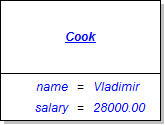
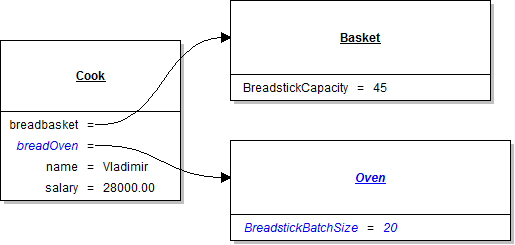
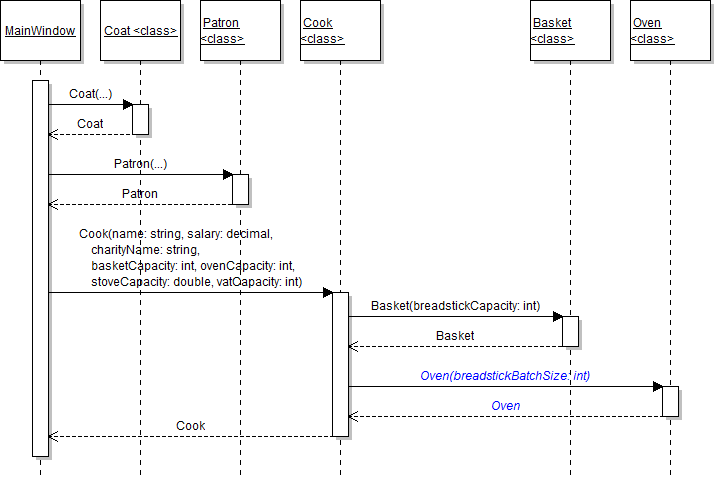
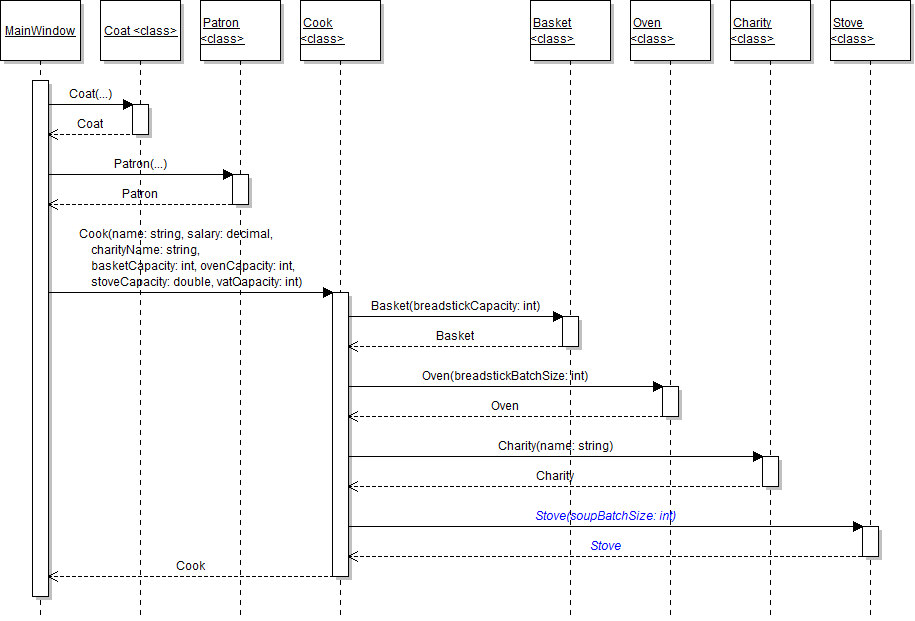
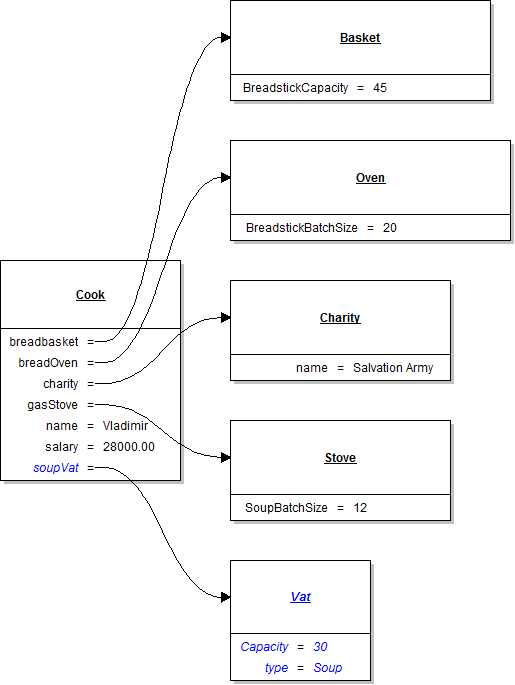
- In the newRestaurantButton_Click after instantiating the patron, define a variable of type Cook called cook and instantiate it to a new Cook object, as shown in the object and sequence diagrams below. The values of the other parameters are listed below the object diagram.
- charityName: Salvation Army
- basketCapacity: 45
- ovenCapacity: 20
- stoveCapacity: 12.0
- vatCapacity: 30.0
- Ensure that all code is StyleCop compliant.
- Check your work:
- Set a breakpoint in the newRestaurantButton_Click on the line that instantiates the cook variable.
- Start the application. Click the New restaurant button.
- Press F11 to step into the cook constructor. Ensure that each of the parameter values matches the values passed in to the constructor.
- Press F10 to return to the newRestaurantButton_Click and over the line of code that instantiates the cook. Ensure that the cook variable is instantiated correctly and that the values of the the fields are correct.
Note: The other parameters in the constructor will be used later when instantiating other fields in the cook. Do nothing with them for now.
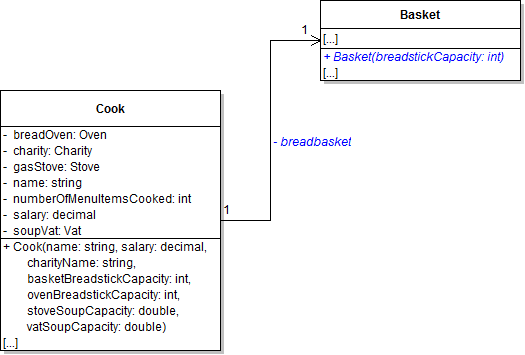
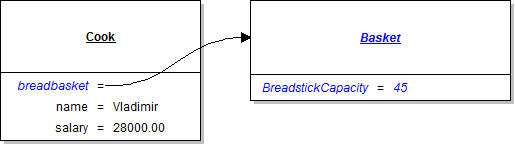
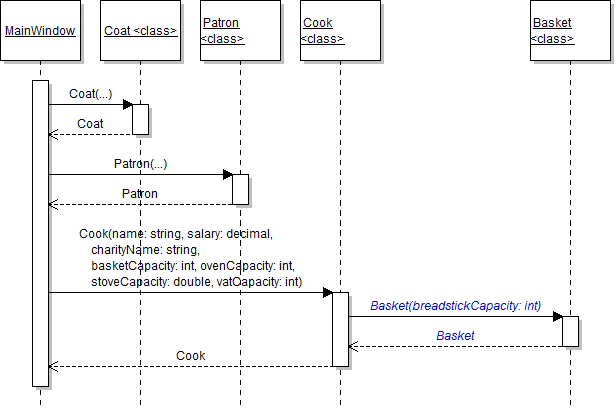
The basket needs a constructor to create instances of the class and set its fields. In this task, you will define a constructor for the Basket class and use it to instantiate the cook's breadbasket. You will check your work by setting a breakpoint, stepping into the constructor, and ensuring that the object is created correctly.
- Define the constructor for the Basket class as shown in the class diagram below.
- In the body of the constructor, set the breadstickCapacity field to the breadstickCapacity parameter.
- Make the cook's basket field private and rename it so that its first letter is lowercase, as shown in the class diagram above.
- Check your work: Build the solution and ensure that the code compiles without errors or warnings.
- In the Cook constructor, instantiate the breadbasket field to a new Basket, as shown in the diagrams below. Pass the basketCapacity parameter as the parameter to the constructor.
- Ensure that all code is StyleCop compliant.
- Check your work:
- Set a breakpoint in the Cook constructor on the line that instantiates the breadbasket field.
- Start the application. Click the New restaurant button.
- Press F11 to step into the basket constructor. Ensure that the parameter value matches the value passed in to the constructor.
- Press F10 to return to the cook constructor and over the line of code that instantiates the basket. Ensure that the breadbasket field is instantiated correctly and that the values of the the fields are correct.
The oven needs a constructor to create instances of the class and set its fields. In this task, you will define a constructor for the Oven class and use it to instantiate the cook's bread oven. You will check your work by setting a breakpoint, stepping into the constructor, and ensuring that the object is created correctly.
- Define the constructor for the Oven class as shown in the class diagram below.
- In the body of the constructor, set the BreadstickBatchSize field to the breadstickBatchSize parameter.
- Make the cook's breadOven field private and rename it so that its first letter is lowercase, as shown in the class diagram above.
- Check your work: Build the solution and ensure that the code compiles without errors or warnings.
- In the Cook constructor, instantiate the breadOven field to a new Oven, as shown in the diagrams below. Pass the ovenCapacity parameter as the parameter to the constructor.
- Ensure that all code is StyleCop compliant.
- Check your work:
- Set a breakpoint in the Cook constructor on the line that instantiates the breadOven field.
- Start the application. Click the New restaurant button.
- Press F11 to step into the oven constructor. Ensure that the parameter value matches the value passed in to the constructor.
- Press F10 to return to the cook constructor and over the line of code that instantiates the bread oven. Ensure that the breadOven field is instantiated correctly and that the values of the the fields are correct.
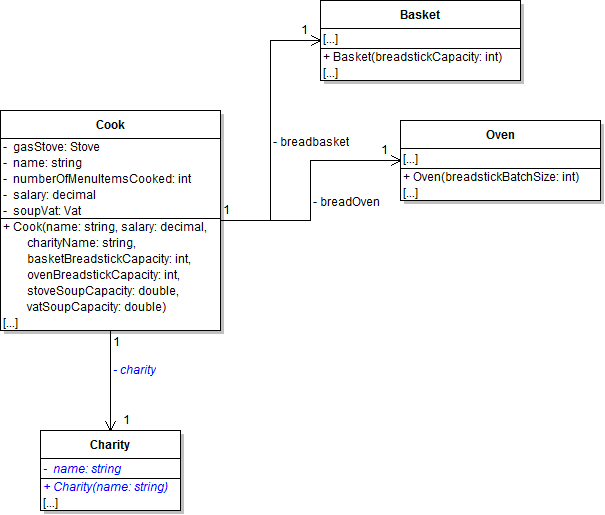
The charity needs a constructor to create instances of the class and set its fields. In this task, you will define a constructor for the Charity class and use it to instantiate the cook's charity. You will also make some of the fields private. You will check your work by setting a breakpoint, stepping into the constructor, and ensuring that the object is created correctly.
- Define the constructor for the Charity class as shown in the class diagram below.
- Make the charity's Name field private and rename it so that the first letter is lowercase, as shown in the class diagram above. Do the same with the cook's Charity field.
- In the body of the constructor, set the name field to the name parameter.
- Check your work: Build the solution and ensure that the code compiles without errors or warnings.
- In the Cook constructor, instantiate the charity field to a new Charity, as shown in the diagrams below. Pass the charityName parameter as the parameter to the constructor.
- Ensure that all code is StyleCop compliant.
- Check your work:
- Set a breakpoint in the Cook constructor on the line that instantiates the charity field.
- Start the application. Click the New restaurant button.
- Press F11 to step into the charity constructor. Ensure that the parameter value matches the value passed in to the constructor.
- Press F10 to return to the cook constructor and over the line of code that instantiates the charity. Ensure that the charity field is instantiated correctly and that the values of the the fields are correct.
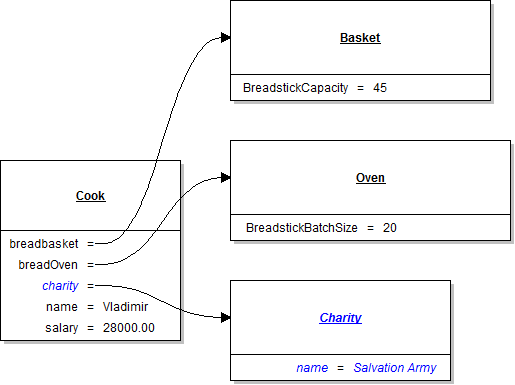
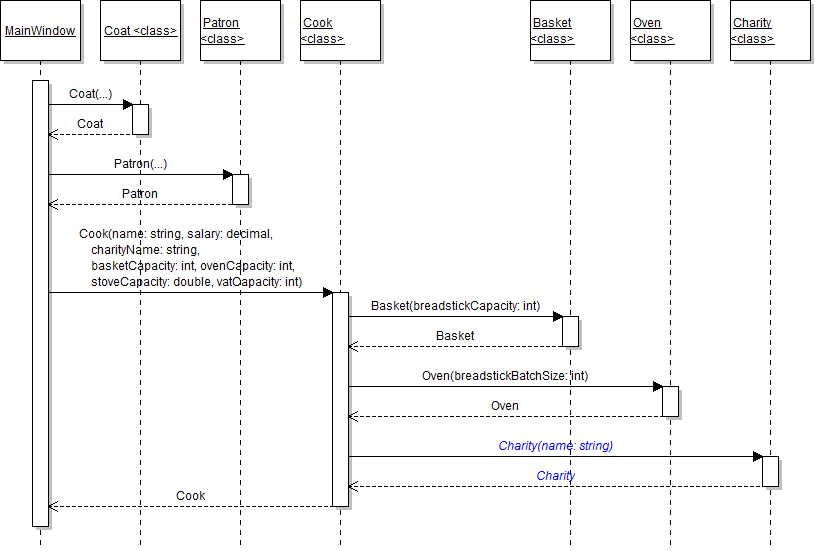
The stove needs a constructor to create instances of the class and set its fields. In this task, you will define a constructor for the Stove class and use it to instantiate the cook's gas stove. You will also make some of the fields private. You will check your work by setting a breakpoint, stepping into the constructor, and ensuring that the object is created correctly.
- Define the constructor for the Stove class as shown in the class diagram below.
- In the body of the constructor, set the soupBatchSize field to the soupBatchSize parameter.
- Make the cook's GasStove field private and rename it so that the first letter is lowercase, as shown in the class diagram above.
- Check your work: Build the solution and ensure that the code compiles without errors or warnings.
- In the Cook constructor, instantiate the gasStove field to a new Stove, as shown in the diagrams below. Pass the stoveCapacity parameter as the parameter to the constructor.
- Ensure that all code is StyleCop compliant.
- Check your work:
- Set a breakpoint in the Cook constructor on the line that instantiates the gasStove field.
- Start the application. Click the New restaurant button.
- Press F11 to step into the stove constructor. Ensure that the parameter value matches the value passed in to the constructor.
- Press F10 to return to the cook constructor and over the line of code that instantiates the gas stove. Ensure that the gasStove field is instantiated correctly and that the values of the the fields are correct.
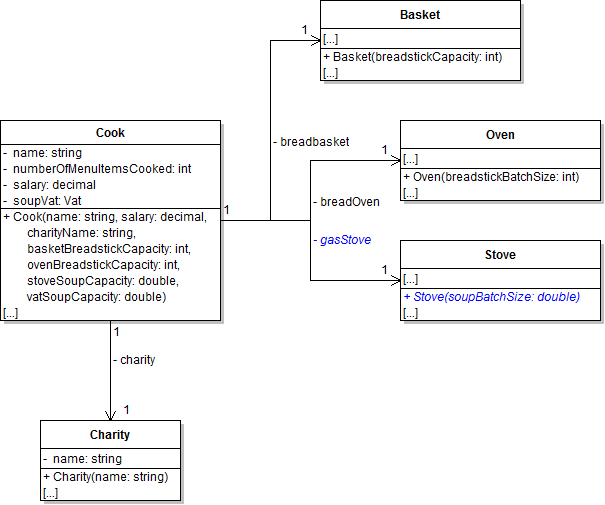
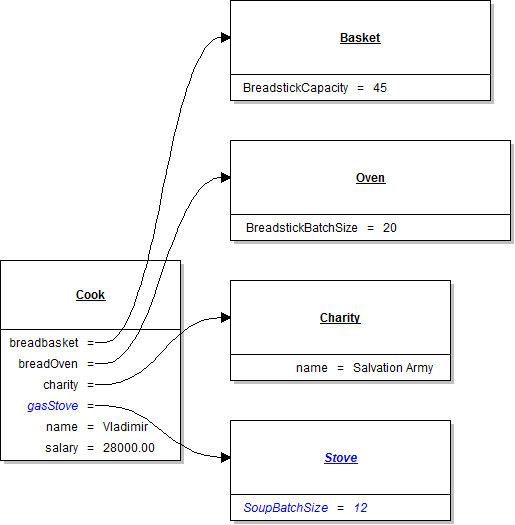
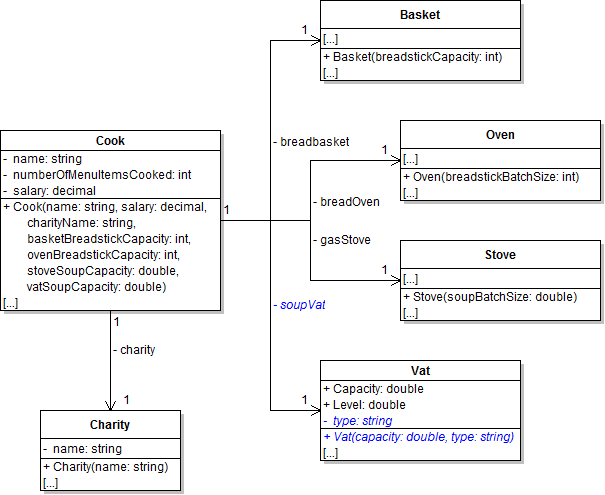
The vat needs a constructor to create instances of the class and set its fields. In this task, you will define a constructor for the Vat class and use it to instantiate the cook's soup vat. You will also make some of the fields private. You will check your work by setting a breakpoint, stepping into the constructor, and ensuring that the object is created correctly.
- Define the constructor for the Vat class as shown in the class diagram below.
- Make the vat's Type field private and rename it so that the first letter is lowercase, as shown in the class diagram above. Do the same for the cook's SoupVat field.
- In the body of the constructor, set the capacity and type fields to the appropriate parameters.
- Check your work: Build the solution and ensure that the code compiles without errors or warnings.
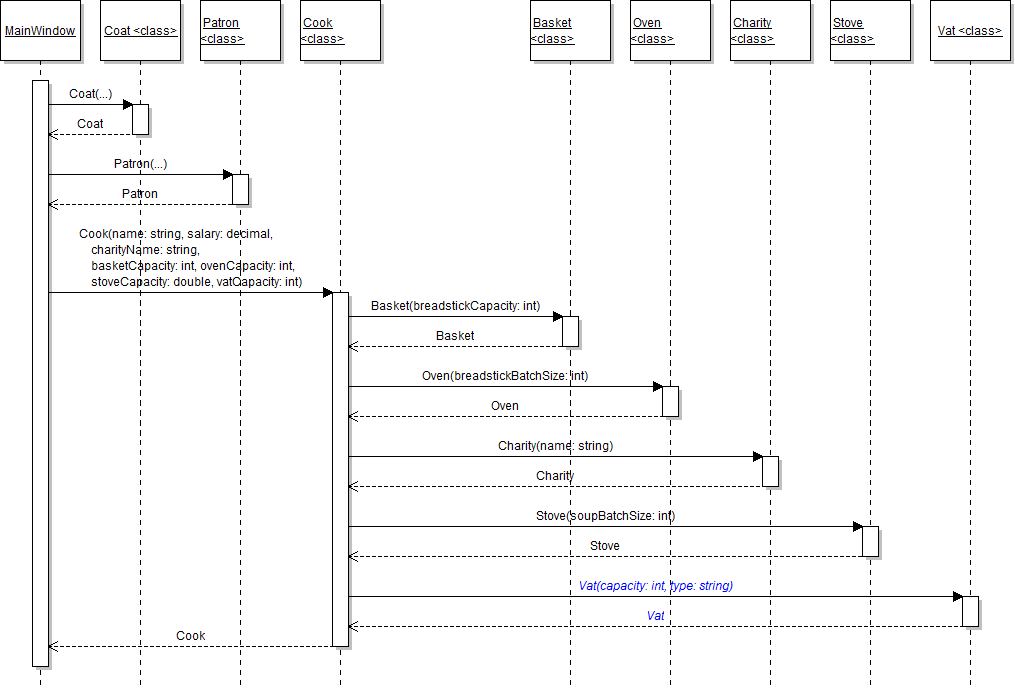
- In the Cook constructor, instantiate the soupVat field to a new Vat, as shown in the diagrams below. Pass the vatCapacity parameter as the parameter to the constructor.
- Ensure that all code is StyleCop compliant.
- Check your work:
- Set a breakpoint in the Cook constructor on the line that instantiates the soupVat field.
- Start the application. Click the New restaurant button.
- Press F11 to step into the vat constructor. Ensure that the parameter value matches the value passed in to the constructor.
- Press F10 to return to the cook constructor and over the line of code that instantiates the soup vat. Ensure that the soupVat field is instantiated correctly and that the values of the the fields are correct.
The restaurant needs a constructor to create instances of the class and set its fields. In this task, you will define a constructor for the Restaurant class and use it to instantiate Mom's restaurant. You will also make some of the fields private. You will check your work by setting a breakpoint, stepping into the constructor, and ensuring that the object is created correctly.
- Define the constructor for the Restaurant class as shown in the class diagram below.
- Make the Capacity, Name, Booth, Owner, and TheRegular fields private and rename them so that the first letter is lowercase, as shown in the class diagram above.
- In the body of the constructor, set the capacity and name fields to the appropriate parameters. Set the owner field to the cook parameter and theRegular field to the patron parameter. Also, instantiate the Servers and TicketSpindle fields to new lists.
- Check your work: Build the solution and ensure that the code compiles without errors or warnings.
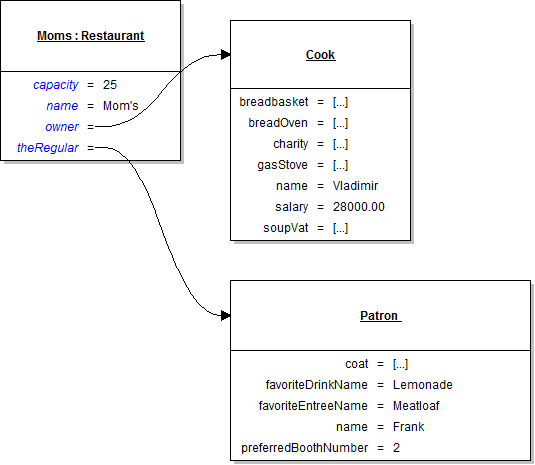
- In the newZooButton_Click after instantiating the cook variable, instantiate the moms field to a new Restaurant object, as shown in the diagrams below. Pass the cook and patron variables as the cook and patron parameters, respectively. The values of the other parameters are listed below the object diagram.
- boothNumber: 2
- menuColor: Black
- dinnerMenuPageCount: 6
- lunchMenuPageCount: 4
- Ensure that all code is StyleCop compliant.
- Check your work:
- Set a breakpoint in the newRestaurantButton_Click on the line that instantiates the moms field.
- Start the application. Click the New restaurant button.
- Press F11 to step into the restaurant constructor. Ensure that each of the parameter values matches the values passed in to the constructor.
- Press F10 to return to the newRestaurantButton_Click and over the line of code that instantiates the moms field. Ensure that the moms field is instantiated correctly and that the values of the the fields are correct.
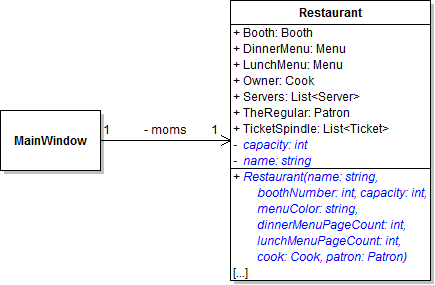
Note: The other parameters in the constructor will be used later when instantiating other fields in the restaurant. Do nothing with them for now.
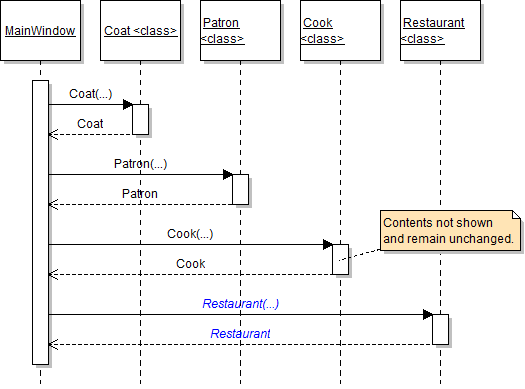
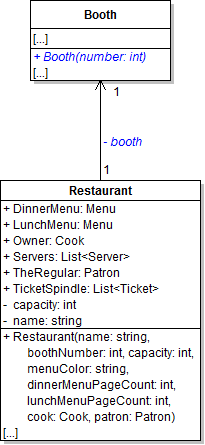
The booth needs a constructor to create instances of the class and set its fields. In this task, you will define a constructor for the Booth class and use it to instantiate the restaurant's booth. You will also make some of the fields private. You will check your work by setting a breakpoint, stepping into the constructor, and ensuring that the object is created correctly.
- Define the constructor for the Booth class as shown in the class diagram below.
- In the body of the constructor, set the number field to the number parameter. Set the IsSet field to true.
- Make the restaurant's booth field private and rename it so that the first letter is lowercase, as shown in the class diagram above.
- Check your work: Build the solution and ensure that the code compiles without errors or warnings.
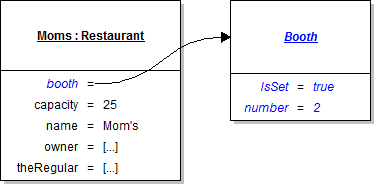
- In the Restaurant constructor, instantiate the booth field to a new Booth, as shown in the diagrams below. Pass the boothNumber parameter as the parameter to the constructor.
- Ensure that all code is StyleCop compliant.
- Check your work:
- Set a breakpoint in the Restaurant constructor on the line that instantiates the booth field.
- Start the application. Click the New restaurant button.
- Press F11 to step into the booth constructor. Ensure that the parameter value matches the value passed in to the constructor.
- Press F10 to return to the restaurant constructor and over the line of code that instantiates the booth field. Ensure that the booth field is instantiated correctly and that the values of the the fields are correct.
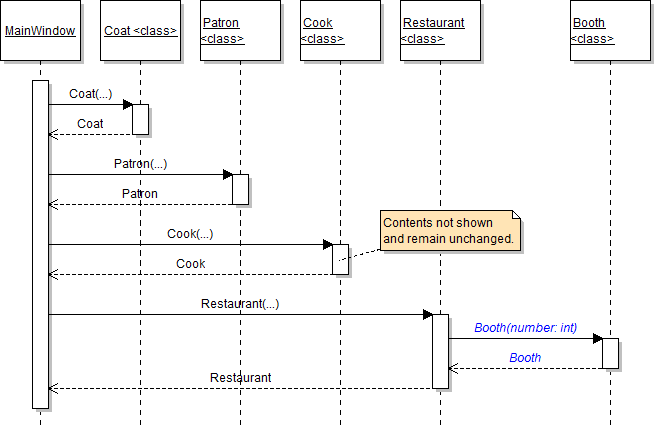
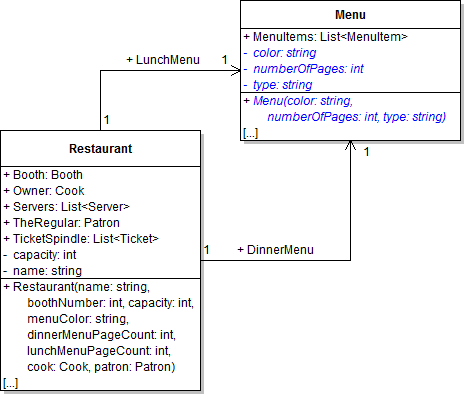
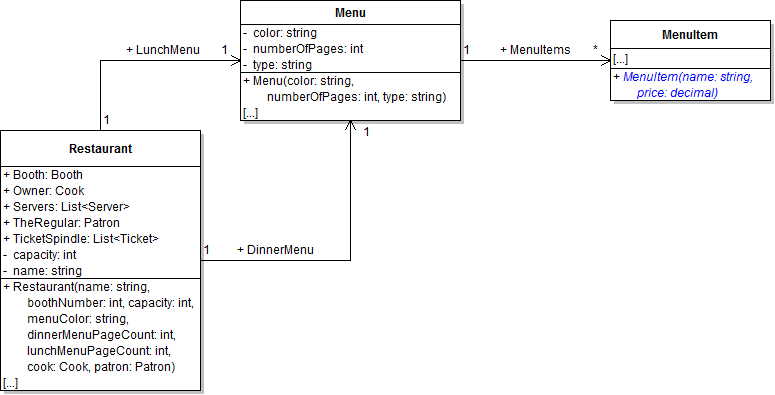
The menu needs a constructor to create instances of the class and set its fields. In this task, you will define a constructor for the Menu class and use it to instantiate the restaurant's lunch and dinner menus. You will also make some of the fields private. You will check your work by setting a breakpoint, stepping into the constructor, and ensuring that the objects are created correctly.
- Define the constructor for the Menu class as shown in the class diagram below.
- Make the NumberOfPages, Color, and Type fields private and rename them so that the first letter is lowercase, as shown in the class diagram above.
- In the body of the constructor, set the color, numberOfPages, and type fields to the appropriate parameters. Also, instantiate the MenuItems field to a new list.
- Check your work: Build the solution and ensure that the code compiles without errors or warnings.
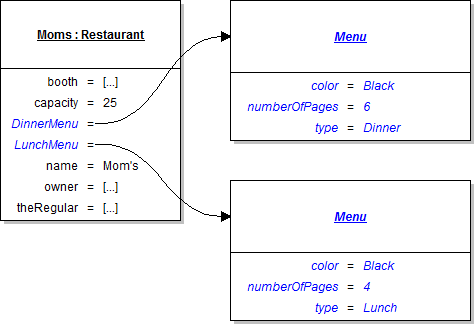
- In the Restaurant constructor, instantiate the DinnerMenu field to a new Menu, as shown in the diagrams below. Pass the menuColor and dinnerMenuPageCount parameters as the color and numberOfPages parameters.
- In the Restaurant constructor, instantiate the LunchMenu field to a new Menu, as shown in the diagrams above. Pass the menuColor and lunchMenuPageCount parameters as the color and numberOfPages parameters.
- Ensure that all code is StyleCop compliant.
- Check your work:
- Set a breakpoint in the Restaurant constructor on the line that instantiates the DinnerMenu field.
- Start the application. Click the New restaurant button.
- Press F11 to step into the menu constructor. Ensure that each of the parameter values matches the values passed in to the constructor.
- Press F10 to return to the restaurant constructor and over the line of code that instantiates the dinner menu. Ensure that the DinnerMenu field is instantiated correctly and that the values of the the fields are correct.
- Press F11 to step into the menu constructor again, this time for the lunch menu. Ensure that each of the parameter values matches the values passed in to the constructor.
- Press F10 to return to the restaurant constructor and over the line of code that instantiates the lunch menu. Ensure that the LunchMenu field is instantiated correctly and that the values of the the fields are correct.
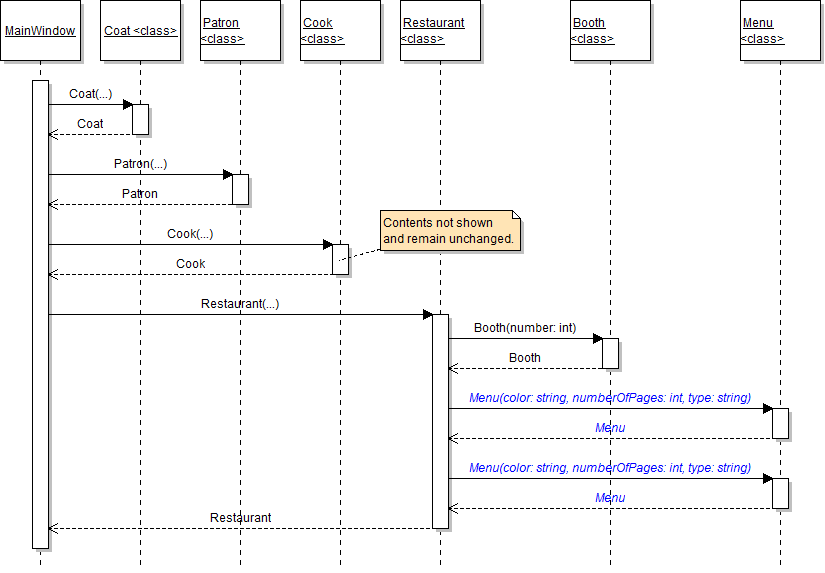
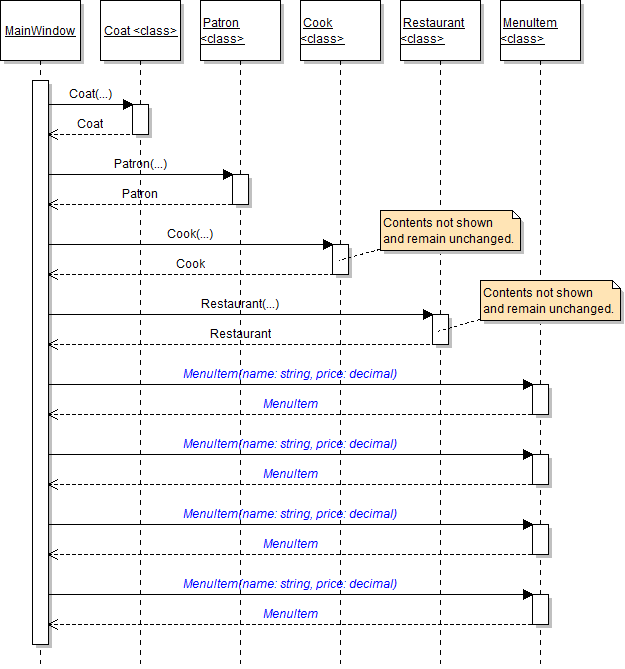
The menu item needs a constructor to create instances of the class and set its fields. In this task, you will define a constructor for the MenuItem class and use it to instantiate the lunch menu's menu items. You will check your work by setting a breakpoint, stepping into the constructor, and ensuring that the objects are created correctly.
- Define the constructor for the MenuItem class as shown in the class diagram below.
- In the body of the constructor, set the Name and Price fields to the appropriate parameters.
- Check your work: Build the solution and ensure that the code compiles without errors or warnings.
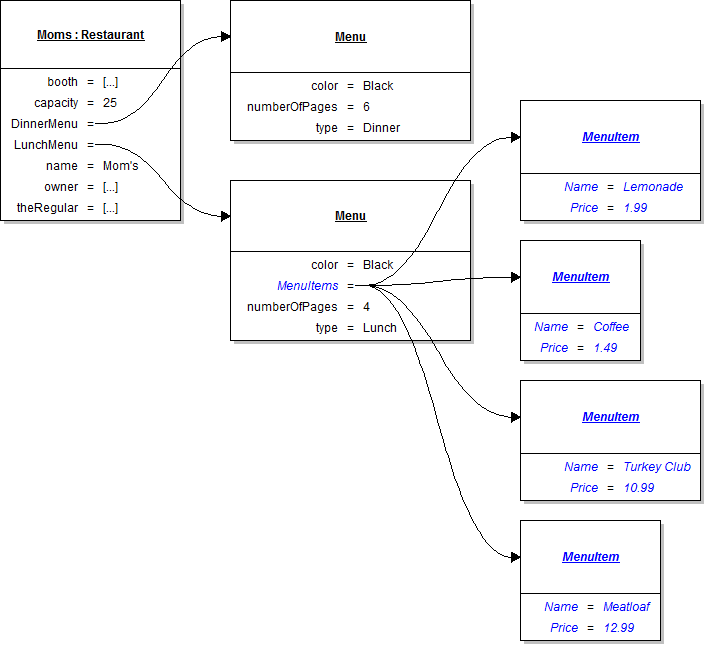
- In the newZooButton_Click after instantiating the moms field, instantiate each of the four menu items shown in the object diagram below. Add each item to the lunch menu's MenuItems list.
- Ensure that all code is StyleCop compliant.
- Check your work:
- Set a breakpoint in the newRestaurantButton_Click on the line that instantiates the first menu item.
- Start the application. Click the New restaurant button.
- Press F11 to step into the menu item constructor. Ensure that each of the parameter values matches the values passed in to the constructor.
- Press F10 to return to the newRestaurantButton_Click and over the line of code that instantiates the item and adds it to the list. Ensure that the item is instantiated correctly and that it is added to the list correctly.
- Press F10 to step over the code that instantiates the other items and adds them to the list. Ensure that each item is instantiated correctly and that the MenuItems list contains four items - lemonade, coffee, turkey club, and meatloaf.
Tip: To reduce the number of lines of code needed for this step, you can call the MenuItem constructor within the call to the Add method of the MenuItems list.
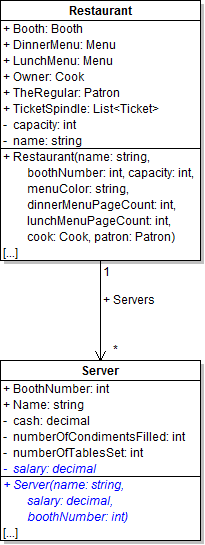
The server needs a constructor to create instances of the class and set its fields. In this task, you will define a constructor for the Server class and use it to instantiate the restaurant's servers. You will check your work by setting a breakpoint, stepping into the constructor, and ensuring that the objects are created correctly.
- Define the constructor for the Server class as shown in the class diagram below.
- Make the server's Salary field private and rename it so that the first letter is lowercase, as shown in the class diagram above.
- In the body of the constructor, set the BoothNumber, Name, and salary fields to the appropriate parameters.
- Check your work: Build the solution and ensure that the code compiles without errors or warnings.
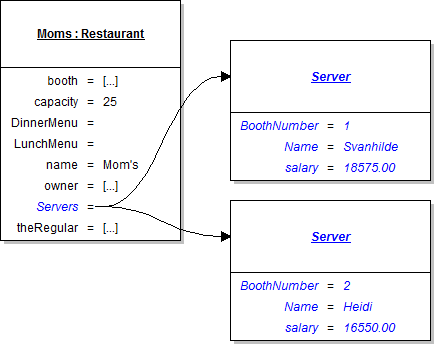
- In the newZooButton_Click after instantiating the lunch menu items, instantiate each of the two servers shown in the object diagram below. Add each server to Mom's Servers list.
- Ensure that all code is StyleCop compliant.
- Check your work:
- Set a breakpoint in the newRestaurantButton_Click on the line that instantiates the first server.
- Start the application. Click the New restaurant button.
- Press F11 to step into the server constructor. Ensure that each of the parameter values matches the values passed in to the constructor.
- Press F10 to return to the newRestaurantButton_Click and over the line of code that instantiates the server and adds it to the list. Ensure that the server is instantiated correctly and that it is added to the list correctly.
- Press F10 to step over the code that instantiates the other server and adds it to the list. Ensure that the server is instantiated correctly and that the Servers list contains two servers - Svanhilde and Heidi.
Tip: To reduce the number of lines of code needed for this step, you can call the Server constructor within the call to the Add method of the Servers list.
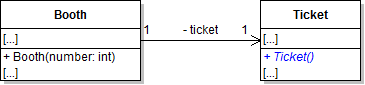
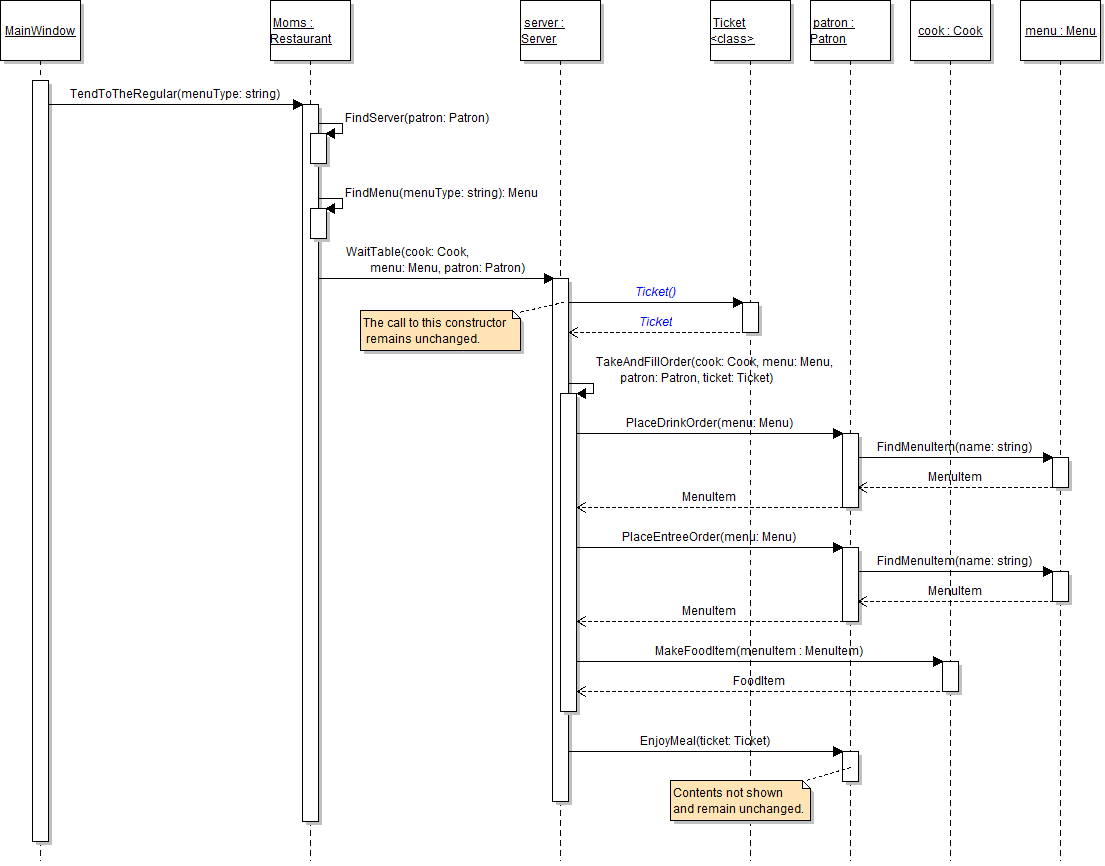
The ticket needs a constructor to create instances of the class and set its fields. In this task, you will define a constructor for the Ticket class and use it to instantiate a ticket when serving a patron. You will check your work by setting a breakpoint, stepping into the constructor, and ensuring that the object is created correctly.
- Define the constructor for the Ticket class as shown in the class diagram below.
- In the body of the constructor, instantiate the FoodItems and MenuItems fields to new lists.
- Check your work: Build the solution and ensure that the code compiles without errors or warnings.
- In the server's WaitTable method, leave the line that instantiates the ticket variable, but remove the two lines that instantiate the FoodItems and MenuItems lists (because the instantiation occurs in the ticket constructor). The constructor call is shown in the sequence diagram below.
- Ensure that all code is StyleCop compliant.
- Check your work:
- Set a breakpoint in the server's WaitTable method on the line that calls the ticket constructor.
- Start the application. Click the New restaurant button, then click the Heidi, seat the regular button, then click the Serve lunch to the regular button.
- Press F11 to step into and through the ticket constructor.
- Press F10 to return to the WaitTable method and over the line that instantiates the ticket variable. Ensure that the ticket variable is instantiated and its two lists are instantiated correctly.
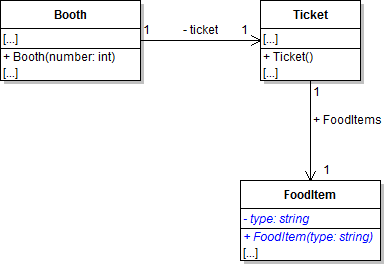
The food item needs a constructor to create instances of the class and set its fields. In this task, you will define a constructor for the FoodItem class and use it to instantiate a food item when serving a patron. You will check your work by setting a breakpoint, stepping into the constructor, and ensuring that the object is created correctly.
- Define the constructor for the FoodItem class as shown in the class diagram below.
- Make the Type field private and rename it so that the first letter is lowercase, as shown in the class diagram above.
- In the body of the constructor, set the type field to the type parameter.
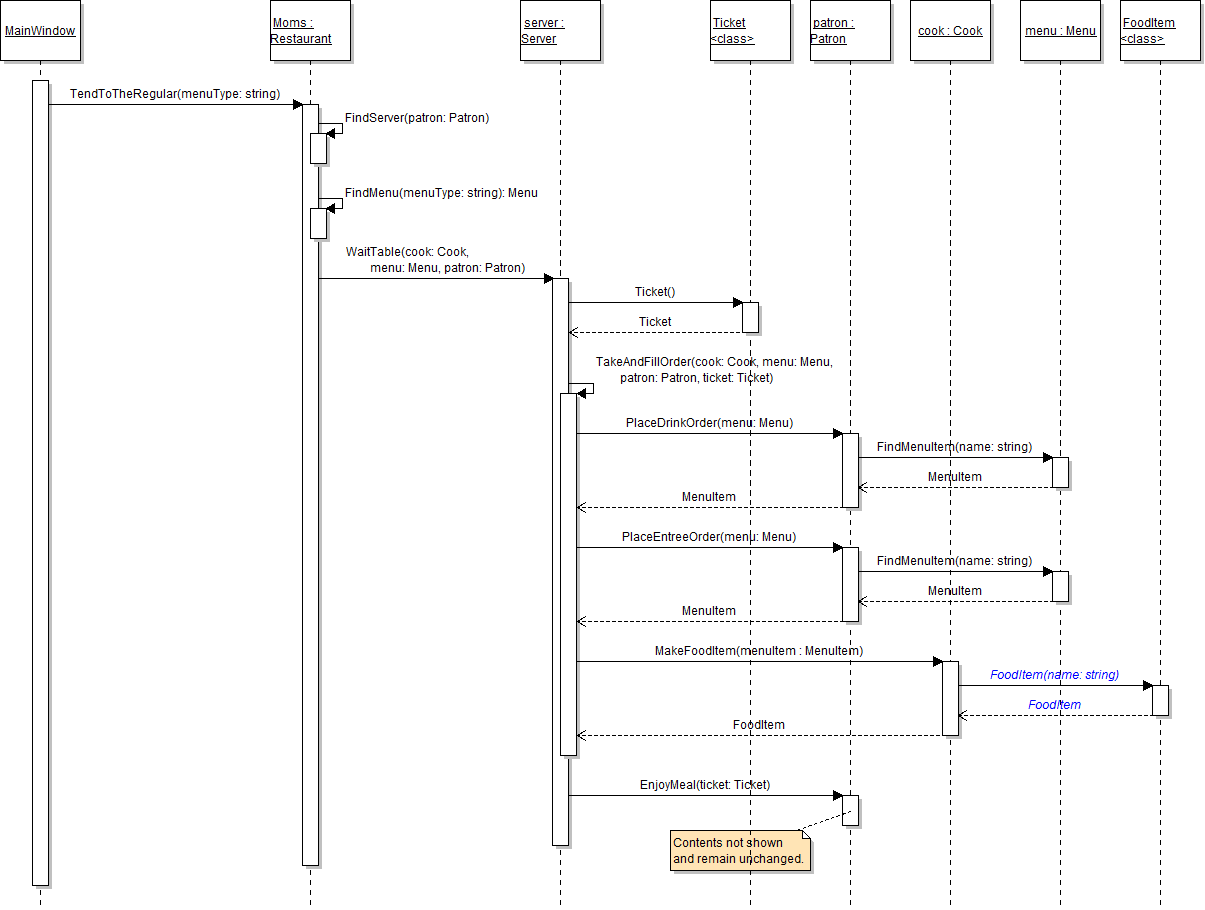
- In the cook's MakeFoodItem method, instantiate the foodItem variable by calling the FoodItem constructor, as shown in the sequence diagram below. Pass the Name field of the menuItem as the parameter to the constructor.
- Ensure that all code is StyleCop compliant.
- Check your work:
- Set a breakpoint in the cook's MakeFoodItem method on the line that calls the FoodItem constructor.
- Start the application. Click the New restaurant button, then click the Heidi, seat the regular button, then click the Serve lunch to the regular button.
- Press F11 to step into and through the food item constructor. Ensure that the value of the parameter matches the value passed in to the constructor.
- Press F10 to return to the MakeFoodItem method and over the line that instantiates the foodItem variable. Ensure that the variable is instantiated correctly and its type field is set to the correct value (in this particular instance, it should be "Lemonade").
Note: Remove the code in the MakeFoodItem method that set the food item's Type field. This is now completed in the food item's constructor.
- Build the application and ensure that it has no compiler errors or warnings.
- Ensure that all code is StyleCop compliant.
- Browse to the project folder and add it to a newly created zipped archive.
- Submit the zipped project folder to the correct assignment in Blackboard.