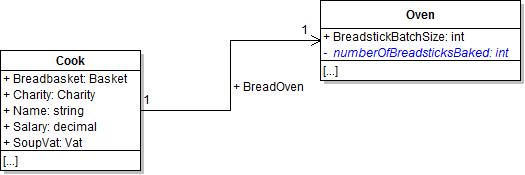
In this task, you will make the oven's NumberOfBreadsticksBaked field private. You will check your work by setting a breakpoint, stepping through the code, and ensuring that the functionality that uses the field remains the same.
- Make the oven's NumberOfBreadsticksBaked field private, as shown in the class diagram below. Also rename the field so that its first letter is lowercase.
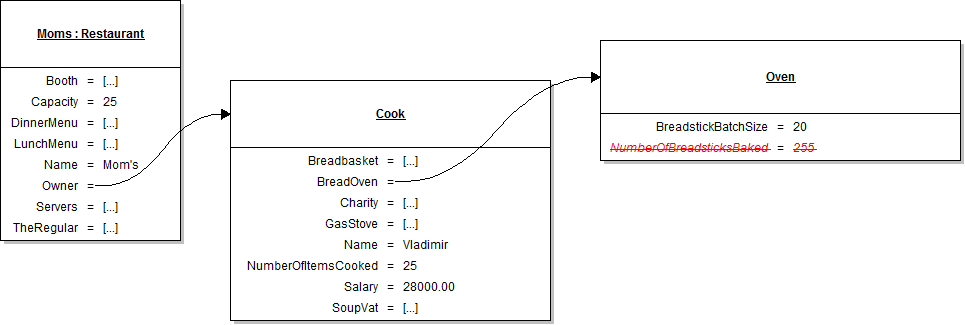
- In the newRestaurantButton_Click, remove the line of code that sets the oven's numberOfBreadsticksBaked field, as shown in the object diagram below.
- Ensure that all code is StyleCop compliant.
- Check your work:
- Set a breakpoint in the oven's BakeBreadsticks method on the line that sets the value of the numberOfBreadsticksBaked field.
- Start the application.
- Click the New restaurant button. Then click the Prepare daily food button.
- Ensure the value of the numberOfBreadsticksBaked field is 0. Press F10 to step over the line of code that sets the field value. Ensure that the value changes to 20.
Warning: If you simply changed the name of the field without going through the actual renaming process (using Ctrl + R, R), you will need to resolve build errors that occur because of the field being referenced by the capitalized name.
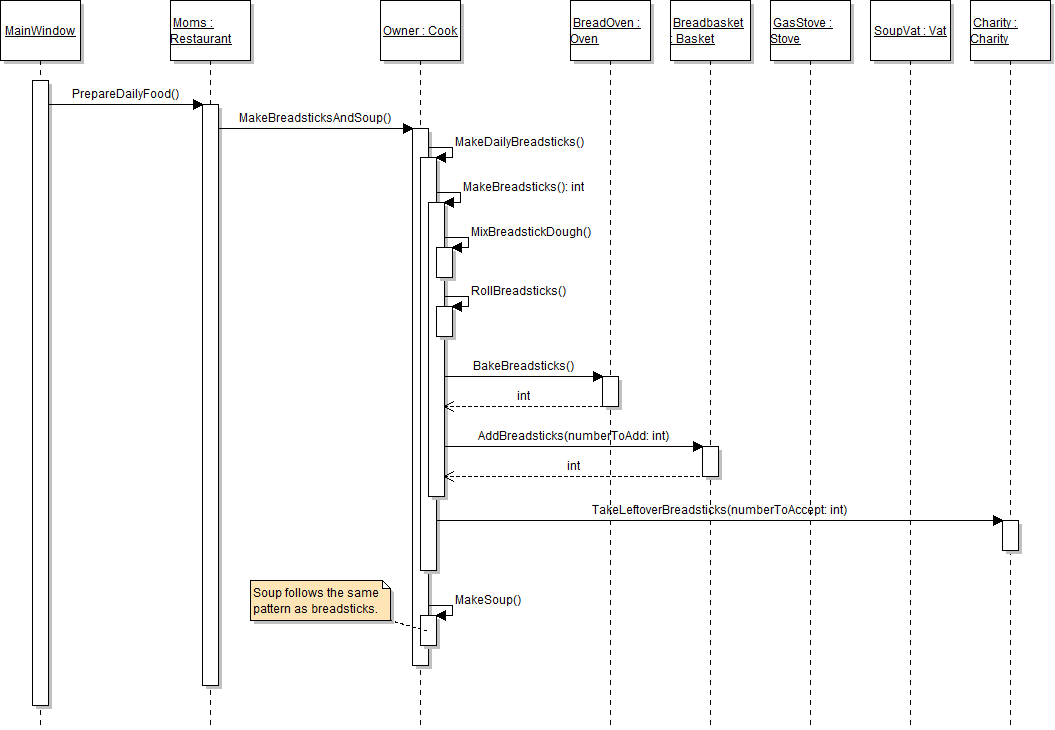
Note: Ensure that the code in the basket's BakeBreadsticks method refers to the lowercase field.
Tip: The following sequence diagram can be used as a reference while debugging.
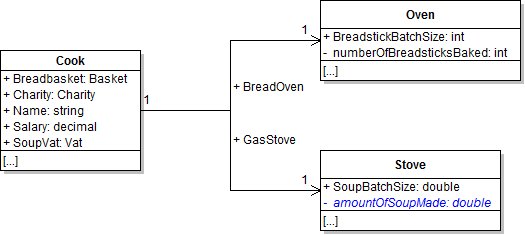
In this task, you will make the stove's AmountOfSoupMade field private. You will check your work by setting a breakpoint, stepping through the code, and ensuring that the functionality that uses the field remains the same.
- Make the stove's AmountOfSoupMade field private, as shown in the class diagram below. Also rename the field so that its first letter is lowercase.
- In the newRestaurantButton_Click, remove the line of code that sets the stove's amountOfSoupMade field, as shown in the object diagram below.
- Ensure that all code is StyleCop compliant.
- Check your work:
- Set a breakpoint in the stove's CookSoup method on the line that sets the amountOfSoupMade field.
- Start the application.
- Click the New restaurant button. Then click the Prepare daily food button.
- Ensure the value of the amountOfSoupMade field is 0. Press F10 to step over the line of code that sets the field value. Ensure that the value changes to 12.
Note: Ensure that the code in the stove's CookSoup method refers to the lowercase field.
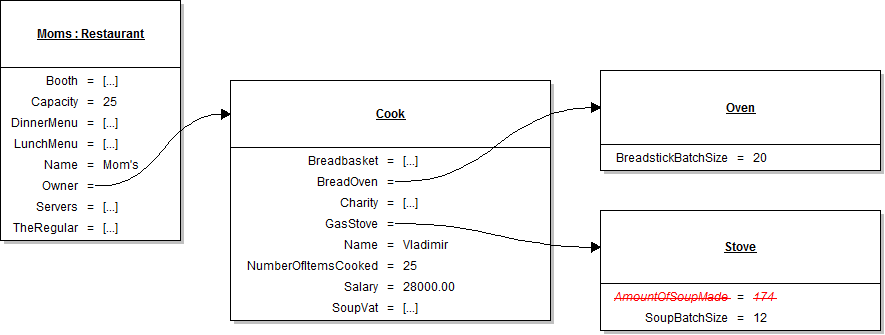
Tip: Use the sequence diagram from step 1 as a reference while debugging.
In this task, you will make the ticket's AmountPaid field private. You will check your work by setting a breakpoint, stepping through the code, and ensuring that the functionality that uses the field remains the same.
- Make the ticket's AmountPaid field private, as shown in the class diagram below. Also rename the field so that its first letter is lowercase.
- In the newRestaurantButton_Click, remove the line of code that sets the booth's ticket's amountPaid field, as shown in the object diagram below.
- Ensure that all code is StyleCop compliant.
- Check your work:
- Set a breakpoint in the ticket's AddPayment method on the line that sets the amountPaid field.
- Start the application.
- Click the New restaurant button. Then click the Heidi, seat the regular button. Then click the Serve lunch to the regular button.
- Ensure the value of the amountPaid field is 0. Press F10 to step over the line of code that sets the field value. Ensure that the value changes to 15.99.
- Check your work:
- Set a breakpoint in the ticket's GiveTip method on the line that returns the tip amount.
- Start the application.
- Click the New restaurant button. Then click the Heidi, seat the regular button. Then click the Serve lunch to the regular button. Then click the Heidi, set up table button.
- Press F10 to return to the server's BusTable method and over the call to the GiveTip method. The value of the Cash field should change from 0 to 3.00.
Note: Ensure that the code in the GiveTip and AddPayment methods now refer to the lowercase field.
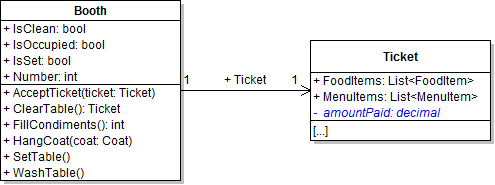
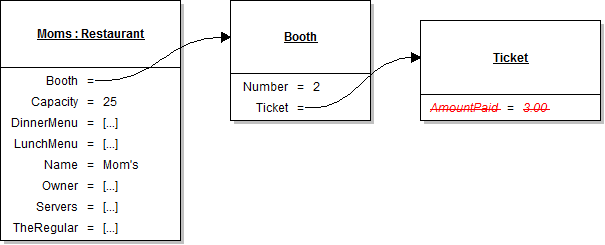
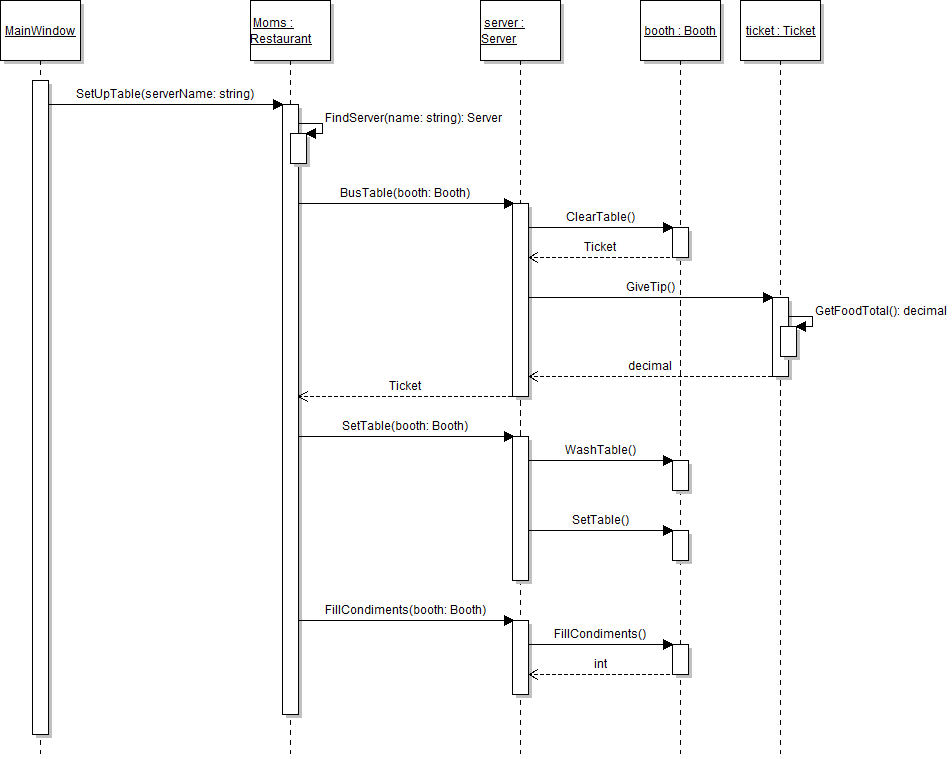
Tip: The following sequence diagram can be used as a reference while debugging.
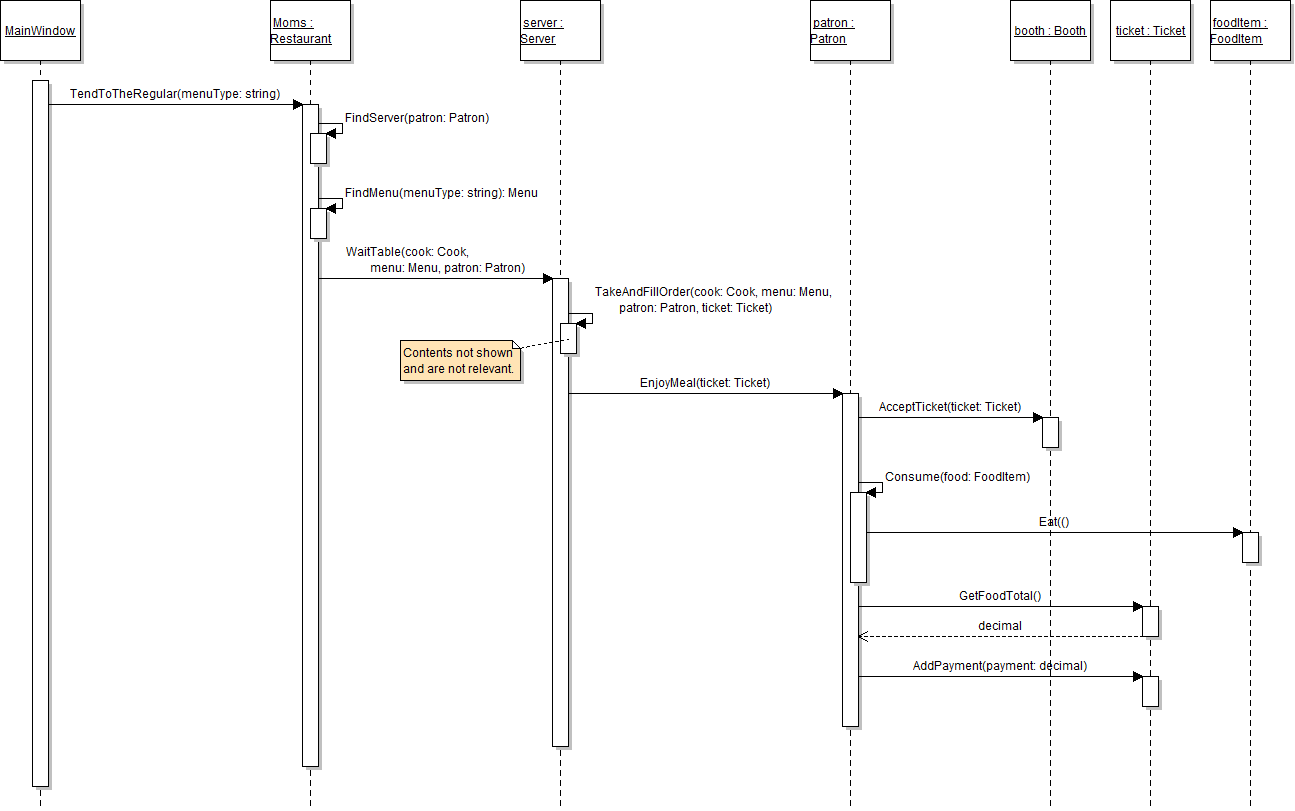
Tip: The following sequence diagram can be used as a reference while debugging.
In this task, you will make the booth's Ticket field private. You will check your work by setting a breakpoint, stepping through the code, and ensuring that the functionality that uses the field remains the same.
- Make the booth's Ticket field private, as shown in the class diagram below. Also rename the field so that its first letter is lowercase.
- In the newRestaurantButton_Click, remove the line of code that sets the booth's ticket field, as shown in the object diagram below.
- In the newRestaurantButton_Click, initialize the booth's IsSet field to true, as shown in the object diagram above.
- Ensure that all code is StyleCop compliant.
- Check your work:
- Set a breakpoint in the booth's AcceptTicket method on the line that sets the ticket field.
- Start the application.
- Click the New restaurant button. Then click the Heidi, seat the regular button. Then click the Serve lunch to the regular button.
- Press F10 to step over the line of code that sets the ticket field. Ensure that the ticket field changes from null to instantiated as the object in the ticket parameter.
- Check your work:
- Set a breakpoint in the booth's ClearTable method on the line that sets the ticket field to null.
- Start the application.
- Click the New restaurant button. Then click the Heidi, seat the regular button. Then click the Serve lunch to the regular button. Then click the Heidi, set up table button.
- Press F10 to step over the line of code that sets the ticket field. Ensure that the ticket field changes from instantiated to null.
Note: Ensure that the code in the ClearTable and AcceptTicket methods now refer to the lowercase field.
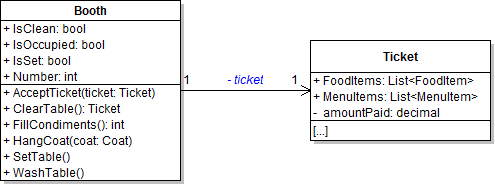
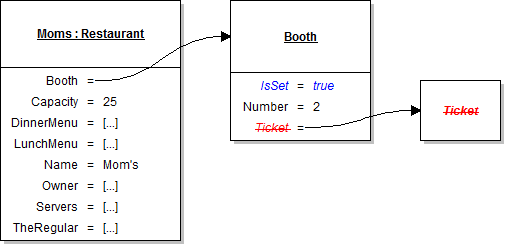
Tip: Use the serve lunch sequence diagram from step 3 as a reference while debugging.
Tip: Use the set up table sequence diagram from step 3 as a reference while debugging.
In this task, you will make the server's Cash field private. You will check your work by setting a breakpoint, stepping through the code, and ensuring that the functionality that uses the field remains the same.
- Make the server's Cash field private, as shown in the class diagram below. Also rename the field so that its first letter is lowercase.
- Ensure that all code is StyleCop compliant.
- Check your work:
- Set a breakpoint in the server's BusTable method on the line that sets the cash field.
- Start the application.
- Click the New restaurant button. Then click the Heidi, seat the regular button. Then click the Serve lunch to the regular button. Then click the Heidi, set up table button.
- Press F10 to step over the call to the GiveTip method. Ensure that the value of the cash field changes from 0 to 3.00.
Note: Ensure that the code in the BusTable method now refers to the lowercase field.
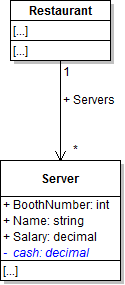
Tip: Use the set up table sequence diagram from step 3 as a reference while debugging.
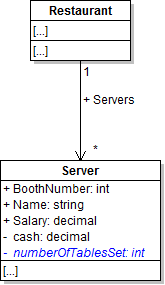
In this task, you will make the server's NumberOfTablesSet field private. You will check your work by setting a breakpoint, stepping through the code, and ensuring that the functionality that uses the field remains the same.
- Make the server's NumberOfTableSet field private, as shown in the class diagram below. Also rename the field so that its first letter is lowercase.
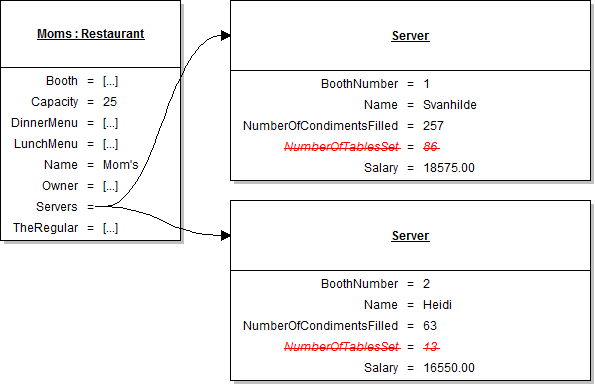
- In the newRestaurantButton_Click, remove the lines of code that set both servers' numberOfTableSet field, as shown in the object diagram below.
- Ensure that all code is StyleCop compliant.
- Check your work:
- Set a breakpoint in the server's SetTable method on the the line that increments the numberOfTablesSet field.
- Start the application.
- Click the New restaurant button. Then click the Heidi, seat the regular button. Then click the Serve lunch to the regular button. Then click the Heidi, set up table button.
- Press F10 to step over the line of code that increments the field. The value of the numberOfTablesSet field should change from 0 to 1.
Note: Ensure that the code in the SetTable method now refers to the lowercase field.
Tip: Use the set up table sequence diagram from step 3 as a reference while debugging.
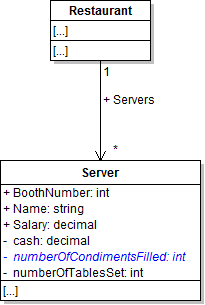
In this task, you will make the server's NumberOfCondimentsFilled field private. You will check your work by setting a breakpoint, stepping through the code, and ensuring that the functionality that uses the field remains the same.
- Make the server's NumberOfCondimentsFilled field private, as shown in the class diagram below. Also rename the field so that its first letter is lowercase.
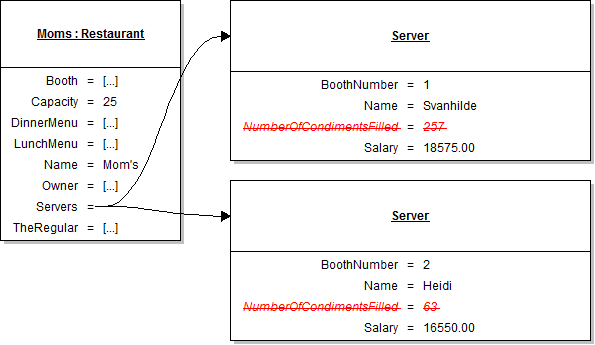
- In the newRestaurantButton_Click, remove the lines of code that set both servers' numberOfCondimentsFilled field, as shown in the object diagram below.
- Ensure that all code is StyleCop compliant.
- Check your work:
- Set a breakpoint in the server's FillCondiments method on the line that sets the numberOfCondimentsFilled field.
- Start the application.
- Click the New restaurant button. Then click the Heidi, seat the regular button. Then click the Serve lunch to the regular button. Then click the Heidi, set up table button.
- Press F10 to step over the line of code that sets the numberOfCondimentsFilled field. Ensure that the value of the field changes from 0 to 4.
Note: Ensure that the code in the server's FillCondiments method now refers to the lowercase field.
Tip: Use the set up table sequence diagram from step 3 as a reference while debugging.
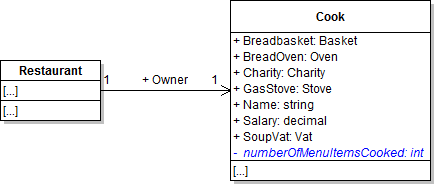
In this task, you will make the cook's NumberOfMenuItemsCooked field private. You will check your work by setting a breakpoint, stepping through the code, and ensuring that the functionality that uses the field remains the same.
- Make the cook's NumberOfMenuItemsCooked field private, as shown in the class diagram below. Also rename the field so that its first letter is lowercase.
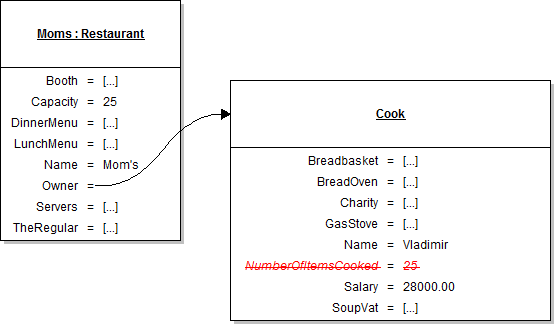
- In the newRestaurantButton_Click, remove the line of code that sets the cook's numberOfMenuItemsCooked field, as shown in the object diagram below.
- Ensure that all code is StyleCop compliant.
- Check your work:
- Set a breakpoint in the cook's MakeFoodItem method on the line that increments the numberOfFoodItemsCooked field.
- Start the application.
- Click the New restaurant button. Then click the Heidi, seat the regular button. Then click the Serve lunch to the regular button.
- Press F10 to step over the line of code that increments the numberOfMenuItemsCooked field. Ensure that the value of the field changes from 0 to 1.
Note: Ensure that the code in the cook's MakeFoodItem method now refers to the lowercase field.
Tip: Use the serve lunch sequence diagram from step 3 as a reference while debugging.
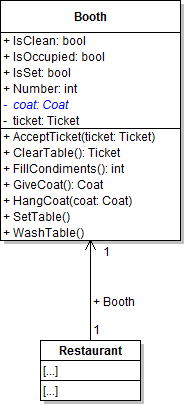
In this task, you will make the booth's Coat field private. You will check your work by setting a breakpoint, stepping through the code, and ensuring that the functionality that uses the field remains the same.
- Make the booth's Coat field private, as shown in the class diagram below. Also rename the field so that its first letter is lowercase.
- Ensure that all code is StyleCop compliant.
- Check your work:
- Set a breakpoint in the booth's GiveCoat method on the line that sets the coat field to null.
- Start the application.
- Click the New restaurant button. Then click the Heidi, seat the regular button. Then click the Serve lunch to the regular button.
- Press F10 to step over the line of code that sets the coat field. Ensure that the coat field changes from instantiated to null.
Note: Ensure that the code in the booth's GiveCoat and HangCoat methods now refers to the lowercase field.
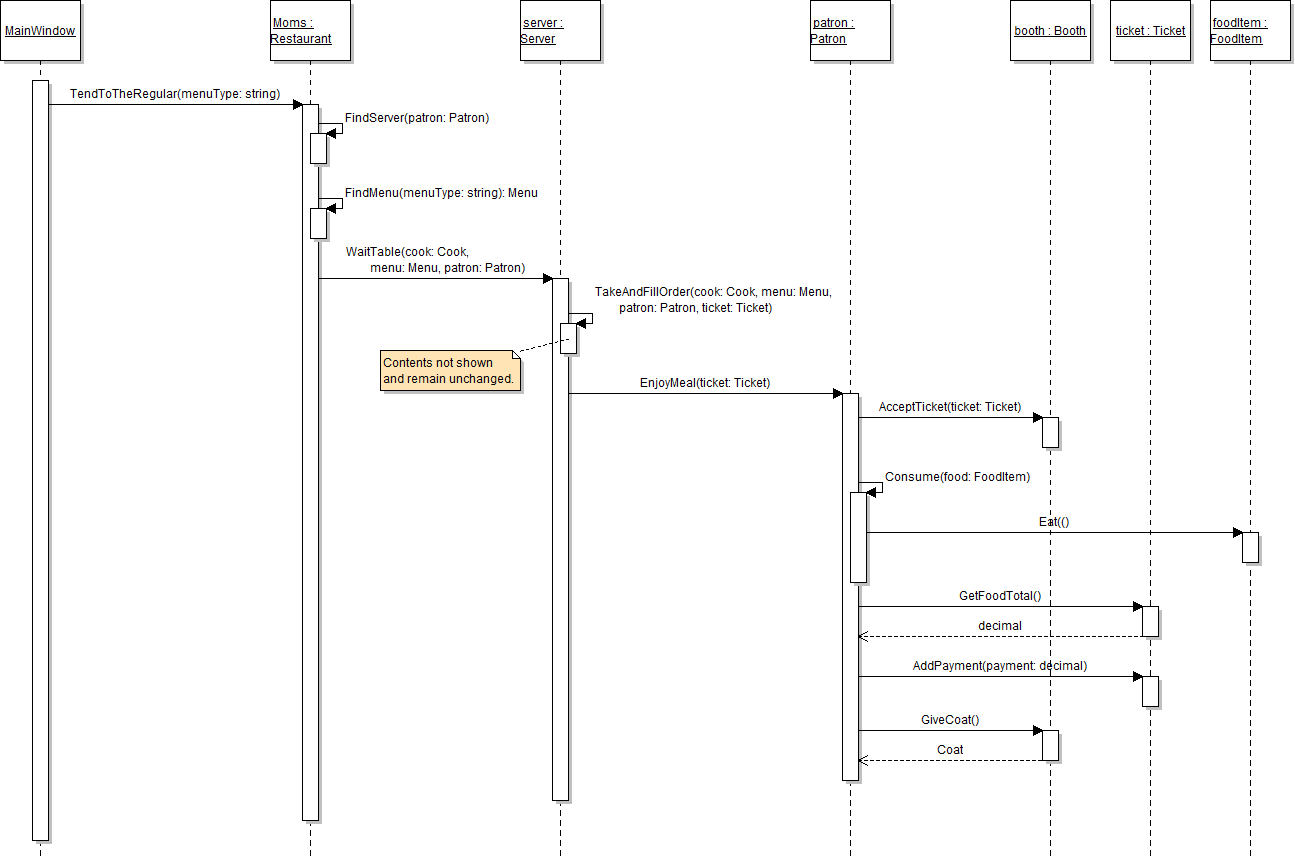
Tip: The following sequence diagram can be used as a reference while debugging.
In this task, you will make the MainWindow's Moms field private. You will check your work by setting a breakpoint, stepping through the code, and ensuring that the functionality that uses the field remains the same.
- Make the MainWindow's Moms field private, as shown in the class diagram below. Also rename the field so that its first letter is lowercase.
- Ensure that all code is StyleCop compliant.
- Check your work:
- Set a breakpoint in the newRestaurantButton_Click on the ending curly brace.
- Start the application.
- Click the New restaurant button.
- Inspect the moms field and ensure that the restaurant and all of its fields are instantiated to the correct objects and set to the correct values.
Note: Ensure that the code in the button clicks now refers to the lowercase field.

A line of code and a local variable can be eliminated by calling a method inline within another method call. In this task, you will call the patron's GiveCoat method within the the call to the booth's HangCoat method. You will check your work by setting a breakpoint, stepping into the methods, and ensuring that the methods are still called correctly and that the functionality remains the same.
- In the server's SeatPatron method, call the patron's GiveCoat method inline within the call to the booth's HangCoat method.
- Check your work:
- Set a breakpoint in the server's SeatPatron method on the line that calls the HangCoat and GiveCoat methods.
- Start the application.
- Click the New restaurant button. Then click the Heidi, seat the regular button.
- Press F11 to step into and through the GiveCoat method. The Coat field should be set to null and the patron's coat object returned.
- Press F11 to return to the SeatPatron method and then step into the HangCoat method. Ensure that the coat parameter contains the patron's XL brown coat object.
Warning: While eliminating local variables and calling a method inline can make code more concise, there is a danger of making the code less readable. A best practice is to always favor readability and simplicity over brevity.
A line of code and a local variable can be eliminated by calling a method inline within another method call. In this task, you will call the restaurant's FindMenu method within the call to the server's WaitTable method. You will check your work by setting a breakpoint, stepping into the methods, and ensuring that the methods are still called correctly and that the functionality remains the same.
- In the restaurant's TendToTheRegular method, call the restaurant's FindMenu method inline within the call to the server's WaitTable method. The method call should be passed as the second parameter of the WaitTable method.
- Check your work:
- Set a breakpoint in the restaurant's TendToTheRegular method on the line that calls the server's WaitTable method.
- Start the application.
- Click the New restaurant button. Then click the Heidi, seat the regular button. Then click the Serve lunch to the regular button.
- Press F11 to step into and through the FindMenu method. The lunch menu object should be returned.
- Press F11 to return to the TendToTheRegular method and into the WaitTable method. Ensure that the menu parameter contains the restaurant's lunch menu object.
A line of code and a local variable can be eliminated by calling a method inline with a mathematic operation. In this task, you will call the booth's FillCondiments method inline to automatically add the result to a field value. You will check your work by setting a breakpoint, stepping into the methods, and ensuring that the methods are still called correctly and that the functionality remains the same.
- In the server's FillCondiments method, call the booth's FillCondiments method on the same line that adds the result to the numberOfCondimentsFilled field.
- Check your work:
- Set a breakpoint in the server's FillCondiments method on the line that calls the booth's FillCondiments method.
- Start the application.
- Click the New restaurant button. Then click the Heidi, set up table button.
- Press F11 to step into and through the booth's FillCondiments method. The return variable should be incremented four times and a value of 4 should be returned.
- Press F10 to return to the server's FillCondiments method and over the line of code that adds to the numberOfCondimentsFilled field. Ensure that the value of the field changes from 0 to 4.
Note: The method should have one line of code and no local variables are needed.
A line of code and a local variable can be eliminated by calling a method inline within another method call. In this task, you will call the cook's MakeFoodItem method within the call to the Add method on the FoodItems list. You will check your work by setting a breakpoint, stepping into the methods, and ensuring that the methods are still called correctly and that the functionality remains the same.
- In the server's TakeAndFillOrder method, call the cook's MakeFoodItem method inline within the call to the Add method on the FoodItems list.
- Check your work:
- Set a breakpoint in the server's TakeAndFillOrder method on the line that calls the cook's MakeFoodItem method.
- Start the application.
- Click the New restaurant button. Then click the Heidi, seat the regular button. Then click the Serve lunch to the regular button.
- Press F11 to step into and through the MakeFoodItem method. The menuItem parameter should contain a lemonade object, and a lemonade food item should be returned.
- Press F10 to return to the server's TakeAndFillOrder method and over the line that calls the Add and MakeFoodItem methods. Ensure that the lemonade food item object is added to the FoodItems list.
- Press F10 to step through the foreach loop and over the line that calls the Add and MakeFoodItem methods again. Ensure that the meatloaf food item object is added to the FoodItems list.
- Build the application and ensure that it has no compiler errors or warnings.
- Ensure that all code is StyleCop compliant.
- Browse to the project folder and add it to a newly created zipped archive.
- Submit the zipped project folder to the correct assignment in Blackboard.