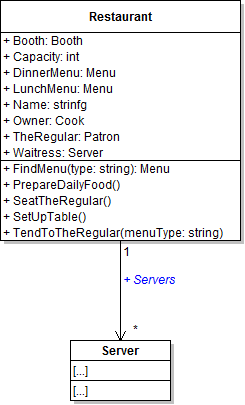
The restaurant needs multiple servers instead of just Heidi. In this task, you will define a list field on the Restaurant class that will be used to hold multiple server objects. You will check your work by ensuring that the solution builds without compiler errors or warnings.
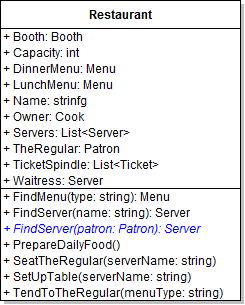
- Define the Servers field as a list on the Restaurant class, as shown in the class diagram below.
- Ensure that all code is StyleCop compliant.
- Check your work: Build the solution and ensure that the code compiles without errors or warnings.
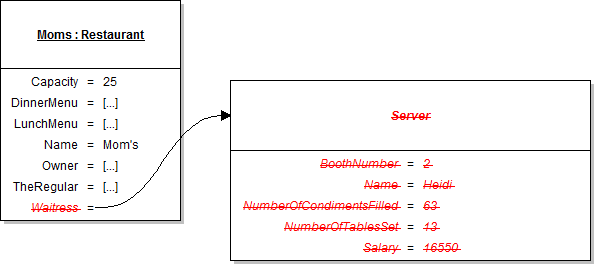
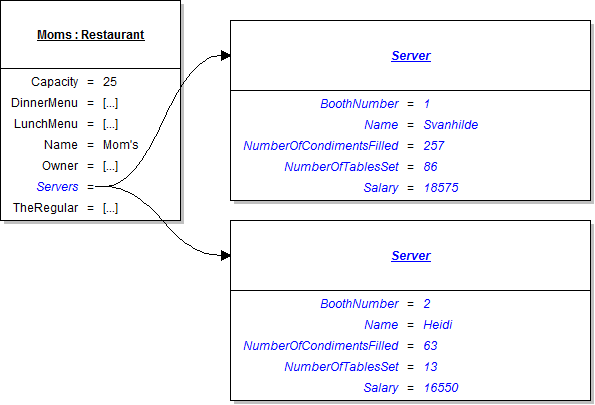
Now that the restaurant has a list of servers, it needs to be instantiated and have multiple servers created and added to it. In this task, you will instantiate the Servers field, instantiate two server objects, and add both servers to the list. You will check your work by setting a breakpoint, stepping through the code, and ensuring that the objects are instantiated correctly and that their field values are set correctly.
- In the newRestaurantButton_Click, remove the code that instantiates the Waitress field and sets the waitress' fields, as shown in the object diagram below.
- Underneath the code that sets the soup vat's fields, instantiate each of the servers and add them to the list. Set their field values as specified in the object diagram below.
- Check your work:
- Set a breakpoint in the newRestaurantButton_Click on the line that instantiates the Servers field.
- Start the application.
- Click the New restaurant button.
- Press F10 to step over the code that instantiates the Servers field. Ensure that the list is instantiated correctly.
- Press F10 to step over the code that instantiates the servers and adds them to the list. Ensure that each server is instantiated, their field values are set, and they are added to the list correctly.
Now that the restaurant has a list of servers, it needs a way to find a particular server in order to have them perform tasks. In this task, you will write and call a method that loops through the list of servers and compares each server's name to the passed-in name. You will check your work by setting a breakpoint, stepping through the loop, and ensuring that the correct object is found and returned.
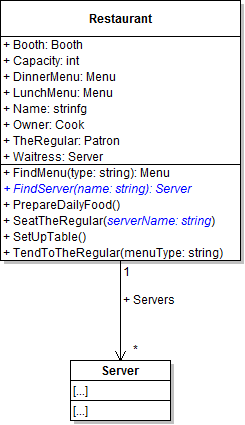
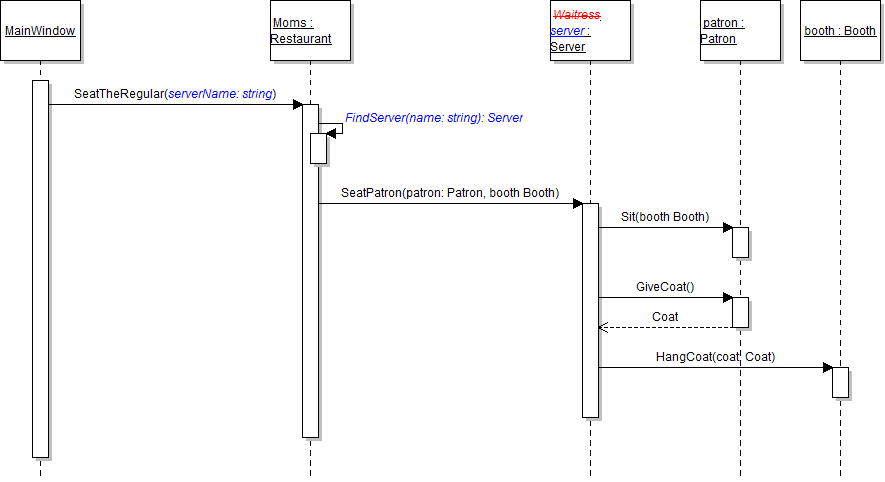
- Add the serverName parameter to the restaurant's SeatTheRegular method, as shown in the class diagram below.
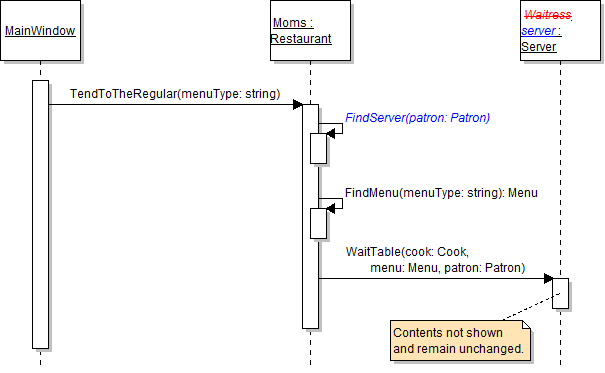
- In the heidiSeatTheRegularButton_Click in MainWindow.xaml.cs, pass the string "Heidi" as the parameter to the call to the SeatTheRegular method. The updated method call is shown in the sequence diagram below.
- Define the FindServer method in the Restaurant class, as shown in the class diagram above.
- In the FindServer method, define a return variable of type Server. Then, use a control-break loop to loop through the list of servers and check each server to see if it matches the method's parameters (the name). If the server matches, set the return variable to the server and break out of the loop. Then return the found server.
- In the restaurant's SeatTheRegular method, call the FindServer method, as shown in the sequence diagram above. Pass the serverName parameter along. Store the result in a local variable named server.
- Then, call the SeatPatron method on the server variable instead of the Waitress field.
- Ensure that all code is StyleCop compliant.
- Check your work:
- Set a breakpoint in the restaurant's SeatTheRegular method on the line that calls the FindServer method.
- Start the application.
- Click the New restaurant button. Then click the Heidi, seat the regular button.
- Ensure that the value of the serverName parameter is "Heidi".
- Press F11 to step into the FindServer method. Ensure that the value of the name parameter is "Heidi".
- Press F10 to step through the foreach loop. The first server in the list is Svanhilde, so the name shouldn't match the first time through the loop. The second server is Heidi, so the name parameter and the server name should match, the return variable should be set, and the loop should break.
- Press F10 to return to the SeatTheRegular method. Ensure that the server variable contains Heidi the waitress.
- Press F11 to step into the SeatPatron method. Ensure that the object you stepped into - the current object - is Heidi the waitress.
Tip: This loop structure is almost identical to that of the FindAnimal and FindGuest methods in the zoo scenario. Use the zoo lab instructions as a guide if you have trouble with this step.
The restaurant needs to search for the correct server to set up tables in addition to seating the regular. In this task, you will call the FindServer method in order to find Heidi and have her set up a table. You will check your work by setting a breakpoint, stepping through the code, and ensuring that the correct server is found and that her methods are called correctly.
- Add the serverName parameter to the restaurant's SetUpTable method, as shown in the class diagram below.
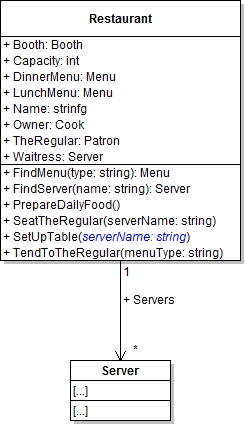
- In the heidiSetUpTableButton_Click in MainWindow.xaml.cs, pass the string "Heidi" as the parameter to the call to the SetUpTable method. The updated method call is shown in the sequence diagram below.
- In the restaurant's SetUpTable method, call the FindServer method, as shown in the sequence diagram above. Pass the serverName parameter along. Store the result in a local variable named server.
- Then, call the BusTable, SetTable, and FillCondiments methods on the server variable instead of the Waitress field, as shown in the sequence diagram above.
- Ensure that all code is StyleCop compliant.
- Check your work:
- Set a breakpoint in the restaurant's SetUpTable method on the line that calls the FindServer method.
- Start the application.
- Click the New restaurant button. Then click the Heidi, seat the regular button. Then click the Serve lunch to the regular button. Then click the Heidi, set up table button.
- Press F10 to step over the call to the FindServer method. Ensure that the server variable contains the Heidi object.
- Press F11 to step into the BusTable method. Ensure that the object you stepped into is Heidi the waitress.
- Press F10 to return to the SetUpTable method. Press F11 to step into the SetTable and FillCondiments methods. In each, ensure that the object you stepped into is Heidi the waitress.
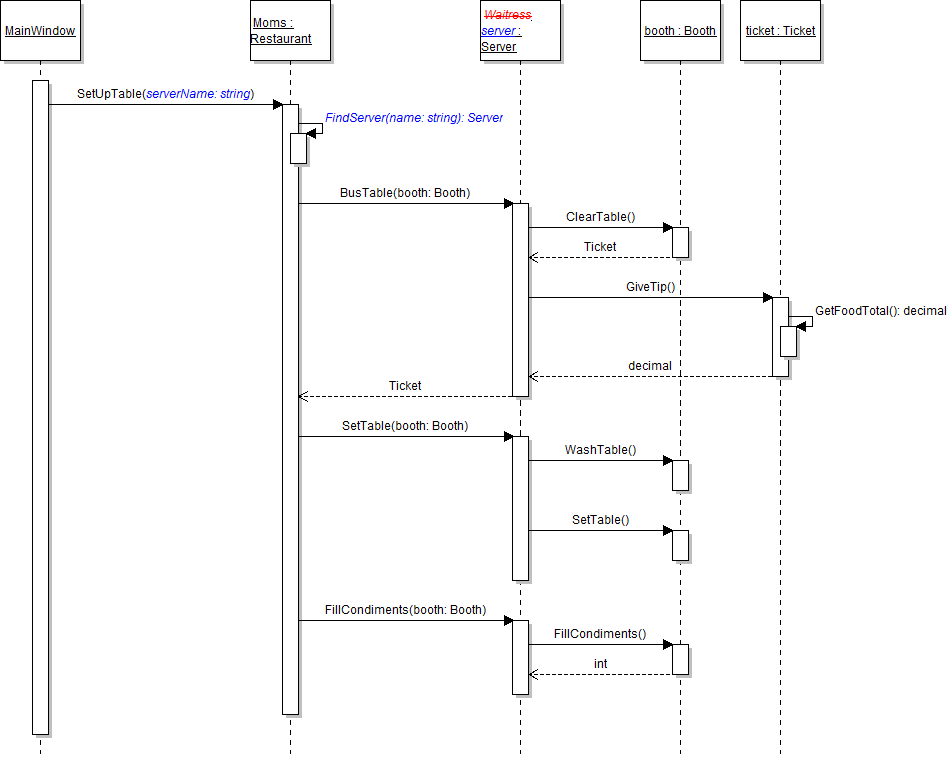
The restaurant needs to keep track of all meal tickets written and collected in a day. In this task, you will define and instantiate a list of tickets and add each collected ticket to the list. You will check your work by setting a breakpoint, stepping through the code, and ensuring that the list is instantiated correctly and that the ticket is added to the list correctly.
- Define the TicketSpindle field as a list on the Restaurant class, as shown in the class diagram below.
- In the newRestaurantButton_Click, instantiate the restaurant's TicketSpindle field to a new list. Put this line of code immediately below the line that instantiates the regular.
- In the restaurant's SetUpTable method, add the ticket returned from the BusTable method to the restaurant's ticket spindle.
- Ensure that all code is StyleCop compliant.
- Check your work:
- Set a breakpoint in the restaurant's SetUpTable method on the line that adds the ticket to the spindle.
- Start the application.
- Click the New restaurant button. Then click the Heidi, seat the regular button. Then click the Serve lunch to the regular button. Then click the Heidi, set up table button.
- Ensure that the TicketSpindle field is instantiated correctly. Press F10 to step over the line that adds the ticket to the spindle. Ensure that the ticket is added to the list correctly and that the list now contains one ticket.
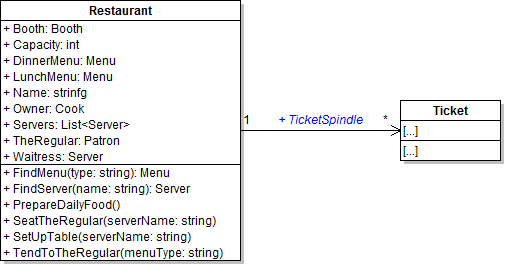
The restaurant needs a way to find the server whose assigned booth number matches that of a given patron. In this task, you will define, write, and call an overloaded version of the FindServer method in order to find a server by booth number. You will check your work by setting a breakpoint, stepping through the method calls, and ensuring that the correct server is found and that her methods are called correctly.
- Define the overloaded FindServer method on the Restaurant class as shown in the class diagram below.
- In the overloaded method, define a return variable of type Server. Then, use a control-break loop to loop through the list of servers and check each server to see if their booth number matches the number of the passed-in patron's booth. If the server matches, set the return variable to the current server and break out of the loop. Then return the found server.
- In the restaurant's TendToTheRegular method, call the FindServer method as shown in the sequence diagram below. Pass the regular as the parameter. Store the returned object in a local variable called server.
- Then, call the WaitTable method on the server variable instead of the Waitress field, as shown in the sequence diagram above.
- Ensure that all code is StyleCop compliant.
- Check your work:
- Set a breakpoint in the restaurant's TendToTheRegular method on the line that calls the FindServer method.
- Start the application.
- Click the New restaurant button. Then click the Heidi, seat the regular button. Then click the Serve lunch to the regular button.
- Press F11 to step into the FindServer method. Press F10 to step through the foreach loop. The first server's booth number should not match that of the patron. The second server's booth number should match, so the second server should be returned from the method.
- Press F10 to return to the TendToTheRegular method and over the call to the FindServer method. Ensure that the server variable contains the Heidi object.
- Press F11 to step into the WaitTable method. Ensure that the object you stepped into is Heidi the waitress.
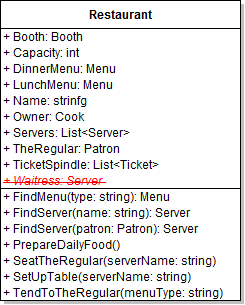
Now that the restaurant has a list for servers, it no longer needs the Waitress field. In this task, you will remove the Waitress field from the Restaurant class. You will check your work by ensuring that the solution builds without compiler errors or warnings.
- Remove the Waitress field from the Restaurant class, as shown in the class diagram below.
- Check your work: Build the solution and ensure that the code compiles without errors or warnings.
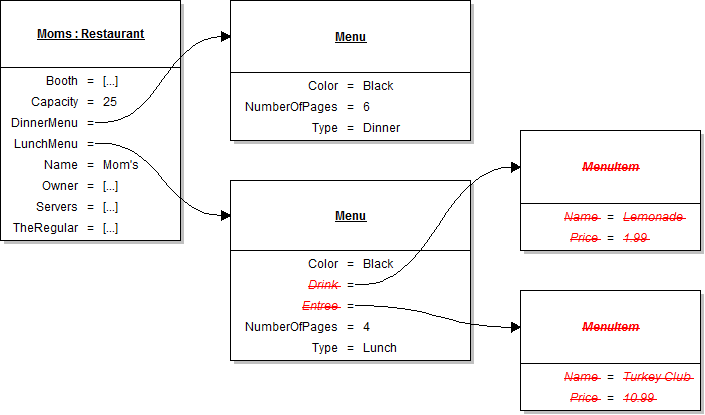
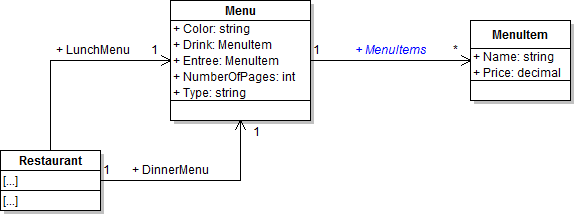
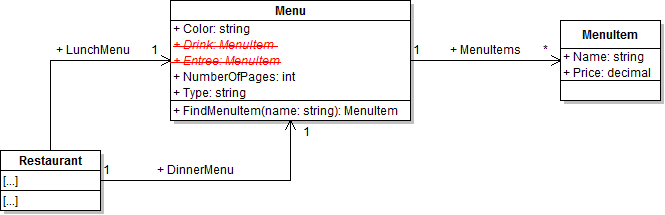
Menus typically have multiple items from which patrons can choose rather than a single drink item and a single entree item. In this task, you will define and instantiate a list of menu items on the Menu class and add a few items to the list. You will check your work by setting a breakpoint, stepping through the code, and ensuring that the objects are instantiated correctly and that their field values are set correctly.
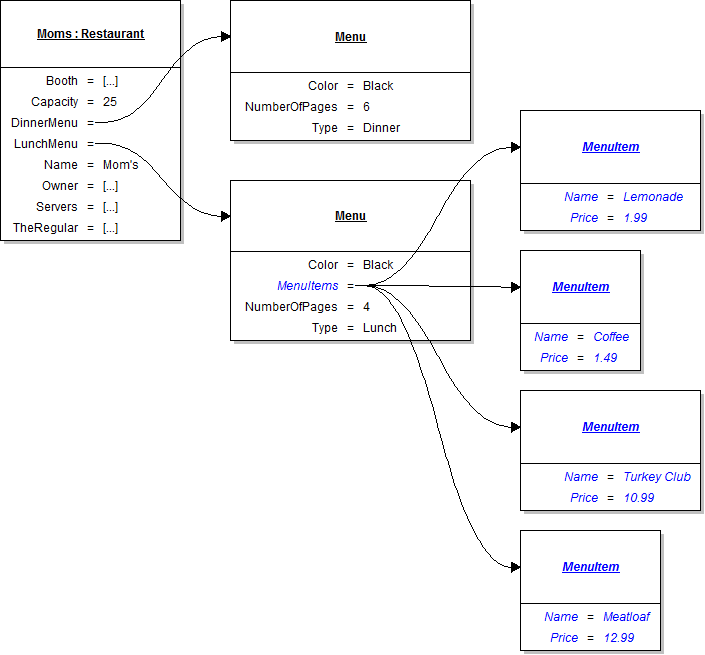
- In the newRestaurantButton_Click, remove the lines of code that instantiate the lunch menu's Drink and Entree fields and set their fields, as shown in the object diagram below.
- Define the MenuItems field as a list on the Menu class, as shown in the class diagram below.
- In the newRestaurantButton_Click, instantiate the lunch menu's MenuItems field to a new list. Put this line of code immediately below the line that sets the lunch menu's color.
- Underneath the code that sets the lunch menu's fields, instantiate each of the menu items and add them to the menu's list of menu items. Set their field values as specified in the object diagram below.
- Ensure that all code is StyleCop compliant.
- Check your work:
- Set a breakpoint in the newRestaurantButton_Click on the line that instantiates the lunch menu's MenuItems list.
- Start the application.
- Click the New restaurant button.
- Press F10 to step over the line of code that instantiates the MenuItems list. Ensure that the list is instantiated correctly.
- Press F10 to step over the code that instantiates the menu items and adds them to the list. Ensure that each item is instantiated, their field values are set, and they are added to the list correctly.
The menu needs a way for other objects to find a menu item by its name. In this task, you will write and call a method for finding menu items by name. You will check your work by setting a breakpoint, stepping through the loop, and ensuring that the correct object is found and returned.
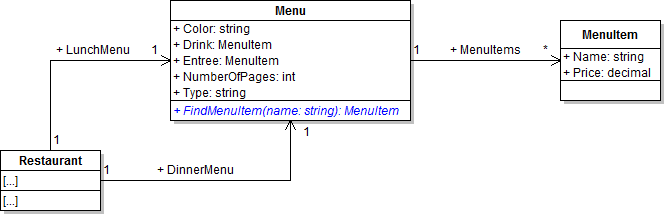
- Define the FindMenuItem method on the Menu class, as shown in the class diagram below.
- In the method, define a return variable of type MenuItem. Then, use a control-break loop to loop through the list of menu items and check each item to see if its name matches the passed-in name. If the item matches, set the return variable to the current item and break out of the loop. Then return the found menu item.
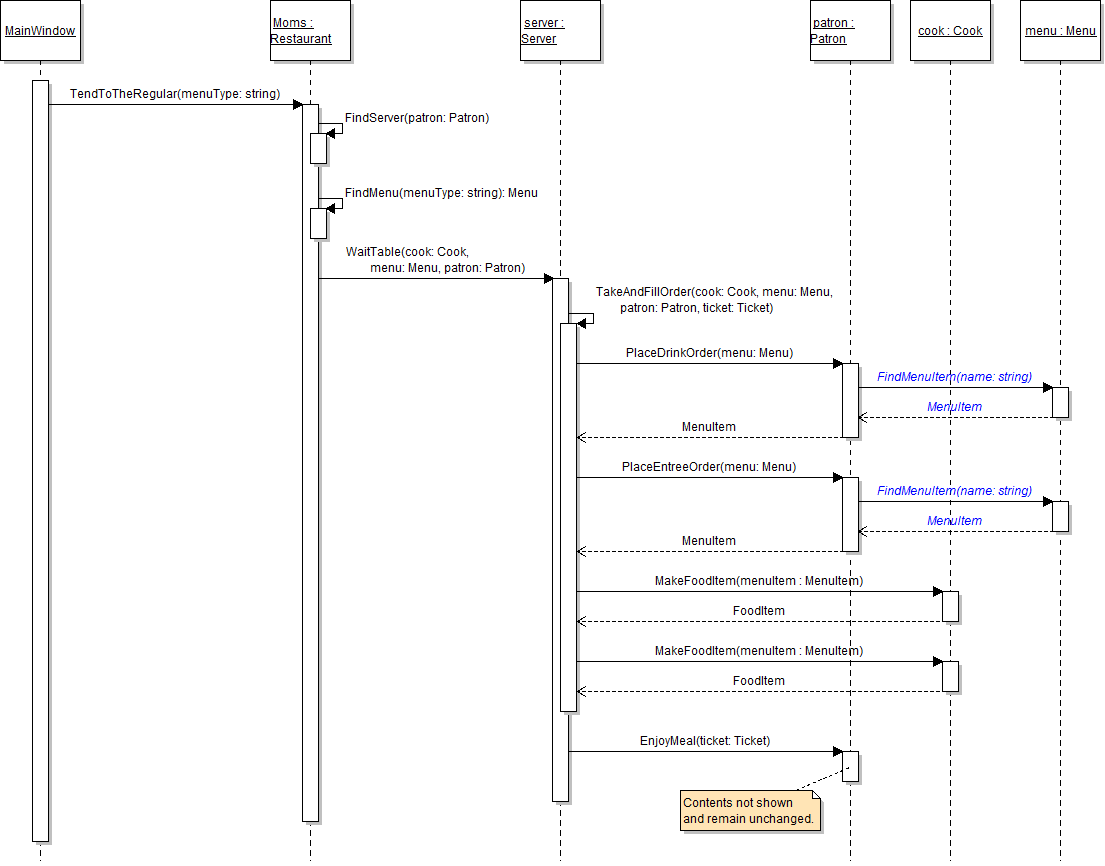
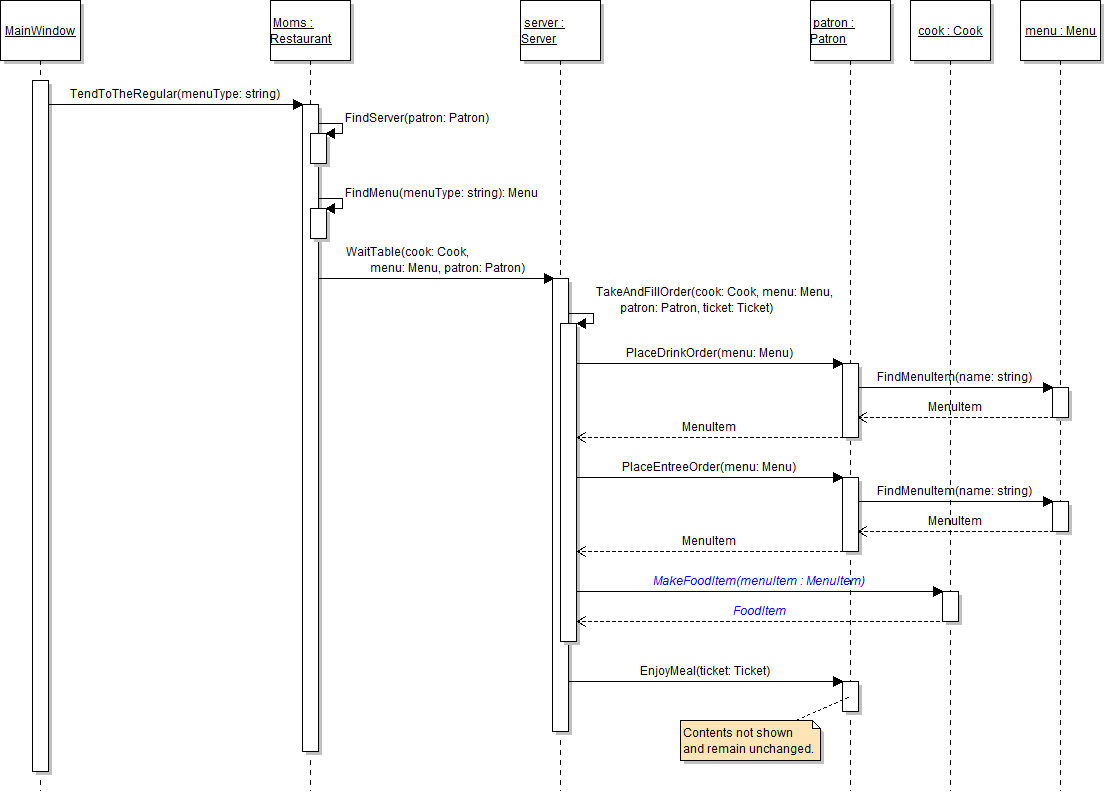
- In the patron's PlaceDrinkOrder method, call the menu's FindMenuItem method, as shown in the sequence diagram below. Pass the patron's favorite drink name as the parameter. Return the object returned from the FindMenuItem method.
- In the patron's PlaceEntreeOrder method, call the menu's FindMenuItem method, as shown in the sequence diagram above. Pass the patron's favorite meal name as the parameter. Return the object returned from the FindMenuItem method.
- Ensure that all code is StyleCop compliant.
- Check your work:
- Set a breakpoint in the patron's PlaceDrinkOrder method on the line that calls the FindMenuItem method.
- Start the application.
- Click the New restaurant button. Then click the Heidi, seat the regular button. Then click the Serve lunch to the regular button.
- Press F11 to step into the FindMenuItem method. Ensure that the value of the name parameter is "Lemonade".
- Press F10 to step through the foreach loop. The first menu item is lemonade, so the boolean expression should evaluate to true and the lemonade menu item should be returned.
- Press F10 to return to the TakeAndFillOrder method. Press F11 to step into the PlaceEntreeOrder method and then into the FindMenuItem method. Ensure that the value of the name parameter is "Meatloaf".
- Press F10 to step through the foreach loop. The meatloaf is the fourth item in the list, so the you should step through the loop four times before the correct item is matched and returned.
- Press F10 to return to the TakeAndFillOrder method. Ensure that the ticket's DrinkMenuItem field contains the lemonade object. Ensure that the ticket's EntreeMenuItem field contains the meatloaf object.
Now that the menu has a list for items, it no longer needs the Drink and Entree fields. In this task, you will remove the Drink and Entree fields from the Menu class. You will check your work by ensuring that the solution builds without compiler errors or warnings.
- Remove the Drink and Entree fields from the Menu class, as shown in the class diagram below.
- Check your work: Build the solution and ensure that the code compiles without errors or warnings.
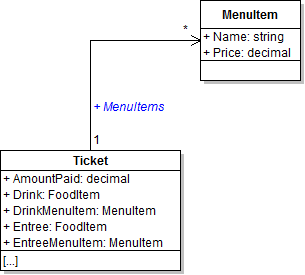
The ticket should have a list of menu items to keep track of everything that a patron orders rather than individual drinks and entrees. In this task, you will add a list of menu items to the Ticket class and add the patron's ordered items to the list. You will check your work by setting a breakpoint, stepping through the code, and ensuring that the list is instantiated correctly and the menu items are added to the list correctly.
- Define the MenuItems field as a list on the Ticket class, as shown in the class diagram below.
- In the server's WaitTable method, instantiate the MenuItems list of the ticket variable after instantiating the ticket.
- Add the patron's drink order to the ticket's list.
- In the server's TakeAndFillOrder method, store the object returned from the PlaceDrinkOrder method in a local variable called menuItem instead of the ticket's DrinkMenuItem field.
- Then, check if the menuItem variable is not null. If so, add the item to the ticket's MenuItems list. If not, do nothing.
- Add the patron's meal order to the ticket's list.
- In the server's TakeAndFillOrder method, store the object returned from the PlaceEntreeOrder method in the menuItem variable instead of the ticket's EntreeMenuItem field.
- Then, check if the menuItem variable is not null. If so, add the item to the ticket's MenuItems list. If not, do nothing.
- Ensure that all code is StyleCop compliant.
- Check your work:
- Set a breakpoint in the server's WaitTable method on the line that instantiates the ticket's MenuItems field.
- Start the application.
- Click the New restaurant button. Then click the Heidi, seat the regular button. Then click the Serve lunch to the regular button.
- Press F10 to step over the line of code that instantiates the ticket's MenuItems list. Ensure that the list is instantiated correctly.
- Press F11 to step into the TakeAndFillOrder method. Press F10 to step over the call to the PlaceDrinkOrder method. Ensure that the menuItem variable contains the lemonade object.
- Press F10 to step into the if statement. The menuItem variable should be instantiated, so the boolean expression should evaluate to true and the item should be added to the list.
- Press F10 to step over the call to the PlaceEntreeOrder method. Ensure that the menuItem variable contains the meatloaf object.
- Press F10 to step into the second if statement. The menuItem variable should be instantiated, so the boolean expression should evaluate to true and the meatloaf item should be added to the list. Ensure that the MenuItems list has two items in it.
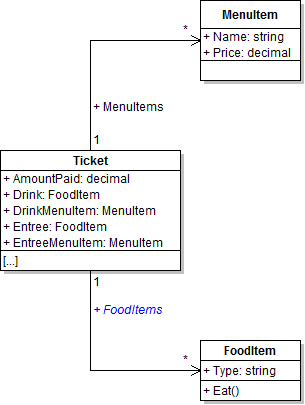
The ticket should have a list of food items in addition to a list of menu items. In this task, you will add a list of food items to the Ticket class and add the cooked food items to the list. You will check your work by setting a breakpoint, stepping through the code, and ensuring that the list is instantiated correctly and the food items are added to the list correctly.
- Define the FoodItems field as a list on the Ticket class, as shown in the class diagram below.
- In the server's WaitTable method, instantiate the FoodItems list of the ticket variable after instantiating the ticket.
- Make a food item for each menu item in the ticket's list.
- Remove the existing two calls to the cook's MakeFoodItem method, as shown in the sequence diagram below.
- In the server's TakeAndFillOrder method after adding the patron's ordered menu items to the list, define a foreach loop to loop through the ticket's MenuItems list.
- In the loop, call the cook's MakeFoodItem method. Pass in the current menu item. Store the result in a local variable called foodItem. Only one call to the cook's MakeFoodItem should exist, as shown in the sequence diagram below.
- After calling the MakeFoodItem method, add the food item to the ticket's FoodItems list.
- Ensure that all code is StyleCop compliant.
- Check your work:
- Set a breakpoint in the server's WaitTable method on the line that instantiates the ticket's FoodItems field.
- Start the application.
- Click the New restaurant button. Then click the Heidi, seat the regular button. Then click the Serve lunch to the regular button.
- Press F10 to step over the line of code that instantiates the ticket's FoodItems list. Ensure that the list is instantiated correctly.
- Press F11 to step into the TakeAndFillOrder method.
- Press F10 to step through the foreach loop. The first menu item is a lemonade, so a food item of type lemonade should be created and added to the list. The second menu item is meatloaf, so a food item of type meatloaf should be created and added to the list. Ensure that the MenuItems list has two items in it.
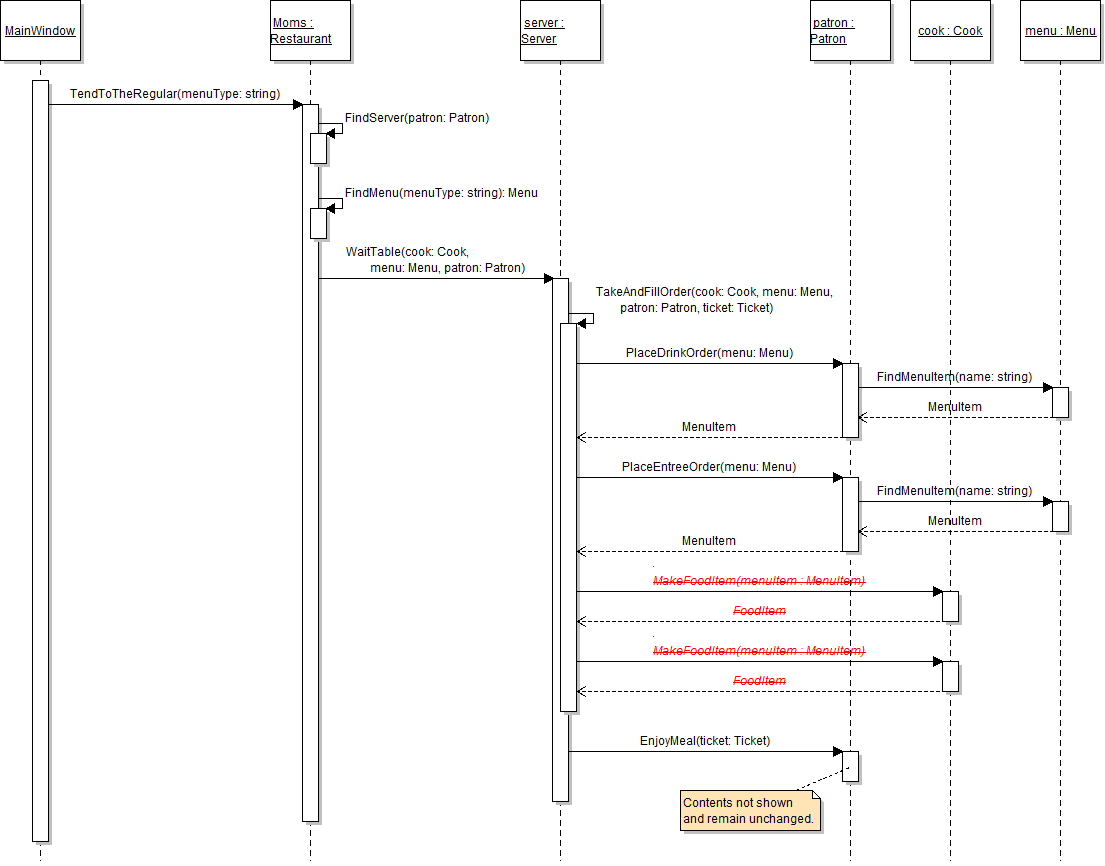
Now that the ticket has a list of food items, the patron needs to loop through that list in order to eat all of the items. In this task, you will loop through the ticket's FoodItems list in order to have the patron consume each item. You will check your work by setting a breakpoint, stepping through the code, and ensuring that each food item is consumed.
- In the patron's EnjoyMeal method, remove the existing calls to the Consume method, as shown in the sequence diagram below.
- After calling the booth's AcceptTicket method, define a foreach loop to loop through the ticket's FoodItems list. In the loop, call the Consume method and pass in the current food item. There should now be only one call to the Consume method.
- Check your work:
- Set a breakpoint in the patron's EnjoyMeal method on the line that defines the foreach loop.
- Start the application.
- Click the New restaurant button. Then click the Heidi, seat the regular button. Then click the Serve lunch to the regular button.
- Press F10 to step through the foreach loop. The loop should run twice, once for the lemonade food item and once for the meatloaf food item.
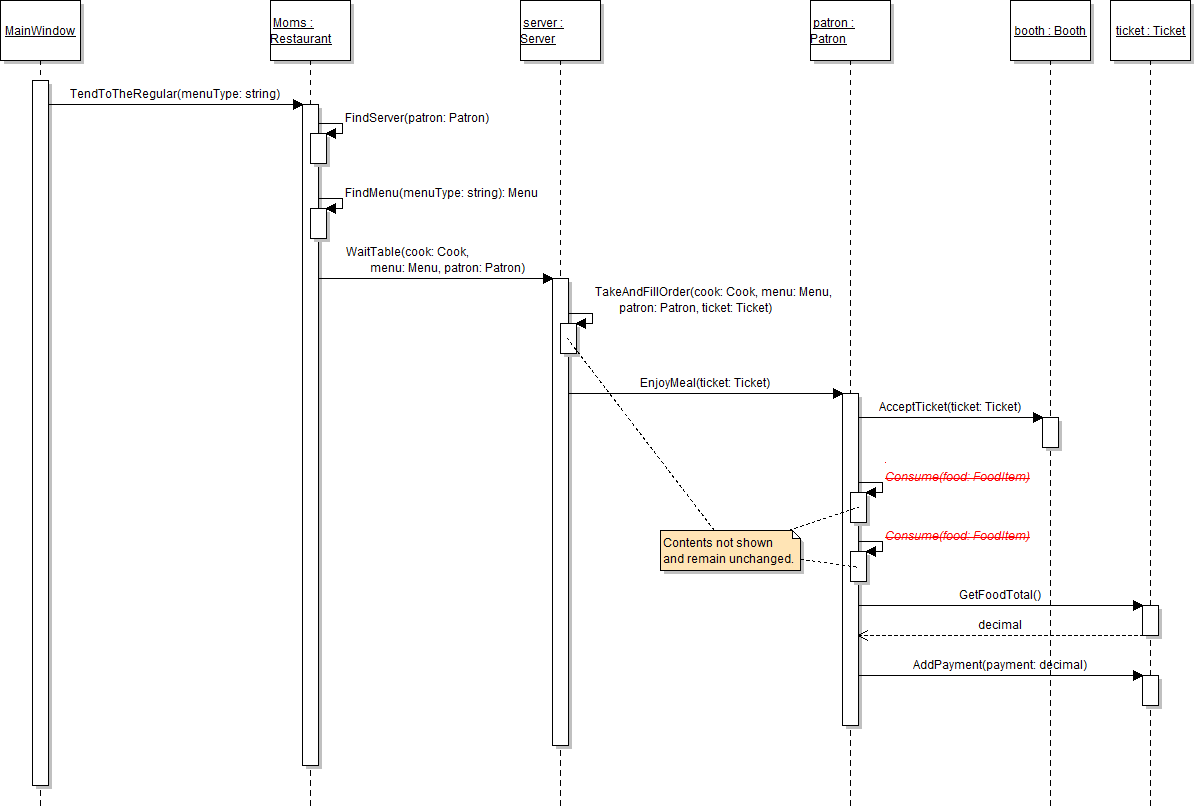
4.2 Restaurant - sequence diagram for adding single call to consume
The ticket has to calculate its food total differently now that it has a list of items rather than individual drink and meal fields. In this task, you will refactor the GetFoodTotal method to use an accumulator loop to total the prices of all items in the list. You will check your work by setting a breakpoint, stepping through the code, and ensuring that the food total is calculated correctly.
- In the ticket's GetFoodTotal method, use an accumulator loop to add up the prices of all of the items in the ticket's MenuItems list. Then return the accumulated total.
- Check your work:
- Set a breakpoint in the patron's EnjoyMeal method on the line that calls the ticket's GetFoodTotal method.
- Start the application.
- Click the New restaurant button. Then click the Heidi, seat the regular button. Then click the Serve lunch to the regular button.
- Press F11 to step into the GetFoodTotal method.
- Press F10 to step through the foreach loop. The loop should run twice because there are two menu items. Ensure that the value of the result variable is 14.98 after the loop has finished.
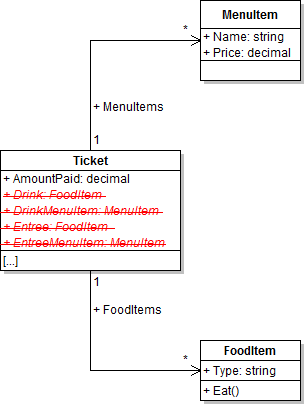
Now that the ticket has lists for menu items and food items, it no longer needs its individual menu item and food item fields. In this task, you will remove the Drink, DrinkMenuItem, Entree, and EntreeMenuItem fields from the Ticket class. You will check your work by ensuring that the solution builds without compiler errors or warnings.
- Remove the Drink, DrinkMenuItem, Entree, and EntreeMenuItem fields from the Ticket class, as shown in the class diagram below.
- Check your work: Build the solution and ensure that the code compiles without errors or warnings.
- Build the application and ensure that it has no compiler errors or warnings.
- Ensure that all code is StyleCop compliant.
- Browse to the project folder and add it to a newly created zipped archive.
- Submit the zipped project folder to the correct assignment in Blackboard.