The server should only seat a patron if the booth is not already occupied by someone else. In this task, you will use a boolean expression in an if statement to determine whether or not to seat the regular. You will check your work by setting a breakpoint, stepping through the code, and ensuring that the boolean expression evaluates correctly.
- In the server's SeatPatron method, first check if the given booth is not occupied (i.e. that the IsOccupied field is false). Call the Sit, GiveCoat and HangCoat methods only if the booth is not occupied.
- Check your work:
- Set a breakpoint in the server's SeatPatron method on the line that defines the if statement.
- Start the application.
- Click the New restaurant button. Then click the Heidi, seat the regular button.
- Press F10 to step over the if statement. The booth should not be occupied, so the boolean expression should evaluate to true and the methods should be called.
- Click Continue in the top toolbar. Then click the Heidi, seat the regular button again.
- Press F10 to step over the if statement. The booth is now occupied by the regular, so the boolean expression should evaluate to false and the methods should not be called.
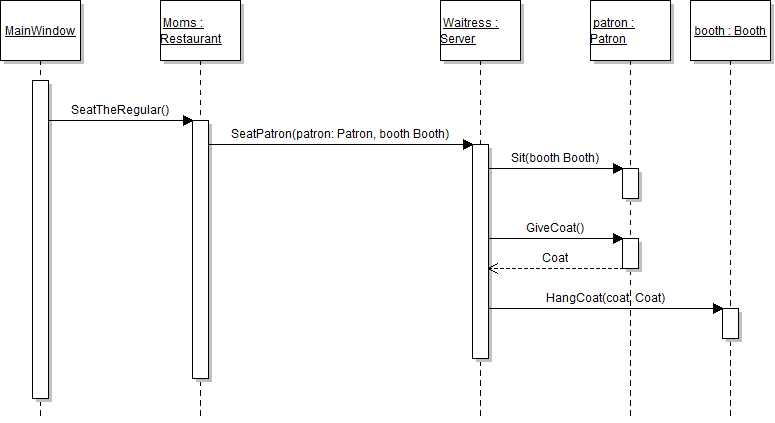
The restaurant needs a way to determine which menu the server should give the patron to order from. In this task, you will define and call a method that returns the appropriate menu based on the value of a parameter. You will check your work by setting a breakpoint, stepping through the method calls, and ensuring that each method is called correctly, parameters are passed correctly, and the correct menu is returned.
- Add a method for finding the correct menu.
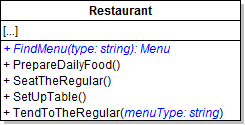
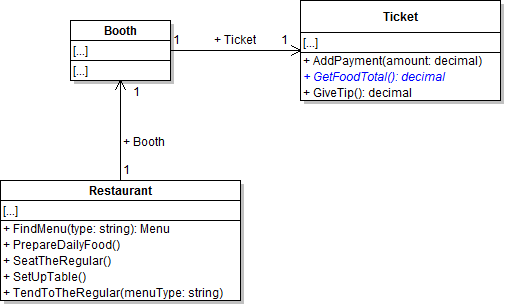
- Define the FindMenu method on the Restaurant class as shown in the class diagram below.
- In the FindMenu method, first define a variable of type Menu. Then, check if the menuType parameter is equal to the string "Lunch". If so, set the variable to the restaurant's LunchMenu field. Otherwise, set the variable to the restaurant's DinnerMenu field. Then return the menu variable.
- Add the menuType parameter to the TendToTheRegular method as shown in the class diagram above.
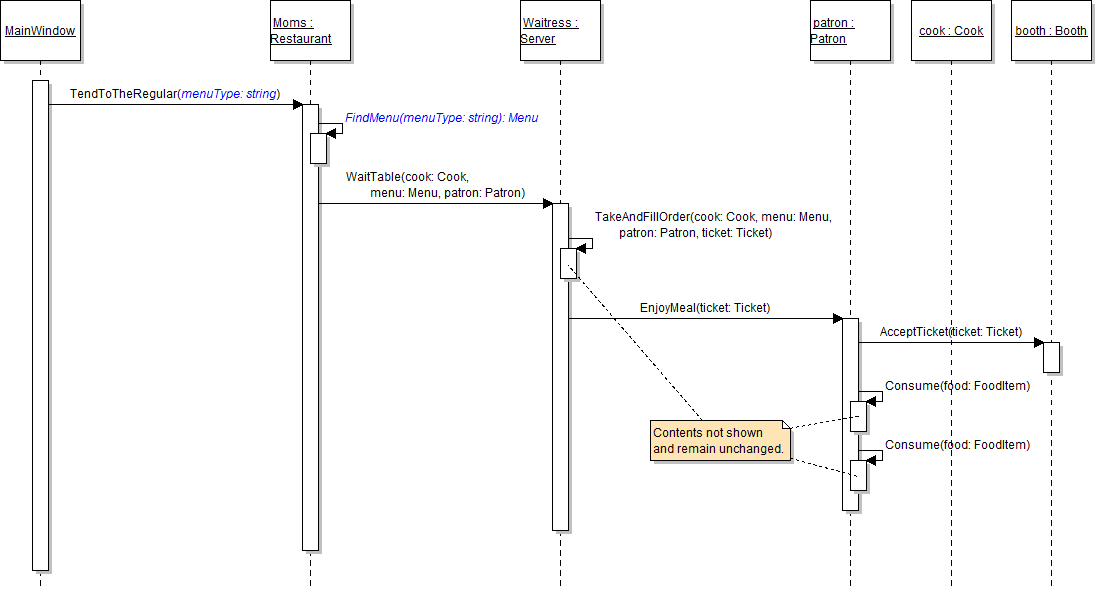
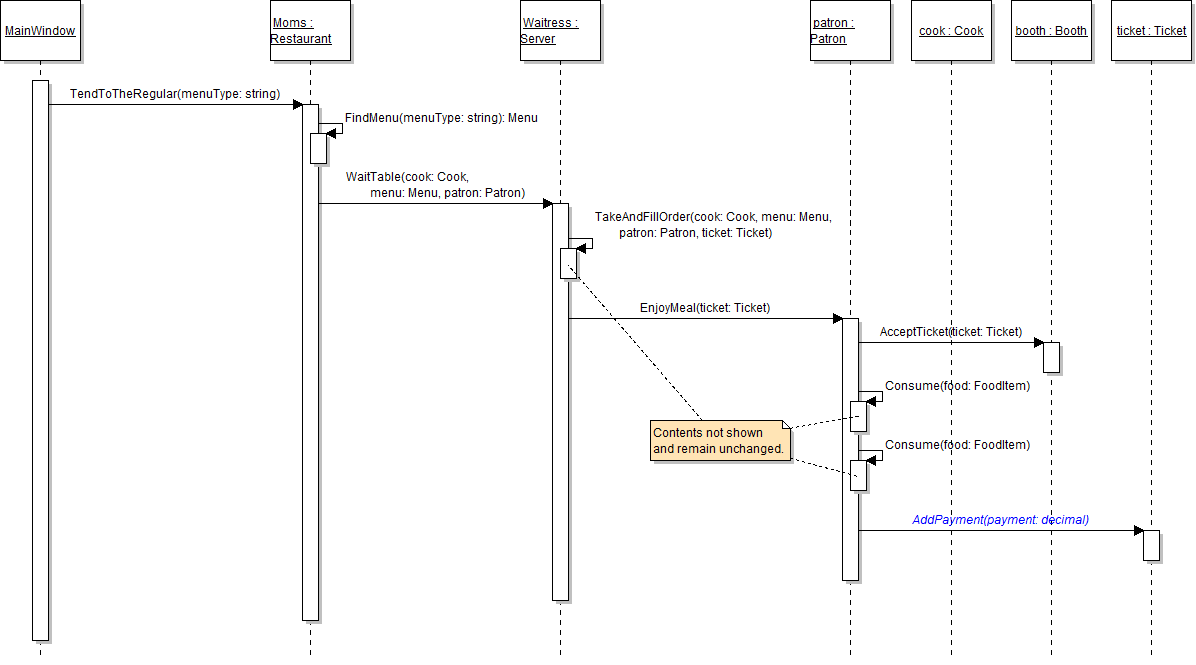
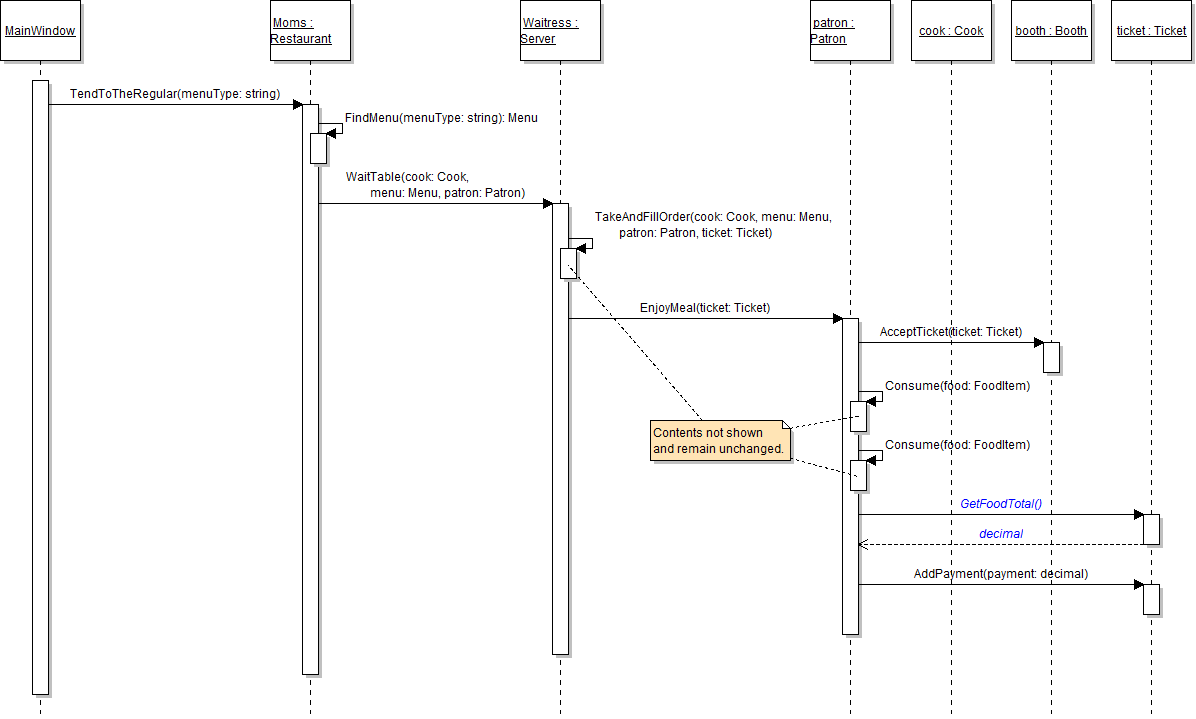
- In the serveLunchToTheRegularButton_Click in MainWindow.xaml.cs, pass the string "Lunch" to the TendToTheRegular method. The updated method call is shown in the sequence diagram below.
- In the TendToTheRegular method, call the FindMenu method as shown in the sequence diagram above. Pass in the menuType parameter. Store the result in a local variable called menu. Then pass the local menu variable to the WaitTable method instead of the LunchMenu field.
- Surround the call to FindServer and WaitTable with a conditional statment checking whether or not the regular patron's Booth field is null.
- Ensure that all code is StyleCop compliant.
- Check your work:
- Set a breakpoint in the serveLunchToTheRegularButton_Click on the line that calls the TendToTheRegular method.
- Start the application.
- Click the New restaurant button. Then click the Serve lunch to the regular button.
- Click the New restaurant button. Then click the Heidi, seat the regular button. Then click the Serve lunch to the regular button.
- Press F11 to step into the TendToTheRegular method. Ensure that the value of the menuType parameter is "Lunch".
- Press F11 to step into the FindMenu method. Ensure that the value of the menuType parameter is "Lunch".
- Press F10 to step through the FindMenu method. The boolean expression checking the value of the menuType parameter should evaluate to true, and the lunch menu should be returned.
- Press F10 to return to the TendToTheRegular method and over the call to the FindMenu method. Ensure that the menu variable contains the restaurant's lunch menu object.
- Press F11 to step into the WaitTable method. Ensure that the menu parameter contains the restaurant's lunch menu object.
Note: The regular patron was not seated prior to him being served. This throws a null reference exception due to the patron's booth being null.
The restaurant's cook needs to keep track of how many items he has cooked. In this task, you will increment the number of items cooked each time the cook makes a food item. You will check your work by setting a breakpoint, stepping through the code, and ensuring that the number of items cooked increments correctly.
- In the cook's MakeFoodItem method, increment the NumberOfMenuItemsCooked field by one just before returning the food item.
- Check your work:
- Set a breakpoint in the server's TakeAndFillOrder method on the first call to the cook's MakeFoodItem method.
- Start the application.
- Click the New restaurant button. Then click the Heidi, seat the regular button. Then click the Serve lunch to the regular button.
- Press F11 to step into the MakeFoodItem method. Inspect the value of the NumberOfMenuItemsCooked field and ensure that it is 25.
- Press F10 to step over the line that increments the NumberOfMenuItemsCooked field. Inspect the value of the field and ensure that it is 26.
- Press F10 to return to the TakeAndFillOrder method. Press F11 to step into the second call to the MakeFoodItem method. Press F10 to step over the line that increments the NumberOfMenuItemsCooked field. Inspect the value of the field and ensure that it is 27.
The server should only tell the cook to make the food items if the patron has ordered something on the menu. In this task, you will use if statements to determine if the ticket's menu items exist before calling the cook's MakeFoodItem method. You will check your work by setting a breakpoint, stepping through the code, and ensuring that the boolean expressions in the if statements evaluate correctly.
- In the server's TakeAndFillOrder method, check if the ticket's DrinkMenuItem field is not null before having the cook make the drink. If the field is null, do nothing (i.e. do not add an else statement).
- In the server's TakeAndFillOrder method, check if the ticket's EntreeMenuItem field is not null before having the cook make the entree. If the field is null, do nothing.
- Check your work:
- Set a breakpoint in the server's TakeAndFillOrder method on the line that checks if the DrinkMenuItem field is not null.
- Start the application.
- Click the New restaurant button. Then click the Heidi, seat the regular button. Then click the Serve lunch to the regular button.
- Press F10 to step over the if statement. The drink menu item should exist, so the boolean expression should evaluate to true and the cook should make the drink.
- Press F10 to step over the second if statement. The entree menu item should exist, so the boolean expression should evaluate to true and the cook should make the entree.
The patron needs to add up the total of the food he ordered so that he knows how much he owes. In this task, you will use mathematic operators to add up the prices of the ticket's items. You will check your work by setting a breakpoint, stepping through the code, and ensuring that the food total is added correctly.
- In the patron's EnjoyMeal method, determine the ticket total by adding the price of the DrinkMenuItem and the price of the EntreeMenuItem. Store the result in a local variable called foodTotal. Do this after the two calls to the Consume method.
- After determining the food total, determine the tip amount by rounding 20 percent of the food total to two decimal places. Store the result in a local variable called tip.
- Check your work:
- Set a breakpoint in the patron's EnjoyMeal method on the line that calculates the ticket total.
- Start the application.
- Click the New restaurant button. Then click the Heidi, seat the regular button. Then click the Serve lunch to the regular button.
- Inspect the prices of the ticket's DrinkMenuItem and EntreeMenuItem fields. They should be set to 1.99 and 10.99, respectively.
- Press F10 to step over the line of code that calculates the food total. The value of the foodTotal variable should be 12.98.
- Press F10 to step over the line of code that calculates the tip. The value of the tip variable should be 2.60.
The patron needs a way to pay his ticket total after eating his meal. In this task, you will define and call a method for adding the patron's payment to the ticket's total amount paid. You will check your work by setting a breakpoint, stepping into the method call, and ensuring that the correct amount is added to the ticket's AmountPaid field.
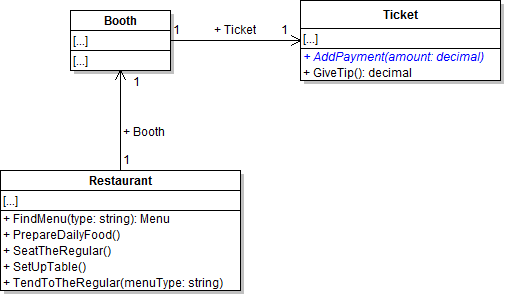
- Define the AddPayment method on the Ticket class as shown in the class diagram below.
- In the AddPayment method, add the value of the amount parameter to the AmountPaid field.
- In the patron's EnjoyMeal method, call the ticket's AddPayment method as shown in the sequence diagram below. Pass the foodTotal plus the tip as the parameter.
- Ensure that all code is StyleCop compliant.
- Check your work:
- Set a breakpoint in the patron's EnjoyMeal method on the line that calls the ticket's AddPayment method.
- Start the application.
- Click the New restaurant button. Then click the Heidi, seat the regular button. Then click the Serve lunch to the regular button.
- Press F11 to step into the AddPayment method. Ensure the value of the amount parameter is 15.58. Press F10 to step over the code that adds the amount to the AmountPaid field. Ensure the AmountPaid field is 15.58.
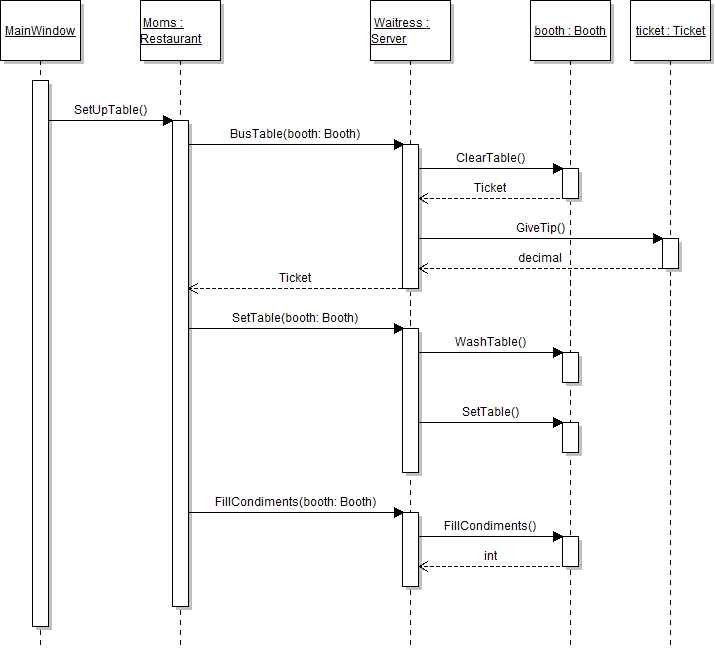
The server needs to know the amount of the tip left when she is setting up a table after a patron has paid and left. In this task, you will calculate the amount of the tip left with the ticket. You will check your work by setting a breakpoint, stepping through the method call, and ensuring that the tip amount is calculated correctly.
- In the ticket's GiveTip method, return the value of the amount paid minus the food total (the price of the drink menu item plus the price of the entree menu item). Subtracting the food total from the total amount paid will leave the amount of the tip.
- Check your work:
- Set a breakpoint in the server's BusTable method on the line that calls the GiveTip method.
- Start the application.
- Click the New restaurant button. Then click the Heidi, seat the regular button. Then click the Serve lunch to the regular button. Then click the Heidi, set up table button.
- Press F10 to step over the call to the GiveTip method. Ensure that the value of the cash variable is 2.60.
Tip: If the value of the cash variable is different, ensure your order of mathematic operations is correct in the GiveTip method.
The ticket's food total is calculated in two separate places, and the same code is used in both places. In this task, you will define a method, move the code that calculates the food total to it, and then call that method instead of calculating the total each time it's needed. This will reduce the amount of redundant code in the application. You will check your work by setting a breakpoint, stepping through the code, and ensuring that the food total and tip are still calculated correctly.
- Define the GetFoodTotal method on the Ticket class as shown in the class diagram below.
- In the method, return the food total as calculated both in the patron's EnjoyMeal method and in the ticket's GiveTip method (i.e. the price of the drink menu item plus the price of the entree menu item).
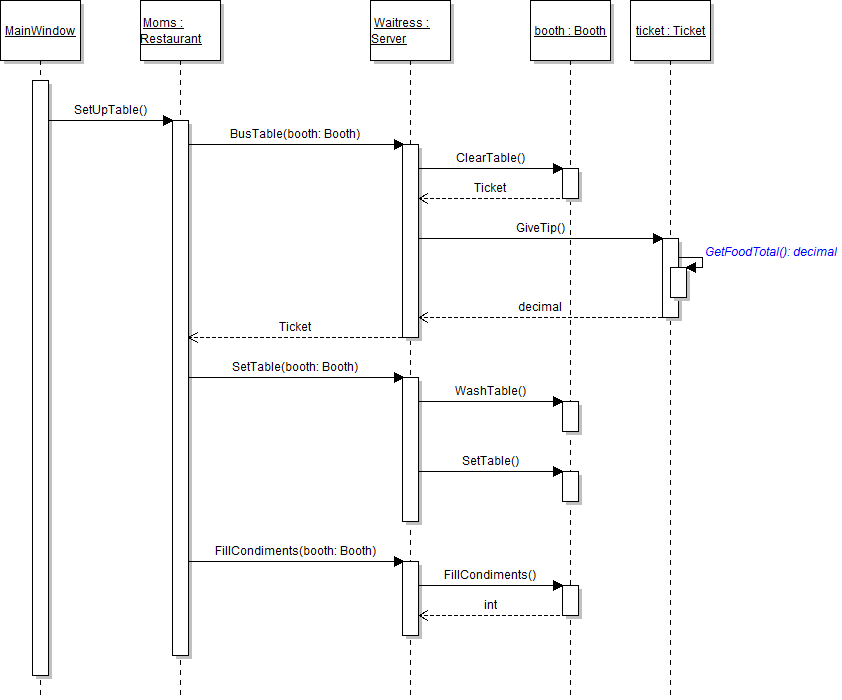
- In the ticket's GiveTip method, call the GetFoodTotal method, as shown in the sequence diagram below, instead of adding the prices of the two menu items together.
- Check your work:
- Set a breakpoint in the server's BusTable method on the line that calls the GiveTip method.
- Start the application.
- Click the New restaurant button. Then click the Heidi, seat the regular button. Then click the Serve lunch to the regular button. Then click the Heidi, set up table button.
- Press F10 to step over the call to the GiveTip method. Ensure that the value of the cash variable is 2.60.
- In the patron's EnjoyMeal method, call the GetFoodTotal method, as shown in the sequence diagram below, instead of adding the prices of the two menu items together. Store the result in the existing foodTotal variable.
- Ensure that all code is StyleCop compliant.
- Check your work:
- Set a breakpoint in the patron's EnjoyMeal method on the line that calls the GetFoodTotal method.
- Start the application.
- Click the New restaurant button. Then click the Heidi, seat the regular button. Then click the Serve lunch to the regular button.
- Press F10 to step over the call to the GetFoodTotal method. The value of the foodTotal varible should be 12.98.
The server wants to keep track of the total amount she has received in tips. In this task, you will define a field for storing the total cash amount and add the tip amount to the cash field each time the server busses a table. You will check your work by setting a breakpoint, stepping through the code, and ensuring that the tip amount is added to the cash field correctly.
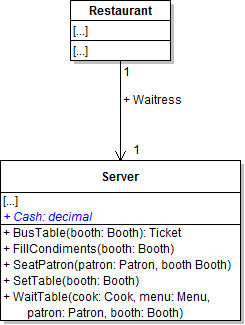
- Define the Cash field on the Server class as shown in the class diagram below.
- In the server's BusTable method, check if the ticket is not null after clearing the table. If so, add the result of calling the GiveTip method to the Cash field instead of storing it in a local variable. If not, do nothing.
- Ensure that all code is StyleCop compliant.
- Check your work:
- Set a breakpoint in the server's BusTable method on the line that define the if statement.
- Start the application.
- Click the New restaurant button. Then click the Heidi, seat the regular button. Then click the Serve lunch to the regular button. Then click the Heidi, set up table button.
- Press F10 to step into the if statement. The patron left the server a ticket, so the boolean expression should evaluate to true.
- Press F10 to step over the call to the GiveTip method. The value of the Cash field should go from 0 to 2.60.
- Click Continue. Then click the Heidi, seat the regular button. Then click the Serve lunch to the regular button.
- Press F10 to step over the line that calls the GiveTip method. The value of the Cash field should go from 2.60 to 5.20.
The server should only wash and set a booth's table if the booth is not set. In this task, you will use an if statement to check that a booth is not set before washing and setting its table. You will also keep track of the number of tables that a server has set. You will check your work by setting a breakpoint, stepping through the code, and ensuring that the boolean expression is evaluated correctly and that the number of tables is updated correctly.
- In the server's SetTable method, first check if the booth is not set (i.e. that its IsSet field is equal to false). If it is not set, then call the WashTable and SetTable methods.
- After the if block, increment the NumberOfTablesSet field by one.
- Check your work:
- Set a breakpoint in the server's SetTable method on the line that defines the if statement.
- Start the application.
- Click the New restaurant button. Then click the Heidi, seat the regular button. Then click the Serve lunch to the regular button. Then click the Heidi, set up table button.
- Press F10 to step into the if statement. The booth should not be set, so the boolean expression should evaluate to true and the wash and set table methods should be called.
- Inspect the value of the NumberOfTablesSet field. It should be 13. Press F10 to step over the line that increments the field. The value of the field should now be 14.
The server needs to take the ticket from the booth while she is clearing the table and setting it up for another patron to use. In this task, you will set the booth's Ticket field to null after the server clears the table. You will check your work by setting a breakpoint, stepping through the code, and ensuring that the fields and local variables are instantiated or not instantiated correctly.
- In the booth's ClearTable method, first store the Ticket field in a local variable. Then, set the Ticket field to null. Then return the local variable.
- Check your work:
- Set a breakpoint in the server's BusTable method on the line that calls the ClearTable method.
- Start the application.
- Click the New restaurant button. Then click the Heidi, set up table button.
- Inspect the booth's Ticket field to ensure that it is instantiated.
- Press F10 to step over the call to the ClearTable method. Inspect the booth's Ticket field to ensure that it is now null. Inspect the ticket variable to ensure that it now holds the ticket object that used to be in the booth's Ticket field.
Note: This functionality represents the server taking the ticket from the booth while setting up the table for another patron.
The server needs to keep track of how many condiments she has filled while setting tables. In this task, you will increment the value of the field by 4 for each time that the server fills ketchup, mustard, salt, and pepper. You will check your work by setting a breakpoint, stepping through the code, and ensuring that the field value is updated correctly.
- In the booth's FillCondiments method, define a local variable called numberFilled and set it to 0. Then increment the variable four times, once each to represent ketchup, mustard, salt, and pepper. Then return the variable.
- In the server's FillCondiments method, add the value of the numberFilled variable to the NumberOfCondimentsFilled field.
- Check your work:
- Set a breakpoint in the server's FillCondiments method on the line that calls the booth's FillCondiments method.
- Start the application.
- Click the New restaurant button. Then click the Heidi, seat the regular button. Then click the Serve lunch to the regular button. Then click the Heidi, set up table button.
- Press F10 to step over the call to the booth's FillCondiments method. Ensure that the value of the numberFilled variable is 4.
- Inspect the NumberOfCondimentsFilled field to ensure its value is 63. Press F10 to step over the line of code that adds the number filled to the field. Ensure that the value of the field is now 67.
int numberFilled = 0;

// Fill ketchup
numberFilled++;

// Fill mustard
numberFilled++;

// Fill salt
numberFilled++;

// Fill pepper
numberFilled++;

return numberFilled;
The cook needs to keep track of how many breadsticks have been made in the bread oven. In this task, you will update the number of breadsticks baked each time breadsticks are made. You will check your work by setting a breakpoint, stepping through the code, and ensuring that the field values are updated correctly.
- In the oven's BakeBreadsticks method, add the breadstick batch size to the number of breadsticks baked.
- After increasing the number of breadsticks baked, return the value of the breadstick batch size minus 2, which represents two breadsticks getting burned.
- Check your work:
- Set a breakpoint in the cook's MakeBreadsticks method on the line that calls the BakeBreadsticks method.
- Start the application.
- Click the New restaurant button. Then click the Prepare daily food button.
- Press F11 to step into the BakeBreadsticks method. Inspect the NumberOfBreadsticksBaked field to ensure that its value is 255. Press F10 to step over the line that adds to the field. The new value should be 275.
- Press F10 to return to the MakeBreadsticks method and over the call to the BakeBreadsticks method. The value of the breadsticksMade variable should be 18.
The breadbasket needs to figure out how many breadsticks needs before adding some to its count so that the count doesn't become larger than the capacity. In this task, you will add logic to the AddBreadsticks method to determine the number of breadsticks needed before adding the correct amount to the basket. You will check your work by setting a breakpoint, stepping through the code, and ensuring that the number needed is calculated correctly and that the breadstick count is updated correctly.
- In the basket's AddBreadsticks method, first calculate the number of breadsticks needed by subtracting the breadstick count from the breadstick capacity. Store the result in a variable called availableCapacity.
- Then, find the smaller value of the numberToAdd parameter and the availableCapacity variable. Use the Math.Min method and store the result in a variable called availableBreadsticks, as shown in the code below.
- Then, add the value of the availableBreadsticks variable to the breadstick count.
- Then, return the number of leftover breadsticks by subtracting the value of the availableBreadsticks variable from the value of the numberToAdd parameter.
- Check your work:
- Set a breakpoint in the cook's MakeBreadsticks method on the line that calls the AddBreadsticks method.
- Start the application.
- Click the New restaurant button. Then click the Prepare daily food button.
- Press F11 to step into the AddBreadsticks method. The value of the numberToAdd parameter should be 18.
- Press F10 to step over the line that determines the number of breadsticks needed. The value of the numberNeeded variable should be 27.
- Press F10 to step into the if statement. Because the number needed is greater than the number available to add, the boolean expression should evaluate to true, and the numberNeeded variable should be set to 18 (the value of the numberToAdd parameter).
- Press F10 to step over the line that adds to the breadstick count. The value of the BreadstickCount field should change from 18 to 36.
- Press F10 to return to the MakeBreadsticks method and over the call to the AddBreadsticks method. The value of the leftoverBreadsticks variable should be 0.
// Determine the number of breadsticks to add to the basket
int availableBreadsticks = Math.Min(numberToAdd, availableCapacity);
The restaurant needs to keep track of how much soup is made and calculate how much is needed to fill the vat in addition to keeping track of the same information for breadsticks. In this task, you will add logic similar to that of the BakeBreadsticks and AddBreadsticks methods to the CookSoup and FillSoup methods. You will check your work by setting a breakpoint, stepping through the code, and ensuring that the amount of soup made is updated succesfully and that the soup vat is filled correctly.
- Keep track of how much soup is made.
- In the stove's CookSoup method, add the soup batch size to the amount of soup made.
- After increasing the amount of soup made, return the value of 98 percent of the soup batch size, which represents two percent of the batch boiling over.
- Calculate the amount of soup needed before adding to the vat.
- In the vat's FillSoup method, first calculate the amount of soup needed by subtracting the level from the capacity. Store the result in a variable called availableCapacity.
- Then, find the smaller value of the amountToAdd parameter and the availableCapacity variable. Use the Math.Min method and store the result in a variable called availableSoup.
- Then, add the value of the availableSoup variable to the level.
- Then, return the amount of leftover soup by subtracting the value of the availableSoup variable from the value of the amountToAdd parameter.
- Check your work:
- Set a breakpoint in the cook's MakeSoup method on the line that calls the CookSoup method.
- Start the application.
- Click the New restaurant button. Then click the Prepare daily food button.
- Press F11 to step into the CookSoup method and over the line that adds to the amount of soup made. The value of the AmountOfSoupMade field should change from 174 to 186.
- Press F10 to return to the MakeSoup method and step over the call to the CookSoup method. The value of the soupMade variable should be 11.76.
- Press F11 to step into the FillSoup method. The value of the amountToAdd parameter should be 11.76.
- Press F10 to step over the line that determines the amount of soup needed. The value of the amountNeeded variable should be 20.
- Press F10 to step into the if statement. Because the amount needed is greater than the amount available to add, the boolean expression should evaluate to true, and the amountNeeded variable should be set to 11.76 (the value of the numberToAdd parameter).
- Press F10 to step over the line that adds to the level. The value of the Level field should change from 10 to 21.76.
- Press F10 to return to the MakeSoup method and over the call to the FillSoup method. The value of the leftoverSoup variable should be 0.
Note: The body of this method is almost identical to the body of the AddBreadsticks method.
The restaurant needs to fill the bread basket. The application currently only makes one batch of breadsticks and then stops. In this task, you will restructure the code in the restaurant's PrepareDailyFood sequence so that breadsticks continue to be made until the basket is full. You will check your work by setting a breakpoint, stepping through code, and ensuring that the necessary breadsticks are made, the loop ends, and the charity takes the leftovers.
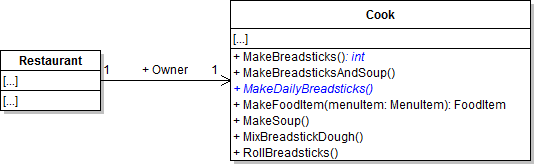
- Define a return type of int for the MakeBreadsticks method, as shown in the class diagram below. The return value represents the number of leftover breadsticks, so return the leftoverBreadsticks variable.
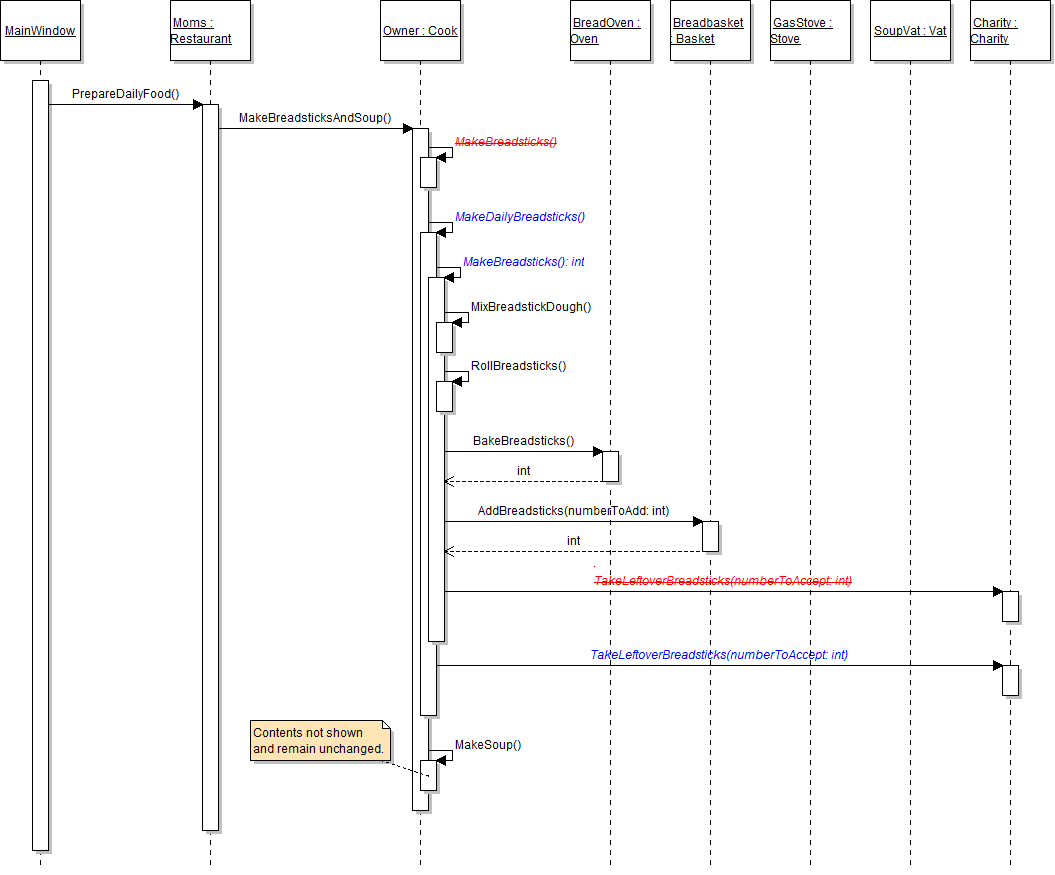
- In the MakeBreadsticks method, remove the call to the charity's TakeLeftoverBreadsticks method, as shown in the sequence diagram below.
- Create a MakeDailyBreadsticks method.
- Define the MakeDailyBreadsticks method in the Cook class, as shown in the class diagram above.
- In the cook's MakeBreadsticksAndSoup method, remove the call to the MakeBreadsticks method and instead call the MakeDailyBreadsticks method, as shown in the sequence diagram above.
- Write the code for the MakeDailyBreadsticks method.
- In the MakeDailyBreadsticks method, first define a variable called leftoverBreadsticks of type int and initialize it to 0.
- Then, define a while loop that will run until the breadbasket is full (i.e. it has reached its capacity), as shown in the code below. While loops continue to run until the boolean expression evaluates to false.
- Inside the while loop, call the MakeBreadsticks method, as shown in the sequence diagram above. Store the value returned from the method in the leftoverBreadsticks variable.
- Then, check if the value of the leftoverBreadsticks variable is greater than 0. If so, call the charity's TakeLeftoverBreadsticks method, as shown in the sequence diagram above. If not, do nothing.
- Ensure that all code is StyleCop compliant.
- Check your work:
- Set a breakpoint in the cook's MakeBreadsticksAndSoup method on the line that calls the MakeDailyBreadsticks method.
- Start the application.
- Click the New restaurant button. Then click the Prepare daily food button.
- Press F11 to step into the MakeDailyBreadsticks method. Press F10 to step into the while loop. The first time through the loop, there should be 0 leftover breadsticks and the basket should not be full.
- Press F10 to step through the while loop a second time. The second time through, there should be 9 leftover breadsticks and the basket should have reached capacity. Because the basket no longer needs breadsticks added to it, the boolean expression should evaluate to false, and the loop should end.
- Press F10 to step into the if statement. The were leftover breadsticks, so the boolean expression should evaluate to true.
while (this.Breadbasket.BreadstickCapacity - this.Breadbasket.BreadstickCount > 0)
{

}The restaurant needs to fill the soup vat in the same way that it filled the bread basket. In this task, you will restructure the code in the restaurant's PrepareDailyFood sequence so that soup continues to be made until the vat is full. You will check your work by setting a breakpoint, stepping through code, and ensuring that the necessary soup is made, the loop ends, and the charity takes the leftovers.
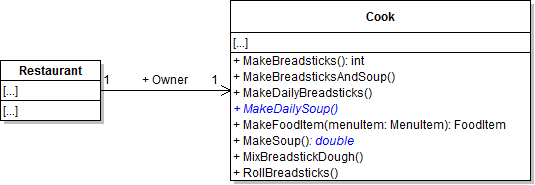
- Define a return type of double for the MakeSoup method, as shown in the class diagram below. The return value represents the amount of leftover soup, so return the leftoverSoup variable.
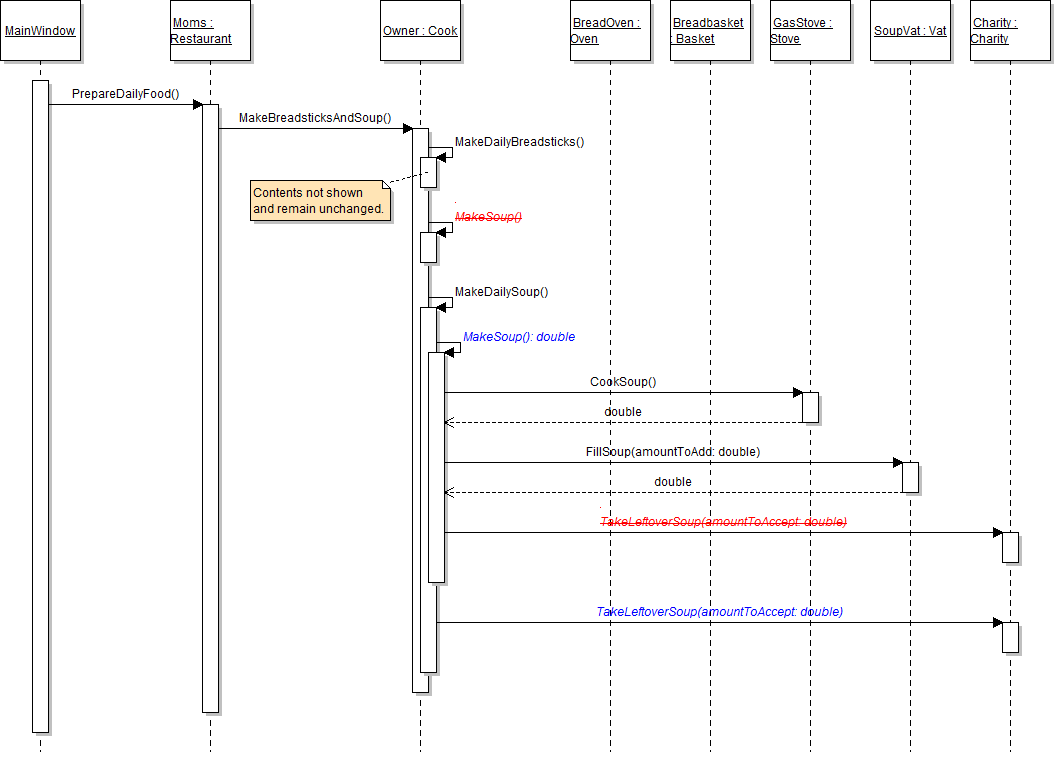
- In the MakeSoup method, remove the call to the charity's TakeLeftoverSoup method, as shown in the sequence diagram below.
- Create a MakeDailySoup method.
- Define the MakeDailyBreadsticks method in the Cook class, as shown in the class diagram above.
- In the cook's MakeBreadsticksAndSoup method, remove the call to the MakeSoup method and instead call the MakeDailySoup method, as shown in the sequence diagram above.
- Write the code for the MakeDailySoup method.
- In the MakeDailySoup method, first define a variable called leftoverSoup of type double and initialize it to 0.0.
- Then, define a while loop that will run until the soup vat is full (i.e. it has reached its capacity), as shown in the code below. While loops continue to run until the boolean expression evaluates to false.
- Inside the while loop, call the MakeSoup method, as shown in the sequence diagram above. Store the value returned from the method in the leftoverSoup variable.
- Then, check if the value of the leftoverSoup variable is greater than 0. If so, call the charity's TakeLeftoverSoup method, as shown in the sequence diagram above. If not, do nothing.
- Ensure that all code is StyleCop compliant.
- Check your work:
- Set a breakpoint in the cook's MakeBreadsticksAndSoup method on the line that calls the MakeDailySoup method.
- Start the application.
- Click the New restaurant button. Then click the Prepare daily food button.
- Press F11 to step into the MakeDailySoup method. Press F10 to step into the while loop. The first time through the loop, there should be 0 leftover soup and the vat should not be full.
- Press F10 to step through the while loop a second time. The second time through, there should be 3.519... leftover soup and the vat should have reached capacity.
- Press F10 to step into the if statement. The was leftover soup, so the boolean expression should evaluate to true.
Note: The structure of the body of this method is almost identical to that of the MakeDailyBreadsticks method.
while (this.SoupVat.Capacity - this.SoupVat.Level > 0)
{

}- Build the application and ensure that it has no compiler errors or warnings.
- Ensure that all code is StyleCop compliant.
- Browse to the project folder and add it to a newly created zipped archive.
- Submit the zipped project folder to the correct assignment in Blackboard.