The server class needs access to the patron's coat in order to hang it for him. In this task, you will define and call a method on the Patron class that returns a coat object. You will check your work by setting a breakpoint, stepping through the method call, and ensuring that the method is called correctly and the correct object is returned.
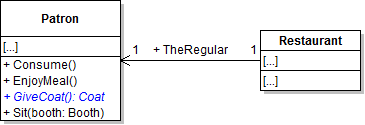
- Define the GiveCoat method on the Patron class as shown in the class diagram below.
- In the GiveCoat method, first define a local variable called coat and set it to the Coat field. Then, set the Coat field to null. Then return the coat variable.
- Check your work: Build the solution and ensure that the code compiles without errors or warnings.
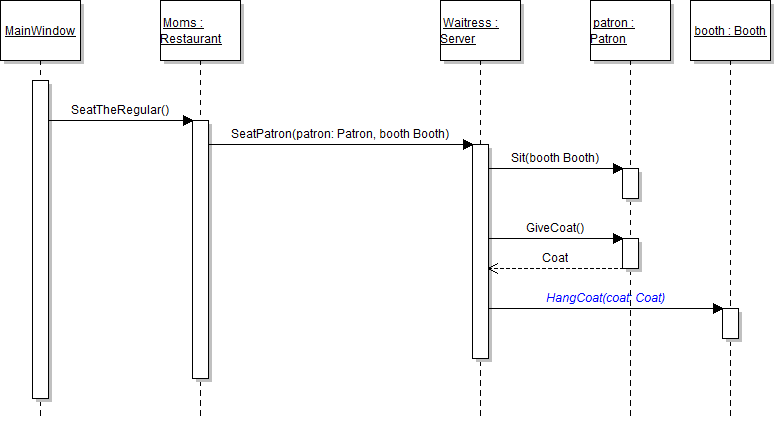
- In the server's SeatPatron method, call the GiveCoat method and store the return in a local variable called coat. The method call is shown in the sequence diagram below.
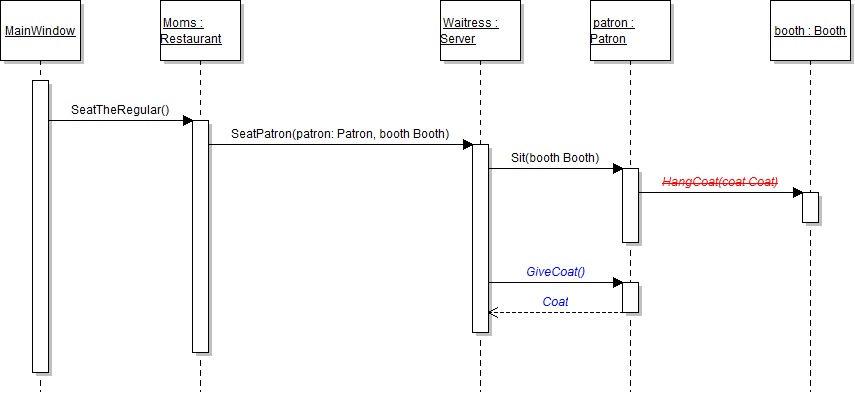
- In the patron's Sit method, remove the call to the HangCoat method, as shown in the sequence diagram above.
- Check your work:
- Set a breakpoint in the server's SeatPatron method on the line that calls the GiveCoat method.
- Start the application.
- Click the New restaurant button. Then click the Heidi, seat the regular button.
- Press F11 to step into the GiveCoat method. Press F10 to return to the caller and over the line that calls the GiveCoat method. Ensure that the coat variable contains the patron's coat object.
- In the server's SeatPatron method, call the HangCoat method as shown in the sequence diagram below. Pass the local coat variable as the parameter.
- Ensure that all code is StyleCop compliant.
- Check your work:
- Set a breakpoint in the server's SeatPatron method on the line that calls the HangCoat method.
- Start the application.
- Click the New restaurant button. Then click the Heidi, seat the regular button.
- Press F11 to step into the HangCoat method. Ensure that the coat parameter is the regular's coat object.
Note: This code transfers ownership of the coat object to the object that is calling the GiveCoat method. Setting the Coat field to null removes the "kite string" that connects the patron to the coat.
The server needs to keep a running total of the number condiments filled. In this task, you will define a return value for the FillCondiments method. You will check your work by setting a breakpoint, stepping into the method call, and ensuring that the method returns the correct value.
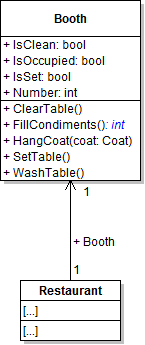
- Define a return type of int for the booth's FillCondiments method, as shown in the class diagram below.
- In the booth's FillCondiments method, return an integer of 1.
- In the server's FillCondiments method, store the return value of the booth's FillCondiments method in a local variable called numberFilled. The updated method call is shown in the sequence diagram below.
- Ensure that all code is StyleCop compliant.
- Check your work:
- Set a breakpoint in the server's FillCondiments method on the line that calls the booth's FillCondiments method.
- Start the application.
- Click the New restaurant button. Then click the Heidi, set up table button.
- Press F10 to step over the call to the booth's FillCondiments method. Ensure that the value stored in the numberFilled variable is 1.
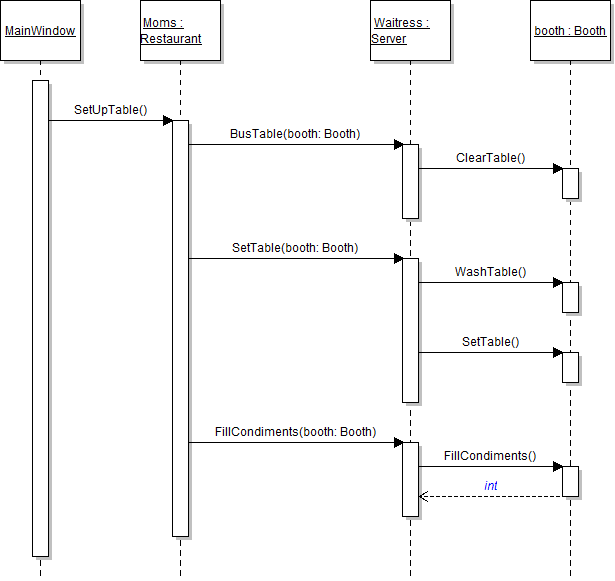
The restaurant needs a way to transfer payment between the patron and server. In this task, you will define a class to represent meal tickets and create an instance of the class. You will check your work by setting a breakpoint, stepping through the code, and ensuring that the ticket was instantiated correctly.
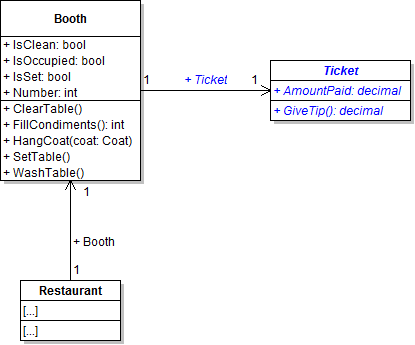
- Create a new class called Ticket in the Business Classes folder and define it as shown in the class diagram below.
- In the GiveTip method, return a decimal value of 1m.
- Define a field of type Ticket within the Booth class, as shown in the class diagram above.
- Create a ticket instance and set it to the booth's ticket field.
- In the newRestaurantButton_Click, instantiate the booth's Ticket field to a new instance of the Ticket class. Put this line of code immediately below the line that sets the booth's number.
- Underneath the code that sets the booth's field values, write the following code comment:
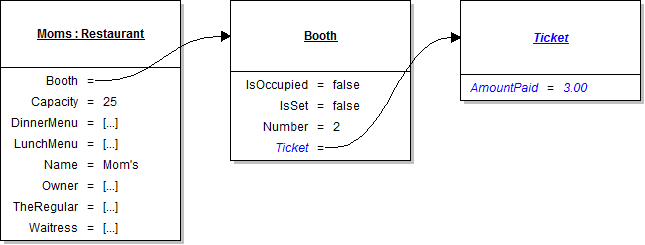
- Underneath the code comment, set the values of the ticket's fields to the values specified in the object diagram below.
- Ensure that all code is StyleCop compliant.
- Check your work:
- Set a breakpoint in the newRestaurantButton_Click on the line that instantiates the booth's ticket.
- Start the application.
- Click the New restaurant button.
- Press F10 to step over the line that instantiates the ticket. Ensure that the ticket is instantiated correctly.
- Press F10 to step over the line of code that sets the ticket's amount paid. Ensure that the field is set to the correct value.
// Set field values of the ticket.
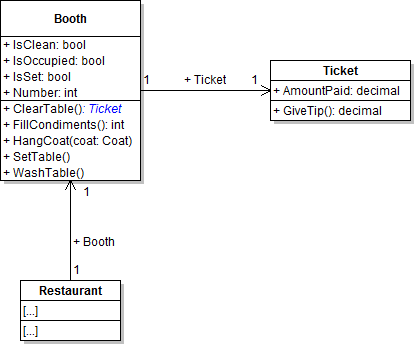
The server needs to acquire the patron's ticket after clearing the table. In this task, you will add a return type to the ClearTable method and accept the return. You will check your work by setting a breakpoint, stepping through the method call, and ensuring that the method returns the correct value.
- Define a return type of Ticket for the booth's ClearTable method, as shown in the class diagram below.
- In the ClearTable method, simply return the current object's Ticket field.
- Check your work: Build the solution and ensure that the code compiles without errors or warnings.
- In the server's BusTable method, store the return value in a local variable named ticket. The updated method call is shown in the sequence diagram below.
- Ensure that all code is StyleCop compliant.
- Check your work:
- Set a breakpoint in the server's BusTable method on the line that calls the booth's ClearTable method.
- Start the application.
- Click the New restaurant button. Then click the Heidi, set the table button.
- Press F10 to step over the call to the ClearTable method. Ensure that the ticket variable contains the booth's ticket object.
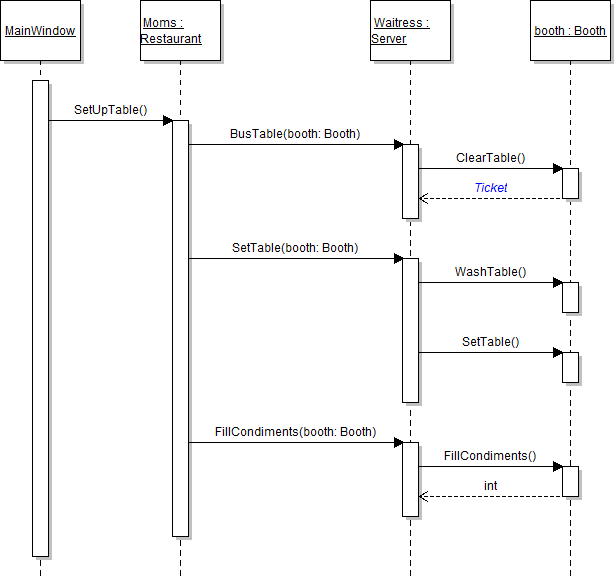
The server wants to separate the tip from the amount left with the ticket. In this task, you will call the GiveTip method and store the return value in a local variable. You will check your work by setting a breakpoint, stepping through the method call, and ensuring that the correct value is returned.
- In the server's BusTable method, call the GiveTip method on the local ticket variable, as shown in the sequence diagram below. Store the return value in a local variable called cash.
- Check your work:
- Set a breakpoint in the server's BusTable method on the line that calls the ticket's GiveTip method.
- Start the application.
- Click the New restaurant button. Then click the Heidi, set up table button.
- Press F11 to step into the GiveTip method. Ensure that you step into the ticket object that was returned from the ClearTable method.
- Press F10 to return to the BusTable method and step over the call to the GiveTip method. Ensure that the value of the cash variable is 1m.
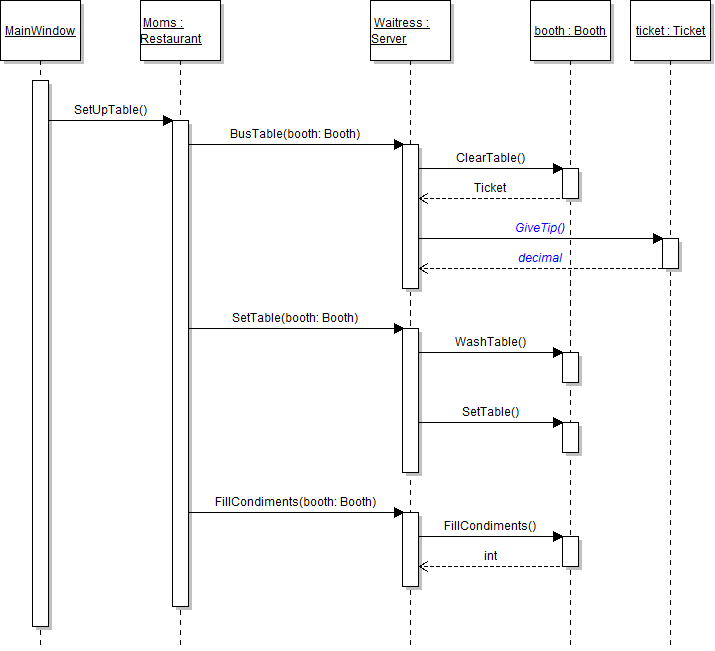
The restaurant would like to keep record of all the tickets retrieved by the servers. In this task, you will add a return type of Ticket to the BusTable method and catch that return in a local variable. You will check your work by setting a breakpoint, stepping through the method, and ensuring that the correct object is returned.
- Define a return type of Ticket for the server's BusTable method, as shown in the class diagram below.
- In the BusTable method, return the local ticket variable.
- In the SetUpTable method, store the ticket returned from the BusTable method in a local variable called ticket. The updated method call is shown in the sequence diagram below.
- Ensure that all code is StyleCop compliant.
- Check your work:
- Set a breakpoint in the restaurant's SetUpTable method on the line that calls the BusTable method.
- Start the application.
- Click the New restaurant button. Then click the Heidi, set up table button.
- Press F10 to step over the call to the BusTable method. Ensure that the ticket variable contains the booth's ticket object.
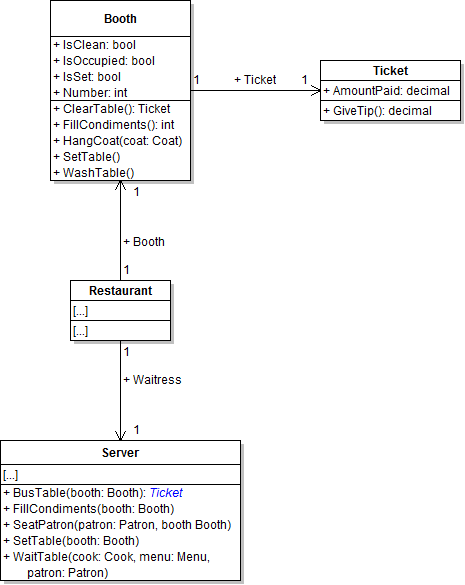
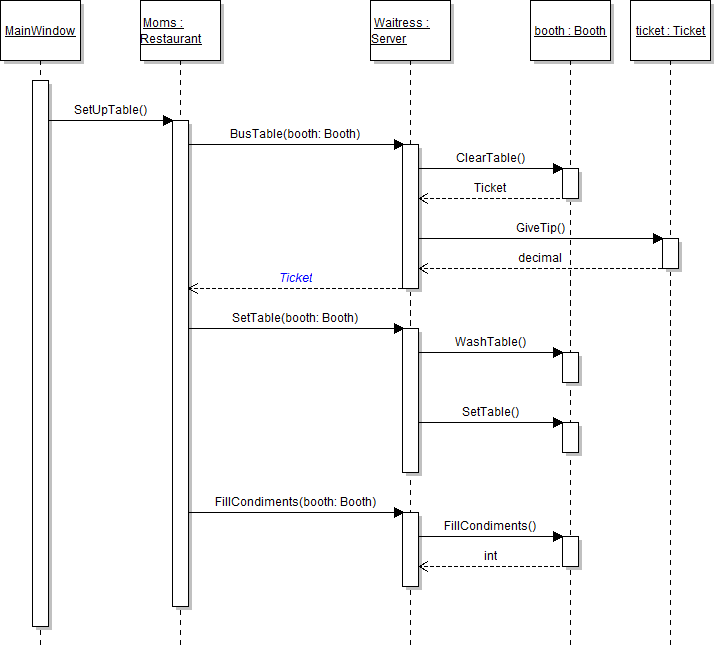
The cook would like to give leftover food to a local charity. In this task, you will define a class to represent a charity and create an instance of the class. You will check your work by setting a breakpoint, stepping through the code, and ensuring that the charity is instantiated correctly.
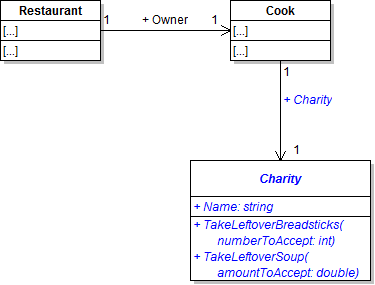
- Create a new class called Charity in the Business Classes folder and define it as shown in the class diagram below.
- Define a Charity field in the Cook class, as shown in the class diagram above.
- Create an instance of the Charity class and assign it to the cook's Charity field.
- In the newRestaurantButton_Click, instantiate the owner's Charity field. Put this line of code immediately below the line that instantiates the owner's bread oven.
- Underneath the code that sets the owner's fields, write the following code comment:
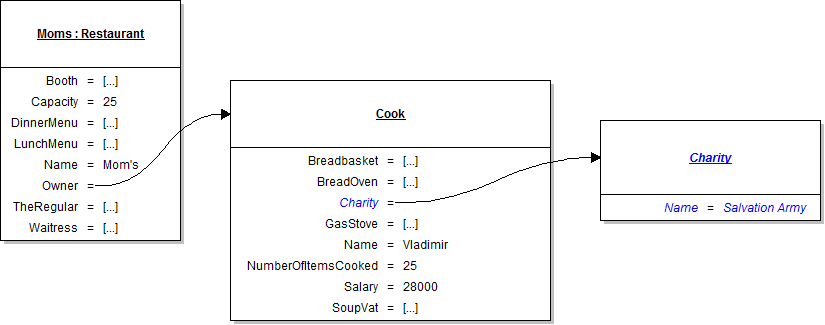
- Underneath the code comment, set the values of the charity's fields to the values specified in the object diagram below.
- Ensure that all code is StyleCop compliant.
- Check your work:
- Set a breakpoint in the newRestaurantButton_Click on the line that instantiates the charity.
- Start the application.
- Click the New restaurant button.
- Press F10 to step over the line of code that instantiates the charity. Ensure that the Charity field is instantiated correctly.
- Press F10 to step over the line of code that sets the charity's field. Ensure that the field is set to the correct value.
// Set field values of the charity.
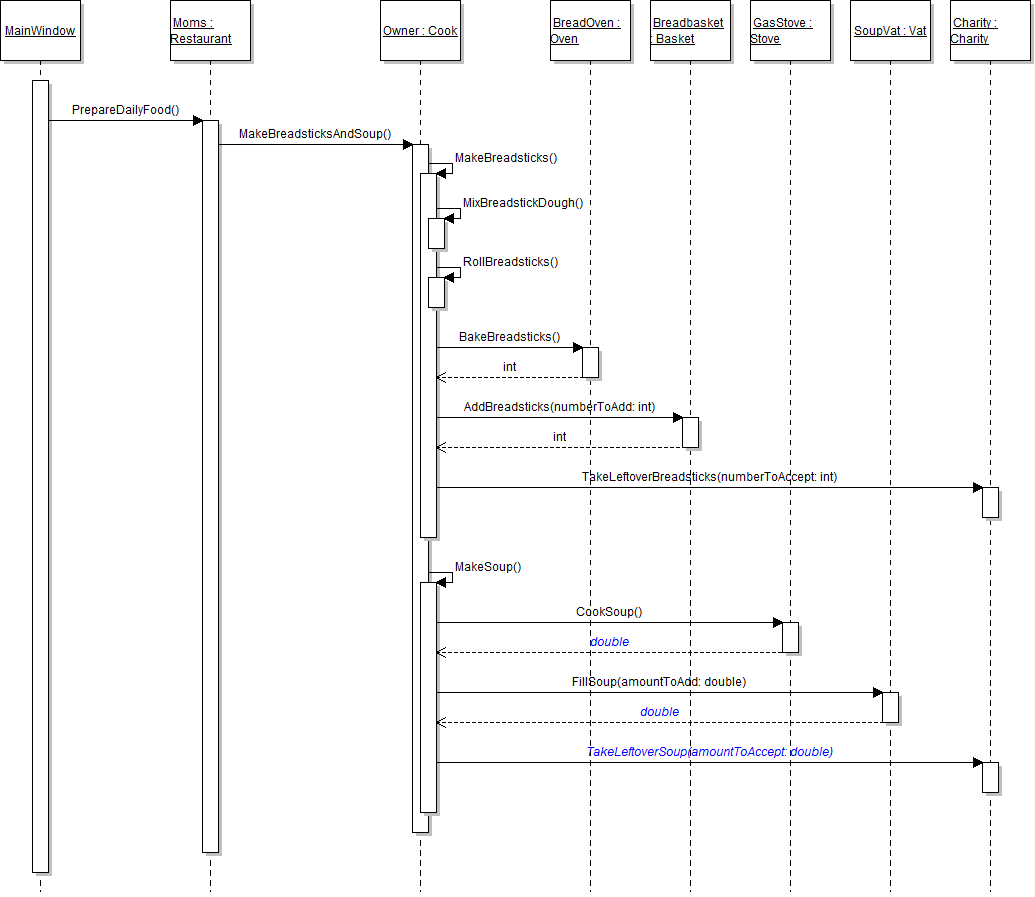
The cook needs to know how many breadsticks were baked in order to know how many to add to the basket. In this task, you will add a return value to the BakeBreadsticks method and use that value when calling the AddBreadsticks method. You will check your work by setting a breakpoint, stepping through the method calls, and ensuring that the correct value is returned from and passed to the appropriate methods.
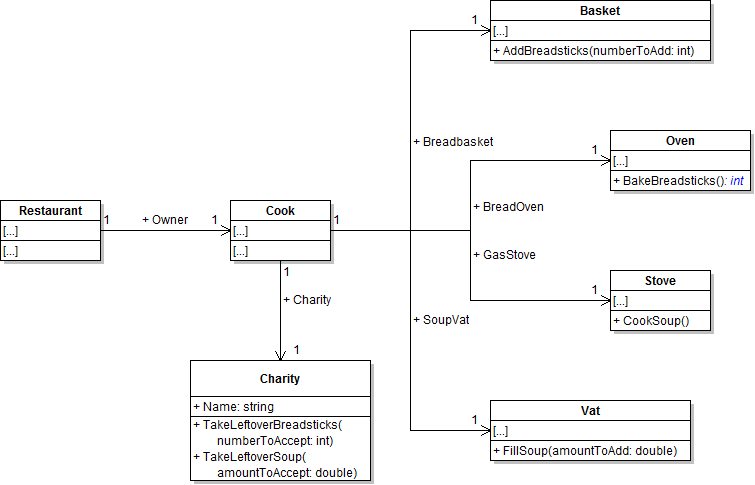
- Define a return type of int for the oven's BakeBreadsticks method, as shown in the class diagram below.
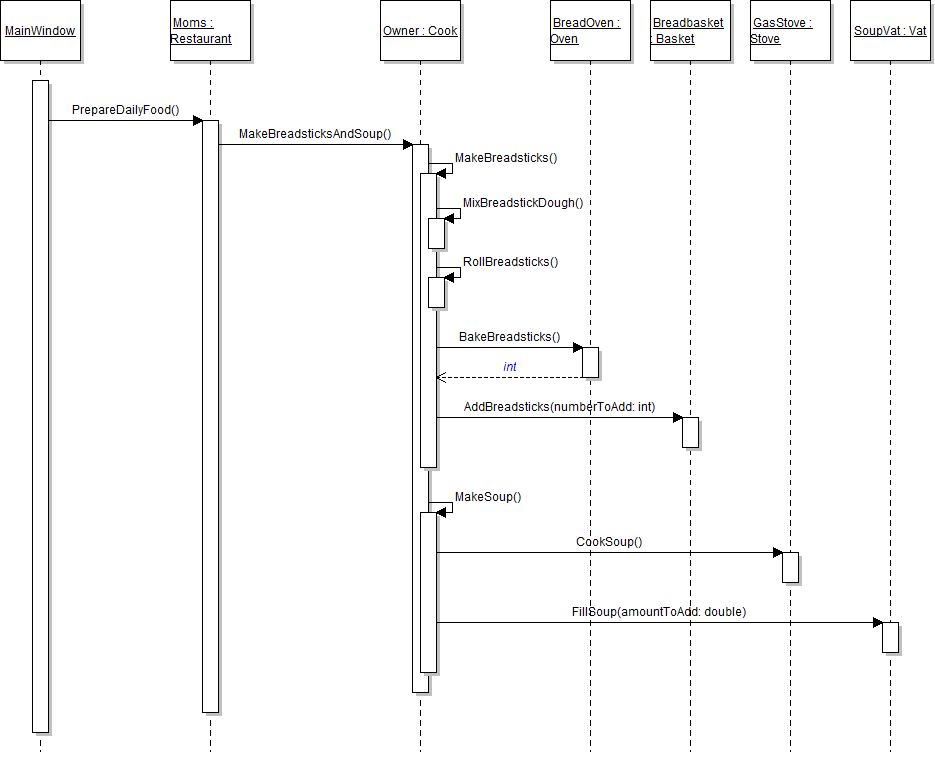
- In the BakeBreadsticks method, return the value of the BreadstickBatchSize field. The updated method call is shown in the sequence diagram below.
- In the MakeBreadsticks method, store the value returned from the BakeBreadsticks method in a local variable named breadsticksMade.
- Check your work:
- Set a breakpoint in the cook's MakeBreadsticks method on the line that calls the BakeBreadsticks method.
- Start the application.
- Click the New restaurant button. Then click the Prepare daily food button.
- Press F11 to step into the BakeBreadsticks method. Ensure that the value of the BreadstickBatchSize field is 20.
- Press F10 to return to the caller and step over the call to the BakeBreadsticks method. Ensure that the value of the breadsticksMade variable is 20.
- In the MakeBreadsticks method, pass the breadsticksMade variable as the parameter when calling the AddBreadsticks method.
- Ensure that all code is StyleCop compliant.
- Check your work:
- Set a breakpoint in the cook's MakeBreadsticks method on the line that calls the AddBreadsticks method.
- Start the application.
- Click the New restaurant button. Then click the Prepare daily food button.
- Press F11 to step into the AddBreadsticks method. Ensure that the value of the numberToAdd parameter is 20.
The restaurant's leftover breadsticks need to be donated to charity. In this task, you will define a return value for the AddBreadsticks method to represent the number of leftover breadsticks and catch the return in a local variable. You will check your work by setting a breakpoint, stepping through the method calls, and ensuring that the correct value is returned from and passed to the appropriate methods.
- Define a return type of int for the Basket's AddBreadsticks method, as shown in the class diagram below.
- In the AddBreadsticks method, return a value of zero. The updated method call is shown in the sequence diagram below.
- In the MakeBreadsticks method, store the value returned from the AddBreadsticks method in a local variable named leftoverBreadsticks.
- In the MakeBreadsticks method, call the charity's TakeLeftoverBreadsticks, as shown in the sequence diagram below. Pass in the local leftoverBreadsticks variable as the method parameter.
- Ensure that all code is StyleCop compliant.
- Check your work:
- Set a breakpoint in the cook's MakeBreadsticks method on the line that calls the AddBreadsticks method.
- Start the application.
- Click the New restaurant button. Then click the Prepare daily food button.
- Press F10 to step over the call to the AddBreadsticks method. Ensure that the leftoverBreadsticks variable has a value of 0.
- Press F11 to step into the TakeLeftoverBreadsticks method. Ensure that the numberToAccept parameter has a value of 0.
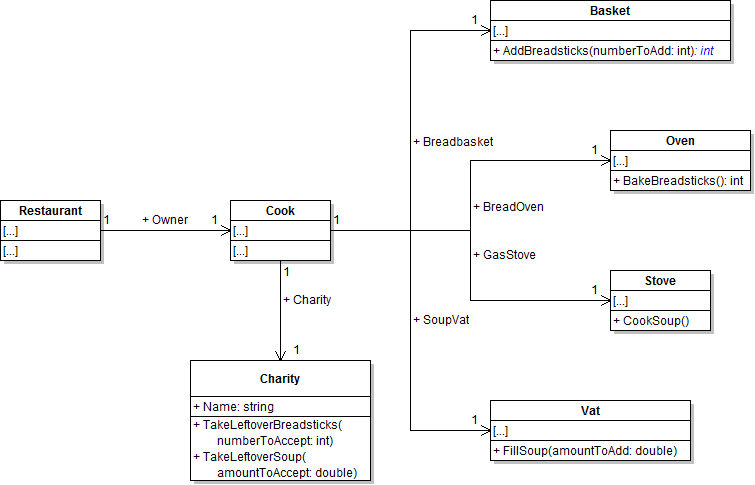
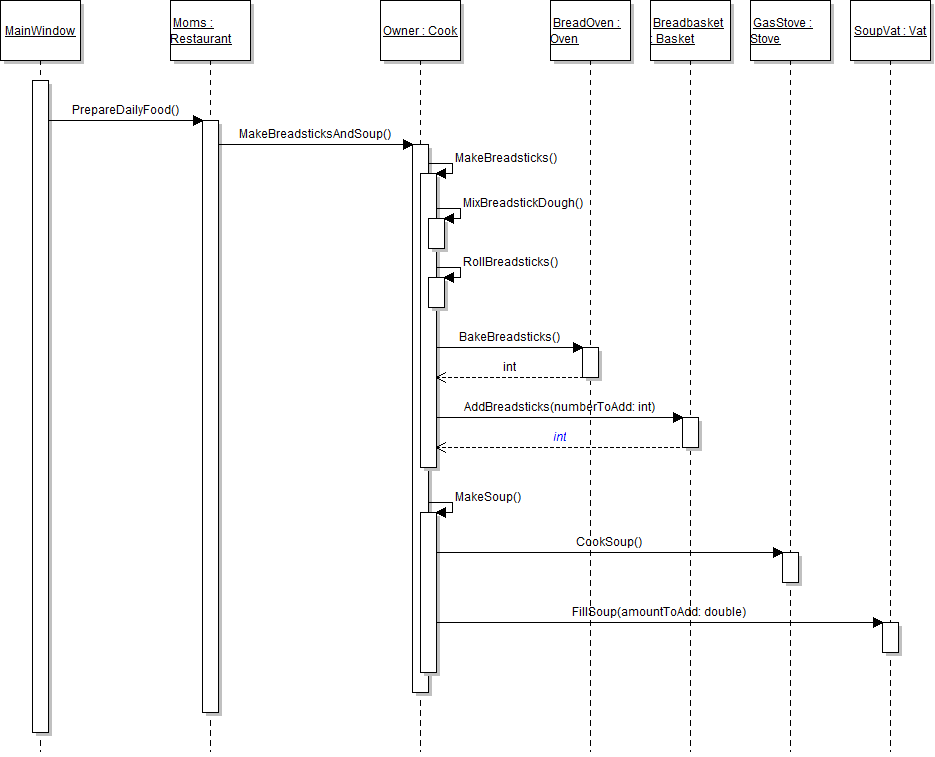
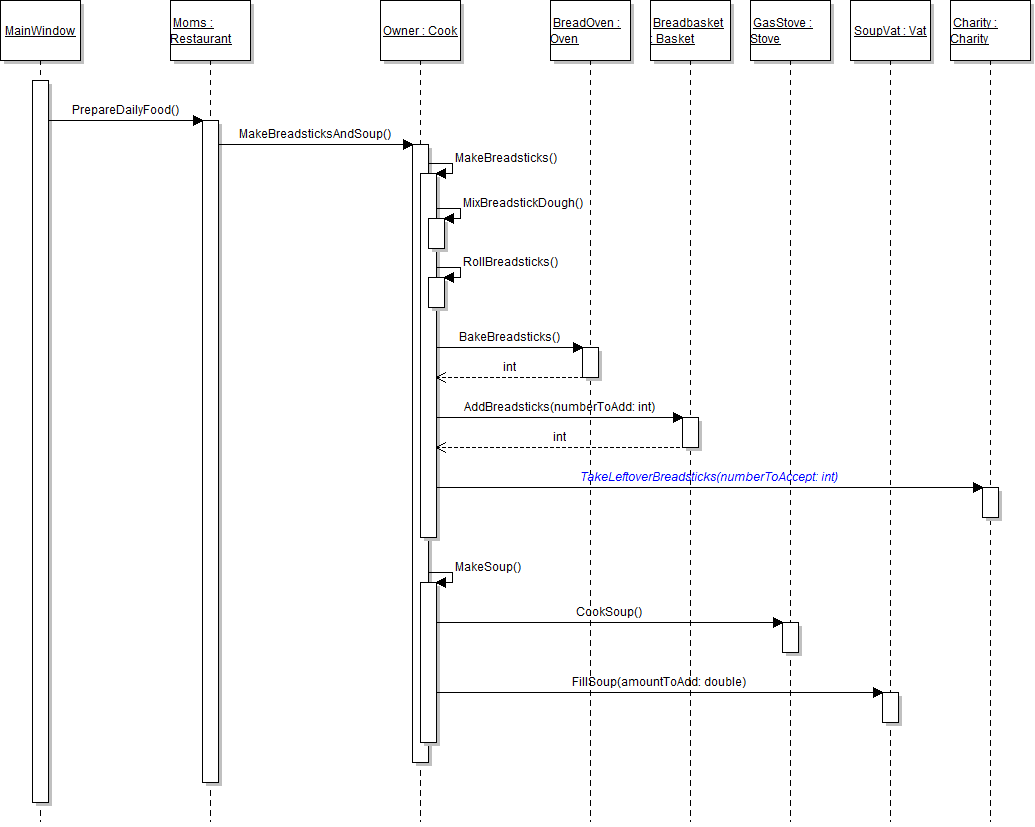
The cook needs to know the results of cooking and filling soup in order to do his job. He would also like to donate leftover soup to charity, just as he did with the breadsticks. In this task, you will define return types for the methods involved in making soup, accept those returns, and give any leftover soup to charity. You will check your work by setting a breakpoint, stepping through the code, and ensuring that the correct value is returned from and passed to the appropriate methods.
- Define a return type of double for the CookSoup and FillSoup methods, as shown in the class diagram below.
- In the CookSoup method, return the value of the SoupBatchSize field.
- In the FillSoup method, return a value of 0.
- In the cook's MakeSoup method, store the value returned from the CookSoup method in variable called soupMade. Pass the variable as the parameter to the FillSoup method call. The updated method call is shown in the sequence diagram below.
- Store the value returned from the FillSoup method in a local variable called leftoverSoup.
- Call the charity's TakeLeftoverSoup method as shown in the sequence diagram above. Pass the leftoverSoup variable as the parameter.
- Ensure that all code is StyleCop compliant.
- Check your work:
- Set a breakpoint within the cook's MakeSoup method on the line that calls the CookSoup method.
- Start the application.
- Click the New restaurant button. Then click the Prepare daily food button.
- Press F10 to step over the call to the CookSoup method. Ensure that the value of the soupMade variable is 12 (the size of the batch).
- Press F11 to step into the call to the FillSoup method. Ensure that the value of the amountToAdd parameter is 12.
- Press F10 to return to the caller and step over the call to the FillSoup method. Ensure that the value of the leftoverSoup variable is 0.
- Press F11 to step into the TakeLeftoverSoup method. Ensure the value of the amountToAccept parameter is 0.
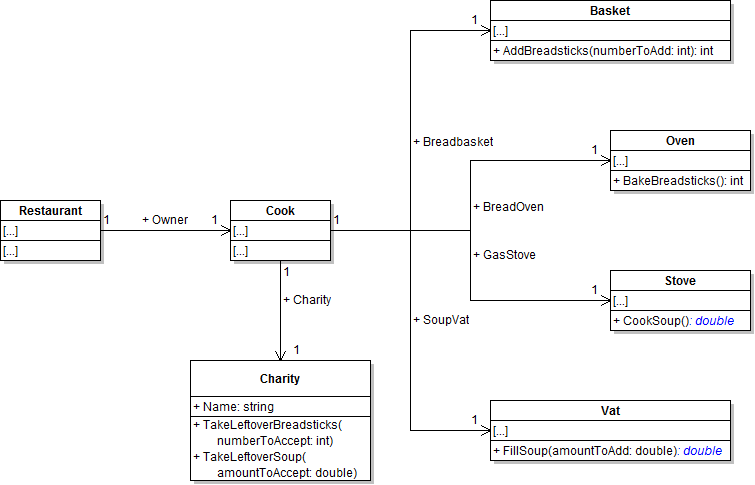
Note: The return value of the CookSoup method represents the amount of soup made. The return value of the FillSoup method represents the amount of leftover soup.
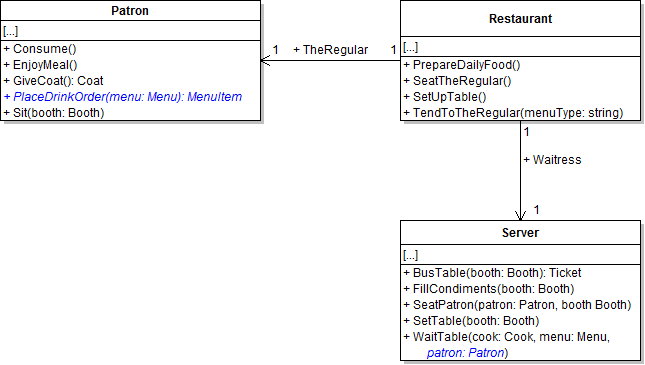
The patron needs to place his drink order when the server fills out his ticket. In this task, you will define and call methods to allow the regular to place an order for his favorite drink. You will check your work by setting a breakpoint, stepping through the method calls, and ensuring that the methods are called correctly, return values are accepted correctly, and parameters are passed correctly.
- Define the PlaceDrinkOrder method on the Patron class as shown in the class diagram below. In the method, return the given menu's drink.
- In the PlaceDrinkOrder method, simply return the menu's Drink field.
- In the server's WaitTable method, pass the patron parameter as the parameter to the TakeAndFillOrder method call. Then call the PlaceDrinkOrder method as shown in the sequence diagram below. Store the menu item returned from the method in a local variable named drinkOrder.
- Ensure that all code is StyleCop compliant.
- Check your work:
- Set a breakpoint within the Server's TakeAndFillOrder method on the line that calls the PlaceDrinkOrder method.
- Start the application.
- Click the New restaurant button. Then click the Serve lunch to the regular button.
- Inspect the patron parameter. Ensure that it contains the restaurant's regular patron.
- Press F11 to step into the PlaceDrinkOrder method. Ensure that the menu parameter is the restaurant's lunch menu.
- Press F10 to return to the caller and step over the line that calls the PlaceDrinkOrder method. Ensure that the drinkOrder variable contains the menu's drink.
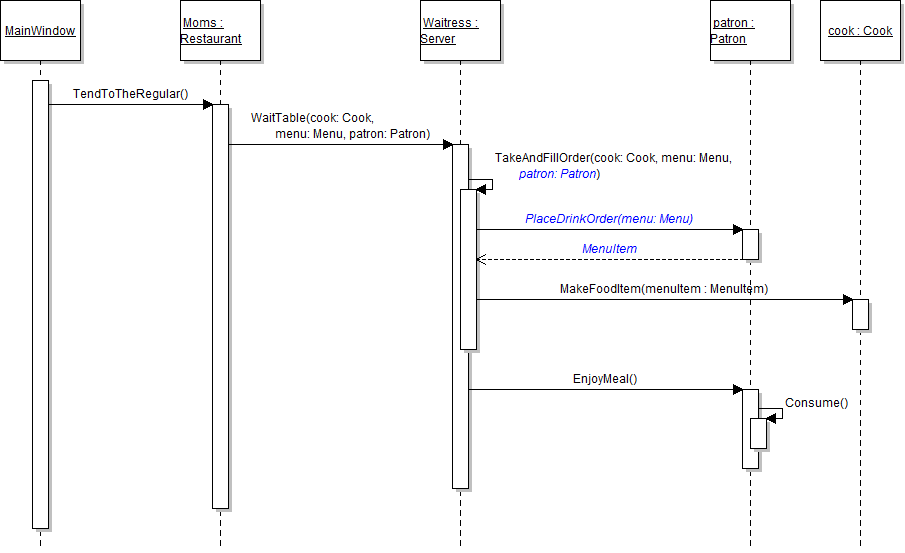
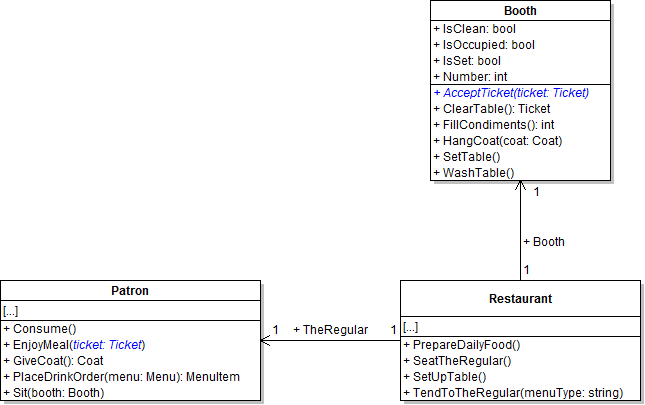
The server needs to give the regular patron his ticket after he orders his meal. In this task, you will add parameters to patron and booth methods in order to allow the server to give the patron his ticket. You will check your work by setting a breakpoint, stepping through the method calls, and ensuring the methods are called correctly and parameters are passed correctly.
- Add the ticket parameter to the EnjoyMeal method as shown in the class diagram below. MISSING AcceptTicket method?
- In the WaitTable method, define a local variable called ticket and instantiate it to a new ticket. Do this before calling the TakeAndFillOrder method. Then pass the ticket variable to the EnjoyMeal method. The updated method call is shown in the sequence diagram below.
- In the EnjoyMeal method, call the AcceptTicket method as shown in the sequence diagram above. Pass the ticket parameter through.
- Ensure that all code is StyleCop compliant.
- Check your work:
- Set a breakpoint in the server's WaitTable method on the line that instantiates the ticket variable.
- Start the application.
- Click the New restaurant button. Then click the Heidi, seat the regular button. Then click the Serve lunch to the regular button.
- Press F10 to step over the line that instantiates the ticket variable. Ensure that it is instantiated correctly.
- Press F11 to step into the EnjoyMeal method. Ensure that the ticket parameter is the same object as the ticket variable from the WaitTable method.
- Press F11 to step into the AcceptTicket method. Ensure that the ticket parameter is the same object as the ticket variable from the WaitTable method.
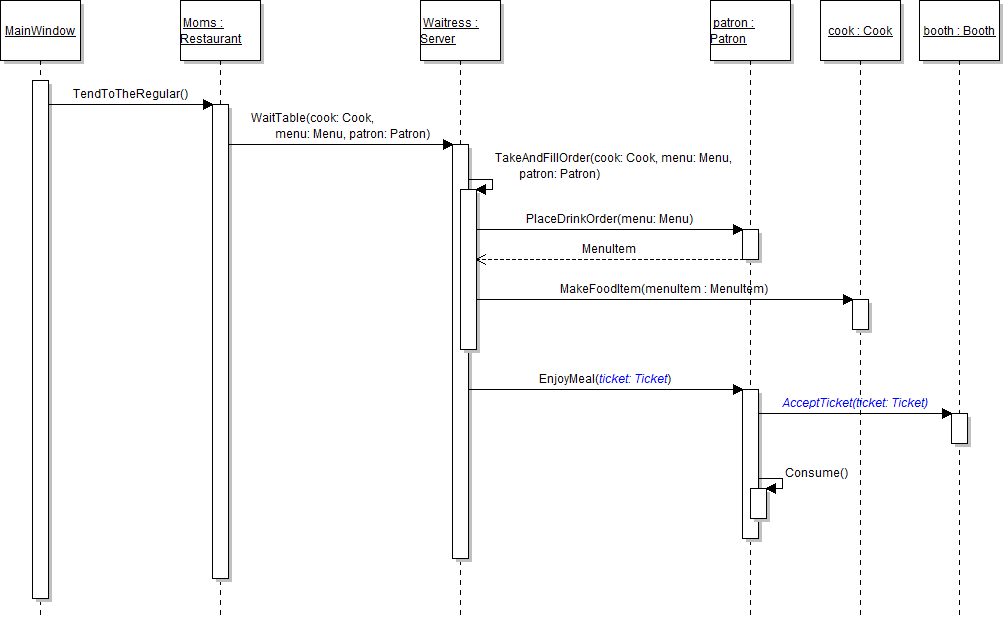
The server needs the cook to make food items, but she also needs to reference them somewhere in order to give them to the patron. In this task, you will define a class to represent food items, have the cook make the food items, and give the patron the food items to consume. You will check your work by setting a breakpoint, stepping through the method calls, and ensuring that methods are called correctly, that parameters are passed correctly, and that returns and accepted correctly.
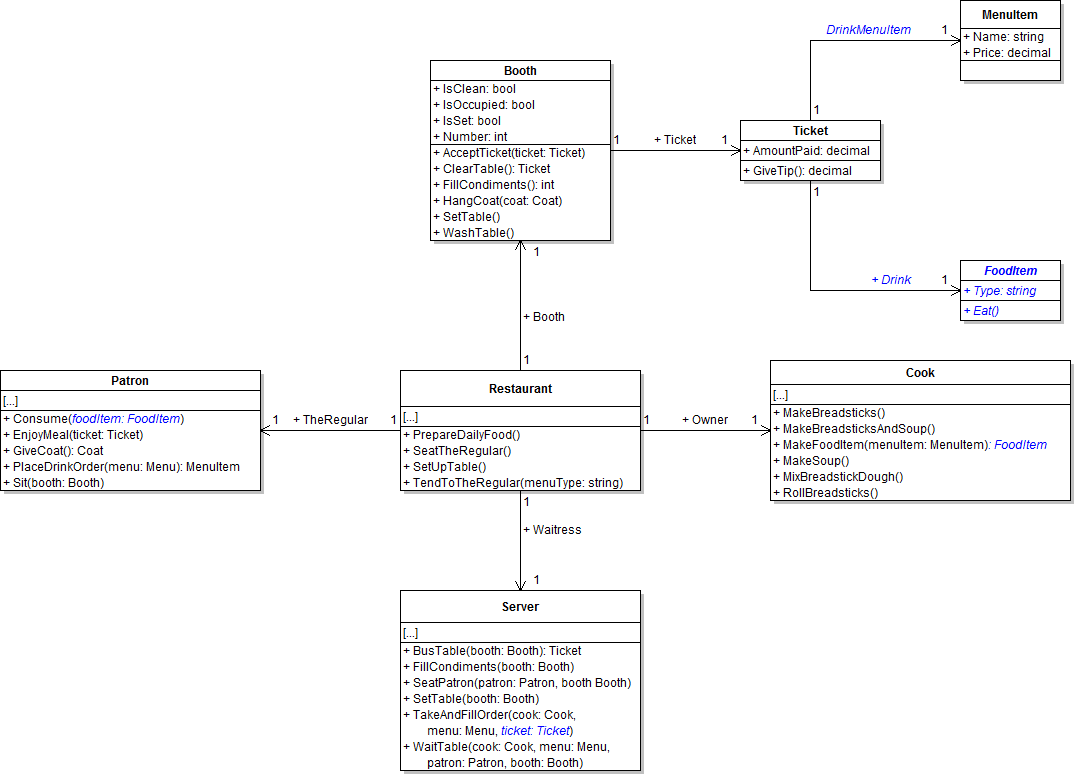
- Add the ticket parameter to the server's TakeAndFillOrder method, as shown in the class diagram below.
- Create a new class called FoodItem in the Business Classes folder and define it as shown in the class diagram above.
- Add the Drink and DrinkMenuItem fields to the Ticket class, as shown in the class diagram above.
- Add the food item parameter to the patron's Consume method, as shown in the class diagram above.
- Define a return type of FoodItem for the cook's MakeFoodItem method, as shown in the class diagram above. In the method, create an instance of the FoodItem class, set the food item's Type field to the menu item's Name field, and then return the food item. The new method call is shown in the sequence diagram below.
- In the server's WaitTable method, pass the ticket variable as the last parameter of the TakeAndFillOrder method call. The updated method call is shown in the sequence diagram above.
- In the server's TakeAndFillOrder method, store the object returned from the PlaceDrinkOrder method in the ticket's DrinkMenuItem field instead of a local variable. Then pass that field into the call to the MakeFoodItem method.
- In the server's TakeAndFillOrder method, accept the food item returned from the MakeFoodItem method and assign it to the ticket's Drink field.
- In the EnjoyMeal method, pass the ticket's Drink field as the parameter to the Consume method.
- In the patron's Consume method, call the passed-in food item's Eat method, as shown in the sequence diagram above.
- Ensure that all code is StyleCop compliant.
- Check your work:
- Set a breakpoint in the server's TakeAndFillOrder method on the line that calls the PlaceDrinkOrder.
- Start the application.
- Click the New restaurant button. Then click the Heidi, seat the regular button. Then click the Serve lunch to the regular button.
- Inspect the ticket parameter. Ensure that the object stored in it is the ticket object created in the WaitTable method.
- Press F10 to step over the call to the PlaceDrinkOrder method. Ensure that the object stored in the DrinkMenuItem field is the lemonade drink item.
- Press F10 to step over the call to the MakeFoodItem method. Ensure that the ticket's Drink field holds a food item object of type lemonade.
- Press F10 to return to the WaitTable method. Press F11 to step into the EnjoyMeal method. Press F11 to step into the Consume method. Ensure that the food parameter is a food item object of type lemonade.
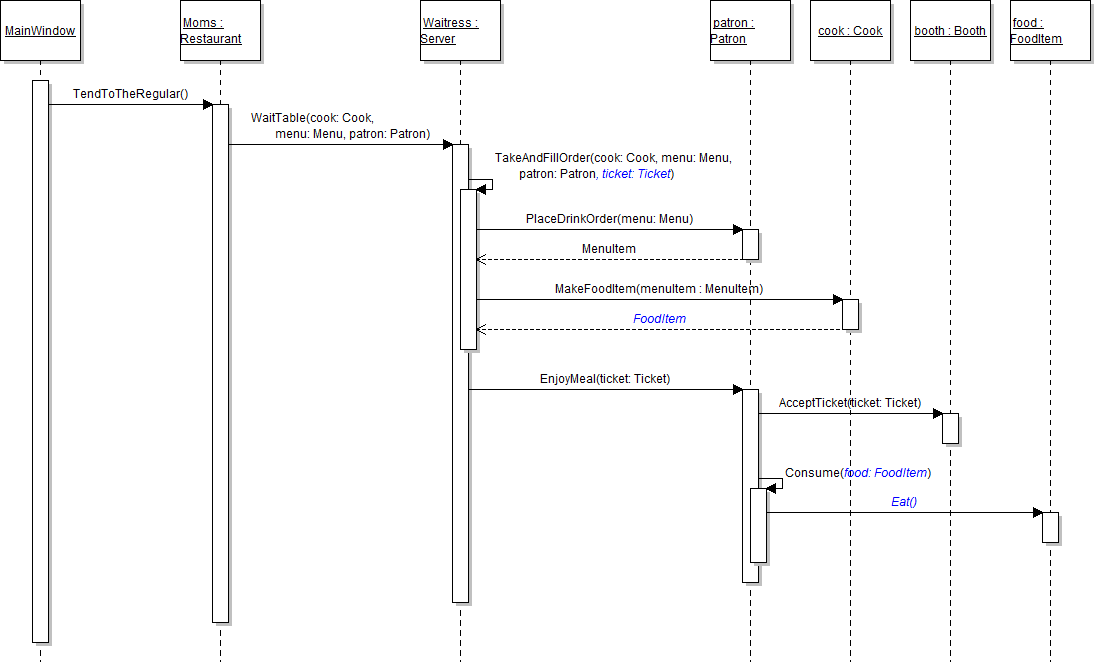
Note: The code in the MakeFoodItem method represents the cook creating a food item of the same type as the menu item that was ordered.
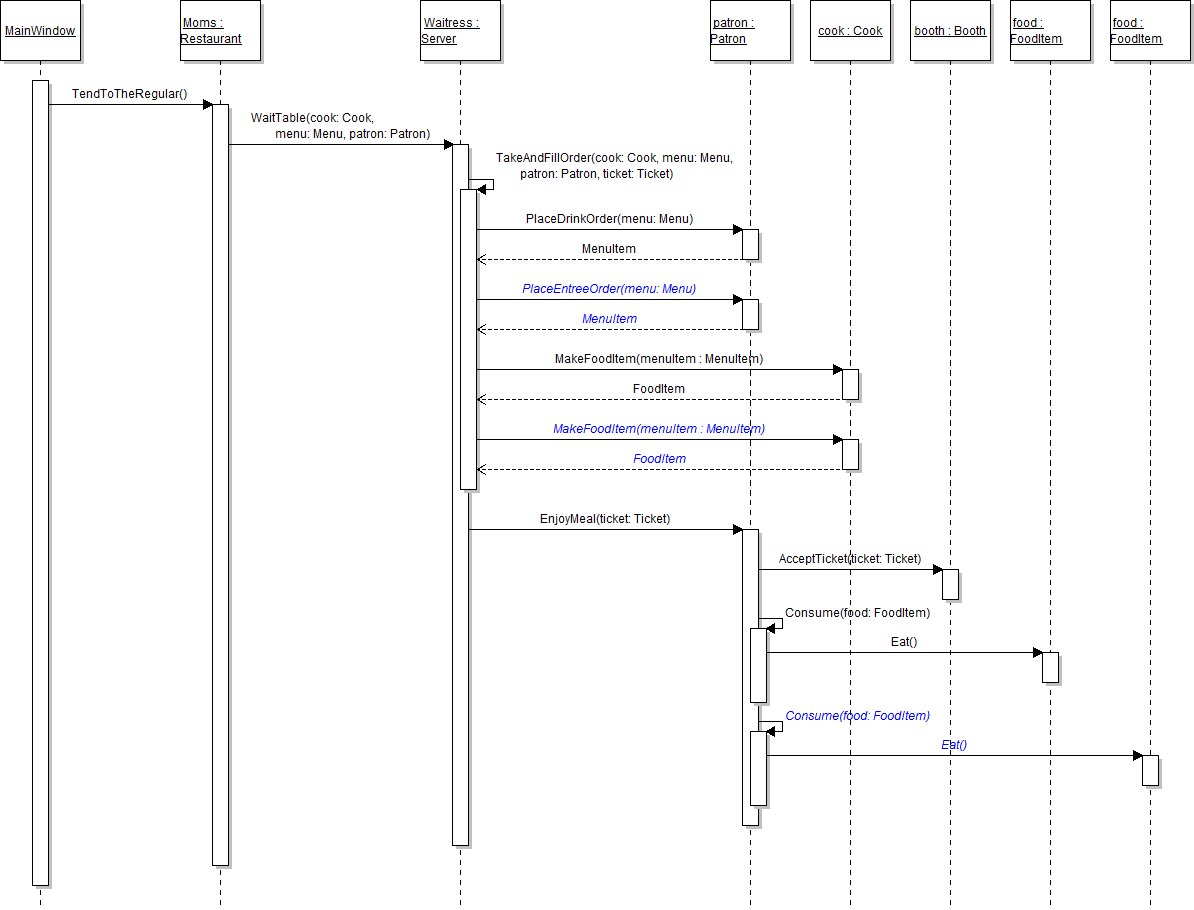
The patron wants to order an entree, and the server needs the cook to make entrees in addition to drinks. In this task, you will define and call methods for ordering and making entrees using a structure similar to that used for ordering and making drinks. You will check your work by setting a breakpoint, stepping through the method calls, and ensuring that methods are called correctly, and parameters and returns are used correctly.
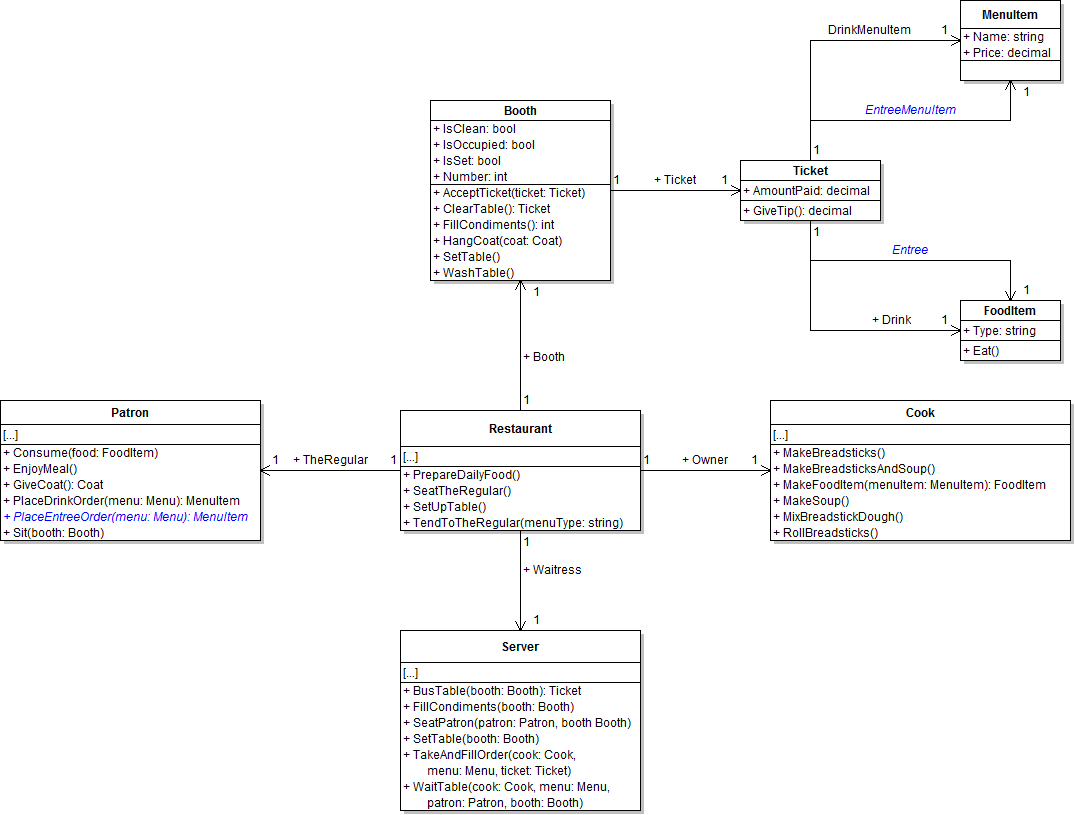
- Define the method and fields as shown in the class diagram below.
- In the patron's PlaceEntreeOrder method, return the menu's Entree field.
- Check your work: Build the solution and ensure that the code compiles without errors or warnings.
- In the server's TakeAndFillOrder method, call the patron's PlaceEntreeOrder method as shown in the sequence diagram below. Store the menu item returned from the method in the ticket's EntreeMenuItem field.
- In the server's TakeAndFillOrder method, call the cook's MakeFoodItem method a second time, as shown in the sequence diagram above. Pass the ticket's EntreeMenuItem field as the parameter. Store the food item returned from the method in the ticket's Entree field.
- In the patron's EnjoyMeal method, call the Consume method a second time, as shown in the sequence diagram above. Pass the ticket's Entree field as the parameter.
- Ensure that all code is StyleCop compliant.
- Check your work:
- Set a breakpoint in the server's TakeAndFillOrder method on the line that calls the PlaceEntreeOrder method.
- Start the application.
- Click the New restaurant button. Then click the Heidi, seat the regular button. Then click the Serve lunch to the regular button.
- Press F10 to step over the call to the PlaceEntreeOrder method. Ensure that the ticket's EntreeMenuItem field contains the turkey club menu item object.
- Press F11 to step into the second call to the MakeFoodItem method (the call for making the entree). Ensure that the menuItem parameter is the turkey club menu item object.
- Press F10 to return to the caller and step over the call to the MakeFoodItem method. Ensure that the ticket's Entree field contains a food item object of type turkey club.
- Press F10 to return to the WaitTable method. Press F11 to step into the EnjoyMeal method and then into the second call to the Consume method. Ensure that the food parameter contains the turkey club food item object.
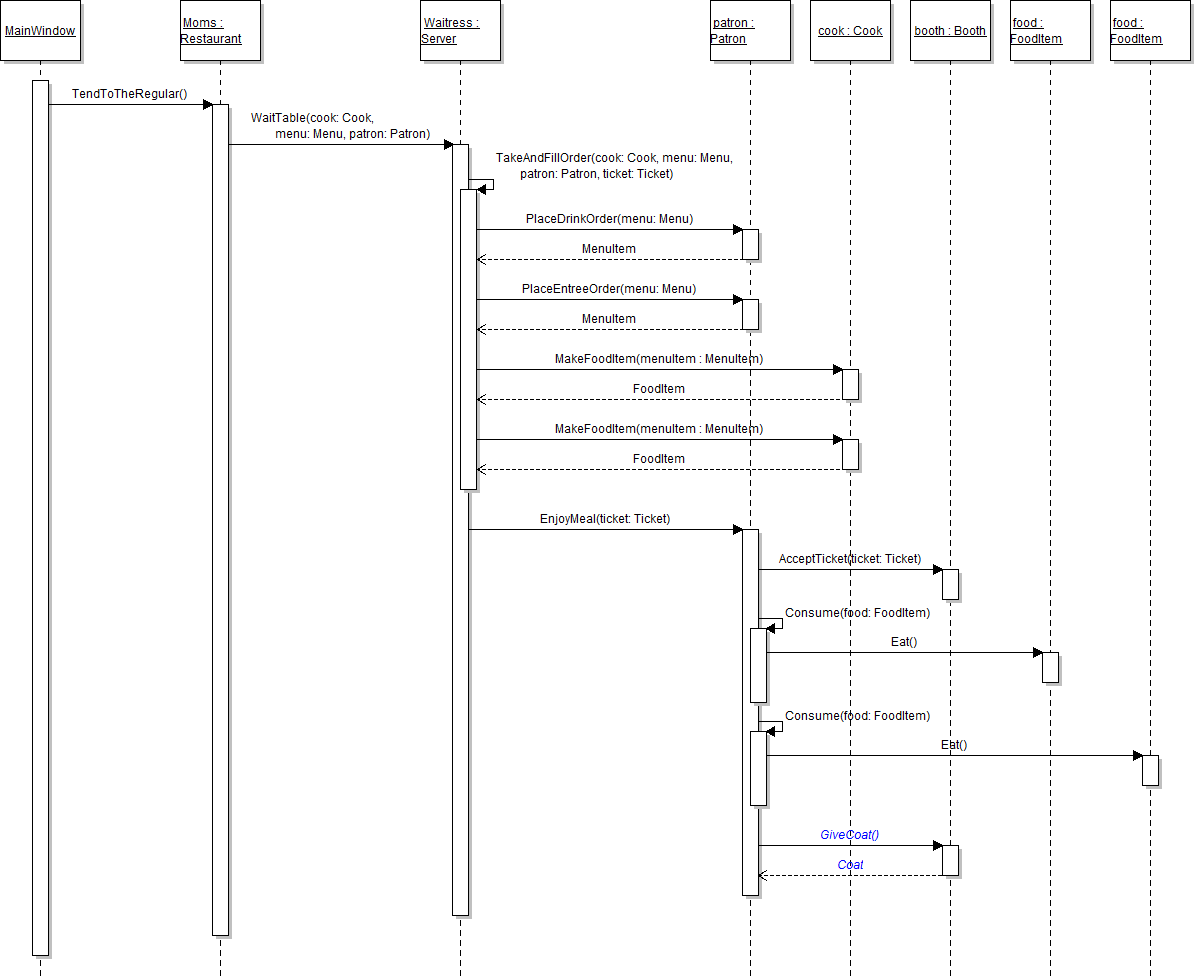
After the patron finishes enjoying his meal, he should take his coat back from the booth. In this task, you will define and call a method on the Booth class that returns the patron's coat back to him. You will check your work by setting a breakpoint, stepping through the code, and ensuring that the method is called correctly and that the correct object is returned.
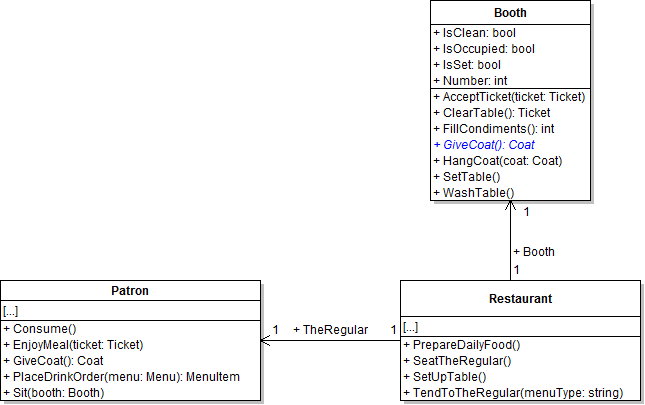
- Define the booth's GiveCoat method, as shown in the class diagram below.
- In the GiveCoat method, first define a local variable called coat and set it to the Coat field. Then, set the Coat field to null. Then return the coat variable.
- In the patron's EnjoyMeal method, call the booth's GiveCoat method as shown in the sequence diagram below. Store the result in the patron's Coat field.
- Ensure that all code is StyleCop compliant.
- Check your work:
- Set a breakpoint in the patron's EnjoyMeal method on the line that calls the booth's GiveCoat method.
- Start the application.
- Click the New restaurant button. Then click the Heidi, seat the regular button. Then click the Serve lunch to the regular button.
- Press F11 to step into the GiveCoat method. Press F10 to step over the line that sets the coat variable. Ensure that the variable contains the booth's coat object.
- Press F10 to step over the line that sets the field to null. Ensure that the Coat field is null.
- Press F10 to return to the EnjoyMeal method and over the call to the GiveCoat method. Ensure that the Coat field contains the XL brown coat object.
- Build the application and ensure that it has no compiler errors or warnings.
- Ensure that all code is StyleCop compliant.
- Browse to the project folder and add it to a newly created zipped archive.
- Submit the zipped project folder to the correct assignment in Blackboard.