You will be adding functionality to the restaurant to have a server seat the regular; this functionality will be triggered by clicking a button. In this task, you will add a button to the MainWindow for use in seating the regular. You will check your work by ensuring that the solution builds without compiler errors or warnings.
- Open the MainWindow's designer by double-clicking on MainWindow.xaml (not MainWindow.xaml.cs) in the Solution Explorer.
- Navigate to the Toolbox and expand the Common WPF Controls section. Click the Button control in the Toolbox to make it the active control type.
- Place a new button on the window by clicking on the background of the window with the Button control selected, as specified in the previous step.
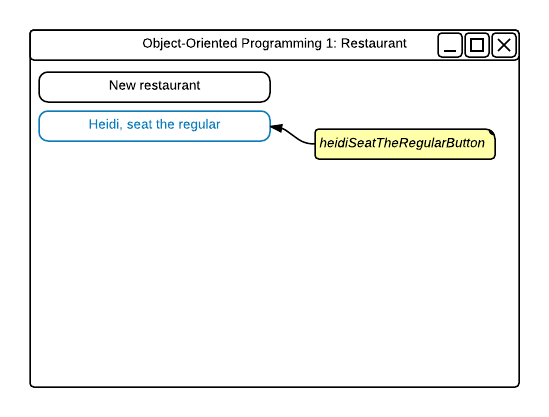
- Position the new button beneath the existing button so that the left edges align. Then stretch the button to be the same width as the existing button, as shown in the wireframe below.
- In the Properties Window, set the button name to heidiSeatTheRegularButton.
- Set the content of the button to "Heidi, seat the regular".
- Click Layout and set button width to 200 pixels and the height to 23 pixels.
- Change the Properties Window to be in "event mode" by clicking on the lightning bolt icon in the upper right corner.
- Double-click in the Click event's text box, which will create an event handler for the button and immediately navigate to MainWindow.xaml.cs, which is the code view for MainWindow.xaml.
- Ensure that all code is StyleCop compliant.
- Check your work: Build the solution and ensure that the code compiles without errors or warnings.
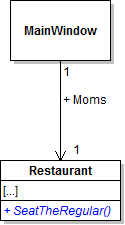
The restaurant needs a way to tell a server to seat the regular. In this task, you will define a method in the Restaurant class for use in seating patrons. You will check your work by ensuring that the solution builds without compiler errors or warnings.
- Define the SeatTheRegular method in the Restaurant class as shown in the class diagram below.
- Ensure that all code is StyleCop compliant.
- Check your work: Build the solution and ensure that the code compiles without errors or warnings.
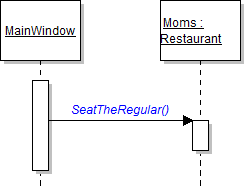
The Restaurant's SeatTheRegular method is ready to go, but it is currently not being used. In this task, you will call the SeatTheRegular method from the Seat the regular button. You will check your work by setting a breakpoint, stepping into the method call, and ensuring that you stepped into the correct method and the correct object.
- In the heidiSeatTheRegularButton_Click in MainWindow.xaml.cs, call the restaurant's SeatTheRegular method on the Moms field, as shown in the sequence diagram below.
- Check your work:
- Set a breakpoint in the heidiSeatTheRegularButton_Click on the line that calls the SeatTheRegular method.
- Start the application.
- Click the New restaurant button. Then click the Heidi, seat the regular button.
- Press F11 to step into the SeatTheRegular method call. Ensure that you step into the Moms object and be taken to the Restaurant.cs file.
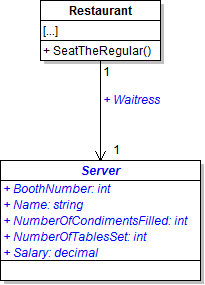
The restaurant needs a waitress to show the patron to his seat. In this task, you will create a class to represent a server and define a corresponding waitress field. You will check your work by ensuring that the solution builds without compiler errors or warnings.
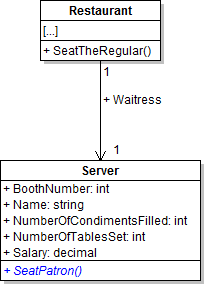
- Create and define a class called Server in the Business Classes folder as shown in the class diagram below.
- Check your work: Build the solution and ensure that the code compiles without errors or warnings.
- Add the Waitress field to the Restaurant class, as shown in the class diagram above.
- Ensure that all code is StyleCop compliant.
- Check your work: Build the solution and ensure that the code compiles without errors or warnings.
The restaurant now has a Waitress field that needs to be set. In this task, you will instantiate the restaurant's Waitress field and set its field values. You will check your work by setting a breakpoint, stepping through the code, and ensuring that all fields are instantiated and set correctly.
- In the newRestaurantButton_Click, create an instance of the Server class and assign it to the restaurant's Waitress field. Put this line of code immediately below the line that instantiates the restaurant's TheRegular field.
- At the end of the newRestaurantButton_Click, write the following code comment:
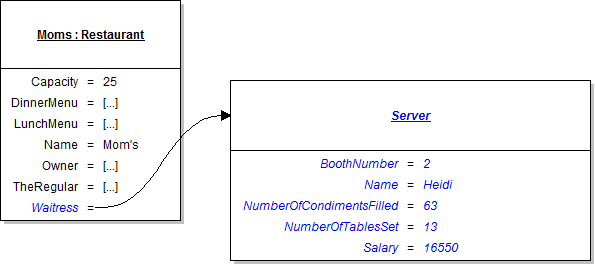
- Underneath the code comment, set the field values of the waitress as specified in the object diagram below.
- Check your work:
- Set a breakpoint in the newRestaurantButton_Click on the line that instantiates the Waitress field.
- Start the application.
- Click the New restaurant button.
- Press F10 to step over the line of code that instantiate the Waitress field. Ensure the field is instantiated correctly.
- Press F10 to step over the lines of code that set the values of the waitress' fields. Ensure that each field value is set correctly.
// Set field values of the waitress
The waitress needs a method for seating a patron that the restaurant can call when the regular needs to be seated. In this task, you will define and call a method on the Server class for use in seating a patron. You will check your work by setting a breakpoint, stepping into the method calls, and ensuring that you stepped into the correct method and the correct object.
- Define the SeatPatron method in the Server class as shown in the class diagram below.
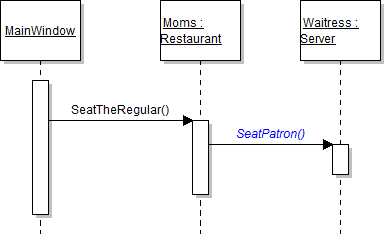
- In the restaurant's SeatTheRegular method, call the server's SeatPatron method on the Waitress field, as shown in the sequence diagram below.
- Ensure that all code is StyleCop compliant.
- Check your work:
- Seat a breakpoint in the heidiSeatTheRegularButton_Click on the line that calls the restaurant's SeatTheRegular method.
- Start the application.
- Click the New restaurant button. Then click the Heidi, seat the regular button.
- Press F11 to step into the restaurant's SeatTheRegular method call. Ensure that you stepped into the Moms object.
- Press F11 to step into the waitress' SeatPatron method call. Ensure that you step into the Waitress object.
The application needs a button to initiate the code sequence for serving lunch to the regular. In this task, you will add a button to the MainWindow to use in serving lunch to the regular. You will check your work by ensuring that the solution builds without compiler errors or warnings.
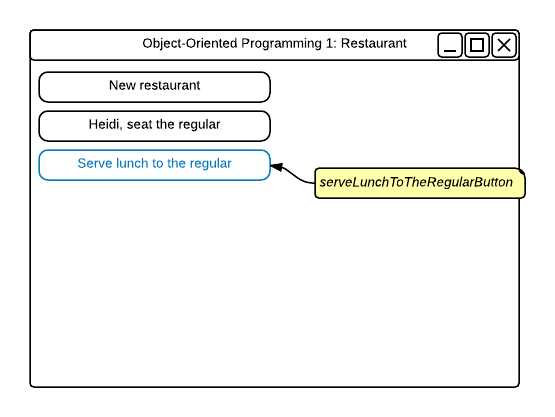
- Place a new button on the MainWindow and position it beneath the existing buttons so that the edges align. Stretch the button so that it is the same width as the other buttons, as shown in the wireframe below.
- In the Properties Window, set the name to "serveLunchToTheRegularButton".
- Set the content to "Serve lunch to the regular".
- Change to the events view and add a click event to the button.
- Ensure that all code is StyleCop compliant.
- Check your work: Build the solution and ensure that the code compiles without errors or warnings.
The restaurant needs a method to launch the process of serving the regular. In this task, you will define and call a method for tending to the regular. You will check your work by setting a breakpoint, stepping through the method calls, and ensuring that you stepped into the correct object.
- Define the TendToTheRegular method in the Restaurant class, as shown in the class diagram below.
- Check your work: Build the solution and ensure that the code compiles without errors or warnings.
- In the serveLunchToTheRegularButton_Click, call the restaurant's TendToTheRegular method on the Moms object, as shown in the sequence diagram below.
- Ensure that all code is StyleCop compliant.
- Check your work:
- Set a breakpoint in the serveLunchToTheRegularButton_Click on the line that calls the restaurant's TendToTheRegular method.
- Start the application.
- Click the New restaurant button. Then click the Serve lunch to the regular button.
- Press F11 to step into the restaurant's TendToTheRegular method call. Ensure that you stepped into the Moms object.
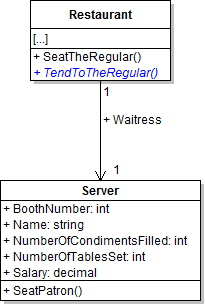
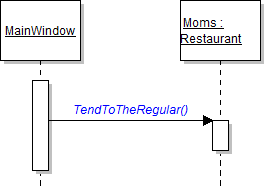
Servers need a method for waiting on tables. In this task, you will define a method on the Server class for waiting on a table and then you will call it. You will check your work by setting a breakpoint, stepping into the method calls, and ensuring that you stepped into the correct method and objects.
- Define the WaitTable method on the Server class, as shown in the class diagram below.
- In the restaurant's TendToTheRegular method, call the server's WaitTable method on the Waitress field, as shown in the sequence diagram below.
- Ensure that all code is StyleCop compliant.
- Check your work:
- Set a breakpoint in the serveLunchToTheRegularButton_Click on the line that calls the TendToTheRegular method.
- Start the application.
- Click the New restaurant button. Then click the Serve lunch to the regular button.
- Press F11 to step into the TendToTheRegular method call.
- Press F11 to step into the waitress' WaitTable method call. Ensure that you stepped into the Waitress object.
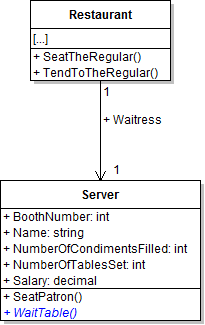
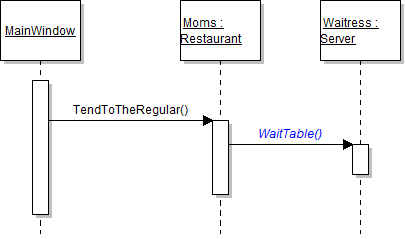
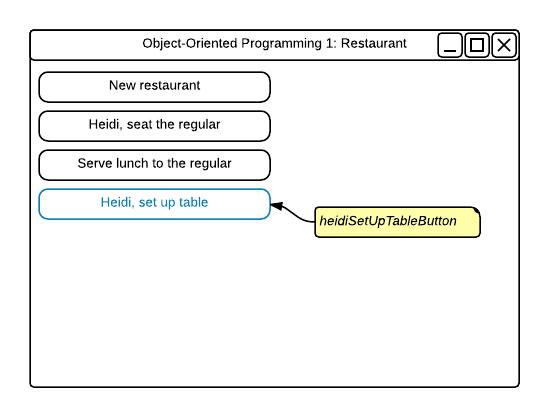
The application needs a button to initiate the code sequence for setting up one of the restaurant's tables. In this task, you will add a button to the MainWindow to use in setting up a table and define and call a method for setting up a table. You will check your work by setting a breakpoint, stepping into the method call, and ensuring you stepped into the correct object.
- Add a new button to the MainWindow.
- In the Properties Window, set the name as shown.
- Still in the Properties window, set the content as shown.
- Change to the events view and add a click event to the button.
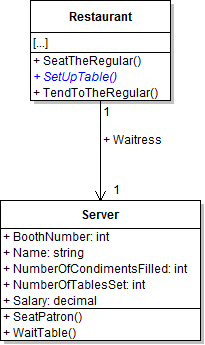
- Define the SetUpTable method on the Restaurant class as shown in the class diagram below.
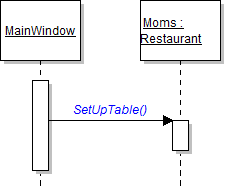
- In the heidiSetUpTableButton_Click event, call the restaurant's SetUpTable method on the Moms field, as shown in the sequence diagram below.
- Ensure that all code is StyleCop compliant.
- Check your work:
- Set a breakpoint in the heidiSetUpTableButton_Click on the line that calls the SetUpTable method.
- Start the application.
- Click the New restaurant button. Then click the Heidi, set up table button.
- Press F11 to step into the restaurant's SetUpTable method call. Ensure that you stepped into the Moms object.
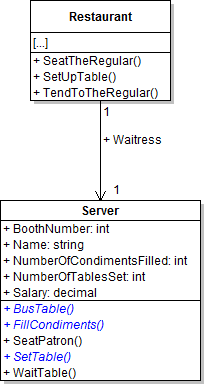
Servers need a method to set up tables so that they are ready for patrons. In this task, you will define and call the methods on the Server class for setting up a table. You will check your work by setting a breakpoint, stepping through the method calls, and ensuring that the methods are called correctly and that you step into the correct object.
- Define the methods on the Server class as shown in the class diagram below.
- Check your work: Build the solution and ensure that the code compiles without errors or warnings.
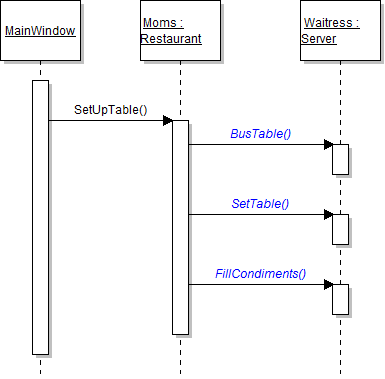
- In the restaurant's SetUpTable method, call the three methods on the Waitress field as shown in the sequence diagram below.
- Ensure that all code is StyleCop compliant.
- Check your work:
- Set a breakpoint in the restaurant's SetUpTable method on the line that calls the BusTable method.
- Start the application.
- Click the New restaurant button. Then click the Heidi, set up table button.
- Press F11 to step into waitress' BusTable method. Ensure that you stepped into the Heidi object. Press F11 to return to the caller (i.e. the Moms restaurant object).
- Press F11 to step into waitress' SetTable method. Ensure that you stepped into the Heidi object. Press F11 to return to the caller (i.e. the Moms restaurant object).
- Press F11 to step into waitress' FillCondiments method. Ensure that you stepped into the Heidi object. Press F11 to return to the caller (i.e. the Moms restaurant object).
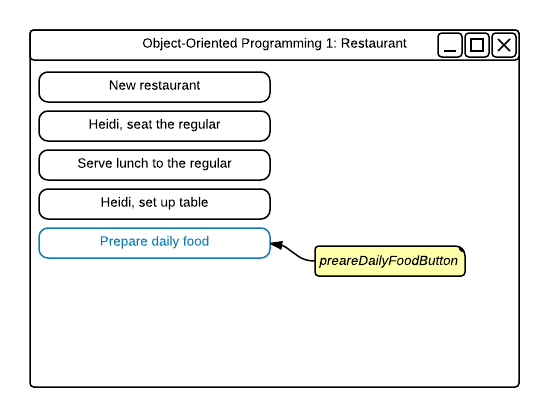
The application needs a button to initiate the code sequence for preparing the restaurant's food. In this task, you will add a new button to the MainWindow for use in preparing food and define and call a method for preparing the food. You will check your work by setting a breakpoint, stepping through the method call, and ensuring the method is called correctly.
- Add the prepareDailyFoodButton to the MainWindow as shown in the wireframe below. Name it and set its content as shown. Give the button a click event.
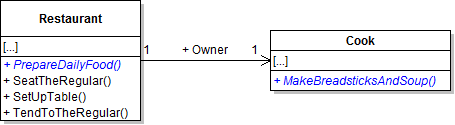
- Define the methods on the Restaurant and Cook classes as shown in the class diagram below.
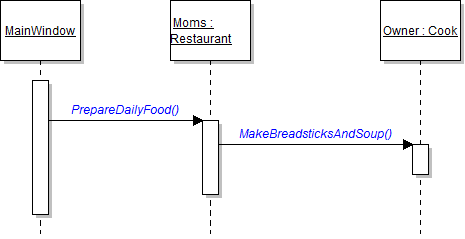
- From the prepareDailyFoodButton_Click, call the methods as shown in the sequence diagram below.
- Ensure that all code is StyleCop compliant.
- Check your work:
- Set a breakpoint in the prepareDailyFoodButton_Click on the line that calls the PrepareDailyFood method.
- Start the application.
- Click the New restaurant button. Then click the Prepare daily food button.
- Press F11 to step into the PrepareDailyFood method. Ensure that you stepped into the Moms restaurant object.
- Press F11 to step into the MakeBreadsticksAndSoup method. Ensure that you stepped into the Vladimir the owner object.
The cook has a method telling him to make the breadsticks and soup for the day, but now he needs a method just for making the breadsticks. In this task, you will define and call a method for making breadsticks. You will check your work by setting a breakpoint, stepping into the method call, and ensuring that you stepped into the correct object.
- Define the MakeBreadsticks method in the Cook class as shown in the class diagram below.
- In the cook's MakeBreadsticksAndSoup method, call the MakeBreadstick method on the current object, as shown in the sequence diagram below.
- Ensure that all code is StyleCop compliant.
- Check your work:
- Set a breakpoint in the cook's MakeBreadsticksAndSoup method on the line that calls the MakeBreadsticks method.
- Start the application.
- Click the New restaurant button. Then click the Prepare daily food button.
- Press F11 to step into the MakeBreadsticks method. Ensure that you remain in the Cook.cs file and in the Vladimir object.
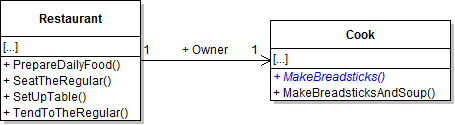
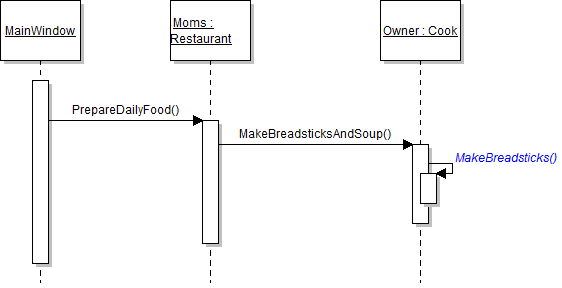
There are multiple steps involved in making breadsticks, and the cook needs methods to accomplish those steps. In this task, you will define and call methods for preparing breadstick dough. You will check your work by setting a breakpoint, stepping through the methods, and ensuring that you stepped into the correct object.
- Define the methods in the Cook class as shown in the class diagram below.
- In the cook's MakeBreadsticks method, call the methods on the current object, as shown in the sequence diagram below.
- Ensure that all code is StyleCop compliant.
- Check your work:
- Set a breakpoint in the cook's MakeBreadsticks method on the line that calls the MixBreadstickDough method.
- Start the application.
- Click the New restaurant button. Then click the Prepare daily food button.
- Press F11 to step into the MixBreadstickDough method. Ensure that you remain in the Cook.cs class and the Vladimir object. Press F11 to return to the calling method.
- Press F11 to step into the RollBreadsticks method. Ensure that you remain in the Cook.cs class and the Vladimir object.
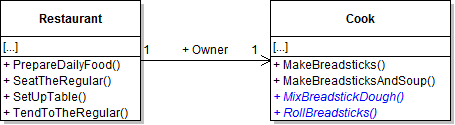
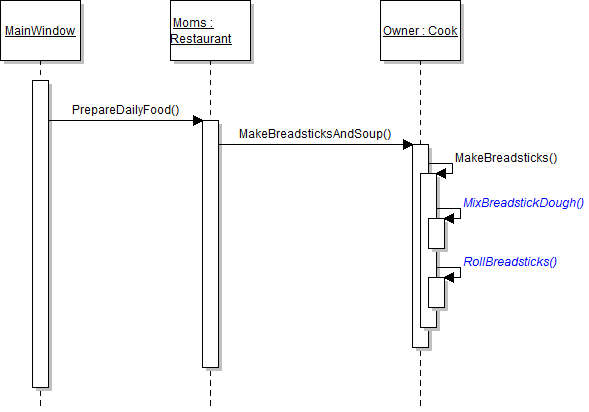
The only steps left in preparing breadsticks are baking them and adding them to the basket. In this task, you will define and call methods for baking the breadsticks in the oven and adding them to the breadbasket. You will check your work by setting a breakpoint, stepping through the method calls, and ensuring that you step into the correct objects.
- Define the methods in the Basket and Oven classes as shown in the class diagram below.
- From the cook's MakeBreadsticks method, call the methods as shown in the sequence diagram below.
- Ensure that all code is StyleCop compliant.
- Check your work:
- Set a breakpoint in the cook's MakeBreadsticks method on the line that calls the BakeBreadsticks method.
- Start the application.
- Click the New restaurant button. Then click the Prepare daily food button.
- Press F11 to step into the BakeBreadsticks method. Ensure that you stepped into the BreadOven object. Press F11 to return to the calling method.
- Press F11 to step into the AddBreadsticks method. Ensure that you stepped into the Breadbasket object. Press F11 to return to the calling method.
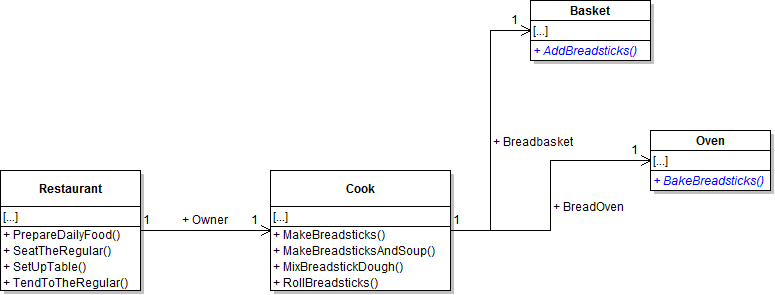
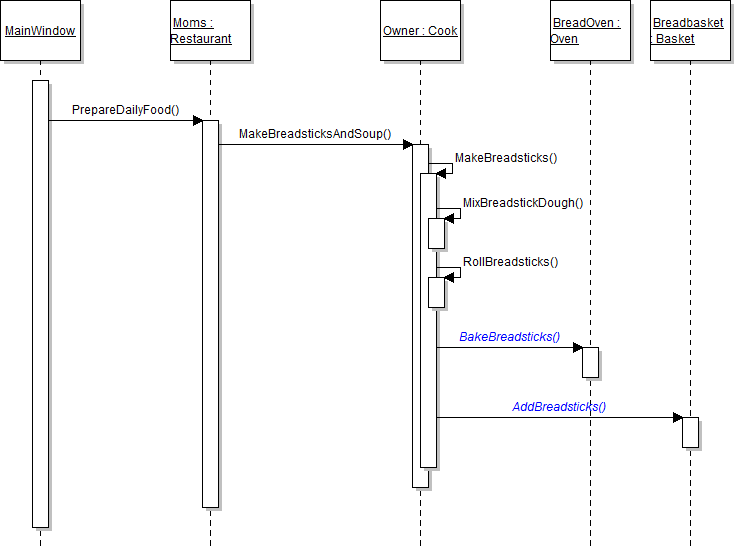
In addition to making breadsticks, the cook also needs to make soup for the day. In this task, you will define and call methods for cooking soup. You will check your work by setting a breakpoint, stepping through the method calls, and ensuring that you stepped into the correct objects.
- Define the methods in the Cook, Stove, and Vat classes as shown in the class diagram below.
- From the cook's MakeBreadsticksAndSoup method, call the methods as shown in the sequence diagram below.
- Ensure that all code is StyleCop compliant.
- Check your work:
- Set a breakpoint in the cook's MakeBreadsticksAndSoup method on the line that calls the MakeSoup method.
- Start the application.
- Click the New restaurant button. Then click the Prepare daily food button.
- Press F11 to step into the MakeSoup method. Ensure that you remain in the Cook.cs file and the Vladimir object.
- Press F11 to step into the CookSoup method. Ensure that you stepped into the GasStove object. Press F11 to return to the calling method.
- Press F11 to step into the FillSoup method. Ensure that you stepped into the SoupVat object. Press F11 to return to the calling method.
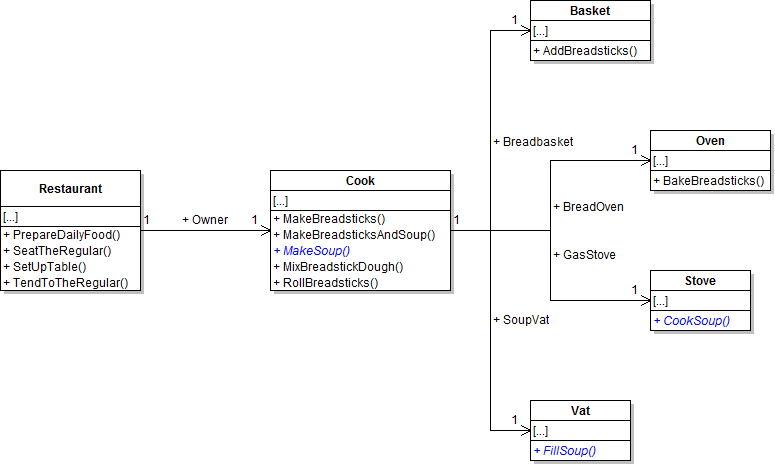
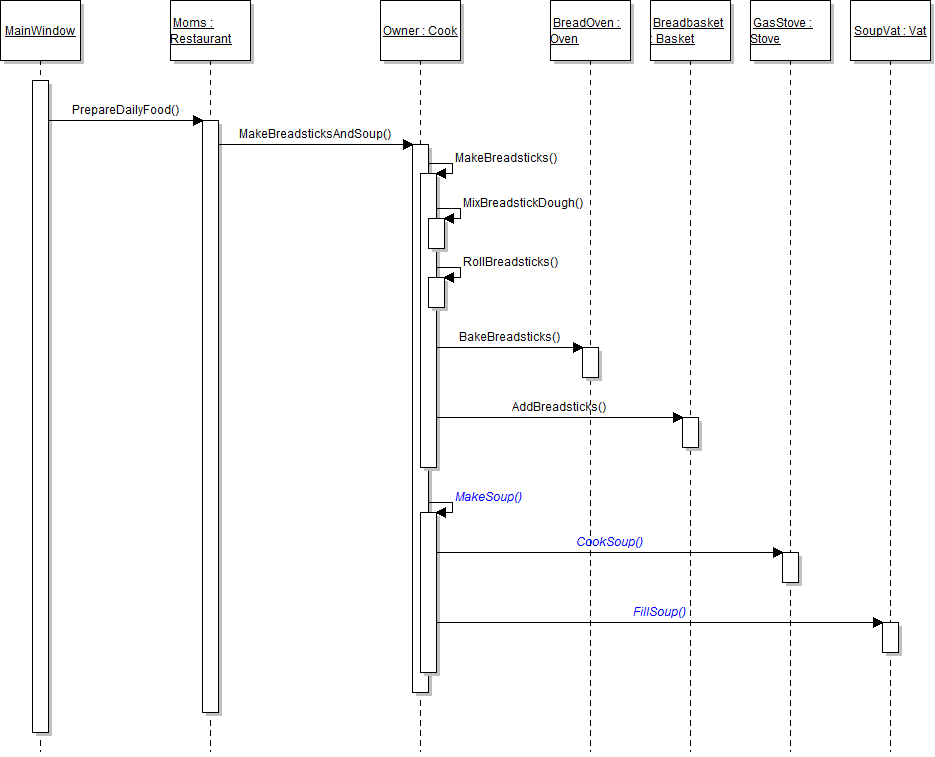
- Build the application and ensure that it has no compiler errors or warnings.
- Ensure that all code is StyleCop compliant.
- Browse to the project folder and add it to a newly created zipped archive.
- Submit the zipped project folder to the correct assignment in Blackboard.