The course's Teacher field needs to be renamed. In this task, you will rename the Teacher field to be called Instructor. You will check your work by ensuring that the solution builds without compiler errors or warnings.
- Rename the course's Teacher field to be named Instructor, as shown in the class diagram below.
- Check your work: Build the solution and ensure that the code compiles without errors or warnings.

Note: Update all object references for this field.
The course, instructor, and assistant all need access to a student in order to tutor the student. In this task, you will define parameters for the existing tutoring methods and pass the Arthur object to the method calls. You will check your work by setting a breakpoint, stepping into the method calls, and ensuring that the parameters contain the correct object.
- Define the student's Learn method and add parameters to existing methods as shown in the class diagram below.
- Pass the current student as the parameter to the existing method calls, as shown in the sequence diagram below.
- Call the student's Learn method from the assistant's TutorStudent method, as shown in the sequence diagram above. Pass in the assistant's knowledge level.
- Ensure that all code is StyleCop compliant.
- Check your work:
- Set a breakpoint in the student's GetHelp method on the line that calls the FindHelp method.
- Start the application.
- Click the New grade book button. Then click the Tutor Arthur button.
- Press F11 to step into the FindHelp method. Ensure that the student parameter contains the Arthur object.
- Press F11 to step into the instructor's TutorStudent method. Ensure that the student parameter contains the Arthur object.
- Press F11 to step into the assistant's TutorStudent method. Ensure that the student parameter contains the Arthur object.
- Press F11 to step into the student's Learn method. Ensure that the object you stepped into is the Arthur object. Ensure that the value of the tutorLevel parameter is 75.3.
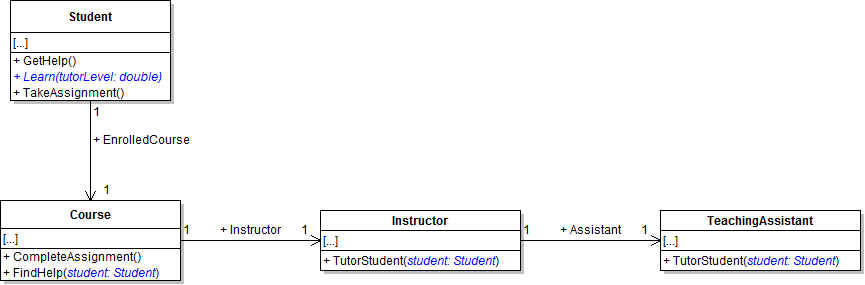
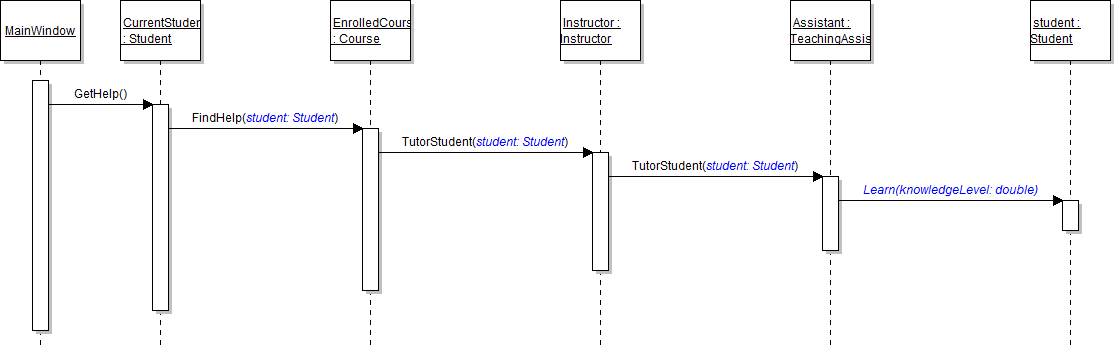
Tip: In the student's GetHelp method, pass the current object (which is the student), by using the this keyword, to the call to the course's FindHelp method.
The instructor needs to know how much knowledge the student gained from a tutoring session. In this task, you will define return types for the existing tutoring methods and return values in each method. You will check your work by setting a breakpoint, stepping through the code, and ensuring that the methods return the correct values.
- Define the return types for the existing tutoring methods, as shown in the class diagram below.
- Return the appropriate values and accept method returns using the sequence diagram below as a reference.
- In the student's Learn method, return the hard-coded value 3.0. The value represents the increase in the student's knowledge level.
- In the assistant's TutorStudent method, accept the return from the Learn method and store it in a local variable. Then return the local variable. The return value in this method also represents the increase in the student's knowledge level.
- In the instructor's TutorStudent method, accept the return from the assistant's TutorStudent method and store it in a local variable. Then return true. The return value represents an indication of whether or not the tutoring session counts toward the student's required sessions.
- In the course's FindHelp method, accept the return from the instructor's TutorStudent method and store it in local variable. Then return the local variable. The return value in this method also represents an indication of whether or not the tutoring session counts toward the student's required sessions.
- In the student's GetHelp method, accept the return from the course's FindHelp method and store it in local variable.
- Ensure that all code is StyleCop compliant.
- Check your work:
- Set a breakpoint in the assistant's TutorStudent method on the line that calls the Learn method.
- Start the application.
- Click the New grade book button. Then click the Tutor Arthur button.
- Press F10 to step over the call to the Learn method. Ensure that the value returned from the method is 3.0.
- Press F10 to return to the instructor's TutorStudent method and step over the call to the assistant's TutorStudent method. Ensure that the value returned is 3.0.
- Press F10 to return to the FindHelp method and step over the call to the instructor's TutorStudent method. Ensure that the value returned is true.
- Press F10 to return to the student's GetHelp method and step over the call to the FindHelp method. Ensure that the value returned is true.
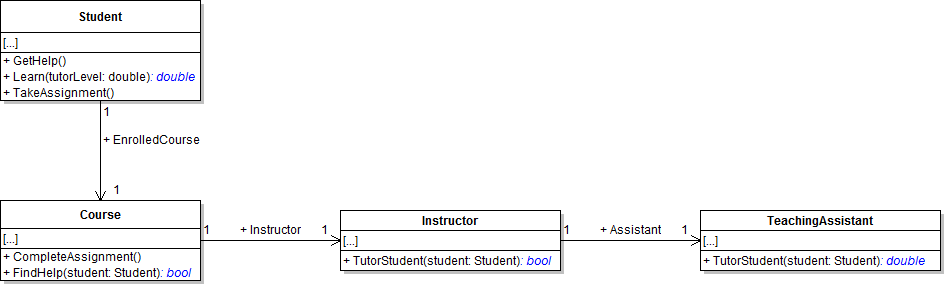
Warning: The application will have compiler errors after you complete this step because you have defined return types without returning any values.
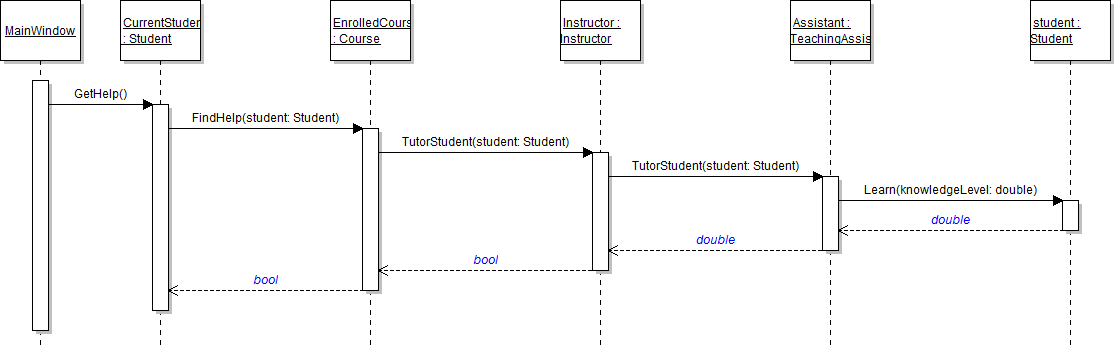
Note: This local variable will be used in a later assignment. Do nothing with it for now.
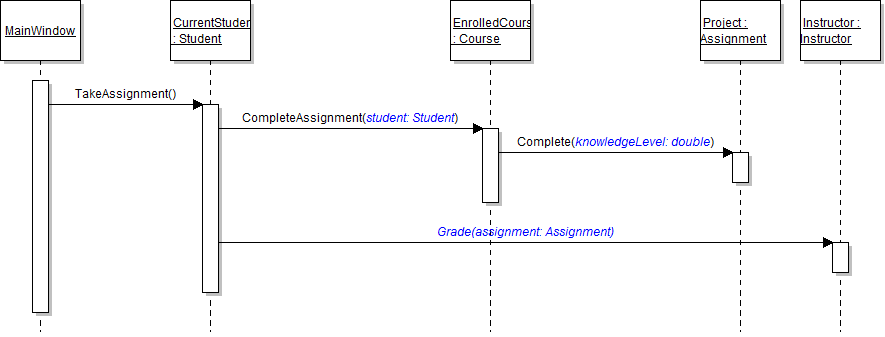
The course needs access to the student in order to give the assignment. In this task, you will define parameters for the existing complete assignment methods and pass Arthur and his knowledge level to the method calls. You will check your work by setting a breakpoint, stepping into the method calls, and ensuring that the parameters contain the correct object or the correct value.
- Define the instructor's Grade method and add parameters to existing methods as shown in the class diagram below.
- Pass the current student and the student's knowledge level as parameters to the existing method calls, as shown in the sequence diagram below.
- Call the instructor's Grade method from the TakeAssignment method, as shown in the sequence diagram above. Pass the course's Project field as the parameter.
- Ensure that all code is StyleCop compliant.
- Check your work: test
- Set a breakpoint in the student's TakeAssignment method on the line that calls the CompleteAssignment method.
- Start the application.
- Click the New grade book button. Then click the Give project button.
- Press F11 to step into the CompleteAssignment method. Ensure that the student parameter is the Arthur object.
- Press F11 to step into the Complete method. Ensure that the value of the knowledgeLevel parameter is 65.5.
- Press F10 to return to the student's TakeAssignment method. Then press F11 to step into the Grade method. Ensure that the assignment parameter contains the Website 1 assignment object.
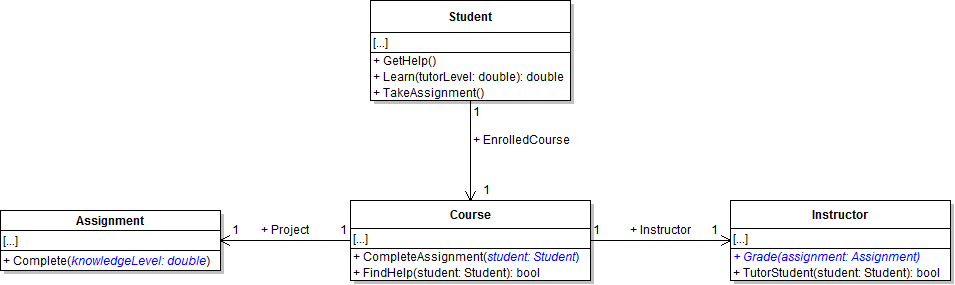
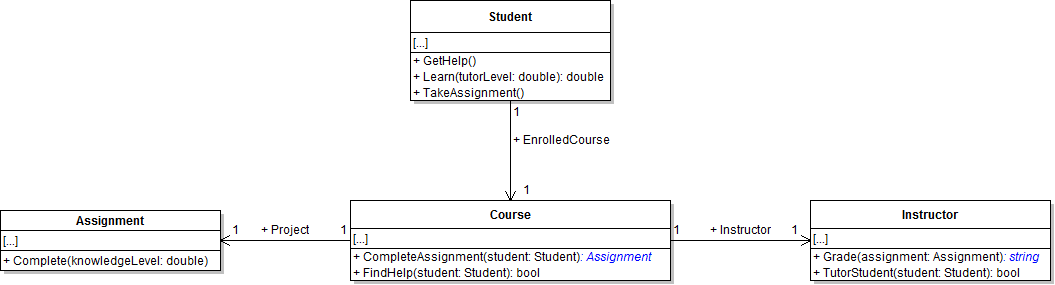
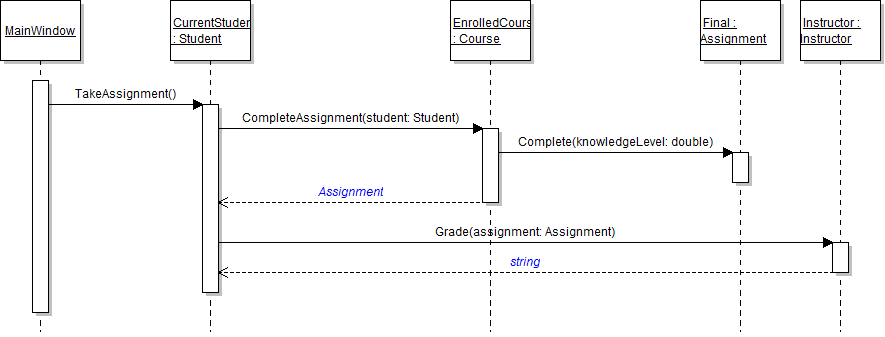
The student wants to receive feedback from the instructor after an assignment is graded. In this task, you will define return types for the existing methods for completing an assignment and return values in each method. You will check your work by setting a breakpoint, stepping through the code, and ensuring that the methods return the correct values.
- Define the return types for the existing methods, as shown in the class diagram below.
- Return the appropriate values and accept method returns using the sequence diagram below as a reference.
- In the course's CompleteAssignment method, return the course's project. The return value represents the assignment that was completed.
- In the student's TakeAssignment method, accept the return from the CompleteAssignment method and store it in a local variable. Then pass the assignment to the instructor's Grade method.
- In the instructor's Grade method, return the hard-coded string "Great job!" The return value represents the student's grade and the instructor's comments to the student.
- In the student's TakeAssignment method, accept the return from the Grade method and store it in a local variable.
- Ensure that all code is StyleCop compliant.
- Check your work:
- Set a breakpoint in the student's TakeAssignment method on the line that calls the CompleteAssignment method.
- Start the application.
- Click the New grade book button. Then click the Give project button.
- Press F10 to step over the call to the Complete Assignment method. Ensure that the Website 1 assignment object is returned from the method.
- Press F10 to step over the call to the Grade method. Ensure that the value returned from the method is the string "Great job!"
- Build the application and ensure that it has no compiler errors or warnings.
- Ensure that all code is StyleCop compliant.
- Browse to the project folder and add it to a newly created compressed, or zipped, archive.
- Submit the compressed, or zipped, project folder to the correct assignment in Blackboard.