- Make a copy of your OOP 1 GradeBook 1.2 folder and .sln file and rename the copied version to OOP 1 GradeBook 2.1.
- Open the newly created OOP 1 GradeBook 2.1 project in Visual Studio to complete this assignment.
The course needs a teacher and the teacher needs an instructional assistant. In this task, you will define classes to represent an instructor and a teaching assistant, define fields of those types, and instantiate those fields and set their values. You will check your work by setting a breakpoint, stepping through the code, and ensuring that all objects are instantiated correctly and all fields are set to the correct values.
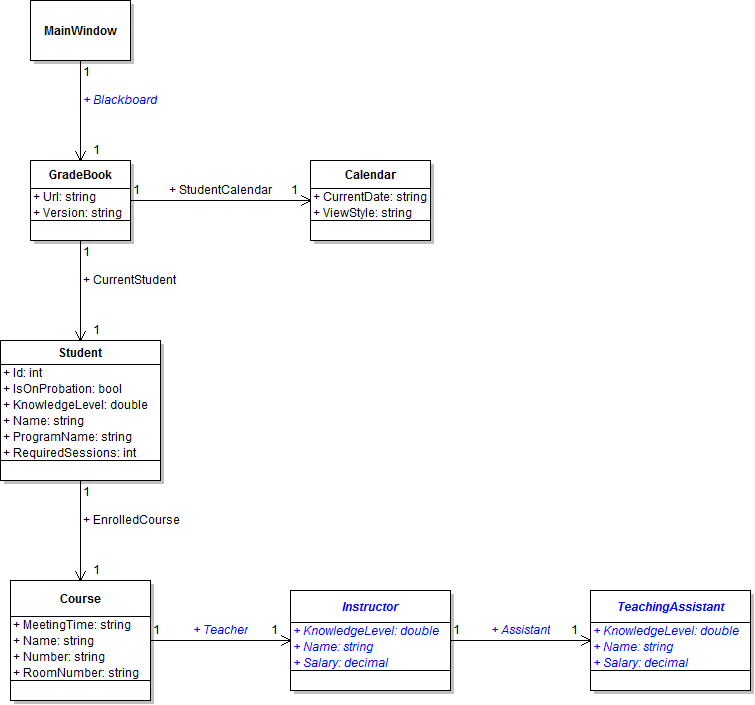
- Define the Blackboard field in the MainWindow, as shown in the class diagram below. Then, instantiate the field instead of the local blackboard variable in the newGradeBookButton_Click and refer to the field throughout.
- Create the Instructor and TeachingAssistant classes in the Business Classes folder and define them as shown in the class diagram above.
- Define a Teacher field on the Course class and Assistant field on the TeachingAssistant class as shown in the class diagram above.
- Check your work: Build the solution and ensure that the code compiles without errors or warnings.
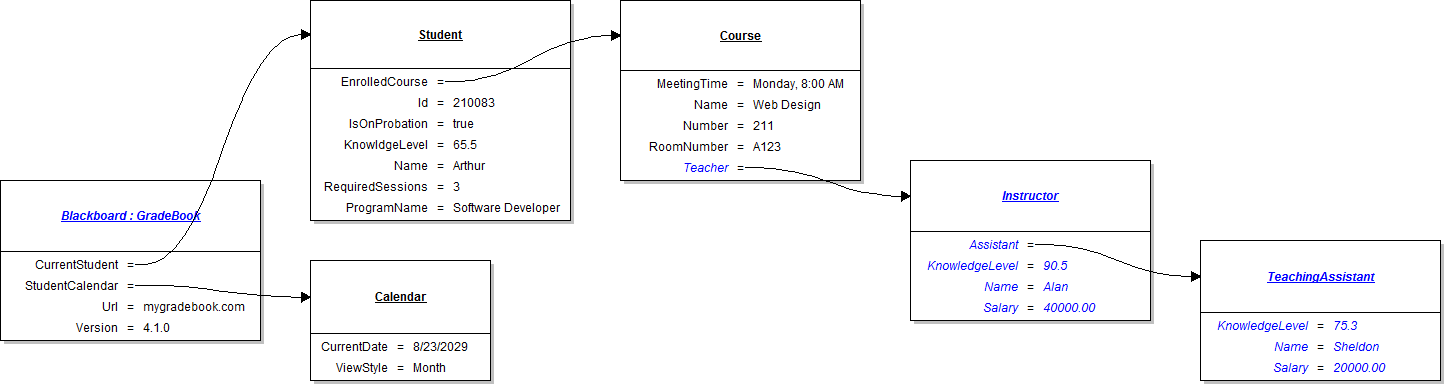
- In the newGradeBookButton_Click, instantiate the instructor and teaching assistant objects and set their fields as shown in the object diagram below.
- Ensure that all code is StyleCop compliant.
- Check your work:
- Set a breakpoint in the newGradeBookButton_Click on the line that instantiates the Blackboard field.
- Start the application.
- Click the New grade book button.
- Press F10 to step over the code that instantiates Blackboard and sets the fields of Blackboard and the current student. Ensure all objects are instantiated correctly.
- Press F10 to step over the code that instantiates the course's teacher and sets the teacher's field values. Ensure that the Teacher field is instantiated correctly and that the rest of the fields are set to the correct values.
- Press F10 to step over the code that sets the teacher's field values. Ensure that the Assistant field is instantiated correctly and that the rest of the fields are set to the correct values.
- Press F10 to step over the code that sets the assistant's and calendar's field values. Ensure that each of the fields are set to the correct values.
- Build the application and ensure that it has no compiler errors or warnings.
- Ensure that all code is StyleCop compliant.
- Browse to the project folder and add it to a newly created compressed, or zipped, archive.
- Submit the compressed, or zipped, project folder to the correct assignment in Blackboard.