10-152-313 - Object-Oriented Programming 3

2.2 VendingMachine Assignment

Using the following diagrams as a guide, create the code (in a new C# project) as outlined in addition to the appropriate additional classes and code necessary to handle all states discussed.

Optional Challenge 1: Create buttons to insert money, select product, take change, take product, and kick machine. In the method that would dispense the product include a random occurrence of the item getting stuck. In the kick method, include a random chance of freeing the product and/or setting off an alarm.

Integrate the completed assignment with the existing Zoo project.

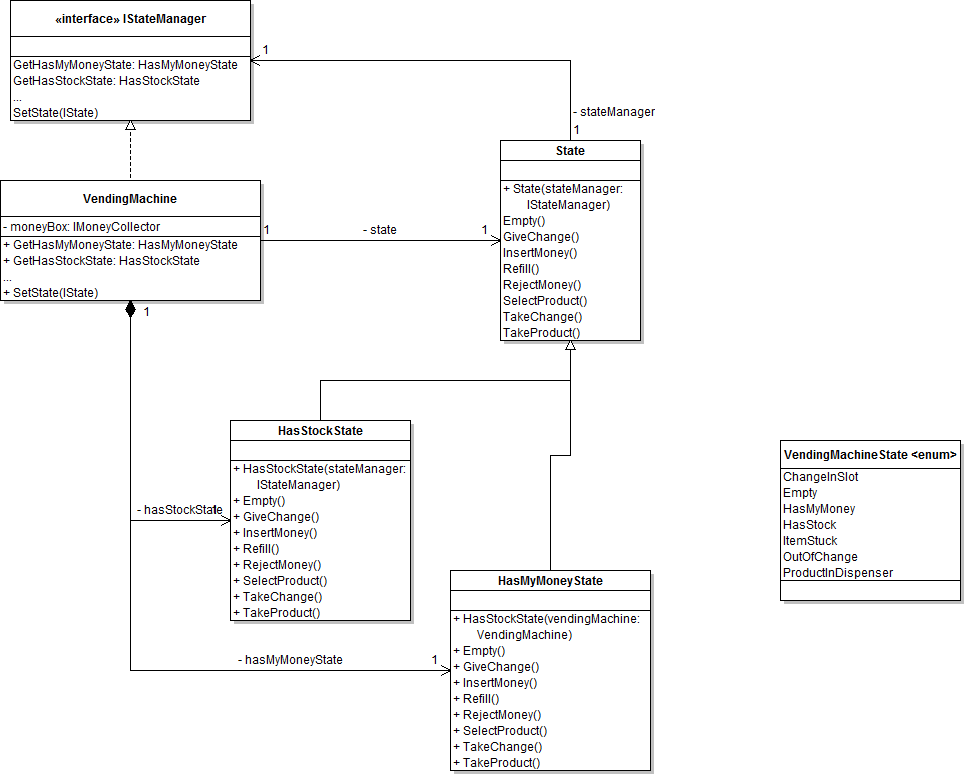
Implement the changes specified in the following UML class diagram.

PNG image of 2.2  VendingMachine UML class diagram
  1. When creating classes be sure to:
    1. Ensure the class in the root namespace. This can be done in one of two ways. Either by adding the class in the project, i.e. scenario, or by adding the class to the business classes folder and removing the ".Business_Classes" designation from the namespace.
    2. insert the following line of code immediately above the class definition:
      [System.Diagnostics.CodeAnalysis.SuppressMessage("Microsoft.StyleCop.CSharp.MaintainabilityRules", "SA1401:FieldsMustBePrivate", Justification = "Encapsulation not taught.")]
  2. Open the main window (MainWindow.xaml) in designer mode (right-click and click “View Designer” or press Shift-F7 to go to designer mode).
  3. Create the button(s) for this week’s assignment.

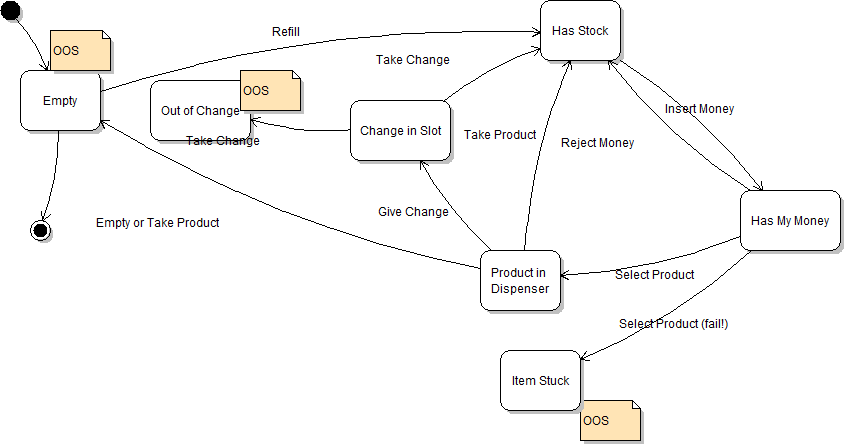
Implement the states shown in this UML state diagram:

PNG image of 2.2 VendingMachine UML state diagram